Infogram

Infogram review

Data visualization that scales from your first free chart to enterprise-grade reporting.

Infogram costs from $19/mo · 5 plans · Free plan available · prices checked Oct 12, 2026

By Ciroapp Editorial Team · Updated Sep 17, 2026

Commission may apply at no extra cost

Infogram homepage screenshot

At a glance

Quick overview for Infogram: rating, pricing summary, key features, and highlights.
Pricing verified Oct 12, 2026

Ciroapp score

4.1/ 5

Infogram makes it easy to turn numbers into charts, maps, and dashboards you can publish online. The free plan is genuinely useful, live data and branding arrive at higher tiers, but there are no refunds and collaboration waits until the Team plan. Overall, it's a solid pick if you publish data visuals regularly and start free before committing.

Pros

  • Pros:The free Basic plan includes 35+ interactive chart types, 13 map types, data import, and online publishing with no credit card required, so you can build real projects before paying
  • Pros:Charts support live data connections on Pro and SQL connectors plus iframe integrations on Business, so recurring reports and dashboards update automatically instead of requiring manual refreshes
  • Pros:The Brand Kit on Business and above applies your own logo, colors, and fonts and removes Infogram's branding, which matters for client-facing reports and public dashboards

Cons

  • Cons:Infogram offers no refunds under its Terms of Service, so picking the wrong plan means the money is spent — you must cancel at least 30 days before renewal to avoid the next charge
  • Cons:Advertised prices are billed yearly; monthly billing costs more, and removing Infogram's logo requires the Business plan at $67/month billed yearly, which is steep for solopreneurs
  • Cons:Real-time collaboration only starts at the Team plan ($149/month billed yearly for 3-10 users), leaving no affordable middle option for very small teams
Best for
  • Marketers creating branded reports, social graphics, and campaign visuals
  • Media and journalism teams visualizing data-driven stories
  • Businesses publishing interactive dashboards and reports online
This section is a summary. Detailed sections about features, use cases, pricing, and reviews follow below.

What is Infogram?

Turning numbers into clear visuals usually means wrestling with design tools or hiring help. Infogram skips that. You build charts, infographics, and dashboards in your browser, publish them online, and start on a free plan with 35+ interactive chart types.

Infogram is a web-based data visualization tool owned by Prezi. It helps you create infographics, reports, charts, maps, slides, and dashboards without design skills. More than 10 million people and 30,000+ companies use it, including teams in media, marketing, government, and education.

It fits anyone who needs to turn raw numbers into visuals for the web — from solo bloggers to large organizations that need SSO and an uptime SLA.

Should you choose Infogram?

Quick buyer guidance before you compare plans or click through.

Choose it if

  • You want to test a visualization tool for free before spending money
  • You publish charts, maps, or infographics to the web on a regular basis
  • You need brand-consistent visuals with your logo, colors, and fonts
  • Your team of 3-10 wants real-time editing and commenting in one workspace
  • Your organization requires SSO, an uptime SLA, and accessibility support

Skip it if

  • There are no refunds under Infogram's Terms of Service, so a wrong plan choice is money spent — cancel at least 30 days before renewal
  • Headline prices are billed yearly; monthly billing costs more (annual saves 24%), so short-term projects pay a premium
  • Removing Infogram's logo requires the Business plan at $67/month billed yearly — steep for solopreneurs wanting white-label visuals
  • Collaboration starts at the Team plan, $149/month billed yearly for 3-10 users, which may not suit very small teams
  • Prices exclude tax, which gets added based on your state or country at checkout

Next steps before buying

  1. 1Sign up for the free Basic plan and rebuild one real project using your own data.
  2. 2Compare monthly versus annual billing. Annual saves 24%, but refunds aren't offered, so only commit if you'll use it that long.
  3. 3Match features to tiers before paying: logo removal needs Business ($67/mo billed yearly), while collaboration needs Team ($149/mo billed yearly).
  4. 4Check that the connections you rely on — SQL connectors, embeds, and API access — are included in the tier you're considering.
  5. 5If you're in education, a nonprofit, or a startup, request a special-pricing quote before you check out.

Ease of use

You work entirely in the browser, so there's nothing to install. The free tier lets you try the editor before paying. Infogram offers help tutorials, webinars, and chat support. Business buyers get a demo option, and Enterprise adds personalized training with a dedicated account manager.

Infogram Key Features

✨ Charts and maps that fit your data

Infogram includes 35+ interactive chart types and 13 map types on the free plan, from pie and bar charts to gantt, treemap, and word cloud. Pro adds 800+ map types. You pick a chart, add your numbers, and publish it online.

It's useful whenever you need a visual readers can explore, not just look at.

✨ Bring data in and keep it fresh

You can import data instead of typing values by hand. Pro plans add data connections and live data, so charts update when the source changes. Business tiers include SQL connectors and iframe integrations.

That matters for dashboards and recurring reports, where manually refreshing numbers each week gets old fast.

✨ AI help and ready-made starting points

The AI infographic maker and AI chart generator speed up first drafts, and AI chart recommendations suggest which visual fits your data. Once you're in the editor, auto layout, callouts, custom links, and advanced image editing handle the polish. Pro unlocks 100+ premium templates plus a royalty-free library of 1 million images and icons.

🎨 Your brand on every published page

From Business up, the Brand Kit applies your logo, colors, and fonts, so Infogram's logo steps aside. Publishing stays flexible as you grow:

  • Embeds place live charts and infographics directly on your website.
  • Privacy control (Pro and up) adds password protection plus PDF and image downloads.
  • HTML export on Enterprise hands finished designs to your developers.

✨ Teams, tracking, and trust

Team plans add real-time collaboration and commenting for 3–10 users in one workspace, plus team templates for shared starting points. Content engagement analytics and tracking links show how visuals perform after publishing. Infogram also advertises WCAG 2.2 accessibility and SOC 2 Type 2 compliance, which matters for government and regulated teams.

Use Cases

📣 Marketers shipping branded visuals

You're a marketer who needs on-brand graphics fast. Import your data, pick a premium template, and apply your logo, colors, and fonts. Then publish online or download HD files for reports and campaigns.

Expected outcome: Polished, branded visuals without waiting on a designer.

Tip: Removing Infogram's logo requires the Business plan or above.

📰 Media teams telling data stories

Your newsroom covers data-heavy stories on deadline. Choose from 35+ chart types and hundreds of map styles, import your numbers, and embed the finished graphic straight into your article.

Expected outcome: Readers get interactive visuals that live right on your page.

🤝 Teams creating together

Your group of 3-10 builds content in one shared workspace. You edit projects in real time, swap feedback through comments, and check engagement analytics to see which visuals perform.

Expected outcome: Less back-and-forth by email, more finished work.

Tip: Real-time collaboration starts on the Team plan.

🏛️ Government and enterprise reporting

You work in a regulated or public-sector environment where security matters. Enterprise adds SSO, a 99.9% uptime SLA, API support, and HTML export, plus a dedicated account manager and personalized training.

Expected outcome: Data visuals that meet IT and compliance requirements.

Infogram pricing

From$19/mo

  • 5 plans
  • Free plan available

Prices checked on Oct 12, 2026 from Infogram's pricing page

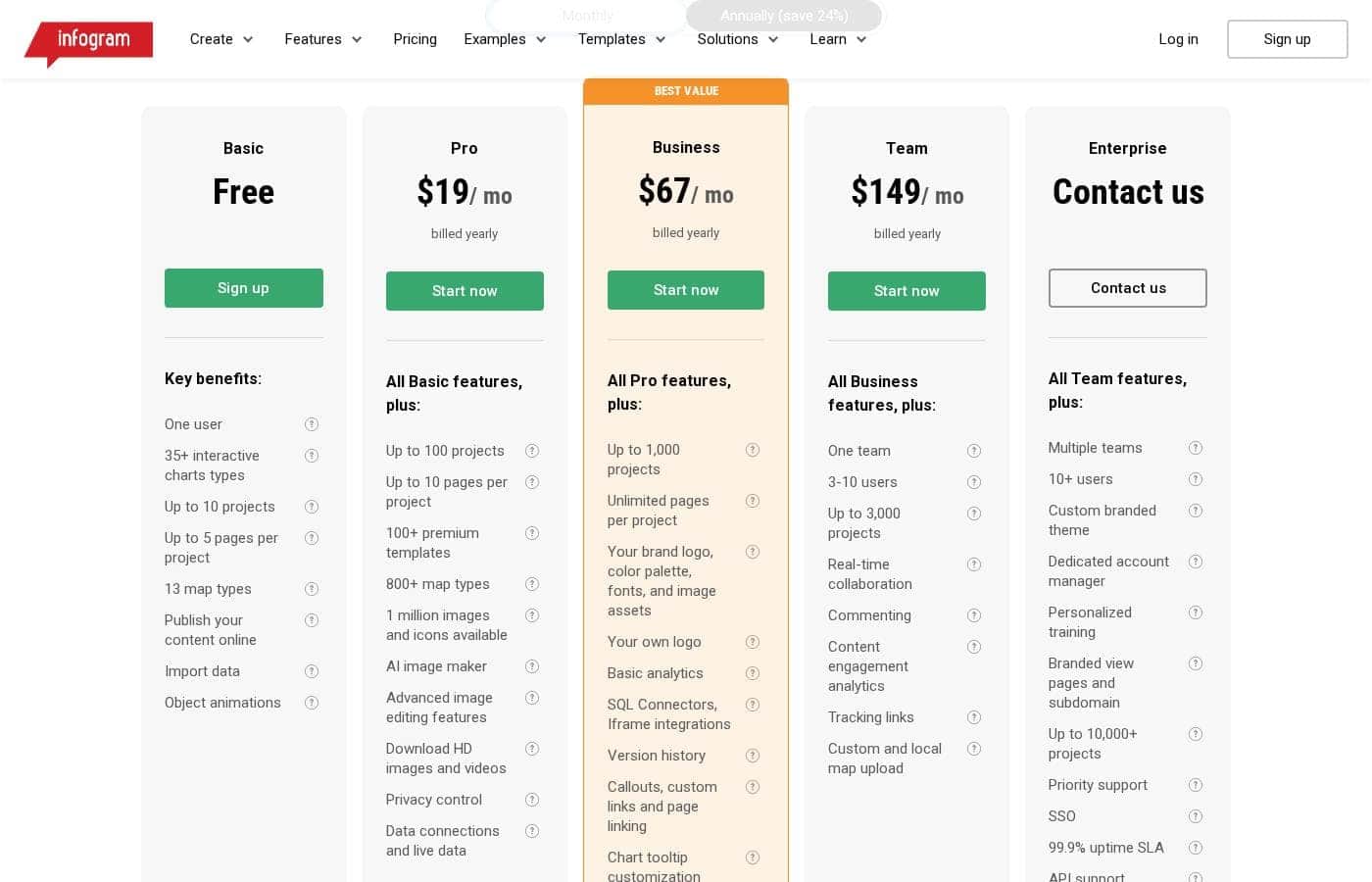
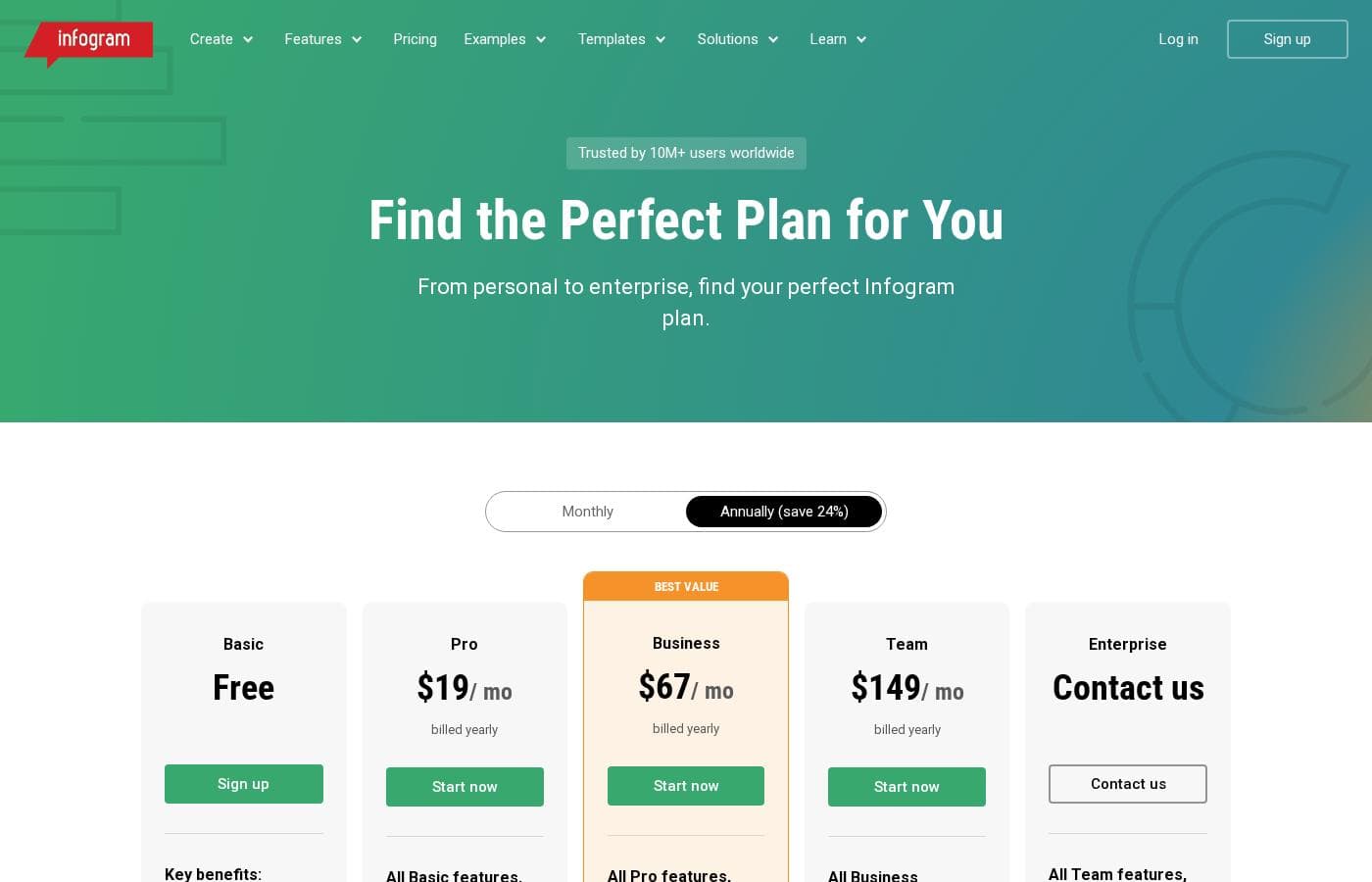
Infogram pricing page screenshotView pricing page screenshot
PlanBilled monthlyBilled annuallyIncludes
Basic
Free
Free
One user, up to 10 projects, up to 5 pages per project
  • One user
  • 35+ interactive chart types
  • Up to 10 projects
  • Up to 5 pages per project
  • 13 map types
  • +3
Pro
—
$19/mo
$228 per year
Up to 100 projects and 10 pages per project
  • All Basic features, plus up to 100 projects
  • Up to 10 pages per project
  • 100+ premium templates
  • 800+ map types
  • 1 million images and icons
  • +5
Business
—
$67/mo
$804 per year
Up to 1,000 projects; unlimited pages per project
  • All Pro features, plus up to 1,000 projects
  • Unlimited pages per project
  • Brand logo, color palette, fonts, and image assets
  • Basic analytics
  • SQL Connectors and Iframe integrations
  • +4
Team
—
$149/mo
$1,788 per year
One team, 3–10 users, up to 3,000 projects
  • All Business features, plus one team with 3–10 users
  • Up to 3,000 projects
  • Real-time collaboration
  • Commenting
  • Content engagement analytics
  • +2
Enterprise
See vendor page
See vendor page
10+ users, multiple teams, up to 10,000+ projects
  • All Team features, plus multiple teams
  • 10+ users
  • Custom branded theme
  • Dedicated account manager
  • Personalized training
  • +7

Price history

Tracking prices since Sep 8, 2026. No price change detected yet.

Pricing types: Free plan, Monthly subscription, Yearly subscription

Pricing notes

Infogram has a free Basic plan plus three self-serve paid tiers: Pro at $19/month, Business at $67/month, and Team at $149/month, all billed yearly (annual billing saves 24%). Enterprise pricing is custom, and a monthly billing option is also available.

Infogram ranges from free to $149 per month with 5 plans: Basic (free), Pro at $19/month billed yearly, Business at $67/month billed yearly, Team at $149/month billed yearly, and Enterprise at custom pricing.

Here's what each plan actually includes.

Basic

Price: Free Best For: Personal use like blogs and presentations Other Features:

  • One user with up to 10 projects
  • 35+ interactive chart types and 13 map types
  • Up to 5 pages per project
  • Online publishing, data import, and object animations

Basic costs nothing, so it's a solid way to learn the editor. You can build infographics, charts, and maps, then publish them online. When you hit the 10-project cap, moving up is easy.

Pro

Price: $19/month billed yearly Other Features:

  • Up to 100 projects with 10 pages each
  • 100+ premium templates and 800+ map types
  • 1 million images and icons
  • AI image maker and advanced image editing
  • HD downloads, privacy control, and live data connections

Pro is the entry point for professional work, since businesses need a paid plan. You get premium templates, HD exports, and AI tools at a friendly price.

Business

Price: $67/month billed yearly Other Features:

  • Up to 1,000 projects with unlimited pages
  • Your own logo, colors, and fonts
  • Basic analytics and version history
  • SQL connectors and iframe integrations
  • Callouts, custom links, and presenter notes

This is Infogram's best value pick for brands. You can swap Infogram's logo for your own, which matters for client-facing work. Public reports simply look more polished with your branding in place.

Team

Price: $149/month billed yearly Other Features:

  • One team with 3–10 users
  • Up to 3,000 projects
  • Real-time collaboration and commenting
  • Content engagement analytics and tracking links
  • Custom and local map uploads

Team adds collaboration for groups that create content together. Everyone shares one workspace, and you can track how it performs. It fits marketing teams, newsrooms, and small departments.

Enterprise

Price: Contact us for a custom quote Other Features:

  • Multiple teams with 10+ users
  • Up to 10,000+ projects
  • SSO, 99.9% uptime SLA, and API support
  • Dedicated account manager and personalized training
  • Priority support and HTML export

Enterprise suits large organizations that need security and hands-on help. Pricing depends on team size, so you'll need to request a quote. If your needs are complex, confirm user and project limits with sales before you buy.

Billing and the fine print: You can pay monthly or yearly, and annual billing saves 24%. All prices exclude tax, which gets added based on your location. Payment options include Visa, Mastercard, American Express, and PayPal.

There's a genuinely free Basic plan, so you can start without spending a thing. Just know Infogram doesn't offer refunds, though you can cancel anytime from your account settings — ideally 30 days before your next payment. Special discounts are also available for education, nonprofits, and startups. 💡
Cost calculator

Estimate what Infogram costs for your team.

Billing

Pro has no published price for this billing cycle.

Pro has a flat price: the number of seats does not change the total. Estimate based on published list prices, before taxes, add-ons and discounts.

How to pay less for Infogram

  • Start on the free plan and upgrade only when you hit its limits.
Visit Infogram

Email me when Infogram changes price

One email when we detect a price change on the vendor's pricing page. No newsletter, no deals. Unsubscribe in one click.

User Reviews

No reviews yet.

Write a Review

Write a Review for Infogram
0/100 characters
0/2000 characters

Why use Infogram?

Most data tools force a trade-off: simple but limited, or powerful but painful. Infogram tries to give you both, and its plan lineup shows it can grow with you.

  • Start free, upgrade only if you need to. The Basic plan includes 35+ interactive chart types, 13 map types, data import, and online publishing at no cost.
  • Scale without switching tools. Pro adds 800+ map types, premium templates, and HD downloads. Business unlocks 1,000 projects, unlimited pages, and your own branding.
  • Work as a team. The Team plan covers 3-10 users with real-time collaboration, commenting, and content engagement analytics.
  • Meet enterprise requirements. Higher tiers offer SSO, a 99.9% uptime SLA, API support, and HTML export.
  • Reach every audience. Infogram advertises WCAG 2.2 Level accessibility and SOC 2 Type 2 compliance — useful for government and regulated teams.
  • Pay less if you qualify. Special pricing exists for education, nonprofits, and startups; just request a quote.

Infogram alternatives

Other tools in the Infographic Maker category

View all Infographic Maker tools
EdrawInfo

EdrawInfo

Infographic Maker3.8/5

EdrawInfo is a super beginners-friendly design tool. It helps anyone create eye-catching infographics quickly and effortlessly. The software is available for both Mac and Windows users. Designing a compelling visual is remarkably easy. You simply select one of the many templates, use the library symbols, add your text, customize details, and export the file. You don't need any special skills to start seeing results. 💡 It provides a vast number of vector cliparts and helps you find inspiration easily. Every element is highly customizable, letting you adjust things like colors, chart values, lines, and even shadow effects.

Piktochart

Piktochart

Infographic Maker3.7/5

Piktochart provides an intuitive platform for visual creation, designed to make complex data understandable. It targets anyone needing professional-quality visuals, often without requiring design experience. The platform powers your entire creative workflow, notably through Pikto AI. This generative AI transforms simple text prompts into stunning visual content in under ten seconds. Whether you're building infographics, designing reports, or creating social media graphics, Piktochart helps enhance your internal and external messaging.

Infogram FAQ

How much does Infogram cost?

Infogram's cheapest paid plan, Pro, costs $19 per month. Paid plans range from $19 to $149 per month. Prices checked on Oct 12, 2026 from the vendor's pricing page.

Does Infogram have a free plan?

Yes. Infogram has a free plan (Basic); paid plans start at $19 per month.

Has Infogram's price changed recently?

No. We have not detected a price change since we started tracking on Sep 8, 2026.

Does Infogram connect to other data tools?

Yes. Every plan imports data, and Pro adds data connections and live data. Business includes SQL connectors and iframe integrations. Enterprise supports API access, so check which tier covers your setup before buying.

How does Infogram handle security and compliance?

Infogram advertises SOC 2 Type 2 compliance and WCAG 2.2 accessibility. Pro and higher plans let you password-protect projects, and Enterprise adds SSO plus a 99.9% uptime SLA.

Is there a free trial?

There's no time-limited trial, but the free Basic plan works as one. You get 35+ chart types, 13 map types, and up to 10 projects with 5 pages each, no card needed.

What languages does Infogram support?

The site is available in English, German, Portuguese, Spanish, and French. You can switch languages from the footer menu. For help in a specific language, contact the support team before you commit.

Ready to try Infogram? Check out the official site or pricing.

Are you Infogram? Claim this listing · Get the badge