Infogram vs Piktochart
Infogram and Piktochart both transform data into engaging visuals, but their strengths diverge sharply. Infogram is built for advanced data connectivity and enterprise-level rigor, offering SQL connectors. Piktochart excels in intuitive design, AI assistance, and maintaining overwhelmingly better user satisfaction.
Best for: Data analysts requiring live SQL or Iframe connections, Organizations needing robust version history and content engagement analytics
Best for: Marketing and HR teams needing fast, AI-generated visuals and infographics, Users without design experience who prioritize an intuitive interface
Powerful visualization, risky subscription model.
We found Infogram offers powerful tools for creating interactive charts and reports, backed by strong branding features in higher tiers. However, user feedback identifies severe administrative risks related to inflexible cancellation and billing policies, making the overall commitment risky. Overall, we recommend approaching the commitment carefully due to documented customer service and refund issues.
Pros
- Incredible platform for creating highly interactive data visualizations.
- Strong library of 100+ premium templates and over 800 map types in paid tiers.
- Supports connection to live data sources, including specialized SQL Connectors.
- Advanced branding controls allow users to apply custom logos, fonts, and colors.
Cons
- Consistently poor customer service experiences reported by recent users.
- Strict company policy refusing refunds, even following unauthorized charges.
- Difficult and unreliable cancellation processes leading to unwanted auto-renewals.
- Predatory subscription practices, including threats regarding presentation privacy upon cancellation.
AI-Driven Visuals, Superior Design, and Prompt Support.
We find Piktochart delivers an exceptional balance of powerful AI-driven visual creation and excellent usability, successful even for users without sophisticated design skills. Overall, we confidently recommend this platform for both individuals and teams seeking professional visual communication tools supported by genuinely proactive customer service.
Pros
- Extremely intuitive and user-friendly interface that requires little onboarding time.
- Powerful AI tool instantly transforms documents and text into visual designs.
- Customer support is exceptionally fast, friendly, informative, and proactive.
- Ensures brand consistency using centralized Brand Kit features and on-brand templates.
Cons
- Some users reported minor difficulties with specific regional payment processing methods.
- The core content creation editor, while highly functional, could benefit from further polish.
AboutInfogram
Infogram is a widely trusted platform for data visualization, embraced by over 10 million users worldwide. It simplifies the process of turning complex information into compelling visual stories, including interactive charts and comprehensive maps. Whether you're using the free Basic plan for personal projects or need an Enterprise solution for your large organization, there is a suitable plan. Paid plans offer professionals greater project capacity and advanced features. You can utilize powerful tools, like AI image creation and connections to live data sources, to create impactful content quickly. ✅
AboutPiktochart
Piktochart provides an intuitive platform for visual creation, designed to make complex data understandable. It targets anyone needing professional-quality visuals, often without requiring design experience. The platform powers your entire creative workflow, notably through Pikto AI. This generative AI transforms simple text prompts into stunning visual content in under ten seconds. Whether you're building infographics, designing reports, or creating social media graphics, Piktochart helps enhance your internal and external messaging. 💡
Highlights
Feature Comparison
Features Overview
We highlight the main differences and pick a winner for each feature.
Data Connectivity
Infogram dominates connectivity with SQL; Piktochart relies mostly on Google Sheets integration.
Infogram offers robust SQL Connectors and Iframe integrations for data security. This ensures your visualizations are always linked to current, authoritative data sources. Piktochart offers dynamic data integration primarily via Google Sheets connection. While useful, Piktochart misses Infogram's ability to connect to deeper enterprise data. If complex, live, and secure data feeds are your priority, Infogram is significantly better. If you only need CSV imports or simple sheets, Piktochart's ease of use might prevail.
AI Capabilities
Piktochart leverages generative AI extensively, while Infogram’s AI focus is narrow.
Piktochart features ‘Pikto AI’ to instantly transform text prompts into stunning visuals. These AI tools include Image Upscaler and Background Remover for creative control. Infogram limits its offering to an ‘AI image maker’ available in Pro and higher plans. Piktochart's AI offers a massive time-saver for marketers needing immediate visual assets. Users seeking quick creation rather than deep data analysis should favor Piktochart.
Customer Support
Piktochart receives overwhelmingly positive support reviews; Infogram suffers severe criticism.
Infogram is plagued by reports of poor, non-responsive customer service. Users frequently cite difficulties with cancellation and predatory auto-renewal practices. Piktochart customer support is consistently praised as fast, friendly, and proactive. High-quality support suggests Piktochart values user satisfaction and retention highly. The lack of trust associated with Infogram's billing practices is a major drawback for new users.
Pricing Structure
Infogram charges per feature tier, but Piktochart uses a per-member licensing model.
Infogram's paid plans range from $19 to $149/month, structured primarily by project volume and features. Team access on Infogram starts at $149/month for 3-10 users. Piktochart prices per member, starting at $14 per member per month (Pro annual). Piktochart’s model might be more cost-effective for small but expanding teams. Infogram is more predictable if you need advanced features but only have one power user.
Branding Control
Both offer great branding; Piktochart’s ‘Branded Templates’ give it a slight automation edge.
Infogram’s Business plan offers full customization: custom logo, colors, fonts, and assets. This ensures every project aligns with your required professional brand identity. Piktochart’s Business plan provides an Unlimited Brand Kit and Branded Templates. Branded Templates automatically convert design drafts to be perfectly on-brand instantly. While Infogram requires manual application, Piktochart automates brand consistency further.
Enterprise Reliability
Infogram guarantees service with a 99.9% SLA; Piktochart focuses on security review and training.
Infogram's Enterprise plan includes a critical 99.9% uptime SLA and API support. This level of service dedication is essential for large organizations and continuous operation. Piktochart’s Enterprise plan includes advanced security reviews and dedicated account management. Piktochart also offers custom training and SSO/SAML for large team deployment. Infogram is clearly superior for clients prioritizing guaranteed infrastructure reliability.
Unique Visual Assets
Infogram offers specialized maps; Piktochart offers a broader, multimedia asset library.
Infogram boasts over 800 map types for detailed geographical data visualization. It is designed for analysts and researchers needing specific, deep data mapping capabilities. Piktochart provides 5M+ Premium Icons, Illustrations, and 3D graphics for diverse design needs. This massive library supports general marketing, social media, and internal communications. If your focus is complex geographic analysis, Infogram is the undisputed specialist.
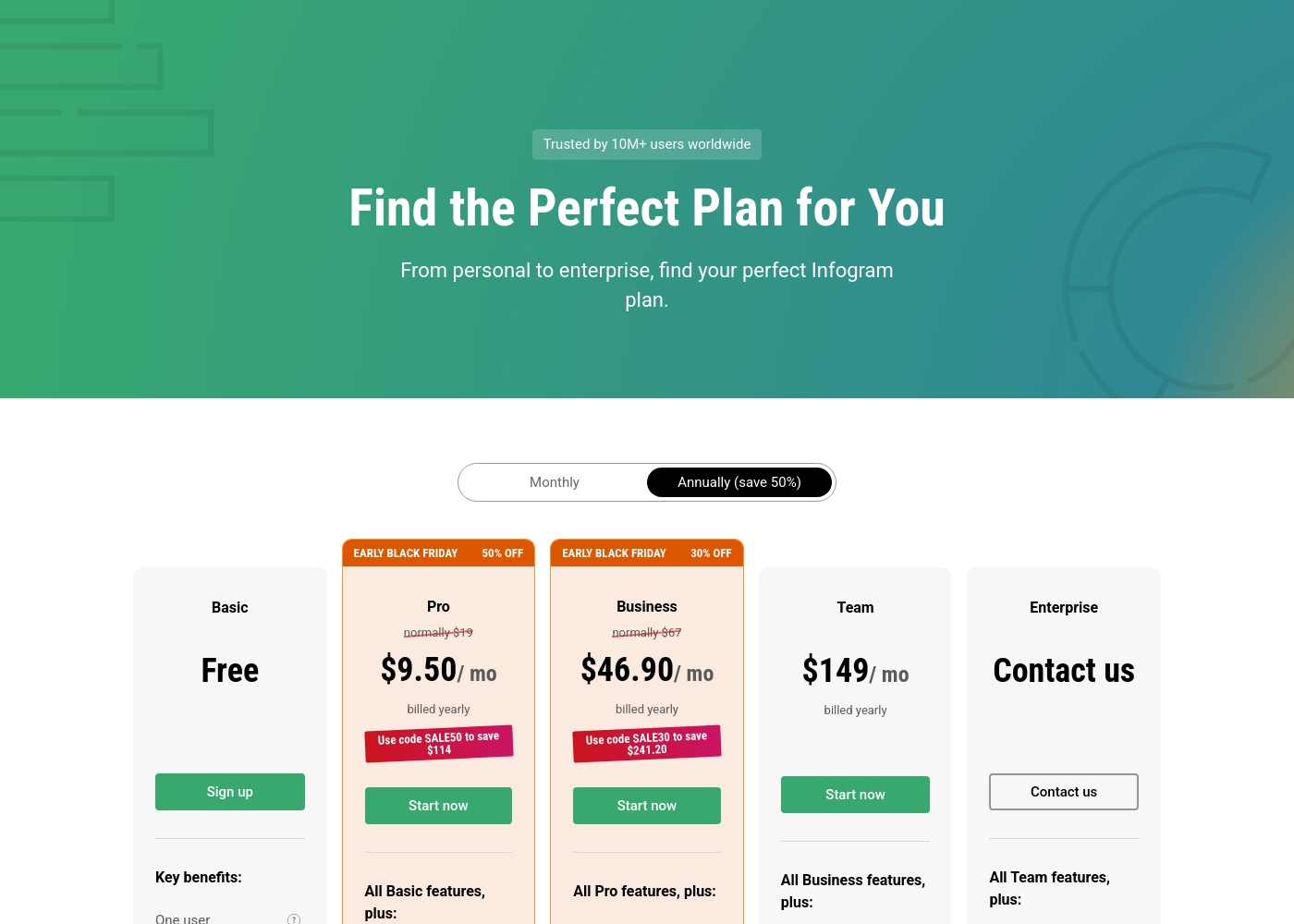
Infogram costs between $0 and $149 per month with five plans: Basic at Free, Pro at $9.50/month, Business at $46.90/month, Team at $149/month, and Enterprise (Contact us).
Let's explore the key features and audience for each subscription level, focusing on the annual billing rates.
Basic (Free)
Price: Free Best For: Personal use (blogs or presentations) Other Features: One user, 35+ interactive chart types, up to 10 projects, 13 map types, publish content online.
- One user
- 35+ interactive charts types
- Up to 10 projects
- Up to 5 pages per project
- 13 map types
- All Basic features included
- Up to 100 projects
- Up to 10 pages per project
- 100+ premium templates
- 800+ map types
- All Pro features included
- Up to 1,000 projects
- Unlimited pages per project
- Your brand logo, color palette, fonts, and image assets
- Basic analytics
- All Business features included
- One team, 3-10 users
- Up to 3,000 projects
- Real-time collaboration
- Commenting
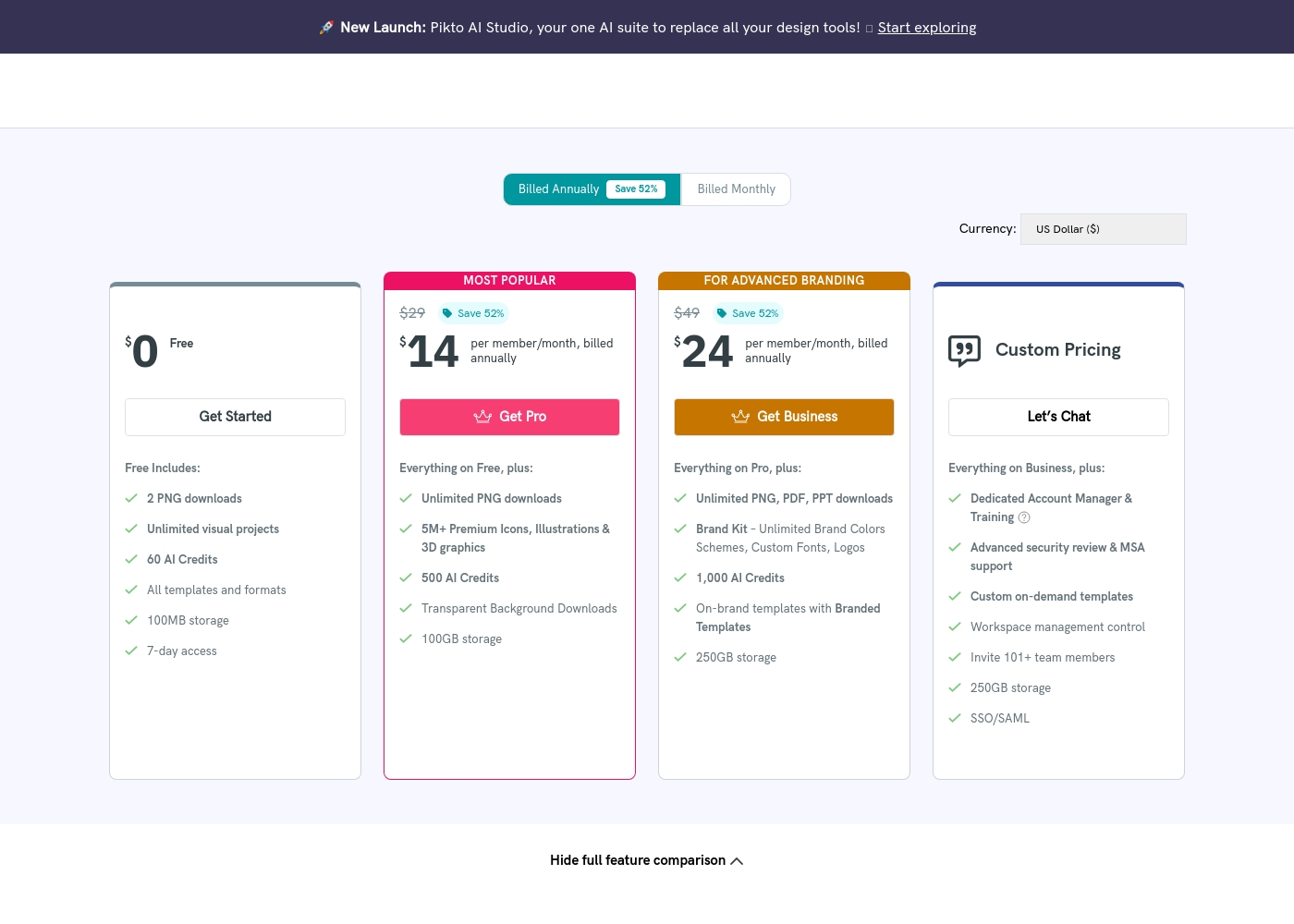
Piktochart costs between $0 and $49 per member per month with six plans: Free at $0, Pro at $14, Business at $24, Education at $39.99, Nonprofit at $60 (all prices annual/per member), and Custom/Enterprise (Custom Pricing).
The information below shows what is included in each plan to help you pick the best fit for your visual communication needs.
Free
Price: $0 Best For: Personal use and testing new tools Other Features:
- Unlimited visual projects
- 60 AI Credits
- 100MB storage
- 7-day access to visuals and videos
- Unlimited visual projects
- 60 AI Credits
- All templates and formats
- Includes 7-day access
- Unlimited PNG downloads
- 5M+ Premium Icons, Illustrations & 3D graphics
- 500 AI Credits
- Transparent Background Downloads
- Unlimited PNG, PDF, PPT downloads
- Brand Kit – Unlimited Brand Colors Schemes, Custom Fonts, Logos
- 1,000 AI Credits
- On-brand templates with Branded Templates
- Dedicated Account Manager & Training
- Advanced security review & MSA support
- Custom on-demand templates
- SSO/SAML
Pricing Notes
- Piktochart offers a significant discount (up to 52%) for annual billing over monthly rates.
- Infogram prices based on projects and features, whereas Piktochart prices per user seat.
- Piktochart offers specialized discounted plans for Education and Nonprofits; Infogram offers specialized inquiries.
- Infogram has strict no-refund policies and many user complaints regarding predatory auto-renewal and difficulty canceling.
- Piktochart offers a Free plan with 7-day access to visuals, requiring an upgrade for permanent retention.
Pricing Head-to-Head
User Reviews
Infogram's external feedback presents a stark contrast. While older reviews praise it as an incredible platform and the best infographic software online—highlighting the interactive elements and quality tools—recent and recurrent issues overshadow the product benefits.
The biggest complaint centers on aggressive and potentially predatory billing practices. Users frequently report unauthorized auto-renewals, significant difficulty with cancellation, and an absolute refusal to issue refunds, even immediately after an erroneous charge.
Incredible platform. I love the interactive elements; they make presentations much more engaging than boring PowerPoint slides. The free model needs tweaking for offline viewing and better custom map options, but the core tool is very effective.
Piktochart receives overwhelmingly positive feedback across external review platforms, maintaining an excellent TrustScore primarily due to its usability and impressive customer support. Reviewers frequently praise the platform's intuitiveness, noting that it allows users without graphic design experience to create professional-quality infographics and reports quickly.
A key feature cited as a massive time-saver is the AI tool, which seamlessly transforms text prompts or Word documents into polished visual designs. Support responsiveness is consistently described as top-notch: fast, friendly, informative, and proactive in resolving issues, whether dealing with account transfers or processing justified refunds.
Piktochart is a super intuitive platform. It allowed me, without any graphic design experience, to make professional infographics and flyers very quickly. The pre-made templates are extremely helpful and customizable.
Our Verdict
Choosing between Infogram and Piktochart depends entirely on whether data rigor or user experience is your priority. Both platforms create compelling visuals; however, their business practices and feature focuses are vastly different. Infogram is the platform for the serious data professional and the large enterprise customer. Its powerful SQL Connectors, Iframe integration, and 99.9% uptime SLA confirm its stability. If your business absolutely requires complex, live data feeds, Infogram has the technical edge. Piktochart shines through its superior user experience and exceptional AI-driven design capabilities. Piktochart’s ‘Pikto AI’ speeds up visual creation drastically for marketing, HR, and communication teams. Crucially, Piktochart wins on integrity, boasting stellar customer support and transparent per-member pricing. The deciding factor should be trust: Piktochart enjoys high praise and reliable support. Conversely, Infogram faces damning complaints regarding predatory billing practices and evasive customer service. If you are an analyst needing deep data connections, choose Infogram’s enterprise features. For almost everyone else seeking speed, great design, and peace of mind, Piktochart is the better choice.
Frequently Asked Questions
Which is better for small teams: Infogram or Piktochart?
Piktochart is typically better for small teams due to its per-member pricing and superior collaboration features. Infogram's team plan jumps significantly in price for just 3–10 users. Piktochart is highly intuitive, reducing training time for non-designers. It also offers a wider range of AI tools to accelerate content creation.
Does Infogram have AI design tools like Piktochart?
Infogram includes an 'AI image maker' in its Pro plan, but Piktochart's AI suite is more advanced. Piktochart offers 'Pikto AI' for full generative visual creation in under ten seconds. It also includes specialized tools like the AI Image Upscaler and Background Remover. If fast, AI-assisted design is essential, Piktochart is the stronger platform.
Which tool provides superior live data integration?
Infogram is superior for serious data integration and live updates. It offers advanced features like SQL Connectors and Iframe integration in paid plans. Piktochart can connect to Google Sheets for dynamic charts, which is sufficient for basic needs. However, Infogram offers the more robust, enterprise-grade connectivity.
Is Piktochart worth the per-member cost over Infogram’s tiered pricing?
Yes, Piktochart’s per-member pricing is often seen as transparent and better value. Infogram requires a large jump to its Team plan to access collaboration features. Piktochart also delivers outstanding customer support, mitigating any potential frustration. Its high user satisfaction rating reflects the platform's overall strong value proposition.
Which platform is safer regarding cancellation and billing?
Piktochart is considerably safer and receives high marks for user satisfaction and integrity. Infogram has significant external complaints regarding predatory auto-renewal and denied refund requests. Users warn of difficulties attempting to cancel their subscriptions with Infogram. Choose Piktochart if you prioritize transparent business practices and responsive support.
Which product is better for organizations needing strict brand consistency?
Both Infogram and Piktochart support deep brand customization on their Business plans. Piktochart has a slight edge by offering 'Branded Templates.' This feature automatically converts all templates to match your unlimited brand assets instantly. Infogram still offers full customization of logo, color, and fonts.
Ready to Choose?
Both tools have their strengths. Choose based on your specific needs.