EdrawInfo vs Infogram
EdrawInfo and Infogram both create compelling visuals, but they serve very different users. EdrawInfo offers stability and one-time pricing for individuals and beginners. Infogram targets businesses needing live data, custom branding, and team collaboration.
Best for: Solo entrepreneurs needing cross-platform stability (Win/Mac/Linux), Users who strongly prefer software ownership over recurring subscriptions
Best for: Marketing teams requiring content engagement analytics and tracking links, Analysts needing visualizations connected to live data sources (SQL/Iframes)
Excellent Diagrams, Questionable Lifetime Value.
We found EdrawInfo excels as a stable, cross-platform tool offering powerful diagramming and infographic creation, even for beginners. The diverse templates and upfront licensing options provide high inherent value. Overall, the significant reports of deceptive practices related to template access and trial billing issues necessitate a cautious recommendation regarding long-term investment.
Pros
- Extremely beginner-friendly with a highly intuitive UI.
- Access to a vast library of vector cliparts and customizable templates.
- Offers one-time purchase options (Perpetual and Lifetime licenses).
- Software is stable and works across Windows, Mac, and Linux.
Cons
- Serious reports regarding previously included lifetime templates being later paywalled.
- Some users report unauthorized charges following the free trial period.
- Support, though responsive, is frequently required due to multiple user complaints.
- The free trial version offers limited functionality.
Powerful visualization, risky subscription model.
We found Infogram offers powerful tools for creating interactive charts and reports, backed by strong branding features in higher tiers. However, user feedback identifies severe administrative risks related to inflexible cancellation and billing policies, making the overall commitment risky. Overall, we recommend approaching the commitment carefully due to documented customer service and refund issues.
Pros
- Incredible platform for creating highly interactive data visualizations.
- Strong library of 100+ premium templates and over 800 map types in paid tiers.
- Supports connection to live data sources, including specialized SQL Connectors.
- Advanced branding controls allow users to apply custom logos, fonts, and colors.
Cons
- Consistently poor customer service experiences reported by recent users.
- Strict company policy refusing refunds, even following unauthorized charges.
- Difficult and unreliable cancellation processes leading to unwanted auto-renewals.
- Predatory subscription practices, including threats regarding presentation privacy upon cancellation.
AboutEdrawInfo
EdrawInfo is a super beginners-friendly design tool. It helps anyone create eye-catching infographics quickly and effortlessly. The software is available for both Mac and Windows users.
Designing a compelling visual is remarkably easy. You simply select one of the many templates, use the library symbols, add your text, customize details, and export the file. You don't need any special skills to start seeing results.
💡 It provides a vast number of vector cliparts and helps you find inspiration easily. Every element is highly customizable, letting you adjust things like colors, chart values, lines, and even shadow effects.
AboutInfogram
Infogram is a widely trusted platform for data visualization, embraced by over 10 million users worldwide. It simplifies the process of turning complex information into compelling visual stories, including interactive charts and comprehensive maps. Whether you're using the free Basic plan for personal projects or need an Enterprise solution for your large organization, there is a suitable plan. Paid plans offer professionals greater project capacity and advanced features. You can utilize powerful tools, like AI image creation and connections to live data sources, to create impactful content quickly. ✅
Highlights
Feature Comparison
Features Overview
We highlight the main differences and pick a winner for each feature.
Licensing Structure
EdrawInfo offers permanent ownership; Infogram uses an aggressive subscription model.
EdrawInfo provides Lifetime and Perpetual licenses for a single one-time payment. Paying once means you own your software permanently, minimizing unforeseen costs. The Annual License is EdrawInfo’s most affordable yearly starting point at $69/year. Infogram is strictly subscription-based, ranging from Free to $149/month (annual commitment). This SaaS model is suitable for operational budgets but requires perpetual payment. If long-term budget stability is critical, EdrawInfo’s one-time purchase option is incredibly valuable. Infogram's recurring fees quickly add up, especially at the Business tier ($67/month). EdrawInfo gives you peace of mind with ownership, whereas Infogram provides continuous feature updates via subscription.
Live Data Integration
Infogram excels at connecting to live data; EdrawInfo relies heavily on manual input.
Infogram is built for dynamic data, offering live connections starting at the Pro plan level. Business plans add powerful SQL Connectors and Iframe integrations for serious data management. Infogram ensures your visualizations are always current. EdrawInfo allows high customization of chart values within the design itself. However, the documentation does not detail support for connecting to live streams or complex external data sources like Infogram. If your reports require data to refresh automatically, Infogram is non-negotiable for professional teams. EdrawInfo is best when your data is static or requires infrequent, manual updates. Infogram’s live data strength makes it superior for executive dashboards and real-time analytical reporting.
Offline Capability
EdrawInfo runs reliably offline; Infogram is entirely dependent on an internet connection.
EdrawInfo prioritizes stability, guaranteeing the software is fast and usable without an active internet connection. This is crucial for urgent projects or working while traveling. EdrawInfo is available across Windows, Mac, and Linux desktops. Infogram is fundamentally a web-based, cloud service for visualization and sharing. You must be online to create projects and utilize its primary features like live data connections. If your workflow demands offline access and cross-platform desktop installation, choose EdrawInfo. Infogram’s web dependence centralizes data but eliminates mobility in low-connectivity areas. EdrawInfo provides installation peace of mind; Infogram provides cloud accessibility from any browser.
Team Collaboration
Infogram provides superior collaboration features; EdrawInfo is optimized for single users.
Infogram introduces powerful collaboration features starting with the Team plan (3-10 users). This includes real-time editing, commenting, and synchronized workflows. Infogram helps teams work together seamlessly. EdrawInfo focuses on single-user activation, allowing a maximum of two devices per license. Its feature set emphasizes personal creation rather than synchronous project co-editing. For organizations where multiple people must synchronously edit and manage data visualizations, Infogram is clearly the stronger choice. EdrawInfo requires designers to pass static files back and forth. Infogram also offers engagement analytics and tracking links to monitor content performance after publishing, vital for marketing teams.
Beginner Interface
EdrawInfo is explicitly built for beginners; Infogram still requires some data handling knowledge.
EdrawInfo is described as a super friendly tool built specifically for beginners using a simple 5-step process. You don't need design skills to create expertly looking infographics easily. EdrawInfo provides a comfortable creation environment. Infogram is highly praised for its core functionality and interactive elements, but the feature depth increases complexity. Connecting SQL data or managing version history is not a task for total novices. If your users are design novices or students needing quick results, EdrawInfo removes technical difficulty successfully. Infogram is excellent for data experts simplifying complex data. EdrawInfo's vast library of vector cliparts and templates ensures a fast start for anyone.
Custom Branding
Infogram nails corporate branding; EdrawInfo offers advanced visual customization.
Infogram allows full enforcement of custom branding starting with the Business plan. Users can instantly apply their own logo, specific color palette, and preferred fonts across all projects. Enterprise plans offer custom branded themes. EdrawInfo allows high visual customization, letting you adjust colors, shadow effects, and line weights in detail. However, it doesn't offer the enterprise-grade brand asset management seen in Infogram. If maintaining strict brand consistency across thousands of professional reports is the goal, Infogram’s Business and Enterprise tiers are essential. EdrawInfo offers flexibility but less corporate control. Infogram ensures every visualization automatically aligns with your company's professional identity.
Customer Reliability
EdrawInfo rates higher, but Infogram's severe billing complaints are a major concern.
EdrawInfo holds a solid 3.9-star rating, with users praising its intuitive UI and time-saving features. It offers a 30-day money-back guarantee, providing a clear path for recourse if the tool fails to perform. Infogram holds a lower 3.0-star rating, mostly due to severe, aggressive billing complaints. Users cite predatory auto-renewal, difficult cancellations, and threats to publish private work if they cancel. While EdrawInfo has faced user complaints regarding paywalled templates, Infogram’s reputation suffers dramatically due to its financial and support practices. For minimizing financial risk and ensuring fair business practice, EdrawInfo appears to be the more reliable choice based on user sentiment.
Output Formats
Both tools offer high-quality exports, supporting professional dissemination and integration.
EdrawInfo supports seamless export and sharing in a wide variety of formats for easy integration into documents. Formats include PDF, PPT, PNG, SVG, and HTML files. This supports both print and digital needs effectively. Infogram also allows downloading finished projects as high-definition images and videos (Pro plan+). Enterprise plans offer specialized HTML export capabilities for greater control over delivery. Both tools excel at professional output necessary for presentations and documents. Infogram often focuses on interactive output, while EdrawInfo is strong on static, printable formats. Choosing between them depends on whether you value EdrawInfo's broad format range or Infogram's HD image/video focus.
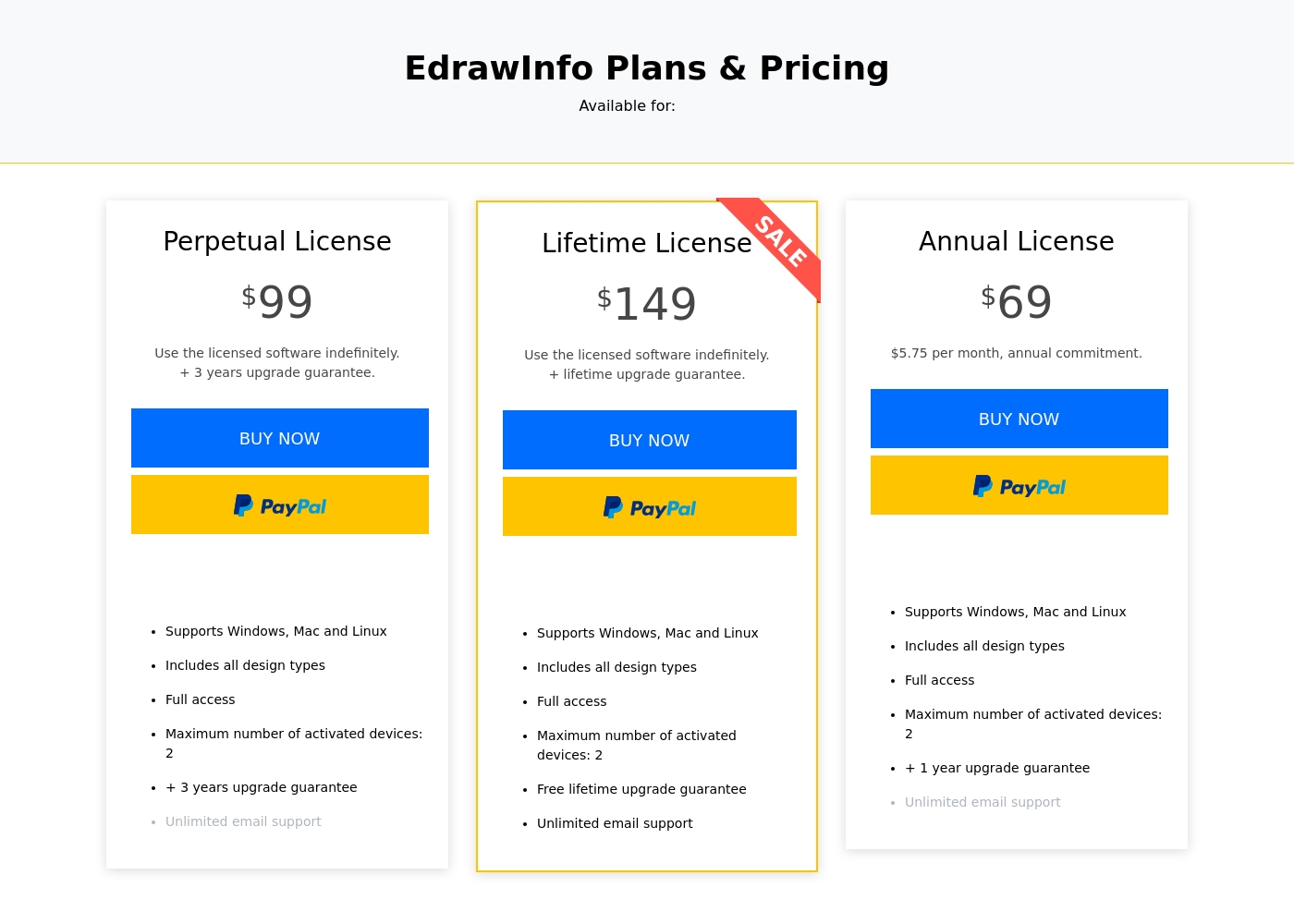
EdrawInfo costs between $69 per year and $149 one-time with 3 core single-user plans: Annual License at $69, Perpetual License at $99, and Lifetime License at $149.
Review the plan details below to find the best option for your design needs. EdrawInfo offers flexibility depending on how you prefer to purchase and own your software.
Annual License
Price: $69 per year ($5.75 per month, annual commitment) Best For: Users needing short-term access or lower upfront cost Refund Policy: 30-day money-back guarantee Other Features:
- Supports Windows, Mac, and Linux
- Includes all design types with full access
- Maximum number of activated devices: 2
- +1 year upgrade guarantee
- Unlimited email support
- Supports Windows, Mac, and Linux
- Includes all design types
- Full access
- One year upgrade guarantee
- Unlimited email support
- Supports Windows, Mac, and Linux
- Includes all design types
- Full access
- Three years upgrade guarantee
- Use licensed software indefinitely
- Supports Windows, Mac, and Linux
- Includes all design types
- Full access
- Free lifetime upgrade guarantee
- Use licensed software indefinitely
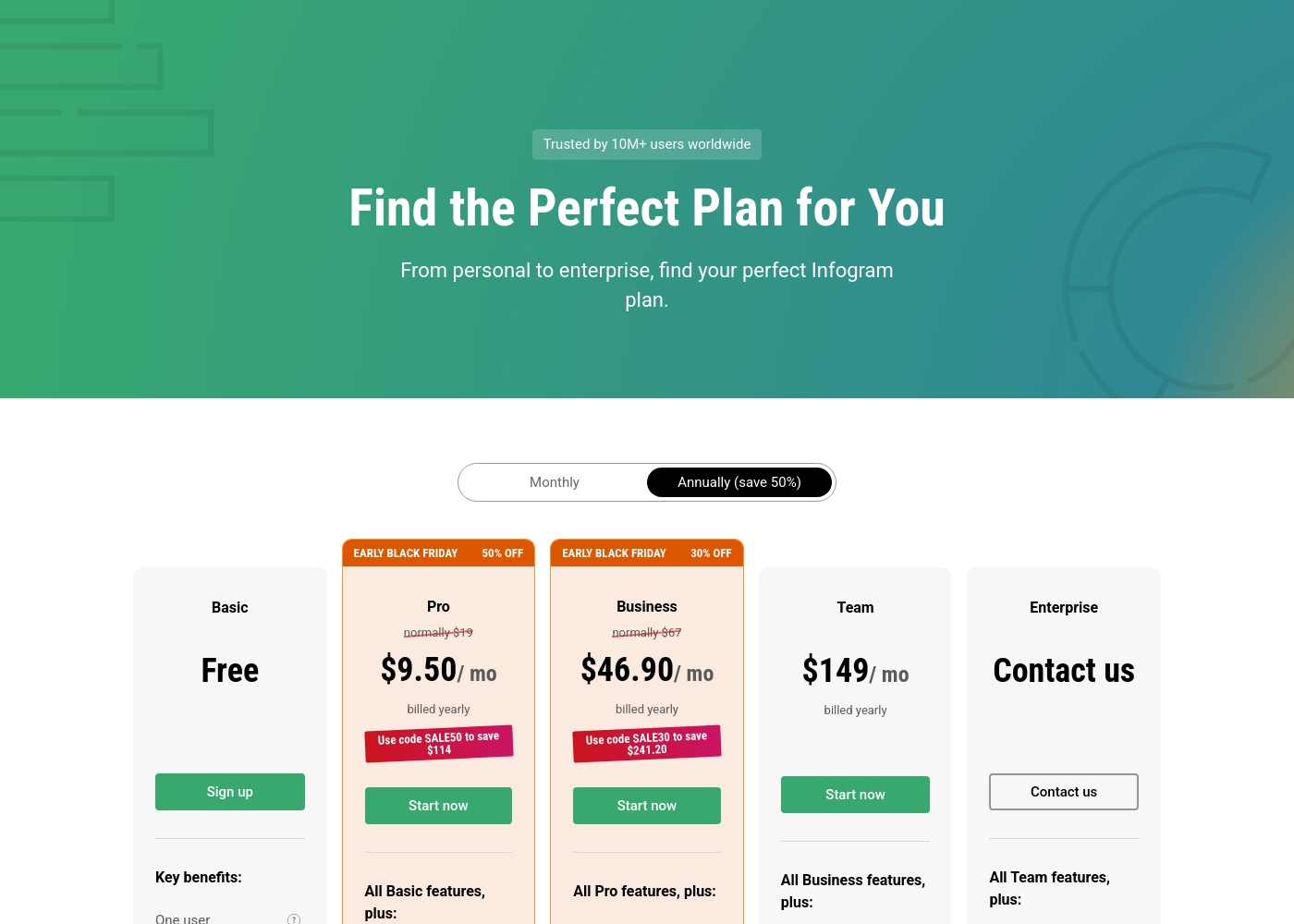
Infogram costs between $0 and $149 per month with five plans: Basic at Free, Pro at $9.50/month, Business at $46.90/month, Team at $149/month, and Enterprise (Contact us).
Let's explore the key features and audience for each subscription level, focusing on the annual billing rates.
Basic (Free)
Price: Free Best For: Personal use (blogs or presentations) Other Features: One user, 35+ interactive chart types, up to 10 projects, 13 map types, publish content online.
- One user
- 35+ interactive charts types
- Up to 10 projects
- Up to 5 pages per project
- 13 map types
- All Basic features included
- Up to 100 projects
- Up to 10 pages per project
- 100+ premium templates
- 800+ map types
- All Pro features included
- Up to 1,000 projects
- Unlimited pages per project
- Your brand logo, color palette, fonts, and image assets
- Basic analytics
- All Business features included
- One team, 3-10 users
- Up to 3,000 projects
- Real-time collaboration
- Commenting
Pricing Notes
- EdrawInfo uniquely offers Perpetual ($99) and Lifetime ($149) one-time purchase options.
- Infogram operates on a SaaS model with paid plans starting at $19/month (billed annually).
- EdrawInfo provides a 30-day money-back guarantee; Infogram has a strict, stated no-refund policy.
- Infogram includes a robust Free Basic plan, better than EdrawInfo's limited free download.
- Team plans for Infogram start high at $149/month for 3-10 users.
Pricing Head-to-Head
User Reviews
EdrawInfo, primarily reviewed on Trustpilot, currently holds a 3.7-star rating across 107 reviews. Users widely recognize the tool for its exceptional ease of use and intuitive interface.
Many find it a powerful assistant for visualizing information, utilizing rich symbol libraries and customizable templates across professional and educational settings. The software is frequently praised for saving time and delivering visually appealing results quickly.
Edrawsoft tools save me significant time managing projects. I love the interface because it is so user-friendly and intuitive, which makes navigation and drawing incredibly simple for complex jobs.
Infogram's external feedback presents a stark contrast. While older reviews praise it as an incredible platform and the best infographic software online—highlighting the interactive elements and quality tools—recent and recurrent issues overshadow the product benefits.
The biggest complaint centers on aggressive and potentially predatory billing practices. Users frequently report unauthorized auto-renewals, significant difficulty with cancellation, and an absolute refusal to issue refunds, even immediately after an erroneous charge.
Incredible platform. I love the interactive elements; they make presentations much more engaging than boring PowerPoint slides. The free model needs tweaking for offline viewing and better custom map options, but the core tool is very effective.
Our Verdict
Choosing between EdrawInfo and Infogram requires prioritizing cost structure versus data capability. EdrawInfo offers stable, easy usability coupled with low, one-time payment options. Infogram is a powerful, web-based tool for integrating live, complex professional data. EdrawInfo excels in approachability and flexible licensing structure for individuals. EdrawInfo is built for beginners, needing a simple 5-step process to generate great visuals fast. You can achieve ultimate ownership by purchasing EdrawInfo’s Forever or Perpetual license for under $150. Infogram dominates complex data visualization and multi-user corporate needs. Infogram connects to live data using SQL connectors and features 800+ map types. It’s significantly better for teams, offering real-time collaboration and advanced custom branding options. However, check user reviews and payment policies carefully before choosing. Infogram has troubling, widely reported issues relating to predatory auto-renewal and denied refunds. EdrawInfo is financially safer with its 30-day money-back guarantee, despite template paywall complaints. If you are a solo user needing offline work and a set cost, choose EdrawInfo and its Perpetual license. If your business depends on team collaboration and live data reports, Infogram is technically superior but requires extreme caution during purchase.
Frequently Asked Questions
Which tool offers a better free option: EdrawInfo or Infogram?
Infogram offers a more robust Basic Free plan with 35+ interactive chart types and data import functionality. EdrawInfo provides a limited function free download to test basic capabilities only. Infogram gives you more usable features without paying anything.
Can I use EdrawInfo offline, or is Infogram web-only?
Yes, EdrawInfo is guaranteed to be stable and fast even without an active internet connection. EdrawInfo supports installation on Windows, Mac, and Linux systems. Infogram is entirely cloud-based and requires connectivity for project creation and sharing.
Which tool is better for professional corporate brand consistency?
Infogram is far superior for corporate brand consistency management. The Business plan allows you to instantly apply your custom logo, specific color palettes, and preferred fonts automatically. EdrawInfo offers high visual customization but lacks organization-wide branding controls.
Does EdrawInfo support live data connections like Infogram?
EdrawInfo focuses on manual data customization within the visual editor and does not mention live data connections. Infogram excels here, offering strong support for live data feeds and SQL/Iframe integrations in its paid plans.
Which has a safer pricing model: EdrawInfo or Infogram?
EdrawInfo has a safer model due to its 30-day money-back guarantee and one-time Perpetual license option. Infogram has a strict, documented no-refund policy and extensive user complaints regarding predatory subscription and cancellation practices.
Is EdrawInfo or Infogram better for large-scale team collaboration?
Infogram is significantly better for collaboration, starting with the Team plan (3-10 users). This includes real-time collaboration, commenting, and tracking links. EdrawInfo is designed primarily for single-user workflow.
Ready to Choose?
Both tools have their strengths. Choose based on your specific needs.