EdrawInfo vs Piktochart
EdrawInfo and Piktochart both help you create stunning infographics quickly. EdrawInfo shines with desktop ownership and reliable offline stability. Piktochart dominates the space with powerful generative AI and robust team collaboration features. Choosing the right tool depends entirely on your ownership preference and workflow requirements.
Best for: Individuals seeking indefinite software ownership via a one-time purchase, Consultants who must work reliably offline during travel or off-site meetings
Best for: Marketing teams needing instant visual generation using Pikto AI tools, Organizations requiring strict, automated brand consistency via a centralized Brand Kit
Excellent Diagrams, Questionable Lifetime Value.
We found EdrawInfo excels as a stable, cross-platform tool offering powerful diagramming and infographic creation, even for beginners. The diverse templates and upfront licensing options provide high inherent value. Overall, the significant reports of deceptive practices related to template access and trial billing issues necessitate a cautious recommendation regarding long-term investment.
Pros
- Extremely beginner-friendly with a highly intuitive UI.
- Access to a vast library of vector cliparts and customizable templates.
- Offers one-time purchase options (Perpetual and Lifetime licenses).
- Software is stable and works across Windows, Mac, and Linux.
Cons
- Serious reports regarding previously included lifetime templates being later paywalled.
- Some users report unauthorized charges following the free trial period.
- Support, though responsive, is frequently required due to multiple user complaints.
- The free trial version offers limited functionality.
AI-Driven Visuals, Superior Design, and Prompt Support.
We find Piktochart delivers an exceptional balance of powerful AI-driven visual creation and excellent usability, successful even for users without sophisticated design skills. Overall, we confidently recommend this platform for both individuals and teams seeking professional visual communication tools supported by genuinely proactive customer service.
Pros
- Extremely intuitive and user-friendly interface that requires little onboarding time.
- Powerful AI tool instantly transforms documents and text into visual designs.
- Customer support is exceptionally fast, friendly, informative, and proactive.
- Ensures brand consistency using centralized Brand Kit features and on-brand templates.
Cons
- Some users reported minor difficulties with specific regional payment processing methods.
- The core content creation editor, while highly functional, could benefit from further polish.
AboutEdrawInfo
EdrawInfo is a super beginners-friendly design tool. It helps anyone create eye-catching infographics quickly and effortlessly. The software is available for both Mac and Windows users.
Designing a compelling visual is remarkably easy. You simply select one of the many templates, use the library symbols, add your text, customize details, and export the file. You don't need any special skills to start seeing results.
💡 It provides a vast number of vector cliparts and helps you find inspiration easily. Every element is highly customizable, letting you adjust things like colors, chart values, lines, and even shadow effects.
AboutPiktochart
Piktochart provides an intuitive platform for visual creation, designed to make complex data understandable. It targets anyone needing professional-quality visuals, often without requiring design experience. The platform powers your entire creative workflow, notably through Pikto AI. This generative AI transforms simple text prompts into stunning visual content in under ten seconds. Whether you're building infographics, designing reports, or creating social media graphics, Piktochart helps enhance your internal and external messaging. 💡
Highlights
Feature Comparison
Features Overview
We highlight the main differences and pick a winner for each feature.
Pricing Model
EdrawInfo offers permanent ownership; Piktochart requires ongoing subscriptions.
EdrawInfo stands out by offering Perpetual and Lifetime licenses. You pay a single, one-time fee and own the software indefinitely. This is perfect for users who strongly dislike recurring annual costs. Piktochart uses a standard per-member subscription model for Pro and Business plans. Continuous access to features and visuals requires an active subscription payment. The core difference is viewing the software as an asset or an ongoing service. EdrawInfo is a long-term desktop investment. EdrawInfo's one-time purchase options offer unmatched long-term value if you plan to use the tool for many years.
AI Capabilities
Piktochart features powerful generative AI; EdrawInfo relies on manual template selection.
Piktochart leverages 'Pikto AI' to streamline design, instantly generating visuals from text prompts. Paid plans offer up to 1,000 AI Credits for rapid content creation. Piktochart also includes specialized tools like AI Image Upscaler and Background Remover functions. This drastically cuts down on manual design time. EdrawInfo focuses on providing a vast library of templates and vector cliparts. The user interface guides you through a streamlined, five-step manual customization process. Teams prioritizing speed and automated visual creation will greatly prefer Piktochart’s real-time generative capabilities.
Collaboration Tools
Piktochart provides a shared team workspace; EdrawInfo only supports file export sharing.
Piktochart is purpose-built for team workflow with a seamless shared workspace. Teams can integrate easily using commenting and revision features. This collaborative environment helps speed up review and alignment among team members. The experience feels similar to co-editing in Google Docs. EdrawInfo focuses on the needs of the individual creator and requires files to be exported. Sharing often involves saving PDFs or images and emailing them to collaborators. For any organization that requires real-time feedback and version control, Piktochart’s native sharing capabilities are superior.
Offline Usability
EdrawInfo works reliably offline; Piktochart is optimized for online, web-based use.
EdrawInfo is downloaded software designed for ultimate stability and speed. It remains fast and functional even when you lack an active internet connection. This stability is critical for users who need to rely on the software for urgent projects. It supports full feature use across Windows, Mac, and Linux desktops. Piktochart is a web application, and continuous use often requires an internet connection. Data integration also depends on online sources like Google Sheets. If you frequently travel or rely on intermittent connectivity, EdrawInfo provides essential peace of mind concerning project access and stability.
Data Visualization
Piktochart handles live data synchronization; EdrawInfo offers strong manual customization.
Piktochart offers dynamic data integration, allowing live data import from Google Sheets. Users can import external data sources using CSV files easily. This enables Piktochart users to update charts and graphs automatically when the source data changes. It makes reporting much more accurate. EdrawInfo lets users fully customize individual chart values and all design details. However, it does not explicitly support external data file import like CSV or Excel. Teams dealing with rapidly changing metrics, like in marketing or finance, will find Piktochart’s live data linking far more efficient.
Brand Consistency
Piktochart offers an unlimited, centralized Brand Kit; EdrawInfo relies on manual branding.
Piktochart's Business plan includes a powerful, centralized Brand Kit without limits. This hub stores custom fonts, logos, and specific company colors. Piktochart also includes 'Branded Templates' which convert designs automatically to match corporate standards. This guarantees organization-wide visual consistency. EdrawInfo allows high customization of colors and effects within the design workspace. However, it lacks an integrated asset management system for mass brand deployment. For organizations where maintaining strong, verified branding is non-negotiable, Piktochart offers superior, automated solutions.
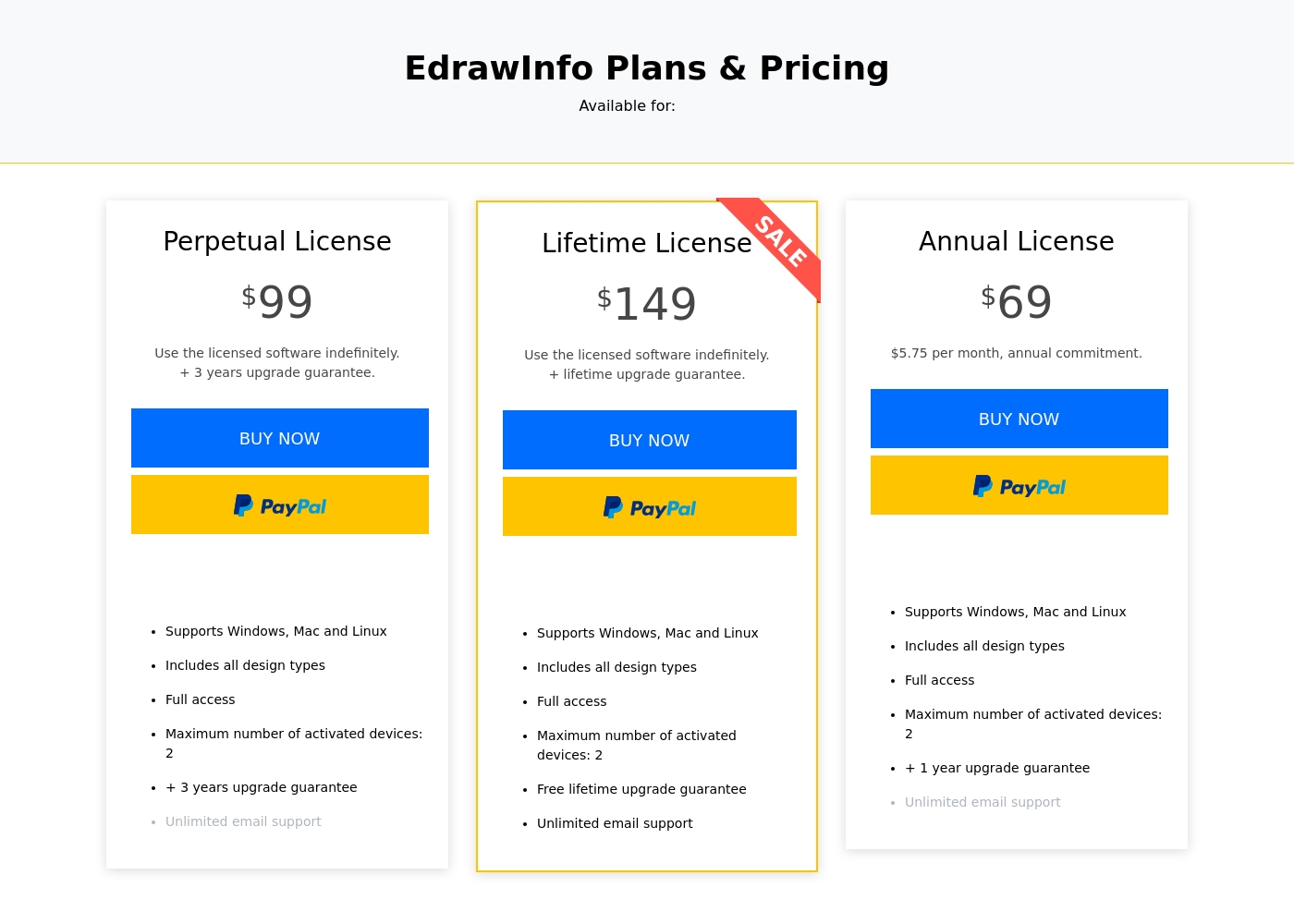
EdrawInfo costs between $69 per year and $149 one-time with 3 core single-user plans: Annual License at $69, Perpetual License at $99, and Lifetime License at $149.
Review the plan details below to find the best option for your design needs. EdrawInfo offers flexibility depending on how you prefer to purchase and own your software.
Annual License
Price: $69 per year ($5.75 per month, annual commitment) Best For: Users needing short-term access or lower upfront cost Refund Policy: 30-day money-back guarantee Other Features:
- Supports Windows, Mac, and Linux
- Includes all design types with full access
- Maximum number of activated devices: 2
- +1 year upgrade guarantee
- Unlimited email support
- Supports Windows, Mac, and Linux
- Includes all design types
- Full access
- One year upgrade guarantee
- Unlimited email support
- Supports Windows, Mac, and Linux
- Includes all design types
- Full access
- Three years upgrade guarantee
- Use licensed software indefinitely
- Supports Windows, Mac, and Linux
- Includes all design types
- Full access
- Free lifetime upgrade guarantee
- Use licensed software indefinitely
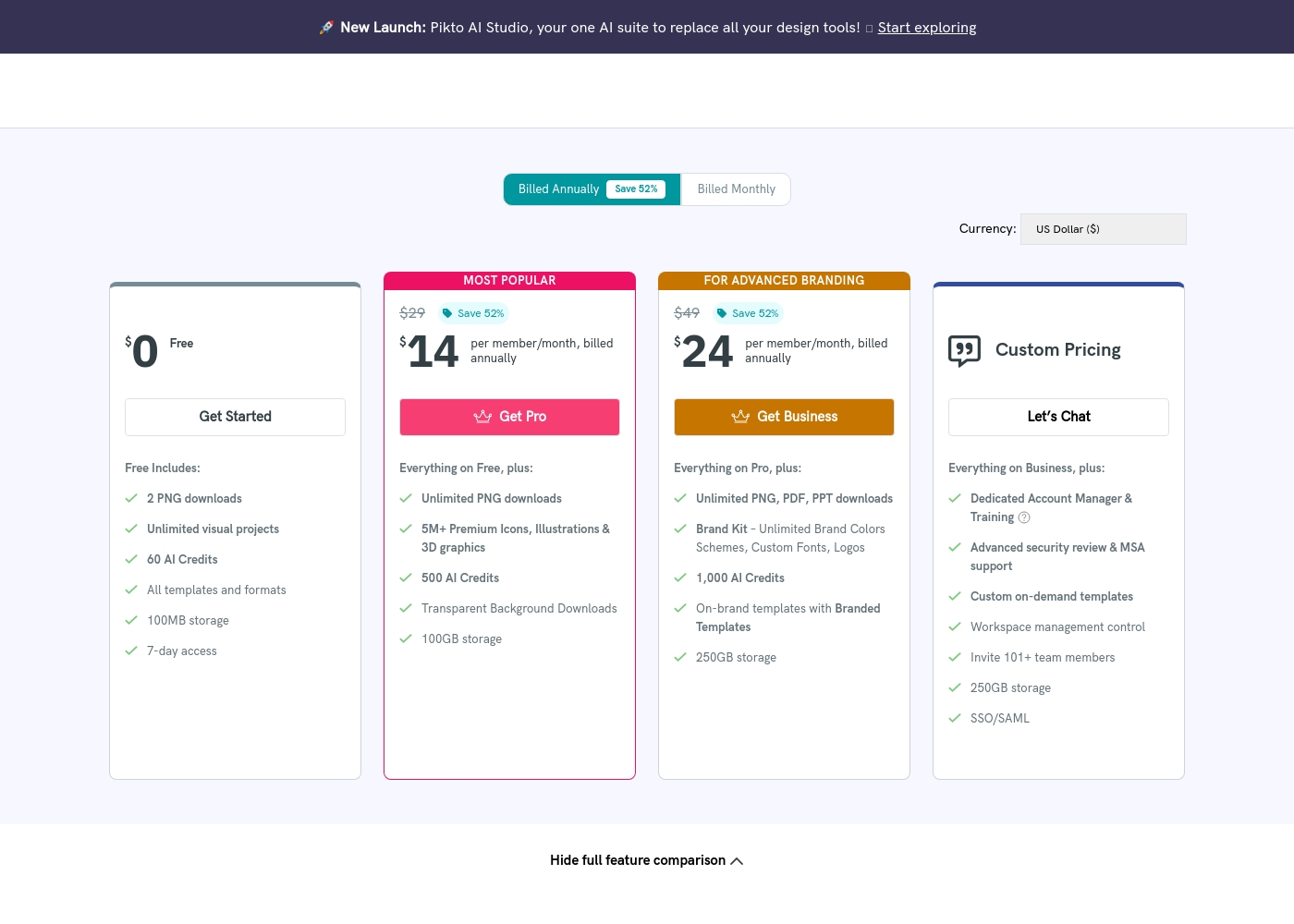
Piktochart costs between $0 and $49 per member per month with six plans: Free at $0, Pro at $14, Business at $24, Education at $39.99, Nonprofit at $60 (all prices annual/per member), and Custom/Enterprise (Custom Pricing).
The information below shows what is included in each plan to help you pick the best fit for your visual communication needs.
Free
Price: $0 Best For: Personal use and testing new tools Other Features:
- Unlimited visual projects
- 60 AI Credits
- 100MB storage
- 7-day access to visuals and videos
- Unlimited visual projects
- 60 AI Credits
- All templates and formats
- Includes 7-day access
- Unlimited PNG downloads
- 5M+ Premium Icons, Illustrations & 3D graphics
- 500 AI Credits
- Transparent Background Downloads
- Unlimited PNG, PDF, PPT downloads
- Brand Kit – Unlimited Brand Colors Schemes, Custom Fonts, Logos
- 1,000 AI Credits
- On-brand templates with Branded Templates
- Dedicated Account Manager & Training
- Advanced security review & MSA support
- Custom on-demand templates
- SSO/SAML
Pricing Notes
- EdrawInfo offers long-term value via Perpetual ($99) and Lifetime ($149) one-time payment options.
- Piktochart uses per-member, recurring subscriptions but has a substantial, robust free plan.
- Annual billing in Piktochart saves you up to 52% compared to monthly billed plans.
- EdrawInfo provides a guaranteed 30-day money-back policy. Piktochart handles refunds strictly on a case-by-case basis.
- Piktochart includes specialized, deeply discounted annual plans for Education and Nonprofit organizations.
Pricing Head-to-Head
User Reviews
EdrawInfo, primarily reviewed on Trustpilot, currently holds a 3.7-star rating across 107 reviews. Users widely recognize the tool for its exceptional ease of use and intuitive interface.
Many find it a powerful assistant for visualizing information, utilizing rich symbol libraries and customizable templates across professional and educational settings. The software is frequently praised for saving time and delivering visually appealing results quickly.
Edrawsoft tools save me significant time managing projects. I love the interface because it is so user-friendly and intuitive, which makes navigation and drawing incredibly simple for complex jobs.
Piktochart receives overwhelmingly positive feedback across external review platforms, maintaining an excellent TrustScore primarily due to its usability and impressive customer support. Reviewers frequently praise the platform's intuitiveness, noting that it allows users without graphic design experience to create professional-quality infographics and reports quickly.
A key feature cited as a massive time-saver is the AI tool, which seamlessly transforms text prompts or Word documents into polished visual designs. Support responsiveness is consistently described as top-notch: fast, friendly, informative, and proactive in resolving issues, whether dealing with account transfers or processing justified refunds.
Piktochart is a super intuitive platform. It allowed me, without any graphic design experience, to make professional infographics and flyers very quickly. The pre-made templates are extremely helpful and customizable.
Our Verdict
Choosing between EdrawInfo and Piktochart means picking desktop stability versus AI efficiency. Piktochart is arguably the stronger, more scalable ecosystem for modern teams. However, EdrawInfo provides a rare, valuable opportunity for perpetual software ownership. EdrawInfo's superstar feature is the one-time Lifetime License. You pay just $149 once and use the software indefinitely across Windows, Mac, and Linux. This desktop structure guarantees stability, allowing you to work fast even if your internet drops out completely. Piktochart’s power lies in its generative Pikto AI and comprehensive team tools. Pikto AI can instantly create stunning, polished visuals within 10 seconds, accelerating content creation dramatically. It effortlessly handles important tasks like live data sync from Google Sheets for updated reports. Your decisive factor is simple: ownership versus collaboration. Choose EdrawInfo if you are a solo user, require offline access, and want to avoid recurring subscription fees forever. EdrawInfo offers long-term reliability for evergreen documents. For any growing team or organization focused on branding and efficiency, Piktochart is the clear recommendation. Piktochart’s centralized Brand Kit, Live Chat support, and robust collaboration features make team alignment simple and instant.
Frequently Asked Questions
Which is better for small teams: EdrawInfo or Piktochart?
Piktochart is better suited for small teams due to its design around collaboration. It offers a shared workspace, easy commenting, and review features for team alignment. EdrawInfo works best for individual users who share final files via export.
Does EdrawInfo offer AI picture generation like Piktochart?
No, EdrawInfo does not advertise built-in generative AI capabilities for image creation. Piktochart, conversely, uses Pikto AI to instantly generate visuals from simple text prompts, saving significant time.
Can I buy a Lifetime version of Piktochart?
Piktochart is exclusively sold as a subscription service, priced per member per month. EdrawInfo is one of the few platforms that offers true Perpetual and Lifetime licenses with a single, one-time payment.
Which tool is better for ensuring strict brand consistency?
Piktochart is vastly superior for brand consistency on its Business plan. It provides an unlimited, centralized Brand Kit and automated Branded Templates. EdrawInfo requires users to manually customize colors and fonts for each design.
Which tool handles data visualization and integration better?
Piktochart provides dynamic data integration, allowing live data synchronization from Google Sheets. EdrawInfo allows deep manual customization of chart values but does not support direct CSV or Excel data file imports.
Is EdrawInfo stable and reliable for offline use?
Yes, EdrawInfo is designed as software that guarantees stable and fast performance even without an active internet connection. Piktochart is a web-based platform that requires consistent connectivity.
Ready to Choose?
Both tools have their strengths. Choose based on your specific needs.