Beautiful.ai มีแผนการสมัครสมาชิกที่ยืดหยุ่นซึ่งออกแบบมาสำหรับบุคคลและทีม โดยเริ่มต้นที่ $12 ต่อเดือนเมื่อเรียกเก็บเงินรายปี คุณสามารถเลือกการเรียกเก็บเงินรายปีเพื่อความคุ้มค่าที่สุด หรือเลือกการผูกมัดรายเดือนที่มีราคาสูงกว่า ซึ่งเหมาะสำหรับความต้องการระยะสั้น
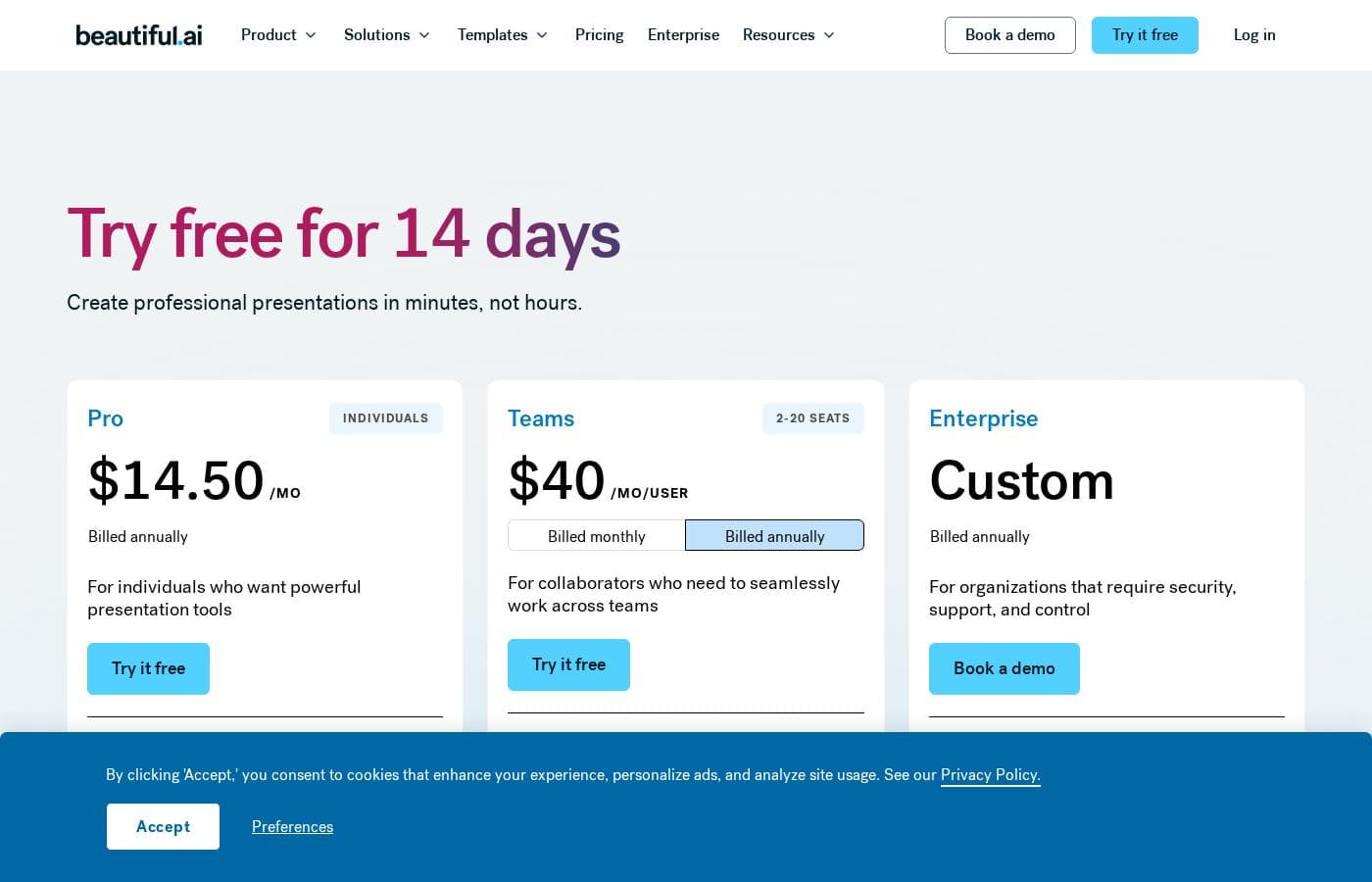
Beautiful.ai มีค่าใช้จ่ายระหว่าง $12/เดือน ถึง $50/ผู้ใช้/เดือน โดยมีแผนหลักสามแผน: Pro ที่ $12/เดือน (เรียกเก็บเงินรายปี), Team ที่ $40/ผู้ใช้/เดือน (เรียกเก็บเงินรายปี) และ Enterprise (ราคาแบบกำหนดเอง)
หากคุณพร้อมที่จะสร้างงานนำเสนอที่สวยงามอย่างรวดเร็ว คุณจะพบแผนที่เหมาะกับความต้องการของคุณ ไม่ว่าคุณจะทำงานคนเดียวหรือทำงานร่วมกันในองค์กรขนาดใหญ่
Pro (ส่วนบุคคล)
ราคา: $12/เดือน (เรียกเก็บเงินรายปี หรือ $45/เดือน เรียกเก็บเงินรายเดือน)
เว็บไซต์ที่รองรับ: ไม่ได้ระบุไว้ชัดเจน
เหมาะสำหรับ: บุคคลที่ต้องการเครื่องมือสร้างงานนำเสนอที่ทรงพลัง
คุณสมบัติอื่น ๆ:
- การสร้างเนื้อหาด้วย AI แบบไม่จำกัด
- การใช้สไตล์แบรนด์ของคุณเอง
- การสร้างภาพและการช่วยเขียนด้วย AI
- เลย์เอาต์ Smart Slide มากกว่า 300 แบบ
- การแสดงข้อมูลด้วยภาพแบบไดนามิก
ระดับนี้เหมาะสำหรับฟรีแลนซ์ ที่ปรึกษา หรือใครก็ตามที่ต้องการการออกแบบงานนำเสนอระดับสูงโดยไม่ต้องผูกมัดกับแผนทีม แผน Pro ให้เครื่องมือ AI ที่จำเป็นทั้งหมดแก่คุณเพื่อทำงานอย่างชาญฉลาดและรวดเร็วยิ่งขึ้น
Team
ราคา: $40/ผู้ใช้/เดือน (เรียกเก็บเงินรายปี หรือ $50/ผู้ใช้/เดือน เรียกเก็บเงินรายเดือน)
เว็บไซต์ที่รองรับ: ไม่ได้ระบุไว้ชัดเจน
เหมาะสำหรับ: ผู้ที่ทำงานร่วมกันที่ต้องการทำงานร่วมกันอย่างราบรื่นในทีม
คุณสมบัติอื่น ๆ:
- การแก้ไขร่วมกันแบบสดแบบเรียลไทม์
- คลังสไลด์และเทมเพลตส่วนกลาง
- การควบคุมเวอร์ชันและสไลด์ที่ถูกล็อก
- การวิเคราะห์ผู้ดูและสไลด์
- สร้างงานนำเสนอได้มากกว่า 100+ ภาษา
Enterprise
ราคา: ติดต่อฝ่ายขายสำหรับราคา
เว็บไซต์ที่รองรับ: ไม่ได้ระบุไว้ชัดเจน
เหมาะสำหรับ: องค์กรที่มีผู้ใช้ 20+ คนที่ต้องการความปลอดภัย การสนับสนุน และการควบคุม
นโยบายการคืนเงิน: ไม่ได้ระบุไว้ชัดเจน
คุณสมบัติอื่น ๆ:
- การเริ่มต้นใช้งานและการฝึกอบรมทีมเฉพาะบุคคล
- ความปลอดภัยระดับสูงสุด (ได้รับการรับรอง CCPA, PCI, SOC 2 Type II และ GDPR)
- การลงชื่อเข้าใช้ครั้งเดียวที่ปลอดภัย (SSO)
- การอนุญาตผู้ใช้ขั้นสูงและบันทึกการตรวจสอบ
- แนวป้องกันแบรนด์ที่กำหนดค่าได้
The Enterprise plan ให้ระดับความปลอดภัยและการสนับสนุนสูงสุดสำหรับองค์กรขนาดใหญ่ หากคุณมีทีมงานที่กว้างขวางและความต้องการปฏิบัติตามข้อกำหนดที่เข้มงวด โซลูชันแบบกำหนดเองนี้จะรับรองว่าคุณสามารถควบคุมองค์กรได้อย่างเต็มที่และได้รับบริการลำดับความสำคัญ
พร้อมที่จะเจาะลึกแล้วหรือยัง? Beautiful.ai มี การทดลองใช้ฟรี 14 วัน สำหรับทั้งแผน Pro และ Team ให้คุณสำรวจคุณสมบัติทั้งหมดก่อนตัดสินใจ โปรดทราบว่าการทดลองใช้ต้องใช้บัตรเครดิต และคุณจะถูกเรียกเก็บเงินโดยอัตโนมัติหากคุณไม่ยกเลิกก่อนหมดสองสัปดาห์ การสมัครสมาชิกรายปีมีหน้าต่าง 24 ชั่วโมงที่จำกัดสำหรับการคืนเงินบางส่วนที่เป็นไปได้ ในขณะที่แผนรายเดือนไม่มีการคืนเงิน ดังนั้นควรเลือกตัวเลือกการเรียกเก็บเงินของคุณอย่างชาญฉลาด