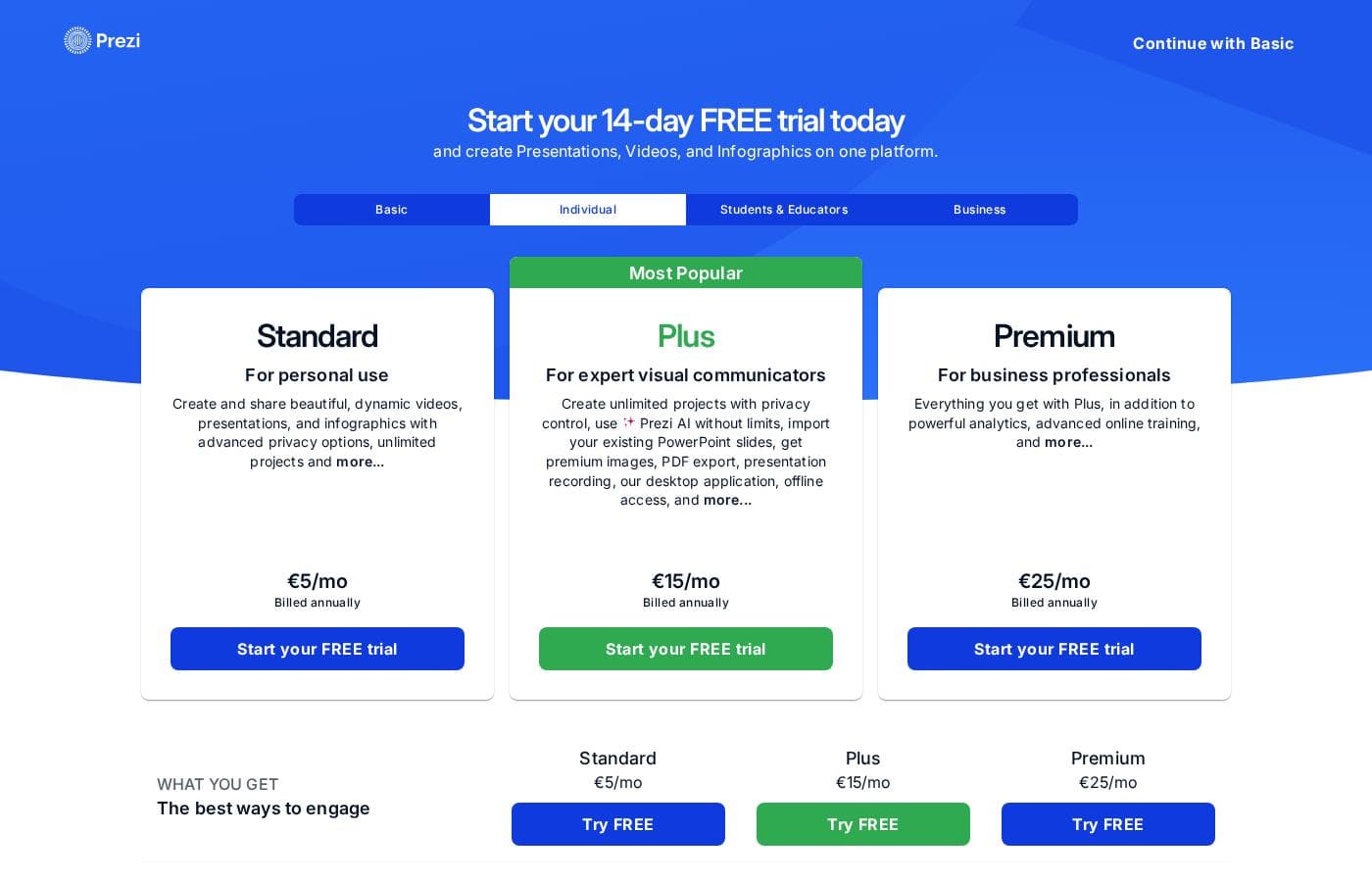
Prezi มีระดับการสมัครสมาชิกแบบชำระเงินหลักสามระดับเมื่อเรียกเก็บเงินเป็นรายปี โดยเริ่มต้นที่ $7/เดือน สำหรับการใช้งานส่วนตัว แผนแบบชำระเงินทั้งหมดมีให้ทดลองใช้ฟรี 14 วันเช่นกัน ซึ่งช่วยให้คุณทดสอบคุณสมบัติก่อนตัดสินใจ
Prezi มีราคาอยู่ระหว่าง $7 ถึง $29 ต่อเดือนเมื่อเรียกเก็บเงินเป็นรายปี โดยมีแผนแบบชำระเงินสามระดับ: Standard ที่ $7/เดือน, Plus ที่ $19/เดือน และ Premium ที่ $29/เดือน
นี่คือรายละเอียดว่า Prezi จัดโครงสร้างการสมัครสมาชิกแบบชำระเงินอย่างไร
Standard
ราคา: $7 ต่อเดือน เรียกเก็บเงินเป็นรายปี
รองรับเว็บไซต์: ไม่ได้ระบุไว้ชัดเจน
เหมาะสำหรับ: การใช้งานส่วนตัว
นโยบายการคืนเงิน: ไม่ได้ระบุไว้ชัดเจน
คุณสมบัติอื่น ๆ:
- การสร้างงานนำเสนอด้วย AI (500 เครดิต)
- การควบคุมความเป็นส่วนตัว
- รูปภาพและภาพระดับพรีเมียม 1 ล้าน+ รูปภาพ
- การแก้ไขรูปภาพขั้นสูง
- ลิงก์แชร์ที่ควบคุมได้
แผนนี้เหมาะที่สุดหากคุณต้องการคุณสมบัติพื้นฐานสำหรับโปรเจกต์ส่วนตัวเป็นครั้งคราว คุณจะได้รับการช่วยเหลือจาก AI ด้วยการจำกัดเครดิต และการควบคุมภาพที่จำเป็น หากคุณนำเสนอเป็นครั้งคราวและต้องการการแชร์แบบส่วนตัว แผน Standard เป็นจุดเริ่มต้นที่ดีสำหรับคุณ
Plus (เป็นที่นิยมที่สุด)
ราคา: $19 ต่อเดือน เรียกเก็บเงินเป็นรายปี
รองรับเว็บไซต์: ไม่ได้ระบุไว้ชัดเจน
เหมาะสำหรับ: ผู้สื่อสารภาพที่มีความเชี่ยวชาญ
นโยบายการคืนเงิน: ไม่ได้ระบุไว้ชัดเจน
คุณสมบัติอื่น ๆ:
- การสร้างงานนำเสนอด้วย AI ไม่จำกัด
- การสร้างรูปภาพด้วย AI ไม่จำกัด
- การนำเข้า PDF/PPT ไม่จำกัด
- งานนำเสนอที่ไม่มีลายน้ำ
- แอปเดสก์ท็อป / เข้าถึงแบบออฟไลน์
- ดาวน์โหลด / ส่งออกเป็น PDF
แผน Plus เป็นข้อเสนอที่ได้รับความนิยมมากที่สุดของ Prezi ซึ่งให้ความยืดหยุ่นมากกว่ามาก มันลบข้อจำกัดของ AI ออกไป ทำให้คุณสามารถสร้างได้ไม่จำกัด และมีคุณสมบัติที่สำคัญ เช่น การเข้าถึงแบบออฟไลน์และความสามารถในการดาวน์โหลด เราขอแนะนำ Plus หากคุณสร้างงานนำเสนอระดับมืออาชีพในปริมาณมากบ่อยครั้ง และต้องการตัวเลือกการส่งออกที่แข็งแกร่ง ✨
Premium
ราคา: $29 ต่อเดือน เรียกเก็บเงินเป็นรายปี
รองรับเว็บไซต์: ไม่ได้ระบุไว้ชัดเจน
เหมาะสำหรับ: ผู้เชี่ยวชาญทางธุรกิจ
นโยบายการคืนเงิน: ไม่ได้ระบุไว้ชัดเจน
คุณสมบัติอื่น ๆ:
- การวิเคราะห์งานนำเสนอ
- การสนับสนุนและการฝึกอบรมพิเศษ
- การฝึกอบรมสดขั้นสูง
- การรวมระบบนำเข้าขั้นสูง
ก่อนซื้อแผน คุณสามารถเริ่ม ทดลองใช้ฟรี 14 วัน ของแผนแบบชำระเงินใดก็ได้เพื่อสำรวจคุณสมบัติต่างๆ แม้ว่า Prezi จะมีเวอร์ชัน Public (ฟรี) พื้นฐานด้วย แต่ภาพหน้าจอจะจำกัดอยู่แค่แผนแบบชำระเงินที่แสดงด้านบน ทุกแผนถูกเรียกเก็บเงินเป็นรายปี