Vivaldi

Vivaldi

The powerful, personal, and private browser built for control.

#1 dans Web Browser
2 min read · Updated 11/17/2025
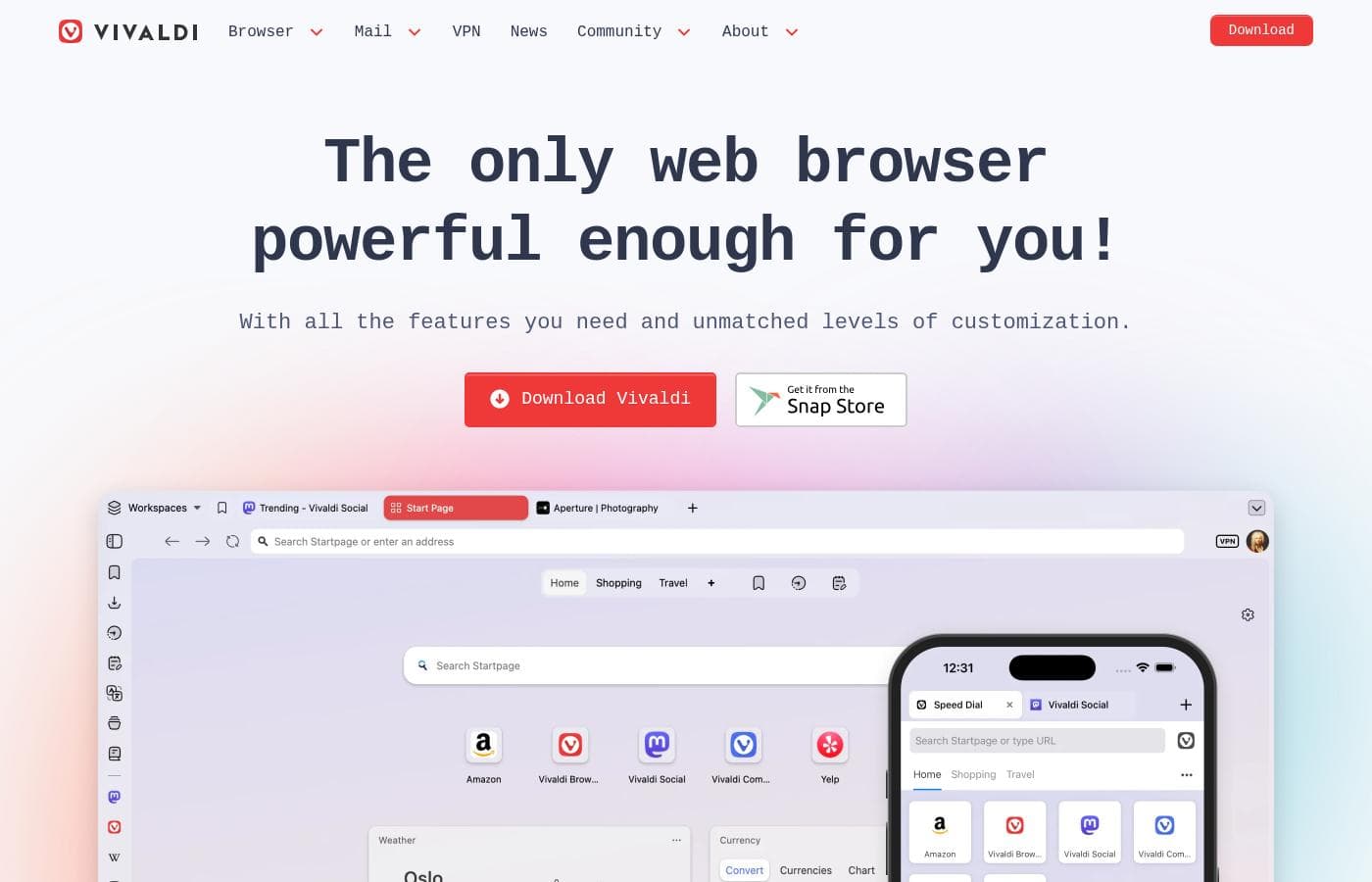
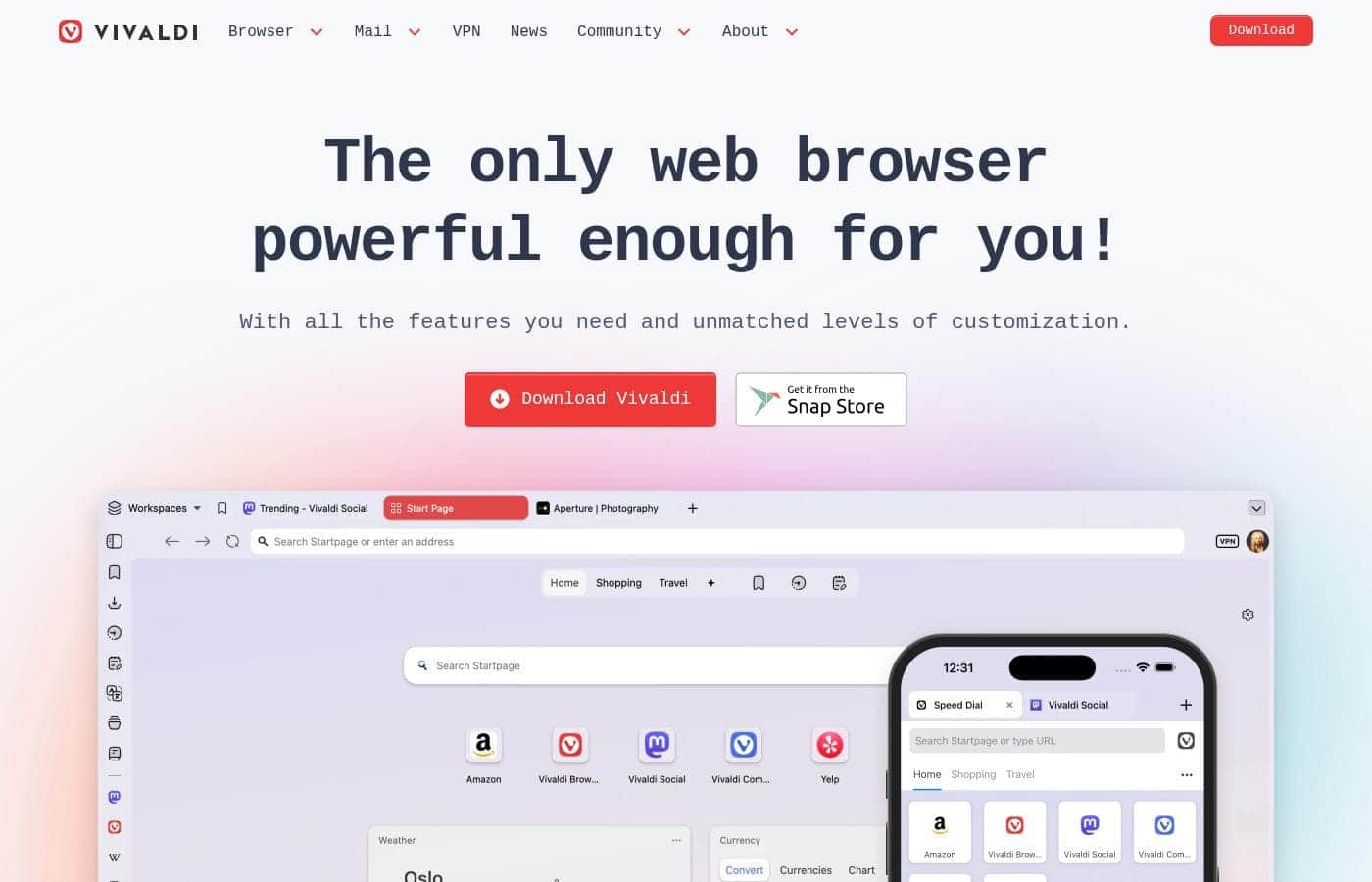
Vivaldi homepage screenshot

At a glance

Quick overview for Vivaldi: rating, pricing summary, key features, and highlights.

Ciroapp review

4.3
Highly Customizable, Feature-Packed, and Free.

We find Vivaldi offers unparalleled privacy and built-in features that usually require separate extensions. While the performance can be inconsistent, and users report occasional bugs, the level of control and the value proposition are immense. Overall, we recommend Vivaldi, especially for advanced users who prioritize customization and an all-in-one suite.

Pros

  • Pro:Unmatched customization options for both interface and functionality.
  • Pro:Zero data tracking and built-in privacy protection features.
  • Pro:Bundled applications like Mail, Calendar, and Feed Reader are included.
  • Pro:Advanced tools for tab organization (Workspaces and Stacking).

Cons

  • Con:Performance issues, including high RAM consumption and occasional lagging.
  • Con:Users report bugs, crashes, and stability problems.
  • Con:Bookmarking import and organization process can be difficult.
  • Con:Minor compatibility issues reported with certain older or complex websites.
Range: FreeFree plan, One-time payment
This section is a summary. Detailed sections about features, use cases, pricing, and reviews follow below.

Vivaldi review, pricing, features, pros & cons

Are you tired of web browsers that feel restrictive and constantly mine your data? Vivaldi takes a stand against the stranglehold tech giants have on the web. It offers unmatched levels of customization and powerful built-in tools.

Browsing the web on your terms is finally possible. ✨

What is Vivaldi?

Vivaldi is a web browser built for users who demand more control and efficiency. It is designed specifically for power users seeking innovative features and custom workflows. This browser fights for a better web by focusing on privacy and avoiding the incessant pollution of data mining.

Vivaldi is meant to let you browse the web your way. 💡

Vivaldi Key Features

🔒 A True Privacy Philosophy, Not Just a Feature

Take back control of your data with a browser built on a core philosophy of privacy. Vivaldi ensures there is no profiling, no data mining, and no-nonsense tracking when you browse. This foundation fights against the way tech giants currently operate the web.

To keep your information safe, Vivaldi includes strong built-in defenses right out of the box. You benefit from tracker and ad blockers that skip annoying ads and speed up your browsing experience. If you choose to sync data across your devices, that information is protected with secure end-to-end encryption.

For enhanced privacy, the browser supports one-click activation for Proton VPN. This gives you extra privacy protections without a complicated setup. Additionally, you can translate any webpage instantly using the single-click built-in private translation tool.

✨ Unmatched Personalization and Workflow Tools

The flexibility is infinite; personalize Vivaldi to match your exact style and workflow. You can personalize every feature, shortcut, and theme to make the browser truly your own. Whether you want a sleek, minimal look or a bold, vibrant interface, the choice is always yours.

Controllability is key to working smarter and faster. Vivaldi supports Mouse Gestures, allowing you to control many functions simply by moving your mouse. You can quickly open, close, and switch Tabs, or even create Notes with movements of the mouse.

Another powerful tool is Command Chains. You can boost productivity by building your own custom shortcuts, workflows, or browser modes. A single keystroke or gesture can trigger a pre-made custom sequence of commands.

✨ Your All-in-One Productivity Toolkit

Get everything you need, and more, with Vivaldi’s sophisticated built-in toolset. This powerful toolkit manages your digital life efficiently without requiring separate extensions. You receive a unified Mail client to handle multiple accounts, mailing lists, and feeds from one central spot.

You also get a built-in, private Calendar to easily manage all your events. Forget algorithm-driven news; the built-in, algorithm-free Feed Reader lets you create a private news feed based purely on your personal interests, not what you do online.

You can also take Notes directly in the sidebar as you browse. These notes are securely synced so you can access them on your other devices anytime.

✨ Master Tab Management and Organization

Easily tackle tab clutter using Vivaldi’s powerful organization features designed for power users. The browser offers flexible features that eliminate the stress of juggling dozens of open tabs.

Tab Stacking helps you group tabs into organized containers, offering two-level stacking for maximum tidiness. When you need to view information simultaneously, you can use Tab Tiling. This feature opens tabs side by side in split-screen, viewing multiple pages at once.

For deeper organization, the Workspaces feature lets you categorize tabs and tab stacks instantly. You can easily switch between context-specific views to keep your work stream focused and efficient.

✨ Essential Convenience Features

Vivaldi includes many small features that make a big difference in your daily navigation. You can add any website to your sidebar using Web Panels. This is a great spot to place your favorite chat apps or social feeds, keeping them accessible while you browse.

If you're watching online video, Pop-out Video lets you display the media in a floating window. This allows you to continue watching your content while you work or play elsewhere in the browser. The system also includes a built-in function to quickly Capture screenshots of either a full webpage or just a selection of the screen.

Use Cases

💼 Separating Professional Work from Personal Browsing 💼

You often juggle multiple professional projects with personal tasks and online research. Mixing these tabs can easily lead to distraction and clutter. Use Vivaldi’s Workspaces feature to categorize and separate your browsing environments immediately.

Create a dedicated 'Work' space containing all your professional Tab Stacks. Then, switch to a 'Personal' workspace for social feeds and hobbies. This simple organization removes mental clutter and helps you maintain sharp focus on whichever task requires your attention.

🔎 Optimizing Intensive Research and Comparison 🔎

When you need to analyze multiple sources simultaneously, standard browsing becomes inefficient. Vivaldi lets you tile several tabs, displaying them side-by-side in a split-screen view. This allows for immediate data comparison without constant switching.

Simultaneously, open the Notes panel in the sidebar. You can instantly capture screenshots or jot down quotes and links into a securely synced note. For fast communication, add your chat application as a discreet Web Panel right next to your research. This robust setup turns complex research into a streamlined workflow.

⚡ Automating Complex Tasks with Custom Shortcuts ⚡

Power users want to save time by automating repetitive daily tasks. You can use Command Chains to link several browser actions into a single process. For example, you might chain the commands to 'Open four specific tabs, switch to reading mode, and hide the address bar.'

Assign this custom sequence to a keyboard shortcut or a Mouse Gesture. With a single press or movement, you execute a complex routine instantly. This tool massively boosts productivity and helps you navigate the web faster than ever before.

📧 Establishing a Unified Digital Communication Hub 📧

Stop relying on separate apps to manage your communication and information streams. You can utilize Vivaldi’s sophisticated built-in tools to manage everything in one secure place. The integrated Mail client handles multiple accounts and mailing lists efficiently through a unified inbox.

Alongside the Mail client, use the private Calendar for event management. The algorithm-free Feed Reader ensures you receive news based purely on your self-defined interests. You gain a powerful, all-in-one toolkit built directly into your browser, simplifying your digital life.

🔒 Ensuring Absolute Privacy While Browsing 🔒

Problem: You are concerned about incessant tracking, data mining, and the tech giants' control of your information.

Approach: Vivaldi treats privacy as a fundamental philosophy rather than just an optional feature. The browser includes built-in ad and tracker blockers that are activated upon installation. When syncing data across your devices, Vivaldi uses end-to-end encryption.

Outcome: You browse the web faster, free from annoying advertisements, with confidence that your data footprint is minimized and protected from profiling.

📱 Maintaining a Consistent Look and Workflow Across Devices 📱

Your browsing experience should be seamless whether you are using a desktop, laptop, or mobile device. Vivaldi allows you to sync your history, passwords, open tabs, and custom Notes securely across all platforms.

Synchronization uses end-to-end encryption to shield your sensitive information from third parties. This consistency ensures that you can always pick up exactly where you left off. The mobile version also includes the built-in ad blocker for clutter-free browsing on the go.

Pricing Overview for Vivaldi

Pricing range
Free
Pricing types
Free plan, One-time payment

Vivaldi is a fully featured web browser that is free to download and use across all desktop and mobile platforms. The company operates on a donation model to support its continuous development work.

Plans & Pricing

Vivaldi Browser (Free)

Contact for pricing
Donation suggested for ongoing support.
  • Built-in Mail, Calendar, and Feed Reader
  • Secure Sync with end-to-end encryption
  • Advanced tab management (Tab Tiling, Tab Stacking, Workspaces)
  • Built-in Ad Blocker and tracking protection
  • Private translation tool
  • Mouse Gestures and Command Chains

Vivaldi is a free web browser; there are no mandatory subscription costs or explicit paid pricing tiers listed in the provided documentation.

While there are no set plans to compare, it helps to review the core offering and what you get upon download.

Vivaldi Browser (Free)

Price: Not explicitly stated Websites Supported: Not explicitly stated Best For: Users who demand powerful built-in features, extensive privacy, and high levels of customization. Refund Policy: Not explicitly stated Other Features:

  • Built-in Mail, Calendar, and Feed Reader
  • Secure Sync with end-to-end encryption
  • Advanced tab management (Tab Tiling, Stacking, Workspaces)
  • Built-in Ad Blocker and private translation tool
  • Keyboard Command Chains for boosting productivity

This core browser package is ideal for power users who need an efficient, highly personalized, and privacy-focused browsing environment. You get maximum browsing control, plus many tools that often require separate extensions, all built right in.

The Vivaldi browser is free to download and use across all your devices. The company suggests that users can give an optional donation to support their mission and help them continue building the most amazing browser, but there is no free trial because the full software is completely free.

User Reviews

Vivaldi receives positive but highly polarized reviews, resulting in a 3.7 average score on Trustpilot. Users overwhelmingly commend its feature-rich design, noting the massive benefits of the built-in Mail client, Calendar, and advanced Tab Management.

The browser’s staunch focus on privacy and customization is frequently highlighted as a major benefit, especially for power users and developers seeking an efficient, non-tracking environment. However, reliability remains a recurring pain point.

Several users reported significant technical issues, including the browser crashing repeatedly, problems with file downloads, and excessive RAM consumption. Users also expressed frustration with the confusing process of organizing and importing bookmarks, calling it a “pain.” Overall, Vivaldi offers exceptional features and value (since it's free), but users should be prepared for potential performance and bug challenges.

👍

What users say elsewhere

Alex M.
· Trustpilot
5.0 / 5

This is finally a fully customizable browser. I can adjust how it works to match exactly what I need. It is a huge relief to have this level of control over my browsing experience.

David P.
· Trustpilot
5.0 / 5

I'm a programmer and long-time power user, and Vivaldi is truly the best browser available. I highly recommend trying it for several weeks. Once you use Vivaldi, switching back to anything else is challenging.

No reviews yet.

Write a Review

Write a Review for Vivaldi
0/100 characters
0/2000 characters

Why use Vivaldi?

Choose Vivaldi if you are ready to conquer the web and make your browser truly your own. This platform goes beyond standard browsing by giving you the tools necessary to work smarter and faster.

  • Unparalleled Personalization: You can personalize every theme, shortcut, and feature to match your exact style and workflow. Whether you want a sleek minimal look or a bold, vibrant interface, the flexibility is infinite.
  • 🔒 Privacy Philosophy: Privacy is a core philosophy here, not just a feature. Vivaldi ensures no profiling, no data mining, and no-nonsense. Built-in ad and tracker blockers, plus end-to-end encryption for synced data, keep your information safe.
  • 🚀 Boost Your Efficiency: Tackle tab clutter efficiently using powerful organization tools. You can use two-level Tab Stacking and Workspaces to categorize and switch between views easily, increasing your productivity.
  • 🔧 All-in-One Toolkit: Vivaldi includes sophisticated built-in tools. This includes a unified Mail client, a private Calendar, and an algorithm-free Feed Reader. You get everything you need built-in, and more.

This browser is a game-changer if you value efficiency, privacy, and full control over your digital space. If you want a fast, highly customizable, and trustworthy alternative, give Vivaldi a try today. ✨ Download Vivaldi and take back control of your browsing.

Ready to transform your workflow with Vivaldi?

Vivaldi Alternatives

Other tools in the Web Browser category

Frequently Asked Questions

Is Vivaldi fully free, or are core features hidden behind a paid subscription?

Vivaldi is completely free to download and use across all desktop and mobile devices. All extensive features, including the built-in Mail, Calendar, and Ad Blocker, are included at no mandatory cost.

If Vivaldi is free, what is the business model, and how does the company generate revenue?

Vivaldi operates as free software, prioritizing user privacy over data mining. The company relies on optional donations from users to support continuous development and fund its mission.

Does Vivaldi offer a free trial period for new users?

Since the complete browser package with all features is entirely free to download, a separate free trial is not necessary. You gain instant access to the full functionality immediately after installation.

How does Vivaldi protect my personal data and browsing activity?

Vivaldi maintains a strict no profiling, no data mining philosophy. It includes built-in ad and tracker blockers that work automatically to secure your browsing sessions.

If I use Vivaldi Sync to move data between devices, how is the information secured?

Secure Sync utilizes end-to-end encryption to protect sensitive data like your history, passwords, and bookmarks. This means third parties cannot access your synchronized information.

Can I use Vivaldi's built-in Mail and Calendar features with my existing email accounts?

Yes, the powerful, built-in email client is designed to manage emails from multiple accounts and mailing lists seamlessly. The internal Calendar client helps you organize your events privately.

What kind of integrations does Vivaldi offer for productivity tools?

The browser is an all-in-one suite with integrated Notes, a Feed Reader, and the Capture tool for taking screenshots. You can also use Web Panels to place favorite sites directly in the sidebar.

Can I integrate a VPN service directly into the browser?

Yes, Vivaldi offers one-click activation for Proton VPN. This service provides enhanced privacy features and full VPN capability directly within the browser interface.

Do I need to purchase new licenses for Vivaldi if I use it on multiple devices?

Vivaldi is free software, so there are no licenses or per-seat fees required. You can download and use the browser on all your desktop and mobile devices at no cost.

Who is Vivaldi best suited for as a web browser?

It's ideally built for power users who demand high levels of customization and efficiency. It serves users who value advanced organization tools like Workspaces and Tab Stacking.

Are there quotas or limits on the amount of data stored in the built-in Notes or Feed Reader?

Not explicitly stated on the official site. The browser is feature-rich, but specific limits or storage quotas for internal tools are not detailed in the official documentation.

What is Vivaldi's formal refund policy for user donations?

Not explicitly stated on the official site. Since Vivaldi is free software and donations are optional contributions, review their donation processing page for specific refund details.

Does Vivaldi offer support for various languages and regions?

Not explicitly stated on the official site. However, the private translation tool indicates a strong consideration for international users and multiple languages.

How do I import my bookmarks and settings when migrating from a different browser?

The provided context focuses on using Vivaldi Sync to move data across Vivaldi devices. Specific, step-by-step migration tools or instructions for importing from competing browsers are not explicitly detailed here.

Ready to try Vivaldi? Check out the official site or pricing.