Submagic

Submagic review

AI editing that turns one video into a steady stream of shorts

Submagic costs from $19/mo · 5 plans

By Ciroapp Editorial Team · Updated Sep 17, 2026

Commission may apply at no extra cost

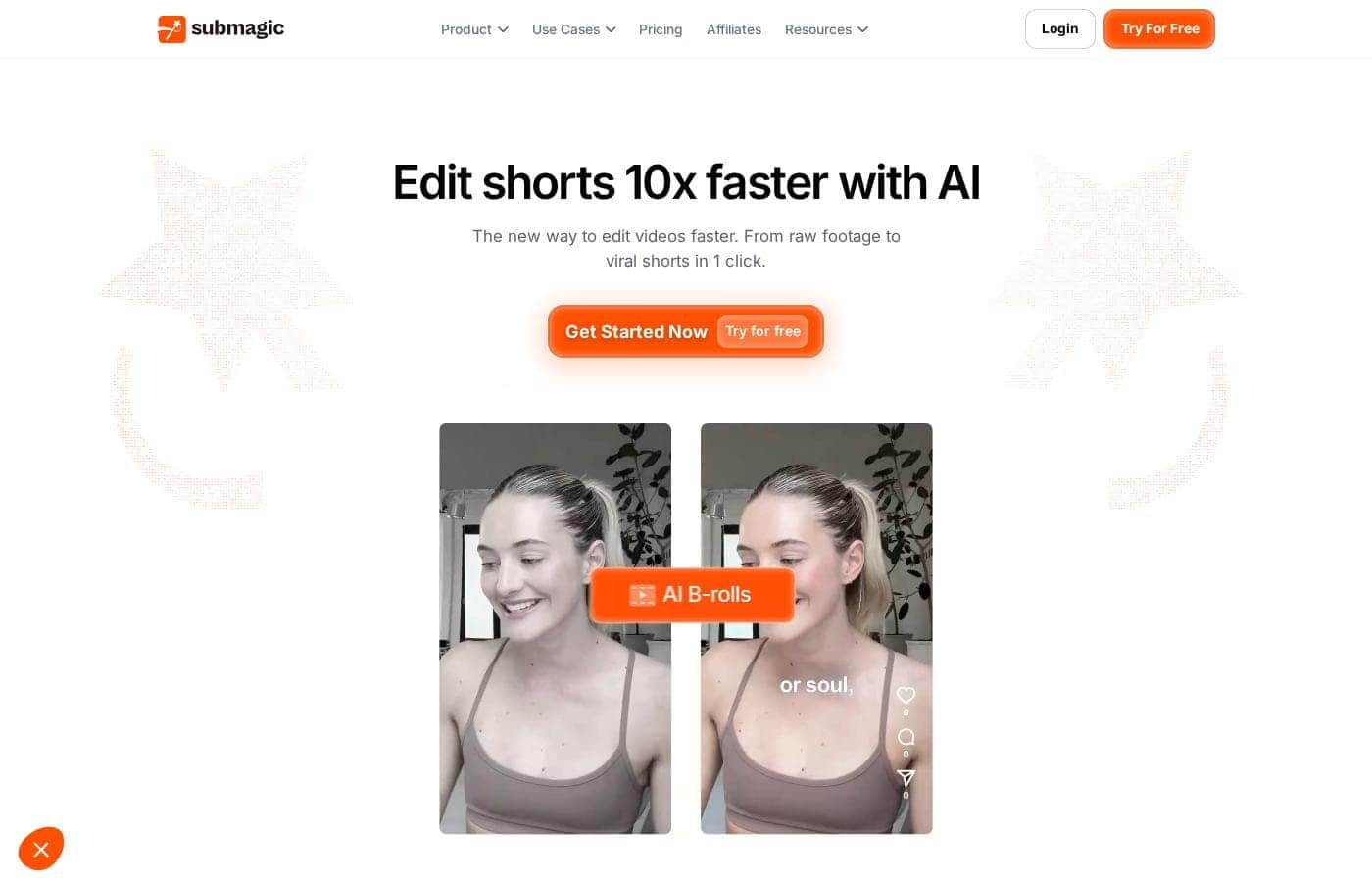
Submagic homepage screenshot

At a glance

Quick overview for Submagic: rating, pricing summary, key features, and highlights.
Vendor page checked Oct 12, 2026

Ciroapp score

4.1/ 5

Submagic turns long videos into captioned, b-roll-ready shorts and publishes them straight to TikTok, Reels, and Shorts. Pricing is clear and every plan is watermark-free, though headline claims like 99% caption accuracy come from the vendor and refund terms aren't published. Overall, it's a solid pick for creators who post shorts often and want editing off their plate.

Pros

  • Pros:Magic clips automatically extract the best moments from long-form uploads like podcasts, interviews, and YouTube videos, so a single recording can fill a content calendar for days
  • Pros:AI captions support 123 languages with a claimed 99% accuracy, and users have reported successfully creating content in languages they don't speak
  • Pros:One-click editing removes silences, bad takes, and filler words while inserting B-roll, replacing hours of timeline work with a single automated pass

Cons

  • Cons:Headline performance claims like 10x faster editing and 99% caption accuracy are vendor statements, not independently verified
  • Cons:Refund terms aren't published anywhere on the site, so buyers committing to a full year of billing can't confirm cancellation recourse up front
  • Cons:Direct publishing support is only explicitly confirmed for TikTok, Reels, and Shorts, leaving other platforms unverified
Best for
  • Content creators repurposing podcasts and interviews into shorts
  • Marketing teams posting consistently across TikTok, Reels, and Shorts
  • Agencies producing on-brand client content quickly
Free trial
Yes
This section is a summary. Detailed sections about features, use cases, pricing, and reviews follow below.

What is Submagic?

Editing short videos eats hours you'd rather spend posting. Submagic aims to fix that with AI captions, auto-generated clips, and one-click editing. Upload a video or YouTube link, let the AI trim and caption it, then schedule posts across TikTok, Reels, Shorts, and more.

Submagic is an AI-powered video editor built for short-form content. It targets creators, marketers, agencies, media companies, and businesses that publish on TikTok, Reels, and Shorts. You upload footage or a YouTube link, and the AI adds captions, removes silences, inserts B-roll, and finds key moments.

The site also offers scheduling, AI avatars, and team collaboration in one workspace.

Should you choose Submagic?

Quick buyer guidance before you compare plans or click through.

Choose it if

  • You publish shorts regularly and editing is your bottleneck
  • You need captions in multiple languages — the site claims 123 at 99% accuracy
  • You want one long video turned into several clips automatically
  • You'd rather schedule and publish inside the same tool you edit in
  • You can't film and want AI avatars instead of on-camera work

Skip it if

  • Trial and refund terms aren't detailed on the page — confirm them before you pay
  • Headline claims like 10x faster and 99% accuracy are vendor statements, not independently verified
  • Direct publishing depends on connecting your social accounts, and the page only names TikTok, Reels, and Shorts explicitly
  • If you mainly need traditional long-form editing, the short-form focus may not cover it

Next steps before buying

  1. 1Sign up for the free trial and run one real video or YouTube link through it
  2. 2Judge caption accuracy in every language your team or audience uses
  3. 3Confirm the platforms you publish to are supported for direct scheduling
  4. 4Compare against another editor if you also need long-form or manual control

Ease of use

The site describes a simple three-step flow: upload a video or YouTube link, let the AI edit, then schedule and publish. Testimonials call it easy even for beginners, and one user says staff used it successfully in languages they don't speak.

Submagic Key Features

✍️ Captions that keep people watching

Upload a video and Submagic generates caption styles in 123 languages with 99% accuracy. The AI syncs words to your footage automatically, so you don't type anything. Use it when your audience watches with sound off, or when you post in multiple languages.

The result: captions built to boost views and retention.

✨ One video in, many shorts out

Magic clips scan long videos and pull out the key moments for you. Drop in a podcast, interview, or YouTube video, and it cuts the best parts into ready-to-post shorts. This is the fastest way to fill your content calendar from footage you already have.

✨ Edit in one click, not one afternoon

Submagic handles the tedious parts of editing for you. In one click, the AI: • Removes silences • Inserts B-roll • Finds key moments

Drop in podcasts, YouTube videos, or phone footage — all formats work. The vendor says this flow is 10x faster than editing by hand.

📅 Schedule once, publish everywhere

Pick a date, choose your platforms, and Submagic publishes on schedule right from the editor. Videos are optimized for TikTok, Reels, and Shorts, with exports up to 4K at 60fps. It's ideal when you batch content and want posts to go live without opening five apps.

✨ Create shorts without a camera

AI avatars generate videos for you, so there's no filming and no actors to hire. Use them to publish consistent content faster and cheaper. They're a practical fallback when you can't shoot but still want to keep your posting rhythm going.

Use Cases

🎙️ Repurpose one podcast into a week of shorts

You record one long interview. Upload it or paste a YouTube link, and Magic clips pull the best moments, add captions, and trim the dead air. Your feed stays full without daily filming.

Expected outcome: several ready-to-post clips from a single upload.

🤝 Deliver on-brand client content, fast

Your team reviews, edits, and approves videos in one shared workspace. Custom templates and brand assets keep every client's look consistent, even when several editors touch the same account. > Tip: save each client's style as a custom template.

📅 Post to every channel without the scramble

Pick a date, choose TikTok, Reels, or Shorts, and Submagic publishes on schedule. Export up to 4K at 60fps so clips look sharp everywhere your audience scrolls. Expected outcome: a steady posting calendar from one editor.

🌍 Create without a camera, in any language

Use AI avatars when filming isn't an option, and generate captions in 123 languages. One agency reviewer said staff used it successfully in languages they don't speak. Expected outcome: consistent shorts without actors or translation help.

Submagic pricing

From$19/mo

  • 5 plans
  • Save up to 41% with annual billing

Vendor page checked on Oct 12, 2026; confirm current prices on Submagic's pricing page

Submagic pricing page screenshotView pricing page screenshot
PlanBilled monthlyBilled annuallyIncludes
Starter
per user
$19/mo
$12/mo
$144 per year
Save up to 37% with annual billing
15 videos per member/month; 2-min duration cap; 1 user workspace
  • 45 credits/month (about 15 videos)
  • 2-min max video length
  • AI auto captions in 1080p at 30 FPS
  • Free b-rolls and audio
  • Text-based trimming
  • +2
Pro
per user
$39/mo
$23/mo
$276 per year
Save up to 41% with annual billing
40 videos per member/month; 5-min duration cap; 3 users; 10 API minutes/month
  • 120 credits/month (about 40 videos)
  • 5-min max video length
  • Storyblocks b-rolls and audio
  • 2K exports
  • AI auto zooms, clean audio, silence and bad-take removal
  • +2
Business
per user
$69/mo
$41/mo
$492 per year
Save up to 41% with annual billing
100 videos per member/month; 30-min duration cap; 3 publishing profiles per platform
  • 300 credits/month (about 100 videos)
  • 30-min max video length
  • 4K exports at 60 FPS
  • 10 custom templates
  • Logos and brand assets
  • +3
Custom
See vendor page
See vendor page
  • Custom videos per month
  • Custom minutes per video
  • Custom member count
  • Unlimited custom templates
  • Dedicated customer success
  • +1
API Credits (add-on)
$57/mo
—
250–10,000 API minutes; added after purchasing a plan
  • 250 min: $57/mo ($0.23/min)
  • 500 min: $75/mo ($0.15/min)
  • 1,000 min: $150/mo ($0.15/min)
  • 2,000 min: $300/mo ($0.15/min)
  • 5,000 min: $500/mo ($0.10/min)
  • +1

Price history

Tracking prices since Oct 1, 2026. No price change detected yet.

Pricing types: Free trial, Monthly subscription, Yearly subscription, Per seat pricing, Usage-based pricing

Pricing notes

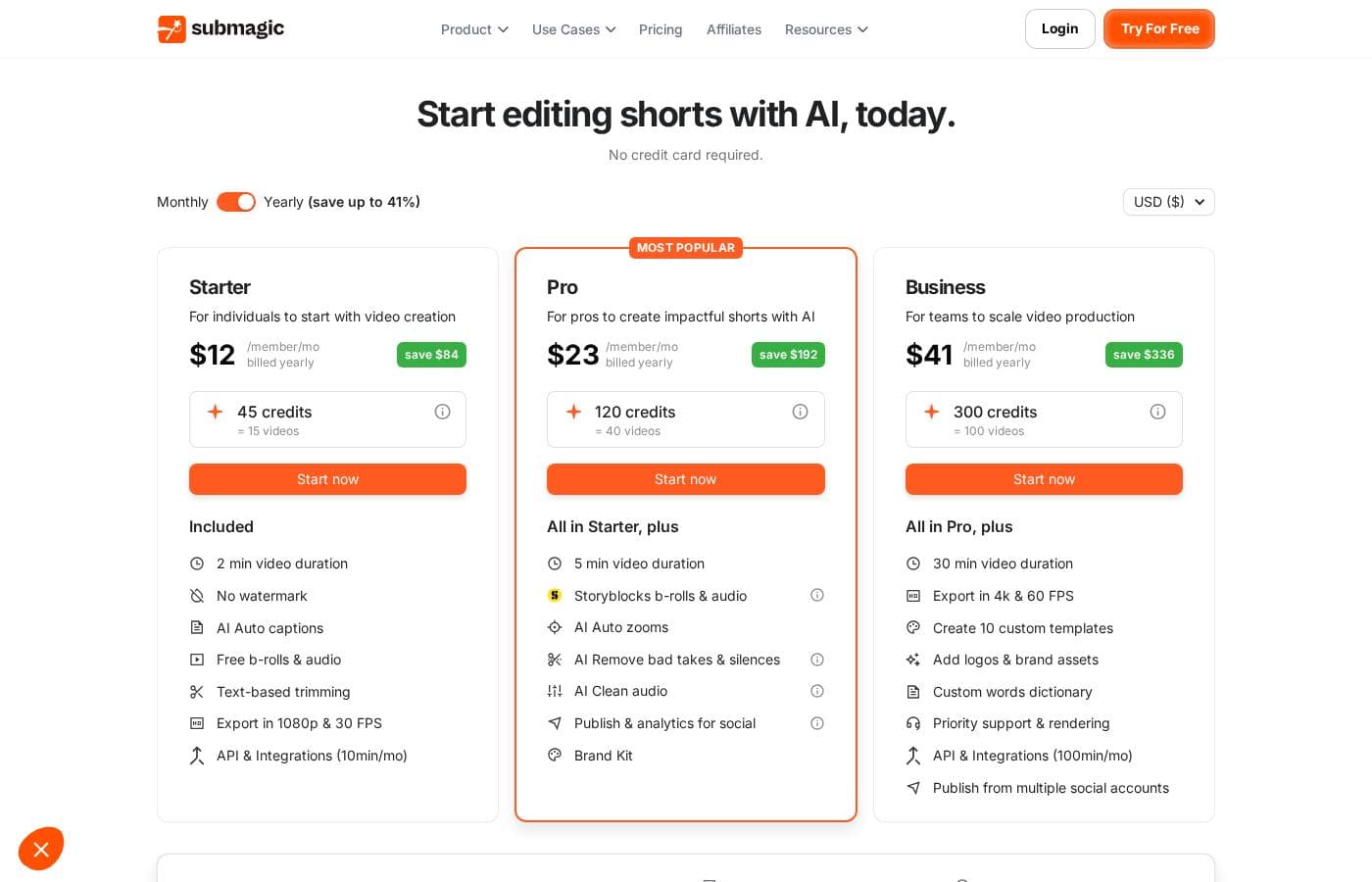
Submagic offers three per-member plans: Starter at $19/month, Pro at $39/month, and Business at $69/month. Yearly billing drops those to $12, $23, and $41 per month (up to 41% off), and a Custom plan plus API credit packs are also available.

Submagic costs between $12 and $69 per month with three plans: Starter at $12, Pro at $23, and Business at $41 per member/month when billed yearly (or $19, $39, and $69 month-to-month). A Custom plan is also available for larger teams.

Here's a quick tour of what each plan includes.

Starter

Price: $19/month, or $12/month billed yearly Best For: Individuals getting started with short-form video Other Features:

  • 45 credits per month (about 15 videos)
  • 2-minute max video length
  • 1080p exports at 30 FPS, no watermark
  • Free b-roll and audio library

Starter is the simple entry point. You get AI auto captions, text-based trimming, and 10 API minutes a month. It's a solid fit if you're posting a few shorts a week and want clean results without a big spend.

Pro

Price: $39/month, or $23/month billed yearly Best For: Creators and professionals who publish often Other Features:

  • 120 credits per month (about 40 videos)
  • 5-minute max video length
  • Storyblocks b-roll and audio
  • 2K exports, AI auto zooms, and clean audio
  • Social publishing and analytics, plus a Brand Kit

Pro is the "most popular" tier, and it's easy to see why. You unlock the fuller AI toolkit, including tools that remove bad takes, filler words, and silences. Three custom templates and three users come standard, so small teams can share one workspace.

Business

Price: $69/month, or $41/month billed yearly Best For: Teams scaling video production Other Features:

  • 300 credits per month (about 100 videos)
  • 30-minute max video length
  • 4K exports at 60 FPS
  • Priority support and rendering
  • 100 API minutes per month

Business is built for volume. You can publish from multiple social accounts and add logos and brand assets. If you only post the occasional clip, this tier is more than you need — Pro covers most solo creators.

Custom

Best For: Companies with specific usage needs Other Features:

  • Custom videos, minutes, and member counts
  • Unlimited custom templates
  • Dedicated customer success
  • Advanced security and SSO

Big teams should talk to sales here. You'll get a plan shaped around your workflow instead of fixed limits.

API Credits (add-on)

Price: $57–$1,000/month depending on pack Other Features:

  • Packs from 250 to 10,000 minutes
  • Rates drop from $0.23 to $0.10 per minute
  • Add after purchasing any plan

Need more automation? These packs extend the API minutes included with your plan.

Yearly billing cuts costs by up to 41%, and both options are cancel anytime. Prices also display in euros and Brazilian reais. Submagic lets you try the tool for free with no credit card required, and since there's no public refund policy on the page, confirm those terms before committing to a full year. 💸
Cost calculator

Estimate what Submagic costs for your team.

Billing
Per month
$95
Per year
$1,140

Starter is priced per user: price × 5 seats. Estimate based on published list prices, before taxes, add-ons and discounts.

How to pay less for Submagic

  • Pay annually: saves up to 41% compared with monthly billing.
  • A free trial is available: test it before you pay.
  • Some plans are priced per user: only pay for seats people actually use.
  • Cheaper tools in this category start at $9.99/mo.
Start free trial

Email me when Submagic changes price

One email when we detect a price change on the vendor's pricing page. No newsletter, no deals. Unsubscribe in one click.

User Reviews

No reviews yet.

Write a Review

Write a Review for Submagic
0/100 characters
0/2000 characters

Why use Submagic?

Posting shorts consistently is hard when every clip needs cutting, captioning, and formatting by hand. Submagic automates those steps so you can publish more without hiring an editor.

  • Scale one video into many: Magic clips pull key moments from podcasts, interviews, or YouTube videos, so a single upload can feed your content calendar for days.
  • Captions built for reach: The site claims viral-style captions in 123 languages with 99% accuracy, designed to boost views and retention.
  • Skip the timeline grind: One-click AI editing removes silences, inserts B-roll, and trims footage, which the vendor says is 10x faster than manual editing.
  • Publish from one place: Pick a date, choose your platforms, and Submagic publishes on schedule — optimized for TikTok, Reels, and Shorts up to 4K and 60fps.
  • Create without a camera: AI avatars generate shorts when filming or hiring actors isn't an option.
  • Stay on brand as a team: Review, edit, and publish together in one shared workspace.

Submagic alternatives

Other tools in the Video repurposing category

View all Video repurposing tools
Klap

Klap

Video repurposing3.9/5From $14/mo

Klap is a powerful, AI-driven video editor designed for streamlined content repurposing. It serves content creators, brands, and anyone looking to maximize their audience potential. The process is simple: upload a video file or paste a YouTube link. Klap's AI then extracts the most critical topics, applies intelligent framing, and quickly gives you multiple high-resolution clips suitable for Reels, TikToks, or Shorts. It works optimally for spoken content, such as interviews or podcasts, due to the reliance on speech detection.

Minvo

Minvo

Video repurposing4/5From $9.99/mo

Minvo is an intuitive platform built for over 10,000 creators and businesses who need effective audience engagement. It handles the difficult parts of video editing using smart AI tools. Whether you’re cutting clips for TikTok or generating transcripts for LinkedIn, Minvo puts robust creation power right at your fingertips. 💡 It offers flexibility for every user. You choose how to edit: simply highlight text to cut content, just like editing a word document, or use the precision timeline editing meant for more advanced professionals.

Opus Clip

Opus Clip

Video Repurposing4/5

OpusClip is an advanced AI editor built to automate your video workflow. It analyzes your long video and uses big data to identify the most viral-worthy moments. The AI then re-arranges those moments into high-quality shorts. These clips are automatically polished with dynamic captions and smooth transitions. You can take full editing control or let the AI take over; either way, it's made effortless. Team workspaces are also available to help your business scale creative output without scaling overhead.

Wisecut

Wisecut

Video Repurposing3.9/5

Wisecut is an automatic AI video editor that transforms your recordings into polished, professional results. It’s trusted by over one million creators and media teams today. This platform specializes in converting long videos into powerful, engaging short-form content. It works like having a personal editor who knows exactly what will resonate with your audience.

Exemplary AI

Exemplary AI

Video Repurposing3.6/5

Exemplary AI is a powerful platform dedicated to instant content creation. It specifically uses AI to automate the demanding task of video repurposing. You simply upload your longer video content, and the system easily handles the complex conversions. It generates many crucial written assets, including detailed show notes, complete summaries, and accurate transcripts. This efficient system ensures you gain the maximum value from every video asset quickly.

Cheapest Video repurposing software for 1 to 25 users

Submagic FAQ

How much does Submagic cost?

Submagic's cheapest paid plan, Starter, costs $19 per month. Paid plans range from $19 to $69 per month.

Does Submagic have a free plan?

No. Submagic lists no free plan; the cheapest paid plan starts at $19 per month.

Does Submagic offer a free trial or a money-back guarantee?

Submagic offers a free trial.

How much do you save with annual billing on Submagic?

Paying annually saves up to 41% compared with monthly billing, based on Submagic's list prices.

Has Submagic's price changed recently?

No. We have not detected a price change since we started tracking on Oct 1, 2026.

What integrations, API access, and security features are included?

Starter and Pro include 10 API minutes monthly; Business includes 100, and there's a dedicated integrations page. Teams on the Custom plan get advanced security, SSO, and a dedicated customer success manager.

Which languages and regions does Submagic support?

Captions work in 123 languages, and prices display in US dollars, euros, or Brazilian reais. Business members get priority support, and users report succeeding in languages they don't speak.

Ready to try Submagic? Check out the official site or pricing.

Are you Submagic? Claim this listing · Get the badge