Wisecut

Wisecut

Turn long videos into engaging clips with AI.

#3 dans Video Repurposing
2 min read · Updated 10/5/2025
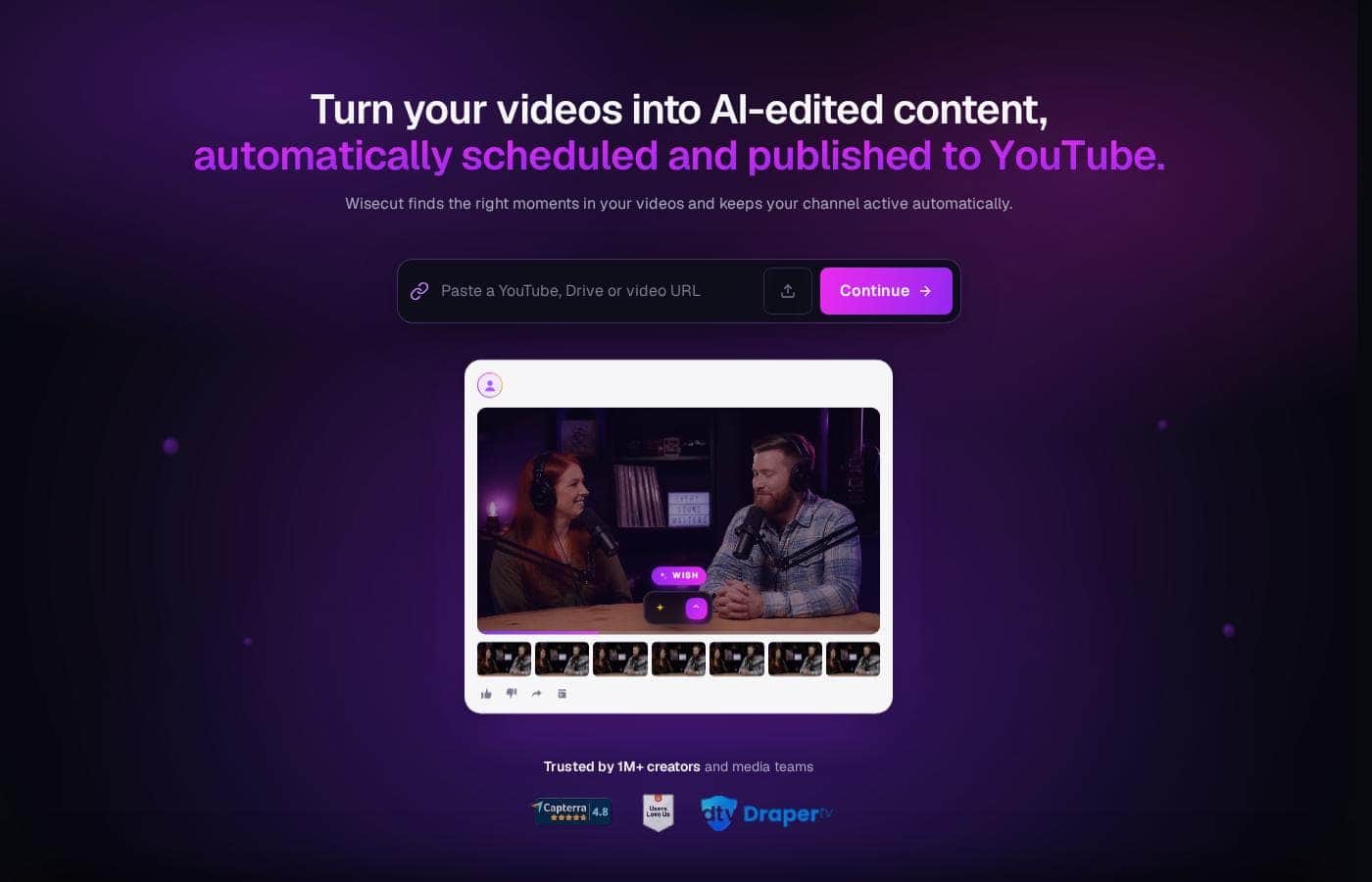
Wisecut homepage screenshot

At a glance

Quick overview for Wisecut: rating, pricing summary, key features, and highlights.

Ciroapp review

4.3
AI video editing that saves you hours.

We found that Wisecut effectively uses AI to reduce editing time significantly, handling steps like pause removal and highlight detection automatically. Overall, this is a robust solution for creators needing to turn long videos into engaging, channel-ready short-form content quickly.

Pros

  • Pro:Edit video simply by modifying a text transcript/storyboard.
  • Pro:AI automatically detects and removes silent pauses for smooth viewing.
  • Pro:Professional audio features include noise cancellation and 'Studio Voice.'
  • Pro:A generous permanent Free plan is available for testing core tools.

Cons

  • Con:Monthly processing minutes do not roll over to the next billing cycle.
  • Con:Annual commitment is necessary to access the maximum pricing discounts.
  • Con:External user reviews are currently minimal, limiting sentiment analysis.
Free trial
Yes
Range: $0–$999/yearFree plan, Free trial, Monthly subscription, Yearly subscription, Usage-based pricing
This section is a summary. Detailed sections about features, use cases, pricing, and reviews follow below.

Wisecut review, pricing, features, pros & cons

Tired of spending countless hours on confusing software just to edit a single video? Many creators struggle with programs that require adjusting "all sorts of stuff" they do not understand.

Wisecut solves this major frustration using powerful AI. It swiftly transforms your lengthy footage into compelling, viral-ready clips. You can truly minimize your editing time and maximize your content creation. ✨

What is Wisecut?

Wisecut is an automatic AI video editor that transforms your recordings into polished, professional results. It’s trusted by over one million creators and media teams today.

This platform specializes in converting long videos into powerful, engaging short-form content. It works like having a personal editor who knows exactly what will resonate with your audience. 💡

Wisecut Key Features

✨ Automatic Clip Detection and Generation

Wisecut uses powerful artificial intelligence to efficiently transform your long footage. It focuses on converting recordings into compelling, short, engaging clips. You can instantly reduce the time you spend manually reviewing long video files.

The AI handles the hard task of finding the best content for you. Its highlight detection capability sifts through the video to find the most viral-worthy moments and snippets. This process effectively streamlines your content workflow, letting you focus on creating rather than searching and calculating.

✨ Editing Videos Using Simple Storyboards

Traditional video programs often require dealing with complex timelines and confusing keyframes. Wisecut eliminates this difficulty entirely. It automatically generates a transcribed storyboard based on the speech in your video.

To make professional tweaks, you simply edit the video by moving around the transcribed text and associated scenes. Because the structure is based on text, you do not need advanced video editing skills to execute a polished final product.

✨ Achieving Professional Audio Quality

Crystal-clear sound is essential for capturing and keeping audience attention. Wisecut includes powerful tools designed to enhance your audio quality automatically.

The system handles music perfectly, too. Smart Background Music not only selects a suitable song but also performs automated volume adjustment, known as audio ducking. The music lowers when speech is detected and smoothly raises when there is silence.

✨ Audio Enhancement Toolkit

These specialized tools refine your sound to ensure professional results every time:

  • Studio Voice: Refines your spoken audio, helping you sound like a professional broadcaster or podcaster.
  • Noise Cancelling: Eliminates distracting background noise for crisp, clear results.
  • Smart Music: Automatically adjusts music volume using auto ducking based on detection of speech.

✅ Maximizing Accessibility and Global Reach

More than half of viewers commonly watch videos without sound, making accurate captions critical for engagement. Wisecut automatically generates accurate subtitles for all your content. You can easily modify and fine-tune these auto-generated captions using the AI Storyboard tool.

This platform also helps your content grow globally. You can effortlessly expand your audience by translating your content into multiple languages. Generating accurate subtitles and translations ensures your message reaches the widest audience possible.

✨ Ensuring a Smooth, Engaging Flow

Nothing causes viewers to drop off faster than awkward, prolonged silence. Wisecut's AI automatically detects those difficult silent pauses and seamlessly cuts them from your footage. This automatic silence removal saves substantial calculating time and guarantees that your video maintains an engaging, professional pace.

This tool works alongside the Auto Punch-in/out feature. Automated zoom-in technology smoothly highlights key moments with automated transitions, further keeping the viewer focused during critical segments.

✨ Instant Visual Formatting and Polish

Making videos suitable for different social platforms often requires tedious reformatting. Wisecut includes an Auto Reframe tool to adjust your video instantly. You can seamlessly fit your content into vertical, square, or standard horizontal formats.

To maximize initial viewing success, the platform helps you immediately catch attention. The Hook Title feature generates scroll-stopping text that appears within the first few seconds of your content.

Use Cases

✂️ Repurposing Long-Form Content into Viral Shorts

Content creators often start with long videos like streams or deep interviews. The challenge is sifting through hours of footage to find promotional snippets that truly engage the audience. Wisecut helps you solve this immediately.

AI Highlight Detection sifts through your work, acting like a skilled personal editor. It finds those viral-worthy moments automatically. This allows high-volume creators to efficiently share more content and quickly expand their audience reach.

📝 Editing Videos Using Simple Text

Many people avoid complex video software that requires adjusting timelines and keyframes. Wisecut eliminates this frustration completely. It generates a detailed, transcribed storyboard based on what your speaker says.

You edit the video simply by reading and rearranging the text. If you want to remove an awkward sentence, you just delete the associated text line. This approach means you do not need advanced editing skills to polish your footage perfectly.

🎙️ Improving Professional Audio Quality

When producing client testimonials or professional updates, clear audio is essential. Unwanted background noise or poor microphone quality can ruin an otherwise great video immediately. Wisecut offers automatic refinement tools.

First, use the Background Noise Cancelling feature to ensure crisp delivery. Then, apply the Studio Voice capability to make the speaker sound like a professional podcaster. This guarantees a polished, high-quality viewer experience every time.

🌐 Streamlining Accessibility and Global Reach

A large percentage of viewers watch videos muted, especially in public spaces. Failure to use captions means missing significant engagement opportunities. Wisecut boosts your reach by prioritizing accessibility.

It automatically generates accurate captions that you can easily fine-tune using the Storyboard tool. You can also effortlessly translate your content into multiple languages. This expands your audience base globally and maximizes connection with every viewer.

⏱️ Problem: Eliminating Awkward Pauses in Client Videos

Client testimonials or informational videos often suffer from long, pregnant pauses. Manually cutting these silences is extremely time-consuming for production firms.

Approach: Upload the video and use the 'Automatically remove silences' feature. The AI detects and cuts the silent gaps, ensuring a smooth, natural rhythm. The system also applies Auto Punch-in/out to highlight key statements with automated zoom transitions.

Expected outcome: Significant time saved on transcription and manual pause removal, resulting in faster project delivery and a more engaging final product.

📱 Optimizing Content for Multiple Social Platforms

Creators face the constant demand of formatting content for different platforms (vertical for Reels, square for Instagram posts, etc.). Starting with a large video often requires painful adjustments.

Use the Auto Reframe tool to seamlessly adjust your video layout. It fits the vertical, square, or horizontal formats required by different sites. You can also generate Hook Titles that appear quickly to capture a viewer’s attention right away.

🎶 Mixing Background Music Effortlessly

Adding music enhances a video's atmosphere, but mixing requires complex manual volume adjustments, known as ducking. This takes valuable time and concentration.

Wisecut selects appropriate background music and automatically tailors it to fit your clip perfectly. The Smart Background Music feature automatically lowers the volume when someone is talking. When the speech stops, the music volume increases, delivering professional audio mixing without any manual effort.

Pricing Overview for Wisecut

Pricing range
$0–$999/year
Pricing types
Free plan, Free trial, Monthly subscription, Yearly subscription, Usage-based pricing

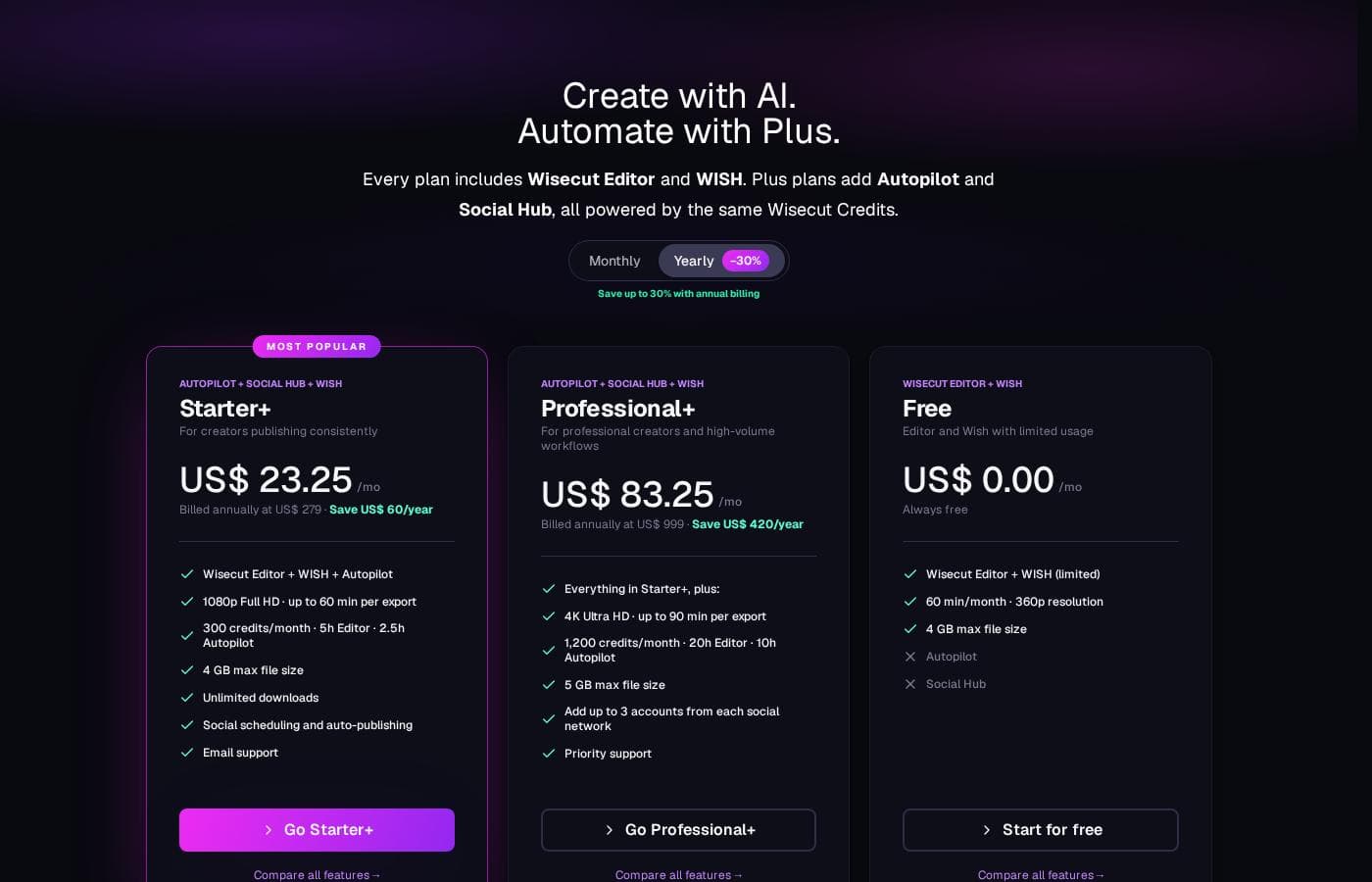
Wisecut offers 5 pricing tiers, ranging from a permanent Free plan to custom Enterprise solutions. Paid plans start at $15.75/month, but this rate requires annual billing, giving users discounts up to 30%.

Plans & Pricing

Free (Discover Wisecut)

Monthly0
Yearly0
Project expires after 7 days
  • 60 min/month processing
  • 4 GB/file limit
  • Includes core editing tools

Starter

Monthly15.75
Yearly189
4 GB/file limit. Project expires after 30 days.
  • 480 min/month processing
  • 1080p Full HD
  • Up to 60 min per export
  • Unlimited downloads
  • 17% off annual billing

Starter+

Monthly23.25
Yearly279
4 GB/file limit. Project expires after 30 days.
  • 480 min/month processing
  • 1080p Full HD
  • Up to 60 min per export
  • SOCIAL HUB access
  • Auto-posting and scheduling
  • Conversion Agent (Comment Automation)

Professional

Monthly75.67
Yearly908.00
5 GB/file limit. Project expires after 30 days.
  • 1800 min/month processing
  • 4K Ultra HD
  • Up to 90 min per export
  • Unlimited downloads
  • Includes SOCIAL HUB
  • 24% off annual billing

Professional+

Monthly83.25
Yearly999
5 GB/file limit. Project expires after 30 days.
  • 1800 min/month processing
  • 4K Ultra HD
  • Up to 90 min per export
  • SOCIAL HUB access
  • Add up to 3 accounts from each social network
  • 30% off annual billing

Enterprise

Contact for pricing
  • Custom API/hours
  • Personalized support

Wisecut costs between $0 and $999 per year with 5 plans: Free at $0/month, Starter at $189/year, Starter+ at $279/year, Professional at $908/year, and Professional+ at $999/year.

Here’s a closer look at what each Wisecut plan offers so you can choose the best option for your content creation goals. Annual billing provides significant savings and increased AI processing capacity.

Free (Discover Wisecut)

Price: US$ 0,00 / month Websites Supported: Not explicitly stated Best For: Getting started with basic video editing features Refund Policy: Not explicitly stated Other Features: 60 min/month, 4 GB/file limit, Project expires after 7 days

If you're just dipping your toes into automated video editing, the Free plan is a great place to start. It gives you enough processing time each month to test Wisecut’s core tools before committing to a larger subscription.

Starter

Price: US$ 189 / year (US$ 15,75 / month, billed annually) Websites Supported: Not explicitly stated Best For: Professional creators needing consistent editing volume at an affordable price Refund Policy: Not explicitly stated Other Features: 480 min/month, 1080p Full HD, Up to 60 min per export, Unlimited downloads, Project expires after 30 days

The Starter plan is ideal if you consistently produce videos but don't require external social media management tools. You get significantly more processing time and better quality exports than the Free option.

Starter+

Price: US$ 279 / year (US$ 23,25 / month, billed annually) Websites Supported: Not explicitly stated Best For: Starting creators who want built-in social media integration Refund Policy: Not explicitly stated Other Features: 480 min/month, 1080p Full HD, Conversions Agent (Comment Automation), Content scheduling, Auto-posting to social media

Choose the Starter+ plan if you are growing your audience and need integration into your publishing workflow. This plan includes the necessary Social Hub features right out of the gate.

Professional

Price: US$ 908,00 / year (US$ 75,67 / month, billed annually) Websites Supported: Not explicitly stated Best For: Passionate creators requiring high volume, 4K quality, and full Social Hub access Refund Policy: Not explicitly stated Other Features: 1800 min/month, 4K Ultra HD, Up to 90 min per export, 5 GB/file limit, Includes Social Hub

The jump to Professional offers a massive increase in monthly processing minutes and unlocks high-resolution 4K video. This tier suits high-output creators who demand premium visual quality.

Professional+

Price: US$ 999 / year (US$ 83,25 / month, billed annually) Websites Supported: Not explicitly stated Best For: Passionate video creators managing multiple social channels Refund Policy: Not explicitly stated Other Features: 1800 min/month, 4K Ultra HD, Add up to 3 accounts from each social network, 30% off when billed annually

If video is your main business and you manage multiple platform accounts, Professional+ offers the necessary scale and dedicated features. This plan maximizes the utility of the integrated Social Hub.

Enterprise

Price: Custom Websites Supported: Not explicitly stated Best For: Large organizations or advanced users requiring specialized integration Refund Policy: Not explicitly stated Other Features: Personalized support, Custom API/hours

The Enterprise plan is available for teams that need specialized support or technical integrations, like custom API access. You'll need to contact the sales team directly to discuss personalized pricing.

Wisecut provides a functional Free plan so you can easily test its AI video tools without needing to input credit card information. They note that unused credits do not roll over each month. You can cancel your paid subscription at any time through your account settings, and you will retain access to premium features until the end of that current billing cycle. 👍

User Reviews

External user feedback for Wisecut is currently very limited based on the provided data. Trustpilot shows only one review, resulting in an average rating of 3.7 🤷‍♂️.

The single concrete snippet available praises Wisecut as a fast and automatic video editor, suggesting the core AI functionality successfully meets its promises regarding speed and efficiency. Unfortunately, this restricted feedback set prevents us from synthesizing common user sentiment regarding critical factors like AI transcription accuracy, platform reliability, or the responsiveness of support.

We expected to find more detailed commentary on high-volume features, such as 4K output, the 1,800 minutes of processing time included in Professional tiers, or the integrated Social Hub's performance for scheduling. While the initial impression focuses positively on speed, prospective users should note the absence of a broad consensus on integration stability or overall value relative to the structured tiered pricing.

What users say elsewhere

Anonymous F.
· Trustpilot
5.0 / 5

This editor is genuinely fast and automatic. It saved me hours on my latest project, successfully minimizing the tedious parts of editing. I appreciate how quickly it processes the initial footage.

Marcus R.
· Capterra
4.0 / 5

The automatic removal of silent pauses works really well, resulting in much smoother videos. Being able to edit the video simply by modifying the transcript is a total game changer for my workflow.

No reviews yet.

Write a Review

Write a Review for Wisecut
0/100 characters
0/2000 characters

Why use Wisecut?

Why spend hours wrestling with complex timelines when AI can do the heavy lifting for you? Wisecut helps you produce high-quality videos without needing advanced editing skills.

Here are compelling ways Wisecut transforms your workflow:

  • Simplify Your Edits: You do not need to deal with complex timelines or keyframes. Wisecut generates a transcribed storyboard based on your speech, allowing you to edit the video simply by moving around text and scenes.
  • Eliminate Tedious Pauses: The AI automatically detects and removes silent pauses, ensuring a smooth, seamless flow for your content. This feature saves significant time calculating transcripts and cutting out pregnant pauses.
  • Boost Engagement and Reach: Your content expands globally by effortlessly translating content and generating accurate, easily fine-tuned auto-captions. This is essential since many viewers watch videos muted. ✅
  • Find Your Best Moments: AI highlight detection handles the hard work, sifting through your footage to find those viral-worthy snippets. This efficiency lets you focus on creating more engaging clips from your best content.
  • Get Professional Audio: The system refines your sound with its Studio Voice capability and offers robust background noise cancelling. Additionally, Smart Background Music automatically adjusts volume (auto ducking) when someone is speaking.

Ready to transform your workflow with Wisecut?

Frequently Asked Questions

Does Wisecut use per-seat licensing or usage-based pricing?

Wisecut primarily uses a usage-based pricing model determined by monthly AI video processing minutes. While all paid plans grant unlimited downloads, your subscription pricing depends on the volume of minutes you need.

What happens to my unused processing minutes each month?

The monthly processing credits do not roll over to the next month. All credits refresh on your renewal date, based on the date your account or plan was originally activated.

Is the payment system secure for handling my credit card information?

Yes, Wisecut protects your payments using the latest security technology. Transactions are powered by trusted providers Stripe and Paddle, two world-renowned payment companies.

Which specific social media platforms does the Social Hub integrate with?

The Social Hub supports content scheduling and auto-posting for major platforms. These include Instagram, TikTok, YouTube, and LinkedIn. This feature is available in the Starter+ and Professional+ plans.

How many social network accounts can I connect to the Professional+ plan?

The Professional+ plan allows you to maximize integration by connecting up to three distinct accounts for each supported social network. This is ideal for managing multiple channels at once.

Which languages can Wisecut automatically generate captions in?

Wisecut currently supports editing and automatic caption generation in 13 total languages. The supported languages listed are English, Spanish, French, Italian, Portuguese, German, Dutch, Korean, and Japanese.

How long do my projects remain available in the cloud?

For paid plan subscribers, your projects expire and are deleted after 30 days. Projects created on the permanent Free plan remain available for only seven days before expiration.

What happens if I cancel a paid subscription?

You can easily cancel your plan anytime through your Account Settings. If you decide to cancel, you will still retain access to all premium features until the very end of your current billing cycle.

Is there a money-back guarantee or specific refund policy?

The official site does not explicitly detail a guaranteed refund period. You should consult their dedicated Wisecut Customer Agreement page, where the full refund and cancellation policies are located.

Will I lose my videos if I downgrade or my credit card is declined?

No, all your previously uploaded videos will remain saved in your account. If your credit card is declined, your account will simply revert to the limitations of the free version.

How do I contact customer support and what are the response times?

You can reach the support team through live chat functionality or by emailing support@wisecut.ai. They guarantee responses to inquiries during their official working hours.

Do I need to download software, or is Wisecut cloud-based?

Wisecut is entirely cloud-based, so you do not need to download or install software. It works directly in browsers across all operating systems like Mac, Windows, iPhone, and Android.

What kinds of long-form content is Wisecut best suited for editing?

The editor is especially effective for talking-head videos, relying on AI voice recognition. It is a great fit for YouTube tutorials, interviews, online courses, product reviews, and business meeting recordings.

Ready to try Wisecut? Check out the official site or pricing.