Vidyo.ai vs Wisecut
Vidyo.ai and Wisecut are top AI tools for turning long videos into short viral clips. Vidyo.ai focuses heavily on multi-platform distribution and affordability. Wisecut simplifies editing with unique text-based storyboards and offers higher video quality. The best choice depends entirely on your specific editing process and required output resolution.
Best for: High-volume creators prioritizing social media reach across diverse platforms., Users who need integrated social media analytics and bulk publishing options.
Best for: Users who despise complex video timelines and prefer text-based storyboard editing., Professionals who require crisp, high-resolution 4K video exports.
Smart AI repurposing with integrity.
We find Vidyo.ai offers a highly valuable AI toolset designed to drastically reduce video editing time and maximize content output across social channels. Based on its deep feature set and competitive annual pricing, it’s a strong contender for creators focused on high-volume short-form video. Overall, the platform is excellent for maximizing reach and is supported by reports of trustworthy operational integrity.
Pros
- AI repurposing features save a huge amount of editing time.
- Exceptional reported customer service (hassle-free refund noted by user).
- Strong annual pricing structure, with the Growth plan offering great value.
- Includes advanced features like unlimited B-Roll and AI silence removal.
Cons
- Extremely limited quantity of independent user reviews available.
- The Free plan limits rendering to 720p and applies a watermark.
- No explicit money-back guarantee is listed in the pricing details.
AI video editing that saves you hours.
We found that Wisecut effectively uses AI to reduce editing time significantly, handling steps like pause removal and highlight detection automatically. Overall, this is a robust solution for creators needing to turn long videos into engaging, channel-ready short-form content quickly.
Pros
- Edit video simply by modifying a text transcript/storyboard.
- AI automatically detects and removes silent pauses for smooth viewing.
- Professional audio features include noise cancellation and 'Studio Voice.'
- A generous permanent Free plan is available for testing core tools.
Cons
- Monthly processing minutes do not roll over to the next billing cycle.
- Annual commitment is necessary to access the maximum pricing discounts.
- External user reviews are currently minimal, limiting sentiment analysis.
AboutVidyo.ai
Vidyo.ai is an intelligent content creation platform focusing strongly on AI-powered video repurposing. This platform is built specifically for creators, influencers, and businesses who need to maximize their output efficiently. You can remove the time commitment involved in manual editing and streamline content distribution across social channels. 💡
AboutWisecut
Wisecut is an automatic AI video editor that transforms your recordings into polished, professional results. It’s trusted by over one million creators and media teams today.
This platform specializes in converting long videos into powerful, engaging short-form content. It works like having a personal editor who knows exactly what will resonate with your audience. 💡
Highlights
Feature Comparison
Features Overview
We highlight the main differences and pick a winner for each feature.
Editing Workflow
Wisecut uses unique text-based storyboards for simple editing, avoiding complex timelines.
Vidyo.ai focuses on quick creation using a prompt and AI suggestions. You gain precise control using timestamps or transcript input. The workflow is fast for high output volume. Wisecut completely replaces traditional timeline editing methods. You manipulate the video clip simply by editing the transcribed text. Wisecut's text editing is inherently easier for video editing novices. Vidyo.ai offers detailed control but requires more direct input. If you struggle with dragging and dropping clips, Wisecut is significantly easier to learn and use.
Output Resolution
Wisecut provides professional 4K Ultra HD video exports; Vidyo.ai maxes out at 1080p.
Vidyo.ai supports Full HD 1080p exports in its Lite plan and above. The free plan is limited to 720p resolution and includes a watermark on exports. Wisecut offers 1080p video exports starting with the Starter plans. By upgrading to Professional+, you unlock 4K Ultra HD export quality. If you prioritize image sharpness and need high-resolution 4K output, Wisecut is the necessary choice. Vidyo.ai is sufficient for standard social media needs. Professional video agencies needing pristine quality footage will find Wisecut meets their technical demands better.
Audio Refinement
Wisecut offers a robust audio toolkit, including Studio Voice and auto-ducking Smart Music.
Vidyo.ai provides essential tools like AI Filler and Silence Removal. These functions ensure a tight, well-paced video clip flow. Wisecut offers 'Studio Voice' to refine spoken audio dramatically. It also expertly applies Smart Background Music with automated volume adjustment. Wisecut clearly invests more heavily in sophisticated audio processing. Vidyo.ai focuses primarily on eliminating verbal distractions. For podcasters or interviews where audio quality is paramount, Wisecut delivers a superior, polished product.
Distribution & Scheduling
Vidyo.ai connects to more social platforms than Wisecut, streamlining outreach significantly.
Vidyo.ai’s Essential plan allows 1-Click scheduling to seven social media platforms. The Growth plan includes unlimited post scheduling and bulk publishing options. Wisecut’s Social Hub integrates with four main platforms: Instagram, TikTok, YouTube, and LinkedIn. Professional+ allows management of up to three accounts per network. Vidyo.ai provides broader platform reach and superior bulk publishing capabilities. Wisecut focuses on multi-account management within fewer networks. If distributing to Pinterest, X, or other platforms is vital, Vidyo.ai simplifies that workflow right inside the app.
Visual Assets
Vidyo.ai provides unlimited, copyright-free B-Roll built-in; Wisecut does not mention B-Roll access.
Vidyo.ai gives users access to unlimited, copyright-free B-Roll footage. This instantly enhances video quality and visual appeal. Wisecut utilizes features like Auto Punch-in/out for visual effect. This creates automatic zoom transitions to highlight key moments. Vidyo.ai wins by providing vast stock assets to add visual context quickly. Wisecut relies on automated movements for visual dynamism. If you need to overlay graphics or supplementary footage often, Vidyo.ai saves time searching for assets.
Pricing and Value
Vidyo.ai is significantly cheaper yearly, while Wisecut offers clearer volume limits.
Vidyo.ai’s top-tier Growth plan costs $33/month when billed annually. This includes robust distribution and analytics features. Wisecut’s Professional+ plan is $83.25/month annually. This tier includes 4K output and 1,800 monthly processing minutes. Vidyo.ai offers better value for budget-conscious creators at the feature-parity level. Wisecut's higher price reflects 4K quality and minute transparency. The Wisecut pricing structure is better for high-volume users needing a guaranteed minute quota.
Analytics
Vidyo.ai provides integrated social media analytics, a crucial edge for performance tracking.
Vidyo.ai includes built-in social media analytics in its platform. The Growth plan unlocks Advanced AI Analytics features. Wisecut does not advertise any integrated analytics or performance tracking tools. Users must rely totally on native social platform data. Getting performance feedback inside the editing suite is a major convenience. Vidyo.ai excels in closing the content loop from creation to tracking. For marketers invested in rapid A/B testing of shorts, Vidyo.ai centralizes the data view.
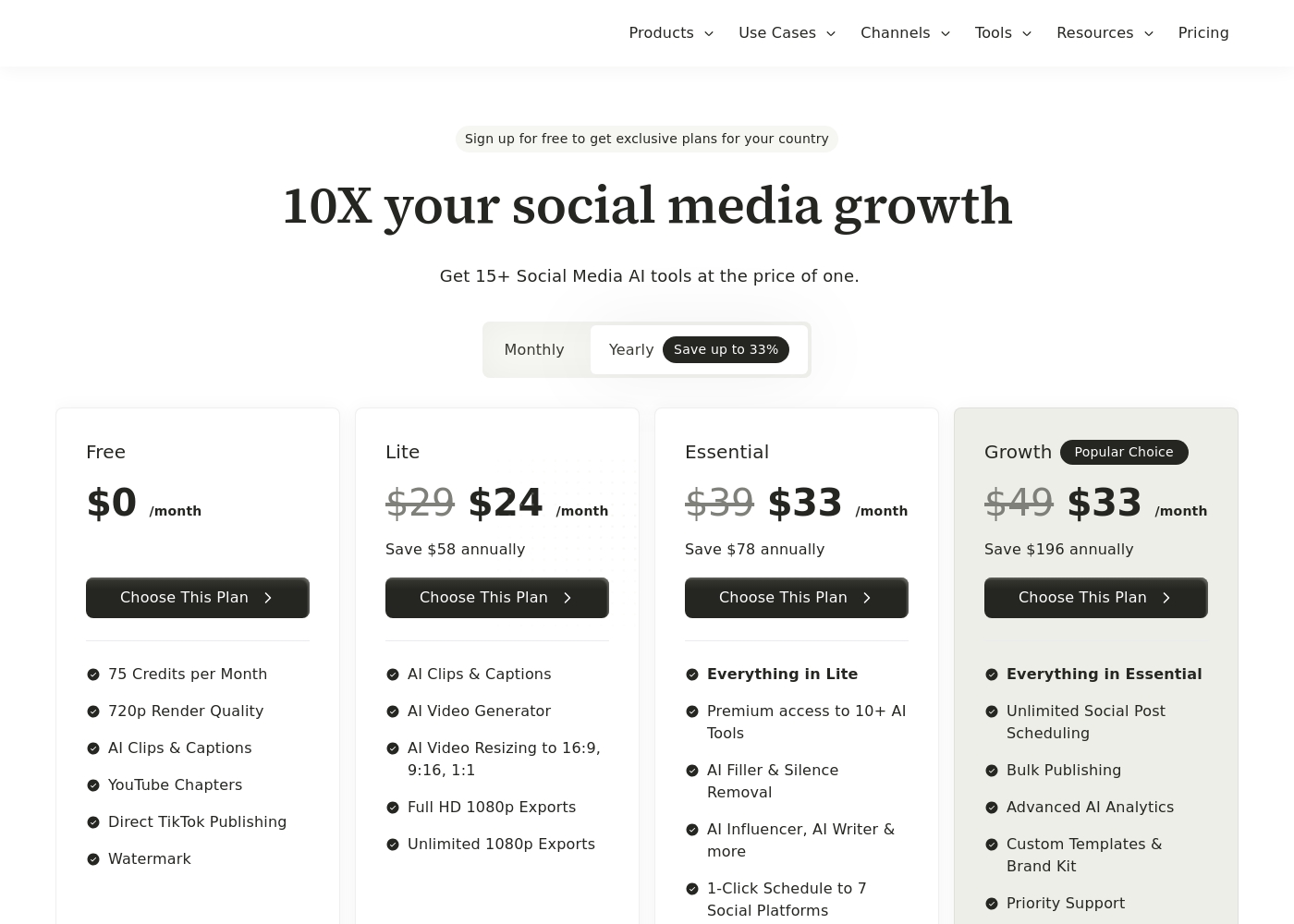
Vidyo.ai costs between $0 and $33 per month with four plans: Free at $0/month, Lite at $24/month, Essential at $33/month, and Growth at $33/month (annual prices).
If you choose yearly billing, you save significantly over the standard monthly rates. This structure helps you choose the right set of tools for your content needs. Here's a look at what each plan offers.
Free
Price: $0 /month Best For: Basic users and platform testing Other Features:
- 75 Credits per Month
- 720p Render Quality
- Direct TikTok Publishing
- Watermark
- 75 Credits per Month
- 720p Render Quality
- AI Clips & Captions
- YouTube Chapters
- Direct TikTok Publishing
- AI Clips & Captions
- AI Video Generator
- AI Video Resizing to 16:9, 9:16, 1:1
- Full HD 1080p Exports
- Unlimited 1080p Exports
- Everything in Lite
- Premium access to 10+ AI Tools
- AI Filler & Silence Removal
- AI Influencer, AI Writer & more
- 1-Click Schedule to 7 Social Platforms
- Everything in Essential
- Unlimited Social Post Scheduling
- Bulk Publishing
- Advanced AI Analytics
- Custom Templates & Brand Kit
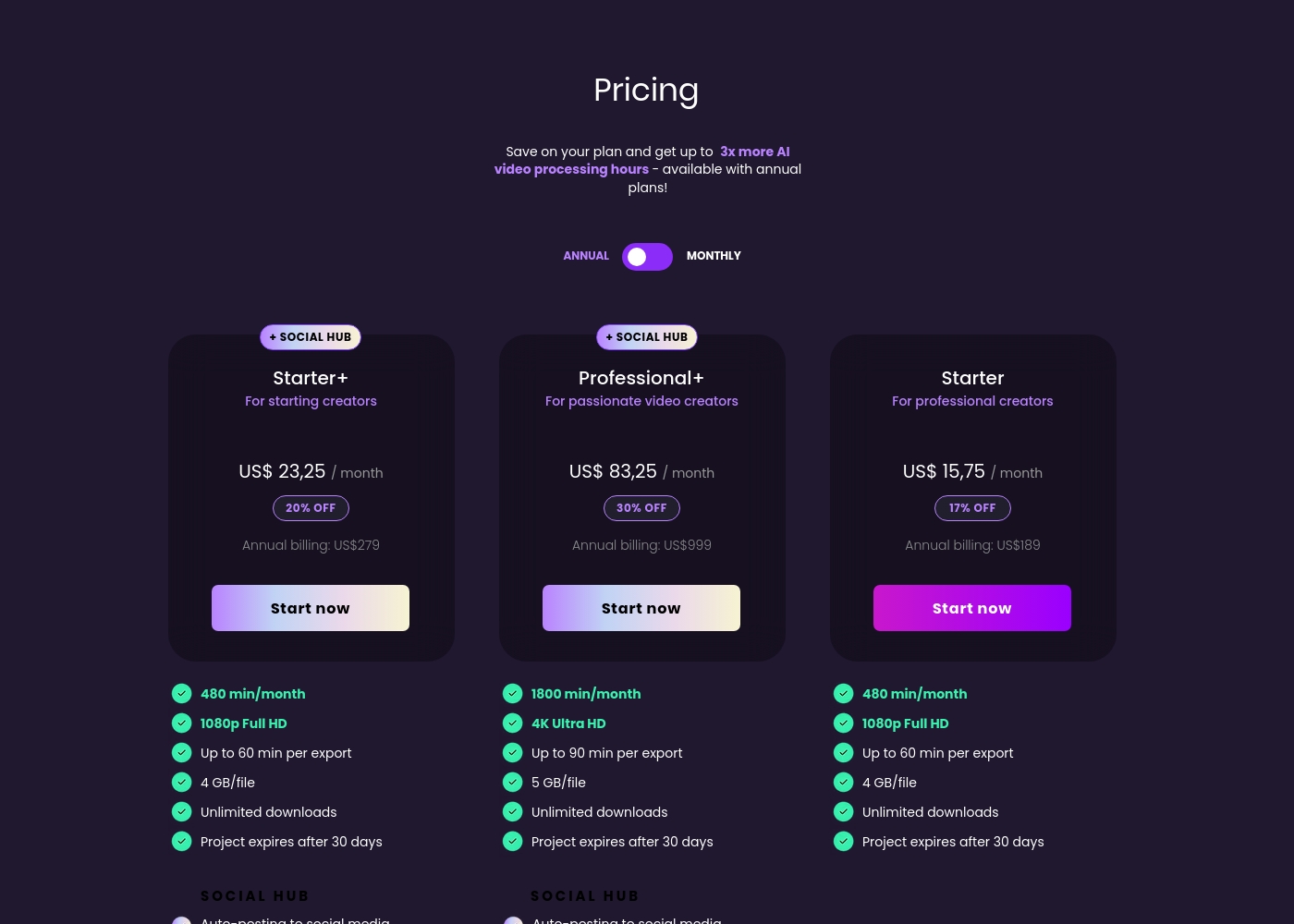
Wisecut costs between $0 and $999 per year with 5 plans: Free at $0/month, Starter at $189/year, Starter+ at $279/year, Professional at $908/year, and Professional+ at $999/year.
Here’s a closer look at what each Wisecut plan offers so you can choose the best option for your content creation goals. Annual billing provides significant savings and increased AI processing capacity.
Free (Discover Wisecut)
Price: US$ 0,00 / month Best For: Getting started with basic video editing features Other Features: 60 min/month, 4 GB/file limit, Project expires after 7 days
- 60 min/month processing
- 4 GB/file limit
- Includes core editing tools
- 480 min/month processing
- 1080p Full HD
- Up to 60 min per export
- Unlimited downloads
- 17% off annual billing
- 480 min/month processing
- 1080p Full HD
- Up to 60 min per export
- SOCIAL HUB access
- Auto-posting and scheduling
- 1800 min/month processing
- 4K Ultra HD
- Up to 90 min per export
- Unlimited downloads
- Includes SOCIAL HUB
Pricing Notes
- Vidyo.ai's highest paid tier ($33/month annually) is significantly cheaper than Wisecut's highest paid tier ($83.25/month annually).
- Wisecut provides clear monthly volume limits (up to 1,800 minutes/month); Vidyo.ai uses an opaque credit system.
- Both Vidyo.ai and Wisecut offer substantial savings (30%+ off) for committing to annual billing cycles.
- Wisecut includes 4K output at its highest price point, a feature Vidyo.ai does not offer.
- Wisecut states that its monthly processing minutes do not roll over to the next month.
Pricing Head-to-Head
User Reviews
External sentiment for Vidyo.ai is based on extremely limited data, as the overall Trustpilot rating of 3.7 stems from only one detailed user review and there is no Capterra feedback available. Despite the low volume, the single 5-star testimonial provides powerful evidence regarding product efficacy and corporate integrity.
The user highlights that the platform is fantastic at extracting key clips from long-form videos and podcasts, calling it a huge time-saver for content creators. More notably, the review confirms exceptional customer service.
The platform was fantastic at extracting key clips from my long-form videos and podcasts. It was a HUGE time-saver for my content creation workflow. The product itself worked great when I used it daily.
External user feedback for Wisecut is currently very limited based on the provided data. Trustpilot shows only one review, resulting in an average rating of 3.7 🤷♂️.
The single concrete snippet available praises Wisecut as a fast and automatic video editor, suggesting the core AI functionality successfully meets its promises regarding speed and efficiency. Unfortunately, this restricted feedback set prevents us from synthesizing common user sentiment regarding critical factors like AI transcription accuracy, platform reliability, or the responsiveness of support.
This editor is genuinely fast and automatic. It saved me hours on my latest project, successfully minimizing the tedious parts of editing. I appreciate how quickly it processes the initial footage.
Our Verdict
Choosing between Vidyo.ai and Wisecut is deciding between specialized efficiency and overall technical quality. Both are superb AI tools for quickly repurposing video content. For most creators, the decision rests on whether you prioritize publishing scope or editing simplicity and resolution. Vidyo.ai’s critical superpower is maximizing social media reach and optimizing costs. It offers 1-Click scheduling to seven social platforms quickly. The Growth plan provides fantastic value at $33/month annually, including Advanced AI Analytics. If you need powerful automation and centralized analytics on a tight budget, Vidyo.ai is hard to beat. Wisecut’s greatest strength lies in its game-changing, text-based editing workflow. You completely bypass complex timelines, editing clips simply by manipulating the transcribed storyboard. Furthermore, Wisecut is the only tool here that supports professional 4K Ultra HD output. Its advanced audio tools guarantee a highly polished final product. The main deciding factor is video quality versus sheer publishing volume. If 4K resolution, Studio Voice audio, and super-simple text editing are must-haves, choose Wisecut. If integrated distribution across seven platforms and unlimited B-Roll assets are more important, Vidyo.ai wins. Pick Vidyo.ai if you need to dominate social channels with high volume publishing and integrated tracking. Select Wisecut if you produce talking-head content and require pristine 4K quality with the easiest possible editing experience.
Frequently Asked Questions
Which is cheaper: Vidyo.ai or Wisecut?
Vidyo.ai is significantly cheaper for its top-tier features, maxing out at $33/month annually. Wisecut's Professional+ plan costs $83.25/month annually. Both Vidyo.ai and Wisecut offer a permanent Free plan for testing core capabilities.
Does Vidyo.ai offer 4K video resolution like Wisecut?
No, Vidyo.ai currently limits exports to a maximum of 1080p Full HD resolution. Wisecut supports professional 4K Ultra HD output in its higher-tier plans. If 4K resolution is mandatory, Wisecut is the required platform.
Which platform has better tools for audio refinement, Vidyo.ai or Wisecut?
Wisecut offers superior audio tools, including 'Studio Voice' and Smart Background Music with auto-ducking. Vidyo.ai focuses on standard features like filler and silence removal. Choose Wisecut if professional audio polish is a top priority.
Is Wisecut's text-based editing system better than Vidyo.ai's clip control?
Wisecut’s storyboard editing is radically simpler for non-editors. You edit the video by adjusting the script, not a timeline. Vidyo.ai offers precise clip control but uses a more traditional input method.
Which tool provides integrated content planning and analytics?
Vidyo.ai includes an AI Content Planner and integrated social media analytics. The Growth plan unlocks Advanced AI Analytics for detailed tracking. Wisecut does not list internal analytics features.
Can I publish to more social networks using Vidyo.ai or Wisecut?
Vidyo.ai's Essential plan supports 1-Click scheduling to seven social media platforms. Wisecut’s Social Hub integrates officially with four platforms. Vidyo.ai offers broader distribution capabilities.
Ready to Choose?
Both tools have their strengths. Choose based on your specific needs.