Vidyo.ai

Vidyo.ai

AI content repurposing for viral video growth.

#2 dans Video Repurposing
2 min read Β· Updated 10/5/2025
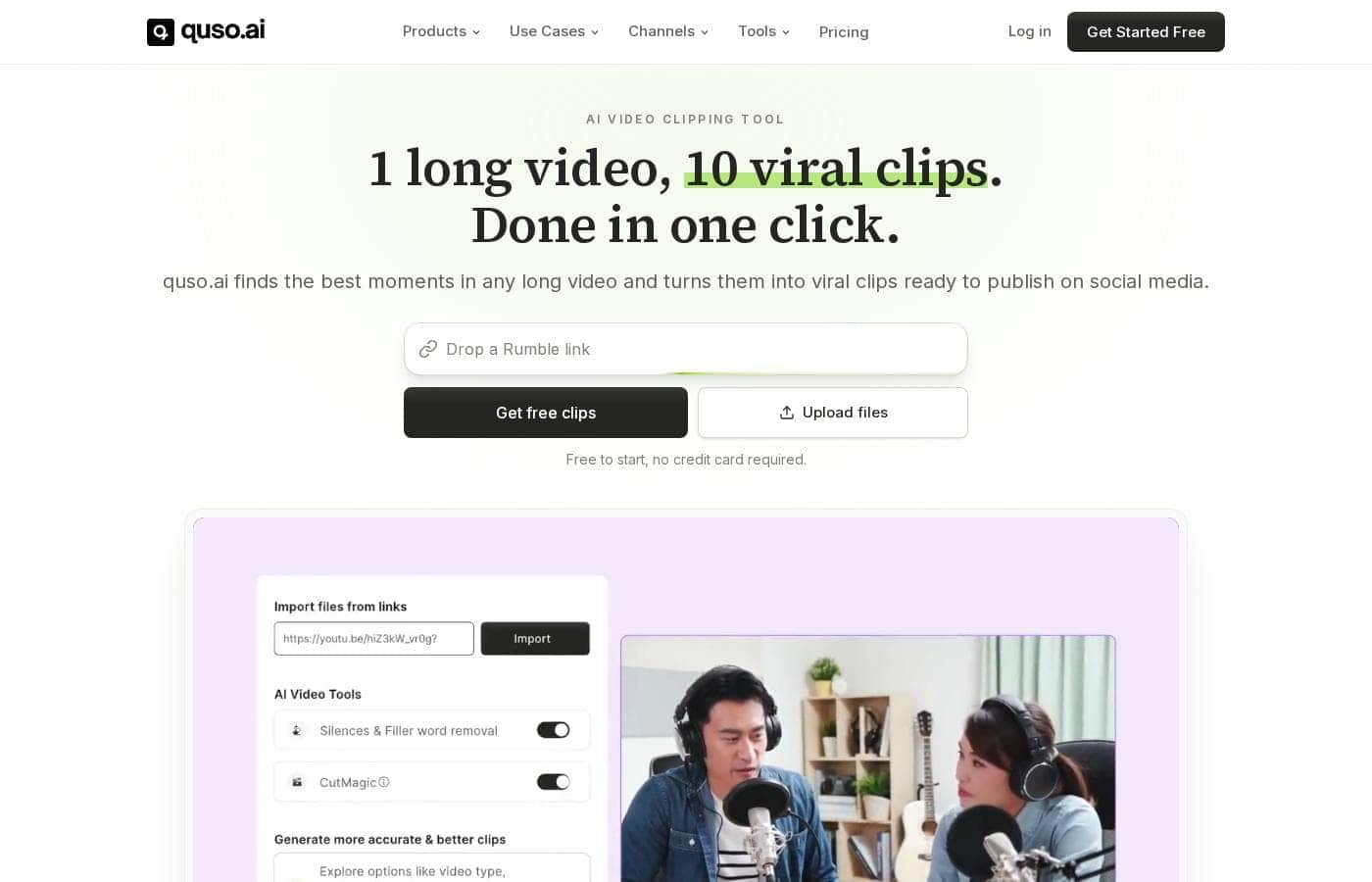
Vidyo.ai homepage screenshot

At a glance

Quick overview for Vidyo.ai: rating, pricing summary, key features, and highlights.

Ciroapp review

4.5
Smart AI repurposing with integrity.

We find Vidyo.ai offers a highly valuable AI toolset designed to drastically reduce video editing time and maximize content output across social channels. Based on its deep feature set and competitive annual pricing, it’s a strong contender for creators focused on high-volume short-form video. Overall, the platform is excellent for maximizing reach and is supported by reports of trustworthy operational integrity.

Pros

  • Pro:AI repurposing features save a huge amount of editing time.
  • Pro:Exceptional reported customer service (hassle-free refund noted by user).
  • Pro:Strong annual pricing structure, with the Growth plan offering great value.
  • Pro:Includes advanced features like unlimited B-Roll and AI silence removal.

Cons

  • Con:Extremely limited quantity of independent user reviews available.
  • Con:The Free plan limits rendering to 720p and applies a watermark.
  • Con:No explicit money-back guarantee is listed in the pricing details.
Range: $0–$33/month (annual basis)Free plan, Monthly subscription, Yearly subscription
This section is a summary. Detailed sections about features, use cases, pricing, and reviews follow below.

Vidyo.ai review, pricing, features, pros & cons

It's difficult to keep pace with content demands while maintaining video quality and editing everything manually. Are you tired of seeing great long-form videos languish without proper repurposing? Vidyo.ai tackles this problem efficiently.

✨ This platform uses powerful AI to transform your content, helping you proactively generate 2x more short clips from just one prompt.

What is Vidyo.ai?

Vidyo.ai is an intelligent content creation platform focusing strongly on AI-powered video repurposing. It acts as an AI generator designed to turn your long videos into high-impact, short clips instantly. This platform is built specifically for creators, influencers, and businesses who need to maximize their output efficiently.

You can remove the time commitment involved in manual editing and streamline content distribution across social channels. πŸ’‘

Vidyo.ai Key Features

✨ Instant AI Content Repurposing

Vidyo.ai eliminates the long process of manual video editing. Are you tired of seeing great long videos go unused? This intelligent platform turns your complex content into high-impact, short clips instantly.

You can proactively generate 2x more content from every source video available. You achieve this massive content boost using just one simple prompt. The powerful AI transforms your workflow, helping you maximize your reach efficiently.

✨ Precise Clip Control and Editing

The platform allows you to create exactly the clips you need for optimal engagement. You don't have to rely solely on the AI's suggestions. You can take precise control over the output using specific timestamps or transcript control. This feature ensures you highlight the most valuable moments from your long-form video.

The AI also handles resizing for various platforms automatically. This ensures your clips always fit the required screen dimensions:

  • Horizontal (16:9)
  • Vertical (9:16)
  • Square (1:1)

✨ Professional Visual Enhancement

Vidyo.ai includes key tools that instantly enhance video quality and visual appeal. You gain access to unlimited, copyright-free B-Roll at your fingertips. This resource helps you add necessary visual interest without worrying about licensing issues.

The AI Subtitle Generator applies modern, sharp subtitle styles frequently used by today’s top creators. This feature ensures your content is accessible and maintains a professional, aesthetically pleasing look.

πŸ’‘ Smart Captions and Distribution πŸ’‘

Maximizing reach means making your content shareable and searchable. Vidyo.ai uses AI to effortlessly generate engaging captions, trending hashtags, and useful descriptions. The platform creates this text utilizing your unique brand voice. This ensures exceptional consistency across all your social posts.

The system helps streamline content distribution across all your social channels. You avoid repeating steps by using integrated scheduling tools.

✨ Workflow Automation and Analytics

Generating high-quality content involves more than just editing videos. Vidyo.ai helps you move beyond burdensome manual planning processes. The essential AI Content Planner eliminates the need to map out your strategy in complex spreadsheets. This tool organizes your entire content flow easily.

The platform also offers integrated social media analytics. This helps you monitor success and track your overall social media growth immediately after publishing.

Use Cases

πŸš€ Maximize Output from One Long Video

It’s hard to keep up with the demand for fresh content on platforms like TikTok and Instagram Reels. Manually cutting hours of footage takes too long and slows down your growth. Vidyo.ai solves this by using AI to instantly identify viral moments inside your long-form videos.

You simply upload your video and provide one prompt. The system generates 2x more short clips immediately. This automation means you can publish high-quality content much faster, maximizing your reach with minimal effort.

🎀 Ensuring Brand Voice Consistency on Social Media

Many businesses struggle to write engaging social captions that maintain a consistent, professional brand voice. Generic descriptions often fail to capture viewer attention or convert followers.

Problem β†’ Your marketing team spends hours polishing captions and hashtags after clips are finished.

Approach β†’ Use the AI Social Captions feature. The tool generates descriptions, engaging captions, and trending hashtags automatically.

Outcome β†’ You press one button to create text that perfectly matches your unique brand voice. This ensures consistency while saving significant time.

✨ Polishing Clips with Professional Visuals

A short clip needs visual appeal to perform well, but finding the right stock footage is messy and expensive. Using unlimited, copyright-free B-Roll is essential to enhance quality right away.

  1. Review the clips the AI generated from your source video.
  2. Access the built-in B-Roll library and select unlimited footage.
  3. Drop B-Roll into the clip to visualize abstract concepts or change the scene quickly.
  4. Apply sharp subtitle styles that top creators use to boost readability immediately.

πŸ—“οΈ Streamlining Content Planning and Distribution

Stop planning your content calendar in confusing spreadsheets that require constant manual updates. The AI Content Planner takes control of the scheduling process for you.

Once clips are perfected, scheduling to multiple channels is easy. You can use the one-click schedule function for up to seven social platforms. For power users, the Growth plan offers unlimited social post scheduling and bulk publishing options.

Tip: Combine the planner with integrated social media analytics. This lets you track your success and growth right inside the platform without needing separate tools.

πŸ”Ž Fine-Tuning Video Clips with High Precision

Sometimes the AI needs a little guidance, or you need to isolate a very specific soundbite. Relying only on automated cuts might miss the best moments.

Vidyo.ai gives you precise control over your clips. You can create exactly the clips you want by specifying control using either a timestamp or the transcript. This allows you to quickly isolate the perfect segment, ensuring you capture maximum impact from your original video.

πŸ”‡ Cleaning Up Audio for Professional Results

Long interviews or streams often contain filler words like 'um' and 'ah,' or long, awkward silences. Manually removing these requires tedious editing hours. The AI Filler & Silence Removal feature eliminates these issues automatically.

This powerful AI tool polishes your clips immediately. It ensures your newly generated shorts are tight, professional, and flow perfectly, boosting viewer retention.

Pricing Overview for Vidyo.ai

Pricing range
$0–$33/month (annual basis)
Pricing types
Free plan, Monthly subscription, Yearly subscription

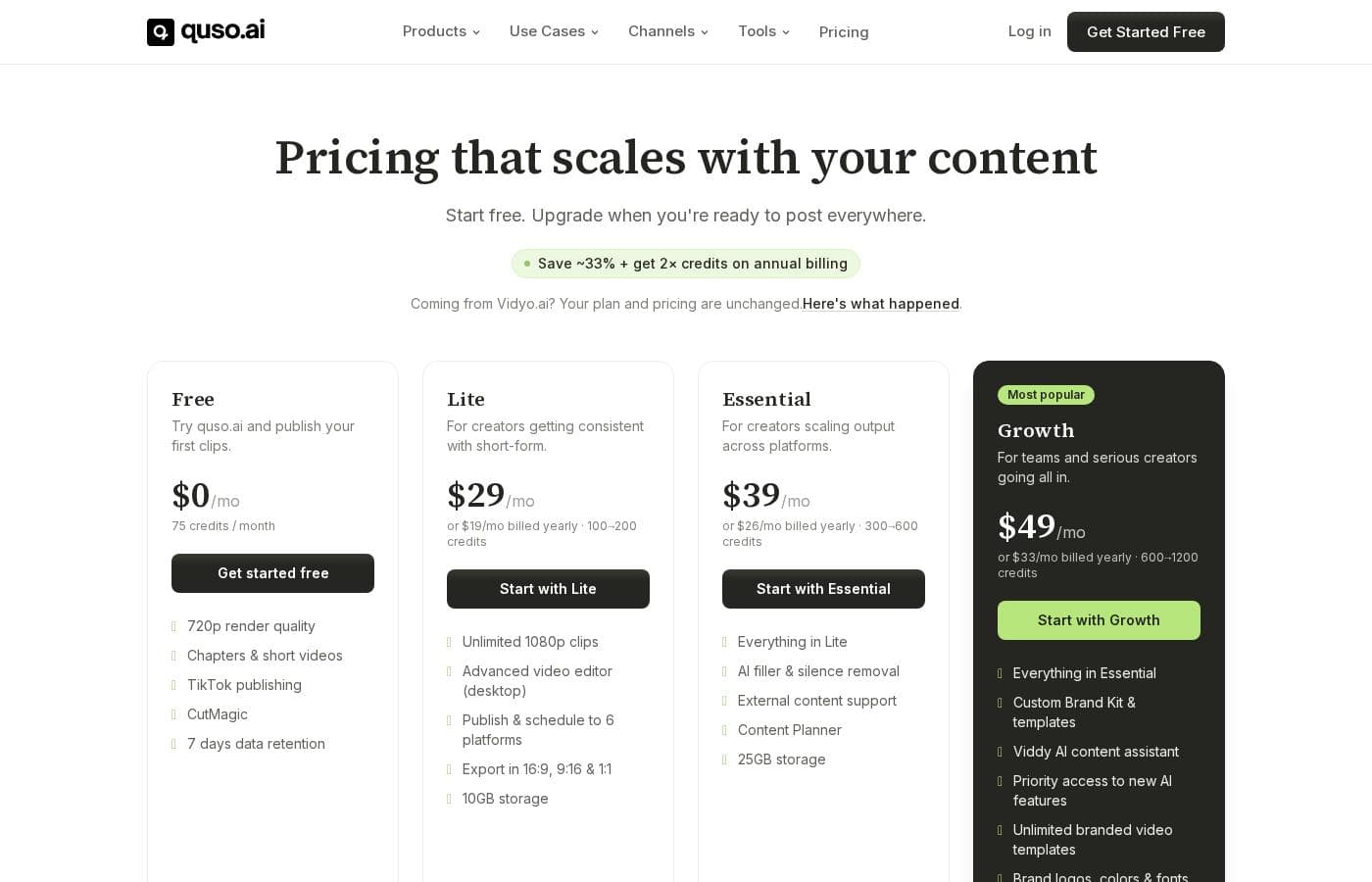
Vidyo.ai offers flexible subscription plans across four tiers: Free, Lite, Essential, and Growth. Paid plans begin at $24/month when billed annually, providing substantial savings compared to choosing monthly payment options.

Plans & Pricing

Free

Monthly$0
Yearly$0
  • 75 Credits per Month
  • 720p Render Quality
  • AI Clips & Captions
  • YouTube Chapters
  • Direct TikTok Publishing
  • Watermark

Lite

Monthly$29
Yearly$24
  • AI Clips & Captions
  • AI Video Generator
  • AI Video Resizing to 16:9, 9:16, 1:1
  • Full HD 1080p Exports
  • Unlimited 1080p Exports

Essential

Monthly$39
Yearly$33
  • Everything in Lite
  • Premium access to 10+ AI Tools
  • AI Filler & Silence Removal
  • AI Influencer, AI Writer & more
  • 1-Click Schedule to 7 Social Platforms

Growth

Monthly$49
Yearly$33
  • Everything in Essential
  • Unlimited Social Post Scheduling
  • Bulk Publishing
  • Advanced AI Analytics
  • Custom Templates & Brand Kit
  • Priority Support

Vidyo.ai costs between $0 and $33 per month with four plans: Free at $0/month, Lite at $24/month, Essential at $33/month, and Growth at $33/month (annual prices).

If you choose yearly billing, you save significantly over the standard monthly rates. This structure helps you choose the right set of tools for your content needs. Here's a look at what each plan offers.

Free

Price: $0 /month Websites Supported: Not explicitly stated Best For: Basic users and platform testing Refund Policy: Not explicitly stated Other Features:

  • 75 Credits per Month
  • 720p Render Quality
  • Direct TikTok Publishing
  • Watermark

This plan is perfect for beginners who want to try out the core features without any financial commitment. It lets you create basic clips and learn how the AI tools work before upgrading.

Lite

Price: $24 /month (Billed annually, $29 monthly) Websites Supported: Not explicitly stated Best For: Content creators needing higher quality exports Refund Policy: Not explicitly stated Other Features:

  • Everything in Free is upgraded (implied)
  • AI Video Generator
  • Full HD 1080p Exports
  • Unlimited 1080p Exports
  • AI Video Resizing to 16:9, 9:16, 1:1

If 720p isn't enough and you need professional-grade, unlimited 1080p exports, the Lite plan is a great fit. It gives you all the core AI clip and caption tools needed for high-quality production.

Essential

Price: $33 /month (Billed annually, $39 monthly) Websites Supported: Not explicitly stated Best For: Users who manage multiple social channels Refund Policy: Not explicitly stated Other Features:

  • Everything included in Lite
  • Premium access to 10+ AI Tools
  • AI Filler & Silence Removal
  • AI Influencer, AI Writer & more
  • 1-Click Schedule to 7 Social Platforms

This tier is excellent for stepping up your content game with specialized AI features like silence removal. It also includes integrated scheduling, making content distribution much easier across seven platforms.

Growth

Price: $33 /month (Billed annually, $49 monthly) Websites Supported: Not explicitly stated Best For: Agencies, professionals, and power users Refund Policy: Not explicitly stated Other Features:

  • Everything included in Essential
  • Unlimited Social Post Scheduling
  • Advanced AI Analytics
  • Custom Templates & Brand Kit
  • Priority Support

The Growth plan is labeled the Popular Choice and provides the most comprehensive feature set for the annual price. Since it costs the same annually as the Essential plan, this is clearly the best value if you need advanced features like bulk publishing and customer support.

Vidyo.ai offers a robust Free plan that is perfect for trying out its core features without any commitment. Paid plans offer steep annual discounts; for example, the Growth plan saves you $196 every year compared to paying monthly. No specific free trial or money-back guarantee is explicitly mentioned in the available pricing details.

User Reviews

External sentiment for Vidyo.ai is based on extremely limited data, as the overall Trustpilot rating of 3.7 stems from only one detailed user review and there is no Capterra feedback available. Despite the low volume, the single 5-star testimonial provides powerful evidence regarding product efficacy and corporate integrity.

The user highlights that the platform is fantastic at extracting key clips from long-form videos and podcasts, calling it a huge time-saver for content creators. More notably, the review confirms exceptional customer service.

The user accidentally incurred a $200 charge after forgetting to cancel their subscription but received a prompt, hassle-free refund within five minutes of contacting support. This suggests the company operates with high integrity, which is a significant factor when committing to a paid SaaS tool.

While we lack extensive data on recurring themes like general reliability or pricing value across a large user base 🧐, this initial feedback strongly suggests Vidyo.ai delivers on its promise of powerful AI content repurposing features combined with highly trustworthy customer care.

What users say elsewhere

Alex D.
Β· Trustpilot
5.0 / 5

The platform was fantastic at extracting key clips from my long-form videos and podcasts. It was a HUGE time-saver for my content creation workflow. The product itself worked great when I used it daily.

Chris P.
Β· Trustpilot
5.0 / 5

I reached out about a refund for an accidental charge after canceling. Support confirmed the refund was being processed within five minutes! Their prompt, hassle-free response really stood out.

No reviews yet.

Write a Review

Write a Review for Vidyo.ai
0/100 characters
0/2000 characters

Why use Vidyo.ai?

Generating high-quality content should not require massive time commitments. Vidyo.ai simplifies your entire workflow, focused on maximizing reach and minimizing effort. Why rely on older methods when you can use smart automation?

Here are compelling ways Vidyo.ai enhances your creation process:

  • Generate 2x more content effortlessly using just a simple prompt.
  • Access unlimited, copyright-free B-Roll immediately to instantly enhance video quality and visual appeal.
  • Effortlessly generate engaging captions, trending hashtags, and descriptions using your unique brand voice.
  • Take precise control over your output by creating custom clips using specific timestamp or transcript control.
  • Apply modern, aesthetically sharp subtitle styles utilized by today’s top creators.
  • Move beyond manual planning with the AI Content Planner and monitor success with integrated social media analytics. βœ…

Ready to transform your workflow with Vidyo.ai?

Frequently Asked Questions

What are the primary export and credit limitations in the Free plan?

You receive 100 credits per month on the Free plan to draft your videos. Exports are limited to 720p resolution, and all resulting videos will permanently include a watermark.

How does the Lite plan differ from the Free plan regarding video quality and watermarks?

The Lite plan significantly upgrades your export quality to Full HD 1080p. It also removes the watermark applied in the Free tier. You can create unlimited 1080p exports on this plan.

Are there storage limits attached to the different subscription plans?

Yes, each plan includes dedicated cloud storage for your videos and projects. Storage ranges from 10 GB for the Free plan and 25 GB for the Lite plan. Essential and Growth plans both provide 75 GB of storage space.

Which social platforms can I publish or schedule content to directly through Vidyo.ai?

The Free plan explicitly supports Direct TikTok Publishing. If you choose the Essential plan, you gain access to 1-Click scheduling across seven different social media platforms.

Does Vidyo.ai offer a free trial or a money-back guarantee for paid subscriptions?

The official pricing site does not explicitly offer a standard free trial or a money-back guarantee. However, the comprehensive Free plan lets you test core features without making a financial commitment.

What happens if I use up all my allocated monthly credits?

The platform allocates monthly credits, for example, 100 on the Free plan, for certain functions. We cannot determine if additional credits can be purchased or if feature usage stops when you run out.

How much do I save by choosing annual billing over monthly billing?

You save substantially by selecting annual billing, with discounts reaching up to 33% on the Growth plan. For instance, the Growth plan drops from $49 monthly to an equivalent of $33 per month when billed annually.

Who should choose the Essential plan instead of the Lite plan?

The Essential plan is ideal for users managing multiple channels that require streamlined distribution. This tier adds integrated 1-Click scheduling and advanced AI tools like Filler and Silence Removal.

Is support helpful if I encounter a billing issue or need to request a refund?

External reports consistently praise the support team's integrity and responsiveness. Users have reported receiving fast, hassle-free refunds for accidental or forgotten subscription charges.

Is Vidyo.ai priced per user, or is it based only on usage volume?

Pricing is based on subscription tiers that control feature access, monthly credits, and included storage limits. There is no mention of a per-seat pricing model on the official site.

Does the platform support multiple languages for generating captions or content?

Yes, Vidyo.ai lists a 'Multi-lingual Feature' in the higher tiers, suggesting language support is available. However, the specific list of supported languages is not detailed in the available plan summaries.

What specialized features are exclusive to the top-tier Growth plan?

The Growth plan is necessary for Bulk Publishing and Unlimited Social Post Scheduling. It also includes Priority Support, Advanced AI Analytics, and dedicated Custom Templates and Brand Kit features.

Ready to try Vidyo.ai? Check out the official site or pricing.