Opus Clip vs Vidyo.ai
Opus Clip and Vidyo.ai both automate short video creation, but they prioritize different workflows. Opus Clip focuses on speed and perfect vertical framing for any genre. Vidyo.ai offers superior integrated publishing and advanced audio cleanup tools. Choosing the right one depends on your publishing strategy.
Best for: Solo creators on a tight budget needing fast, professional output, Video gamers or live streamers with highly dynamic, moving footage
Best for: Content managers who must schedule and distribute across many social channels, Podcasters who need automatic AI Filler and Silence Removal features
Essential AI tool for viral short content.
We found Opus Clip to be an exceptional tool for streamlining content creation workflows, automating the difficult task of transforming long-form content into polished vertical shorts with high accuracy and speed. Overall, this AI editor delivers on its promise to maximize social media output and reach for both budget-conscious creators and growing agencies.
Pros
- Drastic speed increase (clips created up to 5x faster).
- Highly accurate automatic captioning and dynamic text.
- Permanent Free plan and affordable paid tiers starting at $15/mo.
- Watermark-free export available on the Starter plan.
Cons
- Media storage is temporary, expiring rapidly on lower tiers.
- All Free tier exports include a watermark.
- Fixed storage and unlimited advanced AI B-Roll require the Pro plan.
Smart AI repurposing with integrity.
We find Vidyo.ai offers a highly valuable AI toolset designed to drastically reduce video editing time and maximize content output across social channels. Based on its deep feature set and competitive annual pricing, it’s a strong contender for creators focused on high-volume short-form video. Overall, the platform is excellent for maximizing reach and is supported by reports of trustworthy operational integrity.
Pros
- AI repurposing features save a huge amount of editing time.
- Exceptional reported customer service (hassle-free refund noted by user).
- Strong annual pricing structure, with the Growth plan offering great value.
- Includes advanced features like unlimited B-Roll and AI silence removal.
Cons
- Extremely limited quantity of independent user reviews available.
- The Free plan limits rendering to 720p and applies a watermark.
- No explicit money-back guarantee is listed in the pricing details.
AboutOpus Clip
OpusClip is an advanced AI editor built to automate your video workflow. It analyzes your long video and uses big data to identify the most viral-worthy moments.
The AI then re-arranges those moments into high-quality shorts. These clips are automatically polished with dynamic captions and smooth transitions.
You can take full editing control or let the AI take over; either way, it's made effortless. Team workspaces are also available to help your business scale creative output without scaling overhead.
AboutVidyo.ai
Vidyo.ai is an intelligent content creation platform focusing strongly on AI-powered video repurposing. This platform is built specifically for creators, influencers, and businesses who need to maximize their output efficiently. You can remove the time commitment involved in manual editing and streamline content distribution across social channels. 💡
Highlights
Feature Comparison
Features Overview
We highlight the main differences and pick a winner for each feature.
Vertical Video Formatting
Opus Clip uses dynamic AI to perfectly track and center moving subjects. Vidyo.ai provides standard vertical video formatting ratios.
Opus Clip features `ReframeAnything` for superior AI object tracking and centering. This is essential for creators making vlogs, gaming, or action-heavy short videos. Vidyo.ai handles standard resizing to 9:16, 16:9, and 1:1 formats easily. It does not mention any sophisticated dynamic subject tracking like Opus Clip provides. Opus Clip delivers a much more visually polished result for dynamic content automatically. Vidyo.ai might require more manual adjustment to keep moving subjects centered properly in the frame.
Workflow Automation
Vidyo.ai offers superior integrated publishing and scheduling features. Opus Clip requires API access or external Zapier integration.
Vidyo.ai streamlines distribution using integrated 1-Click scheduling to seven platforms. The Growth plan enables unlimited social post scheduling efficiently. Opus Clip offers API access in the Business tier for custom workflow integration. Pro users can use Zapier, but this requires additional setup and platform credits. Vidyo.ai is designed to take the clip from creation straight to distribution seamlessly. Opus Clip users must rely on external tools or higher, customized enterprise support for automation.
Audio Cleanup
Vidyo.ai automatically removes filler words and silences for clean audio. Opus Clip focuses on visual polish and dynamic captions.
Vidyo.ai includes the practical AI Filler & Silence Removal starting in the Essential plan. This instantly elevates the quality of speech-heavy content like podcasts. Opus Clip does not list automated features dedicated to cleaning transcription or filler words. Instead, Opus Clip focuses heavily on accurate, editable, animated captions. Vidyo.ai wins if your source audio frequently contains pauses or vocal ticks that need scrubbing. This feature significantly reduces the necessary editing time for raw footage.
B-Roll Access
Vidyo.ai offers unlimited B-Roll on paid plans; Opus Clip limits advanced AI B-Roll generation.
Vidyo.ai provides unlimited, copyright-free stock B-Roll visuals on all paid tiers instantly. This ensures you can enhance video quality quickly and affordably. Opus Clip offers unlimited stock B-Roll only on Pro and Business tiers. Opus Clip limits advanced AI-generated B-Roll usage to just 3 clips/month on Starter and 50/day on Pro. Vidyo.ai provides better immediate access and fewer restrictions for general B-Roll needs. Opus Clip makes you pay more for higher volumes of AI-recommended B-Roll content.
Entry-Level Value
Opus Clip offers a much lower starting monthly price for watermark-free exports. Vidyo.ai's entry tier costs nearly double per month.
Opus Clip Starter is only $15/month and includes watermark-free video export capability. This is a highly accessible price point for serious solo creators. Vidyo.ai's entry paid tier, Lite, costs $29/month if billed monthly ($24 annually). Opus Clip provides crucial watermark removal at the lowest monthly cost upfront. Vidyo.ai offers greater savings through its annual plans, but its standard monthly rate is higher.
Scalability & Enterprise
Opus Clip is explicitly designed for large teams, offering team seats and SOC II security. Vidyo.ai lacks detailed team features.
Opus Clip includes team workspaces and brand template control from the Pro plan. The Business plan offers enterprise must-haves like SSO and SOC II security compliance. Vidyo.ai offers priority support and custom brand kits on the Growth plan. However, Vidyo.ai does not detail user seats, collaboration tools, or specific enterprise security standards. Opus Clip is the clear choice if you operate an agency or require formalized team administration and high-stakes compliance security.
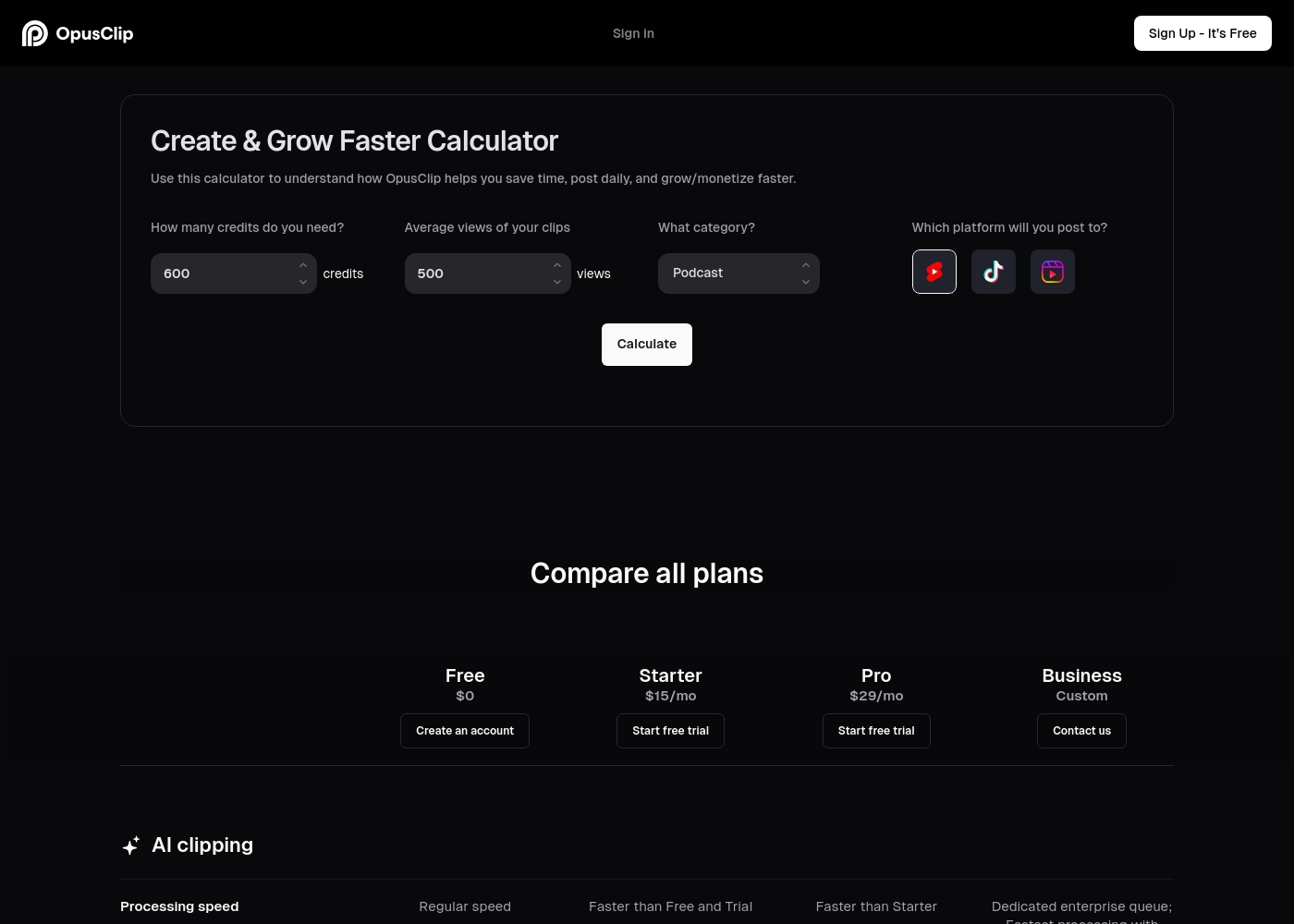
Opus Clip costs between $0 and a custom price per month with four plans: Free at $0, Starter at $15/mo, Pro at $29/mo, and Business (Custom).
If you're ready to select an option, here is a detailed breakdown of what is included in each plan.
Free
Price: $0/mo Best For: New users or small-scale content creators Other Features:
- Regular AI clipping processing speed
- Local video import up to 10GB
- Animated caption templates (with watermark)
- 60 minutes of video processing time refreshed monthly
- Regular AI clipping processing speed
- Local video import (Up to 10GB)
- Animated captions with watermark
- Export limited to 1080p rendered clips
- Faster processing than Free and Trial
- Watermark-free video export
- AI B-Roll Generator (3 clips/month)
- 20 AI Voice-overs per day
- Auto video import from verified YouTube account
- Faster processing than Starter
- 100GB fixed storage
- 2 users/pack, up to 4 users total
- Unlimited stock B-Roll; 50 AI B-Roll clips per day
- Export in bulk
- Dedicated enterprise queue; Fastest processing
- Unlimited member seats and storage
- Single-Sign On (SSO) and SOC II Type 2 compliant
- Priority customer support with dedicated Slack channel
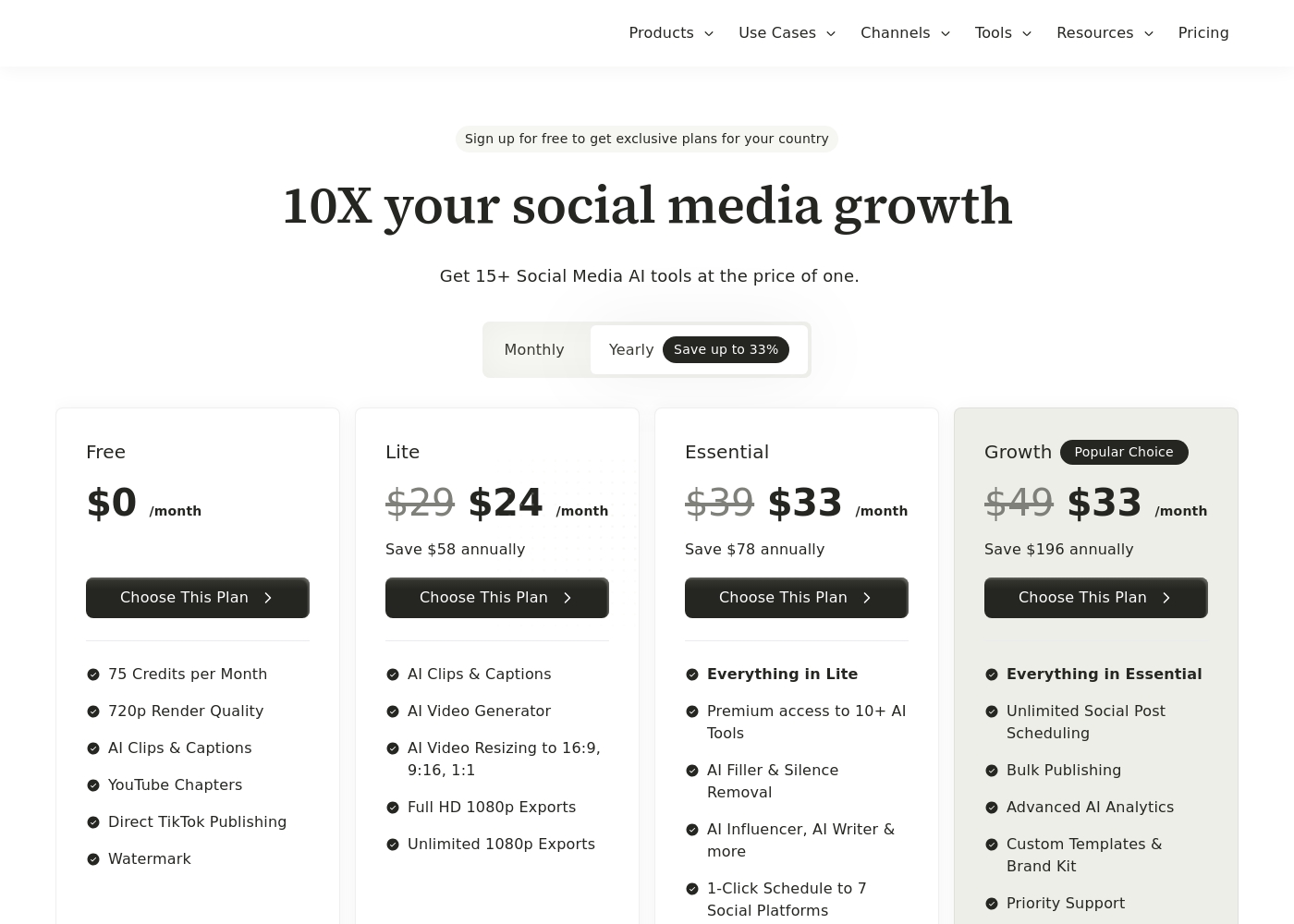
Vidyo.ai costs between $0 and $33 per month with four plans: Free at $0/month, Lite at $24/month, Essential at $33/month, and Growth at $33/month (annual prices).
If you choose yearly billing, you save significantly over the standard monthly rates. This structure helps you choose the right set of tools for your content needs. Here's a look at what each plan offers.
Free
Price: $0 /month Best For: Basic users and platform testing Other Features:
- 75 Credits per Month
- 720p Render Quality
- Direct TikTok Publishing
- Watermark
- 75 Credits per Month
- 720p Render Quality
- AI Clips & Captions
- YouTube Chapters
- Direct TikTok Publishing
- AI Clips & Captions
- AI Video Generator
- AI Video Resizing to 16:9, 9:16, 1:1
- Full HD 1080p Exports
- Unlimited 1080p Exports
- Everything in Lite
- Premium access to 10+ AI Tools
- AI Filler & Silence Removal
- AI Influencer, AI Writer & more
- 1-Click Schedule to 7 Social Platforms
- Everything in Essential
- Unlimited Social Post Scheduling
- Bulk Publishing
- Advanced AI Analytics
- Custom Templates & Brand Kit
Pricing Notes
- Vidyo.ai rewards annual commitment with savings up to 33%; the Growth plan drops to $33/month equivalent.
- Opus Clip’s Starter plan offers the lowest monthly entry point at $15 for watermark removal and faster processing.
- Opus Clip has a dedicated 7-day Pro trial; Vidyo.ai relies on its robust free tier for testing.
- The pricing for Opus Clip primarily scales with processing speed, storage, and specialized AI B-Roll limits.
- Vidyo.ai's pricing scales based on feature access and distribution complexity, including analytics.
Pricing Head-to-Head
User Reviews
Users consistently praise Opus Clip for its remarkable ease of use and its ability to drastically speed up content production. The core functionality—turning lengthy videos into viral shorts—is highly effective, with many creators reporting time savings of up to 5x.
Reviewers frequently highlight the accuracy of the automated caption generation and the practical utility of the
ReframeAnythingI used to spend hours manually editing one long video. Opus Clip changes that completely. Now, I upload my content and have tons of high-quality clips ready in minutes. It’s truly revolutionized my weekly workflow.
External sentiment for Vidyo.ai is based on extremely limited data, as the overall Trustpilot rating of 3.7 stems from only one detailed user review and there is no Capterra feedback available. Despite the low volume, the single 5-star testimonial provides powerful evidence regarding product efficacy and corporate integrity.
The user highlights that the platform is fantastic at extracting key clips from long-form videos and podcasts, calling it a huge time-saver for content creators. More notably, the review confirms exceptional customer service.
The platform was fantastic at extracting key clips from my long-form videos and podcasts. It was a HUGE time-saver for my content creation workflow. The product itself worked great when I used it daily.
Our Verdict
This comparison is tricky because Opus Clip and Vidyo.ai are both excellent, powerful AI editors. Opus Clip is engineered for sheer speed and perfect visuals in complex situations. Vidyo.ai focuses on polishing audio and moving content quickly through your publishing pipeline. Opus Clip’s superpower is its visual engineering, using `ReframeAnything` and `ClipAnything`. If you create vlogs, gaming, or sports content, Opus Clip guarantees centered subjects every time. Plus, the $15 Starter plan offers the lowest barrier to entry for watermark-free exports. Vidyo.ai’s strength lies in its full-stack workflow automation and specific cleanup features. The integrated 1-Click scheduling to seven platforms is a massive time saver. Vidyo.ai also fixes poor audio quality with its AI Filler and Silence Removal feature instantly. The deciding factor is your content niche and production stage requirements. If visual polish and handling complex video genres are critical, always choose Opus Clip. If streamlined distribution and integrated audio cleanup are most valuable, Vidyo.ai is your platform. For structured team scalability and enterprise compliance, Opus Clip is clearly ahead of Vidyo.ai.
Frequently Asked Questions
Which tool is better for teams and large agencies, Opus Clip or Vidyo.ai?
Opus Clip is explicitly ready for scaling needs and large teams. Its Business plan includes SSO, team workspaces, and SOC II security compliance. Vidyo.ai offers custom brand templates but lacks the detailed seat and compliance features visible in Opus Clip.
Why is Opus Clip's Starter plan cheaper than Vidyo.ai's Lite plan?
Opus Clip focuses on a low barrier to entry, offering its Starter plan for $15/month. Vidyo.ai’s Lite plan is $29/month (or $24 annually). If you need core paid features like watermark removal, Opus Clip is the current budget winner.
Does Opus Clip offer advanced audio cleanup tools like Vidyo.ai?
No, Opus Clip focuses on speed and visual enhancements like dynamic captions and reframing. Vidyo.ai provides the unique AI Filler and Silence Removal feature starting in the Essential plan. Use Vidyo.ai if you need the AI to automatically scrub awkward pauses from your source video.
Which tool offers better integrated publishing features?
Vidyo.ai is the clear winner for publishing automation. It includes 1-Click scheduling to seven major social platforms. Opus Clip requires API access or Zapier integration for similar distribution automation.
Can Vidyo.ai dynamically reframe moving subjects like Opus Clip?
Opus Clip features 'ReframeAnything,' using AI to keep moving subjects perfectly centered. Vidyo.ai only offers standard resizing to 9:16 vertical format. Opus Clip delivers a superior and faster polished result for dynamic footage.
Which software provides the best value on B-Roll access?
Vidyo.ai offers unlimited, copyright-free B-Roll on all paid plans. Opus Clip limits the crucial AI-generated B-Roll volume in its lower tiers. Vidyo.ai provides easier and more generous access to supplemental footage.
Ready to Choose?
Both tools have their strengths. Choose based on your specific needs.