Vizard.ai vs Wisecut
Vizard.ai and Wisecut both use proprietary AI to turn long videos into viral clips quickly. Vizard.ai targets extreme volume and agency scale output. Wisecut focuses on finer text-based editing, professional audio, and 4K quality.
Best for: Content agencies needing team collaboration and API access integration, High-volume creators focused on generating 30+ clips per source video
Best for: Podcasters needing automatic silent pause removal and Studio Voice audio quality, Creators who require guaranteed 4K Ultra HD video export quality
Powerful AI, Proceed With Caution.
We found Vizard.ai offers powerful and efficient AI clipping tools that greatly speed up short-form video production. Overall, while the core technology is impressive, the platform’s reported lack of pricing transparency and significant customer support issues warrant user caution.
Pros
- Superior AI clipping technology accurately identifies and extracts video highlights.
- Successfully processes content in non-native and multiple languages.
- The interface design is simple and facilitates an easy workflow.
- The developer offers tiered plans, including a permanent free starting option.
Cons
- Trustpilot has issued a guideline breach warning for the company.
- The "free" transcription tier is often misleading, requiring payment for export.
- Users report dealing with unresponsive, automated customer support.
- Some individuals experienced technical glitches that block clip creation (e.g., timezone errors).
AI video editing that saves you hours.
We found that Wisecut effectively uses AI to reduce editing time significantly, handling steps like pause removal and highlight detection automatically. Overall, this is a robust solution for creators needing to turn long videos into engaging, channel-ready short-form content quickly.
Pros
- Edit video simply by modifying a text transcript/storyboard.
- AI automatically detects and removes silent pauses for smooth viewing.
- Professional audio features include noise cancellation and 'Studio Voice.'
- A generous permanent Free plan is available for testing core tools.
Cons
- Monthly processing minutes do not roll over to the next billing cycle.
- Annual commitment is necessary to access the maximum pricing discounts.
- External user reviews are currently minimal, limiting sentiment analysis.
AboutVizard.ai
Vizard.ai is an intelligent tool that automates video clipping. It turns your long-form video content into short, ready-to-post clips for channels like TikTok, Instagram, and YouTube Shorts.
This platform is built for a wide range of users, including creators, podcasters, successful coaches, marketers, and busy agencies. The process is simple: upload your video, and Vizard handles the transcription, speaker cutout, and processing using its proprietary AI. You just click “Get AI clips,” and the work is done. 💡
AboutWisecut
Wisecut is an automatic AI video editor that transforms your recordings into polished, professional results. It’s trusted by over one million creators and media teams today.
This platform specializes in converting long videos into powerful, engaging short-form content. It works like having a personal editor who knows exactly what will resonate with your audience. 💡
Highlights
Feature Comparison
Features Overview
We highlight the main differences and pick a winner for each feature.
AI Clip Volume & Speed
Vizard.ai generates massive volumes of clips instantly. Wisecut efficiently focuses on detecting quality, viral-worthy moments.
Vizard.ai is optimized for extreme output, generating 30 or more clips from a single video promptly. This approach is up to 10x faster than manual clipping processes. Wisecut uses AI Highlight Detection to find the best viral snippets in your footage. It effectively streamlines your work but does not promise the same raw volume as Vizard.ai. Basically, Vizard.ai is about speed and quantity, perfect for content agencies. Wisecut prioritizes the intelligent segmentation for higher quality snippets. If you need hundreds of clips monthly, Vizard.ai maximizes your efficiency and speed quickly.
Audio Enhancement
Wisecut provides robust audio cleanup like Studio Voice and noise cancellation. Vizard.ai focuses mainly on transcription quality.
Vizard.ai's data focuses on accurate transcription and speaker detection. It does not explicitly mention noise cancellation or voice refining tools for audio polish. Wisecut offers Studio Voice, Noise Cancellation, and Smart Music ducking. It guarantees a fully polished, high-quality audio experience automatically. Wisecut is the clear winner for ensuring professional, broadcast-ready sound. Vizard.ai assumes you have clean audio already for input. Podcasters and interview artists should choose Wisecut for effortless, professional audio results.
Editing Workflow
Both use text-based editing, but Wisecut excels with automatic silence removal. Vizard.ai allows minute timeline adjustments.
Vizard.ai allows you to edit by text and fine-tune timing down to the second level. This gives great control within the Editor Plus interface. Wisecut generates a transcribed storyboard, letting you edit simply by modifying text. The key feature is Autocut Silence, which removes awkward pauses. Wisecut's automatic silence removal saves significant time on video cleanup. You no longer need to manually snip those gaps. If removing 'umms' and awkward pauses is your main pain point, Wisecut solves that automatically.
Team Collaboration
Vizard.ai is built for teams with a centralized workspace. Wisecut features are optimized primarily for solo operation.
Vizard.ai’s Business plan includes a dedicated Shared Workspace feature. Team leaders can manage projects and invite members easily for collaboration. Wisecut's feature set and pricing structure appear geared toward individual creators or small teams. Dedicated collaborative features are not advertised. Vizard.ai explicitly supports professional agency needs and multi-user workflows. Wisecut lacks this robust, centralized management. If your organization requires multiple editors working simultaneously on projects, Vizard.ai is the only dedicated option.
Output Quality & Limits
Wisecut guarantees 4K export and clear minute limits. Vizard.ai keeps quality details non-specific, using monthly credits.
Vizard.ai uses a 'Monthly credits' system for usage tracking. Output quality is not a primary advertised feature or guarantee across all plans. Wisecut’s Professional tiers offer a massive 1800 process minutes monthly. Crucially, it guarantees 4K Ultra HD quality video exports. Wisecut gives high-output creators assurance of superior visual fidelity. Vizard.ai is focused more on high-speed output volume. For creators whose audience demands the highest visual quality (4K), Wisecut is the necessary choice.
Global Reach
Vizard.ai supports caption translation in over 100 languages. Wisecut offers automatic captioning in 13 languages only.
Vizard.ai includes a powerful caption translation feature supporting over 100 languages. This instantly expands potential global viewership. Wisecut supports automatic caption generation and translation in 13 total languages. This is sufficient for major regions but limited globally. The difference in translation capability is substantial (100+ vs 13 languages). Vizard.ai wins if localization is critical. If you target non-English speaking markets extensively, Vizard.ai offers far greater localization potential than Wisecut.
Social Publishing Tools
Wisecut integrates a Social Hub for posting and scheduling. Vizard.ai offers only direct publishing from the app.
Vizard.ai allows users to publish or share clips directly from the interface. It does not detail specific scheduling or management features. Wisecut's Starter+ and Pro+ include a Social Hub for auto-posting and content scheduling. This streamlines the distribution workflow significantly. Wisecut functions as a more integrated content distribution solution than Vizard.ai. Scheduling saves the step of using third-party tools. Creators focusing on multi-platform consistency will appreciate Wisecut's integrated scheduling capabilities immediately.
Pricing Transparency
Wisecut provides clear, volume-based pricing. Vizard.ai's paid tier prices are often unstated or misleadingly hidden.
Vizard.ai's paid monthly pricing is not explicitly listed, only marked with a 50% discount banner. This lack of clarity frustrates users. Wisecut lists all tiers, limits, and annual pricing clearly based on processing minutes. Costs are predictable and scalable. Wisecut is far more trustworthy about pricing and subscription expectations. Vizard.ai's pricing structure invites user confusion. If you prefer predictable monthly costs without pricing mystery, Wisecut is the safer, more transparent investment.
Vizard.ai offers subscriptions starting at $0 per month with 3 main plans: Free, Most Popular, and Business.
The user interface shows several options to help manage your content creation workflow.
Free
Price: $0/month Best For: New users, testing the platform, light content creation needs. Other Features: Video creation, Auto subtitling, AI clipping, Download transcript.
- Video creation
- Auto subtitling
- AI clipping
- Watermark removal
- Monthly credits
- Custom templates
- AI features (clipping, reframe, keywords)
- API access
- Shared workspace
- Brand kit
- Custom fonts
- Live chat support

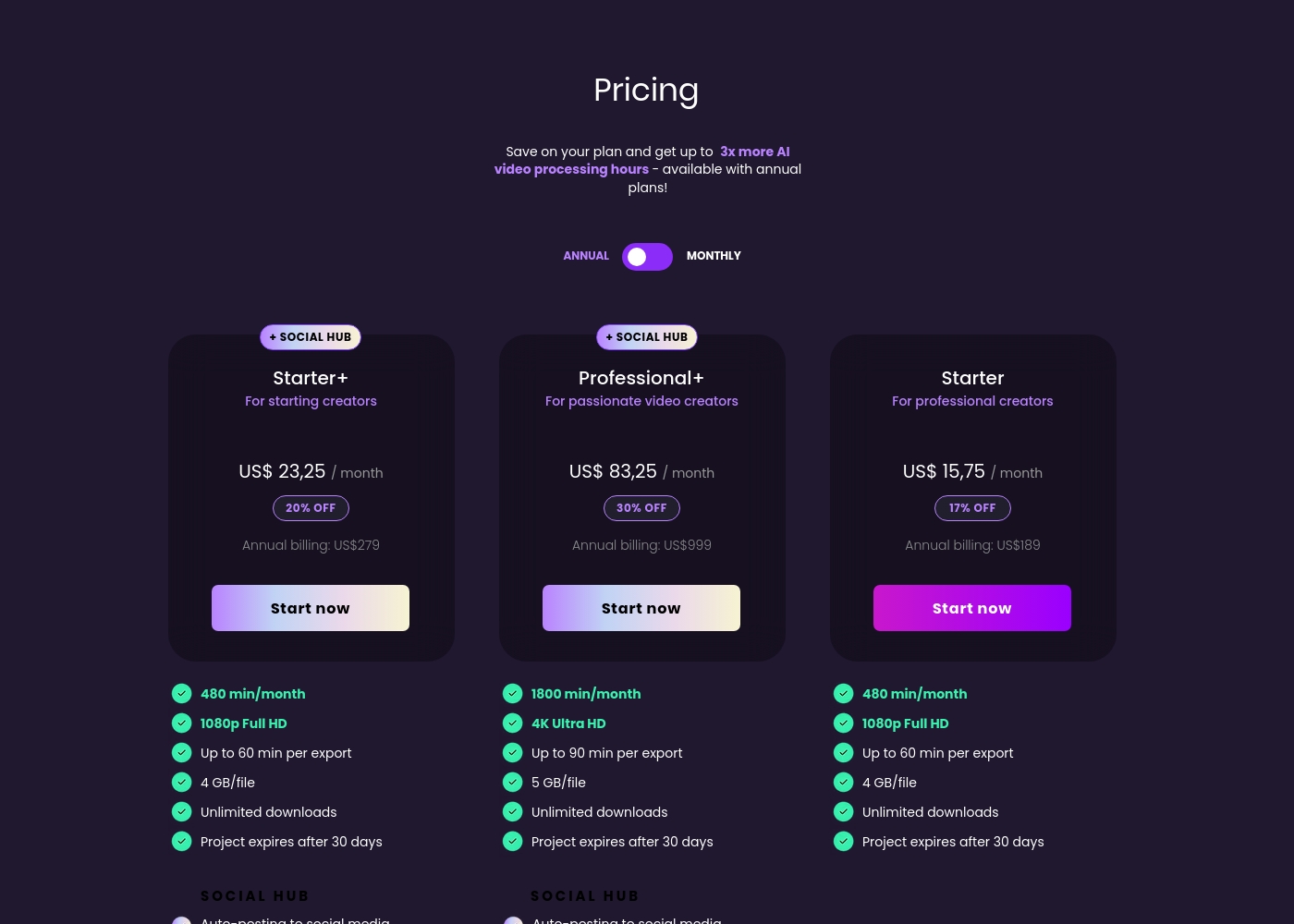
Wisecut costs between $0 and $999 per year with 5 plans: Free at $0/month, Starter at $189/year, Starter+ at $279/year, Professional at $908/year, and Professional+ at $999/year.
Here’s a closer look at what each Wisecut plan offers so you can choose the best option for your content creation goals. Annual billing provides significant savings and increased AI processing capacity.
Free (Discover Wisecut)
Price: US$ 0,00 / month Best For: Getting started with basic video editing features Other Features: 60 min/month, 4 GB/file limit, Project expires after 7 days
- 60 min/month processing
- 4 GB/file limit
- Includes core editing tools
- 480 min/month processing
- 1080p Full HD
- Up to 60 min per export
- Unlimited downloads
- 17% off annual billing
- 480 min/month processing
- 1080p Full HD
- Up to 60 min per export
- SOCIAL HUB access
- Auto-posting and scheduling
- 1800 min/month processing
- 4K Ultra HD
- Up to 90 min per export
- Unlimited downloads
- Includes SOCIAL HUB
Pricing Notes
- Vizard.ai's paid monthly pricing is currently advertised with a 50% discount but is not explicitly detailed at list price.
- Wisecut uses a clear, usage-based model determined by monthly AI processing minutes (up to 1800 min/mo).
- Wisecut heavily incentivizes yearly payment, offering significant discounts (up to 30% savings).
- Users report Vizard.ai's free transcription tier requires payment for export, causing transparency issues.
- Monthly processing credits in Wisecut do not roll over to the next billing cycle.
Pricing Head-to-Head
User Reviews
Vizard.ai receives highly mixed feedback from users, which is complicated by an ongoing Trustpilot warning regarding a breach of guidelines. Positive sentiment centers strongly on the core product's superior AI clipping ability, with multiple users praising the high-quality output and noting that it successfully clips foreign language content where other tools failed. Users find the workflow intuitive and the design easy to understand, making content creation manageable. However, major recurring complaints surround transparency regarding the "Free" plan, which many users report requires a paid subscription prompt just to export transcripts or completed clips, leading to frustration and wasted time.
Furthermore, reliability and support are major pain points for paid users. Some encountered bizarre technical failures, like a time zone error preventing clip creation. Others reported poor customer support, described as dealing with an unresponsive "robot" when trying to resolve issues like managing team seats. While the AI features are powerful generators of content, users should exercise caution given the reports of pricing deception and the lack of reliable support 🚧.
I didn't think this service would be this good; it's genuinely much better than I expected. The design is easy to understand and work with, and it fully gets the job done for me at a high level.
External user feedback for Wisecut is currently very limited based on the provided data. Trustpilot shows only one review, resulting in an average rating of 3.7 🤷♂️.
The single concrete snippet available praises Wisecut as a fast and automatic video editor, suggesting the core AI functionality successfully meets its promises regarding speed and efficiency. Unfortunately, this restricted feedback set prevents us from synthesizing common user sentiment regarding critical factors like AI transcription accuracy, platform reliability, or the responsiveness of support.
This editor is genuinely fast and automatic. It saved me hours on my latest project, successfully minimizing the tedious parts of editing. I appreciate how quickly it processes the initial footage.
Our Verdict
Navigating Vizard.ai versus Wisecut requires determining your true priority: volume or polish. Both use powerful AI for clipping, but their focuses differ. Vizard.ai’s superpower is its industrial-scale output and speed efficiency. It instantly generates 30 or more viral clips from one video effortlessly. Agencies love the Shared Workspace and API access features found in Vizard.ai's Business tier. Plus, Vizard.ai is unmatched for localization with its 100+ language caption translation. Wisecut, conversely, delivers superior clip refinement and professional polish every time. It includes essential quality-of-life additions like automatic silence removal (Autocut Silence). Wisecut also guarantees professional Studio Voice audio enhancement and necessary 4K Ultra HD output. The deciding factor should relate to trust and production transparency. Wisecut offers clear, predictable pricing based on processing minutes. Vizard.ai’s true costs are currently confusing, which has led to negative user sentiment. Pick Wisecut if you prioritize clarity and audio quality. Choose Vizard.ai if your agency demands maximum clipping volume, speed, and global content reach. Select Wisecut if you are a creator needing automatic clean-up and guaranteed 4K professional output quality.
Frequently Asked Questions
Which tool is better for achieving professional audio quality in video clips?
Wisecut is superior for audio refinement. It features Studio Voice to polish sound and includes automatic background noise cancellation. Vizard.ai does not offer these specific enhancements for audio quality.
Does Vizard.ai or Wisecut have comprehensive team collaboration tools?
Vizard.ai is better for larger teams, offering a Shared Workspace feature on its Business plan. Wisecut does not explicitly advertise dedicated, centralized multi-user collaboration features.
Which software offers guaranteed 4K Ultra HD video exports?
Wisecut guarantees 4K Ultra HD quality starting with the Professional tier. Vizard.ai does not explicitly mention guaranteed 4K output quality in its currently advertised plans.
Can Vizard.ai translate captions into more languages than Wisecut?
Yes, Vizard.ai is far better for global reach. It supports caption translation into over 100 languages. Wisecut supports automatic caption generation in 13 total languages.
Which tool has simpler, more transparent pricing structures?
Wisecut provides clear, tiered pricing and predictable usage limits based on processing minutes. Vizard.ai's paid plan prices are not explicitly stated currently, leading to poor user reviews about pricing clarity.
Does Wisecut automatically remove silent pauses in footage like Vizard.ai?
Yes, Wisecut has an excellent feature called Autocut Silence that removes silent gaps automatically. Vizard.ai requires manual fine-tuning down to the second for timing adjustments.
Ready to Choose?
Both tools have their strengths. Choose based on your specific needs.