Klap

Klap

AI turns your long videos into viral short clips, instantly.

#2 dans Video repurposing
3 min read · Updated 10/6/2025
Klap homepage screenshot

At a glance

Quick overview for Klap: rating, pricing summary, key features, and highlights.

Ciroapp review

3.2
Top-tier AI, concerning billing practices.

We find Klap's core AI functionality excellent for transforming long videos into high-quality short clips instantly and efficiently. The software saves content creators significant time and offers advanced features like 4K exports and AI dubbing at higher tiers. However, we note persistent and serious user complaints regarding undisclosed charges, unauthorized annual renewals, and unresponsiveness from customer support regarding billing and cancellation issues. Overall, the technology is top-tier, but operational transparency and support practices concern us.

Pros

  • Pro:AI accurately extracts viral short clips from long videos.
  • Pro:The interface is intuitive, fast, and extremely easy to use.
  • Pro:Saves significant hours on manual clipping and editing tasks.
  • Pro:Robust suite of editing and branding customization tools.

Cons

  • Con:Frequent, severe complaints about unauthorized recurring annual charges.
  • Con:Users report difficulty locating and contacting customer support for troubleshooting.
  • Con:Subscription cancellation process is frequently reported as challenging or impossible from the dashboard.
  • Con:The free trial is misleading; users cannot download or post generated clips without paying.
Free trial
Yes
Range: $23–$151/monthFree trial, Monthly subscription, Yearly subscription
This section is a summary. Detailed sections about features, use cases, pricing, and reviews follow below.

Klap review, pricing, features, pros & cons

Are you spending too much money and time manually clipping your long videos? Does daily posting feel impossible? Klap offers a game-changing solution.

This proven tool uses AI to instantly transform your long content into multiple engaging vertical clips. It saves hours of editing and helps you share more content daily, growing your overall reach. ✨

What is Klap?

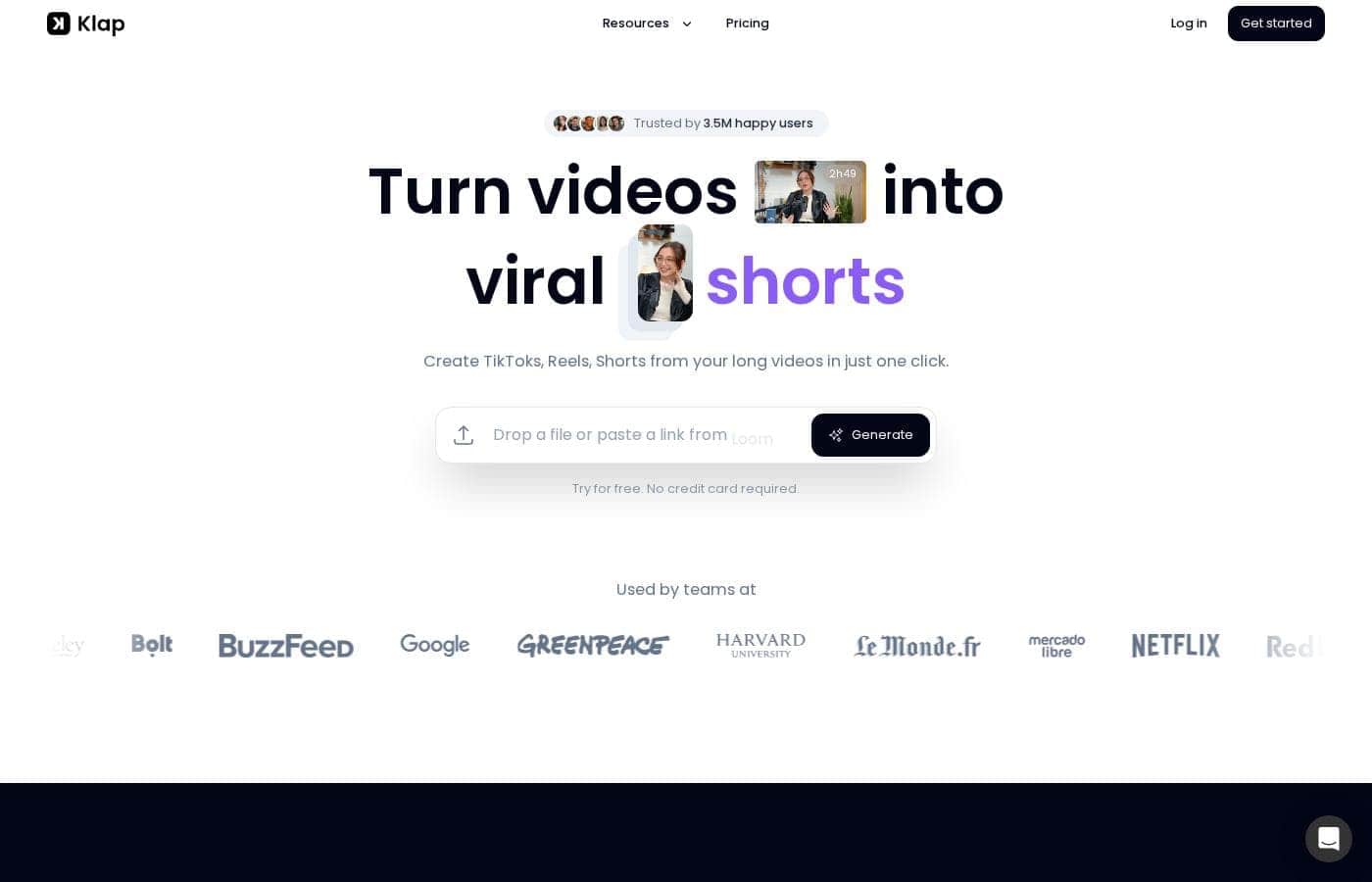
Klap is a powerful, AI-driven video editor designed for streamlined content repurposing. It serves content creators, brands, and anyone looking to maximize their audience potential. The process is simple: upload a video file or paste a YouTube link.

Klap's AI then extracts the most critical topics, applies intelligent framing, and quickly gives you multiple high-resolution clips suitable for Reels, TikToks, or Shorts. It works optimally for spoken content, such as interviews or podcasts, due to the reliance on speech detection. đź’ˇ

Klap Key Features

✨ Instant AI Clip Generation

Stop spending hours manually clipping your videos. Klap simplifies content repurposing with powerful AI. You upload your video file or simply paste a YouTube link to begin the process. The AI instantly extracts the most critical topics from your long-form content.

Klap is highly effective for content focused on speech, such as interviews or podcasts. The algorithm expertly uses speech detection to identify key moments. As a general guide, one minute of original content typically yields about five viral-worthy vertical clips.

✨ Advanced AI Reframe 2 Technology

Ensure your content always looks professional with Klap’s advanced reframing technology. AI Reframe 2 analyzes your video scenes quickly and applies the perfect layout every time. It ensures your clips are fully optimized for vertical viewing platforms.

This technology also features auto-reframing based on intelligent framing and facial recognition. The system automatically shifts focus to the most important speaking subject. It supports specialized layouts, ensuring the best presentation for different content types, including:

  • Split Screen clips
  • Screencast layouts
  • Specialized gaming formats

✨ Viral Content Scoring

Never guess which short clip has viral potential again. Klap's AI assists your content strategy by scoring each resulting clip. This score predicts the likelihood of success for the content.

This feature allows you to instantly publish only content that the AI deems viral-worthy. By relying on the algorithm to select and score the segments, you save significant time and maximize your chances of audience growth.

✨ Customization and Engaging Captions

Maintain your brand's unique identity across all your short-form content. Klap offers full customization options for your clips. You can easily adjust key elements to meet your consistent branding needs.

Ensure brand consistency by choosing specific fonts, colors, logos, and framing options. Klap also generates beautifully designed subtitles automatically. We provide recommended captions to post alongside your videos, helping them look professional and go viral easily.

✨ Complete Workflow Automation

Automate your entire content creation and posting process using Klap. This feature ensures that once your clips are finalized, posting them daily is effortless. Klap supports full workflow automation, saving you hours of management time.

Instantly share your new video clips directly from the platform. You can also schedule them ahead of time to fit your long-term content strategy. Klap supports direct publishing to major platforms like TikTok, YouTube, Instagram, and LinkedIn.

✨ Multilingual Support

Reach a broader global audience with Klap’s extensive language capabilities. The tool supports transcription and editing across various global languages. Klap can edit and transcribe videos in 52 different languages.

This expansive support makes Klap ideal for creators who work with diverse international content. Higher-level tiers also unlock essential professional services, including AI video translation and dubbing in 29 languages.

Use Cases

🚀 Scaling Your Daily Content Output Effortlessly

Posting daily on Instagram, TikTok, and YouTube Shorts can feel impossible. When you try to scale, you quickly run out of time and budget for editing. Klap solves this problem by using AI to automate the clipping process based on key topics.

Simply upload your 45-minute YouTube video or paste the link. Klap instantly extracts five highly engaging clips, ready for vertical platforms. You save hours on editing and gain high-quality content that helps you grow your audience without the added workload. This workflow lets you focus on creation, not tedious manual editing.

🎙️ Repurposing Long Interviews into Viral Clips

Podcasts, interviews, and educational webinars are incredibly rich sources of long-form content. Since Klap's algorithm excels at processing spoken word, it reliably identifies the most impactful soundbites. This ensures you never miss a viral-worthy moment from a lengthy discussion.

Klap turns lengthy recordings into dozens of short clips suitable for social media. Each clip receives an AI-powered viral score, meaning you instantly know which segments have the highest potential to succeed. You can rely on the data without guessing which parts of your content will resonate.

🎨 Maintaining Brand Consistency with Customization

Even fully automated content needs to match your brand's unique identity. Klap provides complete customization options to ensure design consistency across every platform. You control the look and feel of your final product, even when AI does most of the heavy lifting.

You can fully customize elements like the fonts, colors, framing, and add your specific logos. This maintains a professional appearance and reinforces your brand standard, helping your content stand out visually. You get automation without sacrificing quality or brand adherence.

🎯 Optimizing Visuals with Advanced AI Reframing

Long-form videos often require specialized layouts, such as split screens for interviews or specific formats for screencasts and gaming. AI Reframe 2 analyzes your video scenes and automatically applies the perfect professional layout.

This feature ensures faces are always visible and key visual information is clear, regardless of the original video format. Whether you need a split screen or simply responsive captions, Klap handles complex visual editing in just one click. This prevents awkward cropping and guarantees a polished look every time.

🗓️ Automating Publishing and Scheduling

Creating clips is only half the battle; distributing them efficiently is key to growth. Klap integrates publishing directly into its workflow, automating the last step in your content pipeline. You no longer need to download clips and manually upload them across different sites.

Tip: Use the scheduling feature to spread your clips across the week to achieve maximum daily posting volume.

After finalizing your clips, you can directly share and schedule them across major platforms, including TikTok, YouTube, Instagram, and LinkedIn. This complete workflow automation helps you maintain a consistent content strategy across your entire network.

Pricing Overview for Klap

Pricing range
$23–$151/month
Pricing types
Free trial, Monthly subscription, Yearly subscription

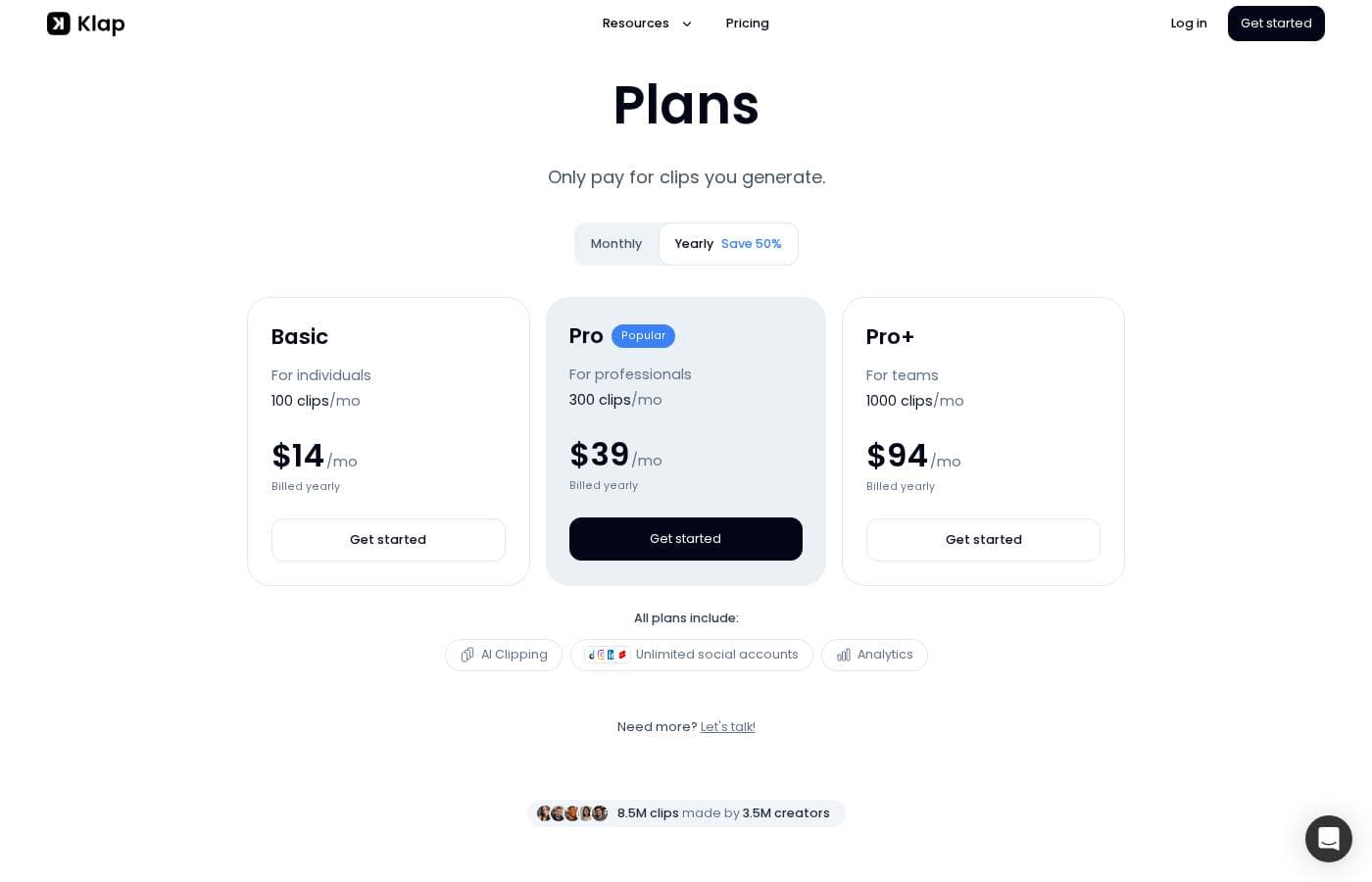
Klap uses a clear, tiered subscription model catering to different levels of content creation intensity. Pricing starts at $23 per month, which is the effective rate when customers choose the annual billing option, offering significant savings over monthly payments.

Plans & Pricing

Klap

Yearly276
Upload 10 videos monthly (Up to 45 minutes long videos)
  • Generate 100 clips monthly
  • HD download

Klap Pro

Yearly756
Upload 30 videos monthly (Up to 2 hours long videos), Generate 300 clips monthly
  • 4K download
  • Translate to 29 languages (AI Dubbing)

Klap Pro+

Yearly1812
Upload 100 videos monthly (Up to 3 hours long videos), Generate 1000 clips monthly
  • 4K download
  • Translate to 29 languages (AI Dubbing)

Klap costs between $23 and $151 per month (when billed annually) with three plans: Klap at $23/month, Klap Pro at $63/month, and Klap Pro+ at $151/month.

Klap offers flexible plans designed to scale with your video creation needs.

Klap

Price: $23/month (Billed Annually) Websites Supported: Not explicitly stated Best For: Users who need to process small batches of video content monthly. Refund Policy: Not explicitly stated (Cancellation is available anytime) Other Features:

  • Upload 10 videos monthly
  • Up to 45 minutes long videos
  • Generate 100 clips monthly
  • HD download

This entry-level plan is designed for creators just starting out or ones with modest content production needs. You can process up to ten videos monthly, each up to 45 minutes long. This tier is great if you want to repurpose content efficiently without relying on massive volume or 4K resolution.

Klap Pro

Price: $63/month (Billed Annually) Websites Supported: Not explicitly stated Best For: Growing creators who need higher capacity and premium features like 4K output. Refund Policy: Not explicitly stated (Cancellation is available anytime) Other Features:

  • Upload 30 videos monthly
  • Up to 2 hours long videos
  • Generate 300 clips monthly
  • 4K download
  • Translate to 29 languages (AI Dubbing)

The Pro plan significantly increases your capacity. You can upload 30 videos monthly, and they can be much longer, up to two hours each. This plan unlocks powerful advanced features like 4K download and AI dubbing in 29 languages. If you are a serious creator scaling up your output, this plan offers excellent value and robust capability.

Klap Pro+

Price: $151/month (Billed Annually) Websites Supported: Not explicitly stated Best For: Professional agencies or high-volume content producers requiring maximum capacity. Refund Policy: Not explicitly stated (Cancellation is available anytime) Other Features:

  • Upload 100 videos monthly
  • Up to 3 hours long videos
  • Generate 1000 clips monthly
  • 4K download
  • Translate to 29 languages (AI Dubbing)

For the dedicated professional or agency, the Pro+ tier allows for massive content production. You can upload up to 100 videos per month, supporting video lengths up to three hours. This plan minimizes your limits while providing access to all premium tools, including robust AI dubbing and crisp 4K output. If you manage multiple accounts or publish daily high-volume content, this is the optimal choice. For even higher needs, Klap offers a custom "Need more? Let's talk!" option.

Klap offers a way to try the service by allowing users to create 1 video for free, according to their FAQs. All subscription plans emphasize transparency, stating there are no hidden fees, and you can cancel your subscription at any time. Payments are secured by Stripe.

User Reviews

Klap generates polarized feedback, largely separating technical performance from customer service and billing. Users consistently praise the platform's ease of use, speed, and quality output, noting that the AI accurately extracts viral clips and significantly saves editing time.

Many creators report immediate success in driving traffic and follower growth using the generated Shorts and Reels. The software's ability to repurpose content quickly is considered valuable, particularly by those utilizing the robust editing and customization tools available to fine-tune the output.

However, operational issues are a serious recurring theme 🚨. Multiple users report severe difficulty with subscription management, including unauthorized annual charges long after trials ended and the inability to find easy cancelation options within the dashboard.

Support responsiveness, especially concerning billing concerns and network errors, is often described as extremely poor or non-existent, leading some users to label the service a "scam." While the core video processing technology is highly valued and effective, potential users should be highly cautious about the company's subscription and customer care practices.

What users say elsewhere

Kamil A.
· Trustpilot · Apr 17, 2025
5.0 / 5

I’ve tried Klap and think it’s a great product. It's easy to use, very intuitive, and remarkably fast. I had to contact customer service once about an issue, and I found a reasonable team that worked to fix my error.

R. K.
· Trustpilot · Sep 5, 2025
5.0 / 5

The platform is easy to use and creates decent shorts automatically. These clips seem to be successfully pushing people to my main channel. This allows me to easily link viewers to my longer form videos.

No reviews yet.

Write a Review

Write a Review for Klap
0/100 characters
0/2000 characters

Why use Klap?

Stop editing and start posting. Klap allows you to scale your content output without spending hours on tedious manual clipping. Over 1.5 million satisfied users rely on this platform because it fundamentally simplifies content generation. Klap helps you share content daily and grow your audience without extra work.

Here is how Klap delivers immediate value:

  • Maximize Content Reach: Easily repurpose your original material to fit every channel. Klap provides a one-click solution, instantly turning your long videos into multiple vertical Shorts and Reels.
  • Advanced Reframing Technology: Introducing AI Reframe 2, the most advanced feature yet. It analyzes your video scenes and applies the perfect layout—whether you need split screens or specialized gaming formats—ensuring a professional look in just one click.
  • Viral Content Scoring: Never guess which clip will succeed. Klap's AI tool scores the potential of each resulting clip, helping you instantly publish only viral-worthy content.
  • Complete Workflow Automation: Klap lets you directly share your new video clips and schedule them across major platforms, including Instagram, TikTok, YouTube, and LinkedIn, automating your content strategy.
  • Full Customization Options: Ensure consistency for your brand. You can fully customize all elements, including fonts, colors, logos, and framing, to meet your unique needs.

Klap is ideal for creators who need to post daily and save significant time. Try Klap today and create your first video for free. âś…

Ready to transform your workflow with Klap?

Frequently Asked Questions

What specifically does the Klap free trial include?

You can use Klap to process one full video completely for free. This lets you trial the AI functionality and the quality of the generated clips before subscribing to a paid tier.

Is Klap’s pricing based on the number of users or video usage quotas?

Klap uses a usage-based pricing structure, not a per-seat model. Your plan determines the monthly caps for video uploads, maximum video length, and the number of clips you can generate.

How do I cancel my subscription with Klap?

The official pricing information states that you can cancel your subscription at any time. The company clearly maintains a policy of having no hidden fees.

Does Klap offer a specific money-back guarantee or refund policy?

Not explicitly stated on the official site. While you can cancel future recurring payments anytime, there is no mention of a money-back period for initial or past charges.

Which social media platforms can I publish and schedule clips to directly?

Klap supports direct sharing and scheduling of your newly created clips. This feature works with TikTok, YouTube, Instagram, and LinkedIn.

How is my payment information handled and secured?

All payments for Klap subscriptions are securely processed by Stripe. Information regarding how Klap secures user content and data beyond payment processing is not provided.

What is the maximum long-form video length I can upload on the basic Klap plan?

The entry-level Klap plan allows you to upload source videos up to 45 minutes long. The Pro and Pro+ plans accommodate videos up to two hours and three hours, respectively.

What specific features do the Pro and Pro+ plans include that the base Klap plan does not?

The higher tiers unlock 4K download resolution for your clips. They also include the advanced AI video translation and dubbing feature for 29 languages.

How many languages can Klap transcribe captions for compared to the number it can dub?

Klap is capable of editing and transcribing captions in 52 languages. The premium feature for AI dubbing and translation is available later for 29 of those languages.

Who is Klap best suited for?

It works best for creators who produce spoken content like interviews, podcasts, or training videos. Klap is ideal for maximizing reach and helping users post content daily.

How do I contact customer support if I have questions about my account?

You can reach the Klap support team through the official site using either Discord or the provided live chat feature.

What should I do if my video needs exceed the largest Pro+ plan?

If you are a high-volume content producer, Klap encourages you to contact them directly. The website offers a custom 'Let's talk!' option for needs beyond the Pro+ tier.

Ready to try Klap? Check out the official site or pricing.