Restream

Restream review

Go live everywhere, turn streams into shorts.

Restream costs from $19/mo · 4 plans · Free plan available · prices checked Nov 1, 2026

By Ciroapp Editorial Team · Updated May 15, 2026

Commission may apply at no extra cost

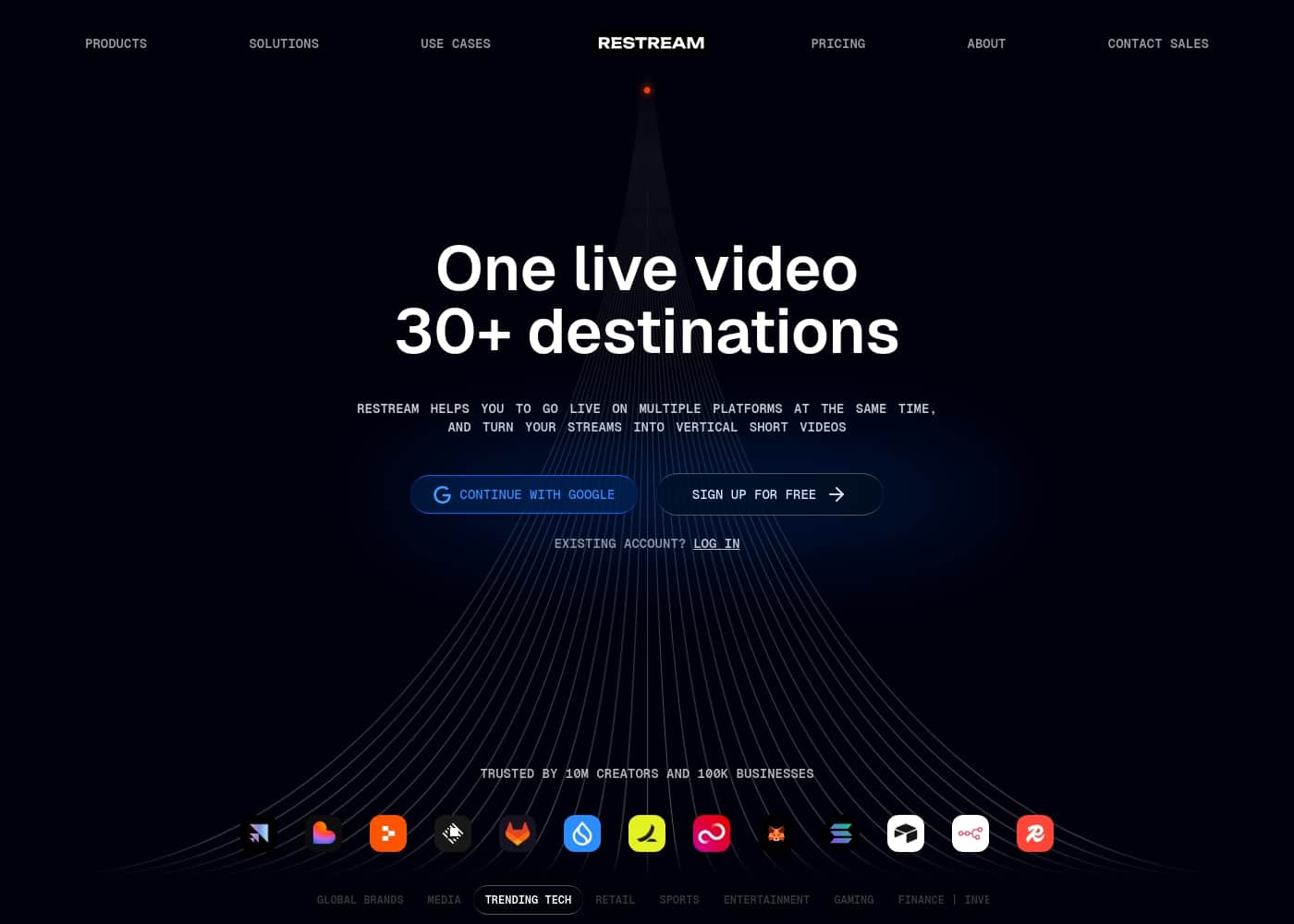
Restream homepage screenshot

At a glance

Quick overview for Restream: rating, pricing summary, key features, and highlights.
Pricing verified Nov 1, 2026

Ciroapp score

4.3/ 5

Powerful multistreaming with a trade-off.

We see Restream as a top-tier solution for creators and businesses aiming to broadcast to multiple platforms simultaneously. It simplifies a complex workflow and adds value with automatic short-video repurposing. Overall, it's a reliable and feature-rich tool, though its value proposition depends on your specific needs and scale.

Pros

  • Stream to 30+ destinations from a single source.
  • Generous free plan allows testing with 2 channels.
  • Simple setup for connecting streaming software and platforms.

Cons

  • Key features like HD streaming and removing branding require paid plans.
  • Annual billing offers savings, but the monthly commitment can be significant.
  • Customer support has received mixed feedback regarding response times.
Best for
  • Content creators wanting to grow on multiple platforms simultaneously
  • Businesses running corporate live streams or all-hands meetings
  • Marketing teams repurposing live events into short-form video clips
This section is a summary. Detailed sections about features, use cases, pricing, and reviews follow below.

What is Restream?

Managing live streams across multiple platforms is a juggling act. You might be using different software for each destination, or worse, missing your audience entirely on key channels. Restream solves this by letting you broadcast one live video to over 30 destinations simultaneously.

It also turns your streams into vertical short videos, helping you reach more people after the live event ends. ✨

Restream is a multistreaming service designed for creators and businesses. Its core function is to take your single live video feed and send it to 30+ platforms at once, like YouTube, Twitch, and Facebook. This is especially useful if you want to grow your audience without choosing just one platform.

It's trusted by millions, including major companies like Google, Adobe, and Shopify. 🌐

Should you choose Restream?

Quick buyer guidance before you compare plans or click through.

Choose it if

  • Creators who are active on more than one social video platform
  • Users who want to maximize viewership from a single live production
  • Teams that need an efficient way to create promotional short videos from live content
  • Anyone tired of managing separate streaming keys and software for each platform
  • Businesses that value proven reliability, as shown by its use by major brands

Skip it if

  • Users who only stream to a single platform and have no need for multistreaming
  • Those on a very tight budget, as key features likely require a paid subscription (annual pricing may be involved)
  • Individuals not yet using or willing to set up third-party streaming software like OBS Studio

Next steps before buying

  1. 1Visit Restream.io and review the available pricing plans and features to see what fits your needs.
  2. 2Confirm the platforms you want to stream to (YouTube, Twitch, etc.) are supported and set up your accounts.
  3. 3Ensure you have compatible streaming software (like OBS, Streamlabs, etc.) as Restream works with it.
  4. 4Sign up for a free account to explore the dashboard and understand the interface before committing.
  5. 5Compare Restream's offering with other multistreaming tools to ensure it meets your specific requirements.

Ease of use

The homepage emphasizes simplicity: go live on multiple platforms with one stream. The core workflow is built around reducing complexity. However, it's important to note you'll need to connect your streaming software and destination accounts to the service.

Restream Key Features

✨ Go Live Everywhere, All at Once

Restream's core feature is multistreaming. It takes your single video feed and broadcasts it to over 30 destinations simultaneously. This means you can reach your audience on YouTube, Twitch, Facebook, and other major platforms from one simple setup.

You stop choosing one platform and start reaching them all with minimal effort. This solves the headache of managing separate streams for each channel.

✨ Effortless Content Repurposing

After your live stream ends, Restream helps you keep the momentum going. The platform can automatically turn your long-form live video into vertical short clips. These are perfect for sharing on TikTok, Instagram Reels, and YouTube Shorts.

It saves you hours of manual editing and helps you promote your content to a new audience after the broadcast is over. ✨

✨ Simple and Reliable Workflow

Restream is designed to simplify your technical workflow. You connect your streaming software, like OBS Studio, once. Then, you broadcast that single feed to all your chosen destinations through the Restream dashboard.

This approach lets you focus more on your content and less on managing complex software. It's a straightforward process trusted by millions of creators and major businesses alike.

✨ Flexible Plans for Every Creator

Restream offers a range of plans to fit different needs. You can start with the free tier to multistream to two channels. If you need more destinations or features like Full HD streaming, you can upgrade.

Paid plans offer options like guest channels, 4K recording, and team workspaces for collaboration. This structure lets you scale as your audience grows.

✨ Built for Professionals and Teams

For those who need more advanced collaboration, Restream provides specialized tools. The Business plan includes features like team workspaces, co-producer mode, and a website player for your stream. This makes it suitable for organizations running corporate events or marketing campaigns.

You can manage broadcasts with colleagues from a shared, professional environment.

✨ Trusted by Leading Brands

You're in good company. Restream is used by over 10 million creators and 100,000 businesses. Its reliability is proven by major global brands.

Companies like Google, Adobe, Shopify, and NASA use the platform for their live streaming needs. This widespread adoption shows it's a dependable tool for serious broadcasters of all sizes.

Use Cases

🚀 The Solo Creator's Multi-Platform Launch

You're a creator with great content. You know your audience is spread across YouTube, Twitch, and Facebook. Instead of picking one and leaving others behind, you use Restream. You go live once from your streaming software. Your stream appears everywhere at the same time. After you're done, Restream helps you cut your best moments into short vertical videos. These clips are perfect for sharing on TikTok and Instagram Reels.

Tip: Start with the free plan to test streaming to two platforms at once.

🎬 Effortless Content Repurposing

You just finished a 90-minute live workshop. Now you have to find the highlight clips to promote it. That used to take hours.

With Restream, the platform can automatically turn your live stream into vertical short videos. You get ready-made clips for different social channels without extra editing work. This saves you time and helps you reach more people after the live event is over.

📝 Step-by-Step: Your First Multistream

Getting started is straightforward. Here's the basic flow:

  1. Sign up for a free Restream account and connect your destination accounts (like YouTube or Twitch).
  2. In your streaming software (like OBS), send your video to Restream's server instead of a single platform.
  3. Choose which platforms you want to go live on from your Restream dashboard.
  4. Hit "Go Live" in your software. Your stream will broadcast to all selected places at once.

Expected outcome: Your live video is simultaneously reaching audiences on multiple platforms from a single source.

🏢 Corporate All-Hands Meeting

A company wants to host a major all-hands meeting. They need to reach employees, investors, and the public. Using Restream on the Business plan, they can stream to their private company intranet, their public YouTube channel, and their LinkedIn page all at once.

Team members can collaborate using co-producer mode and team workspaces. This ensures one consistent message reaches everyone, whether they're internal or external.

🎮 Problem → Approach → Outcome

Problem: A gaming streamer was only growing on Twitch. Their followers on other platforms felt neglected. Approach: They used Restream to simultaneously broadcast their streams to Twitch, YouTube Gaming, and a second YouTube channel for casual viewers.

Outcome: They grew their YouTube subscriber base by over 200% in six months while maintaining their primary community on Twitch. They didn't have to create separate content for each place.

🎓 Bringing a Guest to a Global Stream

An educator wants to interview an expert for their online course. They don't want to just record a Zoom call. Using Restream's guest channels feature, they bring the expert directly into the broadcast.

They then stream this live interview to their YouTube channel, Facebook page, and a dedicated course platform. The audience gets a professional, multi-platform live experience without complex technical setups.

Restream pricing

From$19/mo

  • 4 plans
  • Free plan available
  • Save up to 20% with annual billing

Prices checked on Nov 1, 2026 from Restream's pricing page

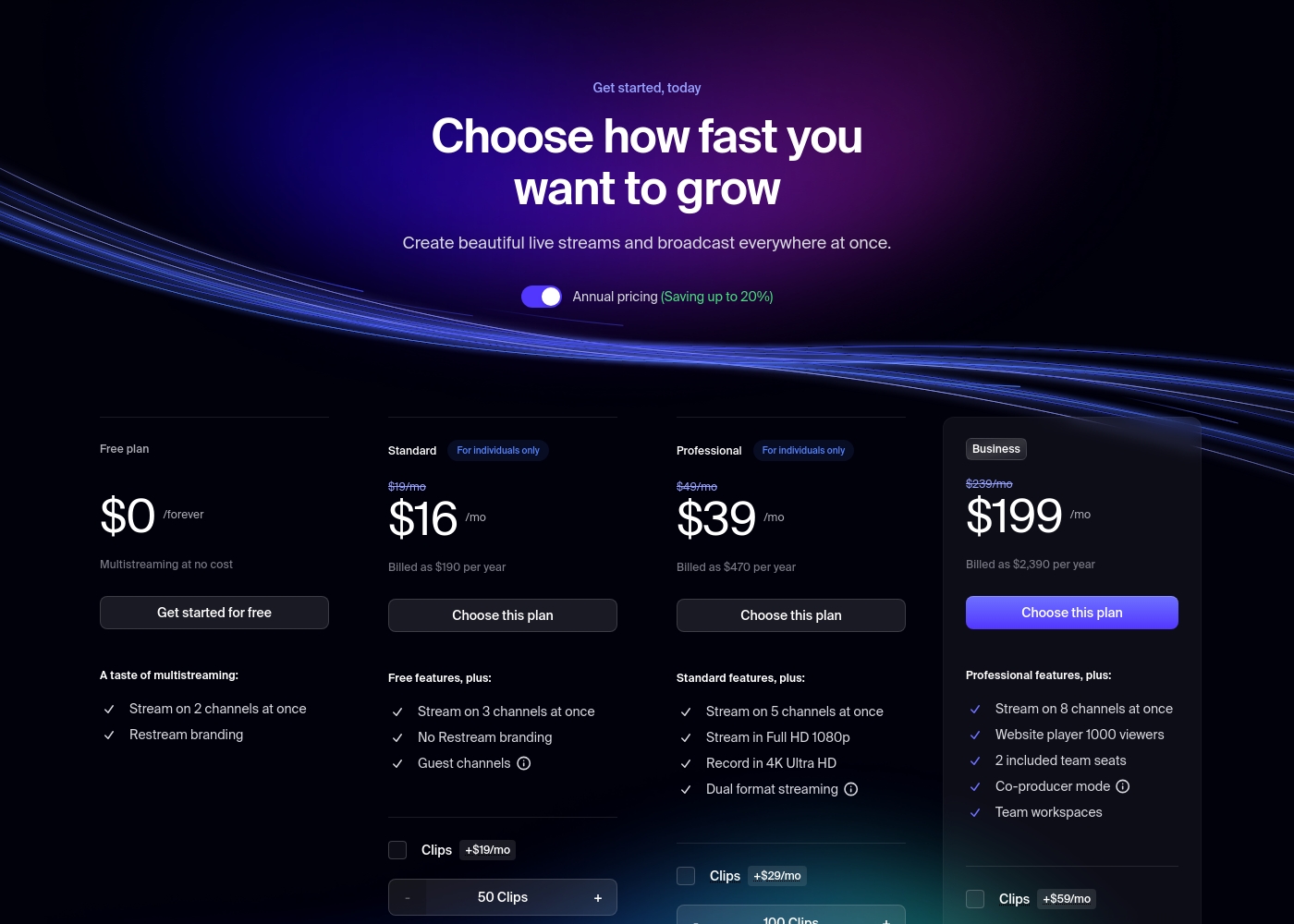
Restream pricing page screenshotView pricing page screenshot
PlanBilled monthlyBilled annuallyIncludes
Free plan
Free
Free
2 channels
  • Stream on 2 channels at once
  • Restream branding
Standard
$19/mo
$16/mo
$192 per year
Save up to 16% with annual billing
3 channels
  • Stream on 3 channels at once
  • No Restream branding
  • Guest channels
Professional
$49/mo
$39/mo
$468 per year
Save up to 20% with annual billing
5 channels
  • Stream on 5 channels at once
  • Stream in Full HD 1080p
  • Record in 4K Ultra HD
  • Dual format streaming
Business
$239/mo
$199/mo
$2,388 per year
Save up to 17% with annual billing
8 channels
  • Stream on 8 channels at once
  • Website player 1000 viewers
  • 2 included team seats
  • Co-producer mode
  • Team workspaces

Price history

Tracking prices since Oct 1, 2026. No price change detected yet.

Pricing types: Free plan, Monthly subscription, Yearly subscription

Pricing notes

Restream offers a variety of plans starting with a generous free tier, while paid subscriptions begin at $16 per month when billed annually. Pricing scales based on the number of destinations, video resolution, and advanced team workspace features.

Restream costs between $0 and $199 per month with 4 plans: Free at $0, Standard at $16, Professional at $39, and Business at $199.

Take a look at the core features to find your perfect fit.

Free plan

Price: $0 / forever

Best For: New creators or casual streamers

Other Features: Stream on 2 channels at once, Restream branding

This plan is a great way to test the waters without spending a dime. You can reach two different social platforms simultaneously to see how your audience reacts.

Standard

Price: $16 / month (billed annually)

Best For: Individuals looking to remove branding

Other Features: Stream on 3 channels, No Restream branding, Guest channels

If you're ready to look more professional, this is the right jump for you. It removes the Restream logo and lets you bring guests onto your broadcast.

Professional

Price: $39 / month (billed annually)

Best For: Enthusiasts needing high-quality video

Other Features: Stream on 5 channels, 1080p Full HD, 4K Ultra HD Recording, Dual format streaming

Choose this tier if you want your streams to look crisp and professional in Full HD. It’s ideal for creators who also want to save high-quality recordings for later use.

Business

Price: $199 / month (billed annually)

Best For: Teams and large organizations

Other Features: Stream on 8 channels, Website player, 2 team seats, Co-producer mode, Team workspaces

This plan is built for professional collaboration and larger reach. Most independent creators should avoid this tier unless they specifically need team access or a custom website player.

Restream offers a permanent free plan for multistreaming to 2 channels. While specific refund terms aren't listed here, you can manage or cancel your subscription through your account settings at any time.

Cost calculator

Estimate what Restream costs for your team.

Billing
Per month
$19
Per year
$228

Standard has a flat price: the number of seats does not change the total. Estimate based on published list prices, before taxes, add-ons and discounts.

How to pay less for Restream

  • Pay annually: saves up to 20% compared with monthly billing.
  • Start on the free plan and upgrade only when you hit its limits.
  • Cheaper tools in this category start at $16/mo.
Visit Restream

Email me when Restream changes price

One email when we detect a price change on the vendor's pricing page. No newsletter, no deals. Unsubscribe in one click.

User Reviews

We found that users on Trustpilot generally praise Restream for its intuitive interface and wide platform support, making multistreaming straightforward. Many highlight the free tier as a great starting point.

🎯 However, a recurring concern is customer support responsiveness, with some users reporting slow or unhelpful replies. Pricing is another point of discussion; while the free plan is valued, paid tiers are seen as potentially expensive for individual creators, especially when billing annually.

Reliability during live streams is mostly positive, though occasional connection issues are noted. Onboarding is typically described as simple, and the tool is often recommended for its reliability and ease of use, despite the support and cost reservations.

Summarized from public reviews on Trustpilot, Capterra

No reviews yet.

Write a Review

Write a Review for Restream
0/100 characters
0/2000 characters

Why use Restream?

Stop choosing one platform. Reach them all.

Streaming to multiple places manually is a headache. It wastes time and splits your audience. Here’s why Restream is a powerful solution for your live content strategy:

  • Maximum Reach with Minimum Effort ✅: Go live on 30+ destinations from a single stream. This lets you find your audience wherever they are, without complex setups.

  • Repurpose Your Content Automatically 🎬: The platform helps you turn your long live streams into vertical short videos. This is a huge time-saver for creating engaging clips for TikTok, Reels, and Shorts after you're done live.

  • Trusted by the Pros: It’s not just for individuals. Restream is used by 10 million creators and 100,000 businesses, including global brands like NASA, CNN, and Discord. This scale shows it's a reliable tool for serious broadcasters.

  • Simple Workflow: The main promise is straightforward: connect your stream once and broadcast everywhere. This simplifies your technical workflow so you can focus on your content and audience.

Restream alternatives

Other tools in the Live streaming category

View all Live streaming tools
StreamYard

StreamYard

Live streaming4.2/5

StreamYard is the definitive professional studio for live streaming and recording, housed entirely within your browser. This platform is designed to produce polished, branded content without needing advanced design or production expertise. It removes the technical friction that often accompanies high-quality content creation. Trusted by over 12 million creators, StreamYard enables you to stream simultaneously to major platforms like Facebook, YouTube, LinkedIn, and Twitch. You can manage multiple remote guests and streams seamlessly from one central location. ✅ This simple elegance makes the system reliable and understandable for everyone.

Switcher Studio

Switcher Studio

Live streaming4.2/5

Switcher Studio is a user-friendly, multi-camera live streaming platform designed for accessibility and quality 💡. It’s a tool that takes your iPhones, iPads, and existing cameras and transforms them into a high-quality production suite. This system allows you to switch between up to nine different camera angles instantly and create professional productions with real-time editing. Everything is simplified so you can focus on your mission, message, and community impact.

Wave.video

Wave.video

Live streaming3.8/5From $16/mo

Wave.video is an industry-leading online video solution designed for creators who want effective tools at their fingertips. It's built to simplify the entire video workflow, providing a bundle of powerful tools for the price of one. You get a robust Video Editor, a customizable Live Streaming Studio, secure Video Hosting, and a free Thumbnail Maker all in one place. 💡 This comprehensive platform makes video production truly accessible and effective for growth.

Restream FAQ

How much does Restream cost?

Restream's cheapest paid plan, Standard, costs $19 per month. Paid plans range from $19 to $239 per month. Prices checked on Nov 1, 2026 from the vendor's pricing page.

Does Restream have a free plan?

Yes. Restream has a free plan (Free plan); paid plans start at $19 per month.

How much do you save with annual billing on Restream?

Paying annually saves up to 20% compared with monthly billing, based on Restream's list prices.

Has Restream's price changed recently?

No. We have not detected a price change since we started tracking on Oct 1, 2026.

What streaming platforms and software can I use with Restream?

Restream supports over 30 destinations, including YouTube, Twitch, Facebook, and LinkedIn. It works with third-party software like OBS Studio, Streamlabs, and XSplit. You can also use Restream's own web-based Studio.

How does Restream handle my stream data and video quality?

Restream does not affect your video quality. The platform uses technology to ensure your stream is sent to destinations without quality loss. Any delay added is under 2 seconds.

Are there limits on the number of destinations or stream duration?

The number of simultaneous destinations depends on your plan: Free (2), Standard (3), Professional (5), and Business (8). The official site does not state a maximum stream duration limit for any plan.

Is there a free trial for the paid plans?

There is no dedicated free trial for paid plans. However, the Free plan is permanent and lets you test the service with 2 channels at no cost before upgrading.

How do I cancel my subscription and is there a refund policy?

You can manage or cancel your subscription through your account settings. A specific refund policy is not detailed on the pricing page; it's best to review the terms before purchase.

What does onboarding and migration look like for new users?

Onboarding is straightforward: sign up, connect your streaming accounts and software. The platform is designed for simple setup. Detailed migration guides from other services are not mentioned.

How responsive is Restream's customer support, and is there an SLA?

External reviews note mixed feedback on support responsiveness. The official site does not specify a service level agreement (SLA) for support response times.

In what languages is Restream available, and does it work globally?

The website is in English. The official site does not explicitly state other supported languages or regional restrictions for the service itself.

Who is Restream best suited for, and who might not need it?

It's best for creators and businesses streaming to multiple platforms simultaneously. It's not ideal for those streaming to only one platform or needing an all-in-one streaming studio without third-party software.

What advanced features are available in the higher-tier plans?

The Professional plan adds Full HD 1080p streaming and 4K recording. The Business plan includes team workspaces, a website player, and co-producer mode. Guest channels are available on Standard and above.

Ready to try Restream? Check out the official site or pricing.

Are you Restream? Claim this listing · Get the badge