Switcher Studio

Switcher Studio

Multicamera, multi-platform streaming — made simple.

#1 dans Live streaming
2 min read · Updated 10/3/2025
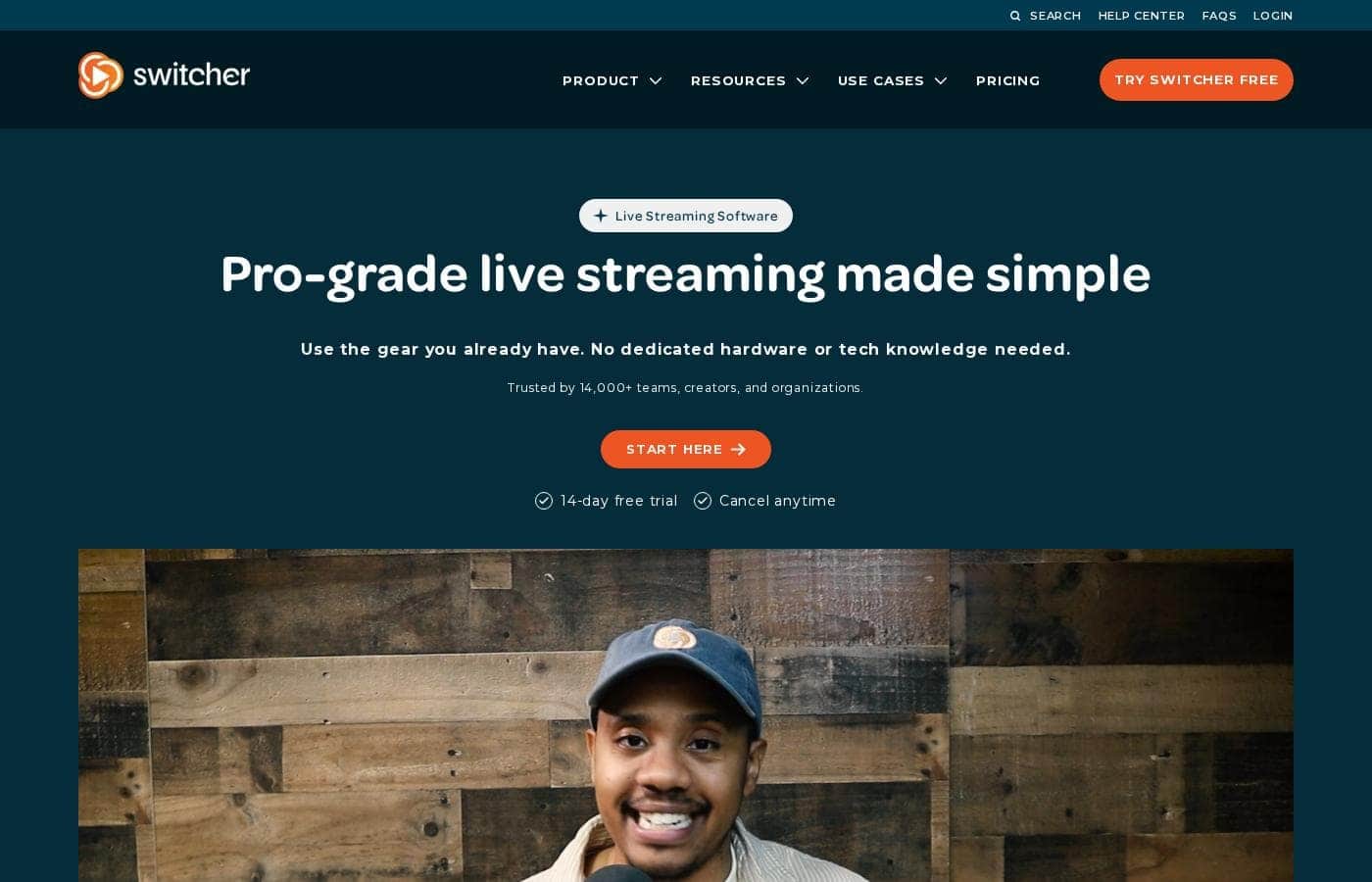
Switcher Studio homepage screenshot

At a glance

Quick overview for Switcher Studio: rating, pricing summary, key features, and highlights.

Ciroapp review

4.5
Professional multi-camera streaming without the high cost.

We find Switcher Studio highly effective for creating professional, multi-angle broadcasts using only standard iOS devices. The software successfully removes technical barriers, providing powerful real-time editing and robust monetization pathways for content creators. Overall, this is an excellent solution for organizations seeking high production value and wide distribution options.

Pros

  • Pro:Turns existing iOS phones and tablets into a powerful multicamera studio.
  • Pro:Allows simultaneous streaming (multistreaming) to many major platforms.
  • Pro:Provides real-time editing, graphics, and branding customization.
  • Pro:Suite plan offers comprehensive monetization tools, including subscriptions and tickets.

Cons

  • Con:Specific monthly and annual pricing rates are not explicitly listed in the provided inputs.
  • Con:Heavily reliant on the iOS operating system for core functionality.
  • Con:The Studio plan limits multicasting to only two platforms at once.
  • Con:The refund policy is restrictive regarding payments for previous periods.
Free trial
Yes — 14 days
Range: Not explicitly statedFree trial, Monthly subscription, Yearly subscription
This section is a summary. Detailed sections about features, use cases, pricing, and reviews follow below.

Switcher Studio review, pricing, features, pros & cons

Are you tired of complex, expensive video setups just to stream live? Getting professional results used to require huge budgets and complicated equipment. Switcher Studio solves this by turning the gear you already own into a powerful multicam studio ✨.

It helps you stream everywhere at once and look polished, affordably.

What is Switcher Studio?

Switcher Studio is a user-friendly, multi-camera live streaming platform designed for accessibility and quality 💡. It’s a tool that takes your iPhones, iPads, and existing cameras and transforms them into a high-quality production suite. This system allows you to switch between up to nine different camera angles instantly and create professional productions with real-time editing.

Everything is simplified so you can focus on your mission, message, and community impact.

Switcher Studio Key Features

📱 Transform Your Devices into a Studio 📱

Switcher Studio allows you to skip complicated and expensive video setups. It turns your existing iPhones, iPads, and other cameras into a powerful multicam production studio. You don't need costly hardware consoles or specialized equipment to start.

Use the intuitive editing features to switch between angles instantly. You can manage and switch between up to nine different camera viewpoints during your live broadcast. This speed and flexibility let you capture every pivotal moment easily, providing a dynamic professional experience.

✨ Stream Across Every Major Platform

Expand your reach instantly by going live everywhere at once. Switcher lets you multistream simultaneously to multiple major social platforms. This capability ensures you connect with your entire community regardless of where they watch.

You can stream directly to Facebook, YouTube, Instagram, TikTok, and X, among others. For effective audience engagement, you can see viewers’ comments from Facebook and YouTube consolidated in one place during your stream.

✨ Custom Graphics Make You Look Pro

High-quality graphics are essential for reinforcing your brand identity. Switcher makes it easy to customize graphic templates and look polished without needing a design background. You can integrate numerous multimedia assets into your stream seamlessly.

  • Slides and PowerPoint presentations (via Switcher Cast)
  • Scoreboards and images
  • Pre-recorded videos and music

You have total creative control over the visual presentation. Tailor the colors, fonts, and the placement of on-screen assets to match your brand perfectly. You can also use advanced layout tools like split screens, lower thirds, and picture-in-picture during your live broadcast.

✨ Build Your Branded Content Hub

Take full control of your content distribution and viewership experience. Switcher allows you to embed live streams and videos effortlessly on your own website. This creates a true hub for your community.

When you host content on a branded watch page, you eliminate external distractions. You guarantee a zero-ad environment and ensure there are no unwanted ‘related video’ recommendations below your content. You can even customize video player colors and organize content into Netflix-style playlists or catalogs.

💰 Robust Monetization Tools 💰

Turn engagement into revenue using built-in monetization systems. Switcher provides tools to fuel your community’s growth and supports several immediate earning methods. Collecting money is simple and happens directly through integrated platforms.

Collect donations effortlessly via established platforms like PayPal, Givelify, and Tithe.ly. You can also sell subscriptions, live event tickets, and access to pay-to-view videos and content playlists. Switcher offers low fees, ensuring you keep most of what you earn since the platform doesn't take a percentage of your revenue.

✨ Intuitive Real-Time Production

The simplified workflow empowers your entire team to run professional streams. The platform is intuitive and quick, making it user-friendly even for volunteers or staff with minimal technical experience. You gain access to pro-grade tools that deliver high-quality video.

Throughout the stream, you can edit videos and streams dynamically in real-time. You can quickly add sound effects or music to enhance the atmosphere. The social media clip creator also streamlines turning your long-form live content into short, shareable clips effortlessly.

Use Cases

⛪ Fueling House of Worship Growth

Many churches need professional online broadcasts but have limited budgets and rely on volunteers. Switcher solves this by turning their existing iPhones and iPads into powerful, multi-angle cameras. Volunteers find the interface intuitive, quickly learning how to switch feeds and insert essential graphics or prayer requests in real-time.

This simple workflow helps staff focus on their message instead of complex production gear. Using the platform’s integrated tools, churches can also effortlessly accept donations through services like PayPal or Givelify, helping sustain church expenses and outreach efforts.

🏈 Producing Dynamic Sports Broadcasts

To capture fast-paced action, you need multiple camera angles and instant switching. Switcher allows you to connect up to nine cameras, recording every pivotal moment of your game. You can switch feeds in real-time, inserting scoreboards, graphics, or play-by-play overlays as needed.

This system is so user-friendly that even students can manage the production, as demonstrated by one 14-year-old running a five-camera varsity baseball game solo. Creating this pro-level content helps sports teams attract more viewers and sponsorship opportunities.

💰 Monetizing Content and Hosting Premium Events

Creators and businesses deserve to earn money from their dedicated audience. The Suite plan allows you to transform your live streams and video library into sources of income. You can easily sell tickets for live events or offer monthly subscriptions to exclusive content.

Switcher ensures you keep most of your revenue by only charging a low fee per transaction. By moving your streaming hub off public platforms and onto your own branded watch-page, you maintain full control over pricing and audience data.

📡 Maximizing Reach via Simultaneous Multistreaming

Problem: You want to ensure an important announcement or product launch reaches your entire audience, regardless of where they watch. Streaming to individual sites is time-consuming and inefficient.

Approach: Use Switcher Studio to stream simultaneously to multiple major platforms. Depending on your plan, you can multicast your high-quality feed to Facebook, YouTube, TikTok, X, and others at the same time.

Outcome: Your message instantly hits viewers wherever they prefer to engage. You can monitor viewer comments from Facebook and YouTube in one place, making your engagement streamlined.

🔗 Creating Your Branded, Ad-Free Content Hub

Relying on public streaming sites means dealing with competitor ads and unwanted video recommendations. Using Switcher, you can embed your live streams and videos directly onto your website or a custom branded watch-page.

This process is quick and simple, ensuring you skip the middleman and create a true hub for your community. You gain complete control over the viewing experience, including customizing the video player colors and creating playlists or 'Netflix-style' catalogs for library visitors.

🎙️ Quickly Handling Multi-Speaker Interviews or Shows

When hosting an interview or discussion, maintaining a polished look requires seamless transitions between speakers. Switcher allows you to use multiple cameras—say, an angle for the host and an angle for the guest—and switch them instantly.

During the broadcast, you can dynamically communicate information using lower-thirds, graphics, or split-screen layouts. This level of real-time editing ensures high image quality and a professional appearance without needing specialized video production skills.

Pricing Overview for Switcher Studio

Pricing range
Not explicitly stated
Pricing types
Free trial, Monthly subscription, Yearly subscription

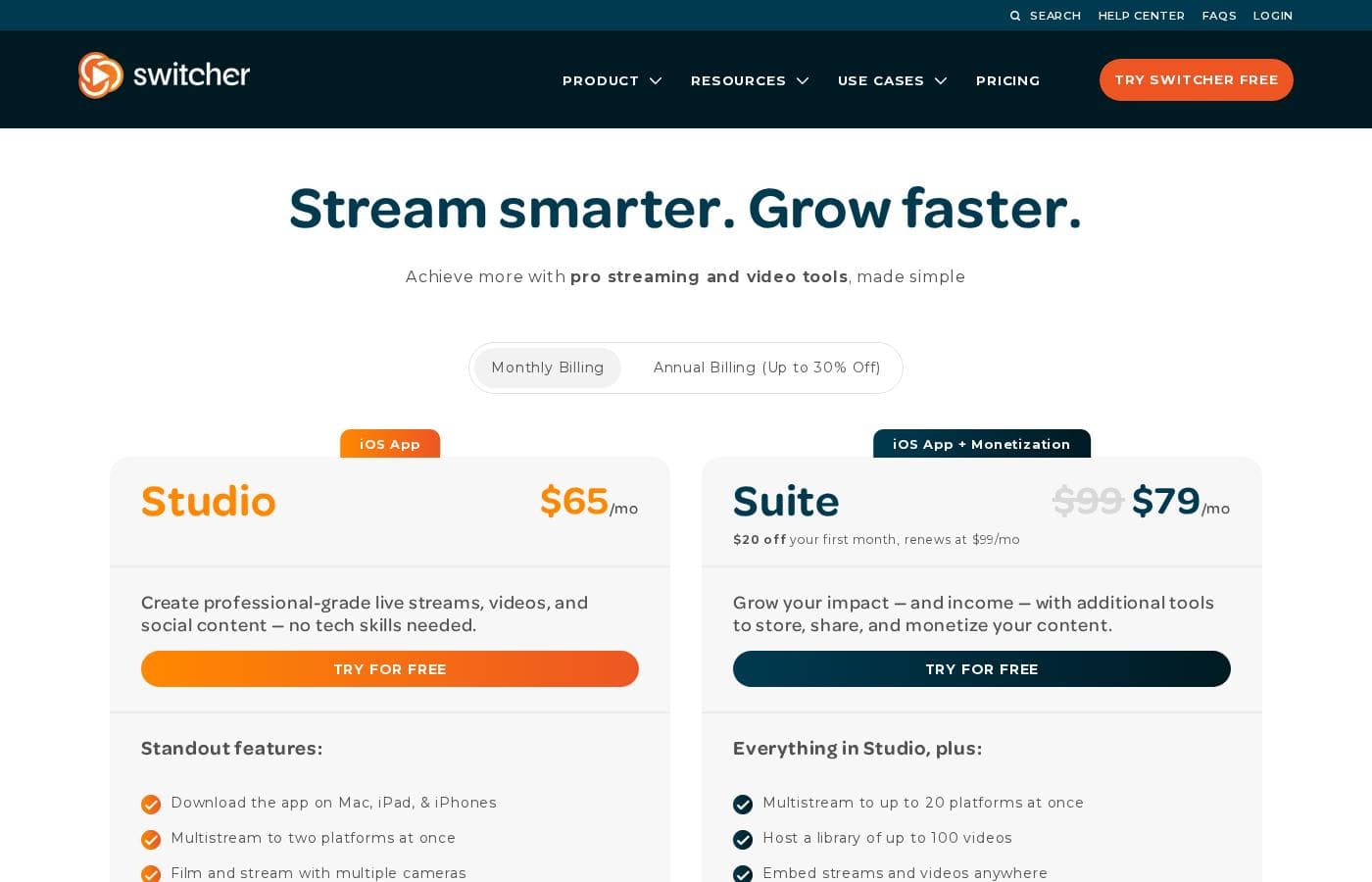
Switcher Studio offers two main tiers, Studio (iOS App) and Suite (iOS App + Monetization), designed for professional mobile live streaming. While specific prices are not shown, potential savings of up to 30% are available if you choose annual billing.

Plans & Pricing

iOS App (Studio)

MonthlyNot explicitly stated
YearlyNot explicitly stated (Up to 30% Off)
Multistream to 2 destinations; 250 assets in Switcher Cloud storage; Host 10 videos
  • Create professional-grade live streams and videos
  • Multistream to two platforms at once
  • Film and stream with multiple cameras
  • Edit videos and streams in real-time
  • Brand videos and streams
  • Customize graphic templates
  • Create social media clips effortlessly
  • Improve with video analytics
  • + 2 more features

iOS App + Monetization (Suite)

MonthlyNot explicitly stated
YearlyNot explicitly stated (Up to 30% Off)
Multistream to 20 destinations; 1,000 assets in Switcher Cloud storage; Host up to 100 videos
  • Everything in Studio, plus:
  • Multistream to up to 20 platforms at once
  • Host a library of up to 100 videos
  • Embed streams and videos anywhere
  • Create web pages for your content
  • Customize video players
  • Sell tickets to live streams
  • Sell pay-to-watch content
  • + 1 more features

Switcher Studio costs are Not explicitly stated per Not explicitly stated with 2 plans: iOS App (Studio) and iOS App + Monetization (Suite).

Below, you'll find a clear breakdown of the two powerful plans available for video creation and live streaming.

iOS App (Studio)

Price: Not explicitly stated Websites Supported: Not explicitly stated Best For: Live streaming and social content creators Refund Policy: Payments for a previous period are nonrefundable; cancellations must happen before the billing cycle ends. Other Features:

  • Multistream to two platforms at once
  • Film and stream with multiple cameras
  • Edit videos and streams in real-time
  • Customize graphic templates
  • Get hands-on expert support

This plan is perfect for creators who want professional-grade live streams and social content without needing technical skills. It provides all the core tools necessary for production, branding, analytics, and accepting audience donations.

iOS App + Monetization (Suite)

Price: Not explicitly stated Websites Supported: Not explicitly stated Best For: Creators focused on growing revenue and content libraries Refund Policy: Payments for a previous period are nonrefundable; cancellations must happen before the billing cycle ends. Other Features:

  • Multistream to up to 20 platforms at once
  • Host a library of up to 100 videos
  • Embed streams and videos anywhere
  • Sell tickets to live streams and pay-to-watch content
  • Sell subscriptions

The Suite plan is designed for those ready to turn their content into a significant source of income. 💰 It includes all Studio features plus extensive monetization tools, large video hosting capacities, and advanced content distribution options, like creating custom web pages for content.

Ready to get started? Switcher offers a free 14-day trial for either plan, letting you test all the features risk-free. You can cancel your subscription at any time, but remember that previous payments are nonrefundable.

User Reviews

The available external review data reveals the presence of Switcher Studio listings on major review sites, but detailed user sentiment regarding recurring themes like support responsiveness or long-term reliability is not explicitly provided. However, the product design strongly suggests high user satisfaction focused on ease of use and professional results.

Switcher Studio excels at simplifying complex multi-camera setups, leveraging existing iOS devices to make high-quality live streaming accessible and affordable. This feature set likely drives positive feedback regarding affordability and setup speed.

Users benefit from robust integration features, allowing simultaneous streaming to multiple platforms (a powerful reach tool). For those on the Suite plan, advanced monetization options, including selling subscriptions and tickets, add significant value.

While specific user commentary on customer support turnaround times is absent, the product’s clear commitment to accessible professionalism establishes a strong value proposition for growing content creators and businesses 🌟. The platform makes high production value attainable without a steep learning curve or excessive investment.

What users say elsewhere

Sarah K.
· Capterra
5.0 / 5

Switcher Studio completely changed how we handle our educational broadcasts. It provides professional visual quality without needing complex equipment. Setup was incredibly fast, and the real-time editing is simple to manage.

Michael B.
· Capterra
4.0 / 5

The monetization features in the Suite plan are exceptional for our business model. Selling tickets to exclusive live content has become straightforward and much more profitable. We appreciate the ability to host a large video library too.

No reviews yet.

Write a Review

Write a Review for Switcher Studio
0/100 characters
0/2000 characters

Why use Switcher Studio?

Why should you choose Switcher Studio for your next live broadcast? This system successfully marries the affordability of smartphone cameras with the power of multicamera streaming. You don't need extensive technical background to create visually stunning and engaging content that significantly expands your reach.

  • Affordable Professionalism: Use the smartphones and tablets you already possess to capture every moment. Switcher lets you skip expensive consoles and cameras, leveraging the gear you already have.
  • Maximize Your Reach: Expand your community instantly by streaming simultaneously to multiple major platforms, including Facebook, YouTube, Instagram, TikTok, and X.
  • Brand Control & Customization: Easily customize graphics, add slides, scoreboards, and multimedia assets to reinforce your identity. You can also embed streams on your own branded watch-page, guaranteeing zero ads or unwanted video recommendations.
  • Robust Monetization: Fuel your growth by collecting donations effortlessly through integrated platforms like PayPal or Givelify. You can also sell access to live events and subscriptions, keeping most of the revenue since Switcher only charges a low fee per transaction.
  • Simplified Production Workflow: The platform is intuitive, quick, and simple to use. It empowers volunteers or staff with simplified, pro-grade tools that enable high image quality and dynamic, real-time editing.

Ready to transform your workflow with Switcher Studio?

Switcher Studio Alternatives

Other tools in the Live streaming category

Frequently Asked Questions

How does the monetization structure work? Is there revenue sharing on my sales?

Switcher charges a minimal transaction fee of $0.99 per sale when using monetization features like selling tickets or subscriptions. Critically, Switcher does not take a percentage or share of your hard-earned revenue.

If I cancel my free 14-day trial early, what happens?

If you purchase a subscription during the trial period, your free trial immediately ends, and your paid subscription begins. You can cancel the trial at any time before purchase.

What is the policy for requesting a refund after I’ve been billed?

Payments for a previous subscription period are nonrefundable based on the stated policy. To avoid future charges, you must cancel your subscription at least 24 hours before your next billing cycle.

What is the difference in cloud storage capacity between the two plans?

The Studio plan includes storage for 250 assets in Switcher Cloud. The Suite plan provides significantly more capacity, allowing storage for 1,000 assets.

What secure payment processors does Switcher Studio use for sales and subscriptions?

Switcher uses Stripe for secure payment processing. This handles transactions for tickets and subscriptions, offering you same-day payouts.

Can I use external cameras, or is Switcher limited strictly to iOS devices?

While it leverages iPhones and iPads wirelessly, you can also use wired multicamera capture. This allows connecting HDMI-enabled cameras like DSLRs or GoPros for high-quality broadcasts.

I want to host videos on my own site. How many videos can each plan host?

The Studio plan lets you host up to 10 videos in your library. Upgrading to the Suite plan increases your total capacity to host a library of up to 100 videos.

Does Switcher Studio offer integration with existing video conferencing tools?

Yes, you can level up your video calls by integrating the iOS app with software like Zoom, Microsoft Teams, or Google Meet. Switcher functions as your multicamera webcam source.

Is there a limit to how many remote guests I can include in a stream?

Both the Studio and Suite plans allow you to seamlessly feature up to five remote guests or co-presenters in your live streams or calls.

Who is the Suite plan best suited for compared to the base Studio plan?

The Suite plan is designed for creators focused on growing revenue and libraries. It includes extensive monetization tools like selling subscriptions and high-capacity video hosting.

What level of customer support can I expect with my subscription?

All users get access to a self-serve knowledge base and fast, expert email support. Dedicated one-on-one launch support is also available to help migrate videos and optimize your strategy.

Can I protect my hosted videos with passwords or restrict access?

Yes, if you use the Suite plan, you can secure private content by requiring viewers to enter a password. You also have controls for scheduling and publishing visibility.

The pricing is not listed. Where can I find the exact monthly subscription costs?

The specific monthly and annual pricing rates are not explicitly provided on the official site. You will need to click 'Try for Free' or check the pricing selection within the app or dashboard.

How does Switcher Studio integrate with e-commerce for shoppable streams?

Switcher integrates through its Shopify application, Cartr. This allows you to sell physical and digital products directly within your streams or videos with zero fees on product sales.

Ready to try Switcher Studio? Check out the official site or pricing.