Switcher Studio vs Wave.video
Switcher Studio and Wave.video are competing video platforms, but their core focus differs greatly. Switcher Studio excels at professional live production using multi-camera iOS setups. Wave.video provides an all-in-one suite for editing, hosting, and streaming from a single browser interface.
Best for: Houses of Worship and Non-Profits relying on volunteers, Sports teams demanding professional multi-angle game broadcasts
Best for: Video marketers needing an all-in-one editor, host, and streamer, Individuals or agencies creating high volumes of pre-recorded (VOD) content
Professional multi-camera streaming without the high cost.
We find Switcher Studio highly effective for creating professional, multi-angle broadcasts using only standard iOS devices. The software successfully removes technical barriers, providing powerful real-time editing and robust monetization pathways for content creators. Overall, this is an excellent solution for organizations seeking high production value and wide distribution options.
Pros
- Turns existing iOS phones and tablets into a powerful multicamera studio.
- Allows simultaneous streaming (multistreaming) to many major platforms.
- Provides real-time editing, graphics, and branding customization.
- Suite plan offers comprehensive monetization tools, including subscriptions and tickets.
Cons
- Specific monthly and annual pricing rates are not explicitly listed in the provided inputs.
- Heavily reliant on the iOS operating system for core functionality.
- The Studio plan limits multicasting to only two platforms at once.
- The refund policy is restrictive regarding payments for previous periods.
Comprehensive Toolkit Needs Stability
We found Wave.video offers an ambitious package combining six essential tools for a competitive price. The comprehensive approach to editing, hosting, and streaming simplifies the creator workflow significantly. Overall, this platform is a valuable resource, provided the recent technical stability issues concerning live streaming and general glitchiness are resolved quickly.
Pros
- All-in-one platform integrating six major workflow tools.
- Strong positive feedback regarding community and customer support.
- Development team constantly adds new features and updates.
- Large stock library with over 200 million assets in paid plans.
Cons
- Severe live streaming reliability issues reported (streams getting stuck/delayed).
- Reports of general quality decline and increased glitchiness.
- Frustrating bugs, such as images rotating after publishing, require re-editing.
- Templates are reported to be older, with development focus shifted away from new video templates.
AboutSwitcher Studio
Switcher Studio is a user-friendly, multi-camera live streaming platform designed for accessibility and quality 💡. It’s a tool that takes your iPhones, iPads, and existing cameras and transforms them into a high-quality production suite. This system allows you to switch between up to nine different camera angles instantly and create professional productions with real-time editing. Everything is simplified so you can focus on your mission, message, and community impact.
AboutWave.video
Wave.video is a combined platform designed to simplify your entire video workflow. It brings together six essential tools into a single online space: a Video Editor, Live Streaming Studio, Thumbnail Maker, Video Hosting, Video Recording, and a Stock Library.
Think of it as a comprehensive toolkit for creators. You can manage everything from live broadcasts to securing video hosting, tracking analytics, and editing clips. It's built to be the easiest way to make and record videos today. 💡
Highlights
Feature Comparison
Features Overview
We highlight the main differences and pick a winner for each feature.
Production Style
Switcher Studio provides superb multi-camera control; Wave.video is centered on remote guest streaming.
Switcher Studio focuses on professional, dynamic multi-camera live switching for on-site events. It handles up to nine camera perspectives using iPhones, iPads, and wired DSLRs for production. The workflow is streamlined for real-time editing and graphics insertion by non-experts. Wave.video provides a customizable streaming studio accessible from any web browser. It is optimized for multi-guest remote interviews and broadcasts but lacks Switcher Studio's physical multi-angle switching setup. Switcher Studio provides superior broadcast quality control; Wave.video offers broader platform accessibility and team collaboration. Choose Switcher Studio if you need genuine multi-angle switching for sports or concerts.
Video Editing Suite
Wave.video includes a full video editor; Switcher Studio focuses strictly on live switching.
Switcher Studio is built around real-time stream editing like graphics and overlays during the live event. Its post-production focus is simplifying long streams into short, shareable social media clips. Wave.video offers a full, robust online video editor for trimming, combining, and resizing VOD content. It supports lengthy videos up to two hours long at 60fps for high quality output. Wave.video is the serious tool for pre-recorded content creation; Switcher Studio is optimized for live production throughput. Wave.video also includes automated tools like background removal and text-to-speech for pre-recorded videos.
Stock Assets
Wave.video offers millions of built-in assets; Switcher Studio requires users to provide assets.
Switcher Studio allows integrating user-provided multimedia assets like scoreboards, slides, and logos. The platform does not emphasize a built-in stock library of videos or music. Wave.video gives users instant access to an impressive library of up to 200 million stock videos, images, and audio tracks. This integration significantly speeds up content creation. Wave.video also includes a free dedicated Thumbnail Maker to ensure your videos get crucial clicks. Wave.video minimizes the time marketers spend searching for legal, high-quality assets for their videos.
Monetization Tools
Switcher Studio offers robust event ticketing and subscriptions; Wave.video focuses primarily on hosting limits.
Switcher Studio offers robust, integrated core monetization tools essential for live creators needing revenue. This includes selling live event tickets, subscriptions, and accepting quick donations via PayPal or Givelify. Switcher Studio keeps fees low, charging only $0.99 per sale with no revenue sharing. Wave.video monetizes via hosting and traffic overages and doesn't offer native stream subscription or ticketing functionality. Creators focused on direct revenue from live audiences must choose Switcher Studio's powerful Suite plan. Wave.video's focus is on maximizing reach and host stability, not transactional revenue.
Platform Stability
Switcher Studio users report higher reliability; Wave.video struggles with current stability issues.
Switcher Studio maintains a high user satisfaction rating of 4.5, leveraging reliable iOS hardware for its core function. The simplified workflow contributes to a stable user experience. Wave.video has recently received critical negative reviews citing server instability and glitchy performance. Users reported streams getting stuck and unexpected image rotations during rendering. Wave.video's comprehensive features are currently undermined by reported technical issues, making Switcher Studio the more stable choice overall. Stability is crucial when broadcasting high-stakes, live professional events.
Hosting & Bandwidth
Switcher Studio limits hosting by count; Wave.video limits by volume, with potential overage fees.
Switcher Studio’s top Suite plan hosts up to 100 videos and allows embedding on ad-free watch pages. This capacity suits creators focusing on quality over sheer volume. Wave.video offers significantly higher volume, providing up to 500GB of storage and 500GB of traffic on its Business plan. However, exceeding these Wave.video limits results in additional overage penalties ($0.01 per GB traffic). The choice depends on content: Switcher Studio for a managed library, Wave.video for massive hosting needs, despite potential extra costs. Wave.video also provides video analytics, a feature not specified by Switcher Studio.
Below, you'll find a clear breakdown of the two powerful plans available for video creation and live streaming.
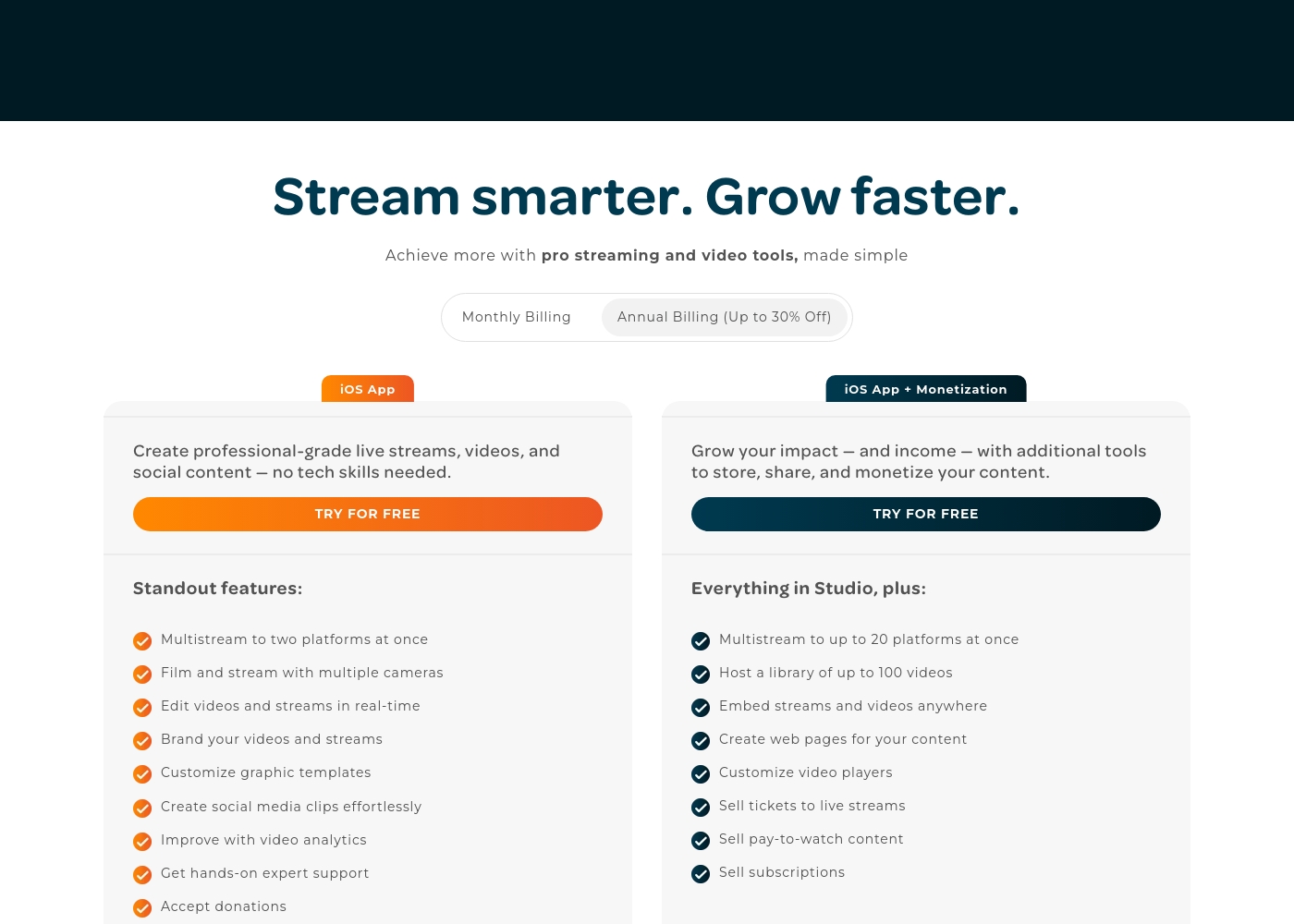
iOS App (Studio)
Best For: Live streaming and social content creators Refund Policy: Payments for a previous period are nonrefundable; cancellations must happen before the billing cycle ends. Other Features:
- Multistream to two platforms at once
- Film and stream with multiple cameras
- Edit videos and streams in real-time
- Customize graphic templates
- Get hands-on expert support
This plan is perfect for creators who want professional-grade live streams and social content without needing technical skills. It provides all the core tools necessary for production, branding, analytics, and accepting audience donations.
- Create professional-grade live streams and videos
- Multistream to two platforms at once
- Film and stream with multiple cameras
- Edit videos and streams in real-time
- Brand videos and streams
- Everything in Studio, plus:
- Multistream to up to 20 platforms at once
- Host a library of up to 100 videos
- Embed streams and videos anywhere
- Create web pages for your content
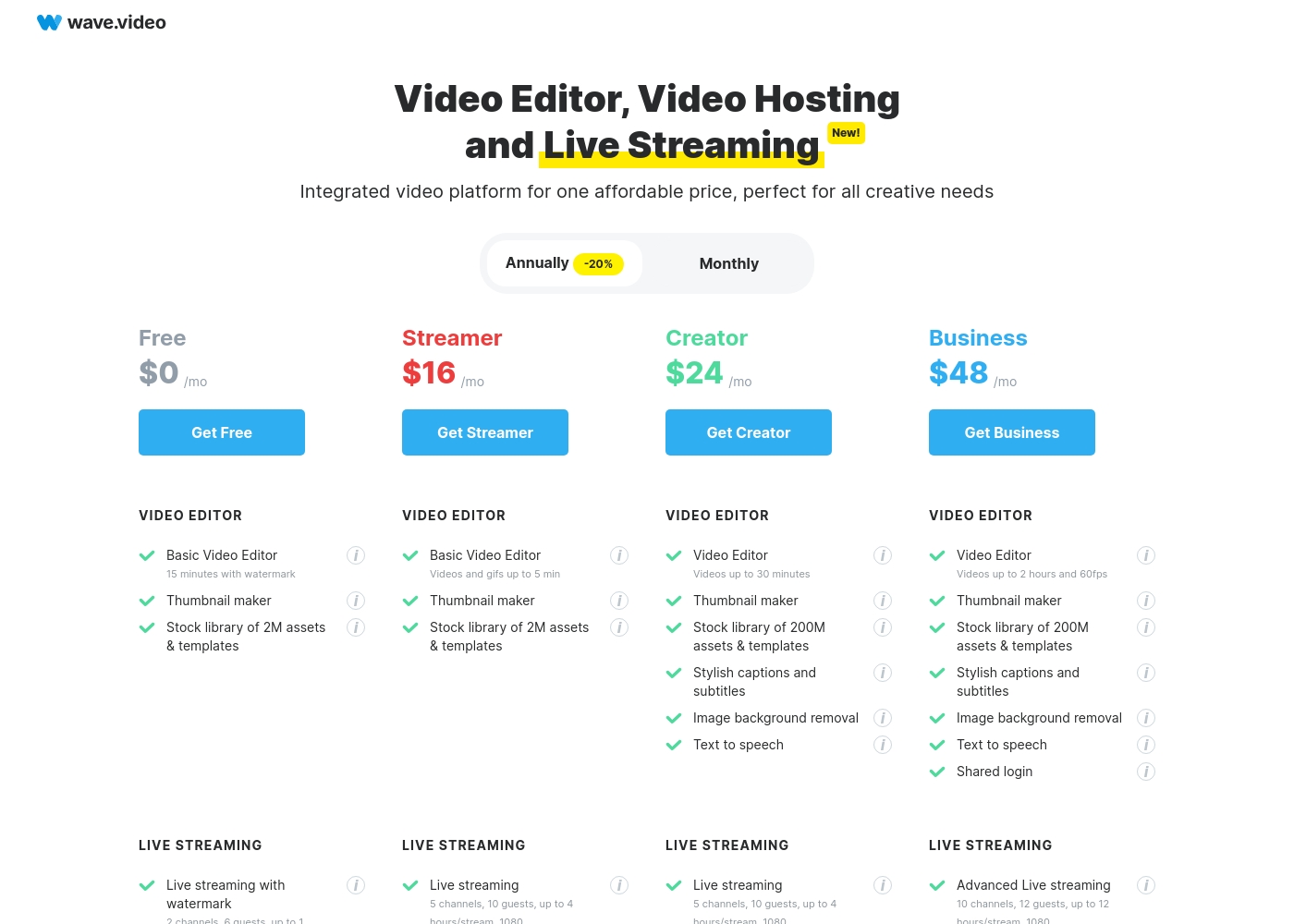
Wave.video costs between $0 and $48 per month (when billed annually) with 4 plans: Free at $0, Streamer at $16, Creator at $24, and Business at $48.
Let's explore which plan best fits your content needs.
Free
Price: $0 /mo Best For: Casual users and testing the basic platform features Other Features:
- Basic Video Editor (15 minutes)
- Thumbnail maker
- Stock library of 2M assets & templates
- Live streaming with watermark (1 hour/stream, 720p)
- Basic Video Editor (15 min)
- Thumbnail maker
- Stock library of 2M assets & templates
- Live streaming with watermark (1 hour/stream, 720)
- Video hosting with watermark (5 embeds, 10Gb storage)
- Basic Video Editor (up to 5 min)
- Stock library of 2M assets & templates
- Live streaming (5 channels, 10 guests, 4 hours/stream, 1080)
- Live streaming scenes and sharing presentations
- Video hosting (20 embeds, 30Gb storage, 150Gb traffic)
- Video Editor (up to 30 min)
- Stock library of 200M assets & templates
- Stylish captions and subtitles
- Image background removal
- Text to speech
- Video Editor (up to 2 hours, 60fps)
- Stock library of 200M assets & templates
- Shared login and Advanced Permissions
- Advanced live streaming (10 channels, 12 guests, 12 hours/stream)
- Advanced video hosting (200 free embeds, 500Gb storage, 500Gb traffic)
Pricing Notes
- Wave.video provides transparent pricing starting at $16/month for paid plans (annual commitment).
- Switcher Studio's exact monthly costs are undisclosed but offers up to 30% off for annual commitment.
- Wave.video enforces usage-based overages (traffic, embeds, captions) on paid plans, adding potential hidden costs.
- Switcher Studio focuses its advanced monetization through low transaction fees ($0.99 per sale) rather than hosting limits.
Pricing Head-to-Head
User Reviews
The available external review data reveals the presence of Switcher Studio listings on major review sites, but detailed user sentiment regarding recurring themes like support responsiveness or long-term reliability is not explicitly provided. However, the product design strongly suggests high user satisfaction focused on ease of use and professional results.
Switcher Studio excels at simplifying complex multi-camera setups, leveraging existing iOS devices to make high-quality live streaming accessible and affordable. This feature set likely drives positive feedback regarding affordability and setup speed.
Switcher Studio completely changed how we handle our educational broadcasts. It provides professional visual quality without needing complex equipment. Setup was incredibly fast, and the real-time editing is simple to manage.
Wave.video reviews show a mixed reception, primarily balancing strong community praise against recent technical reliability concerns. Users frequently commend the dedicated support and the friendly Facebook community, noting that the development team consistently adds new features and clearly values its customers. However, recent feedback highlights significant issues regarding the platform's reliability, particularly concerning live streaming functionality. One user reported severe server problems causing a one-hour stream to take 3.5 hours to complete because the stream kept getting stuck badly. Other long-term users noted a general decline in quality, citing glitchy behavior, older templates, and frustrating bugs like rotating images in finished videos. While the platform is acknowledged as an amazing source of features, users suggest the product needs stabilization, as current glitches and performance issues are making high-quality creation difficult. Despite these flaws, many recognized that the comprehensive platform offers one of the most affordable solutions for marketers needing an all-in-one suite. 👍
The support here is great, and the Facebook community is awesome. You can clearly see they constantly add new features and value their customers. I’ve used this tool for years and never been disappointed.
Our Verdict
The choice between Switcher Studio and Wave.video fundamentally depends on your production goals. If multi-camera professional live mixing is the priority, Switcher Studio is the clear winner here. For those needing an all-in-one suite covering editing and hosting, Wave.video provides superior breadth. You must closely examine your required device compatibility. Switcher Studio's superpower is making broadcast-grade live video easy and affordable, using iPhones and iPads. It enables dynamic multi-angle switching between up to nine cameras instantly. Crucially, Switcher Studio offers integrated monetization by letting you sell tickets or subscriptions with only a small transaction fee. Wave.video focuses on efficiency, merging a full editor, huge stock library, and hosting in one accessible browser tool. You gain instant access to 200 million stock assets and critical features like video analytics and auto-captions. However, recent user reports highlight concerns regarding Wave.video’s stability and glitchy streaming performance. The deciding factor is device and focus. If you require iOS-based multi-camera production and robust event sales, choose Switcher Studio. If you need a stable, browser-based editor that provides stock footage and secure hosting for VOD, Wave.video is the better platform. Final recommendation: Pick Switcher Studio for unbeatable live event production and revenue generation. Choose Wave.video if editing, hosting volume, and massive stock assets are more important than real-time camera switching.
Frequently Asked Questions
Which tool offers better direct monetization for live events?
Switcher Studio is designed for monetization, offering integrated tools to sell tickets and subscriptions. It only charges a low $0.99 transaction fee per sale, keeping your revenue high. Wave.video does not offer native in-stream monetization features like ticketing or subscriptions.
Can I use Switcher Studio if I don't have an iPhone or iPad?
No, Switcher Studio is heavily reliant on the Apple iOS ecosystem for its core multi-camera functions. You must use iPhones or iPads to leverage the primary production features. Wave.video is entirely browser-based and works on any operating system.
Which platform is better for creating short videos and social media content?
Wave.video is better suited, as it includes a full video editor for trimming and resizing content. It also offers a massive stock library (200M assets) and a dedicated Thumbnail Maker. Switcher Studio’s editing is focused on creating clips from already-recorded live streams.
Is Wave.video worth the cost, or should I start with Switcher Studio?
If you need flexibility and editing tools, Wave.video is a good value with transparent prices starting at $16/month. If professional, multi-camera live switching is essential, Switcher Studio is worth the investment. Switcher Studio offers a 14-day free trial.
Does Wave.video offer a traditional free trial for paid plans?
No, Wave.video does not offer a specific free trial period for its paid plans. However, you can use the permanent Free plan to test essential editing and streaming functionalities. Switcher Studio offers a risk-free 14-day trial of its full features.
Which tool offers maximum multistreaming reach?
Switcher Studio offers higher capacity, enabling simultaneous streaming to up to 20 platforms on its Suite plan. Wave.video's top Business plan limits multistreaming to a maximum of 10 channels concurrently.
Ready to Choose?
Both tools have their strengths. Choose based on your specific needs.