StreamYard vs Switcher Studio
Both StreamYard and Switcher Studio deliver excellent professional results for live video. StreamYard excels as a stable, browser-based remote interview studio solution. Switcher Studio converts your existing iOS devices into a powerful multicamera production suite. They target different workflows despite serving the same professional streaming goals.
Best for: Creators who want fast browser-based live streaming, Podcasters recording remote guest interviews
Best for: Sports teams needing dynamic, multiple camera angles, Churches and non-profits utilizing existing iPhone/iPad hardware
Fast, guest-friendly streaming with plan limits to check
StreamYard is excellent for simple browser-based live shows and remote interviews, but buyers should check watermark, multistreaming, storage, trial, and refund limits before upgrading.
Pros
- Very easy browser-based setup for live streams and remote interviews.
- Free plan lets creators test the workflow before subscribing.
- Paid plans remove branding and add multistreaming, custom overlays, RTMP, AI clips, and better recordings.
- Advanced plan adds useful event features such as webinars, custom fonts, and transcript downloads.
Cons
- Free plan keeps StreamYard branding and has tight recording/storage limits.
- Individual plan pricing may be high for casual creators after recent price changes.
- Business or team needs may require higher plans than the public individual tiers.
- Refund eligibility depends on policy details rather than automatic cancellation.
Professional multi-camera streaming without the high cost.
We find Switcher Studio highly effective for creating professional, multi-angle broadcasts using only standard iOS devices. The software successfully removes technical barriers, providing powerful real-time editing and robust monetization pathways for content creators. Overall, this is an excellent solution for organizations seeking high production value and wide distribution options.
Pros
- Turns existing iOS phones and tablets into a powerful multicamera studio.
- Allows simultaneous streaming (multistreaming) to many major platforms.
- Provides real-time editing, graphics, and branding customization.
- Suite plan offers comprehensive monetization tools, including subscriptions and tickets.
Cons
- Specific monthly and annual pricing rates are not explicitly listed in the provided inputs.
- Heavily reliant on the iOS operating system for core functionality.
- The Studio plan limits multicasting to only two platforms at once.
- The refund policy is restrictive regarding payments for previous periods.
AboutStreamYard
StreamYard is a web-based live streaming and recording studio. It helps creators broadcast to platforms such as YouTube and Facebook, bring guests on screen, add overlays and branding, record sessions, use custom RTMP on paid plans, and manage webinars or higher-production events on more advanced tiers.
AboutSwitcher Studio
Switcher Studio is a user-friendly, multi-camera live streaming platform designed for accessibility and quality 💡. It’s a tool that takes your iPhones, iPads, and existing cameras and transforms them into a high-quality production suite. This system allows you to switch between up to nine different camera angles instantly and create professional productions with real-time editing. Everything is simplified so you can focus on your mission, message, and community impact.
Highlights
Feature Comparison
Features Overview
We highlight the main differences and pick a winner for each feature.
Production Environment
StreamYard is purely browser-based; Switcher Studio is a dedicated iOS mobile app.
StreamYard operates entirely within your web browser for ease. This simplifies access and lowers the technical bar for participants. Switcher Studio uses an iOS app, turning your iPhones and iPads into video sources. The dedicated app provides dynamic, powerful mobile production control. StreamYard offers universal access, while Switcher Studio thrives in a hardware-specific environment. Choose StreamYard if you prioritize guest simplicity and universal browser access.
Multi-Camera Control
Switcher Studio handles up to nine cameras; StreamYard uses standard browser inputs.
Switcher Studio excels at complex, dynamic multi-camera production. You can seamlessly switch between up to nine connected iPhones or iPads instantly. StreamYard is optimized for basic streams with a smaller number of browser inputs. It prioritizes guest stability over complex angle switching. Switcher Studio delivers a professional control room feel right on your iPad console.
Video Quality Assurance
StreamYard guarantees quality via local recording; Switcher Studio prioritizes real-time editing.
StreamYard uses local recording for crisp audio/video, even with bad internet connections. This feature ensures studio quality recordings every time. Switcher Studio relies on highly capable iOS cameras for delivery. It depends more heavily on stable connectivity for the live broadcast quality. StreamYard Advanced plan offers 4K local recordings for professionals.
Remote Guest Access
StreamYard guests join instantly; Switcher Studio requires external integrations.
Inviting remote guests to StreamYard is effortless and fast. They just click a link; zero software downloads are needed. Switcher Studio integrates with tools like Zoom or Teams for remote guests. This adds a layer of necessary complexity to the guest experience. StreamYard’s approach is superior for speed and ease of use.
Direct Monetization
Switcher Studio sells tickets/subscriptions; StreamYard focuses on broadcast distribution.
Switcher Studio’s Suite plan offers robust earning potential for content creators. You can sell event tickets, subscriptions, and access to pay-to-view content. StreamYard focuses primarily on wide stream distribution using its multistreaming capability. Switcher Studio uses integrated financial tools and keeps nearly all your revenue. This makes Switcher Studio ideal for entrepreneurs.
Multistreaming Power
Switcher Studio streams to 20 platforms; StreamYard streams up to eight destinations.
Switcher Studio (Suite plan) allows concurrent streaming to 20 platforms maximum. StreamYard (Advanced plan) provides excellent multistreaming to eight destinations. Both tools maximize audience reach across many social platforms simultaneously. Switcher Studio provides significantly wider distribution capacity for creators aiming for massive scale.
Billing Transparency & Risk
Neither lists prices; StreamYard faces explicit negative billing feedback.
Neither StreamYard nor Switcher Studio publishes explicit subscription pricing publicly. Users must start a trial to find the actual costs. StreamYard reviews cite numerous reports of unauthorized, continued billing post-cancellation. Switcher Studio reviews do not share the same widespread negative billing complaints. Switcher Studio presents a much lower risk regarding administrative disputes.
Hardware Utilization
Switcher Studio uses iOS devices; StreamYard uses standard laptop cameras.
Switcher Studio leverages existing iPhones and iPads as high-quality camera sources. This saves significant money on buying professional dedicated video equipment. StreamYard relies on the camera and microphone attached to your computer or laptop. The Switcher Studio workflow is perfect for maximizing investment in mobile hardware.
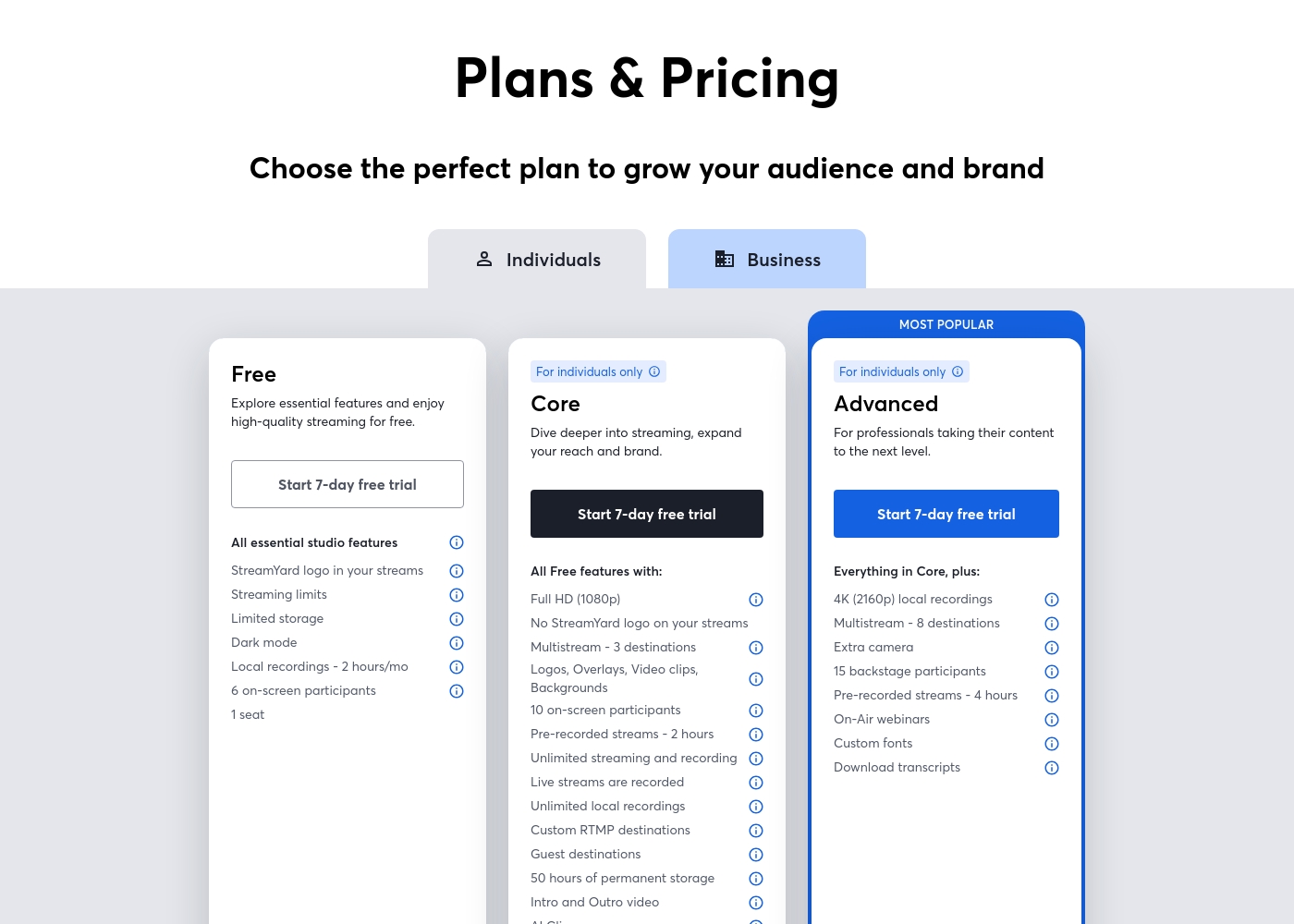
StreamYard has a free plan and paid self-serve plans for individuals. The pricing page currently shows Core at $44.99/month or $35.99/month billed annually, and Advanced at $88.99/month or $68.99/month billed annually. The page also says subscription prices can vary by promotion, seasonal deals, renewal terms, and custom offers. Business plans are separate.
- StreamYard logo in streams
- 2 hours of local recordings per month
- 6 on-screen participants
- 1 seat
- Full HD 1080p
- No StreamYard logo
- Multistream to 3 destinations
- Unlimited streaming and recording
- 50 hours permanent storage
- 4K local recordings
- Multistream to 8 destinations
- On-Air webinars
- Custom fonts
- Download transcripts
Below, you'll find a clear breakdown of the two powerful plans available for video creation and live streaming.
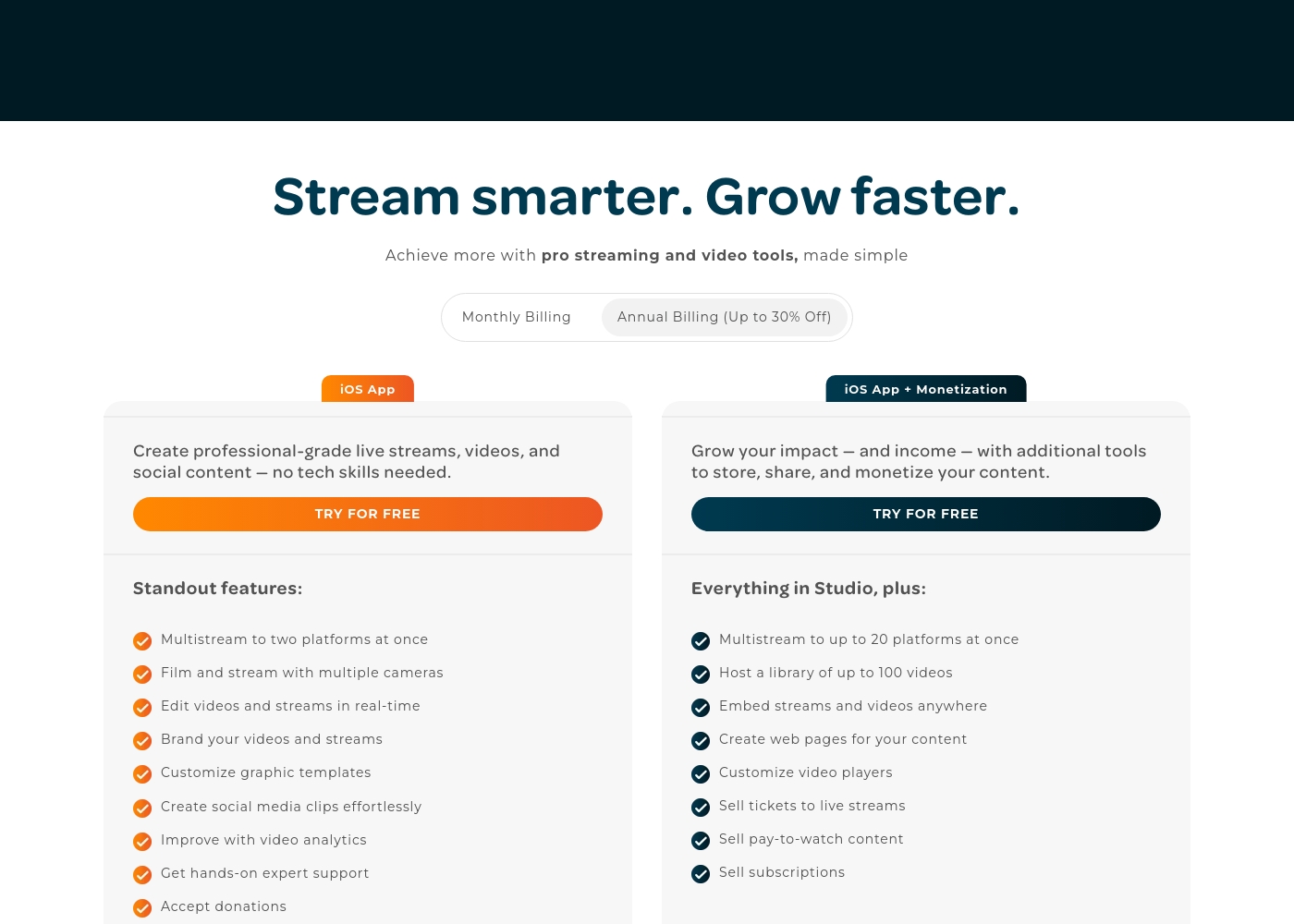
iOS App (Studio)
Best For: Live streaming and social content creators Refund Policy: Payments for a previous period are nonrefundable; cancellations must happen before the billing cycle ends. Other Features:
- Multistream to two platforms at once
- Film and stream with multiple cameras
- Edit videos and streams in real-time
- Customize graphic templates
- Get hands-on expert support
This plan is perfect for creators who want professional-grade live streams and social content without needing technical skills. It provides all the core tools necessary for production, branding, analytics, and accepting audience donations.
- Create professional-grade live streams and videos
- Multistream to two platforms at once
- Film and stream with multiple cameras
- Edit videos and streams in real-time
- Brand videos and streams
- Everything in Studio, plus:
- Multistream to up to 20 platforms at once
- Host a library of up to 100 videos
- Embed streams and videos anywhere
- Create web pages for your content
Pricing Notes
- Exact subscription costs for both StreamYard and Switcher Studio are not publicly listed on their official sites.
- StreamYard offers a permanent Free plan, while Switcher Studio relies only on a 14-day free trial.
- StreamYard is known for its highly problematic billing and cancellation processes, according to external user reviews.
- Switcher Studio offers up to 30% savings for users electing annual billing over monthly payments.
- StreamYard provides a 7-day money-back guarantee on the first charge, which is restrictive.
Pricing Head-to-Head
User Reviews
StreamYard is a strong choice when ease of production matters more than deep studio customization. The main decision is whether the paid plan unlocks enough branding, multistreaming, and recording value for the show schedule.
I highly recommend StreamYard compared to other systems. It works brilliantly for building our podcasting audience and is the best software for a team using the system. The platform is constantly developing and adding new features.
The available external review data reveals the presence of Switcher Studio listings on major review sites, but detailed user sentiment regarding recurring themes like support responsiveness or long-term reliability is not explicitly provided. However, the product design strongly suggests high user satisfaction focused on ease of use and professional results.
Switcher Studio excels at simplifying complex multi-camera setups, leveraging existing iOS devices to make high-quality live streaming accessible and affordable. This feature set likely drives positive feedback regarding affordability and setup speed.
Switcher Studio completely changed how we handle our educational broadcasts. It provides professional visual quality without needing complex equipment. Setup was incredibly fast, and the real-time editing is simple to manage.
Our Verdict
Choosing between StreamYard and Switcher Studio means choosing a primary production workflow. StreamYard is your reliable, browser-based virtual studio, focusing on safety and remote access. Switcher Studio is your dynamic control room, utilizing iOS devices for powerful multi-camera production. StreamYard’s major superpower is technical assurance and stability. Its local recording feature guarantees your remote guests' video and audio quality will be flawless. If you run critical remote interviews or prioritize system stability above all else, StreamYard provides peace of mind. StreamYard is ideal for agencies needing stable, high-quality output every single time, provided you can navigate their billing issues. Switcher Studio dominates specialized production and monetization capabilities. Use Switcher Studio if you need real-time switching between up to nine iPhones or iPads. The Switcher Studio Suite plan lets you sell subscriptions and tickets easily. This transforms your live streams into a direct revenue engine, which StreamYard does not offer. Your deciding factor should be your required complexity and revenue strategy. If you rely on multiple camera angles or need built-in tools to sell content, Switcher Studio is necessary. If you only need two or three remote browser guests and ultra-stability is non-negotiable, you should pick StreamYard. Final recommendation: If you are a high-stakes host or podcast creator, choose StreamYard for its reliability and quality guarantee. If you are a sports broadcaster, church, or entrepreneur focused on high dynamism and direct monetization, Switcher Studio is the superior investment.
Frequently Asked Questions
Which is better for multi-camera production: StreamYard or Switcher Studio?
Switcher Studio is significantly better for multi-camera use. It is built to connect up to nine iOS devices like iPhones and iPads wirelessly. StreamYard relies on standard browser inputs and is optimized for simpler, less complex productions.
Which tool saves video quality when a guest's internet is weak?
StreamYard is the winner here because it uses specific local recording technology. This technology saves separate high-quality files regardless of the live internet speed. Switcher Studio does not explicitly offer this quality guarantee feature.
Does StreamYard offer built-in monetization tools like Switcher Studio?
No, StreamYard focuses on broadcast stability and distribution. Switcher Studio’s Suite plan offers robust monetization features. This includes selling tickets to streams, subscriptions, and protected pay-to-view content, ensuring creators can earn.
Is the pricing for StreamYard or Switcher Studio more transparent?
Neither StreamYard nor Switcher Studio publishes explicit pricing publicly. You must start a trial or contact sales for subscription costs. However, StreamYard carries a heavy risk due to widespread reports of difficult cancellations and unauthorized charges.
Can I use Switcher Studio if I don't have iOS devices?
Switcher Studio is heavily reliant on the iOS operating system for its core functionality. While you can use some wired inputs, StreamYard’s cross-platform browser support is better if you only use Windows or Android devices.
Which platform offers the widest multistreaming reach?
Switcher Studio offers a much wider reach with the ability to stream to 20 destinations concurrently on its Suite plan. StreamYard offers powerful multistreaming but is limited to eight destinations on its top Advanced plan.
Ready to Choose?
Both tools have their strengths. Choose based on your specific needs.