Microsoft Azure

Microsoft Azure review

Microsoft's cloud platform for apps, data, and AI — 200+ products with a 30-day free trial.

Microsoft Azure costs from $14.60/mo · 7 plans

By Ciroapp Editorial Team · Updated Sep 17, 2026

Commission may apply at no extra cost

Microsoft Azure homepage screenshot

At a glance

Quick overview for Microsoft Azure: rating, pricing summary, key features, and highlights.
Vendor page checked Oct 12, 2026

Ciroapp score

4.2/ 5

Microsoft Azure puts 200+ products — compute, databases, AI, and hybrid tools — under one roof, with per-second billing from $14.60 to $5,215.12 per month and a 30-day free trial that includes $200 in credit. Overall, it's a strong, feature-rich platform for teams that want enterprise scale from one vendor, though pay-per-use costs demand active monitoring.

Pros

  • Pros:Breadth under one vendor — 200+ products spanning compute, managed databases (Cosmos DB, Azure SQL, PostgreSQL), analytics, AI, and security, so you avoid stitching together multiple cloud vendors and their separate contracts.
  • Pros:Pay-per-second billing with a wide instance ladder — Cloud Services pricing starts at $14.60/month for an A0 and scales to $5,215.12/month for the memory-optimized E64 v3, so you can start tiny and resize as workloads grow without changing providers.
  • Pros:Hybrid and migration tooling built in — Azure Arc and Azure Local connect on-premises, edge, and other clouds, while Azure Migrate supports staged moves of Windows Server, SQL Server, and SAP workloads with few to no code changes.

Cons

  • Cons:Pay-per-use billing across many services means costs need active management — a 'Stopped Allocated' Cloud Services instance still bills for its cores, and egress bandwidth, Public IPs, and Key Vault certificate storage are billed separately, so bills can surprise teams that don't monitor usage.
  • Cons:The 200+ product catalog can overwhelm smaller teams and beginners; setup effort grows quickly with project complexity, and some instance families (e.g., H-Series, G-Series) show no pricing in certain regions, requiring extra verification before committing.
  • Cons:No published money-back guarantee is visible on the site, and refund terms aren't stated, so buyers should verify trial limits and cancellation terms before signing up.
Best for
  • Enterprises migrating Windows Server, SQL Server, or SAP workloads to the cloud
  • Teams building generative AI apps and agents with Microsoft Foundry
  • Organizations managing hybrid or multicloud setups with Azure Arc
Free trial
Yes — 30 days
This section is a summary. Detailed sections about features, use cases, pricing, and reviews follow below.

What is Microsoft Azure?

Running apps and AI workloads across scattered tools gets expensive and messy fast. Microsoft Azure pulls compute, databases, AI, and hybrid infrastructure into one platform with 200+ products. You can pay as you go, try it free for 30 days, and estimate costs with a public pricing calculator before committing.

Microsoft Azure is a cloud computing platform from Microsoft. It hosts virtual machines, containers, managed databases, analytics, and AI services. Microsoft Foundry handles generative AI apps and agents, while Azure Arc and Azure Local connect on-premises and multicloud setups.

It's aimed at IT teams, developers, data professionals, startups, and enterprises that need scalable infrastructure. Microsoft claims more global regions than any other cloud provider, which matters if you serve users worldwide.

Should you choose Microsoft Azure?

Quick buyer guidance before you compare plans or click through.

Choose it if

  • Companies already using Microsoft tools like GitHub Copilot and Visual Studio Code
  • Teams that need many managed database options, from Cosmos DB to PostgreSQL
  • Businesses wanting flexible purchasing: pay-as-you-go, reservations, or savings plans
  • Organizations serving users across many regions and needing broad global coverage
  • IT teams planning a staged migration using Azure Migrate and its migration center

Skip it if

  • Teams wanting one flat monthly price — pay-per-use billing across many services means costs need active management
  • Beginners who may find 200+ products overwhelming without time set aside for Microsoft Learn training
  • Buyers who expect a published money-back guarantee — refund terms aren't visible on the site, so check trial limits first
  • Small projects that only need basic hosting, where a simpler provider may cost less effort
  • Organizations that want to avoid the Microsoft ecosystem entirely and prefer vendor-neutral platforms

Next steps before buying

  1. 1Open the Azure pricing calculator and estimate monthly costs for your specific workloads before signing up
  2. 2Create the free account to try Azure for up to 30 days and review which services are free
  3. 3Confirm the exact products you need — databases, Kubernetes, AI models — and check each one's pricing page
  4. 4Sample a Microsoft Learn module to gauge the learning curve for your team
  5. 5Compare Azure against other cloud providers on the specific services, regions, and support you actually need

Ease of use

Getting started looks straightforward: a free 30-day account, free services, quickstart templates, and self-paced Microsoft Learn modules lower the entry barrier. Microsoft also offers an Ask Microsoft assistant, documentation, and sales specialists. That said, the platform's sheer breadth of 200+ products suggests setup effort grows quickly with project complexity, so plan time for learning.

Microsoft Azure Key Features

✨ Everything under one roof

Azure puts 200+ cloud products in one place. You get compute, databases, analytics, AI, and security without stitching together separate vendors. That means fewer contracts to manage and tools that already work together.

If your stack keeps growing, it's easier to build on a single platform.

✨ Build AI apps and agents with Microsoft Foundry

Microsoft Foundry is Azure's home for generative AI. You can find models, build and evaluate apps, and deploy custom agents. Azure OpenAI models are available, and Foundry Agent Service helps you design, deploy, and scale agents securely.

Reach for it when AI moves from experiment to production.

✨ Compute that fits the job

Pick the compute style that matches your workload:

  • Virtual machines for full control, deployed in seconds
  • Managed Kubernetes with AKS for scaling containerized apps
  • Azure Functions for serverless code that triggers on demand

✨ Hybrid and multicloud without the guesswork

Azure Arc and Azure Local connect on-premises servers, edge sites, and other clouds to Azure. You can't always move everything at once, and that's fine. Azure Migrate also supports staged moves, including SQL Server databases with few to no application code changes.

🌍 Global scale, engineered for AI

Microsoft claims more global regions than any other cloud provider, which matters when your users span the globe. Azure's infrastructure runs from datacenters to custom silicon, and Maia 200 adds AI acceleration for faster, more efficient inference. Customers like Levi Strauss & Co.

and the Premier League run real workloads here.

Use Cases

🚚 Migrate legacy workloads at your own pace

IT teams move Windows Server, SQL Server, or SAP workloads using Azure Migrate and the migration center. You stage the move over time — no big-bang shift required. Expected outcome: legacy apps run in the cloud with few to no code changes.

Tip: try the pricing calculator first.

🤖 Build AI apps and agents in one place

Developers build, evaluate, and deploy generative AI apps and custom agents with Microsoft Foundry and Azure OpenAI models. Levi Strauss & Co. built a unified Super Agent this way.

Expected outcome: you go from model choice to deployment on a single platform. > Tip: sample a Microsoft Learn module to gauge the learning curve.

🔗 Manage hybrid and multicloud without guesswork

Organizations that can't move everything at once connect on-premises, edge, and other clouds using Azure Arc and Azure Local. Azure Monitor helps you keep an eye on it all. Expected outcome: one consistent view across mixed environments.

Tip: Microsoft Defender for Cloud protects these setups.

⚙️ Run modern apps with managed services

Developers run Kubernetes with AKS, serverless apps with Azure Functions, or serverless containers with Azure Container Apps. Managed databases like Cosmos DB and PostgreSQL back the app. Expected outcome: you scale without managing servers yourself.

Tip: quickstart templates help you get going faster.

Microsoft Azure pricing

From$14.60/mo

  • 7 plans

Vendor page checked on Oct 12, 2026; confirm current prices on Microsoft Azure's pricing page

Microsoft Azure pricing page screenshotView pricing page screenshot
PlanBilled monthlyBilled annuallyIncludes
A-Series (General Purpose)
$14.60/mo
—
Prices exclude tax; estimates based on 730 hours/month; billed per second for actual runtime
  • 1–8 cores
  • 0.75–14 GB RAM
  • 20 GB to 2,040 GB temporary storage
Av2 Standard
$47.45/mo
—
Prices exclude tax; estimates based on 730 hours/month
  • Latest A-Series generation with faster disk
  • 1–8 cores
  • 2–64 GB RAM
  • 10–80 GB temporary storage
A-Series (Memory Intensive)
$255.50/mo
—
Prices exclude tax; estimates based on 730 hours/month
  • 2–8 cores
  • 14–56 GB RAM
  • 490 GB to 2,040 GB temporary storage
D-Series
$102.20/mo
—
Prices exclude tax; estimates based on 730 hours/month
  • SSDs and faster processors than A-Series
  • General purpose D1–D4 and memory intensive D11–D14
  • Up to 16 cores and 112 GB RAM
Dv2-Series
$102.20/mo
—
Prices exclude tax; estimates based on 730 hours/month
  • ~35% faster than D-Series
  • Intel Xeon E5-2673 v3 with Turbo Boost to 3.2 GHz
  • Up to 20 cores and 140 GB RAM
Dv3-Series
$154.03/mo
—
Prices exclude tax; estimates based on 730 hours/month
  • 2–64 vCPUs
  • 8–256 GB RAM
  • 50 GB to 1,600 GB temporary storage
Ev3 (Memory Optimized)
$181.04/mo
—
Prices exclude tax; estimates based on 730 hours/month
  • High memory-to-core ratio
  • 2–64 vCPUs
  • 16–432 GB RAM
  • 50 GB to 1,600 GB temporary storage

Price history

Tracking prices since Oct 1, 2026. No price change detected yet.

Pricing types: Free trial, Monthly subscription, Usage-based pricing

Pricing notes

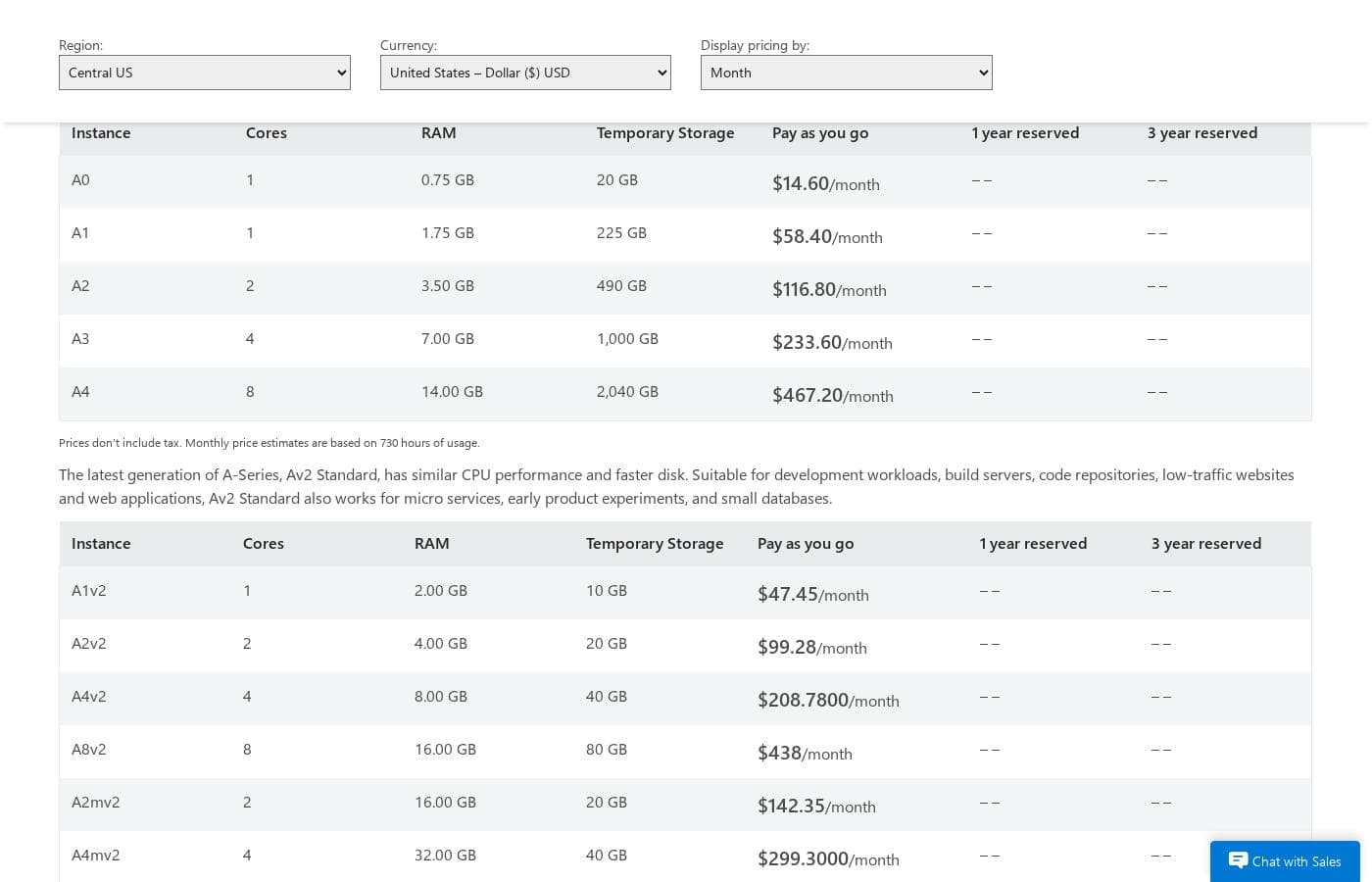
Microsoft Azure Cloud Services uses pay-as-you-go pricing based on the instance size you choose, ranging from $14.60/month for a small A0 instance up to $5,215.12/month for the largest E64 v3. You're billed per second for actual runtime, with monthly estimates based on 730 hours of usage.

Microsoft Azure Cloud Services costs between $14.60 and $5,215.12 per month with pay-as-you-go pricing across seven instance families, from A-Series General Purpose at $14.60/month to the memory-optimized E64 v3 at $5,215.12/month.

Azure doesn't sell fixed plans. You pick an instance size and pay per second for the time it runs. Here's how each family breaks down.

A-Series (General Purpose)

Price: $14.60–$467.20/month Best For: Websites, small-to-medium databases, and everyday applications Other Features:

  • 1–8 cores and 0.75–14 GB RAM
  • 20 GB to 2,040 GB temporary storage

This is the entry point. The A0 costs just $14.60 a month, so it's easy to test the waters. Need more power? Sizes scale up to the A4 with 8 cores at $467.20/month.

Av2 Standard

Price: $47.45–$615.39/month Best For: Development workloads, build servers, code repositories, and low-traffic websites Other Features:

  • Latest A-Series generation with similar CPU performance and faster disk
  • 1–8 cores and 2–64 GB RAM
  • Works for micro services, early product experiments, and small databases

Av2 gives you newer hardware at a similar price point. The A1v2 starts at $47.45/month, making it a solid pick for developers running builds and experiments.

A-Series (Memory Intensive)

Price: $255.50–$1,029.30/month Best For: Large databases, SharePoint server farms, and high-throughput applications Other Features:

  • 2–8 cores with 14–56 GB RAM
  • Up to 2,040 GB temporary storage

When your app is RAM-hungry, this family fits. The A5 starts at $255.50/month with 14 GB of memory, and the A7 tops out at $1,029.30/month.

D-Series

Price: $102.20–$1,541.03/month Best For: Applications that need faster CPUs, better local disk, or more memory Other Features:

  • Solid state drives (SSDs) and faster processors than A-Series
  • General purpose (D1–D4) and memory intensive (D11–D14) options

D-Series adds SSDs and quicker processors. The D1 starts at $102.20/month, while the D14 with 16 cores and 112 GB RAM runs $1,541.03/month.

Dv2-Series

Price: $102.20–$1,926.47/month Best For: Enterprise-grade applications that demand faster CPUs Other Features:

  • About 35% faster than D-Series on average
  • Intel Xeon E5-2673 v3 with Turbo Boost up to 3.2 GHz
  • Same memory and disk configurations as D-Series

Dv2 is the next generation of D-Series: same memory and disk, faster chips. The D1 v2 matches D-Series pricing at $102.20/month.

Dv3-Series

Price: $154.03–$4,934.80/month Best For: General purpose workloads that need serious scale Other Features:

  • 2–64 vCPUs
  • 8–256 GB RAM
  • 50 GB to 1,600 GB temporary storage

Dv3 stretches much further, up to 64 vCPUs. The D64 v3 runs $4,934.80/month though, so save the top sizes for workloads that truly need them.

Ev3 (Memory Optimized)

Price: $181.04–$5,215.12/month Best For: Relational database servers, medium-to-large caches, and in-memory analytics Other Features:

  • High memory-to-core ratio
  • Up to 64 vCPUs and 432 GB RAM

Ev3 packs the most memory here, up to 432 GB. It's also the priciest family, topping out at $5,215.12/month for the E64 v3. Big databases and analytics teams will get the most from it.

A few billing details worth knowing. Prices don't include tax, and monthly estimates assume 730 hours of usage. You're billed for exactly the time an instance runs—partial hours aren't rounded up. If your service shows "Stopped (Deallocated)," billing stops; "Stopped Allocated" still bills you for allocated cores. Standard egress charges, Public IP addresses, and Key Vault certificate storage cost extra. Some families, like H-Series and G-Series, show no pricing in the selected region, so confirm availability for your region before committing.

Want to try before you buy? Azure offers a free trial with $200 in credit and free cloud services for 30 days. There's also a pricing calculator to estimate your exact monthly cost, and you can request a custom quote from the sales team.

Cost calculator

Estimate what Microsoft Azure costs for your team.

Billing
Per month
$14.60
Per year
$175.20

A-Series (General Purpose) states no user limit: shown as one price for the whole account. Check the price for 5 users with the vendor. Estimate based on published list prices, before taxes, add-ons and discounts.

How to pay less for Microsoft Azure

  • Use the 30-day free trial before you pay.
  • Cheaper tools in this category start at $4/mo.
Start free trial

Email me when Microsoft Azure changes price

One email when we detect a price change on the vendor's pricing page. No newsletter, no deals. Unsubscribe in one click.

User Reviews

No reviews yet.

Write a Review

Write a Review for Microsoft Azure
0/100 characters
0/2000 characters

Why use Microsoft Azure?

Picking a cloud platform is a long-term commitment, so breadth, cost control, and support matter as much as raw specs. Here's what stands out from what Microsoft publishes:

  • Everything under one roof — 200+ products cover compute, containers, databases, analytics, AI, and security, so you can avoid stitching together separate vendors.
  • AI tooling built in — Microsoft Foundry lets you build, evaluate, and deploy generative AI apps and custom agents, with Azure OpenAI models available.
  • Hybrid without guesswork — Azure Arc and Azure Local connect on-premises, edge, and other clouds, which helps if you can't move everything at once.
  • Cost levers you control — A public pricing calculator, 30-day free trial, savings plans, reservations, and Azure Hybrid Benefit give you several ways to manage spend.
  • Learning and help are easy to find — Free self-paced Microsoft Learn modules, documentation, quickstart templates, and sales specialists support teams of any size.
  • Proven at scale — Named customers like Levi Strauss & Co., Replit, the Premier League, and Ecolab run real workloads on Azure today.

Microsoft Azure alternatives

Other tools in the Infrastructure as a Service category

View all Infrastructure as a Service tools
DigitalOcean

DigitalOcean

Infrastructure as a Service4.1/5From $4/mo

DigitalOcean provides core infrastructure, focusing on versatile Linux cloud architecture. It’s the right choice for developers who need robust cloud services and specialized platforms. The service supports everything from fundamental system setup, like installing Docker on Ubuntu, to sophisticated deployments. If you're exploring open source AI platforms, or need the muscle of H100 GPUs for models like Ollama, this platform delivers.

Google Cloud

Google Cloud

Infrastructure as a Service4.3/5

Google Cloud is a comprehensive cloud platform offering more than 150 products and capabilities. It helps businesses modernize existing infrastructure or build entirely new AI-driven applications from scratch. The service is designed for developers, business leaders, and startups ready to digitally grow and transform. New customers can try Google Cloud with free usage of over 20 products. Plus, you’ll receive $300 in free credits upon signing up to help you explore.

Vultr

Vultr

Infrastructure as a Service3.9/5

Vultr provides a powerful full-stack cloud compute platform. It offers services ranging from configurable virtual machines to highly accelerated dedicated servers 💡. This platform is ideal for developers and enterprises focused on high-performance computing and complex AI model deployment. You can spin up general purpose or optimized configurations in under 60 seconds.

VMmanager

VMmanager

Infrastructure as a Service3.8/5

VMmanager is a virtualization management platform from ISPsystem. It's built on KVM and targets two audiences: hosting and service providers who lease virtual infrastructure, and companies managing their own IT environments. You get a web panel for creating and controlling VMs, clustering, high availability, and integrations with billing, monitoring, DNS, and IP management tools. A 30-day free trial and public documentation are available.

Utho

Utho

Infrastructure as a Service3.4/5

Utho is India’s first robust cloud platform, trusted by over 22,000 users and growing. It provides a full spectrum of cloud server solutions designed for businesses and developers alike. This platform focuses on offering unbeatable value and high performance for your operations. They deliver a seamless cloud experience tailored entirely to your specific requirements. Utho works through partnerships with top-tier datacenters, ensuring your needs are prioritized within a reliable infrastructure.

MongoDB

MongoDB

Enterprise AI Platform4.3/5

MongoDB is a modern data platform built around a document database. Its flagship service, Atlas, is a fully managed cloud database that also handles search, vector search, and stream processing. Prefer to run things yourself? There's a free Community Edition and a supported Enterprise Advanced option. It's built for developers, teams modernizing legacy systems, and companies adding AI features.

Microsoft Azure FAQ

How much does Microsoft Azure cost?

Microsoft Azure's cheapest paid plan, A-Series (General Purpose), costs $14.60 per month. Paid plans range from $14.60 to $255.50 per month.

Does Microsoft Azure have a free plan?

No. Microsoft Azure lists no free plan; the cheapest paid plan starts at $14.60 per month.

Does Microsoft Azure offer a free trial or a money-back guarantee?

Microsoft Azure offers a 30-day free trial.

Has Microsoft Azure's price changed recently?

No. We have not detected a price change since we started tracking on Oct 1, 2026.

Will I still be billed if my Cloud Services instance is stopped?

Usually yes. Only a fully deleted (deallocated) service stops billing. To stop all charges, delete both your staging and production deployments — simply stopping the service keeps billing your allocated cores.

How does Azure help me protect data and secrets?

Key Vault guards keys and certificates, Defender for Cloud protects hybrid and multicloud workloads, Sentinel adds security analytics, and Private Link keeps data on Microsoft's network. Key Vault certificate storage is billed separately for Cloud Services.

Which developer tools and integrations work with Azure?

Azure pairs with GitHub, GitHub Copilot, Visual Studio Code, and Azure DevOps for pipelines, boards, and repos. Logic Apps, API Management, and Service Bus handle app and data integrations across private and public clouds.

Does Azure offer an SLA for Cloud Services?

Yes. Microsoft publishes a Service Level Agreement for Cloud Services, linked from the pricing page. Review the exact uptime commitments for your services and region before moving production workloads there.

Ready to try Microsoft Azure? Check out the official site or pricing.

Are you Microsoft Azure? Claim this listing · Get the badge