Hiver

Hiver review

One workspace where your team and AI Agents resolve complex customer requests together.

By Ciroapp Editorial Team · Updated Sep 16, 2026

Commission may apply at no extra cost

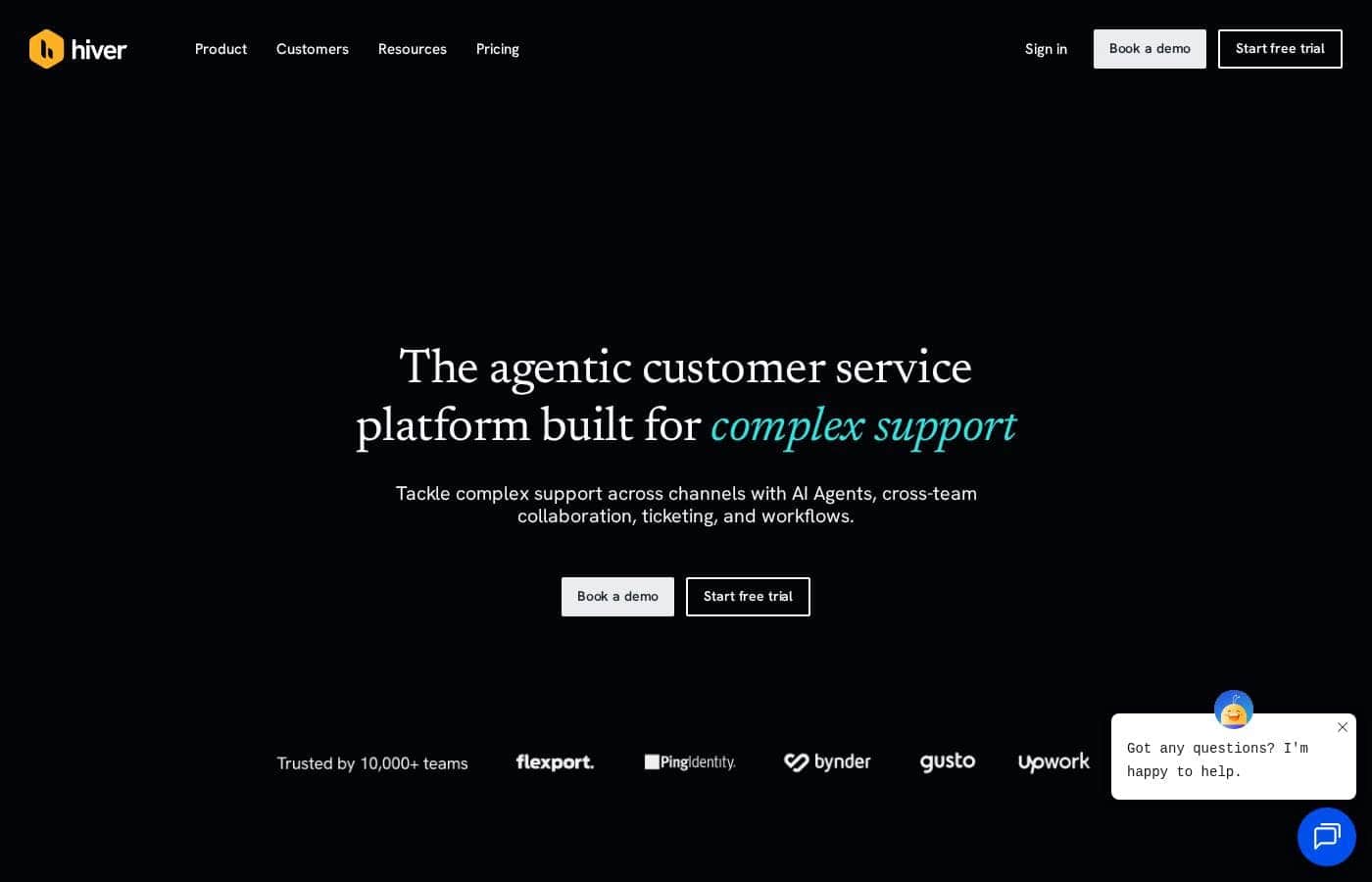
Hiver homepage screenshot

At a glance

Quick overview for Hiver: rating, pricing summary, key features, and highlights.
Vendor page checked Oct 12, 2026

Ciroapp score

4.2/ 5

Hiver pairs shared inbox ticketing with AI Agents that complete multi-step requests across tools like NetSuite and Stripe, backed by strong compliance credentials and a 4.6/5 average from 2,000+ reviews. Dollar prices aren't published, voice costs extra, and the Gmail version locks out Outlook shops. Overall, it's a solid pick for teams buried in cross-team requests.

Pros

  • Pros:AI Agents execute multi-step, cross-system work end to end — such as pulling an invoice from NetSuite, checking policy, and posting a Stripe refund — rather than only deflecting simple FAQs like most AI helpdesks
  • Pros:Two deployment options fit different stacks — Hiver in Gmail turns shared inboxes like info@ into a helpdesk inside Gmail via a Chrome extension, while Hiver Omni is a standalone, email-agnostic web app for Outlook teams needing voice and WhatsApp
  • Pros:All channels — email, live chat, Slack, voice, SMS, and WhatsApp — land in a single queue with unified customer history, so agents stop switching tabs and customers stop repeating themselves

Cons

  • Cons:Dollar prices aren't published — plans are shown only as a comparison table, so you must check the pricing page or book a demo before you can budget
  • Cons:The voice channel is sold as a paid add-on, so teams needing phone support should budget extra beyond any plan price
  • Cons:Hiver in Gmail only works if your team runs on Gmail; Outlook or mixed-email shops must adopt the separate Hiver Omni platform instead
Best for
  • Support teams handling complex, multi-step requests across email, chat, Slack, and voice
  • Gmail-based teams that want a shared inbox helpdesk without leaving their inbox
  • Finance, HR, and ops teams managing requests in shared mailboxes like ap@ or info@
Free trial
Yes — 7 days
This section is a summary. Detailed sections about features, use cases, pricing, and reviews follow below.

What is Hiver?

When customer requests span five tools and three teams, replies slow down and details slip. Hiver puts email, chat, Slack, and voice in one queue, then adds AI Agents that handle multi-step work and AI Copilot that drafts replies, so your team answers before customers have to chase you.

Hiver is a customer service platform with two versions: Hiver in Gmail, which turns shared inboxes like info@ into a helpdesk inside Gmail, and Hiver Omni, a standalone web app that's email-agnostic. Both combine shared inbox ticketing with AI Agents, AI Copilot, analytics, and integrations with tools like Salesforce and Jira. It's aimed at support, success, finance, and HR teams that handle complex, cross-team requests.

Should you choose Hiver?

Quick buyer guidance before you compare plans or click through.

Choose it if

  • Teams that want one queue with unified history across every support channel
  • Groups that collaborate through internal notes, Slack threads, and linked Jira or Asana tasks
  • Leaders who want AI Insights to surface volume drivers, SLA risk, and customer health shifts
  • Organizations in regulated industries that need SOC 2, HIPAA, and GDPR compliance
  • Teams that prefer configuring routing, triage, and SLAs in plain language without outside consultants

Skip it if

  • If your team doesn't run on Gmail, the Hiver in Gmail product won't work; you'd need the separate Hiver Omni platform instead
  • The free trial runs 7 days, which may feel tight for properly evaluating AI Agents on real tickets
  • Solo users or very small teams with simple, single-channel email may not need an agentic AI platform at this level
  • If you depend on niche internal tools, verify those specific connectors before committing, even though Hiver advertises broad integration coverage

Next steps before buying

  1. 1Pick your product: Hiver in Gmail if you run on Gmail, or Hiver Omni if you use Outlook or need channels like voice and WhatsApp
  2. 2Confirm the integrations you rely on, such as Salesforce, Shopify, NetSuite, or Jira, are supported before you commit
  3. 3Start the 7-day free trial (no credit card needed) or book a demo to see AI Agents run on your actual workflows
  4. 4Skim Hiver's comparison pages against Zendesk, Freshdesk, or Front, then check independent reviews to sanity-check the fit

Ease of use

Hiver leans hard into easy setup. The company says teams configure workflows, ticket fields, and SLAs in natural language and can be up and running in minutes without IT or consultants. Gmail users just add a Chrome extension to start. We can't verify these claims hands-on, but a 4.6/5 rating across 2,000+ reviews and a Best Usability badge on G2 point to a gentle learning curve.

Hiver Key Features

📥 One queue for every channel

Customer requests shouldn't live in five tools. Hiver brings email, chat, Slack, voice, SMS, and WhatsApp into a single queue with unified history. Your team sees the full conversation, wherever it started, so nothing slips through.

Pick Hiver in Gmail or the standalone Hiver Omni app.

🤖 AI Agents that act, not just answer

Most AI tools handle the easy tickets and leave the hard ones to you. Hiver's AI Agents don't. Describe the procedure in plain language, and the agent runs it across your systems.

Take a refund request. The agent will:

✨ Collaboration built for cross-team work

Complex requests often need more than one team. Loop in teammates with internal notes, run Slack threads right inside Hiver, and create linked tasks in Jira, Linear, or Asana without switching apps. You can assign tasks to AI Agents too, and they work alongside your team just like a human would.

✨ AI Copilot does the legwork

Your team starts each reply with the investigation already done. AI Copilot surfaces account context, pulls up similar tickets, and drafts the response. It can also take actions across your tools when you ask.

Corrections on a draft feed back into the next one, so replies keep getting sharper.

✨ Insights, QA, and guardrails

Hiver's AI reads your support data so you don't have to dig. It groups conversations into topics, tracks customer health and sentiment, and grades every reply with AI QA against your standards. Guardrails let you set when AI steps in or hands off, and observability shows every action AI takes.

Use Cases

📬 Deliver omnichannel support from one queue

Your customers write in from email, chat, Slack, voice, and WhatsApp. Hiver brings every channel into one workspace with unified history, so agents stop switching tabs and customers stop repeating themselves.

Expected outcome: replies that stay fast and consistent, wherever the request starts.

🤖 Let AI Agents finish multi-step requests

A refund lands in the inbox. Hiver's AI Agent chases missing details, pulls the invoice from NetSuite, checks policy, and posts the refund in Stripe. Your team keeps the judgment calls.

Tip: Describe each procedure in plain language. No coding needed.

🤝 Collaborate across teams without losing context

A complex request needs finance, engineering, and the account owner. Agents loop in teammates with internal notes, run Slack threads inside Hiver, and link Jira, Linear, or Asana tasks.

Expected outcome: one clear answer for the customer, not five forwarded emails.

📥 Run shared inboxes for finance, HR, and ops

Teams behind ap@ or info@ need ownership, routing, and SLAs, not a messy mailbox. Hiver turns shared inboxes into a proper helpdesk. Ping Identity's AP team uses it to resolve work 65% faster.

Tip: Pick Hiver in Gmail if your team lives in Google Workspace.

Hiver pricing

  • 3 plans

Prices not verified yet — see the vendor page.

Hiver's pricing page

Hiver pricing page screenshotView pricing page screenshot
PlanBilled monthlyBilled annuallyIncludes
Entry tier
See vendor page
See vendor page
2 shared inboxes; up to 10 users; 10 automations per shared inbox; 2 custom fields; 12 months analytics retention
  • Shared inboxes, ticketing, and routing
  • Tags, email templates, and custom views
  • SLAs and CSAT ratings
  • Mobile apps for Android and iOS
  • 12 months of analytics data retention
Mid tier
See vendor page
See vendor page
5 shared inboxes; unlimited users; 20 automations per shared inbox; 10 custom fields; 18 months analytics retention
  • 5 shared inboxes
  • Unlimited users
  • 20 automations per shared inbox
  • 10 custom fields
  • 18 months of analytics data retention
Top tier
See vendor page
See vendor page
Unlimited users, automations per shared inbox, and custom fields; 24 months analytics retention; voice channel available as an add-on
  • Unlimited users
  • Unlimited automations per shared inbox
  • Unlimited custom fields
  • 24 months of analytics data retention
  • Premium options listed on the page: onboarding assistance, dedicated success manager, quarterly training

Price history

Tracking prices since Oct 1, 2026. No price change detected yet.

Pricing range: Tiered subscriptions — see hiverhq.com/pricing for current rates

Pricing types: Free trial, Monthly subscription, Yearly subscription

Pricing notes

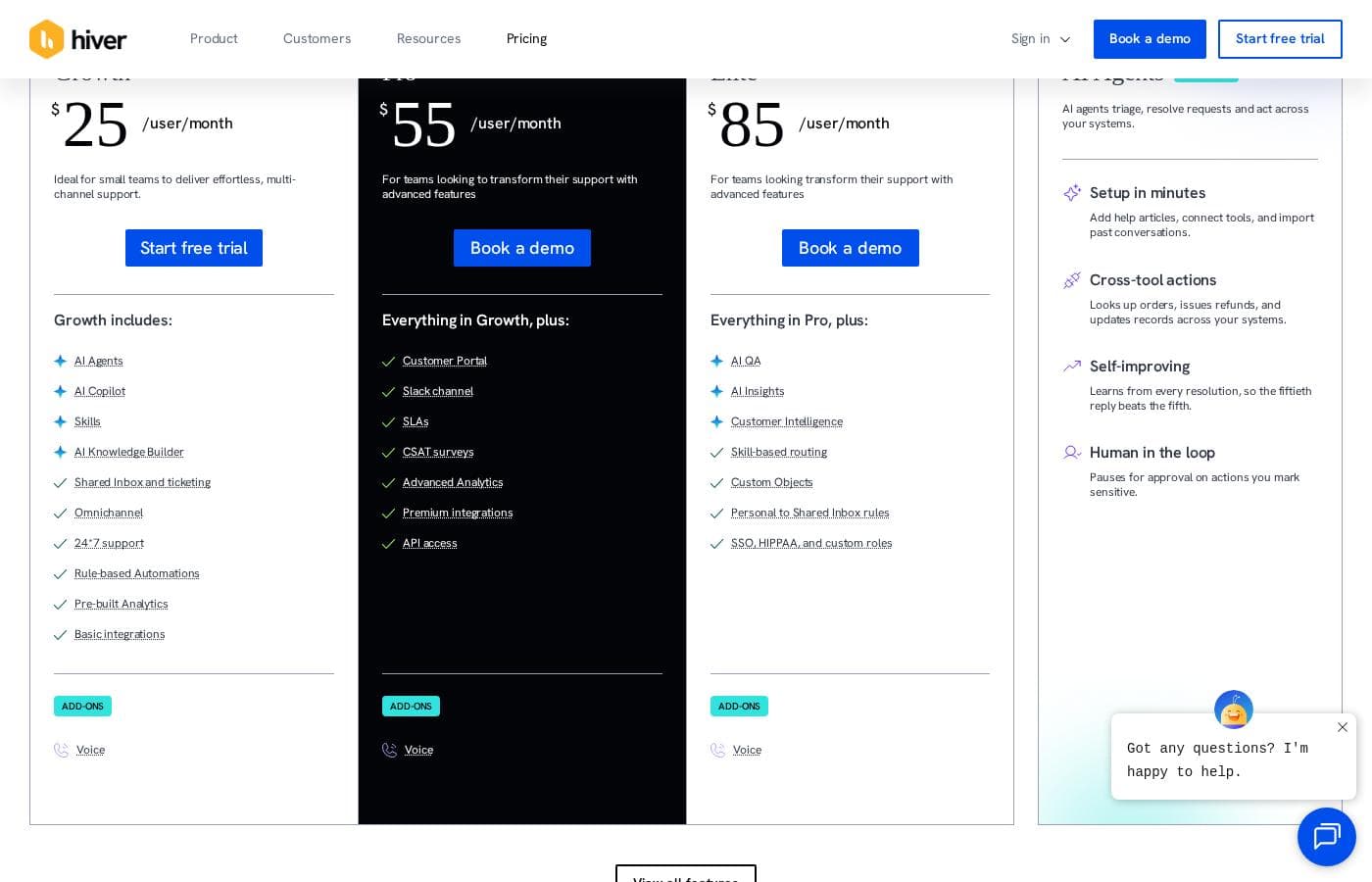
Hiver sells its Hiver Omni platform through tiered subscriptions, laid out in a three-plan comparison table with a billing toggle, plus a 7-day free trial that requires no credit card. Plans scale by user count, shared inboxes, automation limits, custom fields, and analytics retention.

Hiver sells Hiver Omni through tiered subscriptions, with a billing toggle on the pricing page and a 7-day free trial you can start without a credit card.

Hiver's comparison table shows three plan tiers side by side. Exact dollar figures didn't come through in the page content we reviewed, so confirm current rates with Hiver before you buy. What the table does show clearly is how each tier scales: more shared inboxes, stronger automations, more custom fields, and longer analytics history as you move up.

Entry tier

Other Features:

  • 2 shared inboxes
  • Up to 10 users
  • 10 automations per shared inbox
  • 2 custom fields
  • 12 months of analytics data retention

This is the natural starting point. It's built for small teams — up to 10 people — who want to run shared email support properly, with tickets, tags, routing, SLAs, and CSAT surveys as part of the core toolkit. If you're formalizing a support@ inbox for the first time, this tier covers the essentials.

Mid tier

Other Features:

  • 5 shared inboxes
  • Unlimited users
  • 20 automations per shared inbox
  • 10 custom fields
  • 18 months of analytics data retention

Growing teams tend to fit here. You get more inboxes to split brands, products, or departments, double the automation allowance per inbox, and a longer reporting window. Unlimited users means hiring won't push you into the next plan.

Top tier

Other Features:

  • Unlimited users
  • Unlimited automations per shared inbox
  • Unlimited custom fields
  • 24 months of analytics data retention

Larger, busier operations are the audience for this tier. It removes the usage caps that matter at scale and pairs them with the longest data history for spotting trends. The comparison table also lists premium extras you'd expect at this level, such as onboarding assistance, dedicated success managers, and quarterly training, plus security controls like SSO, SCIM provisioning, custom roles, and HIPAA compliance.

Across all tiers, you're looking at the full Hiver Omni toolkit: shared inboxes and ticketing, live chat and web forms, Hiver AI (agents, Copilot, and QA tools), a Help Center, automations, reporting, and integrations with tools like Slack, Salesforce, Shopify, and Jira. Voice is the one channel sold as an add-on, so budget for it separately if phone support matters to your team.

To close on a simple note: there's a 7-day free trial with no credit card required, so you can test Omni before paying anything. Hiver doesn't advertise a money-back guarantee on this pricing page.
How to pay less for Hiver

  • Use the 7-day free trial before you pay.
Start free trial

Email me when Hiver changes price

One email when we detect a price change on the vendor's pricing page. No newsletter, no deals. Unsubscribe in one click.

User Reviews

No reviews yet.

Write a Review

Write a Review for Hiver
0/100 characters
0/2000 characters

Why use Hiver?

Most AI helpdesks deflect simple FAQs and leave the hard tickets to your team. Hiver was built the other way around: its AI Agents work through multi-step, cross-system requests while your people focus on judgment calls.

  • One queue for every channel. Email, chat, Slack, voice, SMS, and WhatsApp land in a single workspace with unified history, so nothing gets lost between tools.
  • AI Agents that act, not just answer. They can pull an invoice from NetSuite, check policy, and post a Stripe refund by following procedures you describe in plain language.
  • Collaboration is built in. Loop in teammates with internal notes, run Slack threads inside Hiver, and create linked Jira, Linear, or Asana tasks without switching apps.
  • Insights without spreadsheets. AI groups conversations into topics, tracks customer health and sentiment, and grades every reply with AI QA against your standards.
  • You stay in control of the AI. Set guardrails for when AI steps in or hands off, and see every action it takes across your systems.
  • Adoption at scale. More than 10,000 teams, including Flexport and Ping Identity, use Hiver, with a 4.6/5 average across 2,000+ reviews on G2, Capterra, and the Chrome Web Store.

Hiver alternatives

Other tools in the Help Desk category

View all Help Desk tools
NinjaOne

NinjaOne

Help Desk4.2/5

Become a NinjaOne affiliate partner and empower your clients to streamline their IT operations! NinjaOne's RMM platform offers visibility, security & control, boosting client productivity & reducing IT costs. #1 for support, Ninja is a proven solution.

Freshdesk is a help desk and ticketing system that converts incoming customer messages from multiple channels into organized tickets. Agents can assign, prioritize, collaborate on, and resolve those tickets using workflows, canned responses, SLA policies, and automation rules. The platform also includes a self-service knowledge base, customer portals, reporting dashboards, and a marketplace of 150+ third-party integrations covering CRM, e-commerce, messaging, and productivity tools.

Deskpro

Deskpro

Help Desk3.9/5

Deskpro is a comprehensive support ecosystem designed to simplify complex service tasks and arm your team for success. It delivers personalized support across every channel, consolidating all interactions into a shared inbox. This solution is built for maximum organizational flexibility. Deskpro serves diverse users, including IT Service Desks, HR/People Ops, and B2B/B2C Customer Support teams. 💡 What truly sets Deskpro apart is its adaptable deployment. You get to choose how your data is managed. Options include Cloud SaaS globally (US, EU, UK), Private Cloud placement (AWS, Azure, Google Cloud), or full Self-Hosted installation. Whether you require rock-solid data sovereignty or completely managed services, Deskpro meets your organization exactly where your needs demand.

HelpDesk

HelpDesk

Help Desk3.6/5

HelpDesk is a browser-based ticketing tool that helps support teams organize messages, assign tickets, and respond to customers from a single place. It handles tickets from email, phone, or online forms, and tracks status from creation to closure.

Cheapest Help Desk software for 1 to 25 users

Hiver FAQ

Which tools does Hiver integrate with?

Hiver offers native connectors for Slack, Salesforce, Shopify, NetSuite, HubSpot, QuickBooks, Jira, Asana, Trello, PagerDuty, and more, plus 1,000+ tools via connectors, MCP, and API. If you rely on niche internal tools, verify those connectors first.

Is Hiver secure enough for regulated industries?

Hiver is SOC 2 Type II audited, ISO/IEC 27001 certified, and GDPR and CCPA compliant. The top tier adds HIPAA compliance, SSO with OIDC or SAML, SCIM provisioning, and custom roles for tighter access control.

What customer support and onboarding help does Hiver offer?

Hiver provides 24x7 email and chat support. Higher tiers add onboarding assistance, a dedicated success manager, quarterly team training, and priority call support — 30-minute sessions you book right from Hiver settings.

How easy is migrating from our current helpdesk?

You can import existing Help Center articles from Zendesk and other tools. Teams configure workflows, ticket fields, and SLAs in plain language, and Gmail users start by simply adding Hiver's Chrome extension.

Ready to try Hiver? Check out the official site or pricing.

Are you Hiver? Claim this listing · Get the badge