HelpDesk

HelpDesk

A comprehensive ticketing system for streamlined customer support.

#1 dans Help Desk
2 min read · Updated 11/17/2025
HelpDesk homepage screenshot

At a glance

Quick overview for HelpDesk: rating, pricing summary, key features, and highlights.

Ciroapp review

4.3
Intuitive Ticketing, Excellent Support, Clear Value.

HelpDesk excels by providing a highly usable, streamlined ticketing system perfect for growing teams needing organization. We found the UI clean and appreciated the consistently praised, responsive customer service available 24/7. Overall, this is a reliable and affordable solution for businesses prioritizing strong core support features.

Pros

  • Pro:Clean, intuitive interface makes the system easy to adopt and use.
  • Pro:Customer support is quick, friendly, and highly responsive.
  • Pro:Setup is rapid, leading to immediate improvements in customer support speed.
  • Pro:Affordable pricing structure includes valuable unlimited free viewer seats.

Cons

  • Con:Advanced features, such as macro customization, are currently limited.
  • Con:Transitioning from previous integrated products (like LiveChat) can be costly/frustrating.
Free trial
Yes — 14 days
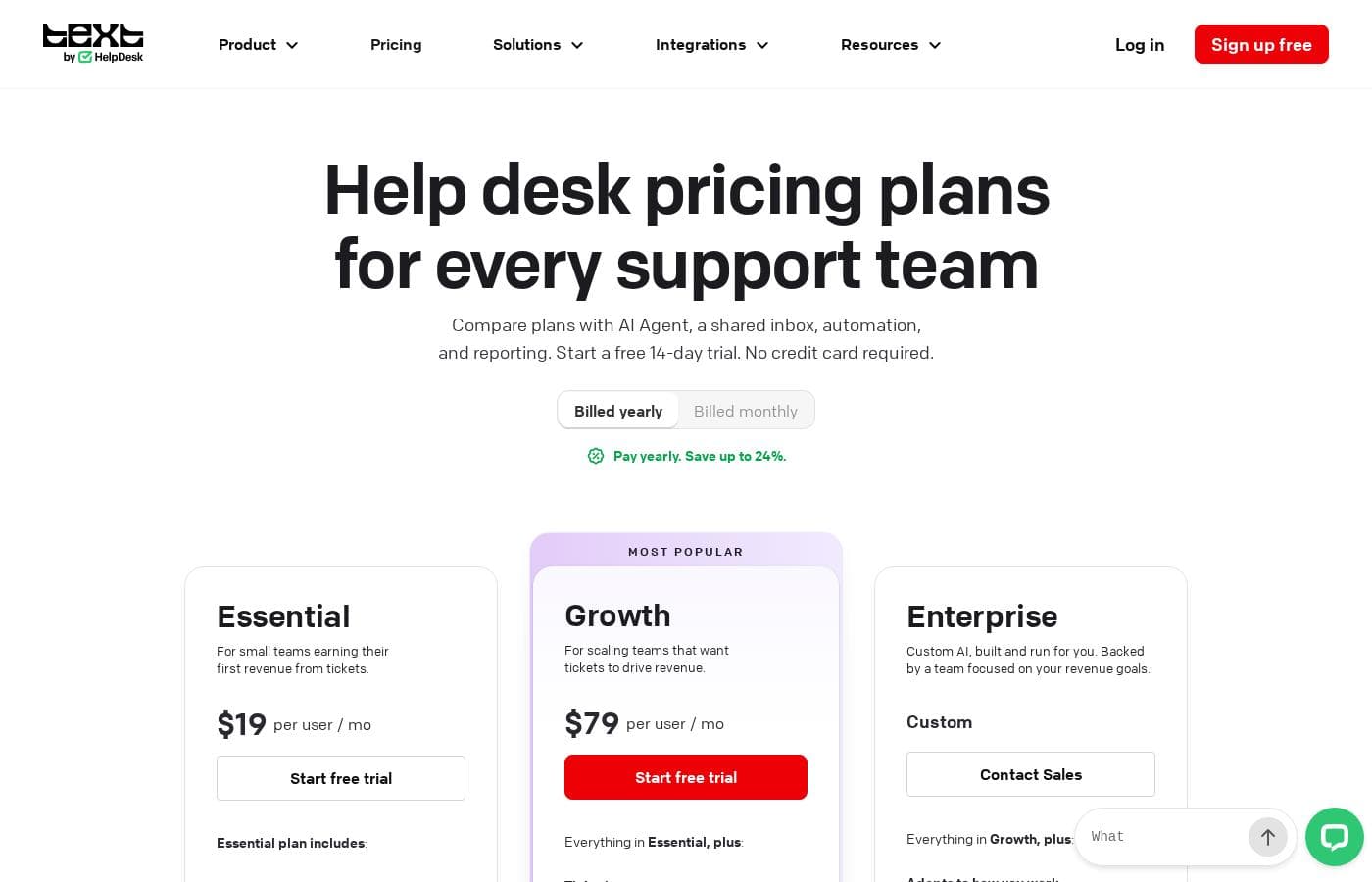
Range: $29–$50/user/month (billed annually)Free trial, Monthly subscription, Yearly subscription, Per seat pricing
This section is a summary. Detailed sections about features, use cases, pricing, and reviews follow below.

HelpDesk review, pricing, features, pros & cons

Tired of disorganized customer support? HelpDesk brings structure to your requests, providing a single point of contact đź’ˇ to manage messages and exchange information efficiently. It streamlines your processes and helps prepare your team for future complexity.

What is HelpDesk?

HelpDesk is comprehensive software designed for managing a wide range of customer support activities. Essentially, it acts as your support team’s central hub, or single point of contact (SPC).

This tool organizes messages and gives timely assistance by converting all communications into standardized tickets 🎟️. Whether users reach out through email, phone, or a web form, the system ensures every request is captured, prioritized, and tracked. It is suitable for growing teams just starting out, as well as large corporations with complex operational needs.

HelpDesk Key Features

đź’ˇ A Central Hub for Unified Communication

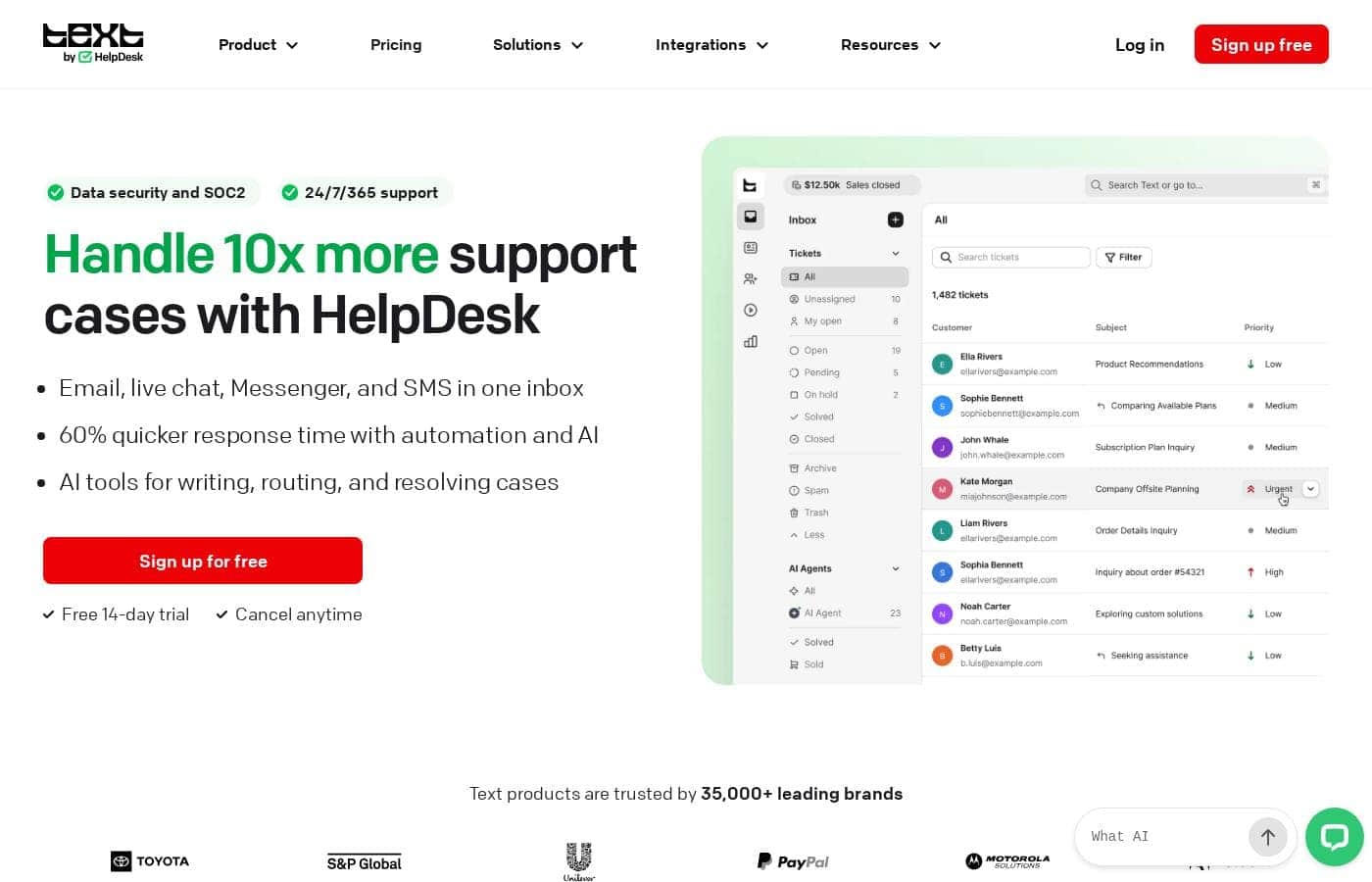
HelpDesk acts as your team’s central hub, providing a single point of contact (SPC) to manage all messages efficiently. It brings essential structure to your support requests. All communications, regardless of the source, are converted into standardized tickets for accurate tracking.

You can ensure that every user request is captured, prioritized, and tracked from submission to closure. Whether customers reach out through email, phone, web forms, or social media, the system organizes everything instantly. This allows you to give timely assistance and exchange information effectively.

✨ Boost Efficiency with Powerful Automation

Automation significantly lowers your team’s manual effort and helps you respond faster. HelpDesk workflows automate the entire ticketing process, streamlining tasks that used to require constant hands-on management.

Automation handles the automatic creation of support tickets and their assignment to the right agent based on predefined rules. It also manages ticket prioritization and escalation when needed. This powerful functionality ensures that response times improve immediately, enhancing customer satisfaction.

Workflows are also used to automate necessary communication with customers throughout the resolution stage. Once the issue is solved, the system supports ticket closure while ensuring resolution details are recorded.

✨ Secure Connection and Robust Data Safety

HelpDesk prioritizes the security and privacy of all user data. We comply with GDPR and hold Privacy Shield certification, ensuring your operations meet strict data protection standards.

For enhanced security, all data transmitted between users and HelpDesk servers is encrypted. We use a 256-bit SSL secure connection to protect your critical information. Furthermore, the system includes built-in Anti-Spam protection. This helps prevent unwanted spam emails from reaching users’ accounts, ensuring a cleaner and more secure support environment.

✨ Unlock Valuable Insights and Tracking

Every support ticket collected represents a source of valuable customer information. HelpDesk provides detailed tracking of the ticket’s progress, recording agent notes and actions throughout the entire process.

The system generates themed reports that enable you to verify team performance and strategically improve your overall customer service strategy. These reports offer key performance metrics, including ticket volume, response times, resolution times, and customer satisfaction (CSAT).

By analyzing past support stories and utilizing these detailed reports, your team can be better prepared to handle new client issues and cases that arise in the future.

✨ Always Accessible and Seamlessly Connected

You can start using HelpDesk immediately because it is a completely browser-based solution. There is no need to install anything; all you require is an internet connection to access the application anywhere.

HelpDesk integrates with a wide range of popular software to create a comprehensive and seamless help desk environment. You’ll find integrations for apps like LiveChat, HubSpot, Salesforce, GitHub, and Jira, among others. You can explore all available connectivity options within the HelpDesk Marketplace.

Use Cases

đź’ˇ Streamlining Request Intake with a Single Point of Contact

Your customers use various channels, like email, web forms, or even the phone, to ask for help. Juggling these inputs leads to missed messages and slow response times. HelpDesk solves this by serving as your team’s central hub, acting as a Single Point of Contact (SPC).

It instantly converts every incoming communication into a standardized, organized ticket. This centralized system ensures that every request is captured immediately, providing your team with a unified and manageable queue right away.

Expected outcome: Zero missed customer communication regardless of the input source.

âś… Automating Ticket Assignment and Prioritization

Manually sorting and routing support requests wastes valuable time your agents could spend solving problems. HelpDesk utilizes powerful automation rules to handle the entire ticketing process for you.

When a new ticket arrives, predefined rules automatically assign it to the most suitable agent or specialized team. You can also prioritize tickets based on urgency, impact, or established Service Level Agreements (SLAs). This means critical issues get immediate attention without any manual intervention.

📊 Analyzing Performance to Optimize Service Strategy

Every resolved ticket holds valuable customer information that helps you prepare for future issues. HelpDesk collects these 'support stories' and uses them to generate sophisticated, themed reports.

These reports allow you to easily verify your team’s effectiveness, analyzing data like ticket volume, response times, and resolution rates. By studying these valuable business insights, you can strategically improve training, adjust staffing, and refine your entire customer service approach over time.

🛡️ Securing Sensitive Customer Data

Data safety is critical when exchanging information with customers and colleagues. HelpDesk implements robust security measures to protect this data and maintain compliance.

All transmitted data is encrypted using a strong 256-bit SSL secure connection. Furthermore, the system complies with GDPR requirements and holds Privacy Shield certification. This commitment to security ensures that you can safely manage and exchange sensitive information in a dependable environment.

Tip: Look into the Enterprise solution for advanced features like Audit Logs and dedicated security assistance.

🔄 Managing the Full Support Lifecycle (Step Flow)

HelpDesk provides a structured process covering the entire journey of any customer request, from initial contact to final review. This consistent workflow promotes efficiency and ensures every step is tracked.

  1. Submission: Users submit tickets through various channels (email, web forms).
  2. Routing & Tracking: Tickets are automatically assigned, prioritized, and tracked, recording agent notes and status updates.
  3. Resolution: Agents communicate with the user and collaborate internally to troubleshoot or escalate the issue.
  4. Closure: The agent resolves and closes the ticket, often gathering user feedback to measure satisfaction.

Pricing Overview for HelpDesk

Pricing range
$29–$50/user/month (billed annually)
Pricing types
Free trial, Monthly subscription, Yearly subscription, Per seat pricing

HelpDesk offers three flexible, per-user plans designed for scalability, starting at $29 per user per month when billed annually for essential features. All tiers include unlimited free viewer seats while pricing is only applied to active Admin and Agent roles.

Plans & Pricing

Team

Monthly$34 per user
Yearly$29 per user
5 teams, 5 active rules, 1 custom domain.
  • Paid users with admin or agent roles
  • Unlimited free viewers
  • 5 teams
  • 5 forwarding addresses
  • 5 reply addresses
  • One custom domain
  • 5 email templates
  • 5 active rules
  • + 1 more features

Business

Monthly$59 per user
Yearly$50 per user
100 teams, 100 custom domains.
  • Paid users with admin or agent roles
  • Unlimited free viewers
  • 100 teams
  • 100 forwarding addresses
  • 100 reply addresses
  • 100 custom domains
  • 100 email templates
  • 50 active rules
  • + 1 more features

Enterprise

MonthlyNot explicitly stated
YearlyNot explicitly stated
No limits (relative to Business).
  • Everything from the Business plan with no limits
  • Dedicated account manager
  • Product training
  • Software engineer support
  • Security assistance
  • White label
  • Service level agreements (SLAs)
  • Custom SSO

HelpDesk costs between $29 and $50 per user per month (billed annually) with three plans: Team at $29/mo, Business at $50/mo, and Enterprise (custom pricing).

The pricing is clear and structured to help you select the best fit for your operational needs.

Team

Price: $29/mo per user (billed annually) or $34/mo per user (billed monthly) Websites Supported: Not explicitly stated Best For: Growing teams with entry-level needs Refund Policy: Reviewed individually by support Other Features:

  • Unlimited free viewer roles
  • 5 teams and customizable ticket views
  • 5 email templates and 5 active automation rules
  • One custom domain
  • 5 activated custom fields

If your team is growing, and you need a solid foundation for organizing support tickets, the Team plan is a perfect fit. This tier gives you essential tools and limits suitable for smaller operations, like five teams and five active rules for basic support automation.

Business (Most Popular)

Price: $50/mo per user (billed annually) or $59/mo per user (billed monthly) Websites Supported: Not explicitly stated Best For: Businesses with multi-brand operations Refund Policy: Reviewed individually by support Other Features:

  • Unlimited free viewer roles
  • 100 teams and 100 custom domains
  • 100 email templates and 100 reply addresses
  • 50 active automation rules
  • 20 activated custom fields

This plan quickly expands your capacity for complex operations spanning multiple brands. You get significantly higher limits across the board, including 100 teams and 50 active rules, making it ideal if you need extensive customization and rapid scaling capabilities. It's the most popular choice for established operations.

Enterprise (Customizable)

Price: Individual contract pricing Websites Supported: Not explicitly stated Best For: Corporations requiring an individual approach Refund Policy: Not explicitly stated Other Features:

  • Everything from Business (with no limits)
  • Dedicated account manager and product training
  • Software engineer support and Security assistance
  • Service Level Agreements (SLAs)
  • White label option

Large corporations needing bespoke features, advanced security, and personalized support should choose the Enterprise option. This plan removes standard scaling limits and provides direct access to dedicated resources and advanced security measures, such as custom Single Sign-On (SSO).

If you're ready to try HelpDesk, you can start a free 14-day trial today! You get full access to all the Business plan features during that time without needing a credit card. While there isn't a standard, guaranteed money-back period, if you need a cancellation or refund, such requests are handled on a case-by-case basis by directly contacting the support team.

User Reviews

HelpDesk generally receives excellent feedback on its usability and interface. Users frequently highlight the platform's clean, intuitive design, noting it is easy to set up and navigate. Many reviewers, including those migrating from competitors, found the ticketing structure to be highly efficient, leading to increased team productivity and decreased response times. The platform's automation features, ticket categorization, and the inclusion of unlimited free viewer seats are often appreciated. Support staff receive high praise for being quick, friendly, and highly professional, often going the extra mile to resolve issues quickly. đź’Ş

However, the feedback is not universally positive. Some users transitioning from the company's older, integrated LiveChat system expressed frustration about the mandated separation and increased subscription cost, calling the new system “way dearer” for micro-businesses. A few users also mentioned that while the system handles essential ticketing functions very well, it lacks depth in advanced features, specifically citing limitations in the macro functionality. Overall, the platform is widely seen as affordable and offers good value for money for businesses focused on reliable core support functions.

What users say elsewhere

Alex P.
· Trustpilot
5.0 / 5

Switching from Zendesk over to HelpDesk saved us money. This chat widget is very affordable and the UI/UX is much better now. The tool is very easy to use and provides us with much more data access.

Sarah M.
· Trustpilot
5.0 / 5

The support team is quick to respond, genuinely friendly, and always goes the extra mile. What impresses me most is their professionalism combined with a human touch—no robotic replies. They even follow up to ensure everything is running smoothly.

No reviews yet.

Write a Review

Write a Review for HelpDesk
0/100 characters
0/2000 characters

Why use HelpDesk?

Why should you choose HelpDesk? It offers more than simple organization; it dramatically improves how you handle customer interactions and gathers valuable business data.

Key advantages you will gain:

  1. Unlock Valuable Insights 📊: Every support ticket collected is a source of customer information. You can analyze past support stories and prepare better for new client issues and cases.
  2. Optimize Team Performance: The system generates themed reports. These reports let you verify your team's effectiveness and strategically improve your entire customer service approach.
  3. Ensure High-Level Security: Your data stays safe. HelpDesk complies with GDPR and holds Privacy Shield certification. They use a 256-bit SSL secure connection to encrypt all transmitted data.
  4. Embrace Powerful Automation âś…: Automate the entire ticketing process, including creation, assignment, and prioritization. This significantly lowers your manual effort and enhances customer satisfaction quickly.
  5. Always Accessible: It's a completely browser-based solution, so you never need to install anything. All you need is an internet connection to start using the application immediately.
  6. Reliable Assistance: You're never alone because HelpDesk offers constant 24/7/365 support from their helpful support heroes.

Ready to transform your workflow with HelpDesk?

HelpDesk Alternatives

Other tools in the Help Desk category

Frequently Asked Questions

How does the per-user pricing model work, and who counts as a paid user?

Pricing applies only to users designated as Admin or Agent roles who need full access to the system. You can add an unlimited number of Viewer seats for free if users only need to browse or read tickets.

What features are included when a customer starts the free 14-day trial?

The 14-day free trial gives users complete access to all the features within the popular Business plan. No credit card is required to begin the trial period, and setup time is estimated at five minutes.

If we choose annual billing, how is that payment processed?

Annual subscriptions receive a 15% discount, but the customer's card is charged upfront for the entire 12-month period. Monthly subscriptions are billed at the beginning of each new cycle.

If a customer needs to cancel their service, is there a standard money-back guarantee?

There is no standard, guaranteed money-back period offered for cancellations. If a customer requires a refund, they must email support to have their request reviewed individually on a case-by-case basis.

Which type of customer is the Business plan best suited for?

The Business plan is recommended for established operations and multi-brand companies. It offers significantly higher feature limits, such as 100 teams and up to 50 active automation rules.

Can we change the number of paid Agent or Admin seats during the contract period?

Yes, you can easily adjust your required capacity by adding or removing agent accounts whenever needed. You can also temporarily suspend billing for an agent by changing their status to a Viewer role.

What fundamental security measures protect user data?

HelpDesk complies with GDPR and holds Privacy Shield certification to ensure data privacy. It also uses a 256-bit SSL secure connection to encrypt all data transmitted between users and the servers.

Are there any service level agreements (SLAs) guaranteeing support response times?

Guaranteed support standards and defined guaranteed response times through SLAs are only provided as a feature of the customizable Enterprise solution.

Does the system impose a limit on the number of tickets we can handle?

No, there is no set limit on the number of tickets you can manage. All subscription plans allow you to handle an unlimited number of tickets on your dashboard.

Which popular third-party applications does HelpDesk integrate with?

HelpDesk integrates with several key applications available in its Marketplace. These include LiveChat, HubSpot, Salesforce, GitHub, Jira, Zapier, Shopify, and WordPress.

Does HelpDesk offer assistance if we need to migrate data from another ticketing system?

Yes, HelpDesk supports data migration from other systems. Interested customers should contact the support team via chat for details on potential costs and migration coverage.

Are there any specific security features exclusive to the Enterprise plan?

Yes, the Enterprise plan offers specialized security features. These include Custom Single Sign-On, dedicated Security Assistance, and an Audit Log to track in-app activities.

Ready to try HelpDesk? Check out the official site or pricing.