HelpDesk vs Hiver
HelpDesk and Hiver both centralize customer requests, but they approach the workflow differently. HelpDesk is a traditional, clean, browser-based ticketing system. Hiver transforms your existing email (e.g., Gmail) into a full help desk platform. This comparison shows which integration style offers your team the best value.
Best for: Mid-sized organizations prioritizing platform security and compliance., Teams needing dedicated ticketing separate from their existing email.
Best for: Small teams leveraging the robust, free version with unlimited users., Google Workspace users aiming for seamless inbox integration.
Intuitive Ticketing, Excellent Support, Clear Value.
HelpDesk excels by providing a highly usable, streamlined ticketing system perfect for growing teams needing organization. We found the UI clean and appreciated the consistently praised, responsive customer service available 24/7. Overall, this is a reliable and affordable solution for businesses prioritizing strong core support features.
Pros
- Clean, intuitive interface makes the system easy to adopt and use.
- Customer support is quick, friendly, and highly responsive.
- Setup is rapid, leading to immediate improvements in customer support speed.
- Affordable pricing structure includes valuable unlimited free viewer seats.
Cons
- Advanced features, such as macro customization, are currently limited.
- Transitioning from previous integrated products (like LiveChat) can be costly/frustrating.
Simple Shared Inbox, Complex Subscription.
We found Hiver's promise of transforming Gmail into a seamless helpdesk highly appealing and effective for team collaboration. However, we must flag significant and recurring user reports concerning aggressive cancellation policies and perceived low value for the price. Overall, Hiver provides strong helpdesk features in a familiar interface, but the associated business practices detract heavily from the user experience.
Pros
- Integrates seamlessly into Gmail, offering a familiar user interface.
- Fast deployment and high ease of use (get started quickly in under 5 minutes).
- Robust Free plan available that supports an unlimited number of users.
- Collaboration tools (Shared Drafts, internal Notes) eliminate messy email forwarding.
Cons
- Repeated and strong user complaints about high pricing or being overpriced.
- Severe complaints regarding extreme difficulty or impossibility when canceling subscriptions.
- Analytics modules have previously been deemed very limited and lacking clarity.
- Past reports indicate buggy software and inconsistent synchronization issues.
AboutHelpDesk
HelpDesk is comprehensive software designed for managing a wide range of customer support activities. Essentially, it acts as your support team’s central hub, or single point of contact (SPC).
This tool organizes messages and gives timely assistance by converting all communications into standardized tickets 🎟️. Whether users reach out through email, phone, or a web form, the system ensures every request is captured, prioritized, and tracked. It is suitable for growing teams just starting out, as well as large corporations with complex operational needs.
AboutHiver
Hiver is an innovative, AI-first customer service platform. It transforms your existing email inbox into a complete, powerful ticketing system. This means you already know how to use it, allowing teams to get started quickly, often in under five minutes. Hiver is built for any team—from customer service and finance to HR and IT—that needs to manage communication across channels like email, live chat, WhatsApp, and phone in one simple place. 💡
Highlights
Feature Comparison
Features Overview
We highlight the main differences and pick a winner for each feature.
User Interface & Adoption
Hiver embeds the shared inbox into your familiar email. HelpDesk requires learning a dedicated platform.
HelpDesk offers a clean, browser-based UI that is install-free. It provides centralized views that simplify ticket tracking and resolution. Users switching to HelpDesk praise its straightforward approach. Hiver transforms your existing email inbox into a full help desk. Teams can get started with Hiver adoption in under five minutes. The immediate familiarity makes the learning curve non-existent for agents. Hiver leverages existing user comfort for maximum speed and deployment efficiency. HelpDesk asks agents to work in a separate, albeit highly secure, environment. Teams already heavily reliant on Google Workspace will find Hiver incredibly convenient. HelpDesk is better if you prefer strict separation of email and ticketing.
AI Functionality
Hiver offers dedicated, trainable AI features. HelpDesk focuses on rules-based automation, lacking modern AI.
HelpDesk focuses on rule-based automation for assignment and prioritization. The JSON data does not mention current AI summary or generative writing features. It relies on agents to quickly handle complex queries. Hiver offers a robust AI add-on costing $20 per user per month. This AI can be trained on your specific historic data in minutes. This enables automatic responses and faster query resolution at scale. Hiver is the choice if increasing agent efficiency using smart automation is critical. HelpDesk provides a solid basic platform but lacks modern intelligent capabilities. Use Hiver if you manage high ticket volumes and need the AI to draft replies instantly. HelpDesk is suitable if your volume is manageable without machine assistance.
Internal Collaboration
Hiver offers superior collaboration tools integrated directly into the thread. HelpDesk uses basic agent notes for tracking.
HelpDesk collaboration relies on agents adding notes and updating status efficiently. This ensures transparency across the team regarding ticket progress. The focus is on tracking the issue lifecycle. Agents using Hiver can utilize Shared Drafts to jointly write final customer responses. Internal Notes and @mentions instantly loop in team members privately. This eliminates the confusion of internal email forwarding chains. Hiver’s tools dramatically reduce internal inbox clutter and speed up communication. HelpDesk's approach is more structured but requires greater attention to logs. For complex service queries needing immediate input from experts, Hiver streamlines the internal conversation. HelpDesk keeps communication separated into notes versus the main thread.
Security & Compliance
Both are secure, but Hiver achieves higher compliance like SOC 2 and HIPAA in top tiers.
HelpDesk delivers strong foundational security, including GDPR compliance and 256-bit SSL encryption. Enterprise plans provide organizational audit logs. Its primary function is robust data safety. Hiver adheres to GDPR, SOC 2 Type II, and ISO 27001 standards. Their Elite plan specifically includes HIPAA compliance (for health data) and Single Sign-On (SSO). This confirms its suitability for regulated sectors. Hiver offers a deeper security profile tailored for large enterprises and highly regulated fields. HelpDesk is excellent for general security needs and web compliance. If your organization requires SOC 2 certification or HIPAA compliance, Hiver is the correct choice. HelpDesk provides great security but stops short of these specific advanced certifications.
Pricing Model
Hiver has a powerful Free plan and cheaper starting tiers. HelpDesk is paid-only, starting at $29/user/month.
The paid plans for HelpDesk start at $29 per user per month (billed annually). Customers report some pricing complexities, especially regarding Live Chat. There is no permanent free tier available. Hiver offers a valuable Free plan with unlimited users and core multi-channel features. Paid plans start cheaper at $19 per user per month annually. The advanced AI feature is an extra $20/user/month cost. Hiver provides unmatched accessibility for startups or very small teams through the Free plan. HelpDesk requires a dedicated budget commitment from day one. If budget flexibility is key, Hiver is the initial winner due to its generous Free plan. Be aware Hiver's total cost rises significantly with AI and highly reported administrative issues.
Integration Ecosystem
Hiver provides 100+ integrations and comprehensive API access. HelpDesk offers key integrations via its Marketplace.
HelpDesk integrates with essential tools like LiveChat, HubSpot, GitHub, and Jira. These integrations support centralized workflows and data tracking. Connectors are readily available in the Marketplace. Hiver integrates with over 100 applications, including Slack, Asana, and QuickBooks. The Growth plan adds Zapier access; Pro includes premium integrations and API access. Data can be viewed without switching tabs. Organizations demanding large, diverse third-party connections will prefer Hiver's breadth. HelpDesk focuses on the quality of its core integrations. If you rely on viewing CRM data inside the ticket thread, Hiver's 100+ app connectors are a major benefit. HelpDesk ensures core functions are linked but offers less variety.
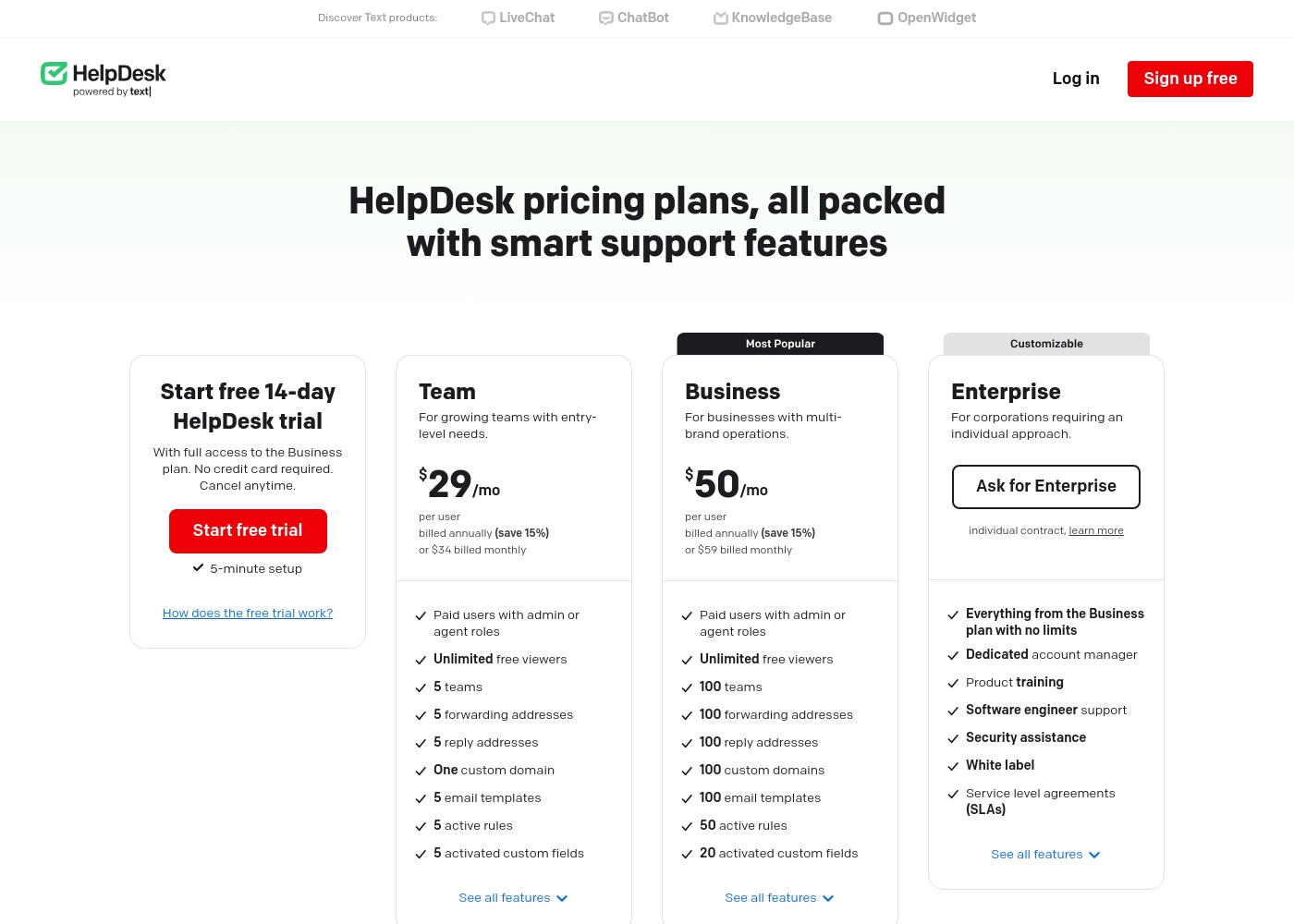
HelpDesk costs between $29 and $50 per user per month (billed annually) with three plans: Team at $29/mo, Business at $50/mo, and Enterprise (custom pricing).
The pricing is clear and structured to help you select the best fit for your operational needs.
Team
Price: $29/mo per user (billed annually) or $34/mo per user (billed monthly) Best For: Growing teams with entry-level needs Refund Policy: Reviewed individually by support Other Features:
- Unlimited free viewer roles
- 5 teams and customizable ticket views
- 5 email templates and 5 active automation rules
- One custom domain
- 5 activated custom fields
- Paid users with admin or agent roles
- Unlimited free viewers
- 5 teams
- 5 forwarding addresses
- 5 reply addresses
- Paid users with admin or agent roles
- Unlimited free viewers
- 100 teams
- 100 forwarding addresses
- 100 reply addresses
- Everything from the Business plan with no limits
- Dedicated account manager
- Product training
- Software engineer support
- Security assistance
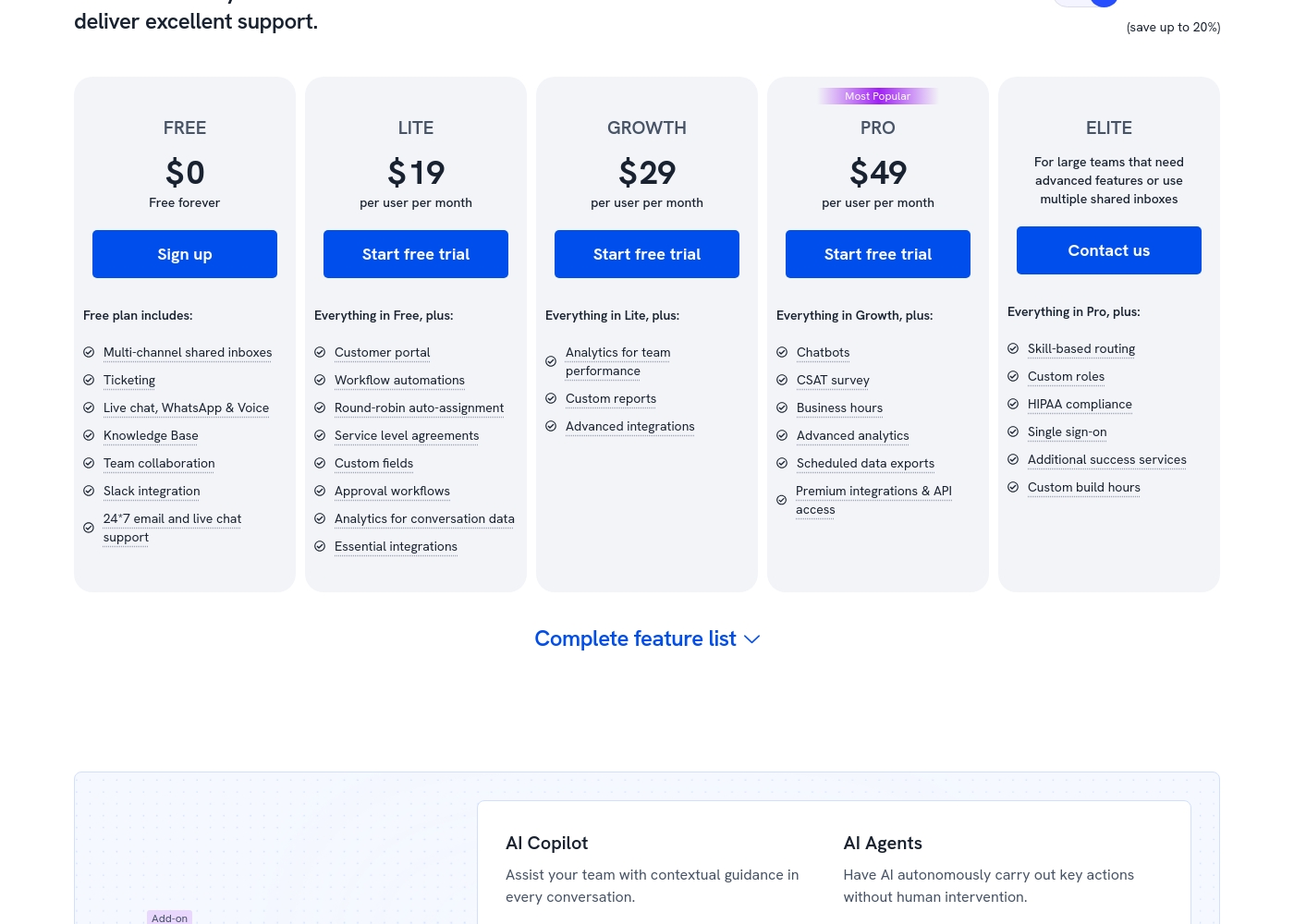
Hiver costs between $0 and $49 per user per month (billed annually) with five plans: FREE at $0, LITE at $19, GROWTH at $29, PRO at $49, and ELITE (Contact us).
Let's explore which plan makes the most sense for your team's unique needs.
FREE
Price: $0 (Free forever) Best For: Teams wanting basic triage capabilities for multi-channel communication. Other Features: Multi-channel shared inboxes, Ticketing, Live chat/WhatsApp/Voice, Knowledge Base, Team collaboration, Slack integration, 24/7 email and live chat support.
- Multi-channel shared inboxes
- Ticketing
- Live chat, WhatsApp & Voice
- Knowledge Base
- Team collaboration
- Customer portal
- Workflow automations
- Round-robin auto-assignment
- Service level agreements (SLA)
- Custom fields
- Analytics for team performance
- Custom reports
- Advanced integrations (e.g., Zapier)
- Chatbots
- CSAT survey
- Business hours
- Advanced analytics
- Scheduled data exports
Pricing Notes
- HelpDesk offers a 14-day free trial; Hiver offers a shorter 7-day trial of their highest Elite plan features.
- Hiver has a robust Free plan offering unlimited users and core multi-channel features.
- The Hiver AI add-on costs an extra $20 per user per month across all paid plans.
- HelpDesk users report complexity, often needing separate subscriptions for Live Chat functionality.
- Hiver annual billing provides savings of up to 20% compared to monthly costs.
Pricing Head-to-Head
User Reviews
HelpDesk generally receives excellent feedback on its usability and interface. Users frequently highlight the platform's clean, intuitive design, noting it is easy to set up and navigate. Many reviewers, including those migrating from competitors, found the ticketing structure to be highly efficient, leading to increased team productivity and decreased response times. The platform's automation features, ticket categorization, and the inclusion of unlimited free viewer seats are often appreciated. Support staff receive high praise for being quick, friendly, and highly professional, often going the extra mile to resolve issues quickly. 💪
However, the feedback is not universally positive. Some users transitioning from the company's older, integrated LiveChat system expressed frustration about the mandated separation and increased subscription cost, calling the new system “way dearer” for micro-businesses. A few users also mentioned that while the system handles essential ticketing functions very well, it lacks depth in advanced features, specifically citing limitations in the macro functionality. Overall, the platform is widely seen as affordable and offers good value for money for businesses focused on reliable core support functions.
Switching from Zendesk over to HelpDesk saved us money. This chat widget is very affordable and the UI/UX is much better now. The tool is very easy to use and provides us with much more data access.
External feedback shows a highly polarized user experience, resulting in a low overall satisfaction score. While some users appreciate Hiver's core function as the "most simple helpdesk within email", providing a frictionless support experience directly inside Gmail, the critical complaints focus heavily on pricing and service practices.
Several recent reviews allege the service is overpriced and strongly advise against use due to extreme difficulties in cancelling existing subscriptions or accounts. These recurring administrative issues suggest a significant lack of focus on customer retention and respect for user autonomy.
Hiver offers the most simple helpdesk solution we've found that works right within the email interface. This made the onboarding process incredibly fast for our team. We appreciate how simple the system is to use daily.
Our Verdict
Choosing between HelpDesk and Hiver rests on your desired workflow location. HelpDesk offers a secure, dedicated ticketing platform. Hiver leverages your existing email interface for maximum speed and minimal training. HelpDesk acts as a reliable, structural help desk solution outside the inbox. It delivers powerful security features like 256-bit SSL and compliance audit logs. This makes HelpDesk excellent for mid-sized organizations focused on platform stability and security standards. Paid tiers start at $29/user/month (annually) for this focused core value. Hiver’s strength is embedding shared inbox power directly into email. It provides an incredible Free plan supporting unlimited users for basic triage and ticketing. For serious scale, Hiver includes trainable AI features for rapid query resolution. The deciding factor should be adoption speed versus price and trust. Hiver is instantly familiar since it lives in Gmail, boosting agent adoption speed. However, HelpDesk maintains much stronger user satisfaction scores (4.2 vs 3.0), indicating better long-term reliability. Hiver users frequently report complicated cancellation processes and high overall pricing concerns. If you prioritize user trust, security, and clean feature separation, choose HelpDesk. If you require seamless Gmail integration and high-scale AI, Hiver is technically superior. Ensure you fully understand the subscription terms before committing to Hiver’s powerful platform.
Frequently Asked Questions
Which is easier to get started with, HelpDesk or Hiver?
Hiver is designed to work within your existing email inbox immediately. Most teams find they can deploy Hiver in minutes with virtually no user training. HelpDesk is browser-based, offering a clean UI, but requires adopting a new dedicated platform.
Does Hiver feature better collaboration tools than HelpDesk?
Yes, Hiver specializes in internal team collaboration within the thread. It provides Shared Drafts, internal Notes, and instant @mentions. HelpDesk focuses collaboration on agent notes and status tracking.
Is HelpDesk cheaper than Hiver?
Hiver is initially cheaper because it offers a permanent Free plan with unlimited users. HelpDesk paid plans start slightly higher at $29/user/month (annual). However, Hiver's AI add-on costs an extra $20/user/month, potentially making HelpDesk cheaper for core paid tiers.
Which tool provides stronger data security and compliance?
Hiver provides compliance with SOC 2, ISO 27001, and HIPAA (Elite plan). HelpDesk offers strong GDPR compliance and 256-bit SSL encryption. Hiver offers higher compliance tiers for regulated enterprises.
Does HelpDesk offer advanced AI capabilities like Hiver?
No, HelpDesk focuses on rules-based automation for routing and prioritization. Hiver offers a powerful AI add-on that can be trained on your data. This allows Hiver to summarize tickets and help compose human-like responses.
Why are user reviews for Hiver much lower than HelpDesk?
HelpDesk enjoys reliable high ratings (4.2) for stability and ease of use. Hiver’s technical features are praised, but its low rating (3.0) stems from numerous user complaints regarding difficult cancellations and subscription practices. Review sentiment strongly favors HelpDesk's predictability.
Ready to Choose?
Both tools have their strengths. Choose based on your specific needs.