Deskpro

Deskpro review

A help desk platform that adapts to your infrastructure β€” cloud, private cloud, or self-hosted.

Deskpro costs from $39/mo Β· 3 plans Β· prices checked Oct 12, 2026

By Ciroapp Editorial Team Β· Updated Sep 17, 2026

Commission may apply at no extra cost

Prices in this video were checked Oct 12, 2026

At a glance

Quick overview for Deskpro: rating, pricing summary, key features, and highlights.
Pricing verified Oct 12, 2026

Ciroapp score

3.9/ 5

Deskpro's defining strength is hosting choice: managed cloud in the US, EU, or UK, private cloud on AWS, Azure, or Google Cloud, or fully self-hosted, all feeding one shared inbox for IT, HR, and support. Overall, it's a solid pick for teams with data residency needs, as long as you're ready for a sales-led quote and involved setup.

Pros

  • Pros:Rare deployment flexibility β€” choose between managed Cloud SaaS in US, EU, or UK regions, Private Cloud on AWS/Azure/Google Cloud, or a full Self-Hosted installation β€” a level of hosting control most SaaS help desks do not offer
  • Pros:Genuinely multi-department β€” the same platform serves IT service desks, HR/People Ops, and customer support teams, so organizations can consolidate instead of running separate tools per function
  • Pros:Shared inbox architecture consolidates all channel interactions into one workspace, giving agents full context for personalized responses

Cons

  • Cons:The breadth of deployment options (SaaS, private cloud, self-hosted) implies a more involved evaluation, setup, and administration process than a simple plug-and-play help desk
  • Cons:Public third-party review data (G2, Capterra, Trustpilot) was not available for this review, so it is hard to independently verify real-world user satisfaction and support quality
  • Cons:Pricing spans an unusually wide range (from $1 to over $27,000 per month), which suggests quotes vary significantly by deployment and scale β€” buyers should expect to engage with sales rather than pick a plan off a shelf
Best for
  • IT service desk managers at mid-size and large organizations who need internal ticketing with deployment control and the option to self-host behind their own firewall
  • Support leaders at B2B or B2C companies with customers in the EU or UK who need guaranteed regional data residency (EU/UK cloud regions) rather than US-only SaaS hosting
  • HR and People Ops teams that want a dedicated, organized queue for sensitive employee questions on the same platform the rest of the company already uses
This section is a summary. Detailed sections about features, use cases, pricing, and reviews follow below.

What is Deskpro?

Deskpro is a comprehensive help desk platform built to handle support across IT service desks, HR and People Ops teams, and B2B or B2C customer support operations. Its core model centers on a shared inbox that consolidates every interaction β€” email, chat, and other channels β€” into one place, so agents can personalize responses without switching between tools. What makes Deskpro stand out in a crowded help desk market is its deployment flexibility: organizations can run it as a managed cloud SaaS in the US, EU, or UK, place it in a private cloud on AWS, Azure, or Google Cloud, or install it fully self-hosted.

Deskpro is a help desk and support ecosystem designed to simplify complex service tasks. It unifies customer, employee, and internal support requests from multiple channels into a single shared inbox, giving agents one workspace for triage, collaboration, and resolution. The platform is positioned for organizations with more demanding requirements than a basic ticketing tool β€” particularly those that need control over where their data lives and how it is hosted.
Should you choose Deskpro?

Quick buyer guidance before you compare plans or click through.

Choose it if

  • IT service desk managers at mid-size and large organizations who need internal ticketing with deployment control and the option to self-host behind their own firewall
  • Support leaders at B2B or B2C companies with customers in the EU or UK who need guaranteed regional data residency (EU/UK cloud regions) rather than US-only SaaS hosting
  • HR and People Ops teams that want a dedicated, organized queue for sensitive employee questions on the same platform the rest of the company already uses
  • Organizations in regulated industries (finance, healthcare, government) that cannot adopt conventional multi-tenant help desk SaaS and need private cloud or on-premise options

Skip it if

  • Very small teams or solo operators who just need basic email ticketing β€” the platform's depth and deployment machinery will be more overhead than value
  • Buyers who want a fully hands-off, fixed-price SaaS product with transparent self-serve checkout; the wide pricing range and deployment choices suggest a sales-assisted purchasing process
  • Teams that require extensive validated third-party review data before committing β€” independent G2/Capterra/Trustpilot signals were not available for this evaluation, so due diligence will need to rely on trials and direct vendor references

Next steps before buying

  1. 1Map your requirements first: list your support channels, expected ticket volume, and β€” critically β€” your data residency and hosting constraints, since these determine whether Cloud SaaS, Private Cloud, or Self-Hosted is the right Deskpro model for you
  2. 2Visit deskpro.com and use the pricing page to identify which deployment model and plan tier aligns with your scale, noting that the range runs from $1 to $27,001 per month on monthly billing
  3. 3Contact Deskpro's sales team for a tailored quote and demo, especially if you are considering private cloud or self-hosted deployment, as these arrangements are typically scoped individually
  4. 4Run a pilot with one team (for example, your IT service desk) before rolling out to HR and customer support, so you can validate routing, permissions, and data-handling requirements on a smaller scope first

Deskpro Key Features

✨ Omnichannel Shared Inbox

Deskpro consolidates interactions from every support channel into a shared inbox, so agents see a complete conversation history regardless of where a request originated. This eliminates the silos that form when email, chat, and web forms are handled in separate tools, and it enables personalized responses because agents always have full context on the person they are helping.

✨ Flexible Deployment Options

Deskpro's defining differentiator is deployment choice. Organizations can use the managed Cloud SaaS hosted in the US, EU, or UK; place the platform in a Private Cloud on AWS, Azure, or Google Cloud; or run a full Self-Hosted installation on their own infrastructure. This range lets teams balance operational convenience against data sovereignty and compliance requirements without changing vendors.

✨ Multi-Department Support Ecosystem

Rather than serving only external customer support, Deskpro is built as an ecosystem for diverse teams: IT Service Desks can manage internal tickets and requests, HR and People Ops can handle employee queries confidentially, and B2B or B2C support teams can manage customer conversations β€” all from the same platform with workflows suited to each function.

✨ Built for Organizational Flexibility

Deskpro is designed for maximum organizational flexibility, meaning teams can adapt the system to their existing processes rather than rebuilding processes around the tool. This matters for organizations with established escalation paths, departmental structures, or compliance workflows that a rigid help desk template would break.

Use Cases

πŸ’‘ IT Service Desk Operations

Internal IT teams can use Deskpro to route employee hardware requests, access issues, and incident reports through a single shared inbox. Because the platform can be self-hosted or placed in a private cloud, IT departments at organizations with strict internal-data policies can run the help desk inside their own security perimeter.

πŸ’‘ HR and People Ops Ticketing

HR teams handle sensitive employee questions about payroll, benefits, policies, and onboarding. Deskpro gives People Ops a dedicated queue with full conversation context, keeping these interactions organized and separate from customer-facing support while running on the same platform.

πŸ’‘ B2B and B2C Customer Support

Customer support teams can consolidate email, chat, and web form inquiries into one shared inbox and deliver personalized responses with full history visible. Companies serving customers in jurisdictions with data residency requirements can choose the EU or UK cloud region β€” or self-host β€” to meet those obligations.

πŸ’‘ Regulated and Data-Sensitive Organizations

Organizations in healthcare, finance, government, or other regulated sectors often cannot use standard multi-tenant SaaS help desks. Deskpro's private cloud placement on AWS, Azure, or Google Cloud, and its full self-hosted option, let these organizations adopt modern help desk tooling while keeping data under their own control.

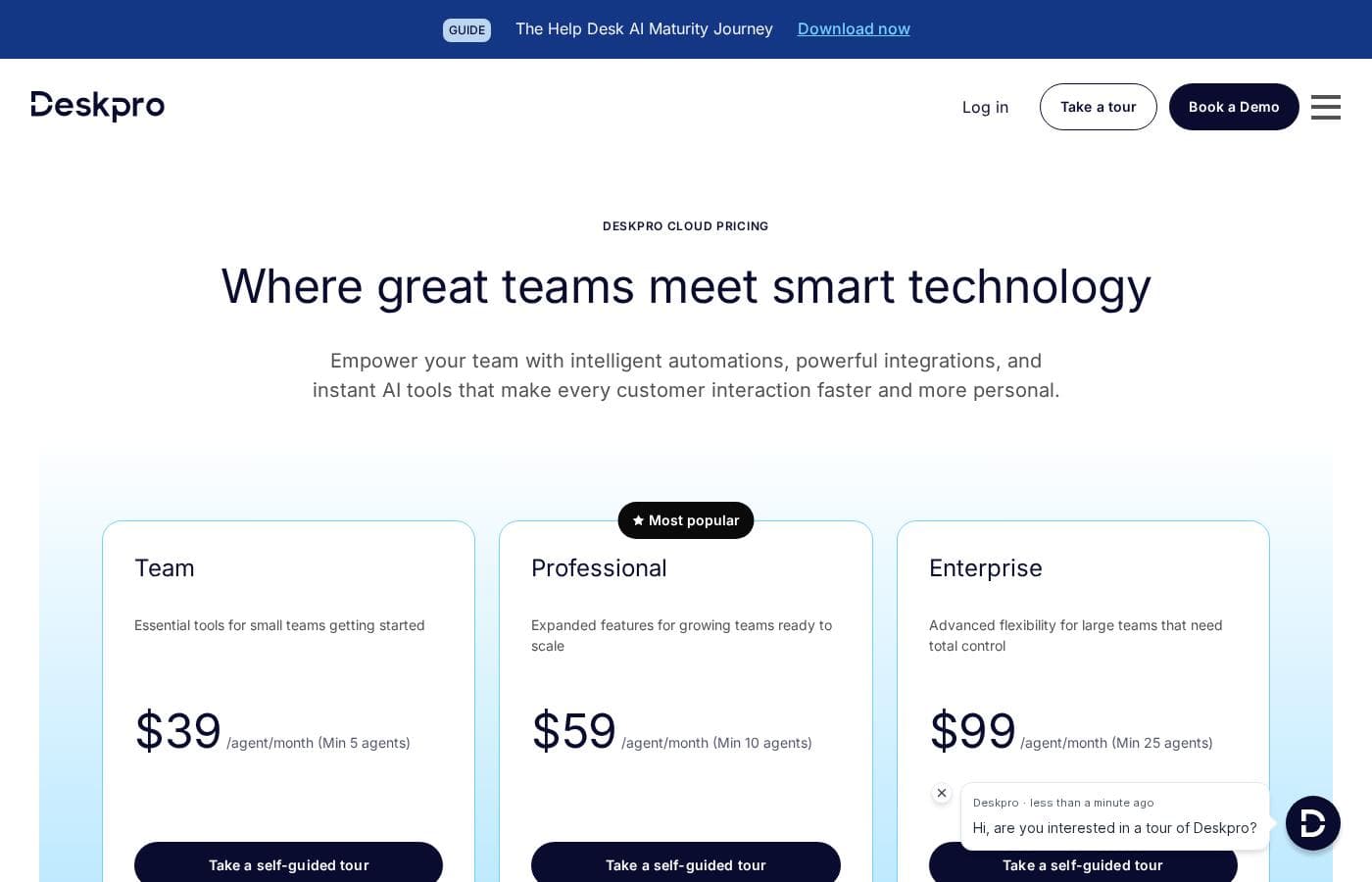
Deskpro pricing

From$39/mo

  • From the vendor's pricing page, checked Oct 12, 2026
  • 3 plans

Prices checked on Oct 12, 2026 from Deskpro's pricing page

Deskpro pricing page screenshotView pricing page screenshot
PlanBilled monthlyBilled annuallyIncludes
Team
per user
$39/mo
β€”
per user
Professional
per user
$59/mo
β€”
per user
Enterprise
per user
$99/mo
β€”
per user

Price history

Tracking prices since Oct 1, 2026. No price change detected yet.

Pricing types: Monthly subscription

Pricing notes

Plans from $1/month

Deskpro pricing: Plans from $1/month Billing options: Monthly subscription

Cost calculator

Estimate what Deskpro costs for your team.

Billing
Per month
$195
Per year
$2,340

Team is priced per user: price Γ— 5 seats. Estimate based on published list prices, before taxes, add-ons and discounts.

How to pay less for Deskpro

  • Some plans are priced per user: only pay for seats people actually use.
  • Cheaper tools in this category start at $1.50/mo.
Visit Deskpro

Email me when Deskpro changes price

One email when we detect a price change on the vendor's pricing page. No newsletter, no deals. Unsubscribe in one click.

User Reviews

No reviews yet.

Write a Review

Write a Review for Deskpro
0/100 characters
0/2000 characters

Why use Deskpro?

Most help desk tools lock you into a single deployment model, which is a problem for organizations with strict data sovereignty rules, regulated industries, or existing infrastructure investments. Deskpro removes that constraint by offering global cloud regions, private cloud placement on major providers, and full self-hosted installations.

Combined with its multi-department applicability β€” IT, HR, and customer support teams can all run on the same platform β€” it suits organizations that want one support system rather than separate tools per team.

Deskpro alternatives

Other tools in the Help Desk category

View all Help Desk tools
NinjaOne

NinjaOne

Help Desk4.2/5From $1.50/mo

Become a NinjaOne affiliate partner and empower your clients to streamline their IT operations! NinjaOne's RMM platform offers visibility, security & control, boosting client productivity & reducing IT costs. #1 for support, Ninja is a proven solution.

Freshdesk by Freshworks

Freshdesk by Freshworks

Help Desk4.2/5From $23/mo

Freshdesk is a help desk and ticketing system that converts incoming customer messages from multiple channels into organized tickets. Agents can assign, prioritize, collaborate on, and resolve those tickets using workflows, canned responses, SLA policies, and automation rules. The platform also includes a self-service knowledge base, customer portals, reporting dashboards, and a marketplace of 150+ third-party integrations covering CRM, e-commerce, messaging, and productivity tools.

HelpDesk

HelpDesk

Help Desk3.6/5From $34/mo

HelpDesk is a browser-based ticketing tool that helps support teams organize messages, assign tickets, and respond to customers from a single place. It handles tickets from email, phone, or online forms, and tracks status from creation to closure.

Hiver

Hiver

Help Desk4.2/5

Hiver is an innovative, AI-first customer service platform. It transforms your existing email inbox into a complete, powerful ticketing system. This means you already know how to use it, allowing teams to get started quickly, often in under five minutes. Hiver is built for any teamβ€”from customer service and finance to HR and ITβ€”that needs to manage communication across channels like email, live chat, WhatsApp, and phone in one simple place.

Techinline

Techinline

Remote Support3.6/5

SetMe by Techinline: a remote desktop solution built for pros who demand reliability, speed, and simplicity. Designed with both IT teams and individuals in mind, SetMe makes remote desktop control seamless, even in low-bandwidth environments.

Freshservice by Freshworks

Freshservice by Freshworks

IT Operations Platform4/5

Freshservice is an IT Operations Platform delivered entirely from the cloud. At its core is a multi-channel ticketing system that consolidates requests from email, a self-service portal, and other intake points, with SLA policies, business hours, and escalation rules enforcing response commitments. Around that core sit modules for the service catalog, knowledge base, asset management and CMDB, change and release management, project tracking, and reporting. No-code automation and the Freddy AI assistant handle repetitive work like ticket categorization, routing, summarization, and suggested replies.

Cheapest Help Desk software for 1 to 25 users

Deskpro FAQ

How much does Deskpro cost?

Deskpro's cheapest paid plan, Team, costs $39 per month. Paid plans range from $39 to $99 per month. Prices checked on Oct 12, 2026 from the vendor's pricing page.

Does Deskpro have a free plan?

No. Deskpro lists no free plan; the cheapest paid plan starts at $39 per month.

Has Deskpro's price changed recently?

No. We have not detected a price change since we started tracking on Oct 1, 2026.

How is Deskpro deployed, and can I host it myself?

Deskpro offers three deployment models. You can use the managed Cloud SaaS hosted in the US, EU, or UK; opt for a Private Cloud placement on AWS, Azure, or Google Cloud where the infrastructure provider is chosen by you but managed for you; or install Deskpro fully self-hosted on your own infrastructure. This makes it one of the few help desks that accommodates strict data sovereignty or internal-hosting requirements.

Is Deskpro only for customer support teams?

No. While it handles B2B and B2C customer support, Deskpro is explicitly designed for diverse internal users as well, including IT Service Desks and HR/People Operations teams. Each department can run its own queues and workflows on the same platform, which is useful for organizations that want a single support system rather than separate tools for external and internal service requests.

When would the private cloud or self-hosted option matter?

It matters when your organization must control where support data resides β€” for example, due to GDPR data residency obligations, sector-specific regulations in healthcare or finance, or internal security policies that prohibit third-party multi-tenant SaaS. With Deskpro you can select an EU or UK cloud region, place the system in your own private cloud tenancy, or run it entirely on-premise, instead of being forced onto a vendor-controlled cloud.

Ready to try Deskpro? Check out the official site or pricing.

Are you Deskpro? Claim this listing Β· Get the badge