Deskpro vs Hiver
Deskpro and Hiver both centralize customer communication, but they target very different users. Deskpro offers ultimate deployment flexibility for enterprises needing total control. Hiver focuses on integration and simplicity, transforming your existing email into a powerful helpdesk.
Best for: Organizations needing Self-Hosted or Private Cloud deployment., Compliance-heavy enterprises requiring HIPAA and Sandbox testing.
Best for: Small teams or startups needing a robust, free shared inbox solution., Teams using Google Workspace or Gmail exclusively for support communication.
Effective support hindered by UI instability.
We observe that Deskpro offers a historically intuitive and integrated ticketing system, appealing to users seeking comprehensive support management. However, recent user feedback indicates challenges with overall stability and the modernity of the user interface provided. Overall, Deskpro provides effective functionality but customer experience relies heavily on recent technical updates improving application reliability.
Pros
- Intuitive and easy-to-use helpdesk ticket system.
- Fast email and phone support handles issues quickly.
- Staff immediately create feature requests for minor bugs.
- Historically considered a reasonably affordable option.
Cons
- Reports of an unstable platform experience (e.g., customers not seeing replies).
- User interface (UI) is criticized for lacking modern appeal.
- Lacks basic quality-of-life features like a dark mode option.
- Live chat and helpline support can be inconsistent or poor.
Simple Shared Inbox, Complex Subscription.
We found Hiver's promise of transforming Gmail into a seamless helpdesk highly appealing and effective for team collaboration. However, we must flag significant and recurring user reports concerning aggressive cancellation policies and perceived low value for the price. Overall, Hiver provides strong helpdesk features in a familiar interface, but the associated business practices detract heavily from the user experience.
Pros
- Integrates seamlessly into Gmail, offering a familiar user interface.
- Fast deployment and high ease of use (get started quickly in under 5 minutes).
- Robust Free plan available that supports an unlimited number of users.
- Collaboration tools (Shared Drafts, internal Notes) eliminate messy email forwarding.
Cons
- Repeated and strong user complaints about high pricing or being overpriced.
- Severe complaints regarding extreme difficulty or impossibility when canceling subscriptions.
- Analytics modules have previously been deemed very limited and lacking clarity.
- Past reports indicate buggy software and inconsistent synchronization issues.
AboutDeskpro
Deskpro is a comprehensive support ecosystem designed to simplify complex service tasks and arm your team for success. It delivers personalized support across every channel, consolidating all interactions into a shared inbox. This solution is built for maximum organizational flexibility. Deskpro serves diverse users, including IT Service Desks, HR/People Ops, and B2B/B2C Customer Support teams. 💡
What truly sets Deskpro apart is its adaptable deployment. You get to choose how your data is managed. Options include Cloud SaaS globally (US, EU, UK), Private Cloud placement (AWS, Azure, Google Cloud), or full Self-Hosted installation. Whether you require rock-solid data sovereignty or completely managed services, Deskpro meets your organization exactly where your needs demand.
AboutHiver
Hiver is an innovative, AI-first customer service platform. It transforms your existing email inbox into a complete, powerful ticketing system. This means you already know how to use it, allowing teams to get started quickly, often in under five minutes. Hiver is built for any team—from customer service and finance to HR and IT—that needs to manage communication across channels like email, live chat, WhatsApp, and phone in one simple place. 💡
Highlights
Feature Comparison
Features Overview
We highlight the main differences and pick a winner for each feature.
Deployment Flexibility
Deskpro offers unmatched control with Self-Hosted or Private Cloud choices. Hiver is strictly a rapid Cloud deployment tool.
Deskpro’s powerful advantage is its total deployment freedom and infrastructure control. You can choose Cloud, Private Cloud on AWS/Azure, or full Self-Hosted installation. This is crucial for maintaining data sovereignty and meeting localized compliance requirements. Hiver is a cloud-based platform designed for rapid deployment directly into your email environment. Teams can get started quickly, often setting up their core support flow in less than five minutes. If high governance and custom control are mandatory, Deskpro is the only option here. Hiver prioritizes minimal setup friction over infrastructure customization. Deskpro's flexibility is essential for large enterprises or organizations in highly regulated sectors like finance or healthcare.
User Interface & Adoption
Hiver transforms your familiar email interface for instant adoption. Deskpro uses a dedicated, comprehensive helpdesk UI.
Deskpro uses a dedicated, full-featured technical support ecosystem interface. Users praise the ticketing system's intuition but note some UI complaints and lack of modern appeal. Hiver integrates seamlessly into Gmail or Outlook, turning your familiar inbox into a powerful ticketing system. This zero learning curve approach guarantees extremely fast team adoption. New teams will likely adopt Hiver much faster since it feels like an enhanced email tool. Deskpro requires learning a new, dedicated application environment. Hiver’s native integration saves time and reduces context switching for agents already using Google Workspace daily.
Minimum Users & Scaling
Hiver offers a powerful Free plan with unlimited users. Deskpro requires a minimum commitment of three paid agents.
Deskpro requires a paid commitment, starting with a minimum of three agents for its Team Cloud plan. The Professional plan requires at least ten agents to start. Pricing scales up with these minimum commitments. Hiver provides a robust Free plan that supports multi-channel shared inboxes for unlimited users. This makes it an ideal choice for small teams watching their budget. If you are a startup or small team, Hiver lets you grow for free before needing to commit financially. Deskpro’s model is built for immediate revenue generation. Hiver wins on entry-level value, but Deskpro’s structured tiers support high-volume scalability in regulated environments.
AI Functionality & Cost
Deskpro includes AI features starting at $39/month. Hiver charges an extra $20/month per user for its AI features.
Deskpro includes AI assistance in its standard plans ($39/month annual). AI handles ticket summaries, auto-triage, and drafting agent replies. This is a bundled feature. Hiver's core AI functionality (Summarizer, Compose, Tagging) is a $20 per user, per month add-on. This cost is incurred on top of the base paid subscription price. Deskpro bundles AI into the initial software cost, making its feature set more accessible earlier. Hiver structures AI as a high-cost, specialized feature. For a team of 10, the Hiver AI add-on instantly adds an extra $200 per month to the bill.
Collaboration Tools
Hiver provides internal Notes and Shared Drafts inside the email thread. Deskpro uses Lite Agents for internal communication.
Deskpro’s unified inbox promotes collaboration and allows internal users called 'Lite Agents' to view tickets. The Professional plan includes 50 Lite Agents. Hiver excels at cleaning up inbox clutter by allowing agents to use @mentions and internal Notes. Agents can also write replies together using Shared Drafts. Lite Agents in Deskpro suit large organizations needing broad cross-departmental visibility. Hiver provides cleaner, faster internal discussions directly within the conversation thread. Hiver’s approach eliminates the need for messy forwarding or external chat to resolve complex cross-team queries quickly.
Security & Compliance
Both offer SOC 2 and GDPR, but Deskpro provides more comprehensive Enterprise controls and HIPAA options across deployments.
Deskpro meets ISO 27001, GDPR, and SOC 2 Type II standards. It offers HIPAA compliance solutions within its Enterprise plans and Self-Hosted options. Hiver is also SOC 2 and GDPR compliant, but HIPAA features are exclusively available only in the top-tier Elite plan. They do not offer Self-Hosting. Deskpro’s ability to customize the deployment environment (Private Cloud, Self-Hosted) ensures maximum governance. This is key for global corporations with strict data mandates. Deskpro integrates necessary security features into the architectural choice, whereas Hiver controls this fully within its SaaS infrastructure.
Customer Reporting
Deskpro focuses on real-time KPIs and custom dashboards. Hiver's analytics have received past criticism for lacking clarity.
Deskpro delivers actionable real-time insights, allowing tracking of KPIs, agent performance, and CSAT scores. Custom dashboards are easy to create and tailor instantly. Hiver offers analytics for conversation data and team performance, with custom reports available in the Growth plan. However, users have previously complained its older analytics modules were limited. Managers seeking immediate visibility into efficiency will prefer Deskpro’s emphasis on custom, real-time metrics. Hiver focuses more on delivering the core support functionality. Effective operations rely on data: Deskpro users can better identify bottlenecks and optimize resource allocation with its reporting structure.
Pricing Transparency
Deskpro has clearer pricing with minimums. Hiver pricing faces heavy user complaints regarding difficulties with cancellation.
Deskpro's pricing tiers ($39–$99/agent/month) are transparently listed with upfront minimum agent requirements. Users reported its pricing is reasonably affordable. Hiver's per-user pricing is competitive ($19–$49/user/month), but multiple external reviews allege extreme difficulty when attempting to cancel the subscription. The trade-off here is operational: Deskpro requires buying more seats upfront, but Hiver has worrying reports of being impossible to escape when needed. Deskpro wins on trust. Avoid lengthy contracts with Hiver unless you are absolutely certain it is the long-term tool for your team, given the persistent cancellation issues reported.
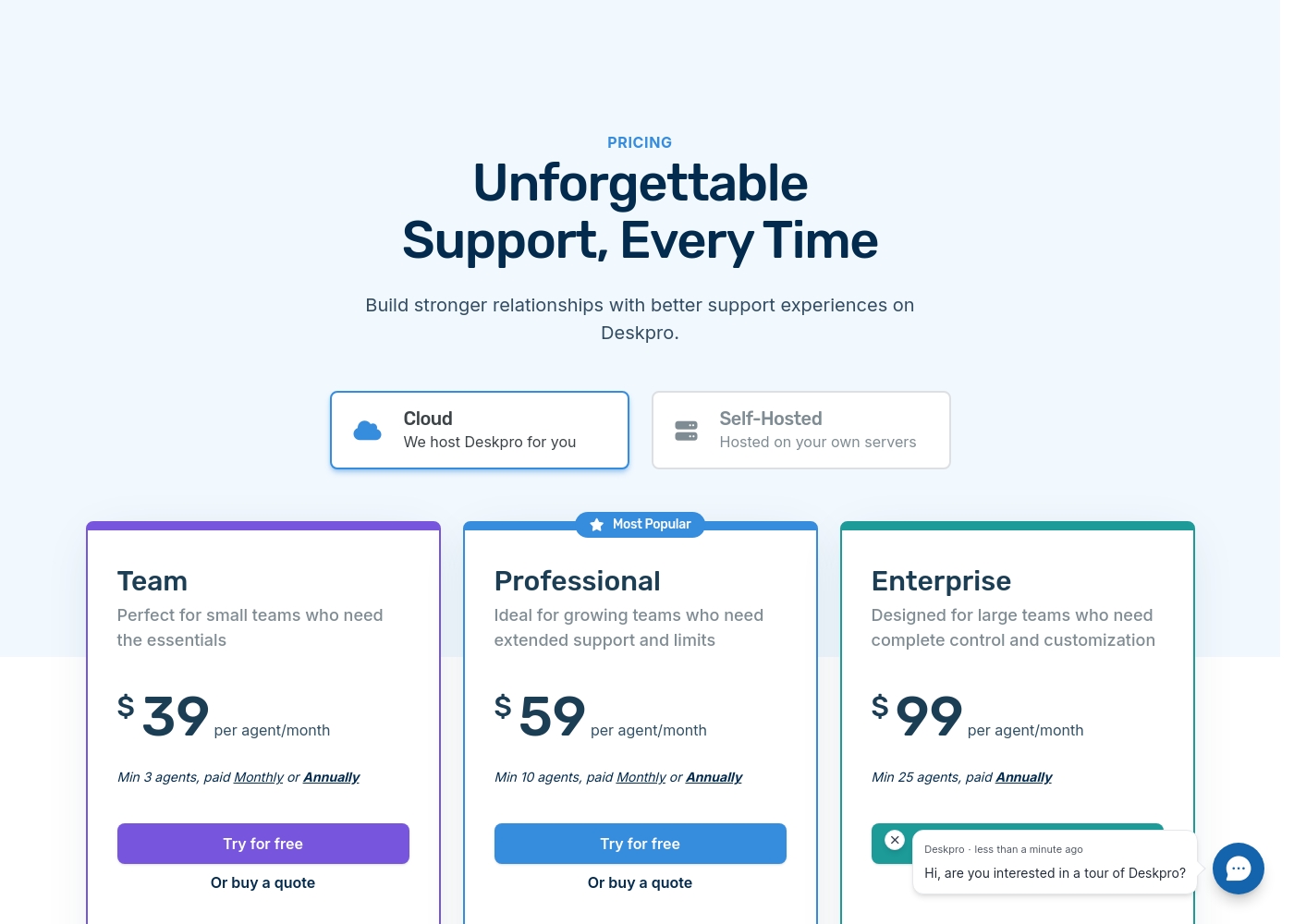
Deskpro costs between $39 and $99 per agent/month with three plans: Team at $39, Professional at $59, and Enterprise at $99. These prices reflect annual commitments for Cloud hosting.
Now, let's explore the key features and commitments for each of these options.
Team
Price: $39 per agent/month (annual billing) / $49 per agent/month (monthly billing) Best For: Small teams who need the essentials Other Features:
- Multiple inboxes covering email, chat, social channels, and SMS
- Help Center for 24/7 self-service knowledge management
- Simple Chatbots for automated pre-human support
- Reporting and Analytics
- Data Center Choice (US/EU/UK)
- Multiple inboxes with all channels
- Chatbots
- Help Center
- Manage unlimited conversations
- Mobile App
- Everything in Team + Review Channels
- 50 Lite Agents
- AI Chatbots
- Voice Premium
- Unbranding
- Everything in Professional + HIPAA Compliant Hosting
- Global Data Center Choice (22 countries)
- Customer Success Manager
- Sandbox
- Custom Contracts
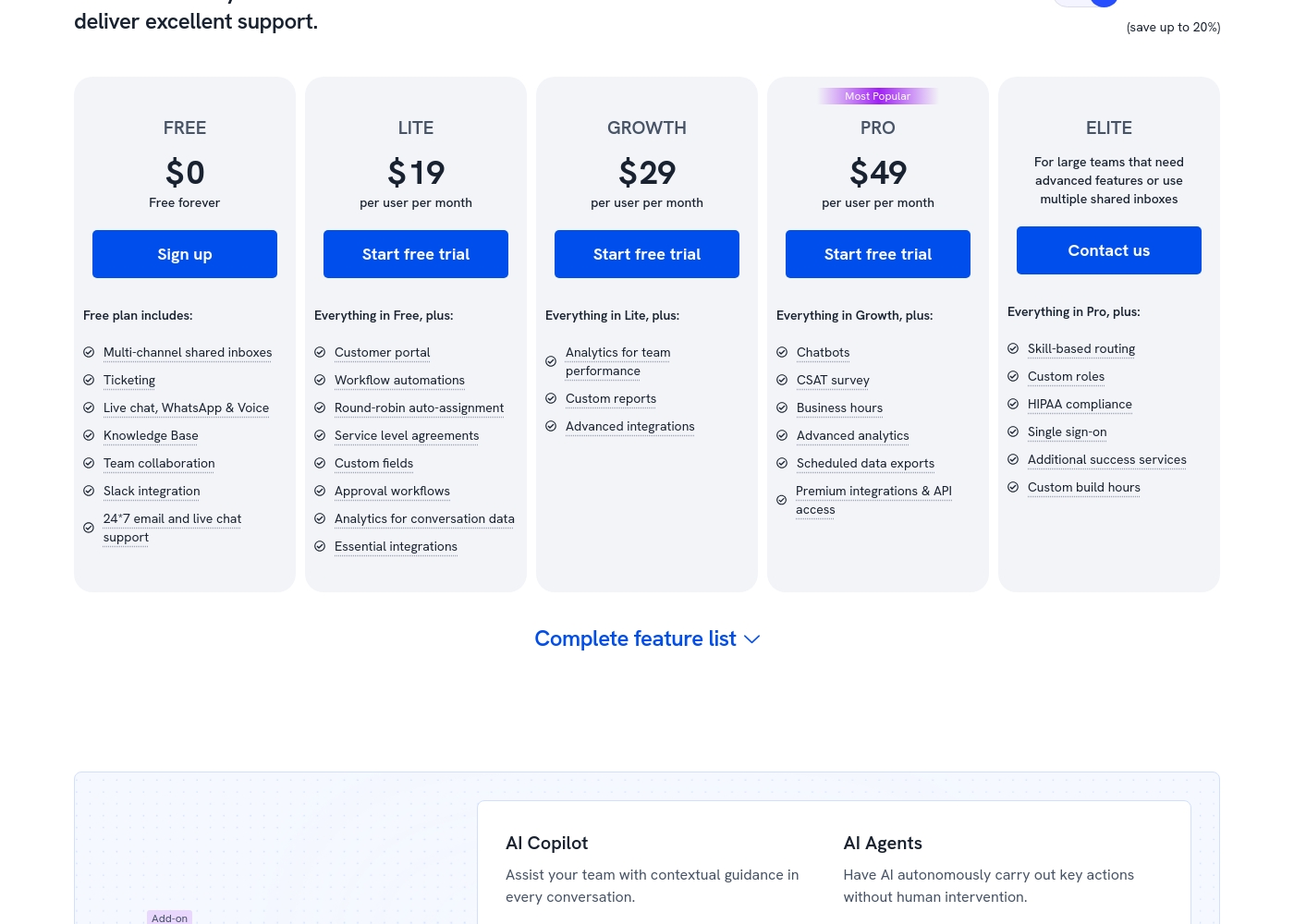
Hiver costs between $0 and $49 per user per month (billed annually) with five plans: FREE at $0, LITE at $19, GROWTH at $29, PRO at $49, and ELITE (Contact us).
Let's explore which plan makes the most sense for your team's unique needs.
FREE
Price: $0 (Free forever) Best For: Teams wanting basic triage capabilities for multi-channel communication. Other Features: Multi-channel shared inboxes, Ticketing, Live chat/WhatsApp/Voice, Knowledge Base, Team collaboration, Slack integration, 24/7 email and live chat support.
- Multi-channel shared inboxes
- Ticketing
- Live chat, WhatsApp & Voice
- Knowledge Base
- Team collaboration
- Customer portal
- Workflow automations
- Round-robin auto-assignment
- Service level agreements (SLA)
- Custom fields
- Analytics for team performance
- Custom reports
- Advanced integrations (e.g., Zapier)
- Chatbots
- CSAT survey
- Business hours
- Advanced analytics
- Scheduled data exports
Pricing Notes
- Hiver offers a robust Free plan with unlimited users, where Deskpro requires a 3-agent minimum commitment for its entry tier.
- Deskpro’s pricing is structured with minimum agent requirements (3, 10, 25 seats) which can increase initial spend.
- Hiver's advanced AI functionality is an additional, mandatory $20/user/month cost across all paid tiers.
- External reviews frequently cite Hiver's high price and extreme difficulty in cancelling subscriptions as major pain points.
- Deskpro offers unbranding options starting at the Professional ($59/month) tier.
Pricing Head-to-Head
User Reviews
Deskpro receives a polarized reception from users, according to the limited reviews available. Historically, users have praised the system for being highly intuitive and relatively affordable, noting the helpdesk ticket system works very well.
However, more recent feedback highlights significant technical frustrations. Users reported the UI is often difficult and unstable, specifically mentioning a lack of dark mode and critical messaging failures where customers could not see agent replies.
Working with Deskpro has shown they have fast support via email and phone. Most questions are answered quickly, sometimes before the call ends. They immediately create feature requests for small bugs we find.
External feedback shows a highly polarized user experience, resulting in a low overall satisfaction score. While some users appreciate Hiver's core function as the "most simple helpdesk within email", providing a frictionless support experience directly inside Gmail, the critical complaints focus heavily on pricing and service practices.
Several recent reviews allege the service is overpriced and strongly advise against use due to extreme difficulties in cancelling existing subscriptions or accounts. These recurring administrative issues suggest a significant lack of focus on customer retention and respect for user autonomy.
Hiver offers the most simple helpdesk solution we've found that works right within the email interface. This made the onboarding process incredibly fast for our team. We appreciate how simple the system is to use daily.
Our Verdict
Choosing between Deskpro and Hiver hinges entirely on your need for control versus simplicity. If you require ultimate governance and data control, Deskpro is the necessary solution. Hiver excels in maximizing the familiar email experience and speed of adoption. Deskpro's superpower is its infrastructure and enterprise governance. It offers Cloud, Private Cloud, and crucial Self-Hosted solutions. This adaptability is vital for handling sensitive data that requires compliance like HIPAA. Deskpro also includes ticket summary AI features sooner in its standard plans. Hiver shines by making your email truly collaborative, feeling native to Gmail or Outlook. Team onboarding is nearly instant, often taking only minutes for agents to become fully proficient. Critically, Hiver provides a powerful Free plan for unlimited users, eliminating the initial financial startup barrier. The critical decision rests on your infrastructure needs and budget tolerance. If your organization must have 100% data sovereignty, Deskpro is the clear, functional choice. If you value low friction and a zero-minimum entry point, Hiver is superior. Pick Deskpro if you are a large, compliance-focused organization ready for a min 10-agent commitment. Choose Hiver if you are a smaller team prioritizing simplicity, rapid launch, and integrating seamlessly with Google Workspace.
Frequently Asked Questions
Which is better for small teams: Deskpro or Hiver?
Hiver is better for small teams because it offers a free plan with unlimited users. Deskpro requires a minimum commitment, starting at three paid agents for their basic plan. Hiver allows you to scale up without immediate financial pressure.
Does Deskpro offer a Self-Hosted option like Hiver?
Yes, Deskpro offers comprehensive Self-Hosted and Private Cloud options for maximum data control. Hiver is exclusively a Cloud-based solution integrated into Google Workspace. If you need data sovereignty, choose Deskpro.
How much does AI functionality cost in Deskpro vs Hiver?
Deskpro includes AI assistance for ticket summarizing and reply drafting starting at $39/month. Hiver charges an extra $20 per user per month for its AI features. Deskpro integrates AI more affordably into its core plans.
Which tool offers better enterprise compliance features?
Deskpro offers better overall compliance due to its deployment flexibility (Self-Hosted/Private Cloud). Both tools offer HIPAA compliance, but Deskpro provides a testing Sandbox environment in its Enterprise tier. Deskpro is designed for broader enterprise needs.
Do I need a minimum number of agents to use Hiver?
No, Hiver’s Free plan supports unlimited users for basic shared inbox functionality. Paid plans are per-user and do not mandate a minimum seat count. Deskpro requires a minimum of 3 paid agents for its entry-level cloud tier.
Why are Hiver users complaining about the platform?
Hiver users frequently complain about extreme difficulty or inability when trying to cancel their subscriptions. They also cite high prices relative to the value offered. Deskpro’s complaints generally relate to UI stability and modernization, not business practices.
Ready to Choose?
Both tools have their strengths. Choose based on your specific needs.