Sender vs Unbounce
Sender and Unbounce serve very different marketing needs. Sender is for affordable, simple email campaigns. Unbounce is for high-converting landing pages and A/B testing. Your choice depends on whether you need to send emails or optimize clicks.
Best for: Small businesses and startups on a tight budget, Beginners who need simple, effective email marketing
Best for: Digital marketers running paid advertising campaigns, Marketing agencies managing multiple client campaigns
Simple, free, and effective for basics.
We found Sender to be a solid, no-frills tool for core email marketing tasks. Its free plan is a major draw for startups and small businesses. Overall, it delivers good value with a straightforward interface, though it may lack some advanced features for power users.
Pros
- Extremely generous free plan (2,500 contacts, 15k emails/month).
- Clean, user-friendly interface that's easy to learn.
- Transparent, affordable pricing with no hidden fees.
- Includes essential automation features from the start.
Cons
- Advanced features and segmentation are limited on lower tiers.
- Some users report occasional email deliverability issues.
- Integrations can be inconsistent with certain platforms.
- Free plan lacks SMS marketing capabilities.
Rapid Conversion Optimization for Marketers.
Unbounce offers a powerful, no-code environment optimized for rapid campaign launch and robust A/B testing capabilities. While we recognize the unique advantages of Smart Traffic AI, we also note recurring user concerns regarding restrictive pricing tiers and design flexibility. Overall, Unbounce is an essential tool for high-volume conversion optimization professionals seeking speed and automation.
Pros
- Powerful and intuitive platform for rigorous A/B testing.
- Exceptional, responsive live customer support is widely praised.
- Smart Traffic AI optimization available to boost conversion rates.
- No-code drag-and-drop builder simplifies page building.
Cons
- Pricing structure is considered expensive by many users.
- Limitations on custom domains and paying for integrations are restrictive.
- Design output can sometimes look generic or lack styling flexibility.
AboutSender
Sender is an email marketing platform designed for businesses of all sizes. It helps you build, automate, and send email campaigns that people actually want to read. Think of it as your straightforward tool for staying in touch with your audience and driving sales. 🚀
AboutUnbounce
Unbounce is the leading landing page platform, built specifically for marketers and agencies. This tool helps you create personalized, high-converting campaigns in record time. It combines a flexible drag-and-drop editor with advanced testing features. You can build landing pages, popups, and sticky bars without needing designers or developers. The main goal is simple: launch faster and convert more customers from this single, powerful platform. 💡
Highlights
Feature Comparison
Features Overview
We highlight the main differences and pick a winner for each feature.
Core Purpose
Sender is an email marketing tool. Unbounce is a landing page and conversion platform.
Sender helps you build and automate email campaigns to nurture a subscriber list. You collect emails and send newsletters, promotions, and automated sequences. Unbounce helps you build high-converting landing pages to capture leads from ads and traffic. You focus on optimizing the click, not the follow-up email. The key difference is the starting point. Sender's value begins after you have an email. Unbounce's value is in getting the email in the first place.
Free Offering
Sender offers a permanent free plan. Unbounce offers only a 14-day trial.
Sender's Free Forever plan includes up to 2,500 subscribers and 15,000 emails per month. You also get automation and support without paying. Unbounce does not have a free plan. It offers a 14-day free trial that requires a credit card. After the trial, you must pay to keep using it. For those on a tight budget or just starting, Sender provides long-term value at zero cost. Unbounce's trial is just for evaluation.
Conversion Optimization
Unbounce is built for optimization. Sender includes basic tools.
Unbounce specializes in conversion rate optimization (CRO). Features include unlimited A/B testing, Smart Traffic AI, and Dynamic Text Replacement to personalize pages. Sender offers landing pages and pop-ups to capture leads. However, it lacks advanced A/B testing and AI-driven optimization tools for those pages. If your goal is to test headlines, layouts, and offers to maximize sign-ups, Unbounce is the dedicated tool for the job.
Pricing & Value
Sender is extremely affordable. Unbounce is a premium investment.
Sender's paid plans start at $7/month. Even the $14/month Professional plan is very low-cost for the features included. Unbounce's cheapest plan starts at $74/month (billed annually). The price scales quickly with traffic and user seats. Unbounce costs more because it's a specialized conversion tool. Sender is a general email tool, making its value proposition different.
Ease of Use
Both are user-friendly, but for different tasks.
Sender is praised for its simple, clean interface. You can set up an email campaign in about 5 minutes with minimal learning curve. Unbounce's drag-and-drop builder is also intuitive for creating pages. However, mastering its advanced testing and AI features takes more time. Sender wins for quick setup and simplicity. Unbounce offers more power but with slightly more complexity.
Advanced Features
Unbounce offers more sophisticated marketing tools.
Unbounce provides Smart Traffic, AI copywriting (Smart Copy), and advanced scheduling for pop-ups and sticky bars. Sender's advanced features are focused on email automation and segmentation. It does not have equivalent AI optimization for its landing pages. For marketers who want the latest AI and automation tools for campaign optimization, Unbounce leads.
Scalability
Both scale, but Unbounce has clear traffic-based limits.
Sender scales by subscriber count. You upgrade plans as your email list grows, with transparent pricing. Unbounce scales by monthly traffic volume and user seats. Exceeding your traffic limit automatically upgrades you to a higher tier. Unbounce's scaling is tied directly to campaign success and traffic. Sender's scaling is tied to audience size.
Customer Support
Both offer strong support, with Sender including it on all plans.
Sender provides 24/7 live support on every plan, including the free one. This is a major plus for new users. Unbounce offers phone, email, and live chat support. Users frequently praise its responsiveness and helpfulness. Both tools score well here. Sender's 24/7 availability on free plans is a notable advantage.
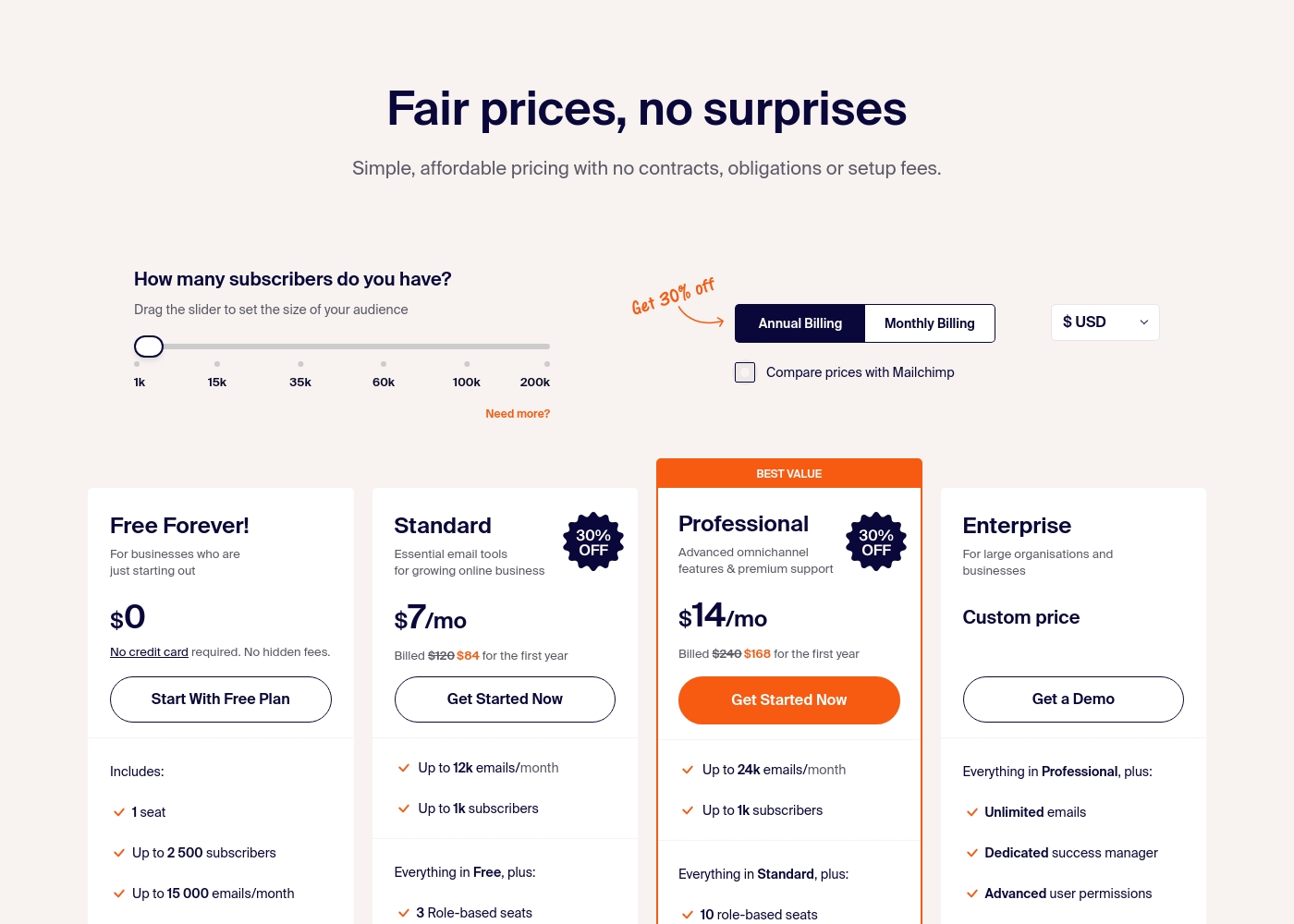
Sender costs between $0 and a custom price per month with 4 plans: Free Forever at $0, Standard at $7, Professional at $14, and Enterprise at Custom price.
Take a look at the specific features and limits included in each plan tier below.
Free Forever!
Price: $0 monthly Best For: Businesses who are just starting out Other Features: 1 seat, up to 2,500 subscribers, 15,000 emails/month, 24/7 live support, email automation.
- 1 seat
- Up to 2,500 subscribers
- Up to 15,000 emails/month
- 24/7 live support
- Email automation
- Up to 12k emails/month
- Up to 1k subscribers
- 3 Role-based seats
- Automated sequences
- Up to 24k emails/month
- Up to 1k subscribers
- 10 role-based seats
- Premium support
- Unlimited emails
- Dedicated success manager
- Advanced user permissions
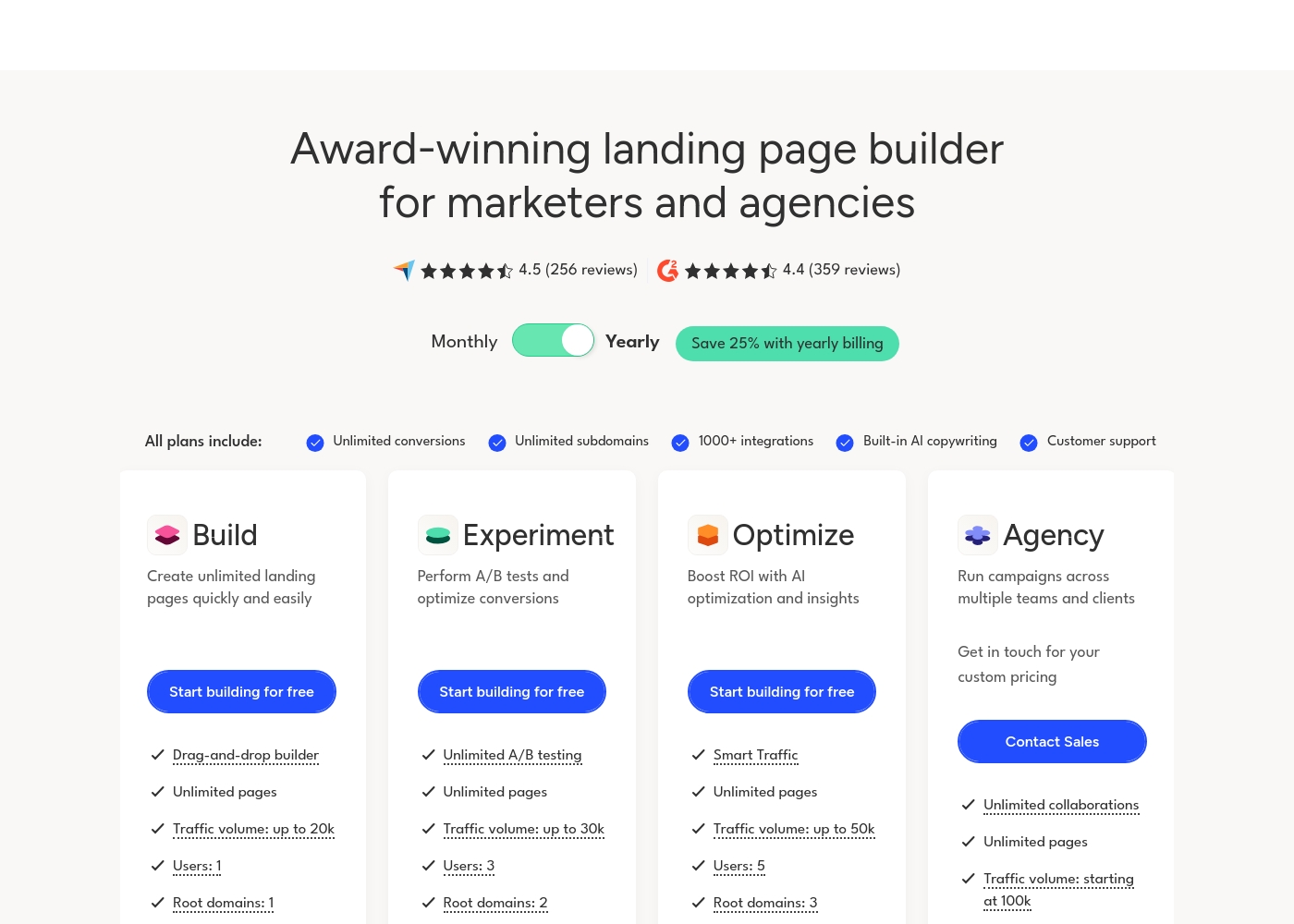
Unbounce costs between $74 and $249 per month (billed annually) with 4 plans: Build at $74/month, Experiment at $112/month, Optimize at $187/month, and Agency (custom pricing).
Let's look closer at what's included in each plan to help you decide which one is the right fit for your needs.
Build
Price: $74 USD/month (billed annually) or $99 USD/month Websites Supported: 1 root domain Best For: Creating unlimited landing pages quickly and easily Other Features:
- Drag-and-drop builder
- Traffic volume up to 20k visitors
- Users: 1
- Popups and sticky bars
- Smart Copy (AI copywriting)
- Drag-and-drop builder
- Unlimited pages
- Popups and sticky bars
- Smart Copy (AI copywriting)
- Customer support
- Unlimited A/B testing
- Dynamic Text Replacement
- All Build plan features
- Smart Traffic (AI optimization)
- Page, popup, and sticky bar scheduling
- Advanced triggers and targeting
- All Experiment plan features
- Unlimited collaborations
- Access to implementation services
- Listing in agency partner directory
- All Optimize plan features
Pricing Notes
- Sender's Free Forever plan is its biggest differentiator, offering substantial value at $0.
- Unbounce's pricing is based on traffic volume, which can lead to unexpected costs if a campaign goes viral.
- Unbounce offers a 25% discount for annual billing. Sender's annual billing also provides savings.
- Sender's paid plans are significantly cheaper than Unbounce's entry-level plan.
- Both tools have transparent pricing, but Unbounce's model can scale faster with success.
Pricing Head-to-Head
User Reviews
User sentiment on Trustpilot and Capterra highlights Sender's generous free plan and ease of setup as major positives. Many praise the intuitive interface and reliable automation.
😊 However, some note occasional deliverability hiccups and a learning curve for advanced features. Customer support is frequently mentioned as responsive, though a few users report slow responses during peak times.
The free plan is unbeatable for a new business. I set up my first automation in minutes. The platform is simple and gets the job done without fuss.
User feedback is highly polarized, but consistently points to Unbounce being a powerful platform for its core purpose. Users frequently describe the platform as an intuitive tool that truly excels at creating multiple variants and running rigorous A/B testing.
Many stated the system is high-quality, helps maximize ROI on PPC campaigns, and backed this up by highlighting the customer support team as unsurpassed, responsive, and cordial. However, recurring themes of dissatisfaction center heavily on affordability and perceived limits.
This is the best A/B test software, period. I’ve used Unbounce for three years and it is incredibly intuitive and high quality. The platform helps maximize our ROI on all PPC campaigns, and their customer service is unsurpassed.
Our Verdict
For most people starting out, Sender is the smarter choice. It delivers essential email marketing tools for free. If your primary goal is converting ad traffic, Unbounce is the superior specialist tool. Sender's superpower is its incredible value. You get a generous free plan, easy setup, and solid automation. It's perfect for building an audience without breaking the bank. Unbounce's superpower is conversion optimization. Its AI-driven Smart Traffic and unlimited A/B testing can significantly boost your campaign ROI. It's built for marketers who live and die by their conversion rates. The deciding factor is your main goal. Need to send newsletters and nurture leads? Choose Sender. Need to build and test landing pages to maximize clicks? Choose Unbounce. Pick Sender if you're a small business needing affordable email marketing. Pick Unbounce if you're a marketer or agency focused on optimizing ad campaigns and landing page performance.
Frequently Asked Questions
Can I use Sender and Unbounce together?
Yes, you can. Many users build landing pages with Unbounce to capture leads. They then use Sender to manage and email that subscriber list with automated campaigns.
Which is better for beginners?
Sender is generally better for beginners. Its interface is simpler, and the free plan removes financial risk. Unbounce has a steeper learning curve and requires payment after 14 days.
Does Unbounce have email marketing features like Sender?
No, Unbounce is not an email marketing tool. It focuses solely on creating landing pages, pop-ups, and sticky bars. You need a separate email platform, like Sender, to send campaigns.
Is Sender's free plan really unlimited?
No, it has limits. The Free Forever plan allows up to 2,500 subscribers and 15,000 emails per month. There are no daily sending limits, but monthly totals are capped.
Why is Unbounce so much more expensive than Sender?
Unbounce is a specialized conversion optimization tool with expensive features like AI and advanced testing. Sender is a more general-purpose email marketing tool with a different cost structure.
Which tool is better for e-commerce stores?
It depends on your focus. Sender is great for email campaigns and abandoned cart reminders. Unbounce is better for creating high-converting product landing pages from ad traffic.
Ready to Choose?
Both tools have their strengths. Choose based on your specific needs.