OVHcloud vs Plesk
This isn't apples-to-apples. OVHcloud is cloud infrastructure you build on. Plesk is a control panel you use to manage that infrastructure. OVHcloud gives you the server; Plesk helps you run the websites on it.
Best for: Businesses needing high-performance dedicated servers, Developers and DevOps teams building cloud applications
Best for: Web agencies managing client sites, IT admins overseeing multiple servers
Robust infrastructure for serious performance.
We find that OVHcloud provides highly powerful infrastructure solutions backed by a self-managed global network, resulting in impressive performance control and superior bandwidth value. Overall, OVHcloud is an excellent choice for organizations needing dedicated power without massive cloud vendor lock-in or excessively high costs.
Pros
- Affordable pricing for high-performance VPS and dedicated servers.
- Robust, automated Anti-DDoS protection is included free on all servers.
- Highly stable services and reliability often reported across many years.
- High-speed performance utilizing liquid cooling and advanced AMD EPYC CPUs.
Cons
- Servers are occasionally out of stock, requiring outreach to the sales team.
- Onboarding documentation can be confusing for new users unfamiliar with complex infrastructure.
- Support quality is inconsistent for some users, occasionally relying too heavily on automation.
Powerful panel, check the support.
Plesk is a feature-rich control panel that excels at centralizing server and website management, especially for WordPress. We found it robust and cloud-compatible, but the overall experience can be inconsistent due to reported customer support challenges. Overall, it's a strong contender for technical users who value its toolkit, but we'd advise trying the free trial to test support responsiveness firsthand.
Pros
- Unified dashboard for managing multiple sites and servers
- Powerful, automated WordPress Toolkit for updates and staging
- Broad security features built-in at the OS and app level
- Compatible with all major cloud platforms (AWS, Azure, Google Cloud)
Cons
- Customer support responsiveness is frequently criticized in reviews
- Pricing can be opaque, and some users report billing surprises
- May present a learning curve for users unfamiliar with server admin
- Not ideal for single, simple websites or fully managed, hands-off services
AboutOVHcloud
OVHcloud is a trusted global provider for all your cloud needs. They offer an extensive range of solutions, from fully managed Hosted Private Cloud to flexible Public Cloud services.
OVHcloud serves small, medium, and enterprise customers globally. They achieve maximum efficiency by manufacturing their own servers and building their core global network.
With 44 data centers across four continents, they provide the foundation you need. Their goal is always to bring freedom, security, and innovation to solve your data challenges.
AboutPlesk
Plesk is a comprehensive server management platform built for developers, IT admins, and hosting providers. It acts as a centralized control panel for building and managing multiple sites. You get tools for security, performance monitoring, and onboarding new clients from a single place.
Highlights
Feature Comparison
Features Overview
We highlight the main differences and pick a winner for each feature.
Core Purpose
OVHcloud provides the server itself. Plesk provides the software to manage websites on that server.
OVHcloud sells you raw computing power. You get virtual private servers, dedicated machines, and managed cloud services. You build your own environment on their global infrastructure. Plesk is a software layer you install on a server (from any provider). It gives you a dashboard to manage websites, databases, and security. You don't get a server from Plesk. The key difference is OVHcloud is the foundation. Plesk is a tool for building on that foundation.
User Interface
OVHcloud's dashboard is for managing infrastructure. Plesk's dashboard is for managing websites.
OVHcloud's control panel is built for server admin. You configure networking, deploy new servers, and manage billing. It's powerful but requires technical knowledge. Plesk's interface is a centralized hub for web professionals. You see all your sites, run one-click WordPress updates, and check security. It's designed for daily website tasks. Choose OVHcloud's panel if you need to manage hardware. Choose Plesk's if you need to manage content and sites.
WordPress Management
Plesk offers a dedicated, advanced toolkit for WordPress. OVHcloud does not include website management tools.
OVHcloud provides no built-in WordPress features. You would install WordPress manually on one of their servers and manage it yourself or with other software. Plesk's WP Toolkit is a major advantage. It lets you install, clone, update, and stage WordPress sites with one click. It includes automated testing for updates. For WordPress-heavy work, Plesk is the clear specialist. OVHcloud is the place to host the server it runs on.
Security Features
OVHcloud protects the network. Plesk protects the server and application layers.
OVHcloud includes robust Anti-DDoS protection for free on all servers. It also offers private networking via vRack to isolate traffic. Security is at the infrastructure level. Plesk provides multi-layer security for the OS, network, and applications. It includes tools and extensions for firewalls, malware scanning, and SSL management. Security is at the software level. Both are secure, but they protect different parts of the stack.
Integration Ecosystem
Plesk integrates with 100+ tools and all major clouds. OVHcloud integrates within its own ecosystem.
Plesk works with AWS, Azure, Google Cloud, and any Linux server. You can extend it with over 100 add-ons like Cloudflare, NGINX, and Git. OVHcloud integrates its own services like vRack, Public Cloud, and Private Cloud. It's a deep but self-contained ecosystem. You wouldn't use it with AWS. Plesk offers broad compatibility. OVHcloud offers deep integration for its own infrastructure.
Customer Support
OVHcloud support gets high praise. Plesk support receives mixed reviews.
OVHcloud testimonials often praise specific account managers. Users report quick, patient help with technical setup and upgrades. Support quality is frequently highlighted. Plesk reviews show a pattern of complaints about slow or unresponsive support. Users report difficulty reaching billing or getting urgent help. This is a common pain point. OVHcloud's support reputation is significantly stronger based on user reviews.
Pricing Model
OVHcloud prices the infrastructure. Plesk prices a software license for your server.
OVHcloud charges for server resources: $4.20/mo for a basic VPS, $70/mo for a dedicated server. You pay for compute power and bandwidth. Plesk charges a license fee: $15.57/mo to $57.74/mo per server. This is on top of the server cost from any provider. The fee covers the management software. You'll often need both: pay OVHcloud for the server and Plesk for the panel to manage it.
Scalability
OVHcloud scales hardware and cloud services. Plesk scales website management across servers.
OVHcloud scales by adding more powerful servers or using their Public Cloud. You can go from a $4.20 VPS to a dedicated machine with AMD EPYC CPUs. Plesk scales by letting you manage more sites. The Web Host Edition supports unlimited domains. You can manage sites across multiple servers from one dashboard. OVHcloud scales your computing power. Plesk scales your web management workflow.
OVHcloud costs between $4.20 and $399 per month across key services: VPS-1 at $4.20/month, Dedicated Servers starting at $70/month, and Public VCF as-a-Service starting at $399/month.
We offer infrastructure solutions tailored to various needs and budgets. The core cost depends entirely on the type of server or cloud service you choose.
VPS-1 Local Zone
Price: $4.20 /month Best For: Low latency access and smooth user experiences Other Features:
- Daily backups included
- Unlimited traffic
- Anti-DDoS protection
- Available in 15+ Local Zones
- Low latency for smooth user experiences
- Data hosted close to you and your customers
- Unlimited Bandwidth, up to 3Gbps
- Daily Backups Included
- Anti-DDoS Protection Included
- Free setup included
- Unlimited traffic on all servers
- Anti-DDoS included
- vRack physical private network
- Fast websites and apps (up to 10 Gbps included)
- Fully managed VMware Cloud Foundation (VCF) solution
- Fast to deploy, easy to scale
- Cost-efficient with flexible, predictable monthly pricing
- Optimized for cost and performance

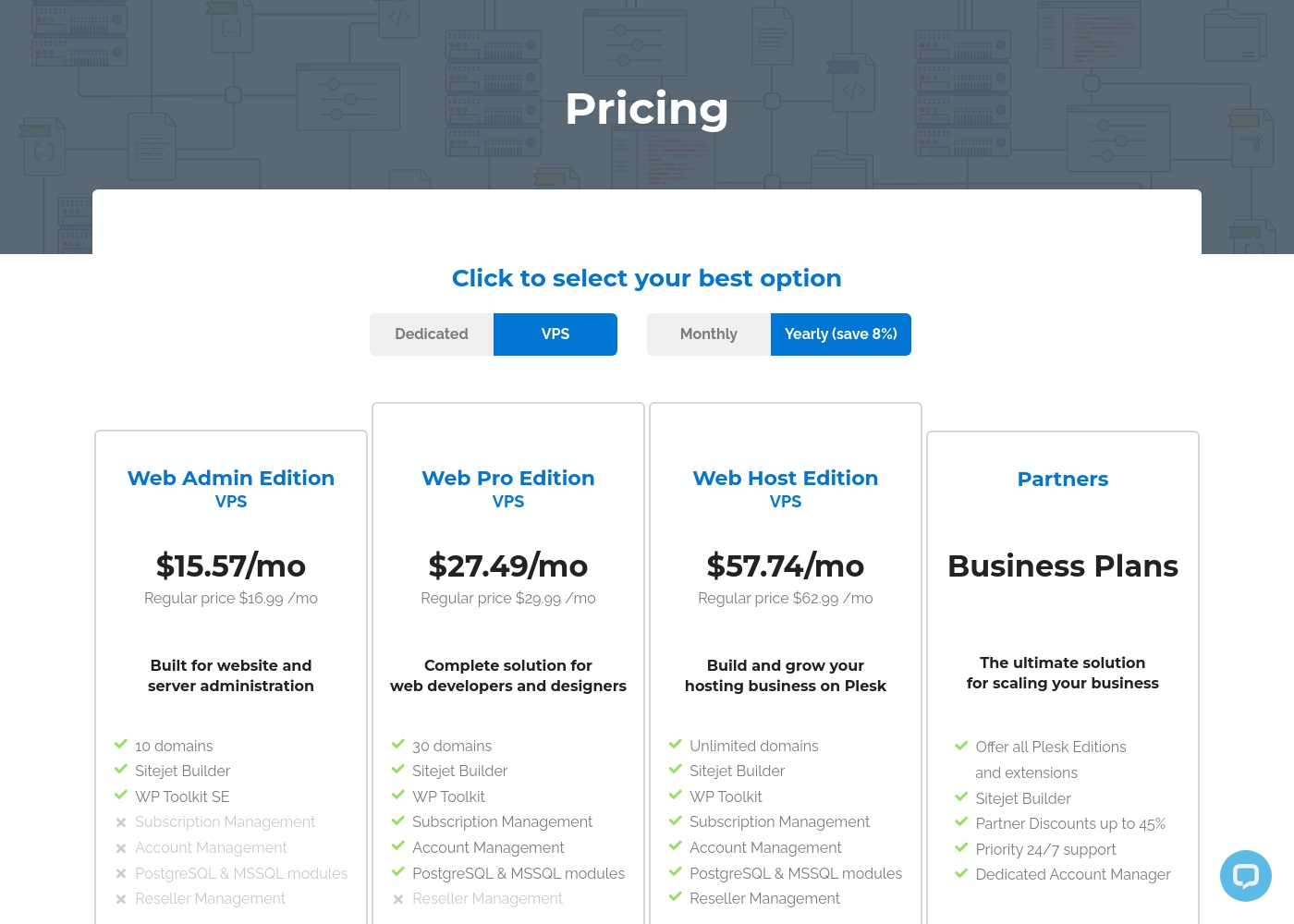
Plesk costs between $15.57 and $57.74 per month with 4 plans: Web Admin Edition at $15.57/mo, Web Pro Edition at $27.49/mo, Web Host Edition at $57.74/mo, and Partners at $250/mo minimum.
You can see how the specific licenses break down below to find the right fit for your server.
Web Admin Edition
Price: $15.57 per month billed annually Websites Supported: 10 domains Best For: Basic website and server administration Other Features: Sitejet Builder, WP Toolkit SE
- 10 domains
- Sitejet Builder
- WP Toolkit SE
- 30 domains
- Sitejet Builder
- WP Toolkit
- Subscription Management
- Account Management
- Unlimited domains
- Sitejet Builder
- WP Toolkit
- Subscription Management
- Account Management
- Offer all Plesk Editions
- Sitejet Builder
- Partner Discounts up to 45%
- Priority 24/7 support
- Dedicated Account Manager
Pricing Notes
- OVHcloud's price is for the server hardware and bandwidth. Plesk's price is a software license fee, typically for a server you already own.
- A complete solution often requires paying OVHcloud for hosting and Plesk for management.
- OVHcloud offers a public cloud credit trial. Plesk offers a 14-day full-function free trial with no credit card.
- Plesk's yearly billing offers an 8% discount over monthly pricing.
Pricing Head-to-Head
User Reviews
Customers widely praise OVHcloud for its exceptional value and affordable pricing, particularly for VPS and dedicated server options. Reliability is a strong theme, with many users reporting highly stable services spanning multiple years without serious outages.
A standout feature is the robust, automated DDoS protection system, which reliably mitigates attacks and ensures server uptime. Reviewers also appreciate the growing number of global locations available for improved latency.
I’ve had only good experiences with their VPS service. For running small applications like websites and bots, it works great and is very affordable. My longest VPS has been running successfully with them for years.
We found that user sentiment for Plesk is quite mixed. On Trustpilot, many users praise its user-friendly interface and reliable server management tools, especially the WordPress toolkit.
🛠️ However, a significant number of reviews complain about unresponsive customer support and billing issues, particularly after contract renewals. Some find the software intuitive for basic tasks, while others report it can be unreliable and cause server downtime.
Plesk makes managing my WordPress sites a breeze. The dashboard is intuitive, and the one-click updates save me hours every week. It's the most reliable panel I've used.
Our Verdict
OVHcloud and Plesk aren't direct competitors. They're often used together. OVHcloud is the world-class infrastructure provider. Plesk is the control panel software that helps you manage websites on that infrastructure. OVHcloud's superpower is raw, cost-effective power. It delivers dedicated servers with AMD EPYC CPUs, unlimited bandwidth, and free DDoS protection. Their global network of 44 data centers is a huge advantage for performance. Plesk's superpower is centralized management. Its dashboard and WordPress Toolkit let you update, secure, and stage dozens of sites from one place. It turns complex server admin into manageable, one-click tasks. The deciding factor is your role. If you need to provision and control the server itself, choose OVHcloud. If you need to manage the websites running on a server, choose Plesk. For most people, the answer is both. Start with an OVHcloud server for the best price and performance. Then install Plesk to make managing your websites incredibly easy. OVHcloud gives you the power; Plesk gives you the control.
Frequently Asked Questions
Do I need OVHcloud to use Plesk?
No. You can use Plesk on servers from any provider, like AWS, DigitalOcean, or your own hardware. It is independent software.
Can I get OVHcloud hosting with Plesk pre-installed?
Yes, many OVHcloud servers can be ordered with Plesk or other control panels pre-installed. Check their server configurators for the option.
Which is better for WordPress: OVHcloud or Plesk?
For managing WordPress, Plesk is better. Its WP Toolkit automates updates and staging. OVHcloud provides the hosting, but you'd manage WordPress manually or with another tool.
Is OVHcloud or Plesk more expensive?
They charge for different things. OVHcloud charges for the server ($4.20/mo+). Plesk charges a management license ($15.57/mo+). You usually need both.
Which has better customer support?
OVHcloud has better customer support. User reviews praise their responsive account managers. Plesk reviews frequently complain about slow support.
Can I manage multiple sites on one OVHcloud server?
Yes, but you'll need to install management software like Plesk or cPanel. OVHcloud provides the raw server; the site management dashboard is separate software.
Ready to Choose?
Both tools have their strengths. Choose based on your specific needs.