Plesk

Plesk review

One panel for your sites, servers, and WordPress workflow.

By Ciroapp Editorial Team · Updated Sep 17, 2026

Commission may apply at no extra cost

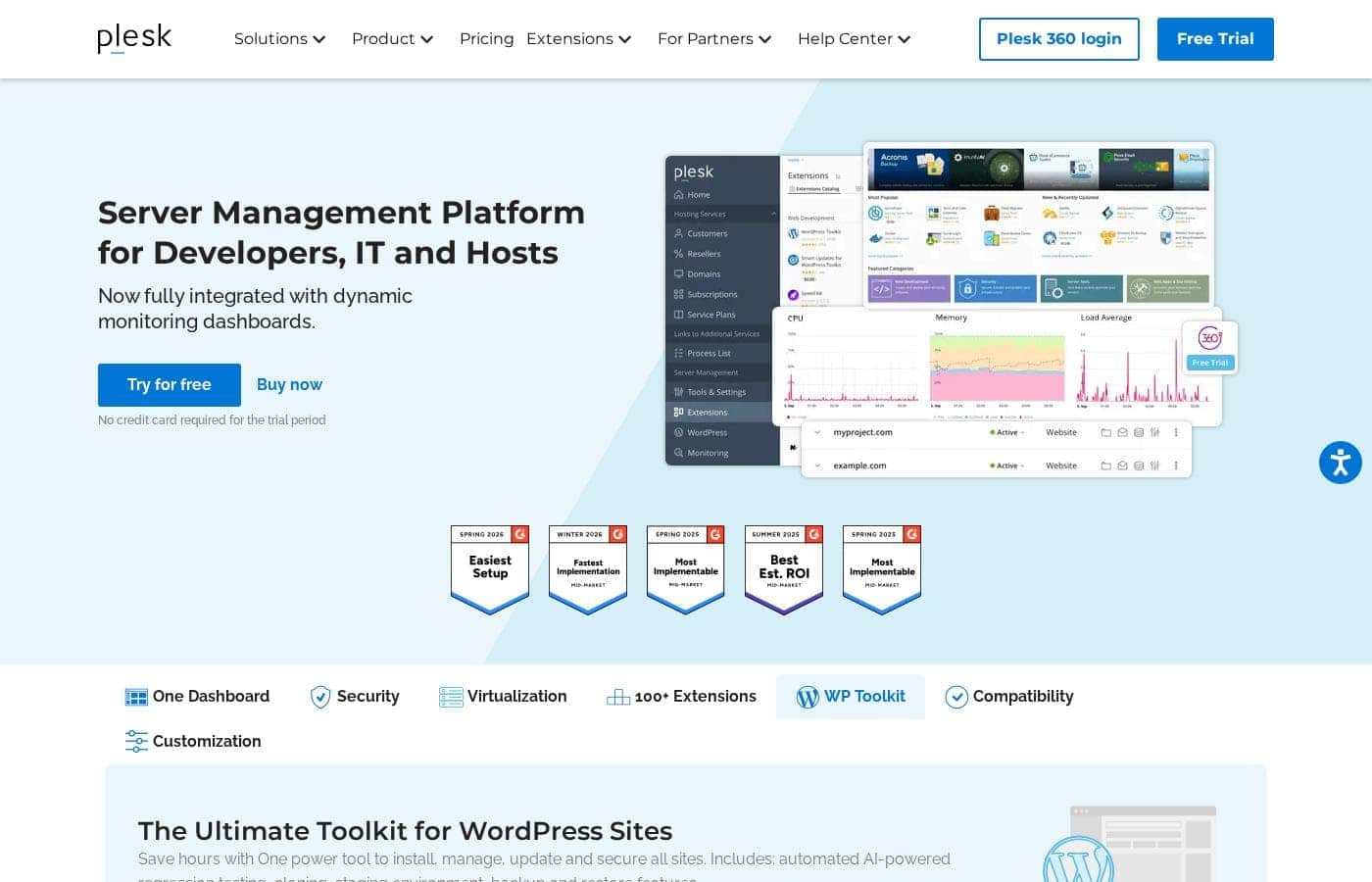
Plesk homepage screenshot

At a glance

Quick overview for Plesk: rating, pricing summary, key features, and highlights.
Vendor page checked Oct 13, 2026

Ciroapp score

4.2/ 5

Plesk pulls server, site, and WordPress management into one dashboard, backed by broad cloud certifications, 100+ extensions, and G2 recognition for easy setup and strong ROI. The catch: exact prices and refund terms aren't published, so budgeting takes extra legwork. Overall, it's a mature, recommendable panel for teams and hosting providers — just confirm costs before you commit.

Pros

  • Pros:WP Toolkit centralizes WordPress management across all your sites, with bulk updates, cloning, staging environments, backups, and AI-powered regression testing — a major time-saver for anyone running multiple installs
  • Pros:Certified for AWS, Azure, Google Cloud, Alibaba Cloud, DigitalOcean, Vultr, OVH, and Linode, so you can manage multi-cloud infrastructure from a single panel instead of hopping between provider consoles
  • Pros:Every edition ships with the Security Core including ModSecurity rules by Atomicorp and free Let's Encrypt SSL certificates, so baseline protection isn't gated behind higher tiers

Cons

  • Cons:Exact license prices aren't published on the pricing page — you have to visit the Plesk store to find current rates, which makes upfront budgeting harder
  • Cons:Some key capabilities depend on third-party integrations — VPS hosting relies on SolusVM and site building relies on Sitejet Builder, so these features may not fit every stack
  • Cons:Refund and cancellation terms aren't stated on the pricing page, so you need to review the store's terms before purchasing
Best for
  • Developers and IT admins managing multiple servers and sites
  • Agencies handling many WordPress sites at once
  • Hosting providers offering shared or VPS hosting
Free trial
Yes
This section is a summary. Detailed sections about features, use cases, pricing, and reviews follow below.

What is Plesk?

Running websites across several servers gets messy fast. You jump between tools, chase updates, and worry about security. Plesk puts site, app, and server management in one dashboard, so you can handle WordPress updates, security checks, and monitoring from a single place.

Plesk is a WebOps and server management platform built for developers, IT teams, and hosting providers. It gives you one dashboard to manage websites, applications, and servers together. You can run it on major clouds like AWS, Azure, Google Cloud, and DigitalOcean, extend it with 100+ extensions, and manage WordPress through its built-in WP Toolkit.

A free trial is available with no credit card required.

Should you choose Plesk?

Quick buyer guidance before you compare plans or click through.

Choose it if

  • You want a single dashboard for sites, apps, and server management
  • You manage multiple WordPress sites and want bulk updates, staging, and backups
  • You want to extend your panel with 100+ available extensions
  • You run infrastructure on hyperscalers like AWS, Azure, or Google Cloud
  • You deliver VPS hosting and can pair Plesk with SolusVM

Skip it if

  • If your host fully manages your server for you, a server management panel may duplicate what you already pay for
  • Some capabilities depend on integrations — SolusVM for VPS and Sitejet Builder for site building — so confirm they fit your stack
  • Stacking many of the 100+ extensions can add setup complexity as your environment grows

Next steps before buying

  1. 1Download the free trial (no credit card needed) and install it on a test server or cloud instance
  2. 2Verify compatibility with your platform — AWS, Azure, Google Cloud, Alibaba, DigitalOcean, Vultr, OVH, and Linode are listed as supported
  3. 3Test the workflows you'll rely on, such as WP Toolkit updates, staging, and the extensions you need
  4. 4Compare against alternatives and review trial and refund terms before you buy

Ease of use

Plesk's site leads with a single-dashboard workflow and displays G2 badges for ease of setup, most implementable, and best estimated ROI in the mid-market. The free trial requires no credit card, which lowers the barrier to trying it. Real-world ease will still depend on your comfort with server administration.

Plesk Key Features

✨ One dashboard for everything

Stop hopping between tools. Plesk puts your sites, apps, and servers in a single panel, so routine tasks stop piling up. Dynamic monitoring dashboards are built in, and security lives in the same place as your sites.

It's handy when you manage several servers or share work across a team.

⚡ WP Toolkit: WordPress without the busywork

WordPress, minus the busywork. WP Toolkit lets you install, update, and secure every site from one tool. It's built for people who manage many installs, so bulk tasks stop eating your day. Extras include:

  • Cloning and staging environments
  • Backup and restore
  • Automated AI-powered regression testing

✨ Extend it and run it anywhere

Grow it your way. Plesk plugs into more than 100 extensions, so you can add the tools you already like. It's certified for AWS, Azure, Google Cloud, Alibaba Cloud, DigitalOcean, Vultr, OVH, and Linode. That matters when your hosting setup changes or you spread workloads across providers.

✨ VPS hosting and site building built in

Plesk does more than manage sites. Pair it with SolusVM to deliver high-performance, scalable VPS hosting. You can also build competitive websites right from your panel with Sitejet Builder.

Use these when you're running a hosting business or want to launch sites without extra tools.

Use Cases

🔁 Agencies juggling many WordPress sites

You manage WordPress sites for clients. WP Toolkit lets you update them all at once, clone sites for testing, and back up before big changes. AI-powered regression testing flags problems early.

Expected outcome: Routine WordPress upkeep stops eating your workday.

☁️ Developers and IT admins across clouds

Your sites live on AWS, Azure, and DigitalOcean. Instead of hopping between consoles, you check monitoring dashboards, run security checks, and manage apps from one panel.

Tip: Plesk is certified for AWS, Azure, Google Cloud, Alibaba, DigitalOcean, Vultr, OVH, and Linode.

🖥️ Hosting providers running VPS and resellers

You run a hosting business. Web Host Edition handles unlimited domains plus reseller accounts, and SolusVM integration supports high-performance VPS hosting.

Expected outcome: One panel to run your entire hosting operation.

🧪 Site owners testing the waters

You run a handful of personal or client sites. Web Admin covers up to 10 domains with security, Let's Encrypt SSL, and lighter WordPress tools — and the free trial needs no credit card.

Plesk pricing

  • 3 plans

Prices not verified yet — see the vendor page.

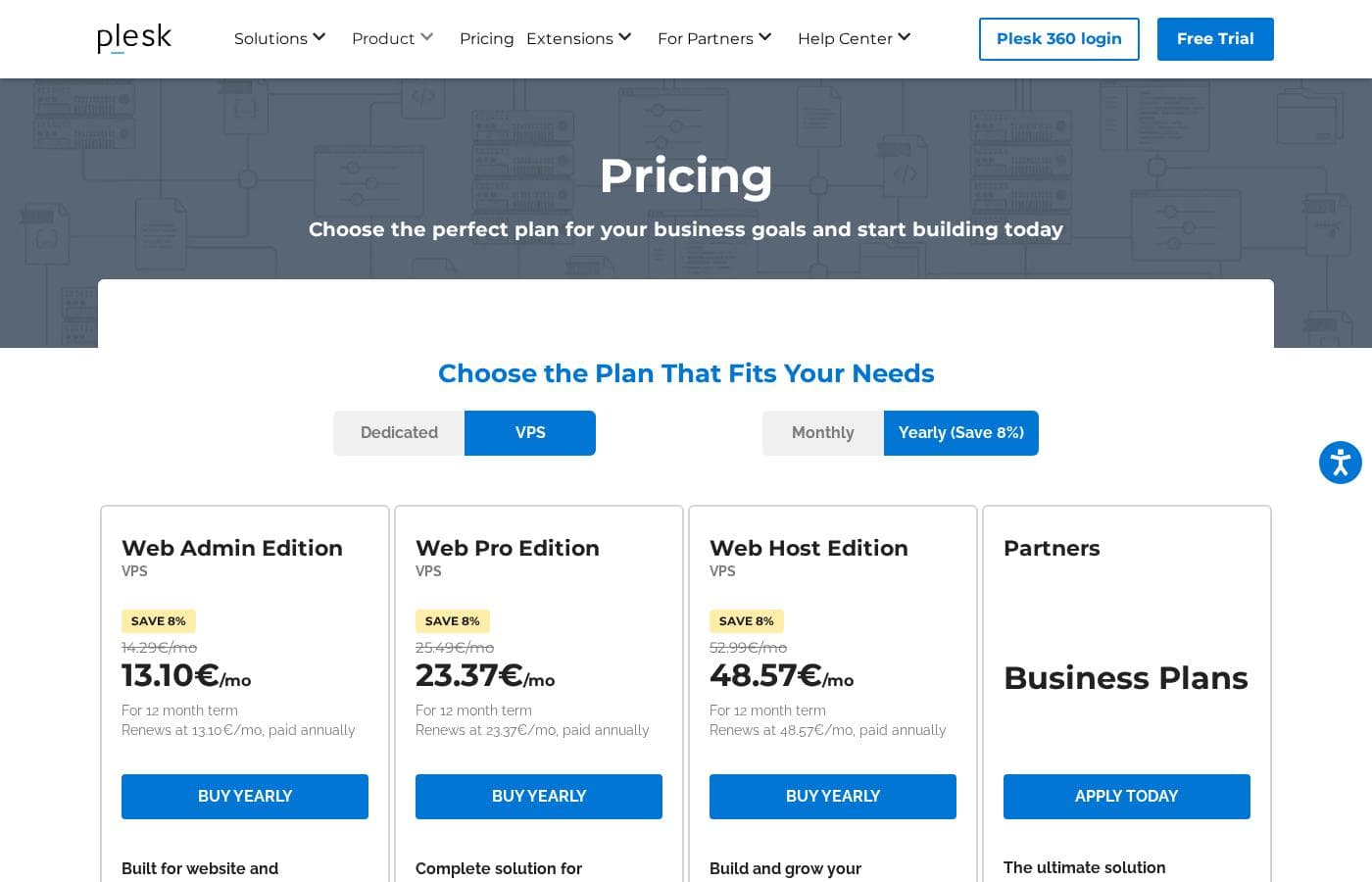
Plesk's pricing page

Plesk pricing page screenshotView pricing page screenshot
PlanBilled monthlyBilled annuallyIncludes
Web Admin Edition
See vendor page
See vendor page
Up to 10 domains
  • Up to 10 domains
  • WP Toolkit SE Only (limited features edition)
  • Security Core with ModSecurity Rules by Atomicorp
  • Let's Encrypt SSL
  • Power user view (server + site admin)
Web Pro Edition
See vendor page
See vendor page
Up to 30 domains
  • Up to 30 domains
  • Full WP Toolkit
  • Subscription, account, and Cgroups resource management
  • Service Provider View and Restricted Mode
  • PostgreSQL and MSSQL management modules
  • +1
Web Host Edition
See vendor page
See vendor page
Unlimited domains
  • Unlimited domains
  • Reseller management
  • Everything included in Web Pro
  • Full service provider toolset
  • Full WP Toolkit and DNSSEC

Price history

Tracking prices since Sep 9, 2026. No price change detected yet.

Pricing range: Varies by edition — see the Plesk store for current rates

Pricing types: Free trial

Pricing notes

Plesk offers three license editions — Web Admin (up to 10 domains), Web Pro (up to 30 domains), and Web Host (unlimited domains) — so you only pay for the scale you need. A free trial with no credit card required lets you test the platform before buying.

Plesk offers three paid license editions — Web Admin, Web Pro, and Web Host — tiered by the number of domains you manage, from 10 domains for website owners up to unlimited domains for hosting providers.

Here's a closer look at what each plan includes.

Web Admin Edition

Websites Supported: Up to 10 domains Best For: Website owners Other Features:

  • WP Toolkit in a limited SE Only edition
  • Security Core with ModSecurity Rules by Atomicorp
  • Free Let's Encrypt SSL certificates
  • Power user view for managing your server and sites

Web Admin is the simplest way in. It's made for people who run their own websites and don't need tools for clients or resellers. You still get core security features, WordPress management in a lighter form, and SSL support. If you're an individual site owner with a small portfolio, this edition covers the basics well.

Web Pro Edition

Websites Supported: Up to 30 domains Best For: Web professionals Other Features:

  • Full WP Toolkit for installing, updating, and securing WordPress
  • Subscription, account, and Cgroups resource management
  • Service Provider View and Restricted Mode
  • PostgreSQL and MSSQL management modules
  • DNSSEC support

Web Pro is the middle tier, and it's a real step up. You get the complete WordPress toolkit, more control over subscriptions and accounts, and advanced database support. Freelancers and agencies managing client sites will feel at home here. If 10 domains feels tight but you don't resell hosting, this is likely your sweet spot.

Web Host Edition

Websites Supported: Unlimited domains Best For: Hosting providers Other Features:

  • Reseller management, exclusive to this edition
  • Everything included in Web Pro
  • Full service provider toolset for running a hosting business

Web Host is built for hosting companies. It adds reseller management on top of all Web Pro features, so you can delegate accounts and grow your business. Most site owners won't need this tier — it only makes sense if you're selling hosting to others or running servers at scale.

Plesk also offers a free trial with no credit card required, so you can explore the platform before spending anything. One thing to note: exact license prices aren't displayed on the pricing page itself, so check the Plesk store for current rates and confirm your domain count before you buy.
How to pay less for Plesk

  • A free trial is available: test it before you pay.
Start free trial

Email me when Plesk changes price

One email when we detect a price change on the vendor's pricing page. No newsletter, no deals. Unsubscribe in one click.

User Reviews

No reviews yet.

Write a Review

Write a Review for Plesk
0/100 characters
0/2000 characters

Why use Plesk?

Juggling separate tools for servers, sites, and WordPress eats hours you could spend on real work. Plesk pulls those jobs into one panel, so routine tasks stop piling up. Based on Plesk's published materials and its G2 recognitions for implementability and ROI, here's where it stands out:

  • One dashboard for everything — manage sites, apps, and servers in a single place, with dynamic monitoring dashboards built in.
  • WP Toolkit saves hours — install, update, and secure all your WordPress sites from one tool, with cloning, staging, backups, and AI-powered regression testing.
  • Extend as you grow — plug in your favorite tools from a catalog of 100+ Plesk extensions.
  • Runs where you do — certified for AWS, Azure, Google Cloud, Alibaba Cloud, DigitalOcean, Vultr, OVH, and Linode, plus SolusVM integration for high-performance VPS hosting.
  • Security managed in the panel — handle security alongside your sites instead of switching between tools.
  • Low-risk to try — a free trial is available with no credit card required, so you can test it on your own setup first.

Plesk alternatives

Other tools in the WordPress Plugins category

View all WordPress Plugins tools
GiveWP

GiveWP

WordPress Plugins4.2/5

GiveWP is consistently called the best donation plugin built specifically for WordPress. This tool is the ultimate platform for organizations and changemakers who need to elevate their fundraising and amplify their mission. It’s trusted by over 100,000 fundraisers across the globe. You can onboard easily using ready-to-go campaign structures that include optimized forms, landing pages, and built-in reporting tools. GiveWP lets you organize and manage all your efforts under a single, unified structure. That helps organizations of all sizes focus on creating a movement and making a lasting impact.

WP Fusion

WP Fusion

WordPress Plugins4/5

WP Fusion is the all-in-one solution for deep integration between WordPress and your CRM or email marketing tool. This robust system easily extends the plugins you use every day, combining their abilities with the power of your automation platform. It works universally across all supported CRMs and plays well with over 100 plugins. 💡 You can start doing more with the tools you already rely on.

Volza

Volza

WordPress Plugins4/5

Volza is a global trade-intelligence platform providing verified international trade information and actionable market insights. With over 30 years of expertise in trade analytics, we support thousands of businesses and leading consultancies around the world.

Plesk FAQ

Does the Plesk free trial require a credit card?

No — the free trial doesn't require a credit card. Download it, install Plesk on your own server or cloud instance, and test the workflows you'll actually rely on before paying anything.

Which clouds and platforms can I run Plesk on?

Plesk is certified for AWS, Azure, Google Cloud, Alibaba Cloud, DigitalOcean, Vultr, OVH, and Linode. It also integrates with SolusVM, so hosting providers can deliver high-performance VPS hosting.

What security features come with every Plesk edition?

Every edition includes the Security Core with ModSecurity rules by Atomicorp and free Let's Encrypt SSL certificates. Higher tiers add DNSSEC for stronger domain-level protection.

How do refunds and cancellations work if I change my mind?

Refund and cancellation terms aren't published on the pricing page. Use the free trial to confirm fit, then review the store's terms before you buy.

Ready to try Plesk? Check out the official site or pricing.

Are you Plesk? Claim this listing · Get the badge