Microsoft PowerPoint vs Prezi
PowerPoint and Prezi solve different presentation problems. PowerPoint is a familiar slide-based tool built for structured decks, Microsoft 365 workflows, template reuse, and offline editing. Prezi is a web-first presentation platform built around a zooming canvas, visual movement, and a more spatial storytelling style.
Best for: Business teams creating board decks, reports, proposals, and training materials, Organizations already standardized on Microsoft 365 and OneDrive
Best for: Educators explaining systems, timelines, maps, or big-picture concepts, Sales teams that want a more distinctive pitch flow
Industry standard now with powerful AI.
We find PowerPoint remains the industry-leading presentation tool, offering essential collaboration and cutting-edge AI features like Designer and Speaker Coach. Overall, the powerful application features are unfortunately hampered by reported systemic issues regarding Microsoft's required account management, customer support, and often unpredictable pricing structure.
Pros
- Industry-leading presentation standard with robust cross-platform usability.
- Incorporates advanced AI tools (Copilot, Designer) for quick concept generation and design.
- Speaker Coach feature provides AI-driven feedback for presentation practice and delivery.
- Supports excellent real-time collaboration, sharing, and commenting for teams.
Cons
- Customer support and technical assistance are widely reported as extremely poor or non-existent.
- Users frequently experience frustrating account access issues and difficult authentication processes.
- Unilateral and significant price increases on subscriptions are a common complaint from existing users.
- Bugs, unintuitive design, and forced updates in the broader Microsoft ecosystem cause friction.
Dynamic visuals hindered by frustrating pricing.
We found Prezi excels at creating engaging, non-linear visuals that capture audience attention, especially with the integrated AI tools and unique zooming canvas. Overall, while the dynamic presentation style is highly effective, we temper our rating due to recurring customer complaints regarding automatic renewal policies and subscription management issues.
Pros
- Provides the strongest visual impact due to its dynamic, non-linear zooming canvas.
- New AI integration quickly generates professional, full presentations from simple prompts.
- Proven effectiveness; independent studies show Prezi presentations are 40% more memorable.
- Prezi Video allows simultaneous display of the speaker and visual content for high engagement.
Cons
- Frequent issues reported regarding unexpected automatic subscription renewals and cancellation difficulties.
- Customer service responsiveness is a common point of concern for users.
- Some long-time users feel Prezi Next offers less creative freedom than the Classic version.
- The annual subscription price is considered steep by many following the initial free trial.
AboutMicrosoft PowerPoint
Microsoft PowerPoint is the essential tool for building dynamic and captivating presentations from any device. It's designed to help you evoke engagement whether you're working alone or with a team. You can easily share your work and collaborate in real time with anyone, even without needing a subscription. PowerPoint is available across PCs, Macs, tablets, and phones, meaning you can always access your slides. 💡
AboutPrezi
Prezi is a dynamic platform designed specifically for visual storytelling. It has been a trusted presentation partner for over 15 years, relied upon by users in 180+ countries. Currently, Prezi is taking this proven approach and redefining the future of presenting with powerful AI assistance. 💡
It moves beyond sequential slides using a unique open canvas and dynamic movement. This method is effective for various settings, whether you need presentations tailored for business, university, or school audiences. The unique design combined with smart assistance makes creating impressive visuals easier than ever before.
Highlights
Feature Comparison
Features Overview
We highlight the main differences and pick a winner for each feature.
Workflow fit
PowerPoint fits existing business workflows; Prezi fits presentation experiences that need motion, spatial structure, and a stronger visual hook.
PowerPoint is strongest when the deck must move through a familiar review chain: draft, comment, revise, present, export, archive, and reuse. Prezi is strongest when the audience benefits from seeing the big picture first and then zooming into sections. That makes Prezi useful for concept maps, education, high-level strategy stories, and sales narratives where movement helps memory.
AI presentation creation
Both tools now support AI-assisted creation, but they fit different editing habits.
Copilot in PowerPoint can create a presentation from a prompt or referenced file, then users refine the slides inside the familiar PowerPoint editor. Prezi AI emphasizes generating a polished presentation from a prompt or uploaded file and then editing the visual structure. PowerPoint is better when AI should support a standard deck; Prezi is better when AI should create a more visual presentation path.
Delivery and rehearsal
PowerPoint has stronger rehearsal support; Prezi has a more distinctive live presentation style.
PowerPoint Speaker Coach evaluates pacing, pitch, filler words, informal speech, and whether the presenter is reading too much from slides. This is valuable for high-stakes speakers. Prezi does not win on rehearsal tooling, but its zooming canvas can make the delivery itself feel more dynamic, especially for visual stories and remote presentations.
Team and enterprise use
PowerPoint is usually easier for organizations because PPTX files, Microsoft 365 permissions, and branded templates are already common.
PowerPoint is the safer choice when a deck must be edited by many stakeholders, reused as a template, or sent as a normal business file. Prezi can still work for teams, but it asks the organization to adopt a different creation and presentation model. Use Prezi selectively for presentations where the format itself creates value.
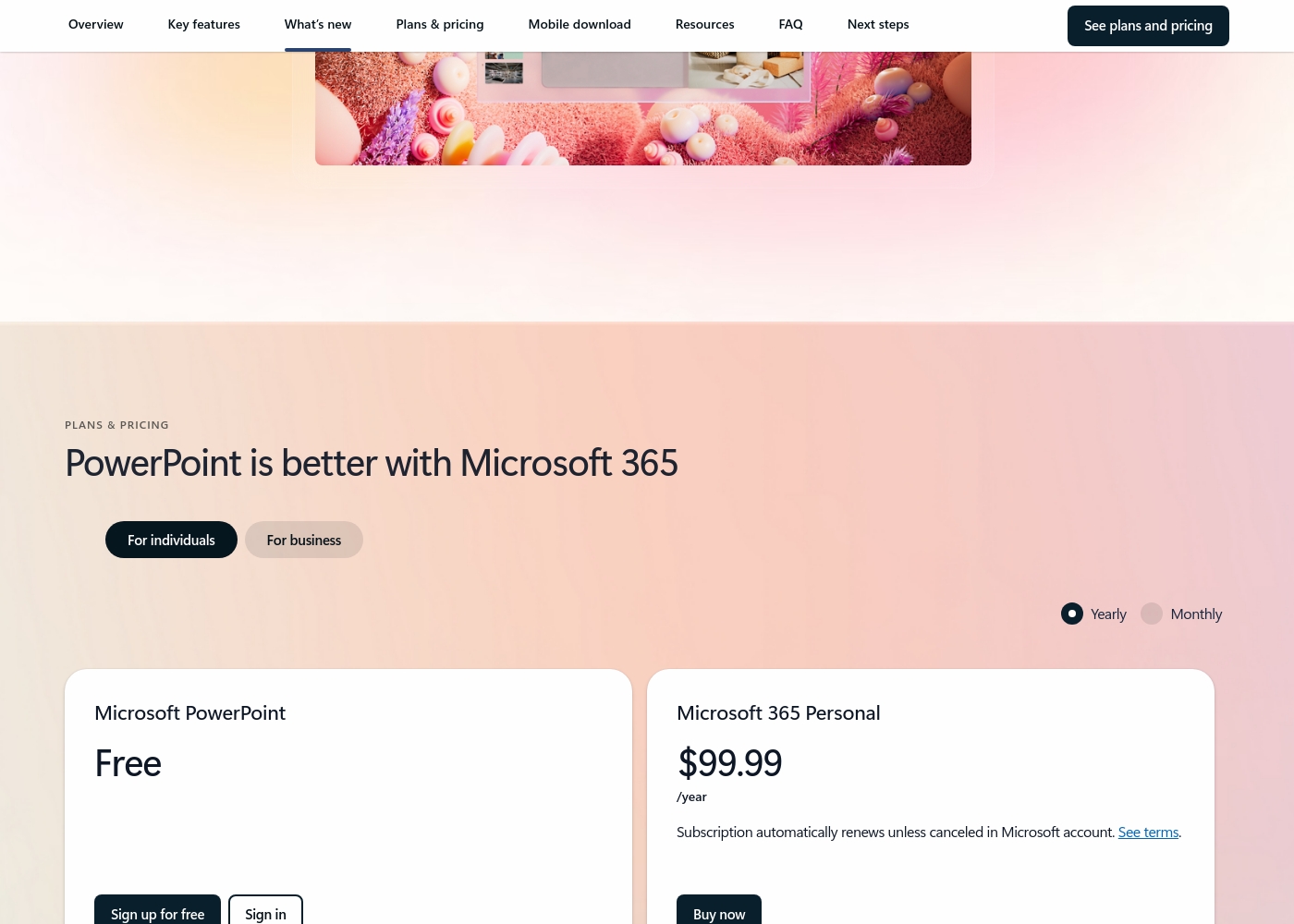
Microsoft PowerPoint costs between $0 and $129.99 per year with 7 primary plans: Free at $0/year, Microsoft 365 Personal at $99.99/year, Microsoft 365 Family at $129.99/year, Microsoft 365 Apps for business at $8.25/user/month (paid yearly), Microsoft 365 Business Standard at $12.50/user/month (paid yearly), Microsoft 365 Business Premium at $22.00/user/month (paid yearly), and business options without Microsoft Teams starting at $10.25/user/month (paid yearly).
Here’s a detailed breakdown of the options provided, starting with choices for individuals and families.
Microsoft PowerPoint Free
Best For: Basic web use and sharing Other Features:
- Web version of PowerPoint (PowerPoint for the web)
- Basic spelling and grammar checks
- 5 GB of secure cloud storage
- Real-time collaboration
- PowerPoint for the web
- Sharing and real-time collaboration
- Basic templates, fonts, icons, and stickers
- Basic spelling and grammar
- Desktop versions of Word, Excel, PowerPoint, Outlook, and OneNote with Copilot
- Microsoft Defender advanced security
- Microsoft Designer (AI-powered image creator)
- Desktop versions of Word, Excel, PowerPoint, Outlook, and OneNote with Copilot
- Up to 6 TB of secure cloud storage (1 TB per person)
- Microsoft Clipchamp video editor with exclusive filters and effects
- Desktop versions of Word, Excel, PowerPoint, and Outlook
- 1 TB of cloud storage per user
- Suitable for up to 300 employees
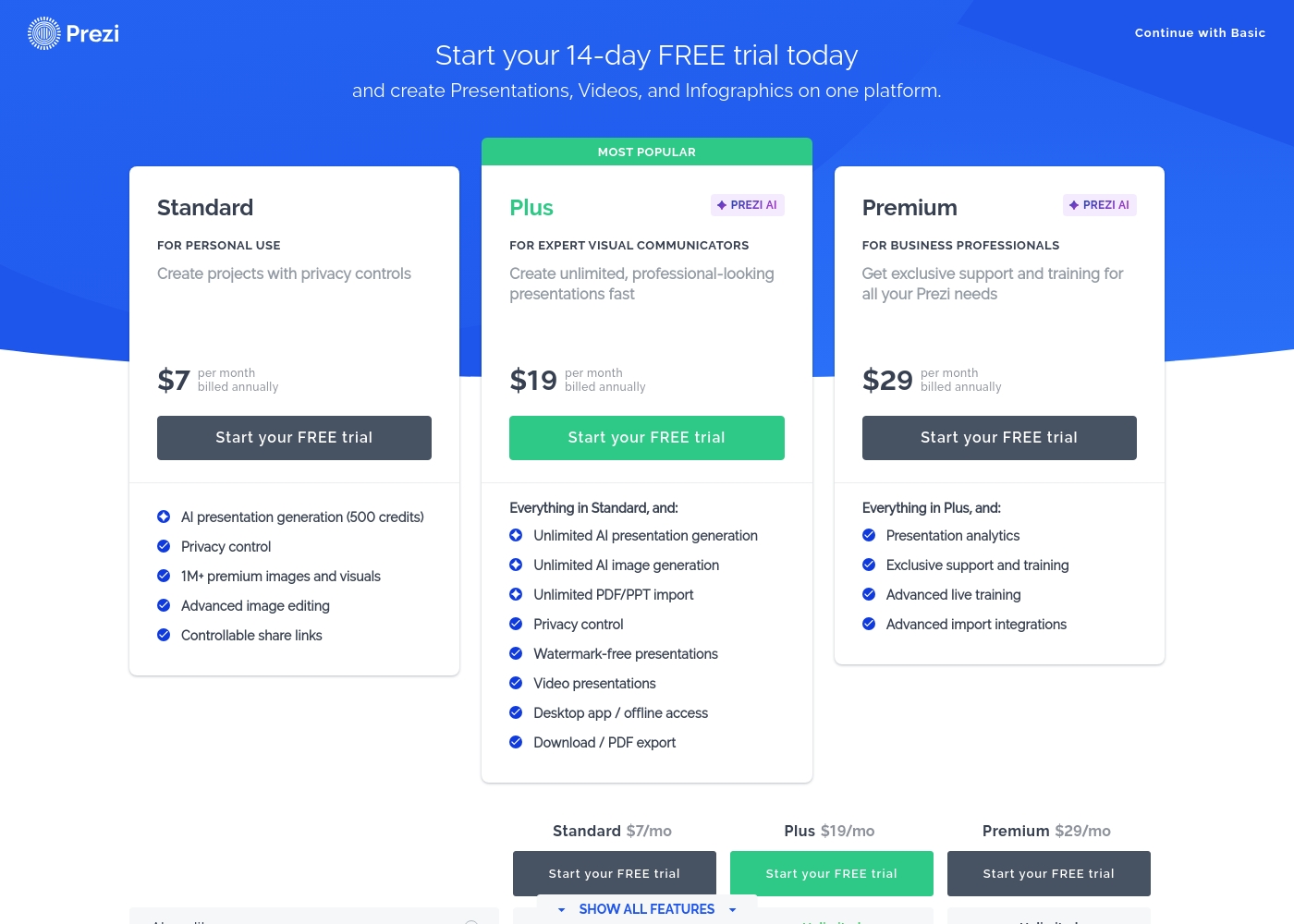
Prezi costs between $7 and $29 per month when billed annually, offering three paid plans: Standard at $7/mo, Plus at $19/mo, and Premium at $29/mo.
Here is a detailed breakdown of how Prezi structures its paid subscriptions.
Standard
Price: $7 per month, billed annually Best For: Personal Use Other Features:
- AI presentation generation (500 credits)
- Privacy control
- 1M+ premium images and visuals
- Advanced image editing
- Controllable share links
- Essential creation tools
- Public sharing
- AI presentation generation (500 credits)
- Privacy control
- 1M+ premium images and visuals
- Advanced image editing
- Controllable share links
- Unlimited AI presentation generation
- Unlimited AI image generation
- Unlimited PDF/PPT import
- Watermark-free presentations
- Desktop app / offline access
- Presentation analytics
- Exclusive support and training
- Advanced live training
- Advanced import integrations
Pricing Notes
- PowerPoint value is strongest when users already need Microsoft 365 apps beyond presentations.
- Prezi value is strongest when the visual format improves the outcome enough to justify a separate presentation workflow.
- Before choosing Prezi, check which plan includes the export, privacy, offline, analytics, and AI limits your team needs.
Pricing Head-to-Head
User Reviews
Trustpilot reviews for Microsoft the company skew heavily toward criticizing the broader ecosystem and support infrastructure rather than specific application performance like PowerPoint. Recurring complaints center on non-existent or drastically delayed customer support, with users citing automated systems that fail to resolve complex issues.
Accountability is a major pain point, as many consumers struggle with account security, frequently being locked out, or facing complicated verification processes that block access to purchased software. Furthermore, many users report issues related to unacceptable pricing practices, including unexpected and significant subscription price increases, sometimes reaching 31% or more, with little to no consultation.
Extremely poor customer service. I don't recall ever experiencing service this bad anywhere else. I bought a business subscription, and nothing has worked for two months, forcing me to waste my evenings.
Prezi receives generally positive, albeit mixed, feedback across platforms like Trustpilot (3.4/5). Users consistently praise the platform for its dynamic movement and outstanding visual impact, confirming it’s much more engaging than traditional presentation tools.
The user-friendly interface and abundance of creative templates keep users inspired, particularly in educational and training settings. The recent AI integration is a major highlight, frequently noted for its ability to quickly generate professional presentations from simple prompts, saving significant time.
I just tried the AI tool to make a presentation for a job interview. I was very impressed with the presentation that was produced! The AI saved me significant time, and I only had to make minor changes.
Our Verdict
The most useful way to compare PowerPoint and Prezi is not "which is better?" but "which presentation behavior do you need?" PowerPoint is the safer operational tool: almost everyone understands it, PPTX handoff is easy, Microsoft 365 collaboration is mature, and Speaker Coach helps presenters rehearse. Prezi is the more distinctive storytelling tool: the zooming canvas can make a presentation feel less like a sequence of static slides and more like a guided visual map. Choose PowerPoint for repeatable business communication. Choose Prezi when memorability, movement, and visual explanation matter more than standard deck workflow.
Frequently Asked Questions
Is PowerPoint better than Prezi for business decks?
Usually yes. PowerPoint is better for structured business decks, executive reviews, client deliverables, reusable templates, offline editing, and standard PPTX handoff.
Is Prezi better than PowerPoint for storytelling?
Prezi can be better when the presentation benefits from a visual map, zooming path, or non-linear structure. It is especially useful for education, sales narratives, and concept-heavy presentations.
Which tool has better AI features?
Both have useful AI features. Copilot in PowerPoint is strongest inside the Microsoft 365 workflow, while Prezi AI is designed around generating and refining more visual presentations.
Can Prezi import PowerPoint files?
Prezi plan documentation and product pages describe creating presentations from existing PowerPoint files or uploads. This can help teams reuse existing material, but the final workflow is still different from editing a native PowerPoint deck.
Which is better for offline presenting?
PowerPoint is usually the safer offline option because desktop PowerPoint is part of Microsoft 365 plans. Prezi can support offline use on eligible paid plans, so users should verify plan details before relying on it for travel or events.
Ready to Choose?
Both tools have their strengths. Choose based on your specific needs.