Instapage vs Sender
Instapage and Sender are both popular tools, but they serve completely different needs. Instapage is a dedicated landing page builder for conversion optimization, while Sender is an all-in-one email marketing platform. This comparison helps you pick the right one for your goals.
Best for: Marketing teams running paid ad campaigns, Businesses focused on conversion rate optimization
Best for: Startups and small businesses on a tight budget, Beginners needing simple email marketing
Top-Tier Conversion Platform with Standout Support.
We found Instapage to be a powerful, conversion-centric platform engineered for speed using proprietary technology. It allows marketing teams to quickly build and test personalized landing pages without needing complex coding skills. Overall, Instapage delivers high-level CRO tools backed by industry-leading customer support.
Pros
- Exceptional customer support noted for speed, professionalism, and providing helpful technical solutions.
- Allows marketing teams to deploy pixel-perfect landing pages quickly, minimizing reliance on developers.
- Pages are engineered for speed using the proprietary Thor Render Engine®.
- The platform provides robust testing capabilities, including server-side A/B testing and AI experiments.
Cons
- Standard pricing is tied strictly to unique monthly visitor limits (15k or 30k+).
- One reported issue suggests difficulties unsubscribing from marketing email lists.
- Monthly subscription pricing details are not explicitly advertised (annual commitment is emphasized).
Simple, free, and effective for basics.
We found Sender to be a solid, no-frills tool for core email marketing tasks. Its free plan is a major draw for startups and small businesses. Overall, it delivers good value with a straightforward interface, though it may lack some advanced features for power users.
Pros
- Extremely generous free plan (2,500 contacts, 15k emails/month).
- Clean, user-friendly interface that's easy to learn.
- Transparent, affordable pricing with no hidden fees.
- Includes essential automation features from the start.
Cons
- Advanced features and segmentation are limited on lower tiers.
- Some users report occasional email deliverability issues.
- Integrations can be inconsistent with certain platforms.
- Free plan lacks SMS marketing capabilities.
AboutInstapage
Instapage simplifies the process of building sophisticated landing pages. It uses an intuitive drag-and-drop editor. You don't need any technical expertise to create beautiful pages that load quickly on any screen. 💡
This platform is ideal for marketing teams and agencies. You can even use the integrated AI to instantly generate content, headlines, and CTAs. This feature optimizes your lead capture strategy without interrupting flow.
AboutSender
Sender is an email marketing platform designed for businesses of all sizes. It helps you build, automate, and send email campaigns that people actually want to read. Think of it as your straightforward tool for staying in touch with your audience and driving sales. 🚀
Highlights
Feature Comparison
Features Overview
We highlight the main differences and pick a winner for each feature.
Ease of Use
Both tools are user-friendly. Instapage offers a pixel-perfect builder, while Sender emphasizes speed to first campaign.
Instapage provides a powerful drag-and-drop editor with pixel-precise control. It's designed for marketers who want pixel-perfect pages without needing developers. The interface is clean but packed with advanced features. Sender is built for simplicity. You can launch your first email campaign in about 5 minutes. The platform integrates directly with your website to get you started immediately. The key difference is focus. Instapage's ease comes from visual collaboration tools for teams. Sender's ease comes from its straightforward, no-fuss email builder.
Feature Set
Instapage specializes in landing pages and conversion optimization. Sender specializes in email marketing and automation workflows.
Instapage's features are laser-focused on getting conversions from ad traffic. You get server-side A/B testing, AI experiments, heatmaps, and AdMap® to align ads with pages. It claims you can achieve 34% higher conversions. Sender's features cover the entire email marketing lifecycle. You get automation sequences, 100+ email templates, landing pages, and transactional emails. The free plan even includes automation and 24/7 support. The trade-off is depth vs. breadth. Instapage goes deep on landing page optimization. Sender covers the essentials of email marketing from start to finish.
Automation & Workflows
Sender includes email automation from the start. Instapage focuses on page-level optimization, not email sequences.
Sender provides powerful email automation as a core feature, even on its Free Forever plan. You can set up welcome series, abandoned cart reminders, and nurture campaigns. This is its primary strength. Instapage does not offer email automation. Its automation is centered on optimizing landing page variants through AI experiments and A/B tests. It's about page performance, not email sequences. The real-world impact is clear. If you need to nurture leads via email, Sender is the tool. If you need to optimize which page converts a click, Instapage is the tool.
Analytics & Reporting
Instapage offers detailed on-page analytics like heatmaps. Sender provides standard email campaign metrics.
Instapage provides granular analytics for landing pages. You can view real-time data on visitors, conversion rates, and cost-per-lead. Heatmaps and visual campaign tracking give deep behavioral insights. Sender's reporting focuses on email performance. You'll see open rates, click-through rates, and subscriber growth. The reporting is functional but some users wish it offered more depth. The difference is what you're analyzing. Instapage helps you understand why a page converts or doesn't. Sender helps you understand how your emails perform.
Pricing Model
Instapage charges based on unique monthly visitors. Sender charges based on subscriber count and offers a free plan.
Instapage pricing starts at $79/month for 15,000 monthly visitors. It scales up to $159/month for more visitors and advanced features. There's a 14-day free trial but no permanent free plan. Sender offers a robust Free Forever plan for up to 2,500 subscribers. Paid plans start at just $7/month for 1,000 subscribers. This makes it extremely accessible for new businesses. The value proposition is very different. Instapage is a premium investment for conversion-focused teams. Sender is a budget-friendly option for email marketing essentials.
Customer Support
Both offer 24/7 support. Instapage users frequently praise the exceptional, technical quality of its support.
Instapage receives glowing reviews for its support team. Users highlight fast response times and technicians who solve complex technical issues, like page speed optimization, not just send help articles. Sender also provides 24/7 live support on all plans, including the free one. Users report it as helpful and responsive, though some note occasional slower responses during peak times. The standout is the quality. Instapage's support is often cited as a key reason for its high rating. Sender's support is reliable and accessible.
Value for Money
Sender's free plan offers unbeatable value for email marketing. Instapage delivers specialized value for paid ad campaigns.
Sender's value is incredible for startups. You get email automation, 2,500 subscribers, and 15,000 emails per month for $0. Upgrading is very affordable, with plans under $15/month. Instapage is a bigger investment, starting at $79/month. However, it promises quantifiable results, like 34% higher conversions, which can directly improve your ad ROI and lower your cost per acquisition. Your choice depends on your goal. Sender provides great value for building an email list. Instapage provides great value for turning ad spend into conversions.
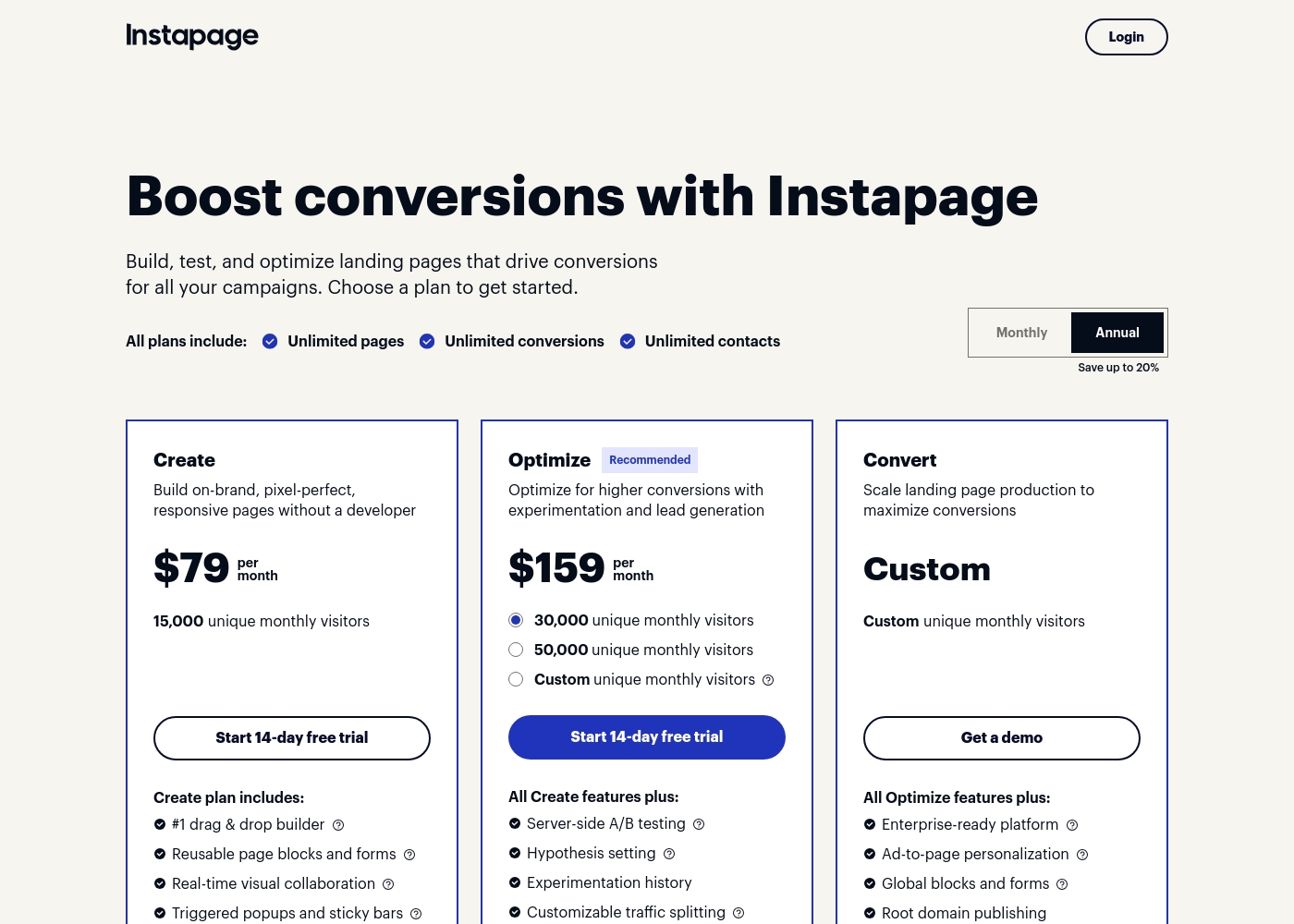
Instapage costs between $79 and $159 per month (billed annually) for standard plans, with three options: Create at $79 per month, Optimize at $159 per month, and Convert (Custom pricing).
Let's explore which plan best fits your conversion goals and budget.
Create
Price: $79 per month (billed annually) Best For: Building on-brand, responsive, pixel-perfect pages without needing a developer. Other Features:
- Drag & drop builder (#1 listed)
- Reusable page blocks and forms
- Real-time visual collaboration tools
- Triggered popups and sticky bars
- #1 drag & drop builder
- Reusable page blocks and forms
- Real-time visual collaboration
- Triggered popups and sticky bars
- Server-side A/B testing
- Hypothesis setting
- Experimentation history
- Customizable traffic splitting
- Includes all Create features
- Enterprise-ready platform
- Ad-to-page personalization
- Global blocks and forms
- Root domain publishing
- Includes all Optimize features
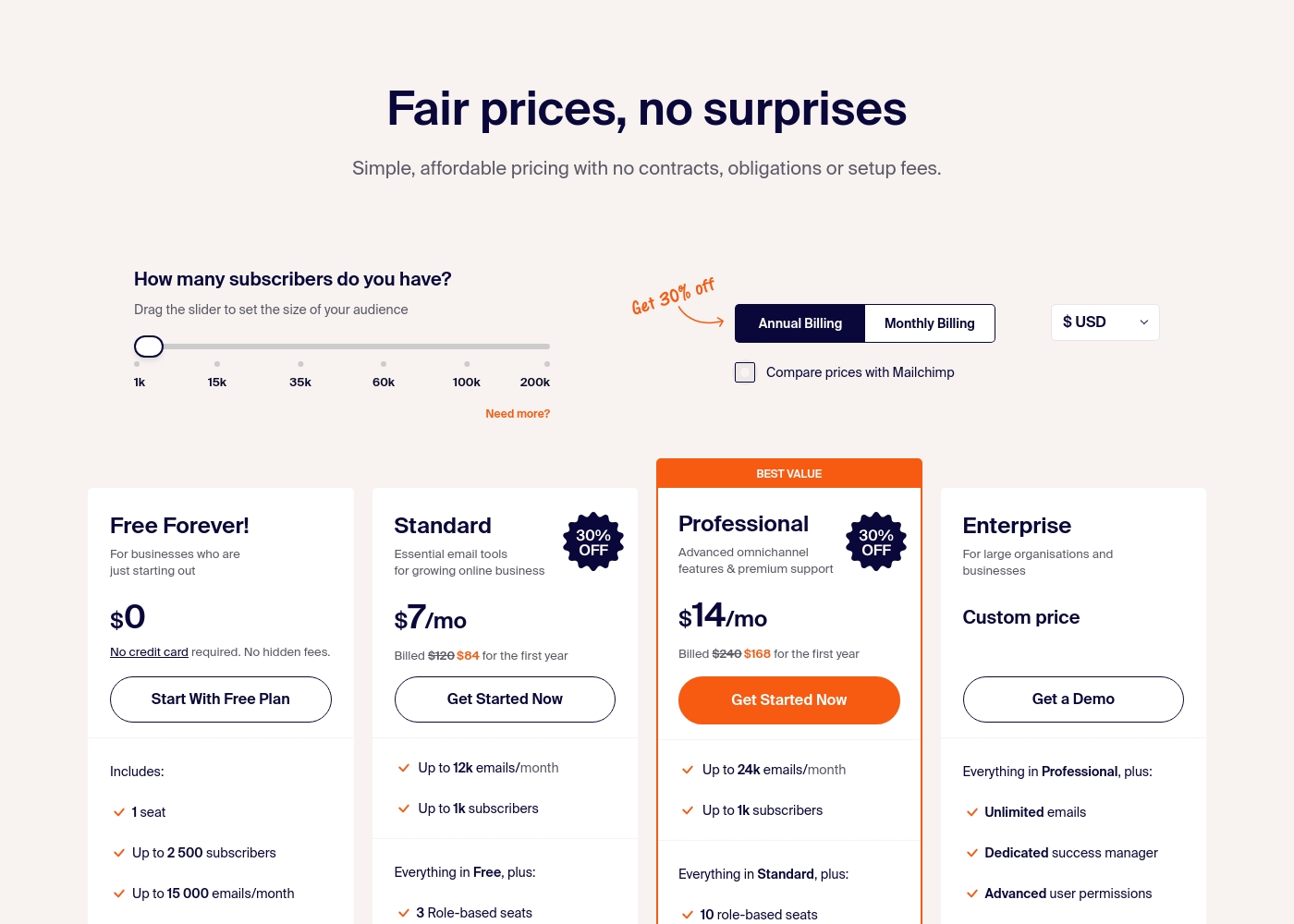
Sender costs between $0 and a custom price per month with 4 plans: Free Forever at $0, Standard at $7, Professional at $14, and Enterprise at Custom price.
Take a look at the specific features and limits included in each plan tier below.
Free Forever!
Price: $0 monthly Best For: Businesses who are just starting out Other Features: 1 seat, up to 2,500 subscribers, 15,000 emails/month, 24/7 live support, email automation.
- 1 seat
- Up to 2,500 subscribers
- Up to 15,000 emails/month
- 24/7 live support
- Email automation
- Up to 12k emails/month
- Up to 1k subscribers
- 3 Role-based seats
- Automated sequences
- Up to 24k emails/month
- Up to 1k subscribers
- 10 role-based seats
- Premium support
- Unlimited emails
- Dedicated success manager
- Advanced user permissions
Pricing Notes
- Instapage has no free plan, only a 14-day trial. Sender offers a permanent free plan.
- Instapage pricing scales by unique monthly visitors. Sender pricing scales by subscriber count.
- Annual billing saves up to 20% on Instapage. Sender also offers annual discounts.
- Both have custom Enterprise tiers. Instapage for high visitor volume, Sender for large subscriber lists.
Pricing Head-to-Head
User Reviews
Instapage receives overwhelmingly positive feedback, primarily driven by its exceptionally fast and professional customer support. Users consistently rate the support team—often naming specific technicians—as the best they have encountered.
Reviewers praise the rapid response times via chat and comprehensive technical guidance (e.g., optimizing page speed, setting up domains) rather than just sending help articles. The platform itself is highly praised as a solid and easy-to-use landing page builder.
Excellent support means quick responses to inquiries. The technicians provide real help instead of just throwing a help article or video at you. I often use this support team as an example for others.
User sentiment on Trustpilot and Capterra highlights Sender's generous free plan and ease of setup as major positives. Many praise the intuitive interface and reliable automation.
😊 However, some note occasional deliverability hiccups and a learning curve for advanced features. Customer support is frequently mentioned as responsive, though a few users report slow responses during peak times.
The free plan is unbeatable for a new business. I set up my first automation in minutes. The platform is simple and gets the job done without fuss.
Our Verdict
This isn't a direct head-to-head. It's a choice between two different tools for two different jobs. Instapage's superpower is turning ad clicks into conversions. Its Thor Render Engine® makes pages load instantly. Tools like AdMap® and AI experiments are built for serious performance marketing. Sender's superpower is making email marketing accessible. Its Free Forever plan includes automation and 24/7 support. You can set up your first campaign in minutes without spending a dime. The deciding factor is your primary goal. If you spend money on ads and need to optimize landing pages, Instapage is the specialist. If you need to build an email list and send newsletters or automations, Sender is the champion. Choose Instapage if you're a performance marketer obsessed with conversion rates and page speed. Choose Sender if you're a startup or small business wanting simple, effective email marketing without the cost. For many, the answer depends on whether you need a better landing page or a better email sequence.
Frequently Asked Questions
Can I use Instapage for email marketing like Sender?
No. Instapage is a landing page builder, not an email marketing platform. You would need to integrate it with a separate email tool like Sender or Mailchimp to send campaigns.
Is Sender good for creating landing pages?
Sender includes a basic landing page builder and pop-up forms. However, it's not as advanced as Instapage. Instapage offers more templates, faster loading speeds, and A/B testing for pages.
Which is better for a small budget: Instapage or Sender?
Sender is the clear winner for tight budgets. Its Free Forever plan includes email automation for 2,500 subscribers. Instapage starts at $79 per month after a 14-day trial.
Does Sender offer A/B testing for emails?
The provided data does not explicitly state A/B testing for email campaigns in Sender's features. Instapage offers robust A/B testing, but only for landing pages, not emails.
Which tool has better customer support?
User reviews suggest Instapage has exceptional, fast technical support. Sender also offers 24/7 live support on all plans, which is very accessible, but Instapage's support is more frequently praised for depth.
Can I migrate from one tool to the other easily?
Migration would be complex since they serve different purposes. Moving from Instapage would mean rebuilding pages elsewhere. Moving to Sender means importing your email list for email marketing.
Ready to Choose?
Both tools have their strengths. Choose based on your specific needs.