Hive vs Ignition
Hive and Ignition solve different problems, so picking the right one is key. Hive connects all your project work into one hub. Ignition automates your proposals and gets you paid faster.
Best for: Agencies managing multiple client projects, Marketing teams coordinating campaigns
Best for: Freelancers and agencies tired of manual invoicing., Consultants and service providers billing by project or retainer.
Powerful hub for connected teams.
We found Hive excels at centralizing work across multiple tools into a single, AI-assisted workspace. Its flexible views and automation are strong assets, though the pricing structure and some user experiences around support warrant careful consideration. Overall, it's a robust choice for teams prioritizing integration and workflow efficiency.
Pros
- Centralizes work from tools like Slack, Salesforce, and email into one unified workspace.
- Offers flexible project views including Kanban, Gantt, Calendar, and Table.
- Integrates Buzz AI for smart search, summaries, and turning conversations into tasks.
- Provides a free forever tier and a free trial with no credit card required.
Cons
- Some users report confusion or dissatisfaction with billing and subscription management.
- Advanced features and support are often reserved for higher-tier, more expensive plans.
- Requires upfront integration setup to realize its full value, which may not suit all teams.
- Pricing details for some modules or support levels are not fully transparent upfront.
Solid automation for getting paid faster.
We found Ignition to be a robust platform that truly automates the proposal-to-payment cycle, saving service businesses considerable admin time and improving cash flow. Overall, it's an excellent choice for firms wanting to professionalize their client onboarding and eliminate manual invoicing work.
Pros
- Automates proposals, agreements, and upfront billing in one flow.
- Helps eliminate manual payment chasing and reduces accounts receivable delays.
- Provides professional templates and tools to upsell and capture additional work.
- Saves significant admin time with bulk actions and automated renewals.
Cons
- Pricing, likely annual, may be a barrier for some budgets.
- Requires commitment to a specific workflow, not a simple standalone invoicer.
- Initial setup and learning curve can be steep for some users.
- May have limitations with deep integrations for non-standard accounting software.
AboutHive
Hive is a project management platform built for teams of all kinds. From agencies and marketing teams to non-profits and education groups, it’s designed to organize collaboration and automate workflows. It’s not just a task list; it’s a connected system where your work happens. 💡
AboutIgnition
Ignition is a platform for service businesses that want to automate proposals, agreements, and billing. 🔄 It's designed for professionals who bill clients for projects or recurring work. The goal is to make getting paid a seamless, automatic part of starting a new engagement.
Highlights
Feature Comparison
Features Overview
We highlight the main differences and pick a winner for each feature.
Core Purpose
Hive is a project management platform. Ignition is a proposal-to-payment automation tool.
Hive aims to be the central hub for all your project work. It connects tools like Slack and Salesforce to pull communication and data into one place. Your team manages tasks and projects from a single source of truth. Ignition is built to automate the entire client agreement process. It combines professional proposals with upfront payment collection and recurring billing. The goal is to eliminate manual invoicing and payment chasing. The key difference is their core mission. Hive organizes internal work and collaboration. Ignition streamlines the external client relationship and cash flow. A marketing agency would use Hive to track a campaign. That same agency would use Ignition to send the initial proposal and collect the first payment.
AI Features
Hive's AI summarizes work and creates tasks. Ignition's AI provides pricing insights.
Hive offers Buzz AI, which can search across connected apps like email and Slack. It can summarize meetings and even turn conversations into action items for your team. Ignition uses AI to help optimize your pricing strategy. It provides tailored insights based on your services and proposals to help you make data-driven decisions. Hive's AI is an assistant for daily work and communication. Ignition's AI is a strategic tool for business growth. For a team drowning in messages, Hive's summarization is a huge time-saver. For a consultant unsure about rates, Ignition's insights provide valuable guidance.
Project & Task Views
Hive offers multiple flexible project views. Ignition has no task management views.
Hive provides a variety of ways to visualize your work. You can use Kanban boards, Gantt charts, calendars, tables, or simple lists. You can mix and match views within a single project. Ignition does not offer project views or task management. Its interface is focused on proposal creation, agreement tracking, and billing dashboards. This is a fundamental difference in scope. Hive is for managing the work itself. Ignition is for managing the business agreement around the work. If you need to see project timelines and dependencies, Hive is your tool. Ignition won't help you schedule your team's tasks.
Billing & Payments
Ignition automates billing from proposal to payment. Hive has no built-in billing.
Ignition's core strength is collecting payment details upfront within a proposal. Once a client signs, billing is fully automated. You can also instantly bill for scope changes. Hive does not handle client proposals, contracts, or payment collection. It is focused on project execution, not financial transactions. The trade-off is clear. Ignition removes the admin of getting paid. Hive doesn't try to compete in that space. A freelancer would use Ignition to ensure they get paid for a new project. They might use Hive to manage the project's tasks once it's underway.
Integration Ecosystem
Hive integrates with communication and CRM tools. Ignition connects with practice management software.
Hive connects to tools central to daily communication and client management, like Slack, Salesforce, email, and Gong. It pulls this data into its workspace for context. Ignition's integrations are more focused on financial and practice management, connecting with Zapier, XPM, and Karbon to sync client data and billing. Hive's integrations help teams collaborate. Ignition's integrations help businesses streamline their service delivery and accounting. Choose based on what you need to connect. For a sales team, Hive's Salesforce integration is key. For an accounting firm, Ignition's XPM connection is vital.
User Experience
Hive offers a free plan and adoption guarantee. Ignition focuses on a streamlined proposal flow.
Hive promotes a low-risk start with a free plan and a 14-day trial. It claims to be democratically built with user feedback. Setup requires connecting your existing tools. Ignition's experience is built around a single, efficient workflow: create proposal, get paid, start work. The setup helps you automate this client onboarding process. Hive's value comes from its flexibility for different team styles. Ignition's value comes from its focused automation of one critical business process. A team wanting to test thoroughly would appreciate Hive's free tier. A business needing to fix cash flow fast would prefer Ignition's direct approach.
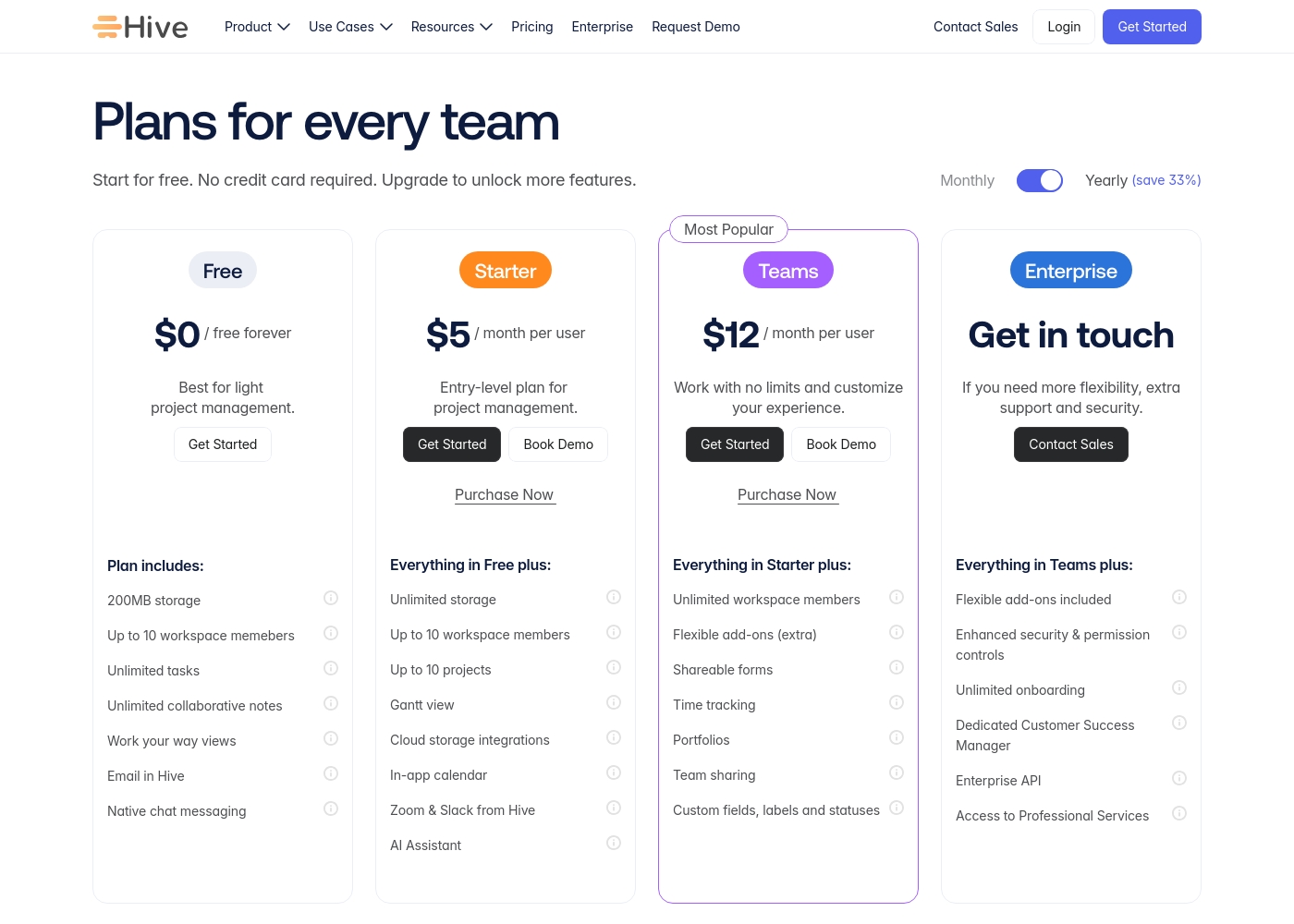
Hive pricing: Hive offers a range of options from a $0 free forever tier to a $12/month per user Teams plan. Subscriptions range from free tools for individuals to robust, feature-rich environments for growing organizations and enterprises alike.
Yearly billing is available to help you save on total costs over time. Monthly plans provide maximum flexibility if you prefer less commitment.
Pricing scales with features, allowing you to pay for only the power you need as your projects grow more complex. Add-ons like Buzz AI and time tracking are extra costs on mid-tier plans, which makes the pricing structure modular and customizable.
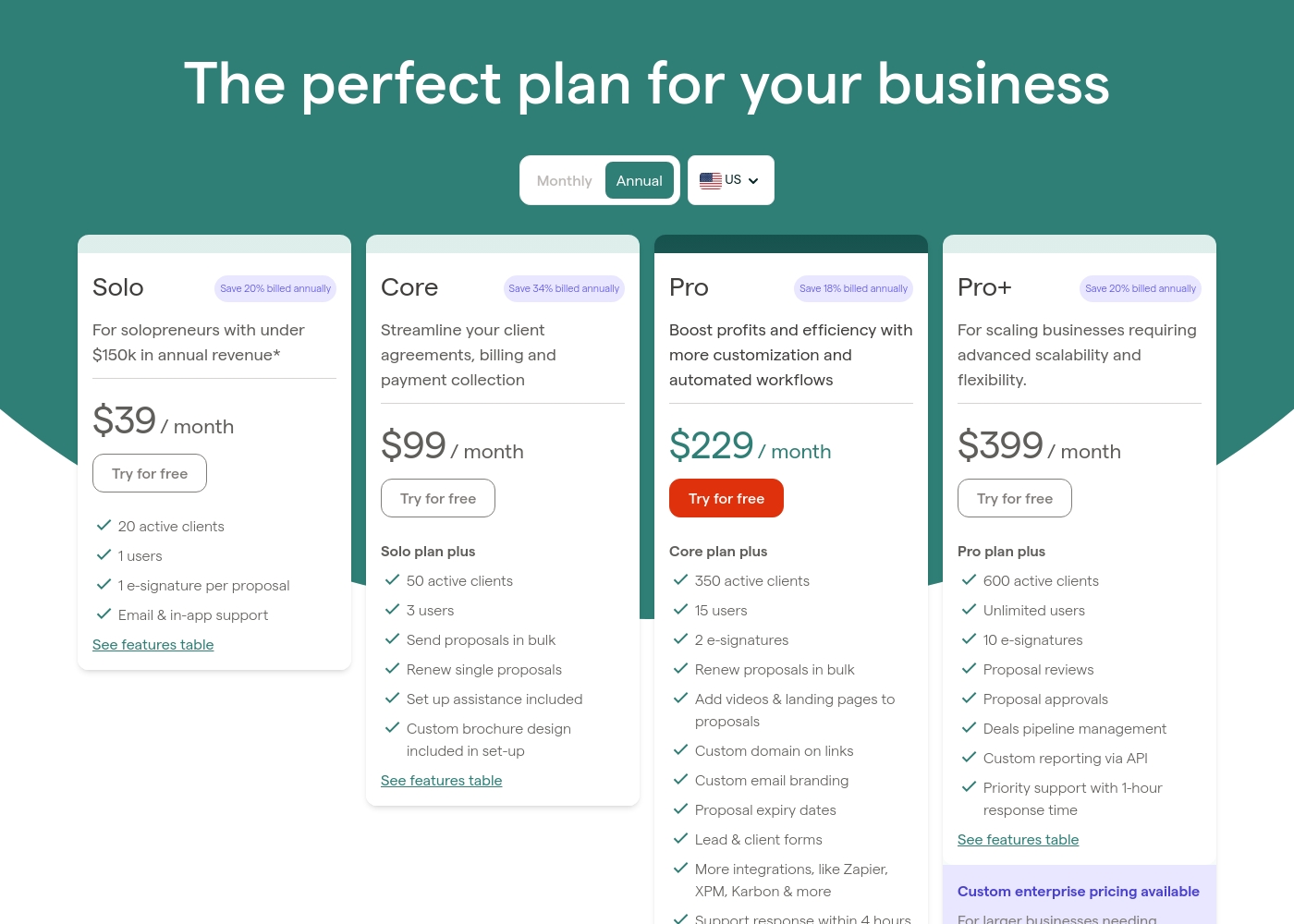
Ignition pricing: Plans from 0 Plans range: 0–200
Pricing Notes
- Hive offers a free forever plan, making it very accessible for small teams.
- Ignition's pricing is likely annual, which is a bigger commitment upfront.
- Hive's cost scales with the number of users. Ignition's scales with active clients and users.
- Hive has optional add-ons like Buzz AI. Ignition's core features are included in plans.
- Always check for the latest trial terms, as Ignition's trial length isn't publicly detailed.
Pricing Head-to-Head
User Reviews
Reviewing Hive's external reputation, we found Trustpilot reviews to be mixed but often positive regarding the product's functionality and customer service responsiveness. Users frequently praise the platform's ease of use and comprehensive features for project management, noting its helpful support team. 📊 On the other hand, some reviews highlight concerns with pricing transparency and occasional billing issues, which can affect overall value perception. ⭐ Capterra's detailed review page was inaccessible due to security restrictions, preventing a full cross-platform synthesis. Based on the available Trustpilot snippets, the sentiment leans towards appreciation for Hive's core toolset and collaborative environment, though experiences with account management and subscription handling are less consistent.
Hive has been a game-changer for our marketing team. The ability to see all our projects in different views, like Gantt charts, helps us stay on top of deadlines. Customer support has also been very responsive whenever we had questions.
Based on external reviews, Ignition receives praise for automating proposals and billing, which users say saves significant time and eliminates payment chasing. Many appreciate the professional client experience and ease of use, especially for integrating agreements and upfront payments.
💡 However, recurring concerns include pricing, which some find expensive, and occasional technical glitches or integration issues. Support responsiveness is noted as a highlight by many, though a few mention a steep initial learning curve and that the annual billing model isn't ideal for all budgets.
Ignition has transformed our proposal and billing process. Getting payment details upfront means we never chase invoices anymore. The automation saves our team hours every week.
Our Verdict
This isn't a fight—it's a choice between two very different tools. Pick Hive if you need to organize project work. Choose Ignition to automate how you get paid. Hive's superpower is centralization. It pulls your Slack chats, Salesforce data, and emails into one project hub. You stop switching apps and start seeing the full picture. Ignition's superpower is automation. It lets you collect payment details with the proposal. Once a client signs, billing runs on autopilot. You never chase an invoice again. The deciding factor is your biggest pain point. Is it messy projects and scattered communication? Hive solves that. Is it late payments and admin busywork? Ignition is your fix. Go with Hive to manage the work itself with your team. Go with Ignition to streamline the business agreement and cash flow. Many service businesses might even use both.
Frequently Asked Questions
Which is better for small teams: Hive or Ignition?
It depends on your need. Hive is better if you need a project management hub. Ignition is better if your main problem is chasing payments. Hive offers a free plan, which is great for testing.
Does Hive have proposal features like Ignition?
No. Hive is for project management and collaboration. It does not create client proposals or collect payments. Ignition is designed specifically for proposals and billing automation.
Is Ignition worth the extra cost over Hive?
If you waste hours chasing payments, yes. Ignition's value is in eliminating that admin work. For project management needs, Hive offers better value with its free tier and per-user pricing.
Can I migrate from Hive to Ignition easily?
They are not direct competitors, so a full migration isn't typical. You might use both tools for different purposes. Data from one wouldn't transfer to the other in a meaningful way.
Which tool has better customer support?
Both receive positive feedback for support. Hive offers dedicated support for enterprise plans. Ignition has priority support with 1-hour response on higher tiers. Check current plans for details.
Do I need to integrate other tools with Hive?
To get its full value, yes. Hive shines when you connect Slack, Salesforce, or email. This creates your central hub. Without integrations, you're not using its main strength.
Ready to Choose?
Both tools have their strengths. Choose based on your specific needs.