WPForms

WPForms review

Build WordPress forms in minutes with drag-and-drop ease and AI help.

WPForms costs from $8.25/mo · 4 plans

By Ciroapp Editorial Team · Updated Sep 9, 2026

Commission may apply at no extra cost

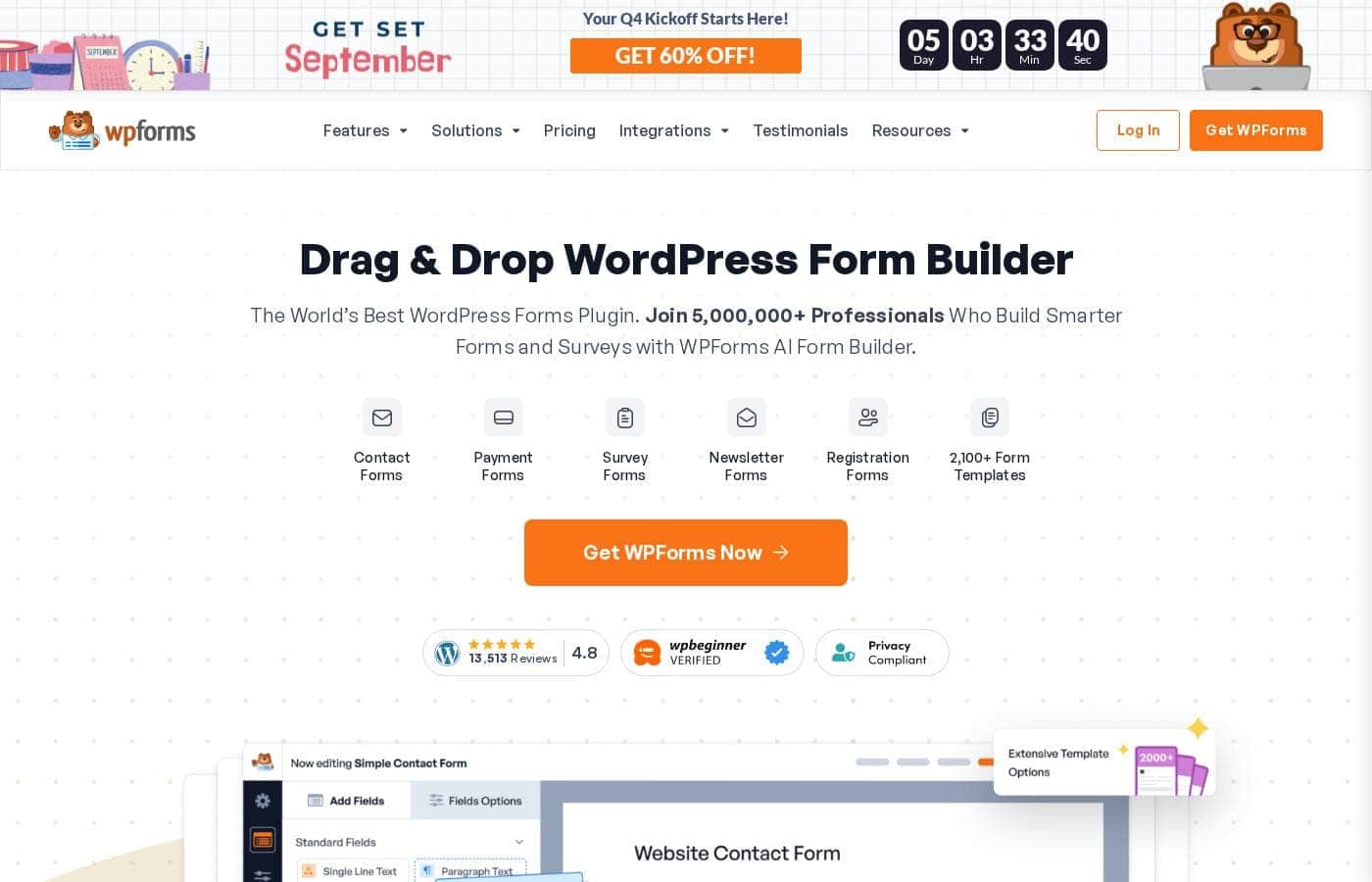
WPForms homepage screenshot

At a glance

Quick overview for WPForms: rating, pricing summary, key features, and highlights.
Vendor page checked Oct 13, 2026

Ciroapp score

4.2/ 5

WPForms makes WordPress form building approachable, pairing an AI generator and 2,100+ templates with built-in payments through Stripe, PayPal, and Square. Watch the details, though: intro prices roughly double at renewal, and removing transaction fees requires the Pro plan. Overall, it's an easy, capable pick for WordPress site owners who want working forms fast.

Pros

  • Pros:WPForms AI generates a complete form — fields, labels, and conditional logic included — from a plain-English description in about 60 seconds, eliminating manual setup for non-technical users.
  • Pros:2,100+ pre-built templates cover contact forms, multi-page applications, donations, surveys, and intake forms, and the vendor claims most users publish their first form in under five minutes.
  • Pros:One-time and recurring payments work inside forms via Stripe, PayPal, Square, and Authorize.net with PCI-compliant card fields — and Pro/Elite licenses add coupons, calculations, and a payment dashboard without a separate shopping cart.

Cons

  • Cons:WPForms is strictly WordPress-only — it can't help if your site runs on Shopify, Wix, Squarespace, or any other platform.
  • Cons:Paid plans are billed annually and renew at the full regular rate (e.g., Basic jumps from the discounted intro price back to $99/year), so the effective long-term cost roughly doubles after year one; renewal rates aren't shown upfront.
  • Cons:Payment features are paywalled by tier — Lite charges a 3% platform fee per transaction, Basic and Plus incur additional processing fees on Stripe, Square, and PayPal, and only Pro and above remove platform transaction fees entirely.
Best for
  • WordPress site owners who want forms without touching code
  • Small businesses collecting orders, quotes, or deposits online
  • Nonprofits running donation and volunteer sign-up forms
Money-back guarantee
Yes — 14 days
This section is a summary. Detailed sections about features, use cases, pricing, and reviews follow below.

What is WPForms?

Building forms in WordPress can eat up hours, especially if you don't code. WPForms tackles that with a drag-and-drop builder, an AI form generator, and 2,100+ templates. You can create contact, payment, and survey forms in minutes — and connect them to tools you already use.

WPForms is a WordPress plugin for building online forms without code. It covers contact forms, surveys, registrations, donations, and payment forms through a drag-and-drop interface, plus an AI option that generates a form from a plain-English description. It's aimed at WordPress site owners who want working forms fast — small businesses, nonprofits, marketers, and beginners.

A free Lite version exists, and paid plans add payments, logic, and integrations.

Should you choose WPForms?

Quick buyer guidance before you compare plans or click through.

Choose it if

  • You already run WordPress and use Elementor, Divi, or the block editor
  • You want submissions stored in your own database, not a third party's
  • You need one-time or recurring payments through Stripe, PayPal, Square, or Authorize.net
  • Site speed matters — the plugin claims it only loads scripts on pages with forms
  • You want a free starting point (Lite) before committing to a paid plan

Skip it if

  • It's WordPress-only, so it won't help if your site runs on another platform
  • Paid plans are billed yearly starting at $49.50/year — an upfront commitment, though a 14-day money-back guarantee applies
  • Advanced tools like payments, calculations, and form access controls sit behind paid plans and addons; Lite covers only the basics
  • Guaranteed email delivery depends on pairing WPForms with WP Mail SMTP or another SMTP provider

Next steps before buying

  1. 1Install the free WPForms Lite version to test the builder on your own site before spending anything.
  2. 2Check the pricing page for current plan costs and confirm which features each tier includes.
  3. 3Confirm your payment gateway, email tool, or CRM has a native integration — or plan to connect through Zapier, Make, or n8n.
  4. 4Verify compatibility with your theme and page builder; Elementor, Divi, and the WordPress block editor are supported.
  5. 5Read the 14-day money-back guarantee terms before upgrading from Lite to a paid plan.

Ease of use

This plugin is clearly built for non-technical users. You get a drag-and-drop builder, 2,100+ ready templates, and an AI generator that creates a form from a plain-English description. The vendor says most people get their first form live in under five minutes, and user reviews frequently mention easy setup, a clean interface, and responsive support.

WPForms Key Features

✨ Build a form in minutes, not hours

Skip the manual setup. Drag fields into place visually, or describe what you need in plain English and WPForms AI builds a complete form in about 60 seconds — fields, labels, and logic included. With 2,100+ templates to start from, most people publish their first form in under five minutes.

✨ Forms that adapt to each visitor

Smart conditional logic shows or hides fields based on what someone enters. Pair it with multi-page layouts, file uploads, and data routing to keep long intake forms short and relevant. Automated notifications then alert customers or teammates the moment a form comes in.

💳 Payments without the shopping cart

Accept one-time and recurring credit card payments, donations, and orders right inside your forms. WPForms connects to Stripe, PayPal, Square, and Authorize.net, with PCI-compliant fields that keep payment data safe. Coupons and a payment dashboard round out the setup for orders, deposits, and fundraising.

✨ Send your data anywhere it needs to go

Your submissions don't have to sit still. WPForms connects to 400+ tools natively through a simple toggle or API key — and reaches thousands more through Zapier, Make, or n8n. A few favorites:

  • Slack alerts and Twilio SMS notifications
  • Salesforce, HubSpot, and Zoho CRM sync
  • Google Sheets, Drive, and Airtable backups

✨ Security that stays on your site

Your data never leaves home. Every submission is stored in your own WordPress database, not a third-party server, with GDPR and CCPA compliance built in. Spam defense stacks reCAPTCHA, hCaptcha, Cloudflare Turnstile, and Akismet — plus a smart engine that blocks bots without making visitors solve puzzles.

Use Cases

💳 Take payments without a shopping cart

Run a small business and want orders or deposits online? Connect Stripe, PayPal, Square, or Authorize.net and take one-time or recurring payments with PCI-compliant card fields.

Expected outcome: Payments land securely in your WordPress dashboard.

Tip: Pro removes platform transaction fees on Stripe, Square, and PayPal.

❤️ Collect donations and volunteers

You lead a nonprofit and need donation forms plus volunteer sign-ups. Build both from templates, keep submissions in your own database, and stay GDPR and CCPA compliant. Supporters can give once or set up recurring gifts.

Expected outcome: More support, less admin.

📈 Capture and route leads

You're a marketer chasing new leads. Publish a form landing page, catch abandoned submissions, and sync entries to Mailchimp, Constant Contact, Brevo, or Klaviyo. Slack and SMS alerts keep your team posted.

Expected outcome: Fewer lost leads, faster follow-up.

⚡ Build your first form in minutes

You're new to WordPress and don't code. Describe the form you need in plain English, and WPForms AI builds it in about 60 seconds — fields, labels, and logic included. Prefer templates? Pick from 2,100+ options.

Expected outcome: Your first form live in under five minutes.

WPForms pricing

From$8.25/mo

  • 4 plans

Vendor page checked on Oct 13, 2026; confirm current prices on WPForms's pricing page

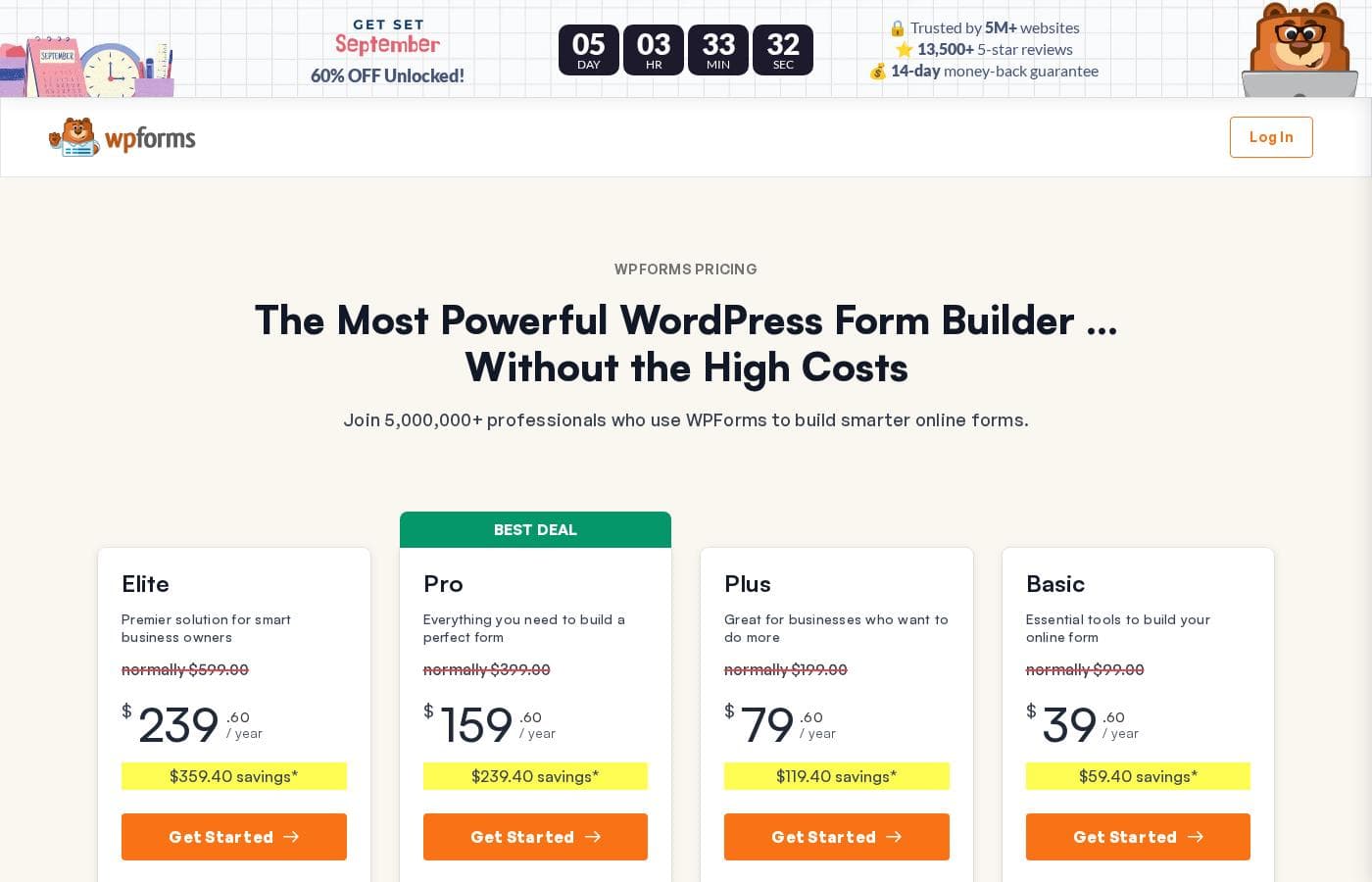
WPForms pricing page screenshotView pricing page screenshot
PlanBilled monthlyBilled annuallyIncludes
Basic
Intro offer $49.50/yr; list price shown
—
$8.25/mo
$99 per year
Use on 1 site, unlimited forms, submissions, and users. Standard support.
Plus
Intro offer $99.50/yr; list price shown
—
$16.58/mo
$199 per year
Use on 3 sites, unlimited forms, submissions, and users. Marketing integrations. Standard support.
Pro
Intro offer $199.50/yr; list price shown
—
$33.25/mo
$399 per year
Best deal. Use on 5 sites, unlimited forms, submissions, and users. Payments, advanced features, and priority support.
Elite
Intro offer $299.50/yr; list price shown
—
$49.92/mo
$599 per year
Use on unlimited sites, unlimited forms, submissions, and users. Premium integrations, site and client management, premium support.

Price history

Tracking prices since Sep 8, 2026. No price change detected yet.

Pricing types: Free plan, Yearly subscription

Pricing notes

WPForms offers four paid plans: Basic at $49.50/year, Plus at $99.50/year, Pro at $199.50/year, and Elite at $299.50/year, all currently 50% off their normal prices. All pricing is in USD, renewals are at full price, and a 14-day money-back guarantee is included.

WPForms costs between $39.60 and $239.60 per year with 4 paid plans: Basic at $39.60/year, Plus at $79.60/year, Pro at $159.60/year, and Elite at $239.60/year. All prices are annual and currently discounted from the regular rates of $99 to $599 per year.

Here's a closer look at what each plan includes.

Basic

Price: $39.60/year (normally $99.00) Websites Supported: 1 Best For: Building essential forms on a single site Refund Policy: 14-day money-back guarantee Other Features:

  • Unlimited forms, submissions, and users
  • 2,100+ form templates with the drag-and-drop builder
  • Entry management with Excel, PDF, and CSV exports
  • Smart conditional logic, file uploads, and spam protection
  • WPForms AI and Standard Support

Basic covers the essentials. It's a solid pick for bloggers or a single small-business site that needs contact forms, notifications, and simple analytics.

Plus

Price: $79.60/year (normally $199.00) Websites Supported: 3 Best For: Businesses that want to do more with marketing and automation Refund Policy: 14-day money-back guarantee Other Features:

  • Everything in Basic, usable on 3 sites
  • Email marketing integrations, including Mailchimp, Constant Contact, Brevo, and Klaviyo
  • Smart workflows, data routing, and user segmentation
  • Slack, Twilio, and Notion integrations
  • Standard Support

Plus is built for growing your email list and automating follow-ups. One thing to know: Stripe, Square, and PayPal work here, but additional processing fees apply — Pro is what removes them.

Pro

Price: $159.60/year (normally $399.00) Websites Supported: 5 Best For: Growing businesses that take payments and need advanced tools (flagged as the "Best Deal" on the page) Refund Policy: 14-day money-back guarantee Other Features:

  • Everything in Plus, usable on 5 sites
  • No transaction fees, plus Stripe, Square, PayPal, Mercado Pago, recurring payments, coupons, and calculations
  • Surveys and polls, digital signatures, save and resume
  • Conversational forms, landing pages, and form abandonment capture
  • Zapier, Make, Google Sheets, and Priority Support

Pro is where WPForms earns its "Best Deal" label. If you collect payments or donations, the zero platform transaction fees can easily offset the price jump from Plus. 💰

Elite

Price: $239.60/year (normally $599.00) Websites Supported: Unlimited Best For: Agencies and multi-site networks Refund Policy: 14-day money-back guarantee Other Features:

  • Everything in Pro, usable on unlimited sites
  • Premium integrations like Salesforce, HubSpot, Zoho CRM, ActiveCampaign, Airtable, and Authorize.Net
  • Multisite support and advanced access control
  • Client license management, webhooks, and entry automation
  • Premium Support

Elite targets agencies and large organizations. Client management tools make sharing license keys across client sites simple, and multisite support fits higher education and government networks.

Every plan is billed annually at the discounted price shown, and the page notes that prices exclude VAT and taxes, which get added at checkout. Each plan also carries the same safety net: a 14-day, no-questions-asked money-back guarantee. Rather than a free trial, WPForms offers Lite — a 100% free version with the drag-and-drop builder, templates, and spam protection. Renewal rates aren't shown on this page, so confirm what you'll pay after year one before you buy.
Cost calculator

Estimate what WPForms costs for your team.

Billing

Basic has no published price for this billing cycle.

Basic has a flat price: the number of seats does not change the total. Estimate based on published list prices, before taxes, add-ons and discounts.

How to pay less for WPForms

  • 14-day money-back guarantee if it does not fit.
  • Cheaper tools in this category start at $4.92/mo.
Visit WPForms

Email me when WPForms changes price

One email when we detect a price change on the vendor's pricing page. No newsletter, no deals. Unsubscribe in one click.

User Reviews

No reviews yet.

Write a Review

Write a Review for WPForms
0/100 characters
0/2000 characters

Why use WPForms?

Most form builders make you choose between easy and powerful. WPForms is built to be both — and it gives you a free way to find out for yourself.

  • Skip the manual setup. Describe the form you need in plain English, and WPForms AI builds it in about 60 seconds — fields, labels, and logic included.
  • Take payments without a shopping cart. Connect Stripe, PayPal, Square, or Authorize.net, with PCI-compliant fields for one-time or recurring payments.
  • Reach the tools you already use. The site lists 400+ native integrations, plus Zapier, Make, and n8n for thousands more apps.
  • Keep data on your own site. Submissions are stored in your WordPress database, with GDPR and CCPA compliance built in.
  • Start free, upgrade when ready. WPForms Lite costs nothing, and paid plans start at $49.50/year with a 14-day money-back guarantee.
  • Get real help when you're stuck. The support team has earned 13,513+ five-star reviews from WordPress users.

WPForms alternatives

Other tools in the WordPress Form Builder category

View all WordPress Form Builder tools
Gravity Forms

Gravity Forms

WordPress Form Builder4.2/5From $4.92/mo

Gravity Forms is the complete WordPress form management plugin you'll ever need. It's designed to help you move beyond simple contact forms and start using your captured data for good. The platform provides an intuitive visual editor, making form creation easy and fast. You can quickly build powerful custom forms from scratch or kickstart your flow using helpful pre-built contact, payment, or survey templates. This solution is trusted by thousands of web professionals and big brands alike.

Formidable Forms

Formidable Forms

WordPress Form Builder4/5From $6.58/mo

Formidable Forms is the essential builder for professional WordPress websites. You can use this tool whether you are building your first site or developing dozens of sites yearly. It’s designed to help you succeed at any scale, handling simple contact forms or complex multi-page forms and calculations. Formidable Forms is far more than a simple form plugin; it’s an integrated application builder that lets you easily transform collected data into powerful content.

Fluent Forms

Fluent Forms

WordPress Form Builder4.1/5From $6.58/mo

Fluent Forms is a professional WordPress plugin designed to help you create any kind of form swiftly. It powers over 600,000 businesses globally, focusing strongly on speed and functionality. Using the simple Drag & Drop Visual Builder, you can choose from 60+ input fields and numerous pre-built templates. Whether you need a simple contact form or an advanced quiz, Fluent Forms makes it easy for anyone, even without coding knowledge, to publish beautiful, responsive forms.

Ninja Forms

Ninja Forms

WordPress Form Builder4.2/5

Ninja Forms is a robust, reliable WordPress forms plugin. Over 50,000,000 downloads show it is a foundation of the WordPress platform. This tool is built to handle anything from simple contact forms to advanced industrial applications. The drag-and-drop builder makes form creation straightforward and highly customizable. It’s perfect for growing businesses, organizations, and professional developers doing client work.

WPForms FAQ

How much does WPForms cost?

WPForms's cheapest paid plan, Basic, costs $8.25 per month. Paid plans range from $8.25 to $49.92 per month.

Does WPForms offer a free trial or a money-back guarantee?

It has a 14-day money-back guarantee.

Has WPForms's price changed recently?

No. We have not detected a price change since we started tracking on Sep 8, 2026.

Can I migrate my forms from Gravity Forms, Ninja Forms, or Contact Form 7?

Yes. The built-in Entry Importer migrates form entries directly from Gravity Forms, Ninja Forms, and Contact Form 7, and you can import entries from CSV files. It's included starting with the Basic plan.

Does WPForms charge transaction fees on payments I collect?

Pro and Elite don't add platform fees, so you only pay your payment processor. Basic and Plus note that additional processing fees apply on Stripe, Square, and PayPal. The free version charges a 3% platform fee per transaction.

What kind of customer support comes with each plan?

Support scales with your plan. Basic and Plus include Standard Support, Pro adds Priority Support with faster response times, and Elite includes Premium Support. The team has earned 13,513+ five-star reviews from WordPress users.

Can WPForms set up the plugin on my site for me?

Yes — White Glove Setup is a service where the WPForms team installs the plugin, configures your platform, and checks that email notifications work. You can buy it with your license or add it later from your account.

Ready to try WPForms? Check out the official site or pricing.

Are you WPForms? Claim this listing · Get the badge