wpDataTables

wpDataTables

The best WordPress table plugin for building responsive data tables.

#3 dans WordPress Table Plugin
2 min read · Updated 11/19/2025
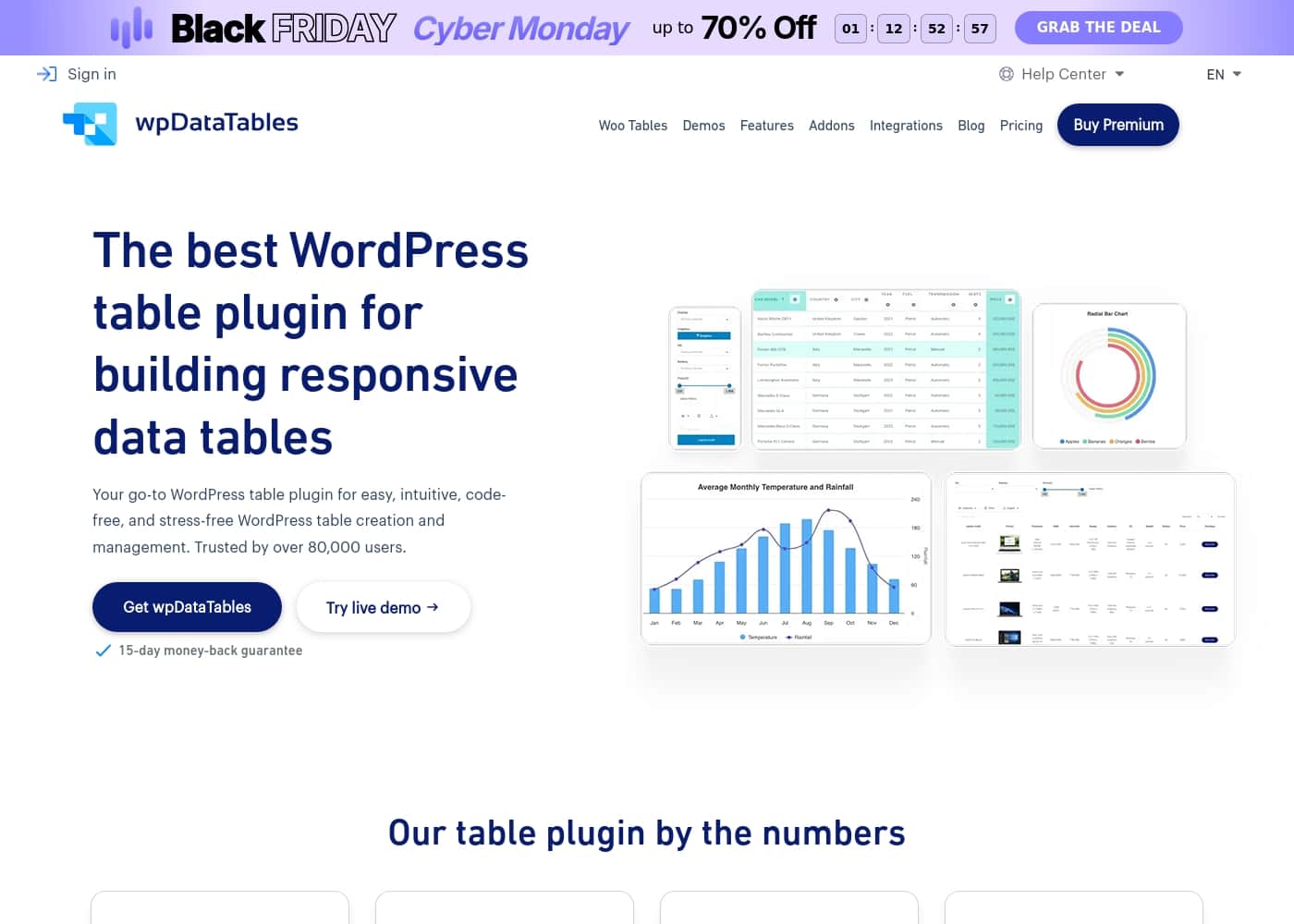
wpDataTables homepage screenshot

At a glance

Quick overview for wpDataTables: rating, pricing summary, key features, and highlights.

Ciroapp review

4.5
Flexible, powerful, and remarkably supported.

We find wpDataTables to be a robust solution that excellently bridges the gap between complex data sources and accessible WordPress presentation. Its strong data integration features and clear responsiveness are significant advantages. Overall, this is a top-tier performer supported by a highly praised customer service team.

Pros

  • Pro:Outstanding, responsive, and effective technical support.
  • Pro:Seamless integration with external databases (MySQL, PostgreSQL).
  • Pro:Highly responsive design ensures tables look great on mobile.
  • Pro:Advanced features like formula columns and conditional formatting.

Cons

  • Con:There is no direct free trial, only a limited free version.
  • Con:External database connection is not included in the entry-level Starter plan.
Money-back guarantee
Yes — 15 days
Range: Not explicitly statedFree plan, Yearly subscription, Lifetime deal
This section is a summary. Detailed sections about features, use cases, pricing, and reviews follow below.

wpDataTables review, pricing, features, pros & cons

Creating clear, dynamic data tables in WordPress can feel frustrating and code-heavy. You might struggle to keep data synchronized or present complex information clearly on mobile devices. wpDataTables solves these common hurdles.

✨ This powerful tool offers stress-free table creation, handles easy synchronization with external sources, and ensures your complex data is always perfectly responsive.

What is wpDataTables?

wpDataTables is your reliable solution for building highly responsive data tables right inside WordPress. It is designed to make the entire process—from initial table creation to user interaction—quick, effective, and simple. This plugin greatly simplifies professional data visualization for all types of users.

Whether you work in business, manage educational resources, or handle personal data projects, wpDataTables helps you organize and present your information beautifully. 💡

wpDataTables Key Features

✨ Seamless Data Sourcing and Synchronization

wpDataTables makes integrating external data refreshingly simple. You can create tables directly from public or private Google Sheets. This is a huge benefit because synchronization happens automatically, keeping your published tables always current.

For more advanced integration, you can connect to external databases, including MySQL, MSSQL, and PostgreSQL. You can import and visualize that complex data easily within your WordPress site. Furthermore, the flexibility extends to connecting data from virtually any API source, ensuring full data compatibility.

✨ Advanced Filtering and Fixed Layouts

When dealing with large datasets, providing excellent user experience is crucial. The advanced filtering tools let your users search tables by specific criteria. They can search by text, filter by date ranges, or select values using dropdowns and checkboxes right on your website.

To prevent confusion while scrolling, you can fix headers and columns in place. This feature ensures that column titles remain visible, no matter how far down a user browses. Fixed layouts allow visitors to compare values and navigate complex tables seamlessly.

✨ Interactive Chart Building

Sometimes raw numbers need visual context to tell the full story. Beyond tables, wpDataTables helps you build dynamic, interactive charts. You have plenty of choices to accurately represent your data using 5 different chart engines.

With access to 80 different chart types, you can choose the right visualization for any situation. Whether you need to illustrate sales trends or compare complex statistics, turning your table data into a professional chart is quick and effective.

💡 Conditional Formatting for Insight 💡

Highlighting key information saves users time and guides their attention. Conditional formatting allows you to set specific criteria for table values. When a condition is met, the relevant cell or row will automatically highlight.

This is invaluable for searching large datasets without manual scanning. For example, you can highlight sales figures above a certain threshold or flag records that need attention. Setting these conditions helps you quickly gain insights from huge amounts of data.

✨ Streamlined Table Management

As your website grows, so does your collection of data tables. wpDataTables helps you keep your workflow organized and accessible. You can arrange and group all your tables into structured folders and subfolders directly in the dashboard.

This organizational tool makes managing hundreds of tables efficient. To find specific data quickly, you can use the seamless search functionality within the folders. A clean backend environment means less time managing files and more time providing data to your audience.

✨ Direct Editing and Calculations

You don't need external programs to maintain your data. wpDataTables offers Excel-like editing capabilities right within WordPress. You can easily update cell values and manage data records directly through the interface.

For tables requiring mathematical operations, you can utilize Formula columns. These features allow you to perform calculations automatically based on other column values. Furthermore, some plans include front-end editing, which lets users update data instantly from the website view.

Use Cases

🛍️ Streamlining E-Commerce Sales

An e-commerce business needs a visually appealing and organized product catalog. Manually updating hundreds of items is extremely inefficient, wasting valuable time. Using wpDataTables lets you build detailed product listings quickly. Customers can easily browse, sort using advanced filters, and compare items right on the page.

You can even streamline the sales process by allowing customers to add items to their shopping carts directly from the table interface. This improves the overall shopping experience and often leads to higher conversions.

🔗 Automating Data Synchronization with Google Sheets

You track critical data—such as project timelines, inventory, or event schedules—in a shared private Google Sheet. You need to display this current information on your WordPress site without manual exporting or copy-paste errors.

wpDataTables establishes a direct connection to your public or private Google Sheet. When you update the data in the sheet itself, that change is automatically reflected instantly in the live table on your website. This ensures your presentation is always accurate.

📊 Visualizing Complex Research and Statistics

A marketer or organization publishes a complex survey results table containing thousands of data points. Users often get lost trying to find specific demographic results or performance metrics if the table is static.

First, configure the table with advanced filtering options like dropdowns and date selectors. Second, apply conditional formatting criteria. Highlighting specific key values, such as results exceeding 80%, instantly guides readers through the data. This makes large datasets easy to analyze and understand quickly.

☁️ Managing Data from External Databases

A key business requirement is displaying operational data stored in external MySQL, MSSQL, or PostgreSQL servers directly on your website. Previously, this required custom coding and complex security setups.

With wpDataTables, you can securely connect to these external data sources. You can easily import and visualize the necessary data within WordPress without needing to export it manually. This integration makes centralized data management much more feasible for organizations.

🔎 Improving User Experience on Huge Tables

When presenting expansive tables, such as large catalogs or finance reports, users often lose context as they scroll horizontally or vertically. Locating the correct column title requires constantly scrolling back to the top.

Problem: Users are confused by missing column headers during deep scrolling. Approach: Implement the fixed headers and columns feature instantly. Expected outcome: Column titles and row identifiers remain visible at all times, making seamless browsing and complex value comparison much easier for site visitors.

🗂️ Organizing Developer Assets Across Projects

Step 1: Developers and agencies often manage hundreds of individual tables across various client sites or internal projects. This amount of assets can quickly lead to confusion and inefficiency. Step 2: Utilize the built-in folders and subfolders functionality within the plugin’s backend.

Sort tables by client, project type (e.g., pricing, comparison, statistics), or completion status. Step 3: Use the seamless search function to locate any specific table quickly, saving time spent navigating. This organized workflow is vital for scaling agencies.

Pricing Overview for wpDataTables

Pricing range
Not explicitly stated
Pricing types
Free plan, Yearly subscription, Lifetime deal
Money-back guarantee
Yes — 15 days

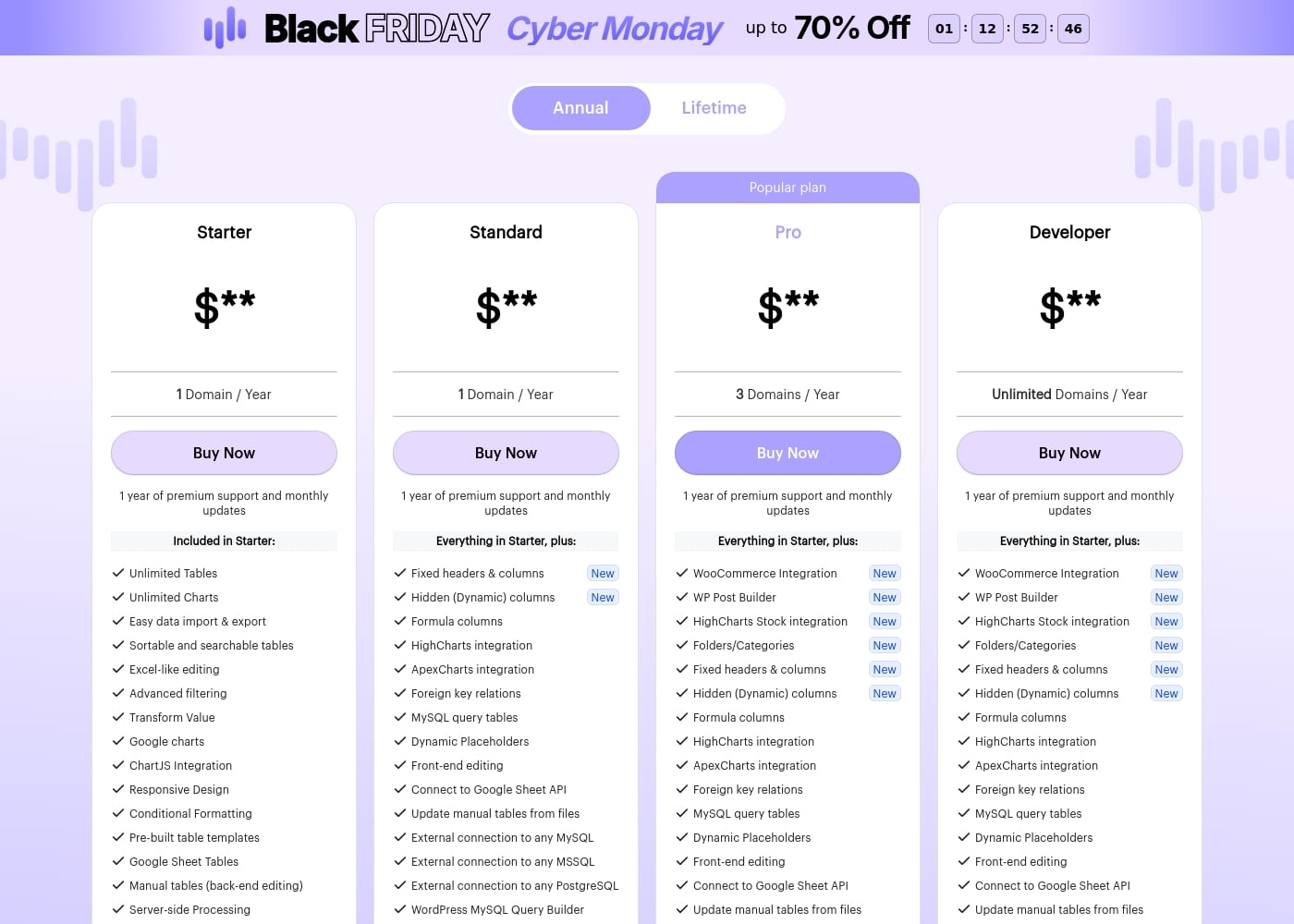
wpDataTables offers annual subscription plans across four tiers: Starter, Standard, Pro, and Developer. Pricing scales primarily based on the number of supported domains and the inclusion of advanced features like third-party integrations and external database connectivity.

Plans & Pricing

Starter

Yearly$**
1 Domain / Year
  • Unlimited Tables and Charts
  • Easy data import & export
  • Excel-like editing
  • Advanced filtering
  • Conditional Formatting
  • Server-side Processing

Standard

Yearly$**
1 Domain / Year
  • Everything in Starter
  • Fixed headers & columns
  • Formula columns
  • Front-end editing
  • External connection (MySQL, MSSQL, PostgreSQL)
  • HighCharts/ApexCharts integration

Pro

Yearly$**
3 Domains / Year
  • Everything in Starter
  • WooCommerce Integration (New)
  • WP Post Builder (New)
  • HighCharts Stock integration (New)
  • Folders/Categories (New)
  • Fixed headers & columns

Developer

Yearly$**
Unlimited Domains / Year
  • Everything in Starter
  • Unlimited Domains support
  • WooCommerce Integration (New)
  • WP Post Builder (New)
  • HighCharts Stock integration (New)
  • Folders/Categories (New)

wpDataTables costs between Not explicitly stated and Not explicitly stated per year with 4 annual plans: Starter at $, Standard at $, Pro at $, and Developer at $.

Let’s explore what features are included with each plan.

Starter

Price: $** / Year Websites Supported: 1 Domain Best For: Basic table creation and data visualization. Refund Policy: 15-day money-back guarantee Other Features: Unlimited Tables, Unlimited Charts, Excel-like editing, Advanced filtering, Conditional Formatting, Server-side Processing.

The Starter plan is ideal if you only manage a single website and need solid core functionality for creating responsive, searchable tables and charts. It covers all the essentials for handling data within a WordPress environment.

Standard

Price: $** / Year Websites Supported: 1 Domain Best For: Users requiring advanced data integration and manipulation tools. Refund Policy: 15-day money-back guarantee Other Features: Fixed headers & columns, Formula columns, HighCharts/ApexCharts integration, Front-end editing, External connection to any MySQL/MSSQL/PostgreSQL database.

The Standard plan builds heavily upon Starter features, adding powerful capabilities like connecting to external databases and enabling front-end editing. This is a great choice if your data needs require external database connectivity or deep relational functionality (foreign key relations).

Pro (Popular plan)

Price: $** / Year Websites Supported: 3 Domains Best For: Professional users or small agencies handling up to three sites, especially those using WooCommerce. Refund Policy: 15-day money-back guarantee Other Features: WooCommerce Integration, WP Post Builder, HighCharts Stock integration, Folders/Categories, Fixed headers & columns, Dynamic Placeholders.

The Pro plan is the most popular choice because it significantly increases your site support to three domains. It incorporates key integrations, like WooCommerce, which are vital for e-commerce sites, along with organizational tools like Folders/Categories. It's a robust deal for growing businesses.

Developer

Price: $** / Year Websites Supported: Unlimited Domains Best For: Agencies, developers, and freelancers who need to deploy wpDataTables across numerous client projects. Refund Policy: 15-day money-back guarantee Other Features: Unlimited Domains support, WooCommerce Integration, WP Post Builder, HighCharts Stock integration, Lifetime support (with Lifetime option), Full feature set.

The Developer plan offers the maximum flexibility with support for an unlimited number of domains. If you are managing a large portfolio or anticipate rapid growth, this plan ensures you have access to every feature and tool without any limits on deployment.

wpDataTables does not offer a free trial, but you can explore a free limited version available on WordPress.org. For peace of mind, all new subscriptions are protected by a generous 15-day money-back guarantee, allowing you to try the full functionality risk-free. You can also cancel your subscription at any time directly through the online store.
User Reviews

wpDataTables receives strong praise on Trustpilot, particularly for its comprehensive functionality and outstanding customer service. Users consistently describe the plugin as feature-rich and powerful, allowing them to create dynamic, complex tables and visualizations with relative ease.

Many reviewers noted that they could manage or generate data tables quickly, often in minutes, describing the software as one of the best WordPress plugins available. The most recurring theme is the quality of the technical support; users call the team "fantastic," "tireless," and "next to none," highlighting their responsiveness and willingness to solve complex problems.

Furthermore, clients appreciate the affordability and the resulting eye-catching, highly mobile-responsive visualizations. Users who have depended on the plugin for several years emphasize its reliability, confirming that wpDataTables delivers consistent value over time.

🛠️

What users say elsewhere

R. S.
· Trustpilot · Jun 18, 2025
5.0 / 5

This plugin is truly feature rich and works like a dream. I have been using it consistently for nearly five years now, which shows how reliable and excellent it is. The support team is absolutely fantastic to work with.

K. M.
· Trustpilot · Aug 29, 2024
5.0 / 5

We needed a powerful tabular data presentation tool that was afforable for clients. wpDataTables delivered eye-catching, mobile-responsive visualizations and made data sources easy to manage. Crucially, the technical support team has been cheerful and tireless in their help.

No reviews yet.

Write a Review

Write a Review for wpDataTables
0/100 characters
0/2000 characters

Why use wpDataTables?

Why spend hours manually wrestling with code or exporting static data when you can achieve professional results swiftly and automatically? wpDataTables empowers you to handle complex data without needing custom programming. It connects directly to various data sources, keeping your tables current without manual intervention. Customers appreciate the advanced filters and searching tools that make large datasets easy to navigate for site visitors.

Here is why wpDataTables stands out as a robust data management solution for WordPress:

  • Flexible Data Integration: Easily connect and create tables using information from private Google Sheets or external databases like MySQL, MSSQL, and PostgreSQL. Sheet updates are reflected automatically in your WordPress tables.
  • Better User Experience: Make long tables searchable and clear for users. You can enable advanced filters, and crucial features like fixing headers and columns prevent confusion when browsing.
  • Advanced Visualization Tools: Highlight important table values using conditional formatting criteria. This feature is invaluable for quickly searching large datasets, saving you lots of time scanning manually.
  • Organized Workflow: Manage your entire collection of tables efficiently. You can arrange WordPress tables into clean folders and subfolders, making site management much easier.
  • Highly Reliable Support: Thousands of users worldwide trust this plugin, noting its professional quality and robust functionality. Customer testimonials consistently praise the dedicated team for providing fast, helpful, and effective support responses.

This plugin is essential for anyone needing intuitive, professional, and code-free data management in WordPress. It has been trusted by over 80,000 active installations for more than ten years. If clean, stress-free data visualization matters to you, try a live demo today and see the power firsthand. 🚀

Ready to transform your workflow with wpDataTables?

wpDataTables Alternatives

Other tools in the WordPress Table Plugin category

Frequently Asked Questions

Is there a free trial for the full version of wpDataTables?

No, a direct free trial is not offered for the full plugin. However, all new subscriptions include a 15-day money-back guarantee, letting you test the complete features risk-free. A limited free version is also available on WordPress.org.

How does the licensing model handle multiple websites or domain limits?

Licensing is based on the number of domains supported per year. Starter and Standard plans cover one domain, Pro covers three domains, and the Developer plan supports unlimited domains. This allows you to choose a plan that matches your deployment scale.

Which plan do I need if I want to connect to external databases like MySQL or PostgreSQL?

External connections to MySQL, MSSQL, or PostgreSQL are available starting with the Standard annual plan. The entry-level Starter plan does not include these advanced external connection features.

Is the subscription based on per-user seats or on features and domain usage?

The subscription is tied only to the features included and the number of allowed domains. The licensing is not based on per-user or per-seat models, and all plans include unlimited tables and charts.

What happens to my data and functionality if I choose not to renew my annual license?

If you do not renew, the plugin will remain fully functional, and you will not lose any data. However, you will stop receiving monthly updates, new features, and access to the premium support system.

Can I pull data directly into my tables from external APIs or JSON feeds?

Yes, you can easily create tables using external APIs through JSON feeds and nested JSON data. All plans also include the capability to connect directly via the Google Sheet API.

Can I upgrade my license later if my business grows and I need more domains?

Of course! You can easily upgrade your license to a higher tier at any time. You just contact the support team, and you only need to pay the difference in cost between the two plans.

Which plan is best suited for agencies managing many client projects?

The Developer plan is explicitly recommended for agencies, developers, and freelancers. It provides the full feature set and supports deployment across an unlimited number of client domains.

What kind of support is included with an annual subscription?

All annual subscription plans include one year of premium support. This gives you direct access to the team, which is widely praised for its responsiveness and helpfulness.

Does wpDataTables provide integration specifically for WooCommerce for e-commerce sites?

Yes, WooCommerce integration is a key feature starting with the Pro plan. This capability helps e-commerce sites create dynamic product listings and comparison tables.

What payment methods are accepted for buying a license?

You can use PayPal, Visa, MasterCard, or American Express to complete your purchase. If you need to use a different method, you should contact the provider directly.

Is information regarding server requirements or data limits provided?

Not explicitly stated on the official site. You may want to check the plugin documentation or contact support about server-side processing capabilities and large dataset limitations.

Ready to try wpDataTables? Check out the official site or pricing.