Ninja Tables

Ninja Tables

The Easiest Table Builder Plugin in WordPress

#1 dans WordPress Table Plugin
2 min read · Updated 10/5/2025
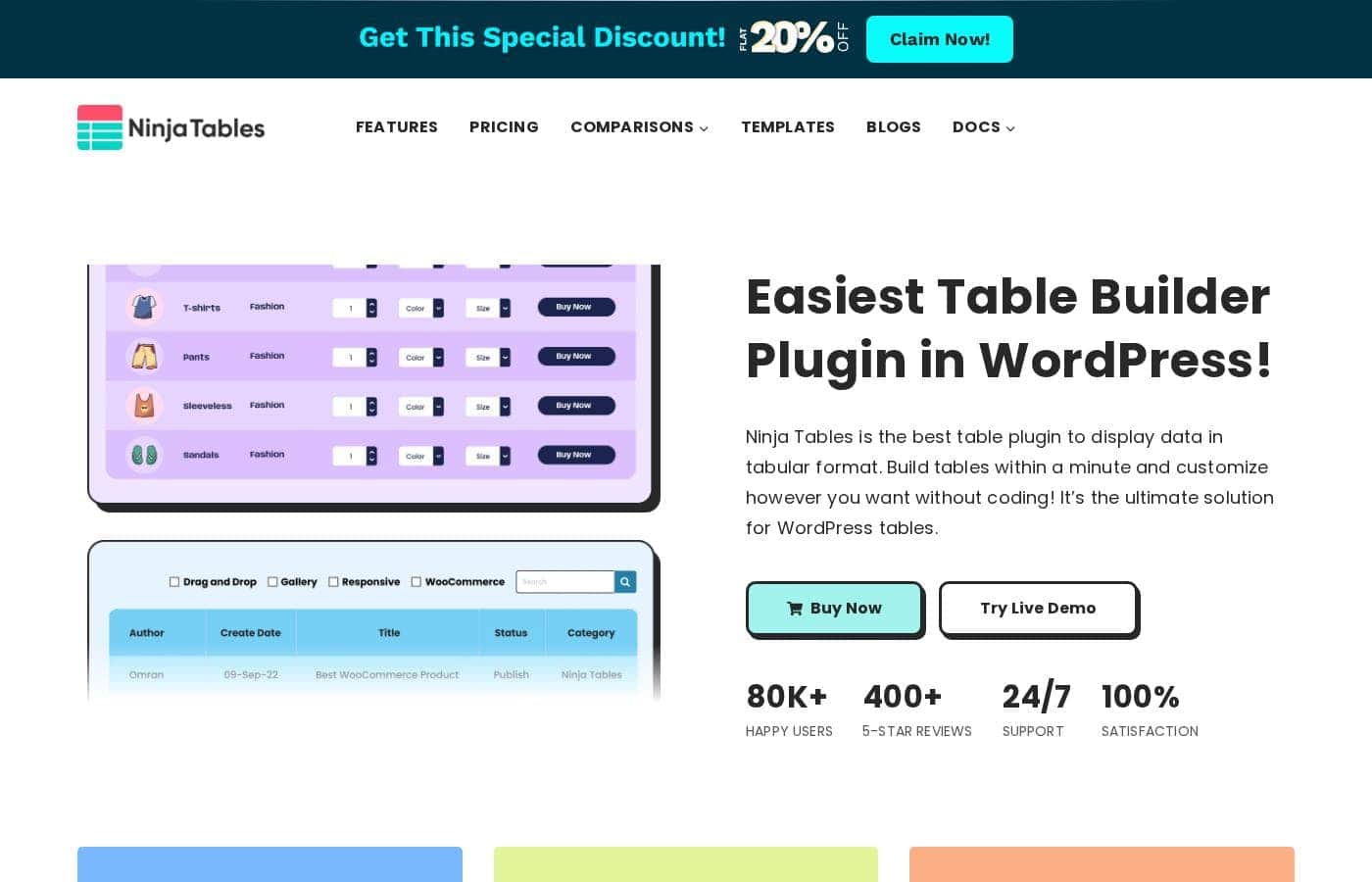
Ninja Tables homepage screenshot

At a glance

Quick overview for Ninja Tables: rating, pricing summary, key features, and highlights.

Ciroapp review

4.7
Powerful tables, painless synchronization, great value.

We found Ninja Tables to be a highly competitive WordPress table builder, offering significant performance benefits, especially regarding loading speed and big data handling. Overall, we recommend it highly for users needing flexible licensing and efficient methods for live data synchronization.

Pros

  • Pro:Extremely fast loading speed, even when managing big data.
  • Pro:No coding required; uses an intuitive drag-and-drop table editor.
  • Pro:Seamless data synchronization direct from Google Sheets.
  • Pro:Dedicated features for deep WooCommerce product integration.

Cons

  • Con:Priority support and essential integrations are limited to Pro tiers.
  • Con:Introductory prices are significantly discounted off the renewal cost.
Money-back guarantee
Yes — 14 days
Range: $63/year – $599 (one-time)Free plan, Yearly subscription, One-time payment
This section is a summary. Detailed sections about features, use cases, pricing, and reviews follow below.

Ninja Tables review, pricing, features, pros & cons

Struggling to manage and display complex data in WordPress often feels frustrating and slow. Thankfully, Ninja Tables cuts through that typical struggle. It lets you build tables within a minute and customize them exactly how you want, all without needing to write a single line of code.

What is Ninja Tables?

Ninja Tables is simply the best WordPress plugin for displaying your data clearly in a tabular format. It is designed to be the ultimate solution for anyone needing organized tables. 💡 The easy, intuitive interface means it’s built for everyone—whether you are a seasoned expert or a complete beginner. You can start with Simple Mode for basic drag-and-drop tables or switch to Advanced Mode for rich customization options.

This plugin helps a wide range of users achieve their goals. Small businesses and online stores use it to display unlimited product details and boost sales. Agencies rely on its smart display to manage employee or student data. Web developers and marketers use it to quickly craft comparison tables, pricing lists, or Amazon product listings.

Ninja Tables Key Features

✅ Effortless Table Creation Modes

Ninja Tables makes building and customizing tables incredibly easy. It’s built for everyone, whether you are a complete beginner or a seasoned expert. You can create tables within a minute without needing to write a single line of code.

To help you work faster, the plugin offers two distinct table creation modes. Use the Simple Mode for basic tables; it provides a quick drag-and-drop interface. When you need more capability, switch to the Advanced Mode, which unlocks fully customizable tables and rich, sophisticated features.

✨ Unmatched Speed and Performance

You never have to worry about tables slowing down your website performance. Ninja Tables uses a Fast Loading architecture designed to handle large amounts of information efficiently. This means the plugin can flawlessly display all types of Big Data.

Even if your tables include unlimited rows or columns, the data displays smoothly. Your site won't weigh down, regardless of the data size or the device users are accessing it on. Importantly, all tables created are SEO-friendly, ensuring search engines can easily read and index your valuable data.

✨ Seamless Data Integration and Syncing

Keeping your table data current is simple and automatic. Ninja Tables offers robust integration with Google Sheets, allowing the plugin to auto-sync and fetch live data without manual intervention. This ensures your website always displays the most updated information.

The import-export feature also makes moving existing data pain-free. If you already have data in another source, you can easily bring it into Ninja Tables and customize those imported tables right away. This flexibility saves you significant time when migrating or managing data.

✨ Powerful Design Customization

You have total control over how your tables look on your WordPress site. The intuitive interface lets you completely customize the table's appearance quickly. You can adjust table colors, backgrounds, and layouts to match your brand exactly.

The Advanced Mode offers over 100 table styles for maximum visual flexibility. If you are in a rush, you can pick pre-made templates and then quickly edit them using drag-and-drop functionality to fit your project perfectly. Agencies can also apply customization layers like filters for specialized displays of employee or student data.

✨ Dedicated E-commerce Functionality

Ninja Tables helps businesses maximize sales through high-quality product displays. The plugin includes dedicated WooCommerce product tables. These tables allow you to organize detailed product information instantly.

This sales-focused approach uses engaging layouts that are designed to increase customer engagement. You can quickly craft professional tables for specific business needs, such as:

Use Cases

🛒 Boosting E-commerce Sales with Product Tables

Small businesses need effective ways to display their inventory clearly. Standard WordPress methods often fail to organize unlimited product details well. You can use the dedicated WooCommerce product tables integration to solve this issue.

This lets you create highly detailed and engaging layouts for your online products. Organizing your information better helps instantly engage more customers, which is great for boosting your overall sales.

📊 Keeping Reports Live Using Google Sheets Integration

Often, critical website data lives in external spreadsheet tools, like Google Sheets. Having to manually update a web table every time the source sheet changes is slow and inefficient. Ninja Tables offers seamless integration to auto-sync this data live.

Now, your website dynamically fetches the refreshed data directly from the Google Sheet. This capability ensures your published reports and metrics are always accurate and up-to-date without recurring manual effort.

⭐ Crafting High-Performance Comparison Tables

Web developers and marketers frequently create specialized tables, such as pricing lists or product comparison charts. These require sharp design and must also be SEO-friendly to perform well in search results. You don't want performance issues to slow down these crucial pages.

Use Advanced Mode to access robust customization features and pre-made templates. The result is a professional, customized table that is visible to search engines and achieves lightning-fast loading speeds, even when complex.

🧑‍💼 Managing Agency and Organizational Data

Agencies or organizations need smart, central methods to display key personnel or academic data. Trying to build custom tables for student lists or employee directories without coding can be complicated and time-consuming.

Use the simple Drag & Drop function to quickly structure your table layout. You can then import existing personal data using the import-export feature. Finally, apply colors and filters to make the data easy for administrators to manage and search.

🚀 Displaying Big Data Smoothly

Problem: A project relies on displaying large amounts of information—unlimited rows and columns—resulting in slow website performance.

Approach: Utilize Ninja Tables' Fast Loading architecture, specifically designed for handling Big Data. It smoothly processes and displays all data without weighing down your website.

Expected outcome: Your users get access to massive datasets quickly, and page load times remain fast, ensuring a positive user experience.

Pricing Overview for Ninja Tables

Pricing range
$63/year – $599 (one-time)
Pricing types
Free plan, Yearly subscription, One-time payment
Money-back guarantee
Yes — 14 days

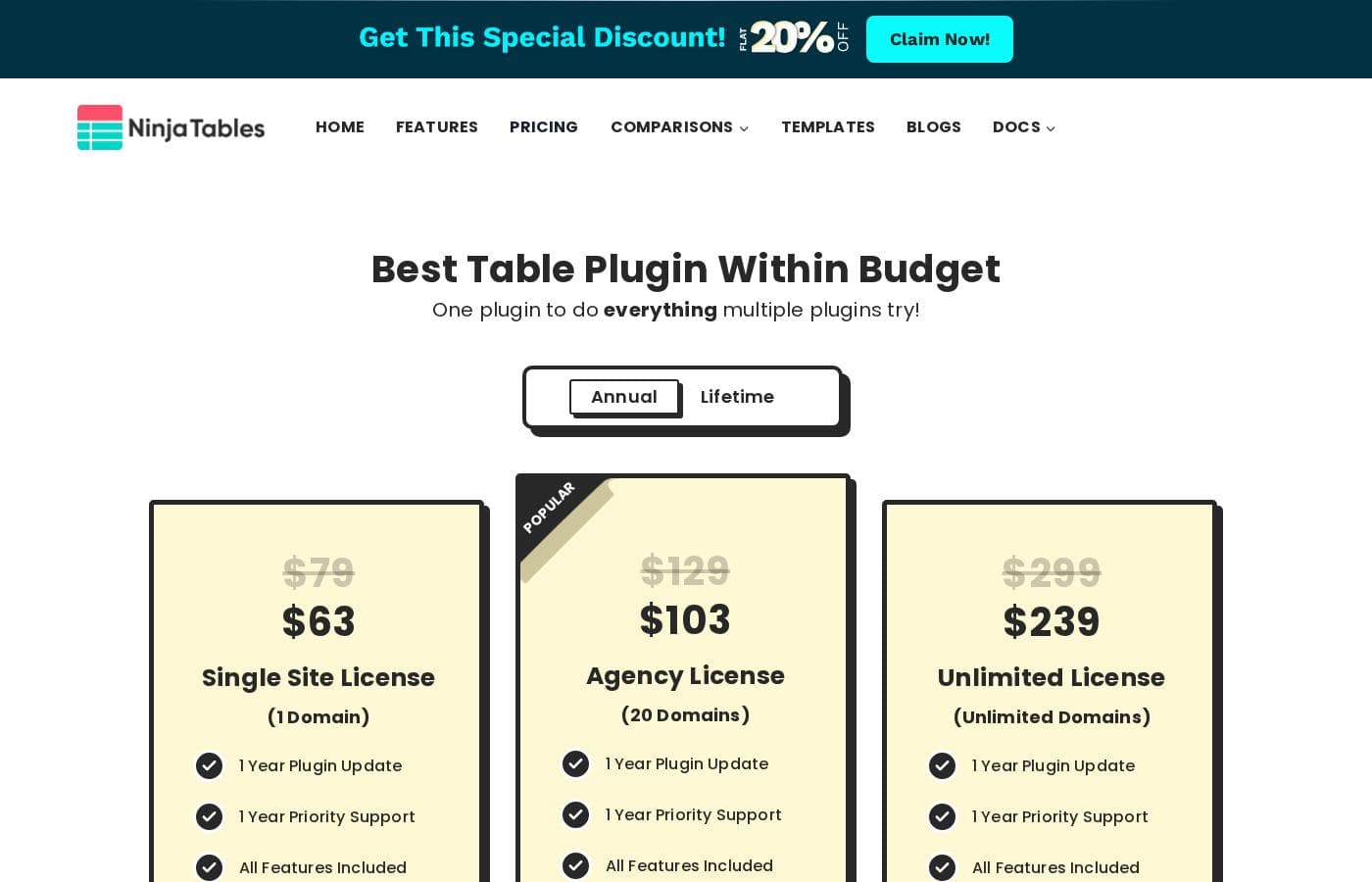
Ninja Tables offers flexible licensing split into Annual and Lifetime options, starting at $63 for a single site annual license. Prices scale based on the number of websites supported, covering between 1 domain and an unlimited number of domains.

Plans & Pricing

Annual Single Site License (1 Domain)

MonthlyNot explicitly stated
Yearly$63
1 Domain
  • 1 Year Plugin Update
  • 1 Year Priority Support
  • All Features Included

Annual Agency License (20 Domains)

MonthlyNot explicitly stated
Yearly$103
20 Domains
  • 1 Year Plugin Update
  • 1 Year Priority Support
  • All Features Included

Annual Unlimited License (Unlimited Domains)

MonthlyNot explicitly stated
Yearly$239
Unlimited Domains
  • 1 Year Plugin Update
  • 1 Year Priority Support
  • All Features Included

Lifetime Single Site License (1 Domain)

MonthlyNot explicitly stated
YearlyNot applicable (One-time $247)
1 Domain
  • Lifetime Plugin Update
  • Lifetime Priority Support
  • All Features Included

Lifetime Agency License (20 Domains)

MonthlyNot explicitly stated
YearlyNot applicable (One-time $399)
20 Domains
  • Lifetime Plugin Update
  • Lifetime Priority Support
  • All Features Included

Lifetime Unlimited License (Unlimited Domains)

MonthlyNot explicitly stated
YearlyNot applicable (One-time $599)
Unlimited Domains
  • Lifetime Plugin Update
  • Lifetime Priority Support
  • All Features Included

Ninja Tables costs between $63 and $599 with six primary Pro plans: Single Site Annual at $63, Agency Annual at $103, Unlimited Annual at $239, Single Site Lifetime at $247, Agency Lifetime at $399, and Unlimited Lifetime at $599.

Let's look closely at the details of the available licenses to find the best fit for your project. Remember that the listed full prices are currently discounted for the initial purchase.

Annual Single Site License (1 Domain)

Price: $63 per year (Discounted from $79) Websites Supported: 1 domain Best For: Individual users or bloggers needing powerful tables for one website. Refund Policy: 14-day money-back Other Features:

  • 1 Year Plugin Update
  • 1 Year Priority Support
  • Access to All Features Included

If you only maintain one WordPress site, this introductory annual license provides everything you need. You get the full power of Ninja Tables Pro for a very low yearly cost. This is the top choice if you want to test the full set of Pro features.

Annual Agency License (20 Domains) — Popular

Price: $103 per year (Discounted from $129) Websites Supported: 20 domains Best For: Web developers or small agencies managing multiple client sites. Refund Policy: 14-day money-back Other Features:

  • 1 Year Plugin Update
  • 1 Year Priority Support
  • Access to All Features Included

This popular annual plan is perfect for professionals who handle up to twenty different websites. It balances extensive site usage with an ongoing annual commitment. You can provide your clients with enhanced table functionality easily.

Annual Unlimited License (Unlimited Domains)

Price: $239 per year (Discounted from $299) Websites Supported: Unlimited domains Best For: Large-scale developers or businesses needing total flexibility. Refund Policy: 14-day money-back Other Features:

  • 1 Year Plugin Update
  • 1 Year Priority Support
  • Access to All Features Included

If you manage many projects and anticipate future growth, the Unlimited Annual plan gives you maximum coverage. You never need to worry about license limits across any of your sites. This plan ensures you always have the necessary technical support and updates throughout the year.

Lifetime Single Site License (1 Domain)

Price: $247 (One-time payment, discounted from $309) Websites Supported: 1 domain Best For: Long-term solo users who prefer avoiding annual renewal fees. Refund Policy: 14-day money-back Other Features:

  • Lifetime Plugin Update
  • Lifetime Priority Support
  • Access to All Features Included

For site owners committed to the plugin long-term, this lifetime option eliminates recurring costs. Pay once and receive updates and priority support for the entire life of the product. This offers significant savings compared to renewing yearly indefinitely. 💸

Lifetime Agency License (20 Domains) — Popular

Price: $399 (One-time payment, discounted from $499) Websites Supported: 20 domains Best For: Mid-sized agencies wanting a permanent license solution for client work. Refund Policy: 14-day money-back Other Features:

  • Lifetime Plugin Update
  • Lifetime Priority Support
  • Access to All Features Included

This popular lifetime tier suits agencies that manage many clients but want the peace of mind of a one-time charge. You cover up to 20 domains permanently without worrying about annual budget cycles. This provides stability and unlimited future support for your projects.

Lifetime Unlimited License (Unlimited Domains)

Price: $599 (One-time payment, discounted from $749) Websites Supported: Unlimited domains Best For: Corporations or massive development firms requiring indefinite access. Refund Policy: 14-day money-back Other Features:

  • Lifetime Plugin Update
  • Lifetime Priority Support
  • Access to All Features Included

If you run an extensive operation or frequently launch new websites, the Lifetime Unlimited plan is the ultimate investment. You gain permanent access across all your current and future domains. This comprehensive license is the highest tier available, designed for maximum scale.

The FAQs confirm that Ninja Tables offers a free version with many functionalities for basic table needs. If you choose a Pro license, every purchase is protected by a solid 14-day, 100% money-back guarantee. If the plugin does not meet your specific needs within those two weeks, you can receive a full refund, no questions asked.

User Reviews

We were supplied with the external review platform addresses for Capterra and Trustpilot. Specifically, the Capterra page link was provided for Ninja Tables.

However, no direct user feedback snippets were supplied from either source for synthesis. Consequently, we are currently unable to report on common user themes relating to accuracy, support responsiveness, or overall value delivered in the real world.

We cannot comment on external perceptions of ease of use, integrations, or reliability based on customer reports. Our summary must rely entirely on the internal marketing and pricing data, as specific testimonials or aggregated star ratings were absent from the provided context.

We regret we cannot offer a balanced customer view at this time due to the lack of submitted external data. 🤷‍♂️

No reviews yet.

Write a Review

Write a Review for Ninja Tables
0/100 characters
0/2000 characters

Why use Ninja Tables?

If you need tables that perform fast and look professional, Ninja Tables offers specific operational advantages built for success. You won't face performance issues, and your tables will be SEO-friendly right out of the box.

Here are some concrete benefits you can expect:

  • Achieve Lightning-Fast Loading Speeds. Even if your data tables involve unlimited rows or columns, the Fast Loading architecture ensures your website won't slow down. This plugin displays all types and amounts of Big Data smoothly. 🚀
  • Build Tables Instantly Without Coding. Thanks to Simple Design and the drag-and-drop function, creating and customizing tables couldn't be easier. You can customize table colors, backgrounds, and layouts with robust controls or use pre-made templates to save time.
  • Maximize Sales with WooCommerce Integration. The dedicated WooCommerce product tables let you organize detailed product information instantly. This sales-focused approach is designed to increase customer engagement.
  • Sync Data Live Effortlessly. Ninja Tables offers seamless integration with Google Sheets, allowing the plugin to auto-sync and fetch live data directly. You can also import existing data using the import-export feature and then customize those imported tables.
  • Rely on Proven Satisfaction and Support. Join over 80,000 happy users who trust this plugin. A dedicated support team works 24/7 to provide priority assistance for any query you might have. ✨

Ready to transform your workflow with Ninja Tables?

Ninja Tables Alternatives

Other tools in the WordPress Table Plugin category

Frequently Asked Questions

Are there any limitations on the number of rows or the size of data I can display in my tables?

No, the plugin is optimized for handling 'Big Data' and promises fast loading speeds. The creators guarantee smooth performance even when displaying unlimited rows or columns in your table data.

Does Ninja Tables integrate with third-party form builders or database systems besides WooCommerce and Google Sheets?

The core feature list explicitly mentions integration with WooCommerce for product tables and Google Sheets for real-time synchronization. Integration with other specific form builders or database systems is not detailed on the official site.

Can I try the premium features of Ninja Tables Pro before purchasing a license?

There is no dedicated free trial for the Pro version itself, but you can try the free version widely available. Alternatively, you can buy a Pro license and use the 14-day money-back guarantee as a risk-free trial.

What happens to the price when my discounted first-year annual license renews?

The initial prices listed ($63, $103, $239) include a special discount valid only for the first purchased year. Renewal will occur automatically at the full, undiscounted list price annually, assuming the pricing remains constant.

How does the 14-day money-back guarantee work if I’m unhappy with the product?

Ninja Tables offers a zero-risk 100% money-back guarantee for 14 days following your purchase. If the plugin fails to meet your needs within those two weeks, you can request a full refund, and no questions will be asked.

Is Ninja Tables licensing based on the number of users or the number of websites?

Licensing is determined strictly by the number of domains or websites where the plugin is activated. The plans are structured around 1 domain, 20 domains, or Unlimited domains and are not limited by individual user accounts or seats.

What is the expected response time for priority support requests?

Pro users receive access to a dedicated support team that works 24/7 to provide priority assistance. However, a guaranteed response time or official Service Level Agreement (SLA) is not explicitly stated on the website.

Where is my table data stored, and what security measures are in place?

Since Ninja Tables is a WordPress plugin, the primary data for your tables resides safely within your own WordPress database. Specific details on data governance or advanced security protocols are not explicitly listed on the provided sales materials.

If I purchase an annual plan, how do I cancel the subscription renewal for the following year?

Annual Licenses require yearly renewal to maintain access to plugin updates and priority support. The precise process or dashboard setting for turning off auto-renewal is not specified on the pricing documentation.

Can I easily move my existing table data from another source into Ninja Tables?

Yes, you can use the built-in import-export feature to seamlessly bring in existing data sets. After importing, you can utilize the Advanced Mode to customize and control the appearance of those tables.

Who is the Unlimited License tier specifically recommended for?

The Unlimited License is designed for large-scale operations like corporations, massive development firms, or agencies that need maximum flexibility. It ensures permanent or continuing access across all current and future client sites without domain restrictions.

Does Ninja Tables support languages other than English, such as translations or RTL writing?

Dedicated information regarding specific language support, official translations, localization capabilities, or Right-to-Left (RTL) writing functionality is not explicitly stated on the official site.

Ready to try Ninja Tables? Check out the official site or pricing.