Softr

Softr review

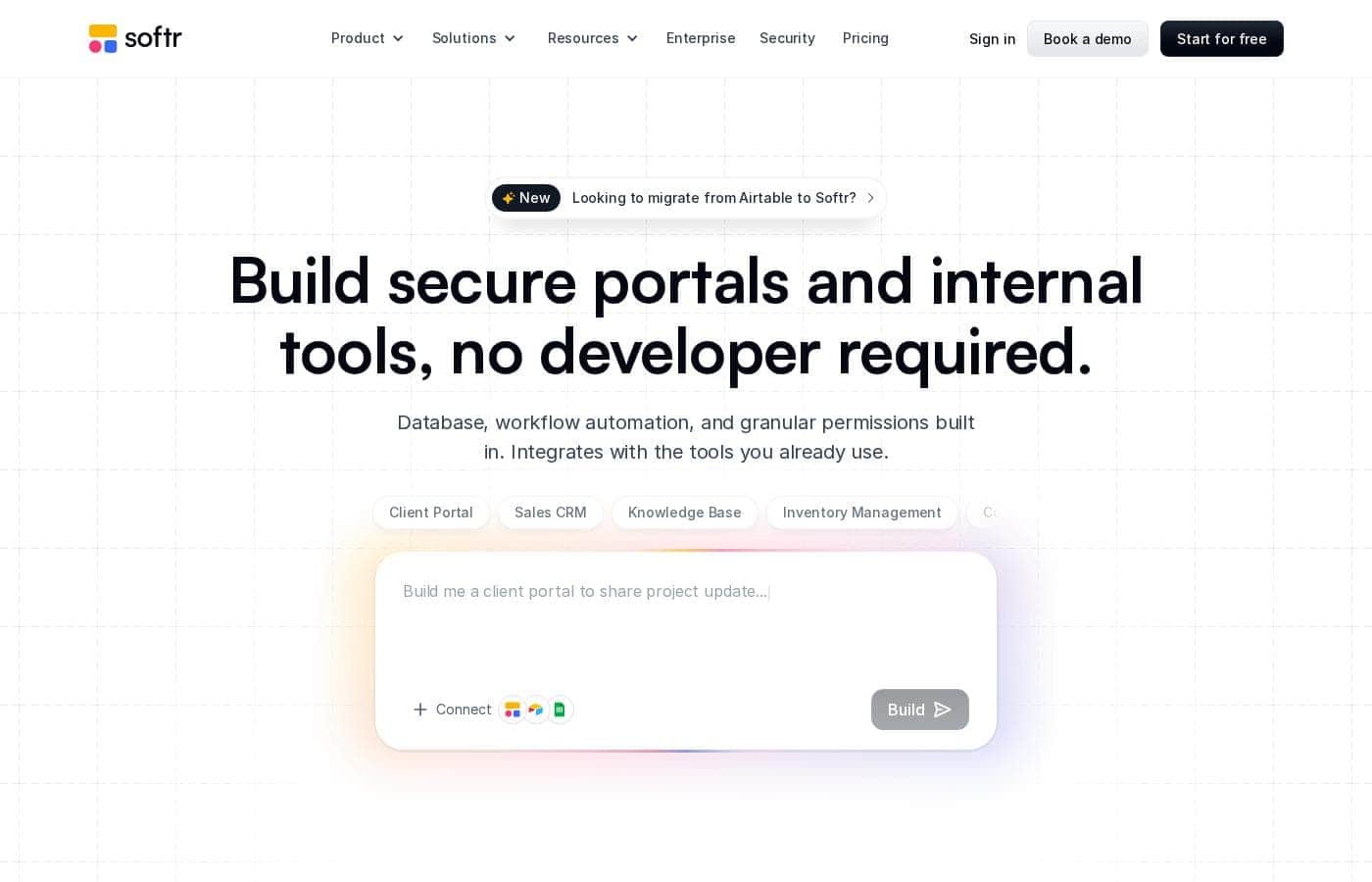
Build client portals, internal tools, and full web apps from your existing data — no developers required.

Softr costs from $25/mo · 4 plans · Free plan available · prices checked Oct 12, 2026

By Ciroapp Editorial Team · Updated Sep 17, 2026

Commission may apply at no extra cost

Softr homepage screenshot

At a glance

Quick overview for Softr: rating, pricing summary, key features, and highlights.
Pricing verified Oct 12, 2026

Ciroapp score

4.1/ 5

Softr lets non-technical teams assemble client portals, member areas, and internal tools on top of Airtable or Sheets data, with granular permissions and built-in accounts. It hits a ceiling with heavy backend logic and large datasets, and you're tied to Softr's hosting. Overall, it's a solid pick for fast, workflow-driven builds without developers.

Pros

  • Pros:Genuinely fast time-to-launch — working portals and internal tools can be assembled from blocks in days, not the weeks typical of custom development
  • Pros:Granular permission system (user groups plus page- and block-level visibility) is unusually complete for a no-code tool, making multi-tenant client portals practical
  • Pros:Connects to data you already maintain — Airtable, Google Sheets, or built-in Softr Databases — so there's no forced data migration

Cons

  • Cons:Complex backend logic, multi-step transactions, and heavy custom integrations can hit the platform's ceiling, at which point teams outgrow no-code and need custom development
  • Cons:Apps are hosted on Softr's infrastructure, so you depend on the platform's uptime, pricing changes, and feature roadmap rather than owning the stack
  • Cons:Performance with very large datasets can lag compared to a purpose-built application, since data is fetched from sources like Airtable
Best for
  • Agencies and service businesses that want a branded client portal on top of their existing Airtable or spreadsheet data
  • Operations, HR, and small internal teams replacing shared spreadsheets with role-based internal tools and dashboards
  • Non-technical founders and makers who need to launch a directory, member area, or MVP in days to validate demand
This section is a summary. Detailed sections about features, use cases, pricing, and reviews follow below.

What is Softr?

Most teams don't need another off-the-shelf SaaS tool — they need software that mirrors how they actually work. Softr addresses this by letting non-technical teams assemble their own web applications, portals, and internal tools on top of data they already manage. Instead of filing feature requests with engineering or settling for spreadsheets shared over email, teams can design the layouts, set the access rules, and publish a working tool themselves.

Softr is an all-in-one no-code platform for building and publishing web applications without writing code. You connect a data source — such as Airtable or Softr's own built-in databases — then assemble pages from pre-built blocks like lists, tables, forms, charts, and user accounts. Granular permissions let you show different content to different user groups, and finished apps publish to the web directly from the platform.

Typical outputs include client portals, member areas, internal dashboards, directories, and lightweight CRMs.
Should you choose Softr?

Quick buyer guidance before you compare plans or click through.

Choose it if

  • Agencies and service businesses that want a branded client portal on top of their existing Airtable or spreadsheet data
  • Operations, HR, and small internal teams replacing shared spreadsheets with role-based internal tools and dashboards
  • Non-technical founders and makers who need to launch a directory, member area, or MVP in days to validate demand
  • Membership organizations and communities that need gated content and member accounts without separate membership software

Skip it if

  • Teams needing complex backend logic, heavy transactional workflows, or deep custom integrations that exceed no-code boundaries
  • Organizations with strict data-residency or compliance requirements that require self-hosting and full control of the infrastructure
  • Applications expected to scale to very large datasets or high transaction volume, where a purpose-built custom application will perform better

Next steps before buying

  1. 1Sign up for Softr's free plan and start from a template closest to your use case — client portal, directory, or internal tool — rather than a blank canvas
  2. 2Connect your existing data source (Airtable, Google Sheets) or create a Softr Database, then map your fields to blocks on your first page
  3. 3Define your user groups and set page- and block-level permissions so each audience sees only what they should
  4. 4Test with real users on the free tier, then upgrade to a paid monthly plan and publish to your custom domain once the workflow is proven

Softr Key Features

✨ Drag-and-Drop Block-Based Builder

Softr apps are assembled from pre-built blocks — lists, tables, forms, calendars, charts, maps, and more — that you arrange on a visual canvas. Each block connects to fields in your data source, so displaying and editing real records requires configuration rather than coding. This block model keeps builds fast while still allowing layout, styling, and conditional visibility to be customized per page.

✨ Data Connectivity

Softr connects to external data sources like Airtable and Google Sheets, and also offers built-in Softr Databases for projects that start from scratch. Because the platform reads and writes directly to the connected source, updates made in the app reflect in the underlying data immediately, and teams keep working in the tools they already use.

✨ User Accounts and Granular Permissions

Portals and internal tools need controlled access, and Softr builds this in. You can define user groups, gate pages and even individual blocks by group or condition, and let users sign up, log in, and manage their own profiles. This makes it straightforward to give clients a self-service portal or restrict an admin dashboard to specific team members without third-party auth tooling.

✨ Publishing and Responsiveness

Finished apps publish to a custom domain directly from Softr, with responsive rendering across desktop and mobile. Since hosting and infrastructure are handled by the platform, launching is a configuration step rather than a deployment project, and updates go live without any build or release process.

Use Cases

💡 Client Portals

Agencies and service businesses use Softr to give clients a branded login where they can view project status, files, invoices, and messages pulled from an Airtable or spreadsheet backend. Permission groups ensure each client sees only their own records, and the portal can be launched on a custom domain in days rather than the weeks a custom build would take.

💡 Internal Tools and Operations Dashboards

Operations, HR, and finance teams replace ad-hoc spreadsheets with Softr apps that wrap their data in proper interfaces: filtered views, submission forms, approval steps, and role-based access. Because the underlying data stays in Airtable or Sheets, teams keep their existing processes while gaining a real application layer on top.

💡 Member Areas and Communities

Membership organizations build gated content libraries, directories, event calendars, and member profiles on Softr. Sign-up, login, and access tiers are handled natively, so a paid or invite-only member area can be stood up without separate membership software.

💡 Marketplace and Directory MVPs

Founders validating an idea use Softr to launch a searchable, filterable directory or listing site connected to a live database. This makes it possible to test demand and gather real user feedback before committing budget to custom development.

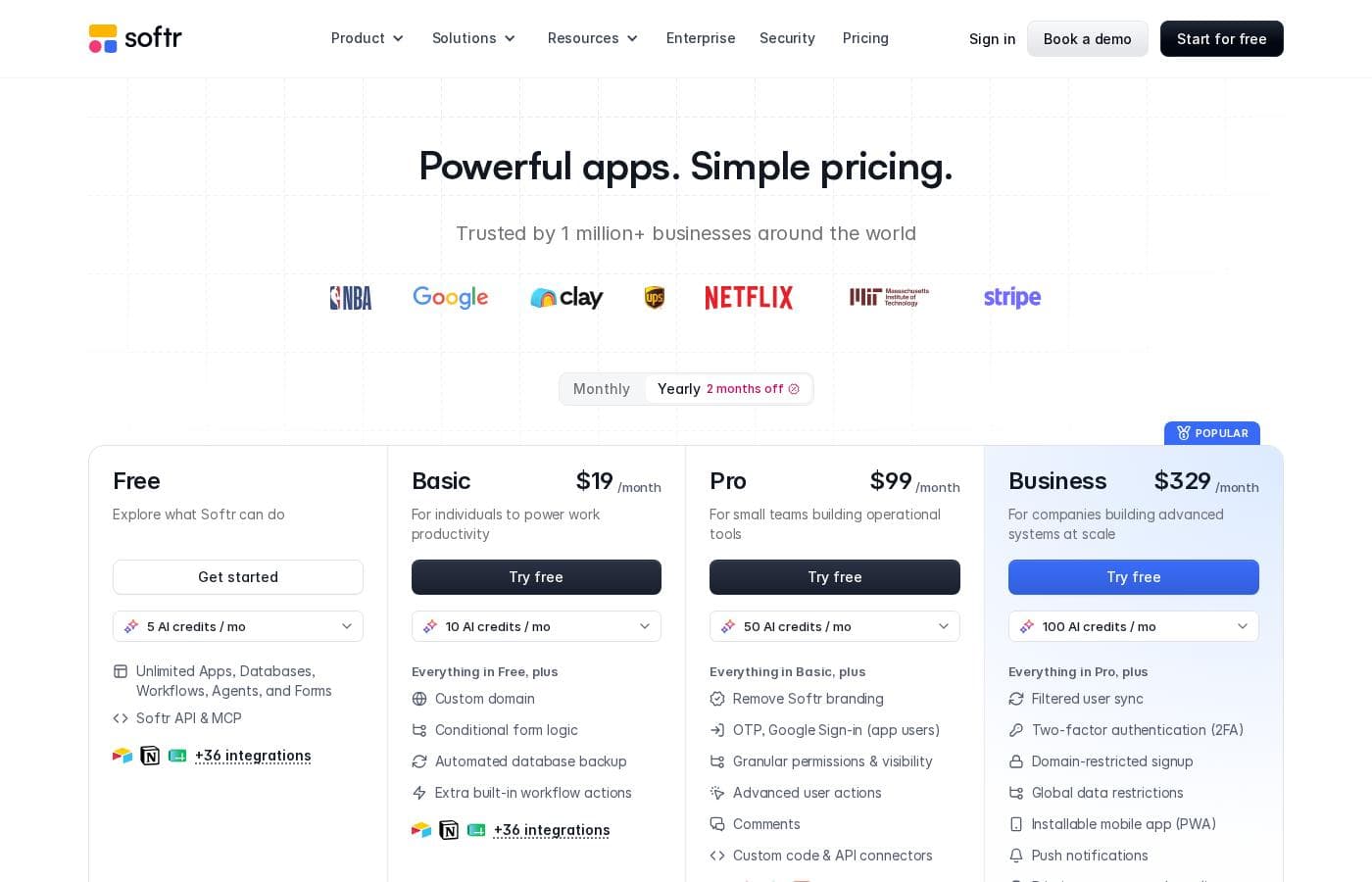
Softr pricing

From$25/mo

  • From the vendor's pricing page, checked Oct 12, 2026
  • 4 plans
  • Free plan available
  • Save up to 24% with annual billing

Prices checked on Oct 12, 2026 from Softr's pricing page

Softr pricing page screenshotView pricing page screenshot
PlanBilled monthlyBilled annuallyIncludes
Free
Free
—
Basic
$25/mo
$19/mo
$228 per year
Save up to 24% with annual billing
Pro
$119/mo
$99/mo
$1,188 per year
Save up to 17% with annual billing
Business
$395/mo
$329/mo
$3,948 per year
Save up to 17% with annual billing

Price history

Tracking prices since Oct 1, 2026. No price change detected yet.

Pricing types: Free plan, Monthly subscription

Pricing notes

Softr pricing: Billing options: Free plan, Monthly subscription

Cost calculator

Estimate what Softr costs for your team.

Billing
Per month
$25
Per year
$300

Basic states no user limit: shown as one price for the whole account. Check the price for 5 users with the vendor. Estimate based on published list prices, before taxes, add-ons and discounts.

How to pay less for Softr

  • Pay annually: saves up to 24% compared with monthly billing.
  • Start on the free plan and upgrade only when you hit its limits.
  • Cheaper tools in this category start at $15/mo.
Visit Softr

Email me when Softr changes price

One email when we detect a price change on the vendor's pricing page. No newsletter, no deals. Unsubscribe in one click.

User Reviews

No reviews yet.

Write a Review

Write a Review for Softr
0/100 characters
0/2000 characters

Why use Softr?

The core value of Softr is speed and ownership. Traditional custom development takes weeks or months and a budget most teams don't have, while generic SaaS tools rarely match real workflows exactly.

With Softr, a team member who understands the workflow can build the tool themselves in days, then adjust it as the process evolves — no developer bottleneck. Because it sits on top of your existing data rather than replacing it, you avoid migration projects, and because permissions and user accounts are built in, portals and internal tools don't require stitching together separate auth and access-control services.

Softr alternatives

Other tools in the All-in-one No Code Platform category

View all All-in-one No Code Platform tools
Knack

Knack

All-in-one No Code Platform4.1/5From $19/mo

Knack is a powerful no-code web application builder. It lets your team create complex, data-rich solutions quickly. These solutions can be SaaS applications, custom client portals, or internal tools for business processes. Knack handles the technical infrastructure behind the scenes 💡. You can revolutionize your operations and build powerful, flexible workflows. If you need a custom client tracker or a better way to manage inventory, Knack delivers from concept to working application in record time. It avoids the typical six-month IT queue.

Emergent

Emergent

All-in-one No Code Platform4/5From $20/mo

Emergent is an AI platform that enables anyone to build full-stack, production-ready web and mobile applications using plain language. Since launching in 2025, Emergent has grown to over 5M users across 190+ countries and surpassed $100M ARR, backed by Khosla Ventures, SoftBank, Lightspeed, YC, and Google’s AI Futures Fund. Partners promote Emergent to founders, builders, and businesses looking to launch software faster without traditional development barriers.

Glide

Glide

All-in-one No Code Platform4/5

Glide is a no-code platform for building AI-powered business apps. It's built for teams and businesses that want to move fast, adapt, and unlock data without writing code. 💡 You connect data from Google Sheets, SQL, and more, then manage it in a familiar spreadsheet-like interface.

Appsmith

Appsmith

All-in-one No Code Platform4.3/5From $15/mo

Appsmith is a developer-first low-code platform. ✅ It allows you to quickly build custom apps with drag-and-drop widgets or code in JavaScript. You can connect to any LLM, database, SaaS tool, or API—even self-hosting for secure access.

Caspio

Caspio

All-in-one No Code Platform4/5

Caspio is defined as the pioneering low-code platform that focuses on scaling with your organization. This system is an all-in-one solution for generating smart, data-driven applications without unnecessary technical compromise. 💡 The platform supports two frameworks: the proven Bridge and the visual Flex framework, both included at no extra cost. Caspio aims to be AI-Enhanced, No Code, and completely Enterprise Ready. It’s an ideal choice for organizations needing fast, customizable, high-end applications, evidenced by its trust among 15,000 organizations worldwide.

MindStudio

MindStudio

Enterprise AI Platform3.9/5

MindStudio is a visual platform for building and deploying AI agents — no coding required, though developers can add JavaScript or Python when needed. Agents can ship as web apps, scheduled automations, browser extensions, email-triggered helpers, or API endpoints. It serves individuals, teams, and enterprises, with customers cited at TikTok, Microsoft, Intel, and Adobe. The company reports 400K+ agents deployed and 1,000+ pre-built integrations.

UENI.com

UENI.com

Website Builder4/5

UENI gives small businesses and independent professionals a chance to reach a broader audience and increase sales by building their new website for them without the need to settle for expensive agencies or complicated DIY web design builders.

Cheapest All-in-one No Code Platform software for 1 to 25 users

Softr FAQ

How much does Softr cost?

Softr's cheapest paid plan, Basic, costs $25 per month. Paid plans range from $25 to $395 per month. Prices checked on Oct 12, 2026 from the vendor's pricing page.

Does Softr have a free plan?

Yes. Softr has a free plan (Free); paid plans start at $25 per month.

How much do you save with annual billing on Softr?

Paying annually saves up to 24% compared with monthly billing, based on Softr's list prices.

Has Softr's price changed recently?

No. We have not detected a price change since we started tracking on Oct 1, 2026.

Do I need coding or developer experience to build with Softr?

No. Softr is designed for non-technical builders: you assemble apps visually from pre-configured blocks, connect them to fields in your data source, and set permissions through menus. Logic is expressed through conditional rules and actions rather than code. Teams with development resources can extend functionality, but the core building experience assumes no programming background.

What data sources does Softr work with?

Softr connects to external sources including Airtable and Google Sheets, and it also offers built-in Softr Databases for teams starting without an existing backend. Because the app reads and writes directly to the connected source, records updated in the app appear in the source immediately, letting teams keep working in familiar tools alongside the Softr interface.

Can I control what different users see in the same app?

Yes. Softr supports user groups with granular permissions: you can gate entire pages or individual blocks by group or condition, so a client portal can show each client only their own records while an admin group sees everything. User registration, login, and profile management are built into the platform, so this access control works without separate authentication tooling.

Ready to try Softr? Check out the official site or pricing.

Are you Softr? Claim this listing · Get the badge