Pangram Labs

Pangram Labs review

AI detection with independently verified accuracy — for text and images.

Pangram Labs costs from $20/mo · 3 plans · Free plan available · prices checked Oct 13, 2026

By Ciroapp Editorial Team · Updated Sep 9, 2026

Commission may apply at no extra cost

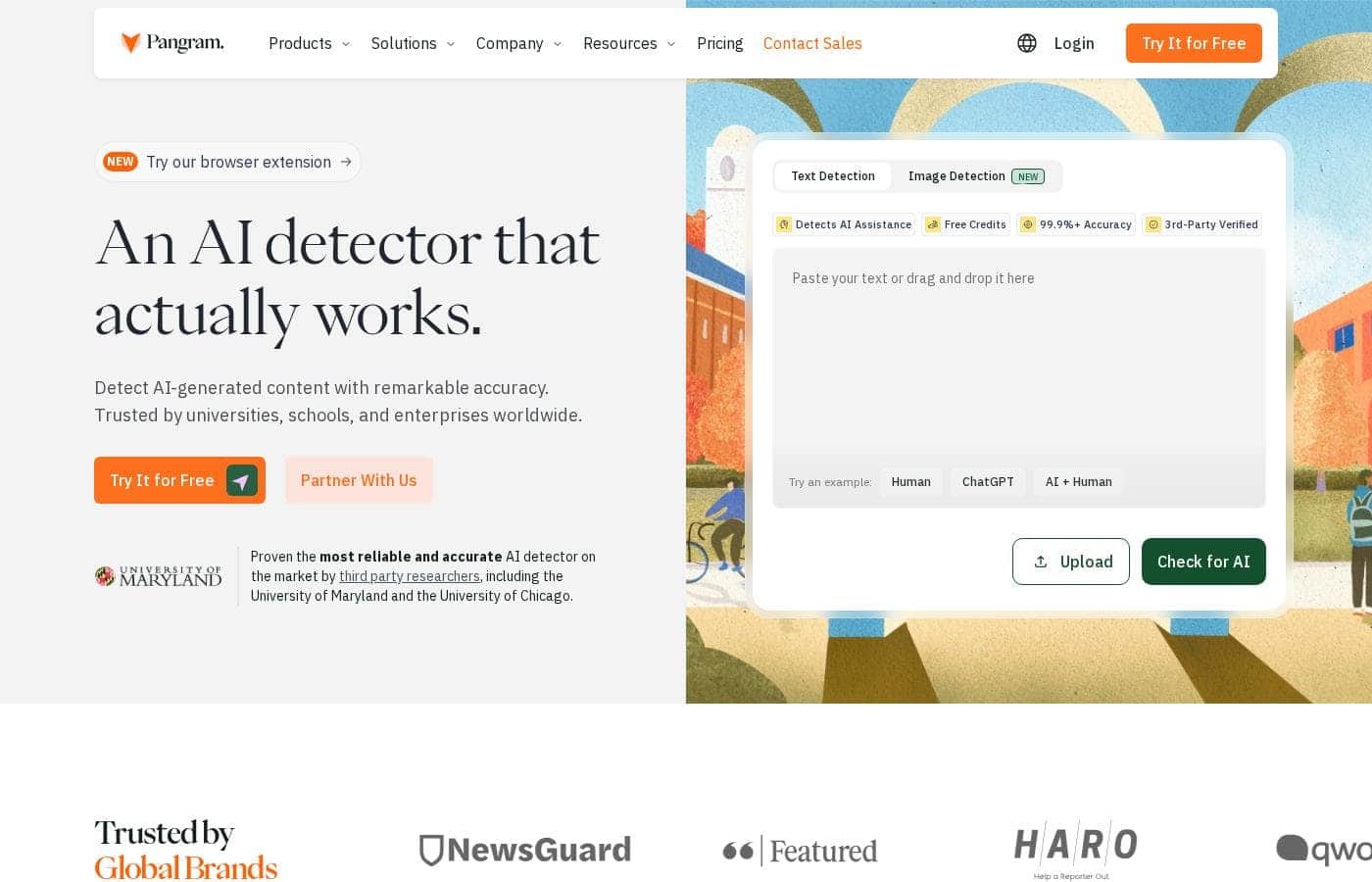
Pangram Labs homepage screenshot

At a glance

Quick overview for Pangram Labs: rating, pricing summary, key features, and highlights.
Pricing verified Oct 13, 2026

Ciroapp score

4.3/ 5

Pangram backs its accuracy claims with independent research from the University of Chicago and University of Maryland, plus a documented 1-in-10,000 false positive rate. Segment-level reports show exactly what's AI, but plagiarism checks sit behind paid plans and no money-back guarantee is advertised. Overall, it's a strong pick for educators, publishers, and developers who need results they can defend.

Pros

  • Pros:Accuracy is independently verified, not just claimed — researchers at the University of Chicago and University of Maryland found Pangram posted the lowest false positive rates against competing detectors, with a documented 1-in-10,000 false positive rate measured across tens of millions of human-written documents.
  • Pros:Segment-level analysis goes beyond a single score by highlighting exactly which parts of a document are AI-generated versus AI-assisted, so mixed human-and-machine writing can be explained with concrete evidence.
  • Pros:Model coverage stays current — Pangram benchmarks against 26 models including ChatGPT, Claude, Gemini, Grok, DeepSeek, and Llama, retests on every major model release, and catches text run through 'humanizer' evasion tools.

Cons

  • Cons:Plagiarism detection is locked behind paid plans — free users get AI and image detection only, and free image checking is capped at just 3 scans per day.
  • Cons:Even the free tier requires creating an account, and no money-back guarantee is advertised; refunds beyond the 7-day trial on Individual and Team plans aren't stated.
  • Cons:Integration support is limited to a specific list (Chrome, Firefox, Google Docs, Canvas, Google Classroom, Moodle, Brightspace), so teams on other LMS platforms or editors should confirm compatibility before committing.
Best for
  • Teachers and professors who need reliable AI checks on student writing
  • Universities rolling out AI policies through an LMS like Canvas or Google Classroom
  • Publishers and platform teams moderating large volumes of user-generated content
Free trial
Yes — 7 days
This section is a summary. Detailed sections about features, use cases, pricing, and reviews follow below.

What is Pangram Labs?

A false positive from an AI detector can cost a student their grade or a writer their reputation. That's the core problem Pangram attacks. It offers independently verified accuracy, a documented 1-in-10,000 false positive rate, and segment-level results that show exactly how much of a document is AI-generated or AI-assisted.

Pangram is an AI content detection tool for text and images. It flags writing from models like ChatGPT, Claude, Gemini, Grok, and Llama, shows how much of a document is AI, and highlights sections edited with AI assistance. It also includes plagiarism checking.

It's built for teachers, universities, publishers, enterprises, and anyone who needs to verify written work is human.

Should you choose Pangram Labs?

Quick buyer guidance before you compare plans or click through.

Choose it if

  • Buyers who want third-party verified accuracy before acting on a flag
  • Multilingual teams — detection covers 20+ languages, from Spanish and French to Chinese and Arabic
  • Anyone handling documents at scale — upload PDF, DOCX, or RTF files, up to 100 at a time
  • Organizations with security requirements — SOC 2 Type 2 verified, encrypted storage, and no data sharing or selling
  • Educators who want students to see the same detailed report their instructor sees

Skip it if

  • You need more than 20 free checks a day — additional credits and plagiarism detection require a paid subscription
  • You'd rather not create an account — even the free tier requires signup
  • Your workflow depends on platforms outside the listed integrations (Chrome, Firefox, Google Docs, Canvas, Google Classroom, Moodle, Brightspace) — confirm support before committing
  • You only scan images occasionally — free image checking is capped at 3 scans per day

Next steps before buying

  1. 1Create a free account and test it on writing you already know the origin of — you get 20 checks per day.
  2. 2Open Pangram's model card to check accuracy numbers for the specific AI models you care about.
  3. 3Confirm the integration you need — Chrome or Firefox extension, Google Docs, or an LMS like Canvas — before rolling it out to a team.
  4. 4Run the same sample through an alternative detector to compare results before you commit.

Ease of use

On the web app, you paste text or upload files and get scores with highlighted sections — no setup required. Browser extensions put checks one click away, and LMS integrations bring reports into Canvas or Google Classroom. Past scans stay in your history for review and download. The workflow looks straightforward for non-technical users, and the API covers automation needs.

Pangram Labs Key Features

✨ See exactly what's AI, segment by segment

Pangram doesn't stop at a score. It breaks your document into segments and shows how much is AI-generated or AI-assisted. Sections edited by AI are highlighted separately from text written from scratch. That's useful when a document mixes human and machine writing — you see exactly where, and you can explain the result with evidence.

✨ Accuracy that holds up under scrutiny

Results you can defend. Independent researchers at the University of Chicago and the University of Maryland tested Pangram against other detectors. It posted the lowest false positive rates and beat trained human readers at spotting AI text. Its documented false positive rate is 1 in 10,000, measured across tens of millions of human-written documents.

✨ Trained on the latest models, ready for the next one

AI models change fast. Pangram is trained specifically on frontier models like ChatGPT, Claude, Gemini, Grok, and Llama, and it benchmarks against 26 models. It retests on every major model release and even catches text processed by 'humanizer' tools.

When a new model ships, the detector updates — you're not stuck with stale results.

✨ Text, images, and plagiarism — checked together

Not everything you check is text. Pangram also detects AI-generated images — upload a JPG, PNG, or WebP file to scan it. It pairs AI detection with plagiarism checking, so one scan covers copied content and machine writing together.

You get the full picture of a document's origin in one place.

🧩 Fits the tools you already use

You don't have to change how you work. Paste text or upload files — PDF, DOCX, RTF, up to 100 at a time — and past scans stay in your history to review or download. Use it wherever writing happens:

  • Chrome and Firefox browser extensions
  • Google Docs integration
  • LMS support for Canvas, Google Classroom, Moodle, and Brightspace

Use Cases

🎓 Fair grading for teachers

A teacher pastes an essay or uploads files and sees which sections are AI-generated or AI-assisted. The documented 1-in-10,000 false positive rate means a flag starts a conversation, not a verdict. Expected outcome: fairer grading, backed by evidence.

🏫 Campus-wide AI policies

Rolling out an AI policy? Pangram works inside Canvas, Google Classroom, Moodle, and Brightspace. Professors check work without leaving their LMS, and integrity teams get segment-level evidence. Expected outcome: consistent enforcement at scale.

Tip: Confirm your LMS is supported before rolling it out campus-wide.

🛡️ Moderation at scale

Running a platform full of user submissions? Use the API or feed scanning to catch AI content automatically. LessWrong's CTO reports it pays for itself many times over.

Expected outcome: less manual review, more authentic communities.

💻 Detection in your product

Building AI checks into your own app? The usage-based Developer API starts at $25, with a 20% bulk discount as volume grows. You get verified accuracy without training a model yourself.

Expected outcome: reliable detection, live from day one.

Pangram Labs pricing

From$20/mo

  • 3 plans
  • Free plan available

Prices checked on Oct 13, 2026 from Pangram Labs's pricing page

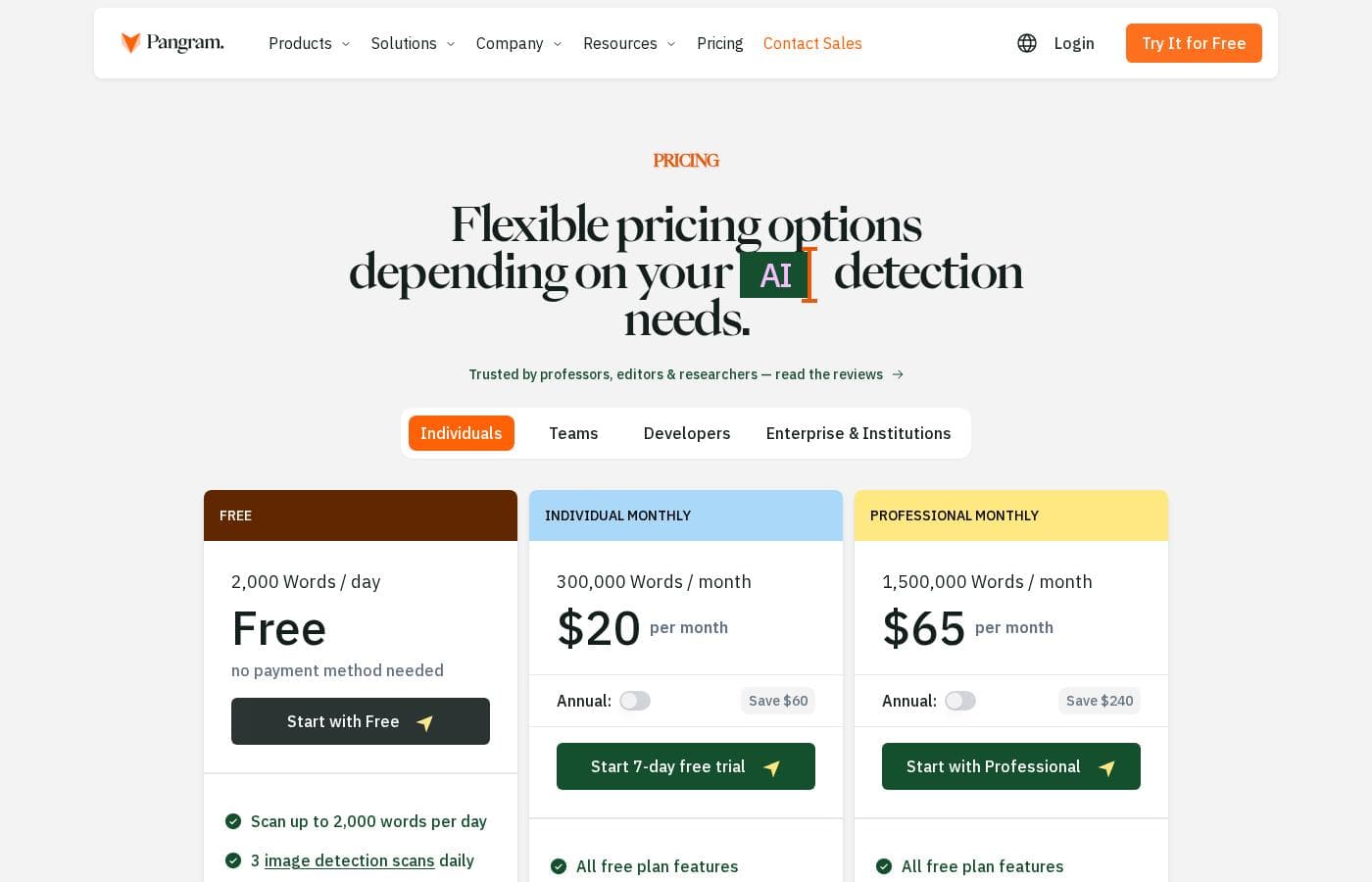
Pangram Labs pricing page screenshotView pricing page screenshot
PlanBilled monthlyBilled annuallyIncludes
Free
Free
—
No payment method needed; 2,000 words/day, 3 image scans daily, 20+ languages, browser extension, Google Docs, API access
Individual
—
$20/mo
$240 per year
Recommended; 7-day free trial ($0 for 7 days); 300,000 words/month, 100 image scans monthly, plagiarism detection, social feed auto-scanning, Gmail integration; save $60 billed annually
Professional
—
$65/mo
$780 per year
Everything in Individual plus 5x more words, 5x more image scans, $200 of API credits monthly; save $240 billed annually

Price history

Tracking prices since Sep 9, 2026. No price change detected yet.

Pricing types: Free plan, Free trial, Monthly subscription, Yearly subscription, Per seat pricing, Usage-based pricing

Pricing notes

Pangram Labs offers a Free plan at $0/month, an Individual plan at $20/month (with a 7-day free trial), and a Professional plan at $65/month. Annual billing saves $60 on Individual and $240 on Professional.

Pangram Labs costs between $0 and $65 per month with seven plans: Free at $0, Individual at $20/month, Professional at $65/month, Developer API from $25, Team at $20 per seat/month, plus custom Educational Institution and Enterprise pricing.

Here's what each tier includes, so you can pick the right fit.

Free

Price: $0 Best For: Light, everyday checks Other Features:

  • Up to 2,000 words scanned per day
  • 3 image detection scans daily
  • AI assistance detection with interpretability highlights
  • File upload and OCR for scanned documents
  • 20+ languages, browser extension, and Google Docs integration

No payment method is needed to start. It's a great fit for students or anyone checking a few documents a day.

Individual

Price: $20 per month (annual billing saves $60) Best For: Writers and editors who scan regularly Other Features:

  • 300,000 words per month
  • 100 image detection scans monthly
  • Plagiarism detection on every scan
  • Auto-scan your feed on social media and Substack

You get a 7-day free trial, so you can test it before paying. This tier suits freelancers, teachers, and busy editors who've outgrown the daily free limit.

Professional

Price: $65 per month (annual billing saves $240) Best For: High-volume users who need API access Other Features:

  • 1,500,000 words per month
  • 500 image detection scans monthly
  • $200 in monthly API usage included
  • Plagiarism detection and feed scanning included

This is the power-user tier — think agencies, moderation teams, and researchers. The included API credit makes it easy to automate scans. If you stay under 300,000 words a month, the Individual plan is the cheaper pick.

Developer API

Price: From $25 (funding levels at $25, $50, $100, $250, $500, and $1,000) Best For: Developers building detection into apps Other Features:

  • Pangram 4: $0.05 per 100 words
  • Pangram 3: $0.05 per 1,000 words
  • 20% discount on bulk API usage
  • Optional auto-refill

You pay for what you use, and auto-refill keeps things running. It's the natural choice if you're embedding AI detection into your own product.

Team

Price: $20 per seat per month (annual billing saves $60 per seat) Best For: Small teams scanning together Other Features:

  • Everything in the Individual plan
  • Admin controls and member management
  • Unified billing
  • seats, and you can add more anytime

A 7-day team trial lets everyone kick the tires first. It's ideal for editorial teams or departments that share one workflow.

Educational Institution

Best For: Schools, districts, and universities Other Features:

  • Unlimited AI and plagiarism checks inside your LMS
  • Catches copy-paste plagiarism and re-used submissions
  • Dashboards for usage, trends, and statistics
  • Data controls, with no training on student data
  • Integrations with Canvas, Brightspace, Moodle, Google Classroom, and Google Docs

Pricing is custom, so you'll contact sales for a quote. It's built for institutions that want detection and plagiarism checks working directly in the classroom.

Enterprise

Best For: Organizations processing large volumes of data Other Features:

  • Variable, custom pricing
  • Progressive discounts beyond the Developer tier
  • SOC 2 compliance and enterprise-level security
  • Shared channel for development and support

This one's for teams with serious scale and security needs. Contact sales to match a plan to your volume.

Bottom line: there's a genuinely free plan — no card required — plus 7-day free trials on Individual and Team. Estimate your monthly word count before you choose, since usage limits drive the price.
Cost calculator

Estimate what Pangram Labs costs for your team.

Billing

Individual has no published price for this billing cycle.

Individual has a flat price: the number of seats does not change the total. Estimate based on published list prices, before taxes, add-ons and discounts.

How to pay less for Pangram Labs

  • Start on the free plan and upgrade only when you hit its limits.
  • Use the 7-day free trial before you pay.
  • Cheaper tools in this category start at $15/mo.
Start free trial

Email me when Pangram Labs changes price

One email when we detect a price change on the vendor's pricing page. No newsletter, no deals. Unsubscribe in one click.

User Reviews

No reviews yet.

Write a Review

Write a Review for Pangram Labs
0/100 characters
0/2000 characters

Why use Pangram Labs?

Most AI detectors ask you to take a score on faith. Pangram backs its claims with published research. Third-party evaluations from the University of Chicago and the University of Maryland found it outperformed competing detectors — and even trained human readers — at spotting AI text. If you need results you can defend, that's the difference.

  • Verified accuracy, not just marketing. Independent researchers tested Pangram against tools like GPTZero and Originality.ai. Pangram posted the lowest false positive rates across product reviews, blog posts, news articles, and more.
  • A documented 1-in-10,000 false positive rate. Pangram calculates this across tens of millions of human-written documents, so a wrong accusation is far less likely.
  • Explanations, not only scores. Segment analysis shows how much of a document is AI. Assistance detection highlights parts that were edited with AI rather than written from scratch.
  • Coverage that stays current. Pangram benchmarks against 26 models — including ChatGPT, Claude, Gemini, Grok, DeepSeek, and Llama — and retests on every major model release.
  • It fits your workflow. Chrome and Firefox extensions, a Google Docs integration, LMS support for Canvas, Google Classroom, Moodle, and Brightspace, plus an API for high-volume projects.
  • A real free tier. You get 20 checks per day, and image detection includes 3 free scans daily, so you can test it on your own documents first.

Pangram Labs alternatives

Other tools in the AI Detector category

View all AI Detector tools
Sapling

Sapling

AI Detector3.5/5From $15/mo

The Sapling AI Content Detector is a powerful tool designed to check the probability that text was written by models such as ChatGPT or Gemini. It uses a specialized machine learning system—a Transformer—to analyze the input. This system specifically estimates the probability that each word or token is machine-generated. 💡 This utility is especially useful for educators concerned about learning integrity, or for practitioners reviewing large volumes of synthetic content. You're guided by visual results, seeing both the overall text score and highlighted portions. The detector also flags individual sentences with low perplexity, helping you catch simplistic or cliché phrasing.

GPTZero

GPTZero

AI Detector4.2/5

GPTZero is a dedicated AI content checker that recognizes machine-generated text in any document. This powerful proprietary model helps you identify exactly which parts of a text originated with a large language model (LLM). How does it work? It analyzes text for key patterns that distinguish machine writing from human writing. These factors include checking for predictability (perplexity), variation in sentence structure (burstiness), and whether the tone is overly generic or repetitive. Since its founding in January 2023, GPTZero has quickly become essential. It has served over 10 million users and is used by hundreds of institutions, especially in education. It is truly built for contexts where authentic and quality writing matters most.

Copyleaks

Copyleaks

AI Detector4.1/5

Copyleaks is a robust platform focusing on digital authenticity. It uses advanced AI technology to analyze unique text patterns. This focus allows the system to flag content created by various Large Language Models (LLMs), including GPT-5, Gemini, Claude, and dozens more. The tool helps you clearly identify AI writing because it looks for signals left behind by statistical modeling. You can also get detailed reports that separate elements written by humans from AI-generated text, even when both are mixed. The platform is truly built for accuracy and scalability.

Writer

Writer

AI Detector4.1/5

The Writer AI Content Detector is a straightforward tool designed for speed and accuracy. It quickly examines your text to determine if it was created by artificial intelligence. This is perfect for writers, editors, and publishers who need simple verification. You can paste your text or even submit a URL for analysis. It gives you the information you need to feel confident before you hit "publish."

Originality.AI

Originality.AI

AI Detector4/5

Originality.ai is a specialized tool developed to authenticate content origin. It’s built on technology that determines if text is created by a person or an advanced AI model, such as ChatGPT-3. The system scans the material and provides a clarity score, specifically ranging from 0 to 100. 💡 This tool is useful for anyone relying on external writers, including marketing managers and web publishers. It helps you ensure that the content you receive is authentic and meets your standards for originality and expertise.

Winston AI

Winston AI

AI Detector3.6/5

Winston AI is a comprehensive integrity solution designed to verify whether text was created by a human or generated by artificial intelligence. Institutions, publishers, and professionals primarily choose it for its industry-leading accuracy rates. It empowers everyone, from large educational bodies to individual SEO writers, to confirm content authenticity. You can create a free account to begin checking for AI content immediately. It serves as a complete solution combined with plagiarism detection and AI image detection capabilities.

Atria

Atria

Chrome Extension3.8/5

Atria is an AI creative platform for performance marketers running Meta and TikTok ads. It combines research, briefs, ad generation, launching, and analytics in one place. Its AI agent, Raya, is trained on $9B+ in real ad spend, per the company. It targets agency owners and brand owners who want more winning creative without adding headcount. The team behind it comes from Tubescience, and the product is SOC 2 Type II certified.

MindStudio

MindStudio

Enterprise AI Platform3.9/5

MindStudio is a visual platform for building and deploying AI agents — no coding required, though developers can add JavaScript or Python when needed. Agents can ship as web apps, scheduled automations, browser extensions, email-triggered helpers, or API endpoints. It serves individuals, teams, and enterprises, with customers cited at TikTok, Microsoft, Intel, and Adobe. The company reports 400K+ agents deployed and 1,000+ pre-built integrations.

Pangram Labs FAQ

How much does Pangram Labs cost?

Pangram Labs's cheapest paid plan, Individual, costs $20 per month. Paid plans range from $20 to $65 per month. Prices checked on Oct 13, 2026 from the vendor's pricing page.

Does Pangram Labs have a free plan?

Yes. Pangram Labs has a free plan (Free); paid plans start at $20 per month.

Does Pangram Labs offer a free trial or a money-back guarantee?

Pangram Labs offers a 7-day free trial.

Has Pangram Labs's price changed recently?

No. We have not detected a price change since we started tracking on Sep 9, 2026.

Can I try Pangram before paying?

Yes. Individual and Team plans include a 7-day free trial. The Free plan gives 2,000 words daily with no payment method. No money-back guarantee is advertised, so confirm refund terms before subscribing.

Which tools does Pangram integrate with?

Pangram offers Chrome and Firefox extensions, a Google Docs integration, and LMS support for Canvas, Brightspace, Moodle, and Google Classroom. You can upload PDF, DOCX, or RTF files — up to 100 at a time.

How does Pangram handle my data and security?

Pangram is SOC 2 Type 2 verified. Your data is encrypted, never shared or sold to third parties, and institutional plans never train on student data.

Ready to try Pangram Labs? Check out the official site or pricing.

Are you Pangram Labs? Claim this listing · Get the badge