Originality.AI

Originality.AI review

Verify what's human before you publish — AI, plagiarism, and fact checks in one scan.

By Ciroapp Editorial Team · Updated Sep 16, 2026

Commission may apply at no extra cost

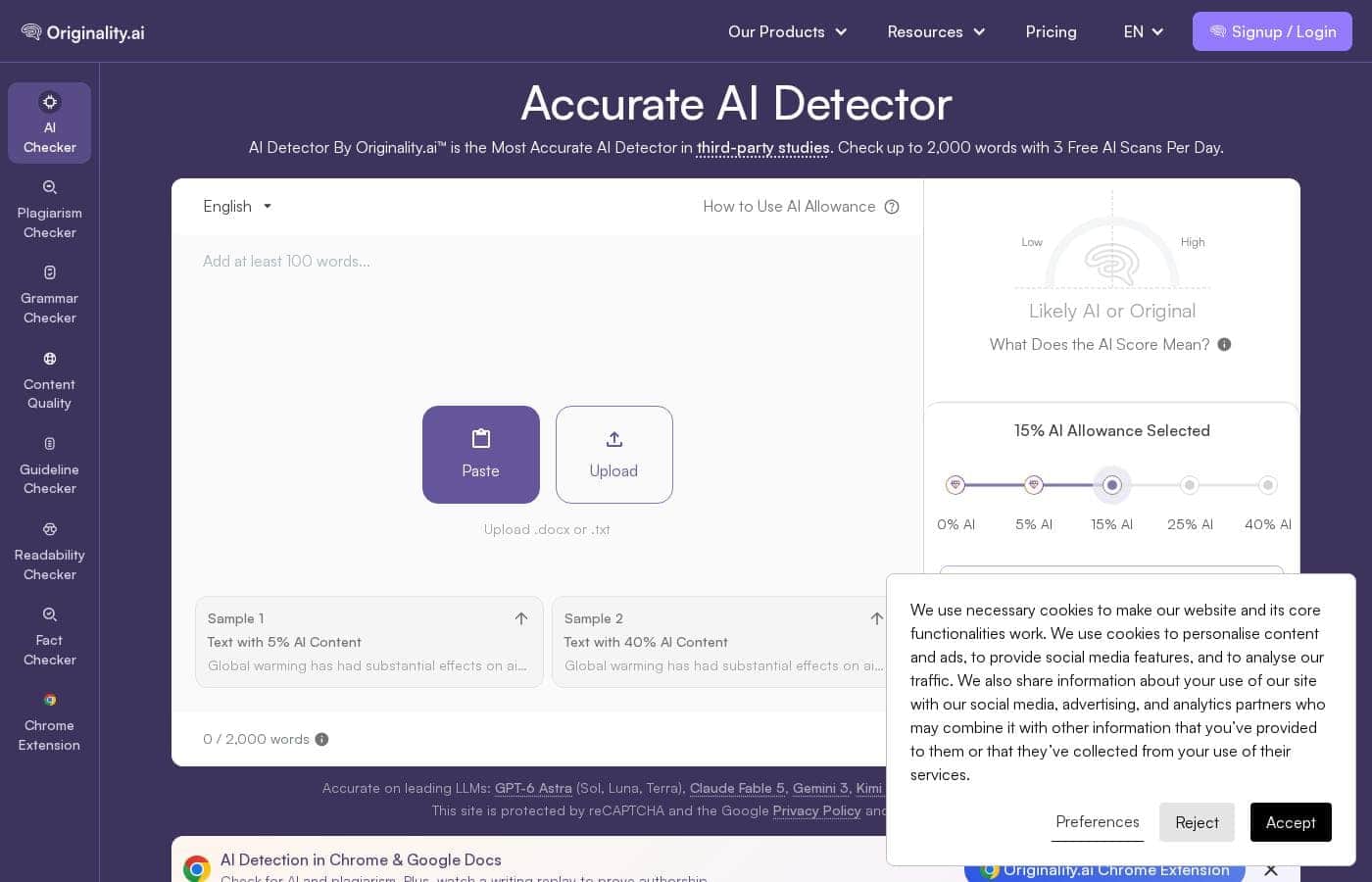
Originality.AI homepage screenshot

At a glance

Quick overview for Originality.AI: rating, pricing summary, key features, and highlights.
Vendor page checked Oct 12, 2026

Ciroapp score

4.0/ 5

Originality.AI bundles AI detection, plagiarism, fact checking, and content quality scoring into one scan, and its 3 free daily scans let you judge accuracy before paying. Reports give percentage scores with section-level highlights, and the team tests against paraphrasers like Quillbot. Overall, it's a strong pick for teams that publish at volume, as long as you budget for expiring credits and treat scores as signals, not verdicts.

Pros

  • Pros:Runs AI detection, plagiarism, fact checking, and content quality checks in a single scan instead of making you juggle separate tools
  • Pros:Actively tests paraphrasing tools like Quillbot and Grammarly, so AI text reworded to look human still gets flagged
  • Pros:Reports include percentage scores plus section-level highlights showing which parts of a document look AI-written, not just an overall verdict

Cons

  • Cons:False positives happen — the vendor's own FAQ discusses what causes them and cautions that a score shouldn't be used on its own
  • Cons:The free tier caps you at 3 scans a day and 2,000 words, which runs out quickly on real agency or publishing workloads
  • Cons:Enterprise pricing isn't published and appears to require a sales conversation, while the homepage shows no costs at all
Best for
  • Content agencies vetting freelance and client submissions
  • Publishers and site owners auditing content before it goes live
  • Teachers and institutions checking student work for AI use
This section is a summary. Detailed sections about features, use cases, pricing, and reviews follow below.

What is Originality.AI?

Worried that the article you just paid for was quietly written by ChatGPT? You're not alone, and guesswork doesn't cut it. Originality.AI combines AI detection, plagiarism checking, and fact checking in one tool.

Its detector ranks as the most accurate in third-party studies, catches AI paraphrasing, and offers 3 free scans a day.

Originality.AI is a browser-based content verification tool. You paste, upload, or link to text, pick your scan types — AI detection, plagiarism, content quality, and more — then click scan. It's aimed at students and teachers, freelance writers, agencies, publishers, and enterprise content teams.

The platform supports team management with roles, offers flexible pricing tiers, and claims industry-standard security for organizations checking content at scale.
Should you choose Originality.AI?

Quick buyer guidance before you compare plans or click through.

Choose it if

  • You want AI, plagiarism, and fact checks in one workflow
  • You'd rather test accuracy with 3 free daily scans than take marketing claims on faith
  • You're concerned about paraphrasing tools disguising AI text
  • You manage contributors and need shared scans with assigned roles
  • You want reports with a percentage score and section-level highlights

Skip it if

  • Heavy users hoping to stay free — 3 scans per day with a 2,000-word cap goes fast on real workloads
  • Anyone who needs zero false positives — the site's own FAQs discuss what causes false positives and whether a score should be used on its own
  • Teams with strict data policies — confirm the homepage FAQ answers on how pasted text is stored or used before uploading sensitive work
  • Buyers needing details like language support or refund terms — those aren't spelled out on the page reviewed

Next steps before buying

  1. 1Run one of your 3 free daily scans on a sample where you already know the human-versus-AI mix, so you can judge the report yourself
  2. 2Open the pricing page to confirm current plan costs, scan credits, and whether credits expire
  3. 3Read the FAQs on false positives and text storage to see if the terms fit your privacy needs
  4. 4Map your monthly word volume against scan limits before choosing a plan
  5. 5Compare results against one or two rival detectors if accuracy is your deciding factor

Ease of use

On paper, it's a three-step flow: add text (paste, upload, or URL), choose your scan types, and click scan. Testimonials repeatedly mention responsive, helpful support when a score raises questions. Individual users should face little setup; teams take on light admin work for roles and member management.

Originality.AI Key Features

✨ AI Detection with Actionable Scores

Paste text, upload a file, or scan by URL, and Originality.AI returns a 0-100 clarity score plus section-level highlights showing which parts of a document look AI-written. The team actively tests paraphrasing tools like Quillbot and Grammarly, so reworded AI content stays detectable. The site cites third-party studies ranking it the most accurate AI detector, and you can judge that yourself with 3 free scans a day before spending anything.

✨ Combined Plagiarism and Quality Checks

A single scan can run AI detection, plagiarism, and content quality checks together instead of forcing you to juggle separate tools. A combined AI plus plagiarism scan costs two credits, where one credit covers 100 words. Reports deliver a percentage score you can act on and share with writers, students, or clients.

✨ Fact-Checking Safety Net

The fact checker reads the sources you cite and flags claims that may not hold up, catching problems an AI or plagiarism scan alone would miss. That matters for publishers and agencies accountable for everything published under their name. Customer reviews on the site mention it catching shaky claims before they went live.

✨ Team Roles and Shared Workflows

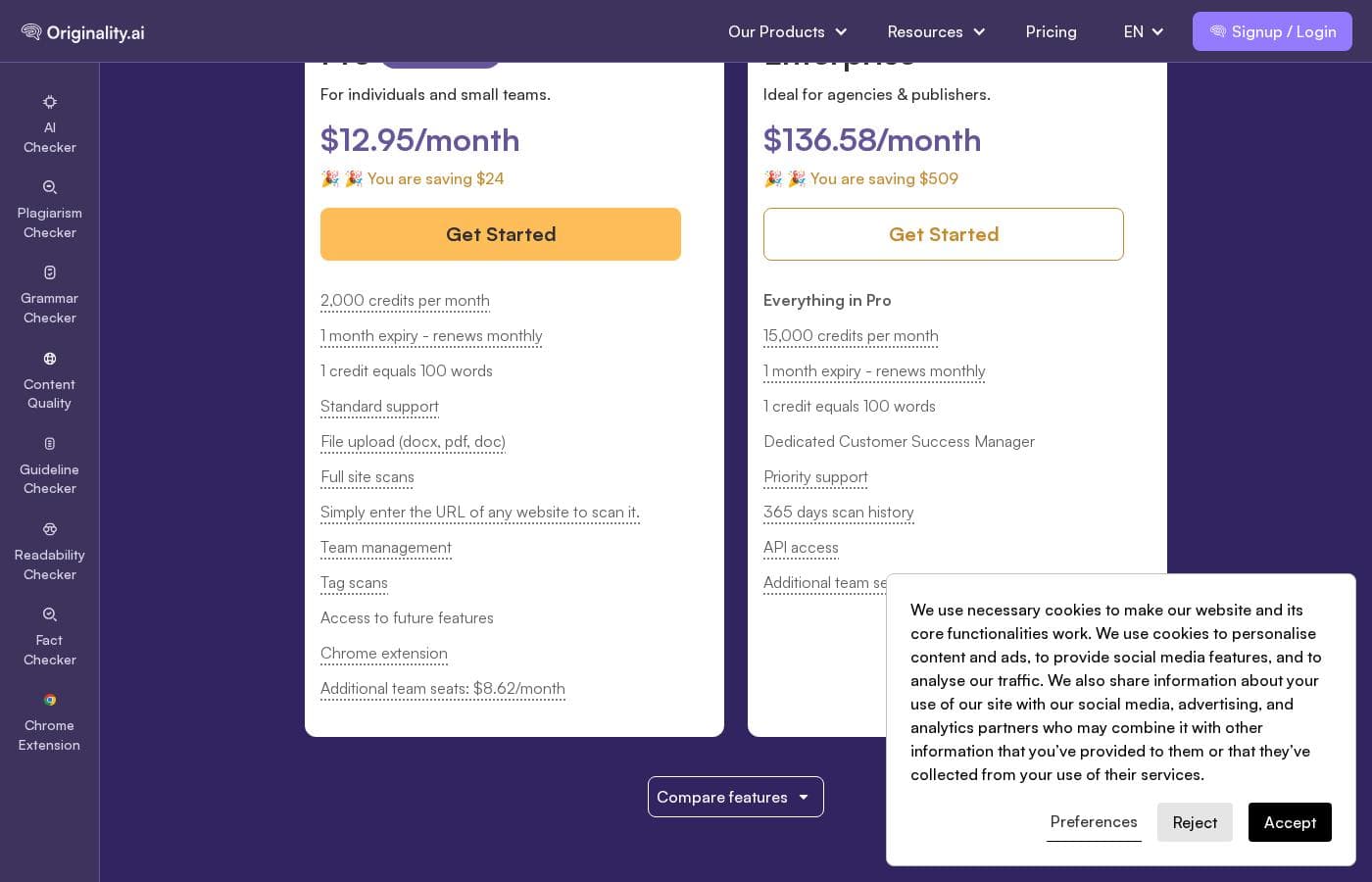
Agencies, schools, and enterprise teams get role management, shared checks, and member administration on both paid tiers. Pro seats cost $8.62 per month on annual billing and Enterprise seats $19.04, billed separately so you only pay for people who need access. Enterprise adds priority support, typically resolved within an hour, plus a dedicated Customer Success Manager.

✨ Integrations That Fit Existing Workflows

The Chrome extension scans directly inside Google Docs and replays the writing process, useful evidence for freelance writers defending their drafts. A Moodle plugin serves course platforms, and Enterprise plans include API access for building verification into custom pipelines.

✨ Free Scans and the Credit System

Every account gets 3 free scans a day, up to 2,000 words, enough to test the detector on text where you already know the human-versus-AI mix. Pro includes 2,000 credits a month and Enterprise 15,000, with one credit scanning 100 words. Subscription credits expire monthly while separately purchased credits last two years, which is worth factoring into your plan choice.

Use Cases

🏢 Vet Freelance Work Before You Publish

Your agency just received ten articles from freelancers. Paste or upload each one, then scan for AI, plagiarism, and quality. You'll get a percentage score and section-level highlights.

Expected outcome: catch AI-written or copied drafts before clients do. > Tip: assign team roles so editors can run shared scans.

🎓 Check Student Papers for AI Use

Wondering if that essay came from ChatGPT? Paste the assignment, scan for AI, and check the percentage score. Use it to start a conversation, not to accuse.

Expected outcome: clear evidence before you meet the student. > Tip: the FAQs say a score shouldn't stand alone.

✍️ Prove Your Drafts Are Human

You're a freelance writer, and clients keep asking if you used AI. Run your draft through an AI and plagiarism scan before you send it. Share the report as proof of original work.

Expected outcome: fewer awkward questions and faster approvals. > Tip: you get 3 free scans a day.

📰 Audit Content Before It Goes Live

Your site publishes dozens of posts a week. Combine AI detection, plagiarism, and fact checking in one scan before hitting publish. The fact checker reads your cited sources and flags claims that may not hold up.

Expected outcome: publish with fewer surprises. > Tip: scan by URL to skip copy-paste.

Originality.AI pricing

Prices not verified yet — see the vendor page.

Originality.AI's pricing page

Originality.AI pricing page screenshotView pricing page screenshot

Price history

Tracking prices since Oct 1, 2026. No price change detected yet.

Pricing types: Free plan, Monthly subscription, Yearly subscription, One-time payment, Usage-based pricing

Pricing notes

Originality.AI pricing: Plans from $0/month Billing options: Free plan, Monthly subscription, Yearly subscription, One-time payment, Usage-based pricing

Email me when Originality.AI changes price

One email when we detect a price change on the vendor's pricing page. No newsletter, no deals. Unsubscribe in one click.

User Reviews

No reviews yet.

Write a Review

Write a Review for Originality.AI
0/100 characters
0/2000 characters

Why use Originality.AI?

Most AI detectors ask you to take their accuracy on faith. Originality.AI points to third-party studies, then lets you test it with free daily scans before you spend anything.

  • Accuracy you can check first — The site cites third-party studies ranking it the most accurate AI detector, and hands you 3 free scans a day (up to 2,000 words) to judge for yourself.
  • Catches disguised AI text — The team actively tests paraphrasing tools like Quillbot and Grammarly, so reworded AI content stays detectable.
  • One scan, several checks — Combine AI detection with plagiarism and content quality checks instead of juggling separate tools.
  • Results you can act on — Customer reviews on the site highlight percentage scores and section-level highlights that show which parts of a document look AI-written.
  • Built for teams and scale — Agencies, schools, and enterprises get role management, shared checks, and industry-standard security.
  • A fact-checking safety net — Reviewers note the fact checker reads your cited sources to flag claims that may not hold up.

Originality.AI alternatives

Other tools in the AI Detector category

View all AI Detector tools
Pangram Labs

Pangram Labs

AI Detector4.3/5

Pangram is an AI content detection tool for text and images. It flags writing from models like ChatGPT, Claude, Gemini, Grok, and Llama, shows how much of a document is AI, and highlights sections edited with AI assistance. It also includes plagiarism checking. It's built for teachers, universities, publishers, enterprises, and anyone who needs to verify written work is human.

GPTZero

GPTZero

AI Detector4.2/5

GPTZero is a dedicated AI content checker that recognizes machine-generated text in any document. This powerful proprietary model helps you identify exactly which parts of a text originated with a large language model (LLM). How does it work? It analyzes text for key patterns that distinguish machine writing from human writing. These factors include checking for predictability (perplexity), variation in sentence structure (burstiness), and whether the tone is overly generic or repetitive. Since its founding in January 2023, GPTZero has quickly become essential. It has served over 10 million users and is used by hundreds of institutions, especially in education. It is truly built for contexts where authentic and quality writing matters most.

Copyleaks

Copyleaks

AI Detector4.1/5

Copyleaks is a robust platform focusing on digital authenticity. It uses advanced AI technology to analyze unique text patterns. This focus allows the system to flag content created by various Large Language Models (LLMs), including GPT-5, Gemini, Claude, and dozens more. The tool helps you clearly identify AI writing because it looks for signals left behind by statistical modeling. You can also get detailed reports that separate elements written by humans from AI-generated text, even when both are mixed. The platform is truly built for accuracy and scalability.

Writer

Writer

AI Detector4.1/5

The Writer AI Content Detector is a straightforward tool designed for speed and accuracy. It quickly examines your text to determine if it was created by artificial intelligence. This is perfect for writers, editors, and publishers who need simple verification. You can paste your text or even submit a URL for analysis. It gives you the information you need to feel confident before you hit "publish."

Winston AI

Winston AI

AI Detector3.6/5

Winston AI is a comprehensive integrity solution designed to verify whether text was created by a human or generated by artificial intelligence. Institutions, publishers, and professionals primarily choose it for its industry-leading accuracy rates. It empowers everyone, from large educational bodies to individual SEO writers, to confirm content authenticity. You can create a free account to begin checking for AI content immediately. It serves as a complete solution combined with plagiarism detection and AI image detection capabilities.

Sapling

Sapling

AI Detector3.5/5

The Sapling AI Content Detector is a powerful tool designed to check the probability that text was written by models such as ChatGPT or Gemini. It uses a specialized machine learning system—a Transformer—to analyze the input. This system specifically estimates the probability that each word or token is machine-generated. 💡 This utility is especially useful for educators concerned about learning integrity, or for practitioners reviewing large volumes of synthetic content. You're guided by visual results, seeing both the overall text score and highlighted portions. The detector also flags individual sentences with low perplexity, helping you catch simplistic or cliché phrasing.

Originality.AI FAQ

Which integrations does Originality.ai offer?

You can scan inside Google Docs with the Chrome extension, which also replays the writing process. There's a Moodle plugin for courses, and Enterprise plans add API access for custom workflows.

How do credits work, and when do they expire?

One credit scans 100 words, and an AI plus plagiarism check costs two. Pro includes 2,000 credits a month; Enterprise gets 15,000. Subscription credits expire monthly, while separately purchased credits last two years.

Can I cancel my plan, and do extra team seats cost more?

You can cancel your subscription anytime. Seats are billed separately: Pro seats cost $8.62 a month on annual plans ($9.95 monthly), and Enterprise seats run $19.04 ($24.95 monthly). Team management is included on both.

How quickly does support resolve issues?

Pro users get standard support, and issues are typically resolved within 24 hours. Enterprise plans include priority support, usually within an hour, plus a dedicated Customer Success Manager.

Ready to try Originality.AI? Check out the official site or pricing.

Are you Originality.AI? Claim this listing · Get the badge