Pabbly Connect

Pabbly Connect

Seamlessly Connect Your Applications for Robust Automation.

#6 dans Automation
2 min read · Updated 11/17/2025
Pabbly Connect homepage screenshot

At a glance

Quick overview for Pabbly Connect: rating, pricing summary, key features, and highlights.

Ciroapp review

3.2
Advanced Automation, Risky Support Structure

We found Pabbly Connect delivers robust, powerful automation, especially benefiting from unlimited operations and excluding internal steps from task counts. However, external feedback consistently highlights catastrophic customer support and administrative issues, creating a high-risk user environment. Overall, this is a strong technical tool hampered severely by company governance.

Pros

  • Pro:Unlimited operations (checks) are included at no extra cost.
  • Pro:Internal steps (filters, routers) do not count toward monthly task limits.
  • Pro:Offers a clear, cost-effective Unlimited Task plan for $69/month.
  • Pro:Supports advanced workflow logic, including custom scripts (JS/Python).

Cons

  • Con:Customer support is overwhelmingly reported as slow, unhelpful, or ineffective.
  • Con:The 30-day money-back guarantee is frequently difficult or impossible to reclaim.
  • Con:Users report major inflexibility regarding account management (e.g., changing email addresses).
  • Con:Automations may occasionally break, leading to platform instability for some users.
Free trial
Yes
Money-back guarantee
Yes — 30 days
Range: $69/monthFree trial, Monthly subscription, Yearly subscription, Usage-based pricing
This section is a summary. Detailed sections about features, use cases, pricing, and reviews follow below.

Pabbly Connect review, pricing, features, pros & cons

Manual data transfer between applications is often tedious and error-prone. Pabbly Connect addresses this by automating data syncing across all your tools. It's a powerful solution that provides unlimited operations and eligibility for all future updates at no extra cost.

What is Pabbly Connect?

Pabbly Connect is an integration application that connects tools so you can send data from one place to another. Setting up an automation workflow is straightforward. 💡 First, you select a Trigger application.

This is the starting point when data is received. Next, you choose an Action step to transfer that data to the destination application. When you enable the workflow, it runs automatically around the clock.

This software operates on a "set it and forget it" principle, ensuring your tasks are handled continuously.

Pabbly Connect Key Features

✨ Building Seamless Multi-Step Workflows

Starting your automation is simple: select a Trigger application. This application initiates the workflow when new data is received by Pabbly Connect. Next, choose the necessary Action steps to transfer and manipulate that data across your tools. This straightforward process ensures you can accurately map your data movement.

Once your triggers and actions are defined, simply enable the workflow. The software operates on a "set it and forget it" principle, running automatically around the clock. Pabbly Connect fully supports multi-step integrations, allowing for complex synchronizations. For instance, a single event, like a new payment, can trigger steps to update your CRM, add the contact to MailChimp, and send an immediate SMS notification.

✨ Smart Conditional Logic and Data Routing

It’s easy to build highly customized workflows using filters and path routers. These powerful features let you execute different actions based on specific conditions you set up. You can analyze values coming in through triggers or webhooks, directing the information only where it needs to go.

This advanced logic is essential for automatic segmentation and process branching. You could direct customers who spend over $1,000 to a "premium list" in your marketing tool, while routing others to a standard contact list. Routers streamline complex decision-making within your automation, ensuring precise data delivery every time.

✨ Transparent and Cost-Effective Task Counting

Pabbly Connect offers remarkable flexibility by providing unlimited operations. An operation is defined as every check made to an external application to see if any new data has arrived. If your workflow checks a service every five minutes for updates, those checks do not count against your charges. This ensures continuous application monitoring is cost-effective.

Crucially, tasks associated with Pabbly Connect's internal applications are also never counted against your monthly limit. This maximizes the value of your allotted tasks, which only includes action steps that move data externally. Functions vital for refined workflow design are excluded from the task count:

✨ Developer Tools: Scripting and API Flexibility

For advanced users, Pabbly Connect allows deep technical customization within your automations. Using Code by Pabbly, you can run custom JavaScript or Python scripts directly inside your workflows. This capability is perfect for executing complex logic, specialized data transformation, and creating tailored actions when standard steps aren't enough.

The platform also enables you to integrate with any application using a functional API, leveraging API modules. These modules provide custom configuration options and support various API structures. This flexibility empowers you to connect seamlessly with unique or proprietary software.

✨ Timing, Scheduling, and Data Management

You can precisely manage the timing of data processing and subsequent actions. The Schedule feature lets you set specific times for workflow execution, running them daily, hourly, weekly, or on a chosen date. This allows you to process batch data or conduct regular maintenance tasks automatically.

Furthermore, the Delay step is available when you need to pause an automation flow. You can delay the next action for a specified time period, be it minutes, hours, days, or until a specific future date and time. This ensures sensitive or time-dependent follow-ups are executed at the optimal moment.

Another powerful tool is the Iterator, which divides a collection of data into numerous individual values. Pabbly Connect processes these values one by one until the collection is exhausted. This allows you to pass each item sequentially to further action steps in your workflow.

✅ Commitment to Data Security and Integrity

Pabbly Connect adheres to high standards for data security and integrity. We are proud to be ISO 27001:2022 certified, demonstrating our strong commitment to maintaining a robust Information Security Management System (ISMS).

Additionally, the platform is compliant with SOC2 Type 2 standards. This compliance assures customers that we have implemented rigorous controls over our systems regarding security, availability, and confidentiality. These certifications provide confidence that your data is protected against threats and unauthorized access.

Use Cases

🛍️ Automated High-Value Customer Segmentation

When a new payment event registers on your platform, Pabbly Connect acts as the central hub. You can use the built-in path router to immediately check the monetary value of that purchase. This powerful feature allows you to evaluate specific data conditions without counting them as billable tasks.

If the sale exceeds a certain dollar amount, the path router automatically directs the customer to your premium marketing list. Purchases below that amount are routed instantly to the standard mailing list instead. This delivers precise, timely messaging to different customer groups. Pabbly Connect ensures your customer relationship management is both smart and highly efficient.

✉️ End-to-End Payment and Follow-Up Flow

Ensure crucial post-sale actions happen instantly and reliably across your business tools. When a payment successfully occurs in an app like Stripe or WooCommerce, the multi-step integration begins. First, the platform securely sends the customer's details to your email marketing service, such as MailChimp.

Next, the contact information is simultaneously updated in your Customer Relationship Management (CRM) system for easy follow-up tracking. To close the loop, Pabbly Connect can trigger an SMS notification to your sales manager. This sequence guarantees that all teams are alerted and data is synced immediately after every transaction.

💻 Implementing Advanced Customization with Code

For unique operational needs, standard formatting tools are sometimes not sufficient enough. Pabbly Connect empowers advanced users with the 'Code by Pabbly' module. You can write and execute custom scripts using both JavaScript or Python directly within your workflow sequence.

This capability allows for complex data transformation and advanced logic implementation. It provides you with ultimate control over how specific data sets are handled and formatted internally. Use custom code to meet exact application input requirements seamlessly before data transfer.

📧 Automating Input from Incoming Emails

Stop manually copying information from business correspondence that drives your workflow. The Pabbly Connect Email Parser automatically extracts data from incoming emails, saving valuable time. It pulls crucial details like the sender's name, the email subject line, and the body text. Attachments can also be processed.

Once the required data is parsed, that information becomes immediately available to subsequent steps. For example, you could use the data to create a new support ticket or update a client's status in a project management tool. This eliminates tedious data entry entirely.

⏰ Time-Based Scheduling and Delays

Not every task should rely on an incoming trigger event. You can set up workflows to execute routinely based on an internal clock using the Schedule feature. This is ideal for batch transfers, regular database cleanups, or generating daily reports. Set it to run every hour, day, week, or on a specific date.

Alternatively, use the Delay step to pause action for a precise period, like ten hours or three days. This feature is perfect for managing drip campaigns or ensuring compliance waits before sending an order confirmation. It allows refined timing in your overall automation strategy.

Pricing Overview for Pabbly Connect

Pricing range
$69/month
Pricing types
Free trial, Monthly subscription, Yearly subscription, Usage-based pricing
Money-back guarantee
Yes — 30 days

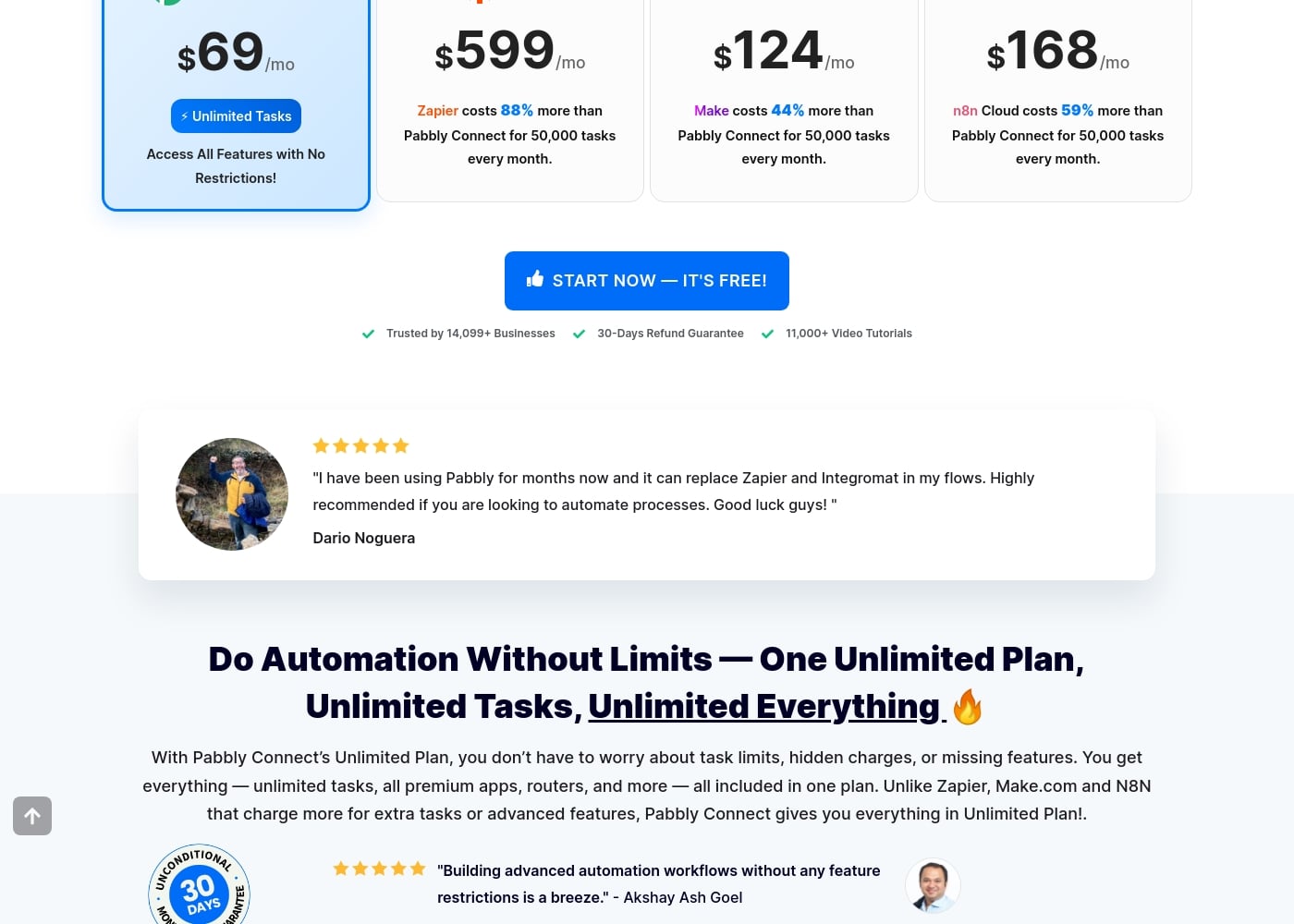
Pabbly Connect centers its offering around an Unlimited Plan for $69 per month, which includes unrestricted access to all features and unlimited monthly tasks. Pricing is generally based on the total number of automation tasks you execute each month, excluding internal steps and triggers.

Plans & Pricing

Unlimited Plan

Monthly$69
Unlimited Tasks
  • Unlimited Tasks every month
  • Access All Features with No Restrictions
  • All premium apps
  • Routers and advanced features included

Pabbly Connect offers three main subscription options based on task volume, costing from Not explicitly stated upward to $69 per month for the top tier.

Before you dive into the details, remember that Pabbly Connect operates on a task-based system. Triggers and internal steps like filters or routers do not count towards your monthly task limit, which is a major benefit.

Standard Plan (Tier 1)

Price: Not explicitly stated Websites Supported: Not explicitly stated Best For: Users new to automation or those with small volume needs. Refund Policy: 30-day money-back guarantee Other Features: 10,000 Tasks every month, eligibility for future integrations and updates.

This plan is ideal for individuals or small operations just starting their automation journey. It provides a solid foundation with 10,000 tasks per month to figure out your workflow needs.

Pro Plan (Tier 2)

Price: Not explicitly stated Websites Supported: Not explicitly stated Best For: Growing businesses requiring higher task volume. Refund Policy: 30-day money-back guarantee Other Features: 20,000 Tasks every month, eligibility for future integrations and updates, multi-step integrations supported.

If your tasks are increasing and you need more capacity, the Pro Plan doubles your monthly limit. It's a great fit for businesses scaling their processes without jumping into unlimited options immediately.

Unlimited Plan

Price: $69/mo Websites Supported: Not explicitly stated Best For: High-volume users, agencies, or those needing certainty with their automation volume. Refund Policy: 30-day money-back guarantee Other Features: Unlimited Tasks every month, access to all features with no restrictions, all premium apps, routers, Code by Pabbly, AI Assistant.

Choose the Unlimited Plan if you absolutely cannot risk hitting task limits. This plan is designed for maximum peace of mind, ensuring you have unrestricted access to all Pabbly Connect features whenever you need them. 🔥

Pabbly Connect also offers numerous Tiers (3 through 9) that provide intermediate task allotments, ranging up to 3.2 million tasks per month, for which pricing is volume-dependent but not explicitly listed here. You can start automating immediately using the free option by clicking the “Start Now — It's Free” button. Furthermore, purchasing a yearly plan allows you to save up to 25% on overall pricing, and all purchases are backed by a strong 30-day refund guarantee.
User Reviews

Pabbly Connect receives highly polarized external feedback. While some users describe the product as technically superior and incredibly fast, noting advanced features that surpass major competitors, the overall customer rating is severely affected by corporate and support issues.

The majority of reviewers describe customer service as 'diabolical,' 'useless,' and extremely slow, frequently failing to resolve tickets properly or in a timely manner. Recurring themes involve difficulty processing the advertised 30-day money-back guarantee, with users alleging the company actively tries to deny refunds.

Reliability concerns also exist; some users report that automations constantly break and that the platform is buggy. Additionally, Pabbly is criticized for inflexibility concerning account management, like changing associated emails.

While Connect offers powerful features, potential users must be cautious given the widespread reports of poor organizational responsiveness and administrative problems. 😬

What users say elsewhere

Marcus M.
· Trustpilot · Mar 28, 2024
1.0 / 5

Pabbly Connect has the absolute worst customer service. They don't read email tickets correctly and take days to reply, if they reply at all. This lack of responsiveness makes advanced troubleshooting impossible.

Octavia R.
· Trustpilot · Oct 18, 2024
2.0 / 5

The tool works well for complex automation tasks and is reliable once set up. However, their policy on account changes is very rigid. I was forced to maintain an old domain just to keep my access rights.

No reviews yet.

Write a Review

Write a Review for Pabbly Connect
0/100 characters
0/2000 characters

Why use Pabbly Connect?

Why choose this platform when building complex integrations? Pabbly Connect offers remarkable flexibility and transparency, especially in task counting. This focus on efficiency allows you to build incredibly reliable and advanced automations.

  • Unlimited Operational Checks: Unlike many competitors, Pabbly Connect provides unlimited operations. This means checking external applications constantly for new data does not count against your charges.
  • Cost-Effective Workflow Design: The platform distinguishes itself by not counting internal apps as tasks. Filters, routers, schedules, text formatters, and iterators are all internal functions that won't deplete your monthly task allotment.
  • Advanced Logic and Routing: You can create advanced workflows using filters and path routers. For example, you can execute different actions based on specific filter conditions you set up.
  • Ultimate Customization: For advanced users, Pabbly Connect allows running custom scripts. You can use Code by Pabbly to run JavaScript or Python directly within your workflows.
  • Commitment to Security: The platform ensures high data security and integrity. Pabbly Connect is both ISO 27001:2022 certified and compliant with SOC2 Type 2 standards. ✅

Ready to transform your workflow with Pabbly Connect?

Frequently Asked Questions

How does Pabbly Connect calculate my monthly task usage?

Tasks are only counted based on the Action steps within your workflows as data transfers. Pabbly Connect does not charge for triggers or internal tools, such as filters, routers, and formatters, which saves you money.

What are "unlimited operations," and why are they included?

An operation refers to an external check the system makes for new data, like polling an application every five minutes. Pabbly Connect includes unlimited operations, ensuring these regular checks never reduce your paid monthly task limit.

Is my data secure using Pabbly Connect for complex automation?

Yes, security is a priority for the platform. Pabbly Connect is proud to be both ISO 27001:2022 certified and compliant with SOC2 Type 2 standards.

What if Pabbly Connect doesn't have a pre-built app integration I need?

You can still connect virtually any application using their custom API modules. This powerful feature offers custom options to manage different API structures within your workflows.

How can I reduce the overall cost of my Pabbly Connect subscription?

You can save significantly by choosing a long-term commitment. You can save up to 25% on overall costs by opting for a yearly or multi-year subscription instead of monthly billing.

What is the monthly cost for the 10,000 or 20,000 task plans?

The specific monthly pricing for the Standard (10k tasks) and Pro (20k tasks) plans is not explicitly stated on the official site. You will need to contact their sales team directly for that detailed pricing information.

Can I run custom code within my automation workflows?

Yes, advanced users can utilize Code by Pabbly. This tool empowers you to execute custom JavaScript or Python scripts directly within your integration flows for advanced logic and data transformation.

Is the pricing model based on the number of team members or users?

No, pricing is strictly based on usage, calculated by the total number of action tasks executed monthly. The cost is independent of how many users access the platform.

How do I cancel my subscription if I decide not to continue?

You can cancel your subscription at any time without penalty. You simply need to send an email with your cancellation request directly to support@pabbly.com.

What options are available if my business needs more than 3.2 million tasks per month?

Tier 9 handles up to 3.2 million tasks, but custom plans are available. If you exceed seven million tasks monthly, you should contact their team directly to arrange a specialized quote.

Does Pabbly Connect offer guaranteed technical support response times or an SLA?

Not explicitly stated on the official site. You can reach out to support via email or find help by posting your technical questions in their official community forum.

Is there a free trial, and what are the specific limits?

A free option is available so you can start automating immediately. The specific task count limit or exact duration for the non-paid version, however, is not explicitly stated on the official site.

Ready to try Pabbly Connect? Check out the official site or pricing.