FlowMattic vs Pabbly Connect
FlowMattic and Pabbly Connect both offer powerful automation, yet their core architectures differ significantly. FlowMattic is deeply embedded within WordPress with unlimited task execution and fixed costs. Pabbly Connect is a flexible, external SaaS focused on broad cross-app connectivity and advanced routing. It's a choice between WordPress mastery and broad ecosystem reach.
Best for: WordPress agencies managing 25+ client sites, E-commerce stores with high order processing volume
Best for: Marketing teams synchronizing lead capture across 10+ cloud apps, Users requiring advanced dynamic conditional routing and segmentation
WordPress automation with budget-friendly power.
We found FlowMattic to be a highly competitive WordPress automation tool, offering deep integration and powerful features like unlimited task execution. Overall, it delivers exceptional value backed by highly personalized support, making it an excellent choice for businesses aiming to reduce reliance on expensive SaaS platforms.
Pros
- Unlimited task executions included in all annual pricing tiers.
- Outstanding and highly responsive developer support team.
- Cost-effective replacement for usage-based SaaS automation tools.
- Deep, native integration within the WordPress ecosystem.
Cons
- Some reports of instability and bugs noticed on production sites.
- Limited structured public documentation or manuals available.
- Relies heavily on developer personal involvement for complex troubleshooting.
Advanced Automation, Risky Support Structure
We found Pabbly Connect delivers robust, powerful automation, especially benefiting from unlimited operations and excluding internal steps from task counts. However, external feedback consistently highlights catastrophic customer support and administrative issues, creating a high-risk user environment. Overall, this is a strong technical tool hampered severely by company governance.
Pros
- Unlimited operations (checks) are included at no extra cost.
- Internal steps (filters, routers) do not count toward monthly task limits.
- Offers a clear, cost-effective Unlimited Task plan for $69/month.
- Supports advanced workflow logic, including custom scripts (JS/Python).
Cons
- Customer support is overwhelmingly reported as slow, unhelpful, or ineffective.
- The 30-day money-back guarantee is frequently difficult or impossible to reclaim.
- Users report major inflexibility regarding account management (e.g., changing email addresses).
- Automations may occasionally break, leading to platform instability for some users.
AboutFlowMattic
FlowMattic is a powerful automation tool trusted by over 7,582 WordPress professionals worldwide. It helps businesses manage their vital operations effortlessly. The platform acts as an essential, reliable, and future-proof tool for anyone running a business on WordPress. Users find that it easily replaces other complex automation systems thanks to its seamless integration. ✅
Whether you run an agency, an e-commerce store, a SaaS platform, or an educational platform, FlowMattic provides the dedicated automated workflows needed for sustainable growth.
AboutPabbly Connect
Pabbly Connect is an integration application that connects tools so you can send data from one place to another. Setting up an automation workflow is straightforward.
💡 First, you select a Trigger application. This is the starting point when data is received.
Next, you choose an Action step to transfer that data to the destination application. When you enable the workflow, it runs automatically around the clock.
Highlights
Feature Comparison
Features Overview
We highlight the main differences and pick a winner for each feature.
Pricing Model & Value
FlowMattic offers unlimited tasks for a fixed price, ensuring predictable costs annually. Pabbly Connect charges based on task volume, which scales expense with usage.
FlowMattic provides unlimited task executions across every annual paid plan. You only pay based on the number of WordPress websites you manage. This fixed annual cost provides unmatched budget predictability for heavy users. Pabbly Connect prices are directly tied to the number of tasks performed monthly. Plans allocate between 12,000 and millions of tasks each billing cycle. While triggers and internal steps are free, high action volume increases the monthly cost. FlowMattic offers a significant long-term value advantage for users with high execution needs. Pabbly Connect is better for budget-conscious users running low-volume, critical automations. If your e-commerce site processes thousands of orders daily, FlowMattic will be far more budget-friendly.
Integration Core
Pabbly Connect integrates widely across external cloud apps; FlowMattic focuses deeply on native WordPress integration.
FlowMattic is built as a WordPress plugin for deep, native integration into the CMS. It uses powerful API modules to connect external services to the WP platform. FlowMattic also offers custom development for highly specialized tool needs. Pabbly Connect is an external SaaS built to synchronize data between hundreds of diverse tools. It excels at linking apps outside the WordPress ecosystem effectively. Pabbly Connect supports multi-step integrations chaining actions across many platforms. If WordPress is your core operational hub, FlowMattic provides superior native integration capabilities. Pabbly Connect is better if your primary automation need is cross-app data synchronization. Pabbly Connect's breadth makes it ideal for syncing CRM data with marketing tools outside your website.
Customer Support
FlowMattic provides highly responsive developer support, while Pabbly Connect users report slow and inconsistent service.
FlowMattic receives high praise for its outstanding and personalized developer support team. Users frequently note that the support is quick, responsive, and often incorporates feedback rapidly. This personalized service is critical for a deep WordPress plugin. Pabbly Connect reviews often mention significant pain points regarding slow or inconsistent email support. Users report that getting timely resolution for bugs or account issues can take too long. A slow support team makes onboarding and troubleshooting frustrating. FlowMattic clearly wins on user sentiment and perceived quality of customer service. Pabbly Connect's scalability is often undermined by its reported reliability and support delays. Responsive support from FlowMattic reduces downtime, which is vital for any mission-critical automation.
Advanced Routing
Pabbly Connect has specialized Path Routers for complex logic; FlowMattic uses advanced data transformation for logic.
FlowMattic supports multi-step workflows and complex logic using sophisticated Data Transformation tools. This ensures data is accurate and ready before passing to the next step. It allows for conditional filtering within the workflow steps. Pabbly Connect features dedicated Filters and robust Path Routers for conditional segregation. You can send different data down various paths based on initial trigger conditions. This structure supports highly complex, divergent workflow outcomes instantly. Pabbly Connect's visual Path Routers offer a slightly more structured approach to conditional logic. FlowMattic achieves similar logic but uses transformation tools alongside filters. Use Pabbly Connect Path Routers to segment newly registered users into different email sequences based on their initial criteria.
Data Handling
Both tools offer robust data manipulation capabilities; FlowMattic focuses on parsing, and Pabbly Connect focuses on formatting.
FlowMattic provides strong tools like dedicated CSV and Webpage Parsers for data extraction. The Lookup Table function allows retrieval of defined values mid-workflow. FlowMattic can also manage complex data sets using Custom Database Tables. Pabbly Connect offers an Email Parser to structure incoming message data effectively. Its Data Formatter ensures consistency across disparate applications quickly. Both FlowMattic and Pabbly Connect handle data modification and structuring efficiently. FlowMattic has an edge with its dedicated Webpage and CSV parsing capabilities. Pabbly Connect is better suited for standardizing data fields between APIs. If you need to scrape data from a webpage for processing, FlowMattic is the clearer choice for the job.
Security & Compliance
Pabbly Connect holds formal security certifications; FlowMattic leverages WordPress data ownership for security.
FlowMattic's security model dictates that all your automation data resides on your server. This gives users full ownership and control over logs and execution history. Specific external security certifications are not publicly advertised for FlowMattic. Pabbly Connect maintains ISO 27001:2022 and SOC 2 Type 2 compliance certifications. These formal standards confirm trust in its security and availability controls. This is vital for enterprises with strict compliance requirements. Pabbly Connect provides recognized external security credentials, important for SaaS trust. FlowMattic relies on the inherent security and control of the private WordPress server. For large corporations requiring audited compliance, Pabbly Connect's SOC 2 Type 2 certification is a necessity.
Performance & Stability
FlowMattic uses a Powerful MCP Server for reliability; Pabbly Connect often suffers from recurring workflow bugs.
FlowMattic has built-in stability features like API Rate Limit Handling for stability. It uses a Powerful MCP Server to ensure consistent execution performance. Some FlowMattic users report occasional bugs, but fixes are generally swift. Pabbly Connect can demonstrate high performance but is frequently cited for workflow glitches and bugs. Users report these platform quirks require necessary manual oversight over execution. This inconsistency can lead to frustrating downtime or data loss. FlowMattic's developer-led support often stabilizes issues faster than Pabbly Connect's slow support response. High ratings suggest FlowMattic delivers overall better day-to-day operational consistency. If reliability running high-volume, continuous workflows is essential, FlowMattic offers a more stable environment.
Targeted Platform
FlowMattic is optimized for WordPress, simplifying the tech stack; Pabbly Connect is a general-purpose, cross-app tool.
FlowMattic specializes in providing dedicated automated workflows within WordPress. It streamlines agency and e-commerce operations right inside the user's platform. FlowMattic aims to replace complex external tools by integrating natively with WordPress's core. Pabbly Connect provides a broad automation layer across various unrelated cloud services. It is designed to act as an independent data pipeline connecting any application via API. Pabbly Connect's focus is on connecting diverse SaaS tools efficiently. If your business is defined by WordPress, FlowMattic provides a competitive advantage through deep integration. If you use a broad mix of platforms, Pabbly Connect provides necessary flexibility. An agency managing dozens of client WP sites will benefit hugely from FlowMattic’s single-platform approach.
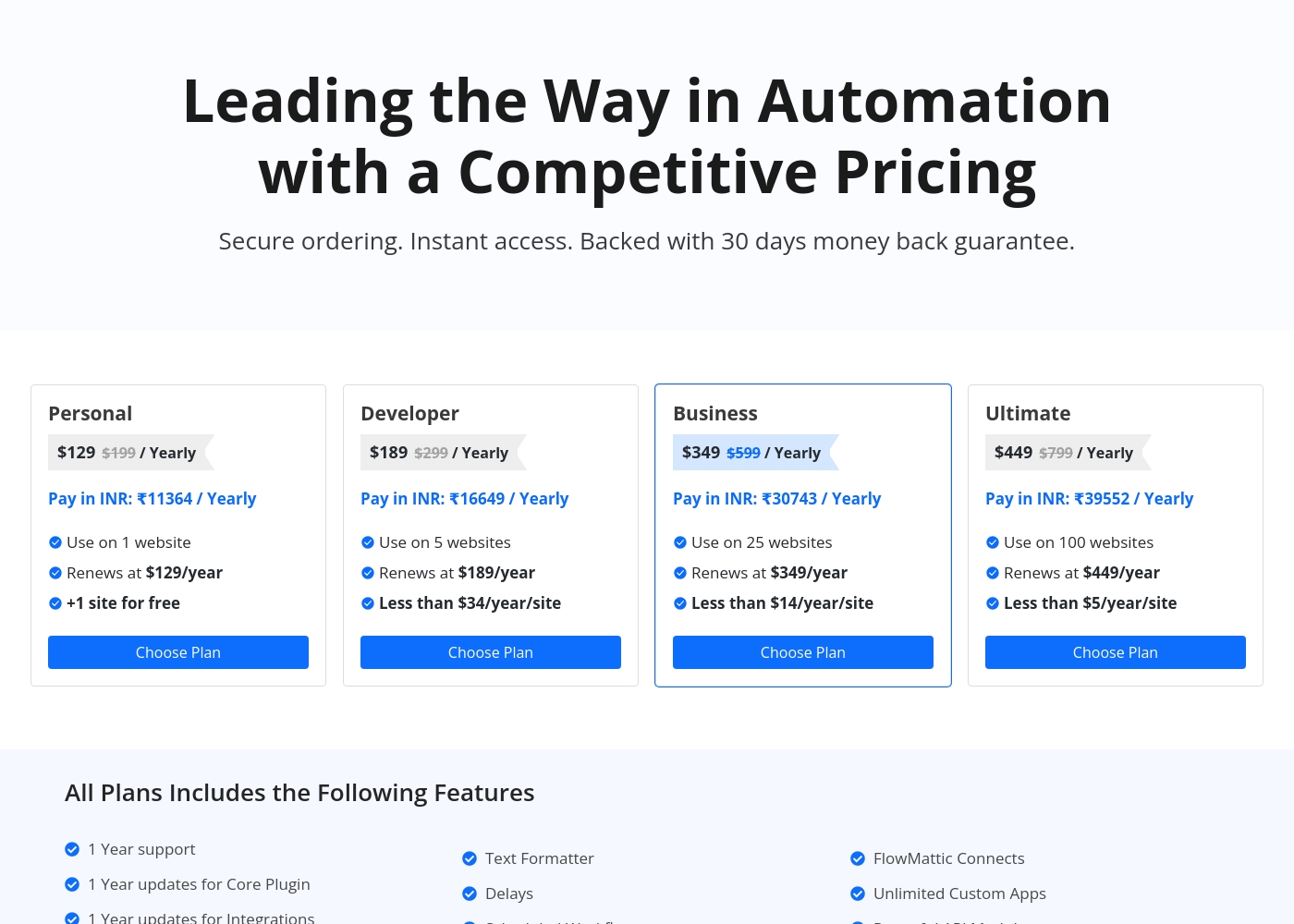
FlowMattic costs between $129 and $449 per year with four plans: Personal at $129, Developer at $189, Business at $349, and Ultimate at $449.
Let's explore what each plan offers for your automation needs.
Personal
Price: $129 / Yearly (Renews at $129/year) Websites Supported: 1 website (+1 site for free) Refund Policy: 30-day money-back guarantee Other Features: 1 year support and updates, Unlimited Custom Apps, Powerful API Module, Unlimited Task Executions, Powerful MCP Server
- Use on 1 website (+1 site for free)
- 1 Year support
- 1 Year updates for Core Plugin and Integrations
- Unlimited Task Executions
- Powerful MCP Server
- Use on 5 websites
- Renews at $189/year
- Instant Webhook Iterator
- Multi-Step Workflows
- AI Workflow Generator
- Use on 25 websites
- Renews at $349/year
- FlowMattic Connects
- Webpage Parser
- CSV Parser
- Use on 100 websites
- Renews at $449/year
- Unlimited AI Assistants
- Powerful API Module
- Custom Database Tables
Before you dive into the details, remember that Pabbly Connect operates on a task-based system. Triggers and internal steps like filters or routers do not count towards your monthly task limit, which is a major benefit.
Standard Plan (Tier 1)
Best For: Users new to automation or those with small volume needs. Refund Policy: 30-day money-back guarantee Other Features: 10,000 Tasks every month, eligibility for future integrations and updates.
This plan is ideal for individuals or small operations just starting their automation journey. It provides a solid foundation with 10,000 tasks per month to figure out your workflow needs.
- Unlimited Tasks every month
- Access All Features with No Restrictions
- All premium apps
- Routers and advanced features included

Pricing Notes
- FlowMattic offers a free test site and a powerful 30-day money-back guarantee.
- All paid FlowMattic plans include unlimited task executions, guaranteeing fixed annual costs.
- Pabbly Connect costs are usage-based, meaning high-volume users will face significantly higher monthly fees.
- Pabbly Connect offers yearly plans that provide savings of up to 25% over monthly subscriptions.
Pricing Head-to-Head
User Reviews
FlowMattic maintains an excellent 4.6-star rating on Trustpilot based on dozens of reviews, with users consistently praising its value and exceptional customer support. Many reviewers highlight the responsiveness and dedication of the development team, noting that suggestions are often implemented quickly.
A key competitive advantage frequently mentioned is the pricing structure: FlowMattic offers unlimited task executions for a fixed annual fee or lifetime deal, making it extremely cost-effective and a great replacement for usage-based automation tools like Zapier or Pabbly. Users find the plugin powerful, intuitive, and constantly evolving with new integrations.
The support and the product are absolutely amazing. We appreciate that you don’t pay per task execution, and their available one-time purchase option makes FlowMattic incredibly valuable for the price.
Pabbly Connect receives highly polarized external feedback. While some users describe the product as technically superior and incredibly fast, noting advanced features that surpass major competitors, the overall customer rating is severely affected by corporate and support issues.
The majority of reviewers describe customer service as 'diabolical,' 'useless,' and extremely slow, frequently failing to resolve tickets properly or in a timely manner. Recurring themes involve difficulty processing the advertised 30-day money-back guarantee, with users alleging the company actively tries to deny refunds.
Pabbly Connect has the absolute worst customer service. They don't read email tickets correctly and take days to reply, if they reply at all. This lack of responsiveness makes advanced troubleshooting impossible.
Our Verdict
The decision between FlowMattic and Pabbly Connect relies entirely on your business foundation. FlowMattic offers predictable power within WordPress; Pabbly Connect provides vast, flexible cloud connectivity. If your operations run on WordPress and cost certainty is paramount, FlowMattic should be your final choice. FlowMattic excels due to deep, native integration into the WordPress Core environment. Every paid plan offers critically important unlimited task executions, eliminating all cost surprises. For high-volume users like agencies or large e-commerce sites, FlowMattic’s fixed annual cost offers huge savings. Its highly responsive developer support resolves integration challenges quickly and effectively. Pabbly Connect is the traditional, robust cloud automation platform built for external data synchronization. It shines in integrating disparate SaaS tools using powerful triggers and actions flexibly. Pabbly Connect features specialized tools like Path Routers for executing complex, conditional, and dynamic workflows. This makes Pabbly Connect ideal for connecting many non-WordPress cloud services. Your determining factor is platform commitment versus cost model. FlowMattic provides cost certainty and superior WP control right on your server. Pabbly Connect offers unmatched cross-platform integration breadth but costs increase with task usage volume. For seamless, cost-effective scaling on WordPress, FlowMattic delivers superior long-term value. Choose Pabbly Connect if formal compliance or broad system compatibility outside WP is non-negotiable despite noted support issues. Most WordPress professionals should start with FlowMattic.
Frequently Asked Questions
Which tool offers truly unlimited automation without increasing costs?
FlowMattic includes unlimited task executions on all paid plans, ensuring fixed annual costs. Pabbly Connect’s pricing is usage-based and scales with the number of tasks consumed monthly. FlowMattic provides far greater budget predictability for heavy automators.
Is FlowMattic or Pabbly Connect better for complex conditional logic?
Pabbly Connect is slightly better here, offering dedicated Filters and Path Routers for complex branching logic. FlowMattic handles conditional needs using Data Transformers and standard filtering. Both tools support robust multi-step workflows.
Which tool provides better security certifications?
Pabbly Connect holds formal ISO 27001:2022 and SOC 2 Type 2 compliance certifications. FlowMattic, as a WordPress plugin, utilizes your server security and gives you full control over data. For enterprise compliance, Pabbly Connect provides necessary documentation.
Can FlowMattic integrate with apps outside WordPress?
Yes, FlowMattic uses its Powerful API Module and webhooks to connect to external services. The primary strength of FlowMattic is managing these connections deep inside the WordPress platform. Pabbly Connect provides broader, external reach as its core function.
Why should I choose FlowMattic over Pabbly Connect for high-volume e-commerce?
FlowMattic offers superior value for high-volume e-commerce due to unlimited task execution. You will not pay more for processing thousands of orders monthly. Pabbly Connect’s task pricing would become very costly very quickly at that volume.
Which tool has better customer support reviews?
FlowMattic has consistently excellent reviews citing highly responsive and dedicated developer support. Pabbly Connect reviews show widespread frustration regarding slow, unhelpful, or inconsistent support responses. FlowMattic earns a clear win for customer care.
Ready to Choose?
Both tools have their strengths. Choose based on your specific needs.