ActivePieces vs Pabbly Connect
ActivePieces and Pabbly Connect both offer powerful workflow automation solutions. ActivePieces focuses heavily on complex AI agent orchestration and open-source flexibility. Pabbly Connect delivers robust data syncing with unique, task-efficient pricing rules. Your choice depends on needing advanced AI logic versus pure data transfer volume.
Best for: Teams building complex AI Agents and custom logic workflows., Organizations requiring open-source flexibility and self-hosting.
Best for: Individuals needing cost-effective, high-volume data synchronization., Users running many multi-step processes where internal logic steps must be free.
Powerful Automation, Complex Pricing
We find ActivePieces to be a technologically superior tool that rivals Zapier and Make, excelling in handling complex, AI-first workflows and offering excellent cost efficiency. Overall, while the core automation engine and feature set are industry-leading and SOC 2 Type II compliant, the platform's relationship with its community has been significantly strained by retroactive policy and pricing changes.
Pros
- AI-first automation featuring agents and 470 connectors.
- High flexibility with no-code canvas and powerful Code module for custom JS libraries.
- Considered cost-effective and cheaper than competitors like Zapier and n8n.
- Includes enterprise-ready features like flow versioning and auto retry for failures.
Cons
- Lack of transparency regarding sudden, substantial pricing structure changes.
- Early supporters felt betrayed by perceived changes to lifetime deals.
- Users were automatically downgraded from paid plans to trial plans without notification.
- Inconsistent customer support response for issues not reported on GitHub.
Advanced Automation, Risky Support Structure
We found Pabbly Connect delivers robust, powerful automation, especially benefiting from unlimited operations and excluding internal steps from task counts. However, external feedback consistently highlights catastrophic customer support and administrative issues, creating a high-risk user environment. Overall, this is a strong technical tool hampered severely by company governance.
Pros
- Unlimited operations (checks) are included at no extra cost.
- Internal steps (filters, routers) do not count toward monthly task limits.
- Offers a clear, cost-effective Unlimited Task plan for $69/month.
- Supports advanced workflow logic, including custom scripts (JS/Python).
Cons
- Customer support is overwhelmingly reported as slow, unhelpful, or ineffective.
- The 30-day money-back guarantee is frequently difficult or impossible to reclaim.
- Users report major inflexibility regarding account management (e.g., changing email addresses).
- Automations may occasionally break, leading to platform instability for some users.
AboutActivePieces
ActivePieces delivers the full ecosystem for AI automation and agents. It focuses on connecting smart agents, no-code flows, and a central data store called Tables. This impressive platform is trusted by companies ranging from startups all the way to Fortune 50 organizations. You can easily start using ActivePieces on the cloud, or choose to self-host with Docker for ultimate control. Whether you are building complex AI agents or setting up simple automations, the system makes it smart and easy. 💡
AboutPabbly Connect
Pabbly Connect is an integration application that connects tools so you can send data from one place to another. Setting up an automation workflow is straightforward.
💡 First, you select a Trigger application. This is the starting point when data is received.
Next, you choose an Action step to transfer that data to the destination application. When you enable the workflow, it runs automatically around the clock.
Highlights
Feature Comparison
Features Overview
We highlight the main differences and pick a winner for each feature.
AI Automation Focus
ActivePieces is built for AI agents; Pabbly Connect excels at classic trigger-action automation.
ActivePieces focuses on orchestrating true AI agents across its 434 tools. Users can build agents that think, act, and access central data stores. This makes ActivePieces suitable for complex, decision-heavy workflows. Pabbly Connect uses the traditional trigger-and-action model for integration flows. It chains actions across apps to synchronize data automatically. Pabbly Connect is designed for moving data efficiently between many applications. The key difference is complexity versus connectivity volume. ActivePieces offers specific AI functionality Pabbly Connect does not have. Pabbly Connect focuses on high-volume, reliable data transfer workflows. If your automation requires sophisticated decision-making, ActivePieces provides the dedicated tools. If you just need data flowing between systems, Pabbly Connect delivers.
Pricing Clarity
Pabbly Connect provides clearer volume pricing; ActivePieces limits active flows despite 'unlimited' tasks.
ActivePieces paid plans start at $25/month and offer 'unlimited tasks.' This is subject to a fair usage policy defined by active flows (10 flows on the Plus plan). Pabbly Connect’s model only charges for executed external actions. Internal logic, like filters and routers, is free and counted as unlimited operations. This makes high-volume conditional routing very cheap. Pabbly Connect offers superior value for money when internal checks dominate the workflow volume. ActivePieces's value is tied more to its advanced features and included AI credits. ActivePieces users must monitor active flow limits; Pabbly Connect users monitor task volume only.
Reliability Tools
ActivePieces offers built-in versioning and auto retry; Pabbly Connect relies solely on security certification.
ActivePieces prioritizes workflow stability with practical, built-in features. It includes auto retry functionality if a step temporarily fails during execution. ActivePieces also features versioning management to instantly revert broken flows. Pabbly Connect ensures strong security compliance with ISO 27001:2022 and SOC 2 Type 2 certifications. This focuses on data integrity and security controls more than flow maintenance. User reviews, however, mention frequent bugs. ActivePieces gives users tools to manage and fix broken flows themselves seamlessly. Pabbly Connect relies heavily on security standards but lacks direct flow resilience features. For mission-critical automations, ActivePieces's versioning and retry features lower the failure risk significantly.
Customization & Hosting
ActivePieces offers a self-hosted open-source version; Pabbly Connect is cloud-only.
ActivePieces provides maximum flexibility via its open-source Community Edition. Users can self-host the tool using Docker for complete control over infrastructure and data privacy. The cloud version also supports custom code in multiple languages. Pabbly Connect is designed exclusively as a cloud service platform. There are no options to download or self-host the software for enhanced control. Custom logic is available via its dedicated API modules. Technical organizations or developers needing full control should choose ActivePieces. Non-technical users benefit from Pabbly Connect's simple, hosted management. ActivePieces allows developers to integrate specific JS and npm packages directly into their workflows.
Human-in-the-Loop
ActivePieces simplifies mandatory human approvals with a dedicated feature; Pabbly Connect requires manual configuration.
ActivePieces features the dedicated Todos component for managing human approvals within a flow. Agents can pause the flow and request necessary sign-offs from authorized users. This formalizes critical decision checkpoints. Pabbly Connect requires users to simulate human approvals using notification steps like sending email or Slack messages. It does not have a proprietary component for tracking these mandated checkpoints. ActivePieces streamlines complex business process management requiring approvals. Pabbly Connect makes collaboration integration a more manual workflow task. Using ActivePieces Todos ensures management review happens within the flow itself, preventing email thread delays.
Conditional Logic
Both offer strong routing; Pabbly Connect's advanced Filters and Path Routers are powerful for segmentation.
ActivePieces provides robust logic tools using Conditions and Loops in its no-code builder. This enables precise 'if-this-then-that' sequences and batch processing. It supports highly complex script integrations. Pabbly Connect excels in data segmentation using advanced Filters and Path Routers. This allows routing customers based on data values, like purchase amount or status. You can easily create specific, conditional outcomes. The tools are functionally similar, but Pabbly Connect's routing is critical due to its task-counting advantage. Since Pabbly Connect routes are free, users can implement deep segmentation without cost increases. Complex conditional routing for high-volume sales is exceptionally affordable using Pabbly Connect's Path Routers.
User Review Sentiment
ActivePieces has higher overall technical praise, but Pabbly Connect is frequently criticized for poor support.
ActivePieces generally earns high marks for its technical capability and competitive pricing. However, a significant fraction of users complain about company transparency and abrupt pricing changes. The technology is loved, the business decisions are sometimes questioned. Pabbly Connect users praise its integration power and efficient task count model (free internal steps). However, its reviews are severely hampered by complaints about slow, inconsistent email support and platform bugs. Many users cite long delays. ActivePieces's high ratings reflect strong functional satisfaction despite executive problems. Pabbly Connect's lower rating reflects poor service delivery and unreliability in the customer experience. Technical users appreciate the speed and flexibility of ActivePieces's development pace.
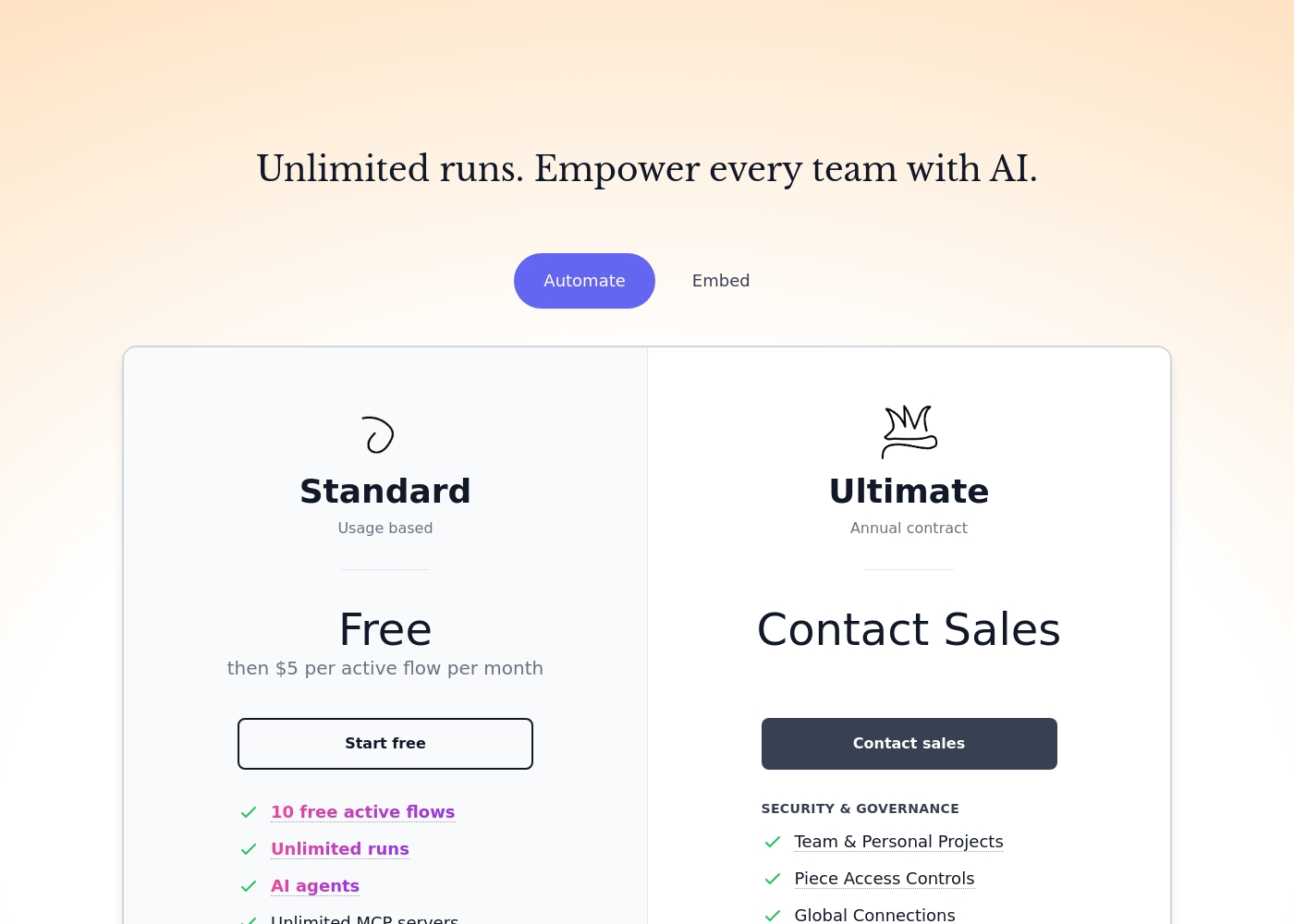
ActivePieces cloud plans start Free, then cost $5 per active flow per month, with enterprise tier pricing requiring a sales inquiry. Two managed plans are available: Standard (Free then $5 per active flow per month) and Ultimate (Contact Sales, Annual contract).
Here is a look at the specific features included in each plan type.
Standard
Price: Free then $5 per active flow per month Other Features:
- 10 free active flows
- Unlimited runs
- AI agents
- Unlimited MCP servers
- Unlimited tables
- Email support
- 10 free active flows
- Unlimited runs
- AI agents
- Unlimited MCP servers
- Unlimited tables
- Security & Governance
- Team & Personal Projects
- Piece Access Controls
- Global Connections
- Custom RBAC
Before you dive into the details, remember that Pabbly Connect operates on a task-based system. Triggers and internal steps like filters or routers do not count towards your monthly task limit, which is a major benefit.
Standard Plan (Tier 1)
Best For: Users new to automation or those with small volume needs. Refund Policy: 30-day money-back guarantee Other Features: 10,000 Tasks every month, eligibility for future integrations and updates.
This plan is ideal for individuals or small operations just starting their automation journey. It provides a solid foundation with 10,000 tasks per month to figure out your workflow needs.
- Unlimited Tasks every month
- Access All Features with No Restrictions
- All premium apps
- Routers and advanced features included

Pricing Notes
- ActivePieces scales primarily based on the number of active flows (10 flows for $25/month).
- Pabbly Connect’s pricing is based purely on task volume, requiring careful monitoring for high usage.
- Pabbly Connect offers unique value by allowing unlimited internal operations (filters, routers) for free.
- ActivePieces’s 'unlimited' tasks on paid plans are subject to a fair usage policy linked to flow limits.
- Pabbly Connect offers a 30-day cooling-off refund guarantee, which ActivePieces does not explicitly state.
Pricing Head-to-Head
User Reviews
We see a nuanced divide in user feedback for ActivePieces on Trustpilot, reflecting both its powerful technical capabilities and its governance challenges. Users consistently praise the platform as a powerful, cost-effective alternative to established competitors like Zapier and Make.
Reviewers note its simple integration process, short learning curve, and ability to handle intricate, heavy-lifting workflows effectively. Many users appreciate the solid community support and quick response when submitting platform bugs via GitHub.
I moved nearly all my Zaps from Zapier with no issues. Their pricing is truly amazing and much cheaper than key competitors. They even allow connecting multiple Gmail accounts to one workflow, which is a limiting factor on n8n.
Pabbly Connect receives highly polarized external feedback. While some users describe the product as technically superior and incredibly fast, noting advanced features that surpass major competitors, the overall customer rating is severely affected by corporate and support issues.
The majority of reviewers describe customer service as 'diabolical,' 'useless,' and extremely slow, frequently failing to resolve tickets properly or in a timely manner. Recurring themes involve difficulty processing the advertised 30-day money-back guarantee, with users alleging the company actively tries to deny refunds.
Pabbly Connect has the absolute worst customer service. They don't read email tickets correctly and take days to reply, if they reply at all. This lack of responsiveness makes advanced troubleshooting impossible.
Our Verdict
Choosing between ActivePieces and Pabbly Connect pits technical flexibility against task efficiency. If your team is tackling complex AI use cases, ActivePieces is the superior technological solution. ActivePieces shines with dedicated AI agent features and self-hosting capability via Docker. Its version management and auto retry features help ensure flow stability. Alternatively, Pabbly Connect delivers immense value for high-volume data movement. Pabbly Connect’s genius lies in making triggers and all internal operations free tasks. If you move data constantly and need complex conditional routing, Pabbly Connect will be significantly cheaper. Keep ActivePieces’s potential transparency issues in mind when committing to a paid plan. Avoid Pabbly Connect if immediate, responsive customer support is a chief concern for your business. Pick ActivePieces if your automation needs advanced AI or enterprise-grade reliability tools. Choose Pabbly Connect if maximizing data flow volume while minimizing operational cost is the main goal.
Frequently Asked Questions
Which platform is better for building AI agents?
ActivePieces is specifically designed for complex AI agent orchestration and agentic workflows. Pabbly Connect is focused on traditional trigger-action data flow automation. ActivePieces has dedicated tools like Tables for AI agents.
Does Pabbly Connect charge for internal steps like filtering logic?
No, Pabbly Connect only charges for external action steps in the workflow. Internal logic steps, like filters and path routers, are counted as unlimited free operations. ActivePieces links costs to active flow limits and AI credits.
Can I self-host the automation software for better control?
Yes, ActivePieces offers an open-source Community Edition that supports self-hosting via Docker. Pabbly Connect is strictly a managed cloud-based service. The self-hosting option is a major benefit of ActivePieces.
How reliable is the customer support for ActivePieces and Pabbly Connect?
Review sentiment suggests customer support is highly unreliable for Pabbly Connect users. ActivePieces also faces criticism regarding transparency and abrupt policy changes. Neither platform is highly praised for support responsiveness.
Which tool offers better flow reliability features?
ActivePieces includes powerful advanced features like auto retry for failed steps. It also provides versioning management to instantly restore older workflows. Pabbly Connect relies more on compliance checks than embedded failure management.
Does ActivePieces have a feature for mandatory human approvals within a flow?
Yes, ActivePieces has a proprietary Todos component designed for this exact purpose. It manages the communication needed for mandatory human approval steps. Pabbly Connect users must build approval steps using email notifications.
Ready to Choose?
Both tools have their strengths. Choose based on your specific needs.