Nifty

Nifty

The Ultimate AI-Powered Project Management OS

#3 dans Project Management
2 min read · Updated 10/6/2025
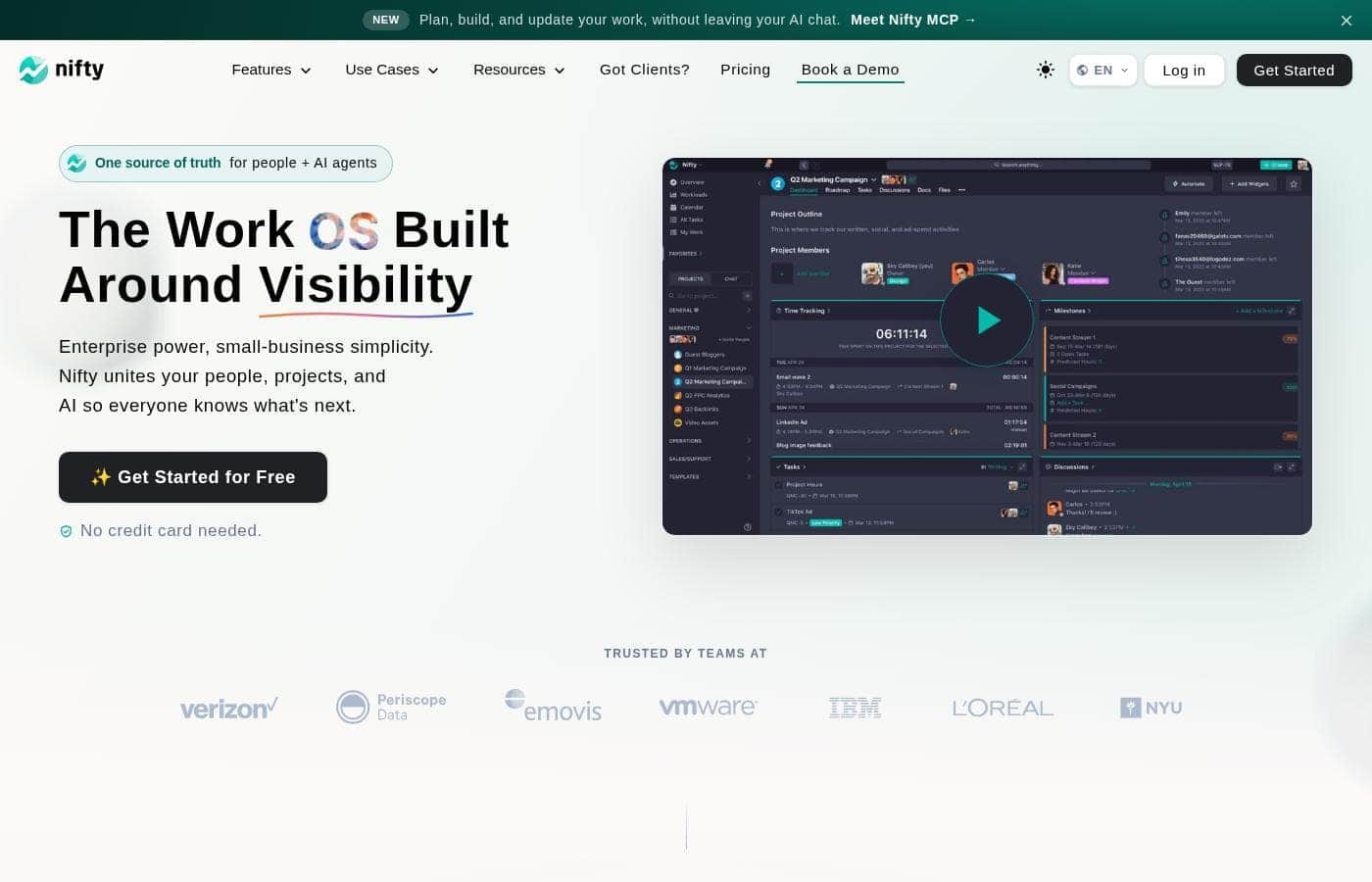
Nifty homepage screenshot

At a glance

Quick overview for Nifty: rating, pricing summary, key features, and highlights.

Ciroapp review

4.2
Excellent All-in-One Project Management OS.

We find Nifty is remarkably successful at centralizing all required project elements into one single, easy-to-use platform, leveraging superior UI design. The pricing scales effectively from a generous Free plan to comprehensive Enterprise features, making it viable for any size team. Overall, we confidently recommend Nifty for organizations seeking true project consolidation and a superior user experience.

Pros

  • Pro:Superior ease-of-use and clean user interface compared to competitors.
  • Pro:Excellent for client-facing work via its built-in client portal functionality.
  • Pro:Consolidates documentation, tasks, and team chat, effectively replacing other tools.
  • Pro:Offers a fully featured Free plan ($0) and affordable, scalable pricing options.

Cons

  • Con:Public user feedback volume and verified third-party reviews are currently very limited.
  • Con:Advanced features like Custom SAML and IP Restriction are gated behind the high-tier Enterprise plan.
Free trial
Yes
Range: $0–$16/monthFree plan, Free trial, Monthly subscription, Yearly subscription, Per seat pricing
This section is a summary. Detailed sections about features, use cases, pricing, and reviews follow below.

Nifty review, pricing, features, pros & cons

Do you constantly switch between different tools just to manage one project? That fragmented workflow is frustrating and always slows your team down. Nifty addresses this challenge by offering one app to unify your teams, goals, and processes.

It’s the ultimate AI-powered project management OS designed to help you execute effortlessly. ✨

What is Nifty?

Nifty serves as an all-in-one hub designed to supercharge productivity and streamline your workflows. It’s a powerful Operating System for managing projects at scale, used by over 20,000 highly productive teams. Instead of separating your roadmaps, tasks, docs, and discussions, Nifty puts everything into a central workspace.

This makes team alignment and smarter decisions happen naturally. This centralized system is perfect for cross-functional collaboration, supporting roles from developers and designers to sales managers. 💡

Nifty Key Features

✨ Supercharge Productivity with Orbit AI

You can streamline complex workflows at scale using Nifty’s Orbit AI. This system is designed to help your team achieve ultimate and consistent productivity. Orbit AI works behind the scenes to help you plan, prioritize, and execute your work effortlessly.

This feature ensures your entire team maintains focus and alignment across even your largest projects.

✨ Align Goals with Visual Roadmaps

Nifty helps you set a clear visual timeline for all your big-picture goals. These comprehensive roadmaps are central to building important team alignment across departments. Progress is automatically captured and updated as tasks are completed, ensuring timelines are always accurate.

This real-time visibility fosters transparency and aids reliable decision-making quickly.

✨ Versatile Task Organization and Tracking

You can organize, prioritize, and track all your daily work exactly on your terms. Nifty supports a high level of detail, helping you manage even the most complicated projects efficiently. This flexibility ensures every role has the view needed to succeed.

Nifty provides five powerful options for tracking tasks:

✨ Five Powerful Options for Task Tracking

  • Kanban
  • List
  • Timeline
  • Calendar
  • Swimlane

These tools help you manage everything from quick daily to-dos to detailed, long-term feature sprints. You can also define custom fields, set task dependencies, and track recurring tasks to fully manage unique workflows.

✨ Centralized Collaboration and Knowledge Hub

Nifty provides a single place for all team communication, empowering members to share ideas and finalize specifications easily. You can gather feedback in real-time using built-in chat features and instant, one-click video calls. This level of immediate communication helps shorten critical feedback cycles, which is especially beneficial for managing clients.

You also create beautiful docs, wikis, and notes directly inside the platform. These documents can be natively connected directly with tasks, ensuring information is conveniently linked right to the work. Nifty even provides native integration support with Google Docs for further flexibility.

✨ Actionable Reporting and Custom Dashboards

Gain fast access to reliable cross-project reporting across all your active work. Nifty furnishes live, historical, and activity-based data points. This information helps you build highly customized dashboards that fit your exact needs and reporting requirements.

Detailed metrics such as budget tracking, time tracking, and team workloads are available effortlessly. Advanced views like cross-project overviews and portfolio views ensure that you maintain consistency and achieve full transparency across your large project portfolio.

✨ Workflow Automation and Seamless Adoption

Let Nifty take care of repetitive busy work by creating custom “if/then” automations. These customized workflows save productive time and allow your team to focus only on high-value tasks. We also provide native forms that quickly capture necessary data.

Upon submission, Nifty automatically processes the form as a new task, document, or project message. Furthermore, Nifty makes adoption easy by letting you import your existing data instantly from tools like Jira, Asana, Trello, ClickUp, and Wrike. You can also embed thousands of third-party applications directly using Custom Embeds.

Use Cases

💡 Simplifying Product Development and Roadmapping

Product teams often struggle to align engineering and marketing teams on feature launches. Nifty allows you to create crystal-clear visual timelines and roadmaps to display your big-picture goals easily. Progress reporting automatically updates as developers complete feature sprints and key tasks.

You can prioritize and track sprint deliverables using Milestones. Additionally, custom Project Embeds improve decision-making by housing necessary data right alongside your documents and specifications. This process ensures better products are built through consistent cross-functional collaboration.

🤝 Streamlining Client Handoffs and Feedback

Client satisfaction depends heavily on fast, clear communication. Nifty helps client management teams shorten feedback cycles and improve communication drastically. You can share project boards with clients so they see progress reports in real time.

Use instant messaging and one-click video meetings to resolve issues quickly. Centralized File Proofing expedites creative approvals, ensuring you never risk losing a client due to slow communication again.

💰 Automating Sales Pipeline Management

Sales teams need robust visibility and efficient handoffs to focus on closing deals. Nifty helps empower them with data-driven insights using automated workflows. You can effectively track lead status and potential financial values to maintain clear pipeline visibility.

Sales collateral can be created and stored centrally for easy access when needed.

  • Goal: Automate project creation after a win.
  • Approach: Set up a custom workflow using Nifty’s built-in automation rules.
  • Outcome: A new delivery project automatically launches upon the closing of a lead, streamlining the transition instantly.

⚙️ Modernizing Engineering Workflows

Engineering workflows are often fragmented across multiple planning and tracking tools. Nifty consolidates tasks, roadmaps, and issue management into one powerful workspace. Development teams can use if/then rules to automate specific custom workflows.

Milestones provide instant, consistent progress reporting for key project stages. Issues, bugs, and necessary changes are all managed directly within Nifty, removing the dependency on external applications.

✅ Centralizing IT Operations and Ticket Management

Operational efficiency means managing processes without letting crucial items fall through the cracks. IT teams can use Nifty to quickly gather service tickets and data via Native Forms.

  1. Ticket Capture: Use beautiful Native Forms to collect inbound requests and data.
  2. Assignment: Automate ticket assignments to the correct team member based on status or inquiry type.
  3. Deployment: Plan project timelines and large infrastructure deployments using visual Roadmaps.

Expected outcome: Resolutions are prioritized efficiently, and workflows are centralized in one app.

🚀 Coordinating Multi-Channel Marketing Campaigns

Marketing teams deliver better results when coordination is simple and timely. Nifty allows you to manage campaigns, tasks, and creative content using real-time collaboration. Teams can create and track specific marketing campaigns as Milestones, keeping goals visible.

The Calendar View for Tasks helps align content deployment schedules successfully. Collaborators can use File Proofing to expedite the approval process for creative assets, ensuring campaigns launch on time with fewer coordination tools involved.

Pricing Overview for Nifty

Pricing range
$0–$16/month
Pricing types
Free plan, Free trial, Monthly subscription, Yearly subscription, Per seat pricing

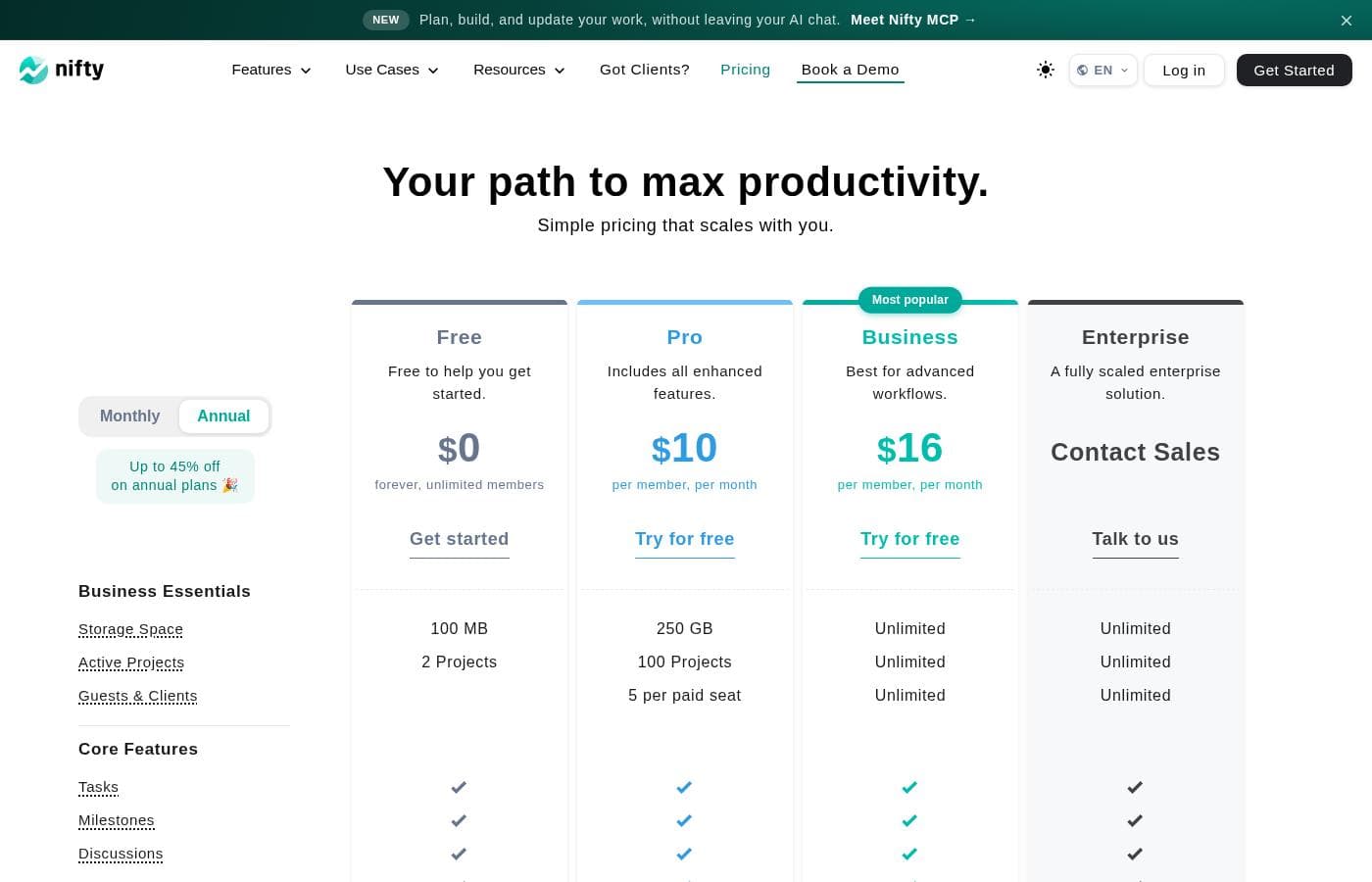
Nifty provides four pricing options, including a Free forever plan for basic productivity needs. Paid plans start at $7 per member monthly, scaling up to specialized Enterprise solutions.

Plans & Pricing

Free

Monthly$0
Yearly$0
100 MB storage and 2 active projects
  • 100 MB Storage Space
  • 2 Active Projects
  • Tasks, Milestones, Discussions, Docs, Files, Team Chat
  • Portfolios and Recurring Tasks
  • Two-Factor Authentication and Google SSO

Personal

Monthly$7
YearlyNot explicitly stated
Limited to 2 Guests & Clients per paid seat
  • 100 GB Storage Space
  • 40 Active Projects
  • Custom Fields
  • Budget Tracking
  • Time Tracking & Reporting

Business

Monthly$16
YearlyNot explicitly stated
  • Unlimited Storage, Active Projects, and Guests & Clients
  • Workflow Automations and File Proofing
  • Cross-Project Overviews and Goals Tracking
  • Team Workloads and Custom Roles & Permissions
  • Priority Support and Microsoft SSO

Enterprise

MonthlyContact Sales
YearlyContact Sales
A fully scaled enterprise solution
  • Native Forms
  • Custom SAML
  • IP Restriction
  • Dedicated Success Manager

Nifty costs between $0 and $16 per month, featuring four plans: Free at $0, Personal at $7 per member, Business at $16 per member, and Enterprise requiring a quote.

We designed Nifty pricing to scale effortlessly with your team's needs. Here is a closer look at what each plan includes.

Free

Price: $0 per month Websites Supported: Not explicitly stated Best For: Free to help you get started Refund Policy: Not explicitly stated Other Features:

  • 100 MB Storage Space
  • 2 Active Projects
  • Core features like Tasks, Docs, and Team Chat
  • Task Dependencies and Portfolio overview

The Free plan is perfect for individuals or small teams just starting out. You receive robust features, including essential security tools like Two-Factor Authentication, right away. Start organizing your projects immediately without needing a credit card.

Personal

Price: $7 per member, per month Websites Supported: Not explicitly stated Best For: Includes all essential features Refund Policy: Not explicitly stated Other Features:

  • 100 GB Storage Space
  • 40 Active Projects
  • Limited guest access (2 per paid seat)
  • Custom Fields, Budget Tracking, and Time Tracking & Reporting

The Personal plan is a great fit for growing teams needing better tracking and collaboration limits. This tier includes essential features like budget tracking and detailed reporting that help you manage workflows efficiently. You also receive 500 times the storage space compared to the Free plan.

Business

Price: $16 per member, per month Websites Supported: Not explicitly stated Best For: Best for advanced workflows Refund Policy: Not explicitly stated Other Features:

  • Unlimited Storage and Unlimited Active Projects
  • Unlimited Guests & Clients
  • Workflow Automations and File Proofing
  • Custom Roles & Permissions and Priority Support

If your organization manages advanced or large-scale projects, the Business plan offers unlimited capacity. This plan empowers teams with sophisticated tools like cross-project overviews and workload management. When you need high-level security and integrated workflows, the Business plan is the ideal choice.

Enterprise

Price: Contact Sales Websites Supported: Not explicitly stated Best For: A fully scaled enterprise solution Refund Policy: Not explicitly stated Other Features:

  • Dedicated Success Manager
  • Custom SAML and IP Restriction
  • Native Forms and Open API support
  • Full Microsoft SSO Integration

The Enterprise solution provides maximum scale, security, and dedicated support for very large organizations. Access advanced features like native forms and stringent security controls like IP restrictions and custom SAML. Contact Nifty's sales team directly to discuss volume pricing and custom solutions tailored to your company.

Nifty offers a Free forever plan so you can start maximizing productivity immediately. Both Personal and Business plans include an option to "Try for free," implying a free trial is available for paid features. While we do not see a specific money-back window, annual plans offer valuable savings of up to 45% off monthly pricing. 🚀

User Reviews

While the overall Trustpilot rating sits at 3.7, this score is based on sparse user feedback within the input provided (specifically, only one review snippet). Users who submit feedback, however, are highly satisfied.

The primary theme emphasized is unmatched ease of use and a clean, intuitive user interface (UI) that dramatically surpasses competitors. One reviewer specifically noted that Nifty serves effectively as a client portal, which adds significant value for client-facing organizations.

Both staff and clients reportedly pick up the system immediately, suggesting minimal friction during onboarding. Nifty’s integrated approach, especially the internal chat feature, is powerful enough to replace dedicated communication tools, demonstrating the true consolidation potential of the platform.

The presence of a "nice mobile app" also points to strong accessibility across different devices. Because we only have very limited market sentiment available, specific recurring feedback on support responsiveness, pricing value, or long-term reliability is mostly unavailable.

However, the initial impression suggests Nifty delivers a highly approachable and integrated project management operating system. 👍

What users say elsewhere

D. R.
· Trustpilot · Sep 23, 2024
5.0 / 5

This is a great, simple project management system. The ease-of-use and UI are genuinely superior to other competitors we’ve tested. Our staff and clients adopted the system immediately.

Alex L.
· Trustpilot
5.0 / 5

We use this platform as our official client portal, which is a big added bonus. Handoffs are much smoother, and it helps us keep all communication centralized. We love the clean interface.

No reviews yet.

Write a Review

Write a Review for Nifty
0/100 characters
0/2000 characters

Why use Nifty?

We know you've likely tried many different project platforms before. Nifty offers a seamless transition and proves extremely reliable for managing large project portfolios. It is clear, well-structured, and easy to use, making it a powerful tool for consistency and adoption.

Here are compelling reasons to choose Nifty:

  • Achieve True Consolidation: Nifty unifies everything your team uses—Roadmaps, Tasks, Docs, and Discussions—in one place without compromising the experience.
  • Boost Alignment with AI: Use Nifty’s Orbit AI to plan and prioritize work effortlessly and at scale for ultimate productivity.
  • Drive Decisions with Data: Access live, historical, and activity-based reporting across all your projects to build dashboards that fit your exact needs.
  • Streamline Client Handoffs: Enhance client satisfaction by shortening feedback cycles using instant messaging, one-click video meetings, and centralized file Proofing.
  • Enjoy Seamless Adoption: Import your existing data instantly from tools like Jira, Asana, and Trello to pick up exactly where you left off.

Nifty is ideal for any highly productive team, especially those in engineering, marketing, and client management, that demand consistency and transparency. Getting started takes less than two minutes to sign up and create your first project. You can start for free, and you never need a credit card. Try Nifty now and thank us later! 🚀

Ready to transform your workflow with Nifty?

Nifty Alternatives

Other tools in the Project Management category

Frequently Asked Questions

How is Nifty priced? Is it per-user or based on usage?

Nifty uses a per-member, per-month pricing model for the Personal ($7) and Business ($16) plans. The cost scales based on the number of active users and the advanced features your organization requires. The Free plan is $0 forever and supports unlimited members.

How long is the free trial for the paid plans?

Nifty offers a free forever plan so you can start immediately without a credit card. While the paid Personal and Business plans offer an option to 'Try for free,' the official site does not explicitly state the duration of these free trials.

Can I easily migrate data from my current project management tool?

Yes, Nifty supports instant import for seamless adoption. You can migrate existing data from several popular tools, including Jira, Asana, Trello, Wrike, ClickUp, and Basecamp. You can also import data using standard CSV or Excel files.

Does Nifty offer a money-back guarantee or refunds if I cancel early?

Nifty does not explicitly advertise a money-back guarantee or refund policy on its primary pricing information. Customers subscribing to annual plans can receive significant savings, up to 45% off the monthly rate.

What kind of security is included, and which features are for larger teams?

Core security features like Two-Factor Authentication and Google SSO are available in all plans, starting with Free. For enterprise customers, the highest tier adds IP Restrictions, Custom SAML, and Full Microsoft SSO Integration.

What are the storage limitations for the paid plans?

Storage limits scale significantly across the tiers. The Free plan includes 100 MB, and the Personal plan provides 100 GB. Both the Business and Enterprise tiers offer unlimited storage space for your team.

Can external guests and clients access projects?

Yes, but limits depend on your plan. The Personal plan restricts guest access to 2 guests per paid seat. If you need extensive external collaboration, the Business and Enterprise plans offer unlimited guests and clients.

How do I get technical support, and is priority support available?

All users can access the Self-Serve Help Center. If you are on the Business or Enterprise plan, you receive Priority Support. Enterprise clients also benefit from a Dedicated Success Manager for enhanced service.

Does Nifty provide API access for deeper custom connections?

Yes, Nifty supports deeper integration and data synchronization. Open API access is specifically available for users subscribing to the Business and Enterprise plans.

Can I use advanced features like workflow automation and custom permissions?

Workflow Automations, Team Workloads, and Custom Roles & Permissions are included starting with the Business plan. Custom Fields are available on the Personal plan and above.

Can I use a custom domain name with Nifty for branding?

Yes, custom domain support is offered. This feature allows you to personalize your workspace and is included in both the Business and the Enterprise pricing plans.

Which plans include specialized client management tools like File Proofing?

File Proofing, which helps expedite approvals for files and creatives, starts at the Business plan. The Business plan also includes unlimited guests and clients for smoother external handoffs.

Are there different languages or regional server options available?

Not explicitly stated on the official site. You may need to contact their sales or support team to inquire about language support and server region options.

Ready to try Nifty? Check out the official site or pricing.