Motion vs Nifty
Motion and Nifty are both top productivity tools, but they appeal to vastly different users. Motion focuses on powerful AI auto-scheduling and creating custom AI employees for heavy automation. Nifty offers an integrated, all-in-one platform focused on consolidation and unmatched user experience.
Best for: Teams dedicated to maximizing AI automation and complex auto-scheduling., Organizations where managers spend hours coordinating shifting tasks daily.
Best for: Marketing and creative agencies managing volume external client approvals., Small or remote teams needing an affordable, easy-to-use, all-in-one project hub.
AI scheduling that manages your work.
We observed that Motion delivers on its promise of powerful, AI-driven task management and scheduling. Users consistently report massive time savings and reduced cognitive load, but the complex credit and seat pricing structure requires careful study. Overall, Motion is a transformative tool for dedicated users who commit to mastering its full capabilities.
Pros
- Reduces mental load using intelligent auto-scheduling and task prioritization.
- Integrates tasks, projects, and calendar into a single, cohesive productivity suite.
- Helps teams break down major goals into manageable, achievable steps for progress.
- High-quality AI note-taker joins meetings and summarizes them effectively.
Cons
- High price point ($50/month cited as excessive by some single users).
- Steep learning curve requires significant upfront time to fully master the system.
- Reported UX/UI glitches, such as obstructive task preview pop-ups.
- Users note that the mobile app and notification features need improvement.
Excellent All-in-One Project Management OS.
We find Nifty is remarkably successful at centralizing all required project elements into one single, easy-to-use platform, leveraging superior UI design. The pricing scales effectively from a generous Free plan to comprehensive Enterprise features, making it viable for any size team. Overall, we confidently recommend Nifty for organizations seeking true project consolidation and a superior user experience.
Pros
- Superior ease-of-use and clean user interface compared to competitors.
- Excellent for client-facing work via its built-in client portal functionality.
- Consolidates documentation, tasks, and team chat, effectively replacing other tools.
- Offers a fully featured Free plan ($0) and affordable, scalable pricing options.
Cons
- Public user feedback volume and verified third-party reviews are currently very limited.
- Advanced features like Custom SAML and IP Restriction are gated behind the high-tier Enterprise plan.
AboutMotion
Motion transforms how teams work by offering the world's first AI workforce at your fingertips. ✨ This platform goes far beyond simple automation; it lets you create and deploy enterprise-grade AI Employees specifically built for your business needs. It merges an entire productivity suite—including AI Projects, AI Calendar, and AI Tasks—where all your work is managed and recorded. Motion is trusted by over a million top performers and teams who want a single, powerful platform for managing work efficiently.
AboutNifty
Nifty serves as an all-in-one hub designed to supercharge productivity and streamline your workflows. It’s a powerful Operating System for managing projects at scale, used by over 20,000 highly productive teams. Instead of separating your roadmaps, tasks, docs, and discussions, Nifty puts everything into a central workspace. This makes team alignment and smarter decisions happen naturally. This centralized system is perfect for cross-functional collaboration, supporting roles from developers and designers to sales managers. 💡
Highlights
Feature Comparison
Features Overview
We highlight the main differences and pick a winner for each feature.
AI Focus & Automation
Motion creates custom AI employees; Nifty uses AI mostly for prioritization.
Motion excels by letting you create custom AI Employees via simple natural language. These powerful agents execute end-to-end tasks and complex workflows automatically. Motion integrates AI deeply into task management, consistently reducing managerial overhead. Nifty uses its Orbit AI primarily for project planning and high-level prioritization across multiple projects. It offers practical 'if/then' workflow automations for routine operational efficiency needs. Nifty’s AI capabilities are focused on better aligning existing team efforts. The key difference is that Motion is an AI workforce platform, while Nifty is a PM tool augmented by helpful AI features. Motion is built for deep automation; Nifty is built for clarity and consolidation. If your goal is to automate complex, multi-step business logic, Motion is the right choice. Nifty is sufficient for basic automation like generating tasks from forms.
Pricing & Value
Nifty is transparent and affordable; Motion is costly and based on usage credits.
Motion’s pricing starts at $29/month, relying heavily on annual pre-payment for access. The cost scales based on Seats and consumed AI Credits, creating complex usage limits. Heavy AI users must frequently upgrade to maintain capacity. Nifty starts with a Free Forever plan and scales simply at $7/user/month. Pricing is transparent and per-member, greatly simplifying budgeting for growing teams. Annual billing for Nifty offers significant savings, up to 45% off. Nifty is clearly more affordable and offers better value for budget-conscious teams and agencies. Motion’s performance justifies its cost for specific, high-end automation needs. Nifty wins easily on accessibility. The difference in sticker price makes Nifty highly attractive to smaller organizations. Motion is best suited for funded teams prioritizing high-volume AI work.
Ease of Adoption
Nifty has superior ease-of-use; Motion users report a steep learning curve.
Motion users often report a steep learning curve is necessary to fully master its complex system. Investing significant time upfront is critical to realize the full benefits of Motion’s auto-scheduling. Minor UI/UX glitches have also been cited by some reviewers. Nifty is consistently praised for its genuinely superior ease-of-use and clean, intuitive user interface. Staff and external clients reportedly adopt the centralized system immediately with minimal training. Instant data import from legacy tools further speeds up migration. If you need your team productive in hours, Nifty is the obvious choice for minimal onboarding friction. Motion requires a commitment to learn its sophisticated scheduling logic. A rapid-growth startup needing immediate productivity without extensive training should prioritize Nifty.
Client Management
Nifty excels at external collaboration; Motion focuses purely on internal projects.
Motion's feature set focuses heavily on internal AI workforce deployment and optimizing team efficiency. The software’s core benefit is removing mental load from internal managers and teammates. Specific features for external client collaboration or portals are not detailed. Nifty sells itself as an excellent client portal, supporting unlimited guests on Business plans. It includes crucial tools like File Proofing to expedite creative asset approvals. Centralized communication shortens feedback cycles drastically. For client-facing agencies, Nifty is intentionally designed to handle external parties seamlessly and affordably. Motion keeps the focus firmly inside the organization. For example, a marketing agency would find Nifty indispensable for managing 20+ client projects weekly.
Project Management Scope
Motion optimizes task flow logistics; Nifty organizes the project totality.
Motion specializes in AI Projects and Tasks, generating project plans in seconds and auto-prioritizing tasks daily. It significantly reduces managerial load by intelligently optimizing all task logistics instantly. Project schedules are dynamically managed by the AI. Nifty offers an all-in-one OS unifying Roadmaps, Tasks, Docs, and Discussions into one centralized workspace. It simplifies large project oversight using Milestones, five different task views, and Cross-Project Overviews. Nifty’s goal is consolidation. Both tools handle projects, but with different priorities; Motion focuses on execution speed. Nifty focuses on asset organization and visibility across all project components. If project schedules change constantly, Motion’s AI handles the re-prioritization automatically. Use Nifty if you must easily link all project files and specs.
Security & Compliance
Motion is SOC 2 compliant; Nifty gates advanced security features.
Motion provides enterprise-grade security and explicitly states it is SOC 2 Type 2 compliant. This high level of assurance guarantees data is encrypted both in transit and at rest. Security is a primary feature regardless of plan. Nifty offers two-factor authentication and Google SSO across all tiers for basic security. However, advanced features like Custom SAML and IP Restriction are strictly reserved for the top-tier Enterprise plan. These features are not available to mid-tier Business users. Motion provides concrete, audited compliance data (SOC 2 Type 2) that Nifty does not match at its standard tiers. This makes Motion an easier choice for regulation-heavy industries. Teams needing immediate regulatory compliance oversight should immediately lean toward Motion.
Reporting & Tracking
Nifty offers detailed time and budget tracking; Motion reports status via AI context.
Motion’s reporting focuses on system-wide project status management driven by AI context gathering. The AI automatically manages project statuses and focuses on achieving efficiency gains like 30% faster completion. Dedicated financial or time tracking is less prominent. Nifty includes granular Budget Tracking and detailed Time Tracking & Reporting starting on its Personal plan. Users can build customized dashboards using live, historical, and activity-based data. Cross-project overviews ensure transparency across large portfolios. If tracking billable hours and specific project expenditures is critical, Nifty provides superior, built-in features. Motion focuses more on systemic efficiency metrics. Agencies billing clients hourly will find Nifty's integrated time tracking indispensable.
Ecosystem & Integrations
Motion gathers context across hundreds of apps; Nifty concentrates on PM data import.
Motion boasts hundreds of integrations with tools like Slack, Zoom, and HubSpot to gather full context. Its AI uses this contextual data for more accurate decision-making and task execution. Plans limit the number of active external connections. Nifty focuses on seamlessly consolidating internal project components like chat, docs, and tasks. It supports rapid data migration using instant import from competitors like Jira, Trello, and Asana. Native Google Docs integration is a major plus. Motion is designed to plug into a fragmented ecosystem and make sense of it using AI. Nifty is designed to replace most of those tools completely. If your AI needs to access data across four different CRMs, Motion's contextual integration is essential.
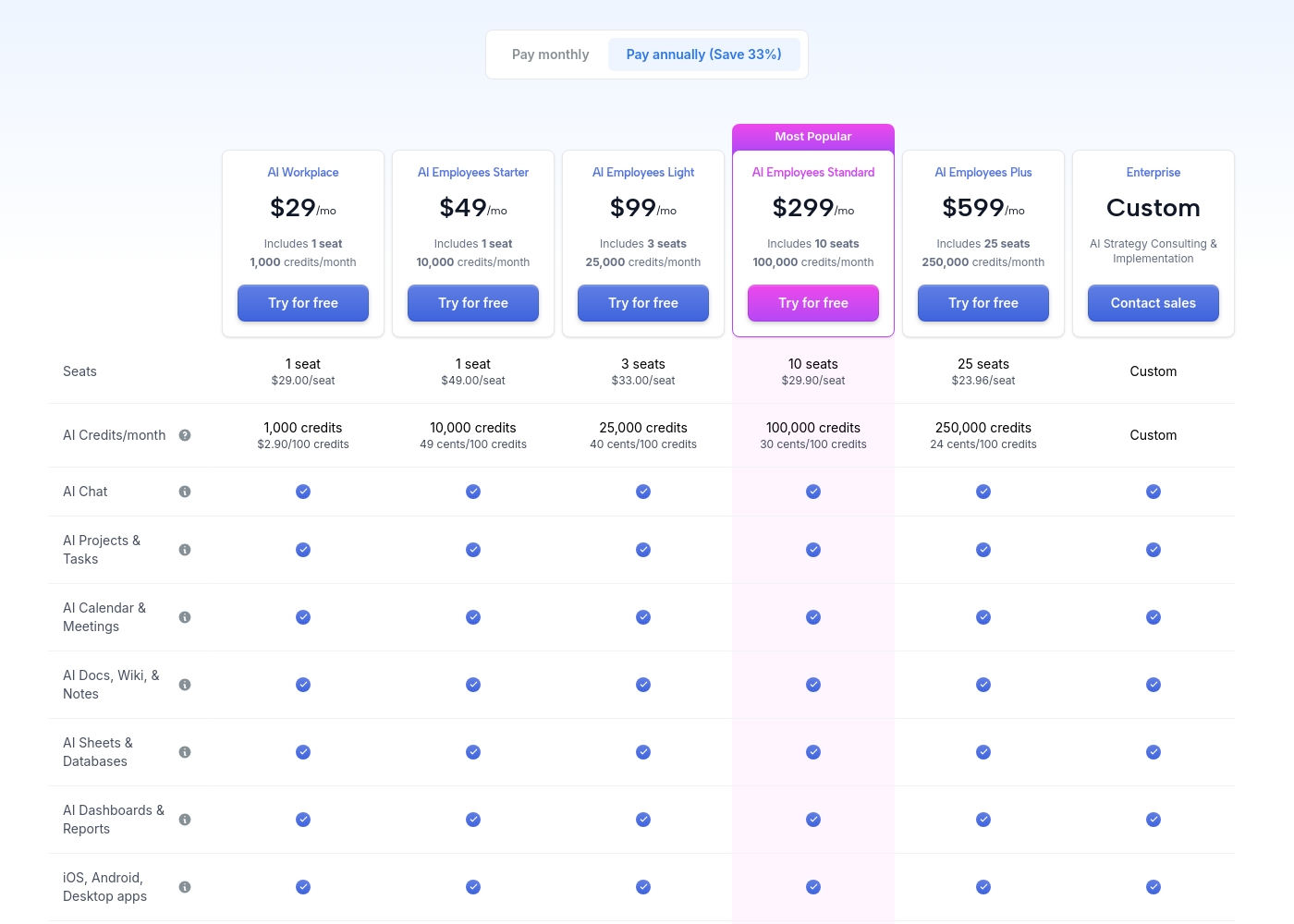
Motion costs between $29 and $599 per month (when billed annually) with 5 primary subscription plans: AI Workplace ($29/mo), AI Employees Starter ($49/mo), AI Employees Light ($99/mo), AI Employees Standard ($299/mo), and AI Employees Plus ($599/mo). There is also a custom Enterprise option.
The prices shown reflect annual billing, which gives you a savings of 33% compared to paying monthly. All plans offer a free trial period.
AI Workplace
Price: $29/mo (billed annually) Best For: Individuals and small startups starting AI integration Other Features:
- Includes 1 seat
- 1,000 credits/month ($2.90 per 100 credits)
- 3 integration connections
- Access to core AI tools (Chat, Projects, Calendar, Docs, Sheets, Dashboards)
- 1 seat
- 1,000 credits/month
- 3 integration connections
- AI Chat, Projects & Tasks, Calendar & Meetings, Docs, Wiki & Notes, Sheets & Databases, Dashboards & Reports
- iOS, Android, Desktop apps
- 1 seat
- 10,000 credits/month
- 5 integration connections
- Everything in AI Workplace
- 3 seats
- 25,000 credits/month
- 10 integration connections
- Everything in AI Employees Starter
- 10 seats (Most Popular)
- 100,000 credits/month
- 20 integration connections
- HTTP Blocks
- Everything in AI Employees Light
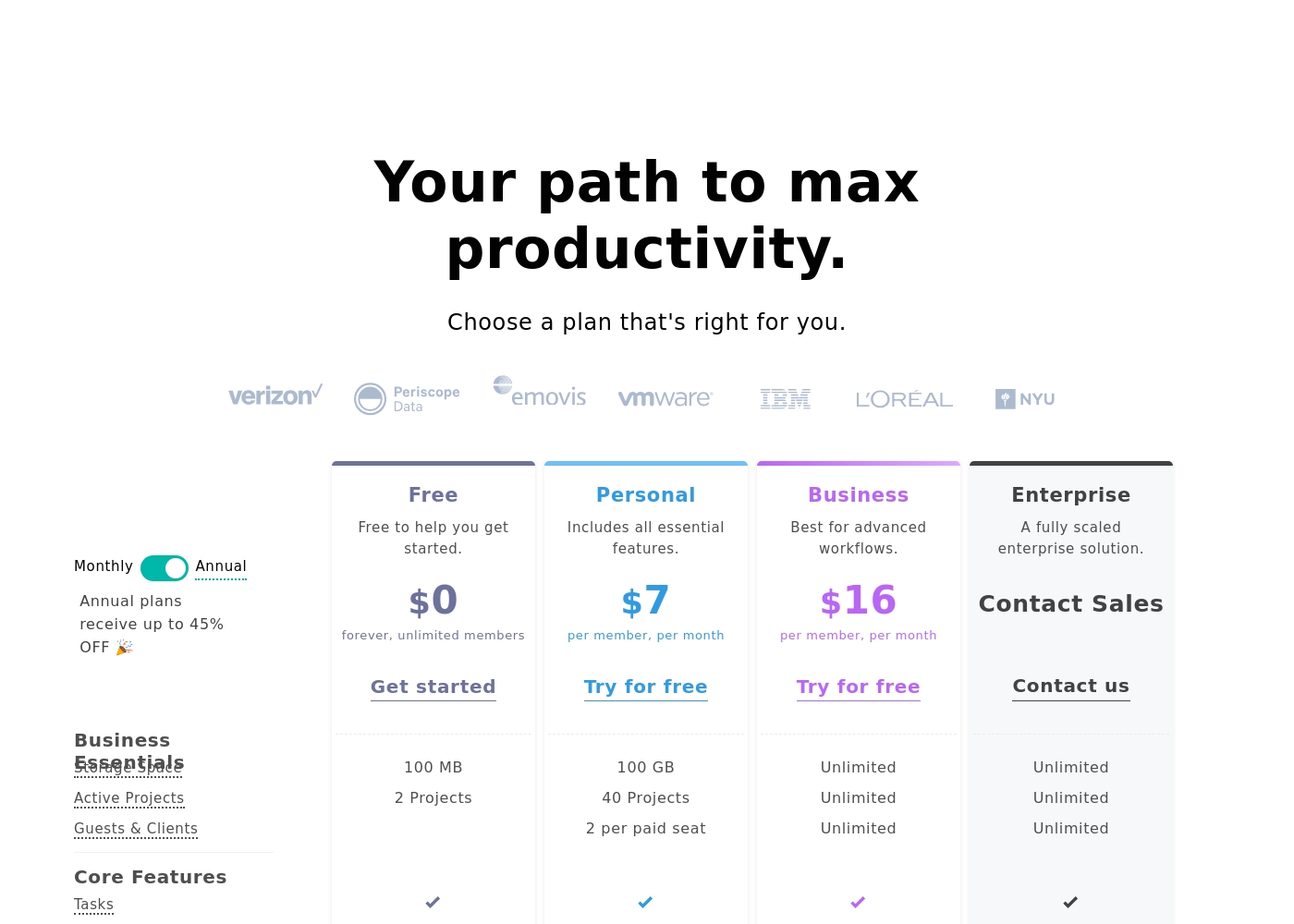
Nifty costs between $0 and $16 per month, featuring four plans: Free at $0, Personal at $7 per member, Business at $16 per member, and Enterprise requiring a quote.
We designed Nifty pricing to scale effortlessly with your team's needs. Here is a closer look at what each plan includes.
Free
Price: $0 per month Best For: Free to help you get started Other Features:
- 100 MB Storage Space
- 2 Active Projects
- Core features like Tasks, Docs, and Team Chat
- Task Dependencies and Portfolio overview
- 100 MB Storage Space
- 2 Active Projects
- Tasks, Milestones, Discussions, Docs, Files, Team Chat
- Portfolios and Recurring Tasks
- Two-Factor Authentication and Google SSO
- 100 GB Storage Space
- 40 Active Projects
- Custom Fields
- Budget Tracking
- Time Tracking & Reporting
- Unlimited Storage, Active Projects, and Guests & Clients
- Workflow Automations and File Proofing
- Cross-Project Overviews and Goals Tracking
- Team Workloads and Custom Roles & Permissions
- Priority Support and Microsoft SSO
- Native Forms
- Custom SAML
- IP Restriction
- Dedicated Success Manager
Pricing Notes
- Nifty provides a robust, fully functional Free Forever plan for basic needs.
- Motion relies on annual billing and a complex usage-based model tied to AI Credits.
- Nifty's pricing is straightforward per-member, starting at only $7/month.
- Motion's lowest paid tier is $29/month, significantly higher than Nifty's entry paid tier.
- Nifty offers monthly payment flexibility; Motion standard tiers are billed annually.
Pricing Head-to-Head
User Reviews
Motion receives overwhelmingly positive feedback, primarily focused on its powerful auto-scheduling and prioritization features. Users frequently praise the application for reducing mental load and decision fatigue by automatically organizing tasks and project workflows.
Many reviewers, including those dealing with complex schedules or ADHD, state that Motion has revolutionized their workflow, saving significant time and boosting productivity. The ability to break down complex goals into achievable tasks is consistently highlighted as a major benefit, making Motion a game-changer for project management teams and individuals alike.
I was recently diagnosed with ADHD, and Motion has made a huge difference in how I structure my day. It removes the stress of figuring out what to do next. It has been well worth the time invested in learning the system, as the benefits are truly clear.
While the overall Trustpilot rating sits at 3.7, this score is based on sparse user feedback within the input provided (specifically, only one review snippet). Users who submit feedback, however, are highly satisfied.
The primary theme emphasized is unmatched ease of use and a clean, intuitive user interface (UI) that dramatically surpasses competitors. One reviewer specifically noted that Nifty serves effectively as a client portal, which adds significant value for client-facing organizations.
This is a great, simple project management system. The ease-of-use and UI are genuinely superior to other competitors we’ve tested. Our staff and clients adopted the system immediately.
Our Verdict
Choosing between Motion and Nifty comes down to the depth of automation versus simplicity and consolidation. For the average team, Nifty offers superior value for money and ease of use. Motion is the superior, highly specialized choice for complex organizations demanding high-level AI efficiency. Motion’s superpower is its AI Workforce, allowing you to create custom AI Employees that execute workflows end-to-end. This platform reduces the administrative burden, helping systems run 30% faster by automatically prioritizing and scheduling tasks dynamically. You choose Motion if your biggest pain point is task logistics and managerial overhead. Nifty champions consolidation, acting as an extremely clean, all-in-one Project Management OS. It’s far easier to adopt and use than Motion right out of the box. Nifty excels at external handoffs, providing features like unlimited guests and file proofing controls ideal for agencies and client work. The deciding factor should be your budget and expertise. If you can handle Motion's higher price and steep learning curve, you unlock unmatched auto-scheduling power. If you need a clean, affordable, and consolidated hub that clients can use easily, Nifty is the smarter and simpler option. We recommend Nifty for agencies and small to mid-sized teams prioritizing ease of adoption and budget control. Pick Motion if you are a manager aiming to deploy an AI workforce and reduce your cognitive load dramatically.
Frequently Asked Questions
Does Nifty's Free plan offer better value than Motion's free trial?
Yes, Nifty offers a robust Free Forever plan with unlimited members and core PM features. Motion, in contrast, only provides a time-limited free trial before requiring a relatively high annual commitment. Nifty is much more accessible for individuals and small teams.
Which tool is best for managing external clients and project approvals?
Nifty is explicitly designed for client collaboration and is the better choice. Nifty offers features like unlimited guests and centralized File Proofing for quick approvals. Motion's focus is on complex internal AI-driven execution and team optimization.
How does Motion's custom AI Workforce compare to Nifty's Orbit AI?
Motion focuses on creating custom AI Employees that execute complex, end-to-end workflows and manage your entire schedule. Nifty's Orbit AI is primarily a planning aid, used for strategic prioritization and streamlining project execution. Motion is a generative tool; Nifty is an organizational tool.
Is Motion worth the steep learning curve required to master its features?
Devoted Motion users report the powerful time savings absolutely justify the learning curve investment. Motion’s unique ability to auto-schedule and dynamically re-prioritize tasks provides efficiency unmatched by Nifty. If you need deep scheduling control, Motion is worth the effort.
Which project management tool offers detailed budget and team time tracking features?
Nifty provides dedicated Time Tracking and Budget Tracking starting on its affordable Personal plan. While Motion provides reporting, Nifty offers more granular controls for financial and time management. This is essential for client billing and scope control.
Can I pay monthly for Motion or Nifty?
Nifty offers flexible monthly payment options for all its paid tiers. Motion requires users to commit to annual billing for its standard paid tiers, which offers a 33% discount. Motion does not offer a public monthly payment plan.
Ready to Choose?
Both tools have their strengths. Choose based on your specific needs.