Modge

Modge review

One desktop agent for time tracking, attendance, and profit visibility

Modge costs from $2/mo · 4 plans · prices checked Oct 23, 2026

By Ciroapp Editorial Team · Updated Sep 17, 2026

Commission may apply at no extra cost

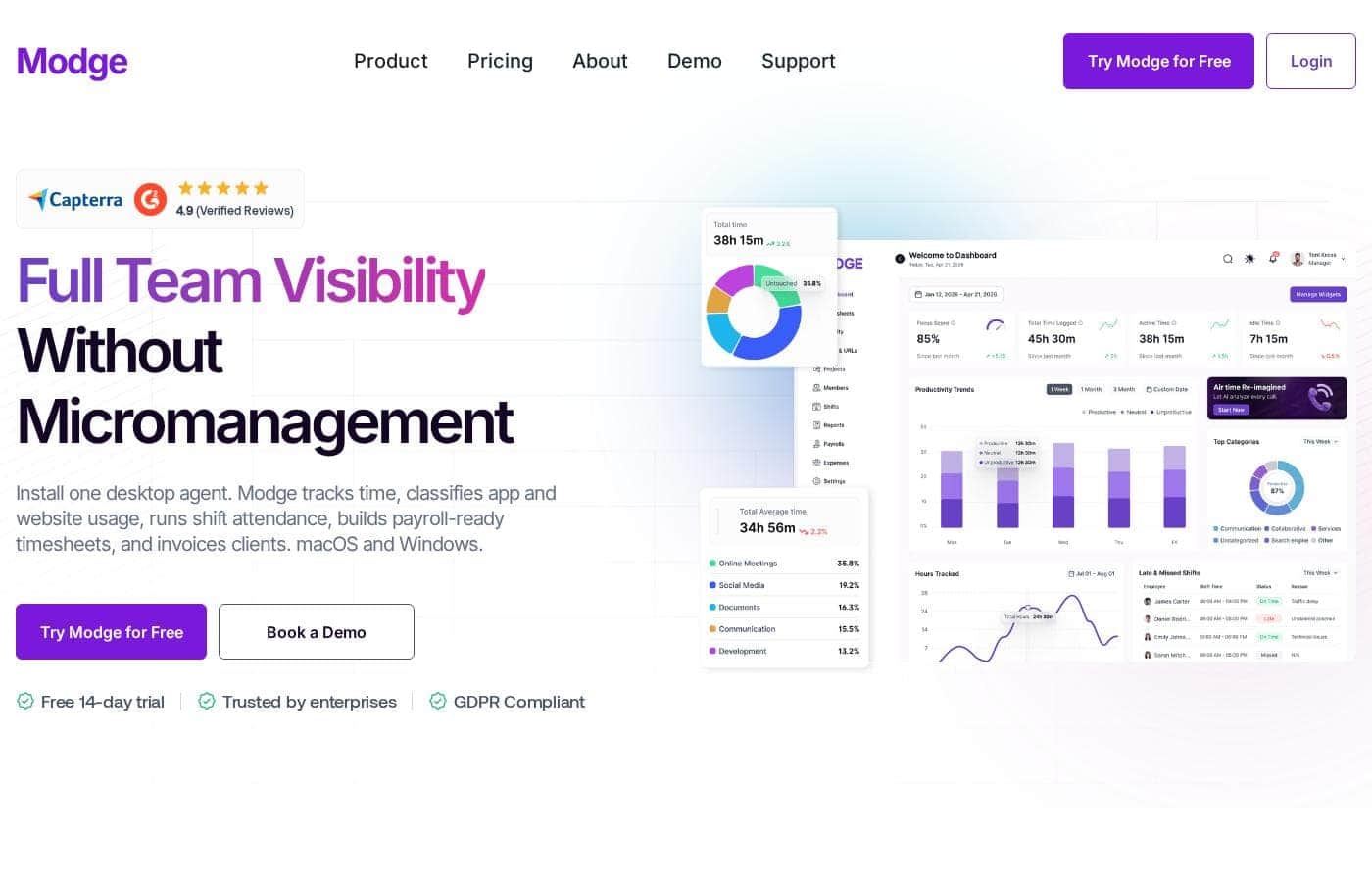
Modge homepage screenshot

At a glance

Quick overview for Modge: rating, pricing summary, key features, and highlights.
Pricing verified Oct 23, 2026

Ciroapp score

3.7/ 5

Modge packs automatic time tracking, app classification, scheduling, and profit-by-client reporting into one macOS and Windows agent, with privacy defaults that stand out, like no keystroke logging and blur-able screenshots. The catch is unpublished pricing and evidence that comes mostly from Modge itself. Overall, it's worth a trial if you're fine requesting a quote to see real costs.

Pros

  • One desktop agent handles the full chain — time capture, app classification, scheduling, attendance, leave, timesheets, and profitability reporting — so teams don't stitch together a timer, scheduler, and spreadsheet
  • Anomaly detection flags idle streaks of 15+ minutes, mouse-jiggler patterns, frequent app switching, and logins that don't match anyone's calendar before those hours reach a client invoice
  • Profitability is computed from tracked hours multiplied by your bill and pay rates, giving real margin per project, client, and person across five exportable report types (CSV or PDF)

Cons

  • Paid plan names and prices aren't published anywhere on the reviewed pages, so buyers can't budget or compare against alternatives without contacting sales
  • The desktop agent supports macOS and Windows only, excluding Linux, Chromebook, and mobile-only teams from coverage
  • There's no mention of a free-forever plan or a money-back guarantee, so the 14-day trial is the only risk-free evaluation window before committing
Best for
  • Remote and hybrid teams that need visibility across time zones
  • Agencies and BPOs billing clients by the hour and needing proof of work
  • Operations and HR teams consolidating attendance, leave, and payroll data
Free trial
Yes — 14 days
This section is a summary. Detailed sections about features, use cases, pricing, and reviews follow below.

What is Modge?

Chasing timesheets, guessing who's working, and rebuilding attendance by hand wears managers down. Modge puts time tracking, shift attendance, and productivity insight into one desktop agent for macOS and Windows. You get payroll-ready timesheets, automatic app classification, and optional screenshots — without chasing anyone.

Modge is time tracking and workforce monitoring software built around one desktop agent for macOS and Windows. The agent records work sessions, classifies app and website usage, builds timesheets, scores shift attendance, and calculates project profitability. It's designed for remote and hybrid teams, agencies and BPOs, tech companies, HR and operations, and enterprises.

The site says more than 1,000 teams use it, and a 14-day free trial needs no credit card.

Should you choose Modge?

Quick buyer guidance before you compare plans or click through.

Choose it if

  • Teams on macOS or Windows that can install a lightweight desktop agent
  • Managers who want payroll-ready timesheets without manual entry or roll calls
  • Client-facing firms that want an audit trail behind every invoice
  • Organizations with compliance needs like GDPR, HIPAA, or SOC 2
  • Leaders who want burnout and time-theft signals before they become costly

Skip it if

  • Teams on Linux, Chromebooks, or mobile-only workflows — the agent covers macOS and Windows only
  • Workplaces where any desktop monitoring would face employee resistance, even with privacy controls in place
  • Freelancers who just want a simple standalone timer without attendance or workforce management

Next steps before buying

  1. 1Start the free 14-day trial — Modge advertises full access with no credit card required
  2. 2Confirm every teammate's device runs macOS or Windows before rolling out the agent
  3. 3Agree on your screenshot and classification policy with employees before install, since these settings shape trust
  4. 4Set up your bill and pay rates early so profitability reports are meaningful from week one

Ease of use

Setup signals look strong. Modge says the agent installs in about two minutes on macOS or Windows, usually without admin rights, and that teams see useful insight within 48 hours. Timesheet approvals take one click, and reports export as CSV or PDF. This is based on the vendor's claims and high verified ratings (around 4.9 on several review platforms) — not hands-on testing.

Modge Key Features

⏱️ Timesheets that write themselves

Nobody loves chasing timesheets. Modge's desktop agent records each session — start, end, project, and active apps — with no timer to remember. Sessions roll into weekly or biweekly timesheets your team submits and managers approve in one click.

Payroll exports follow, so pay runs start from real tracked hours.

✨ App tracking without the labeling work

The agent classifies every app and website as productive, neutral, or unproductive automatically. You set one company-wide rule, then override per job title. Figma counts as productive for designers and neutral for QA — your call.

It's handy when different roles genuinely use different tools.

✨ Scheduling, attendance, and leave on one thread

Build your schedule once and Modge compares it against tracked sessions automatically:

  • Weekly, biweekly, or one-time shift patterns, per person or whole team
  • Attendance scored per shift, with grace windows you control
  • Approved paid leave inserts its hours into the matching timesheet

✨ Spot problems before they get expensive

The live dashboard shows who's working, on what, and how productive each session is right now. Modge also flags idle streaks of 15 minutes or more, frequent app switching, mouse-jiggler patterns, and logins that don't match anyone's calendar. Burnout signals, like long streaks without breaks, surface early too.

📊 See exactly what's profitable

Modge multiplies tracked time by your bill rates and pay rates, so you see real margin per project, client, and person. Five report types cover tracked hours, schedule adherence, app usage, manual time, and profitability. Every one exports as CSV or PDF in a single click.

Use Cases

💼 Bill clients with proof

Track hours, apps, and optional screenshots behind every invoice. Tracked hours multiply by your bill and pay rates to show real margin per client and project. Expected outcome: an audit trail that turns "trust us" into "here's the data." > Tip: Set bill and pay rates in week one.

⏱️ Skip the timesheet chase

The desktop agent logs start, end, project, and apps automatically. Employees submit, you approve in one click, and payroll exports follow. Approved leave hours land in the right pay period on their own.

Expected outcome: payroll-ready timesheets without roll calls.

🌍 See remote work clearly

Managers running distributed teams see who's working now, on which project, and how productive the session is — without hovering over anyone. Async approvals and time-zoned activity were built for this. Expected outcome: fewer status meetings and no more guessing.

🚩 Catch problems early

Modge flags idle streaks, frequent app switching, mouse-jigglers, and logins that don't match anyone's calendar. Burnout signals — long streaks, weeks without leave — surface before resignations do. Expected outcome: conversations you have early, not invoices you dispute later.

Modge pricing

From$2/mo

  • From the vendor's pricing page, checked Oct 23, 2026
  • 4 plans

Prices checked on Oct 23, 2026 from Modge's pricing page

Modge pricing page screenshotView pricing page screenshot
PlanBilled monthlyBilled annuallyIncludes
Basic
per user
$5/mo
—
per user
Pro
per user
$7/mo
—
per user
More Screenshots
per user
$2/mo
—
per user
Extended Data Retention
per user
$2/mo
—
per user

Price history

Tracking prices since Oct 1, 2026. No price change detected yet.

Pricing types: Free trial

Pricing notes

Modge offers a free 14-day trial with full platform access and no credit card required. Paid plan prices aren't listed on the website, so exact rates should be confirmed with Modge directly.

Modge gives every new team a free 14-day trial with full platform access and no credit card required.

Detailed plan pricing isn't published on the site, so here's what we can confirm about getting started and what you'd be paying for.

Free 14-Day Trial

Price: Free for 14 days Best For: Any team that wants to test the full platform before paying Other Features:

  • Full access to every Modge feature for 14 days
  • No credit card required to sign up
  • Desktop agent installs in about two minutes on macOS or Windows

This isn't a stripped-down demo. You get the whole toolkit: automatic time tracking, app and website classification, shift scheduling, attendance scoring, payroll-ready timesheets, and optional screenshots. Modge says most teams hit their first useful insight within the first week, so two weeks is enough to judge fit.

That makes the trial the natural entry point for everyone — solo founders, agencies, and enterprise IT teams alike. You can run it with a small group before deciding whether to roll it out company-wide. If you're comparing workforce monitoring tools, it's the lowest-risk way to build your shortlist.

What the platform includes

Modge doesn't list plan names or prices on its website. It does spell out the product in detail:

  • Productivity dashboards with scores, hours logged, and leaderboards
  • App and URL tracking labeled productive, neutral, or unproductive
  • Weekly or biweekly timesheets with one-click manager approval
  • Shift scheduling, automatic attendance, and leave management
  • Profitability reports by project, client, and person
  • Five report types, exportable as CSV or PDF

Because exact tiers and rates aren't shown, confirm current pricing and any seat or usage limits with Modge before committing — especially if you're weighing an annual agreement. 📋

The clearest cost fact on the site is the trial itself: 14 days, full access, no card needed. There's no mention of a free-forever plan or a money-back guarantee, so the trial is your no-risk window to evaluate. Modge is GDPR compliant and certified to ISO 9001, HIPAA, PCI DSS, and SOC 2 Type II — useful reassurance if pricing talks turn into a longer contract.

Cost calculator

Estimate what Modge costs for your team.

Billing
Per month
$25
Per year
$300

Basic is priced per user: price × 5 seats. Estimate based on published list prices, before taxes, add-ons and discounts.

How to pay less for Modge

  • Use the 14-day free trial before you pay.
  • Some plans are priced per user: only pay for seats people actually use.
Start free trial

Email me when Modge changes price

One email when we detect a price change on the vendor's pricing page. No newsletter, no deals. Unsubscribe in one click.

User Reviews

No reviews yet.

Write a Review

Write a Review for Modge
0/100 characters
0/2000 characters

Why use Modge?

Most teams juggle a timer, a scheduler, and a spreadsheet to answer one question: who did what, and what did it cost? Modge runs that whole loop from a single install — and it lets you verify everything free for 14 days.

  • Time records itself. Sessions capture start, end, project, and active apps automatically, then roll into weekly or biweekly timesheets managers approve in one click, with payroll exports ready.
  • Classification is hands-off. Apps and websites are labeled productive, neutral, or unproductive automatically — with per-role overrides, since Figma isn't the same for designers and QA.
  • Red flags surface early. Idle streaks, frequent app switching, mouse jigglers, and logins that don't match anyone's calendar get flagged before they land on a client invoice.
  • Profit becomes visible. Tracked hours multiplied by your bill and pay rates show real margin per project, client, and person, and every report exports as CSV or PDF in one click.
  • Privacy is built in, not bolted on. No keystroke logging, screenshots off by default with blur options, plus ISO 9001, HIPAA, PCI DSS, and SOC 2 Type II certifications.
  • Onboarding is fast on paper. Modge claims a two-minute install and first insights within 48 hours — and the trial costs nothing to check that claim.

Modge alternatives

Other tools in the Employee monitoring category

View all Employee monitoring tools
Timedoctor

Timedoctor

Employee monitoring3.9/5

Time Doctor focuses entirely on workforce analytics. This powerful solution is specifically built to support teams that are spread out geographically. If you manage remote employees, this tool addresses your unique data needs. It helps you see crucial performance data clearly.

MoniVisor

MoniVisor

Employee monitoring3.8/5

MoniVisor is a comprehensive, safe, and reliable solution for monitoring computer usage on Windows and macOS. It operates discreetly in the background, providing detailed insights without noticeable indicators to the end user. This feature-rich program is ideal for caring guardians protecting kids online and for employers managing remote teams or SMEs who need to boost productivity and streamline their workflow. It focuses on helping you achieve accountability and optimal performance across all environments.

Modge FAQ

How much does Modge cost?

Modge's cheapest paid plan, More Screenshots, costs $2 per month. Paid plans range from $2 to $7 per month. Prices checked on Oct 23, 2026 from the vendor's pricing page.

Does Modge have a free plan?

No. Modge lists no free plan; the cheapest paid plan starts at $2 per month.

Does Modge offer a free trial or a money-back guarantee?

Modge offers a 14-day free trial.

Has Modge's price changed recently?

No. We have not detected a price change since we started tracking on Oct 1, 2026.

How does Modge protect our data?

Your data gets AES-256 encryption at rest and TLS 1.3 in transit. Row-level security means people only see what their role allows, and Modge runs annual penetration tests plus third-party security audits.

Can we control screenshots without going all-or-nothing?

Yes. You enable screenshots per team or per person, set a capture interval that fits your policy, and apply blur at the organization or individual level. They're optional, never always-on.

What if someone needs to log hours by hand?

Modge includes a manual time report. Every hand-entered hour comes with a full audit trail and reason codes, so each entry stays traceable and easy for a manager to review.

Do employees need admin rights to install it?

Usually not. You send teammates a download link, and most setups install without admin rights. The agent is up on macOS or Windows in about two minutes, capturing from the first session.

Ready to try Modge? Check out the official site or pricing.

Are you Modge? Claim this listing · Get the badge