Timedoctor

Timedoctor

Workforce Analytics Designed for Distributed Teams

#1 dans Employee monitoring
1 min read · Updated 10/6/2025
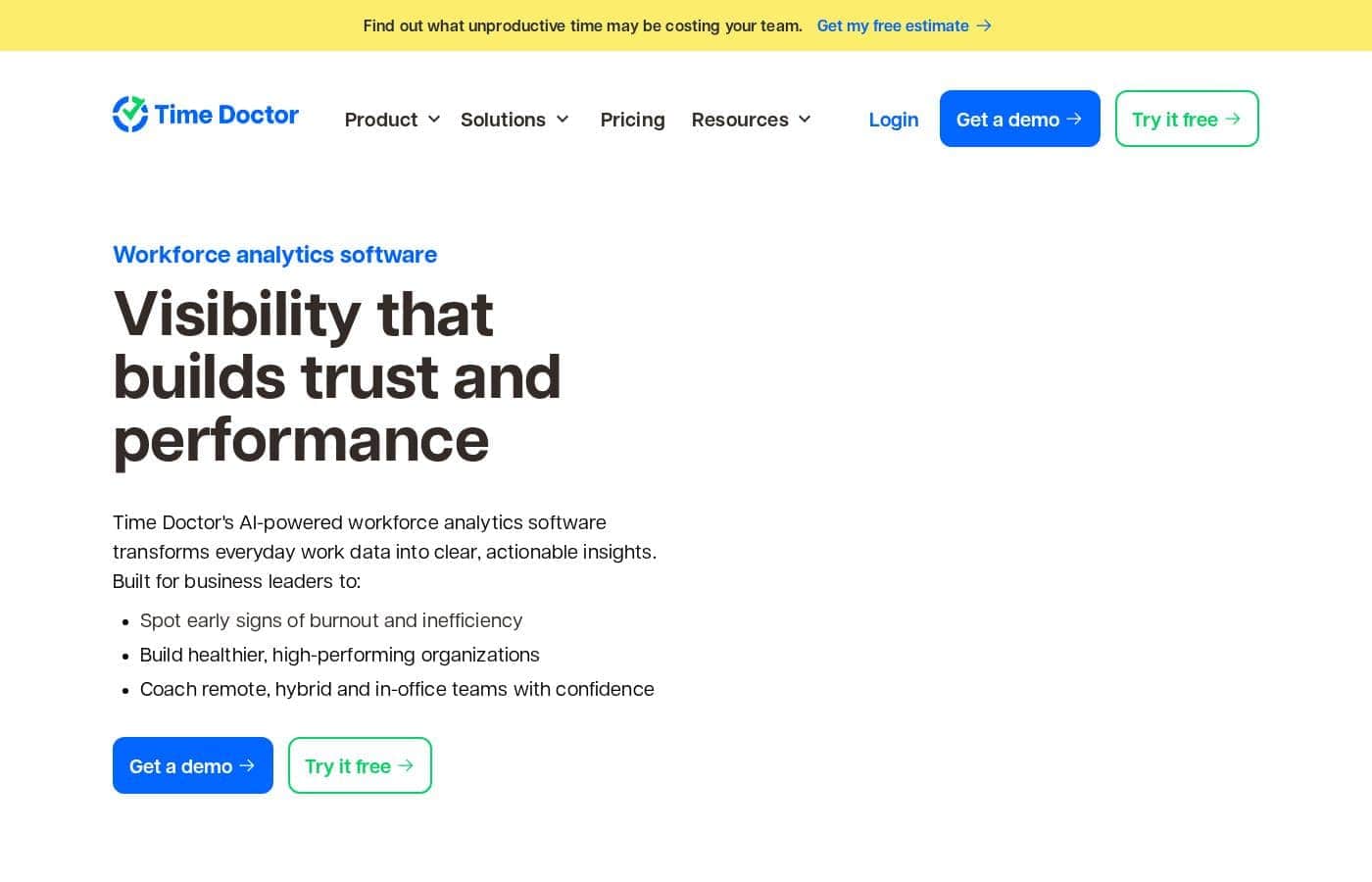
Timedoctor homepage screenshot

At a glance

Quick overview for Timedoctor: rating, pricing summary, key features, and highlights.

Ciroapp review

2.3
Deep Analytics, High Financial Risk

We find Time Doctor offers specialized workforce analytics crucial for distributed teams, providing deep insights into productivity and application usage. Overall, we must caution potential users; while the feature set is comprehensive, recurring and severe reports of billing errors and extremely difficult cancellation processes seriously undermine its operational value.

Pros

  • Pro:Designed specifically for deep workforce analytics in distributed teams.
  • Pro:Time tracking functionality is accurate to the second.
  • Pro:The Premium plan includes powerful AI-based performance analytics and benchmarks.
  • Pro:Integrates smoothly with over 60 popular management platforms like CRM and PSA tools.

Cons

  • Con:Widespread, serious reports of unauthorized charges and duplicate user billing.
  • Con:Cancellation and refund processes are frequently difficult or impossible for users.
  • Con:Recent shifts to Time Doctor 2 (TD 2) introduced integration bugs and lost features.
  • Con:Technical support responsiveness is inconsistent, especially regarding billing disputes.
Free trial
Yes — 14 days
Range: $6.70–$16.70/user/month (billed annually)Free trial, Monthly subscription, Yearly subscription, Per seat pricing
This section is a summary. Detailed sections about features, use cases, pricing, and reviews follow below.

Timedoctor review, pricing, features, pros & cons

Managing remote work can feel challenging. You need concrete data to understand your team's performance, but finding the right tools is often hard. ✨ Time Doctor provides workforce analytics designed specifically for distributed teams.

It offers the visibility you need to manage your people effectively.

What is Timedoctor?

💡 Time Doctor focuses entirely on workforce analytics. This powerful solution is specifically built to support teams that are spread out geographically. If you manage remote employees, this tool addresses your unique data needs.

It helps you see crucial performance data clearly.

Timedoctor Key Features

✨ Core Time Tracking for Instant Visibility

You gain instant, dependable visibility into how time is spent across your workforce. Time Doctor provides automatic tracking for all team members. This neat feature records activity throughout the day, creating an accurate historical record.

Use this detailed data to monitor both remote and hybrid teams effectively. The fundamental data helps you start building a solid foundation for better productivity analysis. Importantly, the system reliably tracks whether employees are actively working online or logging time while offline.

✨ Detailed Workforce Activity Monitoring 📸

Get concrete data about activity levels and the digital tools your employees use. The system monitors activity meticulously using screens and reports. It captures sequential screenshots periodically while tracking time, offering managers visual context for work completed.

Premium features offer granular checks on data integrity. The system provides detection for activities like unusual keyboard movement or mouse jiggler and clicker use. This level of oversight helps you ensure recorded hours are valid and engaged work time.

✨ Integrated Management and Scheduling Tools

Structure your team's workflow using essential management and organizational functions. Time Doctor helps standardize daily management activities within one platform, which is great for growing businesses. These added tools provide better structure for managing distributed teams.

You can easily create and share schedules with your entire team. This simplifies knowing who is working and when they should be logged in. Managers benefit significantly from integrated functions covering attendance monitoring and the formal process of approving recorded time.

✨ Advanced AI for Powerful Performance Insights

Utilize sophisticated AI tools designed to proactively understand and close performance gaps. Specialized AI features are available starting on the Premium plan. Benchmarks AI helps compare your team's current performance against historical data and industry norms.

This crucial data allows you to identify instantly where improvements are needed. You also receive an Unusual Activity AI Report, which alerts you automatically to significant deviations in staff workflow. This comprehensive view helps you maximize efficiency and control.

✨ In-Depth Reporting and Analytics

Access a variety of specialized reports that show how work is getting done. You can review comprehensive Web and App Usage reports that track time spent in different programs. Managers can assign specific Productivity Ratings to different software usage, clarifying employee intent.

All basic plans include a Timeline Report and the ability to link hours to specific Projects and Tasks. The system provides a comprehensive Activity Summary. Premium users also gain access to the specialized Office vs Remote Report.

Use Cases

📊 Establishing Instant Visibility for Remote Teams

Managing staff spread across different locations requires reliable data visibility. Time Doctor provides automatic tracking, giving managers crucial insights without needing constant check-ins. You can track time directly against specific projects and tasks, ensuring accountability for every working moment.

This simple feature helps new users quickly establish a solid foundation for productivity. It provides standardized data for remote oversight, increasing your confidence in distributed operations.

📅 Streamlining Time Management and Approvals

Growing businesses need better structure for managing working hours and attendance compliance. The Standard plan includes dedicated tools for setting and overseeing schedules. You can quickly view who is online and confirm adherence to established work times.

Managers can use the platform to approve recorded time easily. This integration ensures clean data flows for payroll and simplifies the administrative workload associated with decentralized teams.

🚀 Identifying and Closing Productivity Gaps

Problem: It's hard to gauge team effort and focus when employees work independently.

Approach: Use Web & App Usage reporting combined with Productivity Ratings to understand how time is actually spent. For detailed comparisons, look at the Activity Summary reporting to find areas needing improvement.

Outcome: This analysis helps you gain the complete picture of performance. You can identify profit gaps and implement targeted coaching to maximize efficiency across the team.

🛡️ Detecting Unusual or Irregular Activity

Security and compliance are key concerns when monitoring a workforce. Premium features offer powerful AI-based analytics to detect anomalies automatically. The system looks for unusual patterns like irregular keyboard activity or the attempted use of tools like a mouse jiggler.

This robust monitoring helps managers swiftly identify potential risks and maintain high organizational control. It protects against attempted time manipulation and confirms that staff remain focused on their core duties.

🌎 Standardizing Data for Hybrid Workforces

When managing both office and remote employees, you need equitable performance metrics. Time Doctor offers the specialized Office vs Remote Report to deliver standardized data across your entire workforce. This ensures you are comparing activities objectively, regardless of the physical location.

This capability gives managers the critical, tangible business data needed to manage the complexities of a modern hybrid environment systematically. It removes speculation and provides clarity.

🧠 Benchmarking Team Performance with AI

As a team scales, understanding what ‘good’ performance looks like becomes complex. The Benchmarks AI feature offers specialized workforce analytics derived from large data sets. It effectively compares your team’s output and activity levels against established standards.

This allows you to gain deep, high-level insights. You know instantly where your team excels and where adjustments, like workflow changes or additional training, might be necessary.

Pricing Overview for Timedoctor

Pricing range
$6.70–$16.70/user/month (billed annually)
Pricing types
Free trial, Monthly subscription, Yearly subscription, Per seat pricing

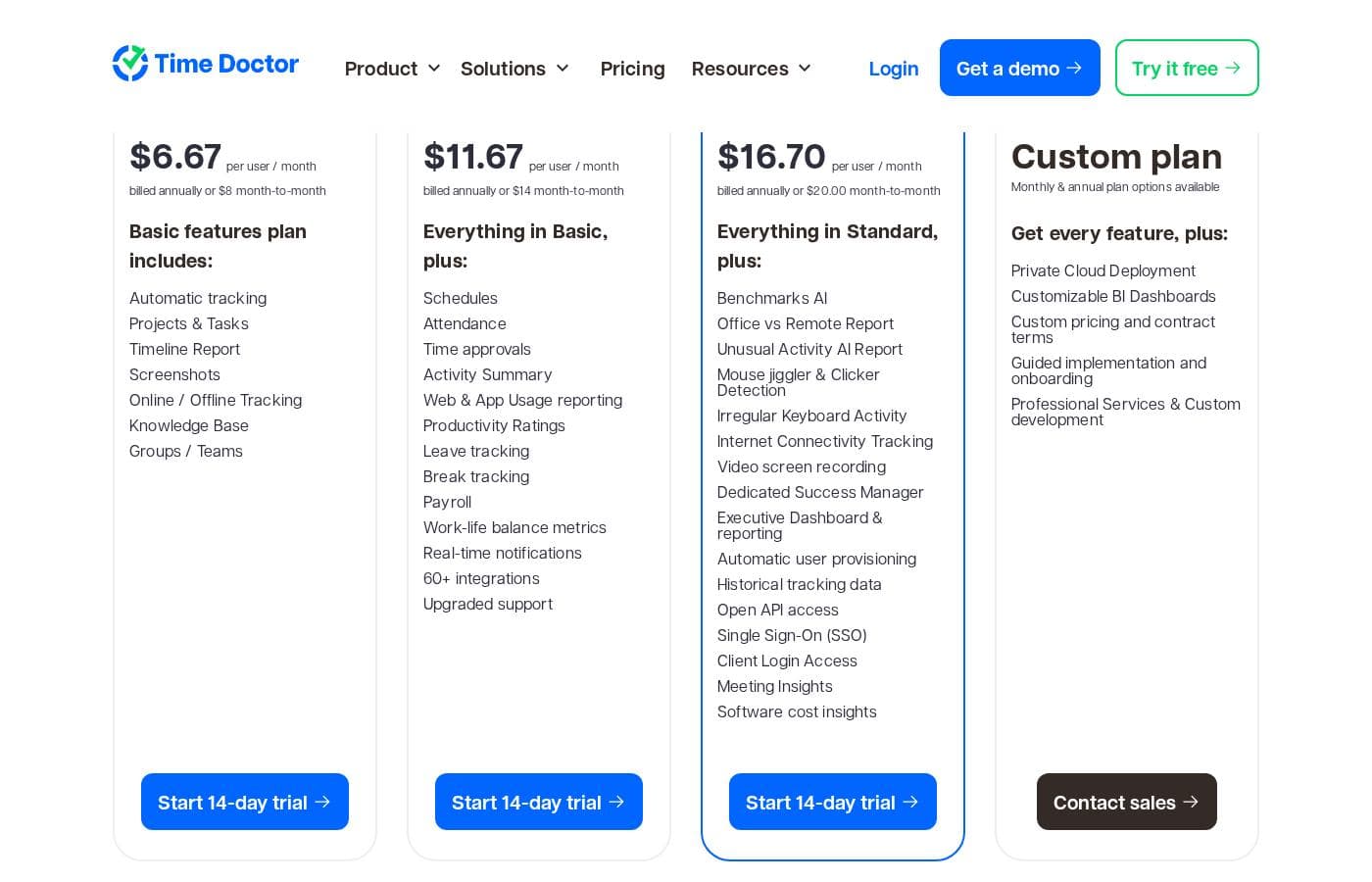
Time Doctor provides flexible, per-user pricing, offering four main plans starting at $6.70 per user per month when billed annually. You can choose between monthly and annual subscriptions, with the annual option including a significant discount.

Plans & Pricing

Basic

Monthly$8.00
Yearly$6.70
per user / month
  • Automatic tracking
  • Projects & Tasks
  • Timeline Report
  • Screenshots
  • Online / Offline Tracking
  • Knowledge Base

Standard

Monthly$14.00
Yearly$11.70
per user / month
  • Everything in Basic
  • Schedules
  • Attendance
  • Time approvals
  • Activity Summary
  • Web & App Usage reporting
  • Productivity Ratings

Premium

Monthly$20.00
Yearly$16.70
per user / month
  • Everything in Standard
  • Benchmarks AI
  • Office vs Remote Report
  • Unusual Activity AI Report
  • Mouse jiggler & Clicker Detection
  • Irregular Keyboard Activity

Enterprise

MonthlyCustom plan
YearlyCustom plan
Monthly & annual plan options available
  • Get every feature
  • Private Cloud Deployment
  • Customizable BI Dashboards
  • Custom pricing and contract terms
  • Guided implementation and onboarding
  • Professional Services & Custom development

Time Doctor costs between $6.70 and $16.70 per user/month, billed annually, with four plans: Basic at $6.70, Standard at $11.70, Premium at $16.70, and Enterprise (Custom plan).

Let’s look at the features and pricing available for each subscription level.

Basic

Price: $6.70 per user / month (billed annually, or $8.00 monthly) Websites Supported: Not explicitly stated Best For: Gaining instant visibility into remote or hybrid teams. Refund Policy: Not explicitly stated Other Features:

  • Automatic tracking
  • Projects & Tasks
  • Timeline Report
  • Screenshots
  • Online / Offline Tracking
  • Knowledge Base

The Basic plan is great for smaller teams or new users who need fundamental monitoring tools. You quickly get essential visibility into tasks and time usage for your workforce. This plan lays a solid foundation for improved productivity.

Standard

Price: $11.70 per user / month (billed annually, or $14.00 monthly) Websites Supported: Not explicitly stated Best For: Gauging team productivity with granular reports. Refund Policy: Not explicitly stated Other Features: Everything included in Basic, plus Schedules, Attendance, Time approvals, Activity Summary, Web & App Usage reporting, and Productivity Ratings.

Moving up to Standard provides more detailed controls, like managing schedules and approving recorded time. This tier suits growing businesses needing advanced reporting capabilities and better structure for their team management.

Premium

Price: $16.70 per user / month (billed annually, or $20.00 monthly) Websites Supported: Not explicitly stated Best For: Getting the complete picture of performance and profit gaps. Refund Policy: Not explicitly stated Other Features: Everything included in Standard, plus Benchmarks AI, Office vs Remote Report, Unusual Activity AI Report, Mouse jiggler & Clicker Detection, and Irregular Keyboard Activity.

The Premium plan is the most popular choice because it includes powerful AI-based analytics. You gain deep insights into productivity benchmarks and can detect irregular keyboard or mouse activity. This comprehensive view helps you maximize efficiency and control.

Enterprise

Price: Custom plan (Monthly and annual options available) Websites Supported: Not explicitly stated Best For: Customizing workforce analytics to an entire enterprise’s needs. Refund Policy: Not explicitly stated Other Features: Private Cloud Deployment, Customizable BI Dashboards, Custom pricing and contract terms, Guided implementation and onboarding, and Professional Services & Custom development.

Enterprise is designed for very large organizations that require specialized infrastructure and tailored features. You benefit from professional services, custom development, and full control over your private cloud deployment. Contact the sales team for specific pricing quotes.

Timedoctor does not offer a permanent free plan, but you can easily try every feature without risk. New users receive a 14-day free trial of the Premium plan, with no credit card required to start. We also offer flexible billing options; customers choosing annual payment receive two months free. 🎉

User Reviews

External reviews for Time Doctor are sharply divided, evidenced by the low 1.5 (Bad) TrustScore. While some users praise the system for significantly improving team productivity and highlight the accuracy of the core time tracking features, most recent complaints revolve around severe financial and support issues.

Many customers report being overcharged, double-billed, or charged without authorization, particularly after encountering glitches or switching between the older Time Doctor 1 (Classic) and the newer Time Doctor 2 platform. Canceling subscriptions or obtaining refunds is frequently described as extremely difficult, with support responses sometimes being unhelpful or slow.

Users noted critical bugs like screen logs failing to record or the system tracking activity automatically even when auto-tracking settings were reportedly disabled. The shift to TD 2 specifically caused integration functionality problems and a perceived downgrade in mobile control options.

However, when the system works as intended, its capacity for detailed workforce analytics is high. Dedicated support agents have sometimes provided full refunds, but responsiveness remains highly inconsistent.

Proceed with caution due to the significant volume of financial complaints. ⚠️

What users say elsewhere

Octavia K.
· Trustpilot
5.0 / 5

We forgot to cancel our trial period and were charged for 19 months without using the contract. Fortunately, after explaining our situation, their support desk agreed to reimburse us in full. Thank you to the department for its attention to customers.

Chris M.
· Trustpilot
4.5 / 5

This system is amazing. It is quite expensive, honestly, but it has dramatically improved productivity levels for my team. The overall benefit well exceeds the cost of the service.

No reviews yet.

Write a Review

Write a Review for Timedoctor
0/100 characters
0/2000 characters

Why use Timedoctor?

Choosing the right platform is simple when you focus on expertise. Time Doctor is purpose-built for the modern distributed workplace. It delivers specialized data tools that give you confidence in your remote operations.

  • ✅ Get deep insights through specialized workforce analytics tools.
  • It is designed exclusively to handle the complexities of distributed teams.
  • Improve remote oversight by providing standardized data across all locations.
  • Use a platform dedicated to providing tangible, critical business data.

Ready to transform your workflow with Timedoctor?

Timedoctor Alternatives

Other tools in the Employee monitoring category

Frequently Asked Questions

What level of service do I get during the 14-day free trial?

When you start your trial, you receive 14 days of free access to all features included in the Premium plan. You don't need to enter a credit card to begin testing the service.

Is Time Doctor priced per usage or based on the number of users?

Time Doctor operates on a flexible per-user per-month pricing model. Costs range from $6.70 to $16.70 per user, depending on the plan you select.

How much money do I save if I choose an annual subscription?

If you pay for the entire year upfront, you receive two months free. This annual commitment provides a 16.6% discount compared to the monthly billing rates.

How long does it typically take to implement Time Doctor for my team?

Implementation is quite fast, and most teams can get set up and start utilizing the basic features within a single day. Larger organizations can access guided onboarding support to ensure everything runs smoothly.

If I need to stop using the service, how do I cancel my account?

To cancel, the company owner must log in, visit the Settings / Billing page, and find the 'Cancel account' link under Billing details. You will confirm your decision through a follow-up dialog.

Does Time Doctor offer any type of money-back guarantee or defined refund policy?

Specific refund terms are not detailed on the pricing page. Time Doctor states you can read about their full refund policy by following a linked resource.

Are sales or consumption taxes included in the listed subscription prices?

No, the listed prices do not include taxes. If your subscription is subject to sales, VAT, GST, or comparable consumption taxes, the amount will be added and clearly shown on the checkout page.

Which types of teams benefit most from the Basic Plan?

The Basic plan best suits smaller teams or new users who need fundamental monitoring. It offers essential tools like automatic tracking and screenshots for instant visibility into remote or hybrid workforce activity.

What deployment options are exclusive to the Enterprise custom plan?

The Enterprise plan is designed for large organizations requiring specialized infrastructure. This includes the option for Private Cloud Deployment, professional services, and customized BI dashboards.

Do you offer security enhancements like Single Sign-On (SSO), and how much does it cost?

Yes, Single Sign-On (SSO) is available as an optional add-on for $200.00 per account per month. This allows for secure, one-click access and improved password management.

How are the optional add-ons billed? Is it per user or per account?

Billing varies by feature. Add-ons like Benchmarks AI are charged per user per month. More advanced features, such as SSO and BigQuery Access, are charged per account per month.

How should I explain the purpose of Time Doctor to my employees?

It's best to explain that the goal is not monitoring personal activity, but rather measuring team effectiveness. This helps protect the business and allows managers to drive efficiency.

Can I see a full list of third-party platform integrations (like project management tools)?

Not explicitly stated on the official site. The provided content focuses on Time Doctor's specialized internal workforce analytics features, not connectivity information.

Is there a minimum number of seats required to purchase a paid subscription?

Not explicitly stated on the official site. Since pricing is strictly per user, you should contact the sales team to confirm any minimum staffing requirements for the plans.

Ready to try Timedoctor? Check out the official site or pricing.