Framer

Framer

The visual platform where designers publish high-performing websites quickly and without code limits.

#12 dans Website Builder
2 min read · Updated 10/5/2025
Framer homepage screenshot

At a glance

Quick overview for Framer: rating, pricing summary, key features, and highlights.

Ciroapp review

2.5
Powerful Design, Challenging User Experience.

Framer is pitched as a high-performance visual tool offering designers full creative control and rapid deployment capabilities. However, we note that the steep learning curve, combined with systemic issues like unhelpful support and reports of misleading pricing structures, creates a challenging user environment. Overall, we find that the foundational technology is impressive, but major user experience and customer service failures drastically undermine its claimed efficiency.

Pros

  • Pro:Powerful visual tool favored by designers, especially those familiar with Figma.
  • Pro:Enables handoff-free publishing and rapid site deployment.
  • Pro:Built-in modern features like advanced CMS, SEO tools, and AI generation.

Cons

  • Con:Highly complicated and unintuitive user interface (UI/UX).
  • Con:Frequent reports of constant bugs and reliability issues.
  • Con:Pricing is often misleading, with unexpected, high costs for basic features like localization.
  • Con:Customer support is reportedly slow, difficult to access, and often relies on unhelpful AI bots.
Free trial
Yes — 30 days
Money-back guarantee
Yes — 14 days
Range: $75–$200/monthFree plan, Yearly subscription, Per seat pricing, Usage-based pricing
This section is a summary. Detailed sections about features, use cases, pricing, and reviews follow below.

Framer review, pricing, features, pros & cons

😩 Are you tired of having your creative vision compromised by slow development cycles and mandatory handoffs? Waiting on complex development often delays launch and limits daily updates.

Framer directly addresses this frustration by providing full creative freedom and essential speed. You can launch seamlessly and ship high-performing pages rapidly, all while staying firmly in control. ✨

What is Framer?

Framer is a powerful visual design tool made for crafting and publishing modern websites. It empowers you to build exactly what you imagine using smooth effects, animations, and interactions. You can craft responsive layouts visually, eliminating the need to write code.

The platform helps you skip the blank canvas entirely. Integrated AI can generate sophisticated page layouts and advanced components right away. Collaboration is built in, meaning updates are seamless, and the entire process is completely handoff-free. 💡

Framer Key Features

✨ AI-Powered Kickstart with Wireframer 💡

Start designing instantly without the frustration of a blank screen. Framer’s integrated AI can generate full site layouts and advanced components within seconds. This feature, known as Wireframer, significantly accelerates your entire starting process.

You immediately gain momentum and can jump right into designing with confidence. This removes the slowest step—the blank canvas—and lets you focus on refining your vision.

✨ Total Visual Design Control

You can build precisely what you imagine using Framer's powerful visual platform. You craft highly responsive layouts quickly and easily, removing the need to write any code. You maintain total creative freedom over the final product.

Bring your designs to life using smooth effects, detailed interactions, and compelling animations. Framer allows you to achieve complex, immersive designs entirely visually, ensuring no compromise on quality.

✨ Seamless Collaboration and Publishing

Keep your team moving quickly with Framer’s built-in, seamless collaboration tools. The platform eliminates traditional handoffs and minimizes friction in the publishing pipeline. Designers can ship daily updates without needing complicated staging or developer involvement.

You can work with collaborators directly on the canvas or edit copy right on the live page. Changes are always auto-saved, and team members are instantly notified when the project is ready to publish.

✨ Effortless Content Management (CMS)

Managing your site’s content should be simple, not stressful. Framer features a powerful, built-in CMS that lets you update content effortlessly without touching code. This is how you keep your website content fresh and relevant every single day.

The CMS also supports sophisticated localization capabilities. For regions using Right-to-Left (RTL) reading directions, like Arabic or Hebrew locales, Framer automatically flips your layouts in Stacks and Grids. This ensures the layout always matches the correct reading direction for the user.

✨ Integrated Growth and Analytics

Understand exactly how your site performs and what drives conversions right inside Framer. The platform offers built-in Analytics and Insights to continuously track critical metrics. You can monitor high-level performance indicators, including traffic volume, pageviews, and unique visitor counts.

Framer also includes robust optimization tools for growth. You can use these features to test different versions of your pages and track conversion funnels. This helps you maximize results based on detailed performance data.

Optimization tools include:

  • A/B testing
  • Click tracking
  • Conversion funnels

✨ Core Performance and SEO

Ensure that your website is both lightning-fast and easily discoverable by search engines. Framer features built-in SEO settings and metadata management for every page. This helps you optimize your ranking on Google.

The platform provides blazing-fast hosting and a premium network connection. Your site achieves high performance, offering visibility into metrics like SEO, Performance, and Accessibility tests to ensure your site is always optimized and running efficiently.

Use Cases

✨ Accelerated Site Launch Using AI Generation

A designer needs to quickly launch a new marketing site for an upcoming product. Traditional methods involve slow setup and code handoffs, which delay the launch. Framer lets the designer generate initial page layouts and sophisticated components immediately using AI. This rapid start bypasses the blank canvas and allows them to move straight into perfecting the design details.

They achieve total creative mastery by visually crafting the final responsive layouts, adding smooth animations and effects. With no required developer handoffs, the site launches seamlessly and much faster than expected. The entire process takes days instead of weeks.

📈 Optimizing Site Performance with Growth Tools

Problem: Your marketing team wants to increase sign-ups but isn't sure which call-to-action performs best. Relying on external, complex testing software adds friction and setup time.

Approach: Use Framer's integrated Analytics and Optimization tools. The team sets up multiple versions of their homepage element using the A/B testing functionality. They closely track performance, visitor metrics, and conversion funnels directly within the platform.

Outcome: The team quickly identifies the winning design variant based on tracked conversions. They immediately apply the change to the live site, maximizing performance and ensuring data-driven growth.

Tip: Leveraging integrated tools means you don't need to exit Framer to monitor how well your pages are converting.

💡 Effortlessly Managing High-Volume Content

A content manager must update their company blog daily without relying on a development team for publication. They need a simple system to manage news articles, case studies, and localized content.

  1. Use the built-in CMS to structure all content collections (e.g., Blog Posts, Team Profiles).
  2. Write and edit content directly in the CMS interface without touching code.
  3. Publish or schedule updates instantly. The connected layouts remain fresh automatically.

Expected outcome: The site content stays current, fresh, and accurate. The content team maintains full control over daily updates, eliminating development bottlenecks.

🤝 Simplifying Team Publishing Cycles

The in-house creative team needs to frequently update the main company website with small design tweaks and fresh imagery. Waiting for development cycles causes frustration and slows down iteration speed. Framer’s collaborative features ensure updates are seamless and handoff-free.

Designers can edit copy directly on the page canvas or make subtle layout changes. Since publishing is handoff-free, they ship daily updates without development approval or complicated staging processes. This speeds up daily operations significantly, maintaining deep control over the visual presentation while moving fast.

🎨 Designing Immersive, Code-Free Experiences

You want to build an immersive brand site filled with unconventional interactions and smooth effects. Traditionally, this requires extensive custom coding and debugging. Framer provides full creative freedom right in the visual canvas.

You create stunning visual designs and complex responsive layouts entirely visually. By crafting custom interactions and animations directly, you achieve exactly what you imagined without ever needing to write code. The result is a high-performing site that looks custom-built but was deployed at record speed.

🌍 Ensuring Global Reach and Accessibility

A company is expanding into markets that use languages read from right to left, such as Arabic. Ensuring the site supports this reading direction often requires extensive component modification.

Framer automatically flips layouts in Stacks and Grids when viewing the site in those locales. You simply check the Layout Direction setting, and Framer handles the necessary adjustments. This streamlines the localization process and ensures proper layout alignment for global audiences.

Pricing Overview for Framer

Pricing range
$75–$200/month
Pricing types
Free plan, Yearly subscription, Per seat pricing, Usage-based pricing
Money-back guarantee
Yes — 14 days

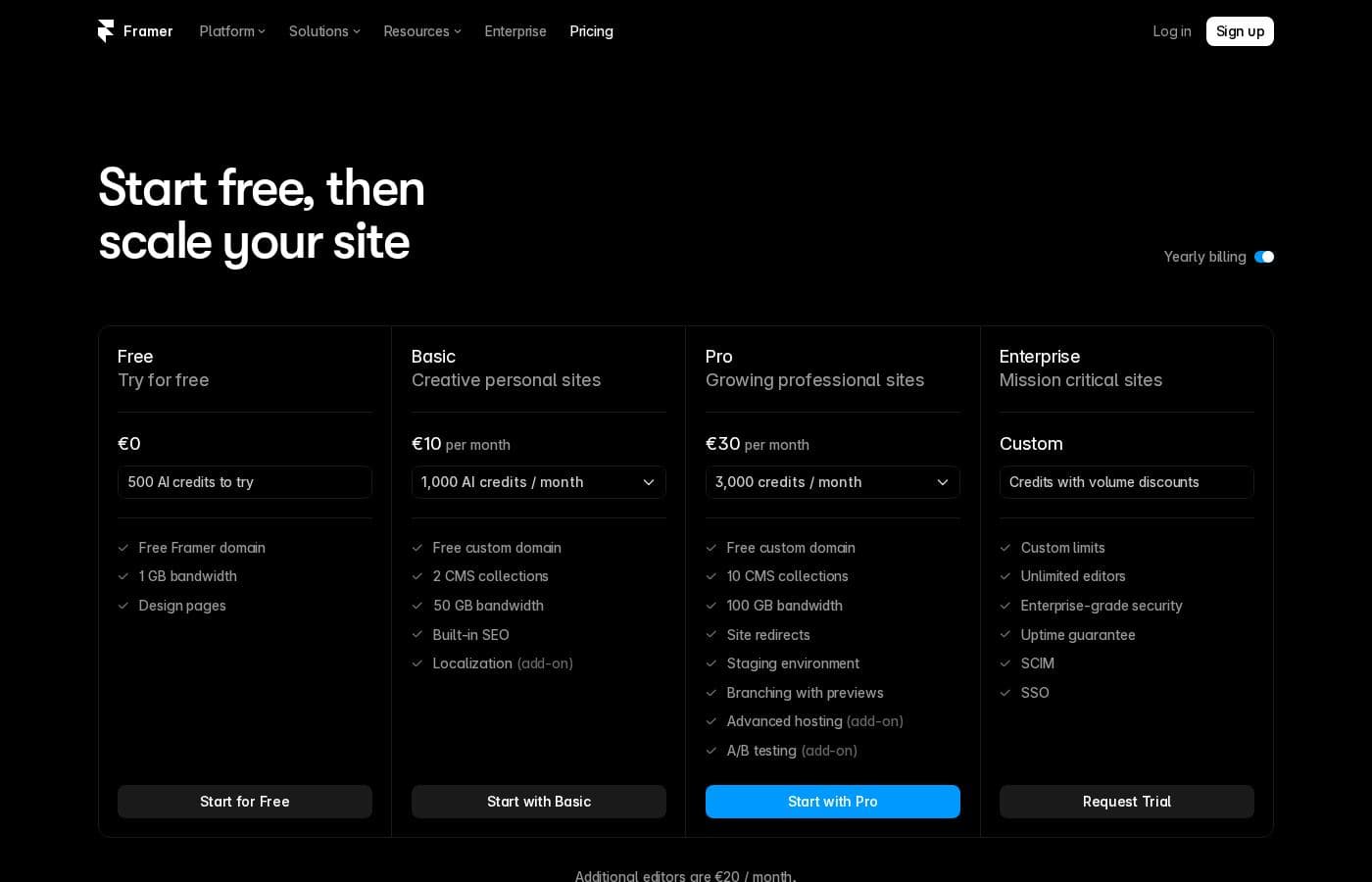
Framer offers a complimentary Free plan for exploration, and three paid Business tiers starting at $75 per site, per month, when billed annually.

Plans & Pricing

Free

Monthly0
Yearly0
Cannot add a custom domain
  • 10 CMS collections
  • 1,000 pages
  • 5MB file uploads
  • Free locale to try

Launch

Yearly$75
Billed yearly. Max 10 editors ($40 per editor thereafter).
  • 15,000 pages
  • 20 CMS collections
  • 200 GB bandwidth
  • 50GB storage
  • 90 day version history
  • AI Wireframer unlimited

Scale

Yearly$200
Billed yearly. Max 10 editors ($40 per editor thereafter).
  • 30,000 pages
  • 30 CMS collections
  • 500 GB bandwidth
  • 100GB storage
  • 120 day version history
  • A/B testing and click tracking (Advanced Analytics add-on)

Enterprise

MonthlyCustom
YearlyCustom
Custom pricing and billing terms.
  • Custom limits and security
  • Premium CDN and hosting
  • Unlimited analytics and redirects
  • Dedicated Slack support and team training
  • SSO for editors and sites

Framer costs between $75 and $200 per month (billed yearly) with two fixed-price plans: Launch at $75/month and Scale at $200/month, plus a custom Enterprise option.

Framer offers a Free plan to let you start designing right away. When you are ready to add a custom domain and access advanced features, you can choose from these paid business offerings.

Launch (Popular Business Plan)

Price: $75/month, per site (billed yearly) Websites Supported: Per site Best For: Launching a business site or marketing stack Refund Policy: 14-day refund eligible for EU and Turkey residents Other Features:

  • 15,000 pages, 20 CMS collections
  • 200 GB bandwidth, 50GB file storage
  • Password protect, Custom code, Cookie banner
  • Up to 10 editors (additional editors $40/month)

This plan is highly popular for businesses ready to establish their online presence. It provides strong hosting limits and core collaboration features, making it great for growing startups or agencies starting small.

Scale

Price: $200/month, per site (billed yearly) Websites Supported: Per site Best For: Scaling businesses with high traffic needs Refund Policy: 14-day refund eligible for EU and Turkey residents Other Features:

  • 30,000 pages, 30 CMS collections
  • 500 GB bandwidth, 100GB file storage
  • A/B testing, Click tracking, Conversion funnels (part of Advanced Analytics add-on)
  • 120 day version history, Staging environment

The Scale plan is built for growing businesses anticipating higher traffic and data storage demands. This tier significantly increases limits and unlocks advanced analytics tools necessary for detailed performance tracking.

Enterprise

Price: Custom pricing and billing terms Websites Supported: Not explicitly stated Best For: Large organizations needing custom limits and security Refund Policy: Not explicitly stated Other Features:

  • Custom limits and security settings
  • Premium CDN and unlimited analytics
  • Dedicated Slack support and team training
  • Custom MSA, Access controls, SSO for editors and sites

The Enterprise plan is ideal for established teams requiring bespoke infrastructure and high-level support. You get fully customized feature sets, security standards, and personalized billing arrangements.

If you're just starting out, you can Use Framer for free to explore the platform. The Free plan includes access to 1,000 pages, 10 CMS collections, and 5MB file uploads. If you purchase a subscription and live in the EU or Turkey, you are legally eligible for a refund within 14 days of purchase if you contact the Support team to process cancellation.

User Reviews

Framer generates highly polarized feedback, reflected in its low Trustpilot standing. Users generally praise the platform’s powerful features and the impressive technical capabilities for designers, noting its potential as a beautiful site builder.

However, the external criticism mainly centers on poor User Experience (UX), which many describe as clunky, complicated, and unintuitive, making even simple tasks frustrating 😡. A significant number of reports highlight constant bugs and half-baked features impacting overall reliability.

Furthermore, users frequently mention seriously misleading pricing practices, involving high unexpected fees for basic needs like extra languages or root domain access, leading to feelings of "bait and switch." Support quality is also a major pain point; many customers report excessive delays, difficulty finding help, and relying heavily on AI bots. While the core technology is strong, we see a clear pattern of frustration regarding pricing structure, interface complexity, and unresponsive support.

What users say elsewhere

Alex L.
· Trustpilot
1.0 / 5

The UI/UX is truly terrible, clunky, and overly complicated. I’ve been in web design for eight years, and this is the least intuitive platform I have ever used. Seriously, they need to hire a new designer quickly.

Maria F.
· Trustpilot
1.0 / 5

The support is a total joke. I bought a subscription only to immediately run into a bug that prevented me from using the service. Finding support was a nightmare, and they haven't replied to my messages in days.

No reviews yet.

Write a Review

Write a Review for Framer
0/100 characters
0/2000 characters

Why use Framer?

Choosing Framer means choosing efficiency and deep control over your digital presence. Users report launching fast, shipping pages at record speed, and never compromising on design quality. Framer transforms the traditional design-to-production pipeline.

Here’s why Framer is the smart choice for building and growing your site:

  • Accelerated Start: Leverage AI to generate components and site layouts in seconds. This allows you to move incredibly fast and start designing with immediate confidence.
  • Total Creative Mastery: Achieve full creative freedom with absolutely no code limits. You can bring complex, immersive designs to life entirely visually.
  • Handoff-Free Publishing: Designers gain the power to ship daily updates without needing developer handoffs or complicated staging processes, drastically reducing friction.
  • Integrated Growth Tools: Manage your content effortlessly with a built-in CMS. Additionally, the platform offers powerful Analytics and A/B Testing to monitor conversions and built-in SEO tools for blazing-fast hosting and optimization. ✅

Ready to transform your workflow with Framer?

Frequently Asked Questions

How are extra collaborators or editors charged on the paid plans?

The Launch and Scale plans both include up to 10 project editors. If you need more editors, each additional user costs $40 per month. You are notified when an extra editor is added to your billing cycle.

How is the Advanced Analytics add-on, which includes A/B testing, billed?

Advanced Analytics is usage-based and starts with a 30-day free trial. After the trial, billing is based on events, such as page views or form submissions. The first 25,000 events are complimentary each month.

What happens if my site exceeds defined usage limits like bandwidth or storage?

If you reach capacity limits like bandwidth or form entries, Framer permits exceeding that limit for one month. You’ll receive an email notification asking you to upgrade your plan to accommodate the higher usage.

What are the costs associated with adding extra languages or locales to my site?

The Launch plan includes up to 10 locales, and the Scale plan includes up to 20 locales. Every additional locale beyond your plan's limit costs $40 per locale.

What security compliance standards are mentioned for Enterprise-level customers?

The Enterprise plan includes custom security features like SSO for editors and sites, access controls, SOC type 2 compliance, and ISO 27001 compliance. These features provide robust data protection and infrastructure assurances.

What is Framer's refund policy if I decide to cancel my subscription?

If you live in the EU or Turkey, you are legally eligible for a refund within 14 days of purchase. You must contact the Support team to process the cancellation and claim your refund within this timeframe.

What kind of customer support or personalized assistance is available?

All paid plans offer in-app support. Users on the Enterprise plan receive priority support, a dedicated Slack channel, specialized product specialists, and team training.

Is there a free trial available for the core paid plans?

Framer offers a complimentary Free plan you can use indefinitely to explore the design environment. You can also try the Advanced Analytics add-on, which includes A/B testing, for 30 days for free.

Who is the ideal user for the Framer platform?

Framer is ideal for designers and teams prioritizing speed and performance without relying on traditional development handoffs. It suits agencies, startups, and companies that need to manage their entire marketing site efficiently.

What payment methods are accepted for subscriptions?

You can pay for most subscriptions using a credit card or, in some regions, PayPal. Enterprise customers can arrange custom billing options, including bank transfers.

Does Framer allow integrations with third-party tools?

Framer supports various components and plugins to extend functionality. Examples found include a Notion Plugin for CMS synchronization and a JSON Sync Plugin.

Will Framer make exceptions for open-source or non-commercial side projects with high traffic?

Yes, Framer states it can be flexible with limits for open-source or non-revenue projects. You should contact them directly to discuss potential options for handling unexpectedly high traffic.

Ready to try Framer? Check out the official site or pricing.