Carrd vs Framer
Carrd and Framer solve website building in completely opposite ways. Carrd is unmatched for extreme simplicity and ultra-low annual cost. Framer prioritizes visual design power and scalable team control. The choice depends entirely on your project's complexity and budget.
Best for: Solo entrepreneurs and freelancers needing a quick landing page., Budget-conscious users seeking the lowest annual cost.
Best for: Design agencies handling modern, visually complex sites., Teams prioritizing fast deployment and no developer handoffs.
The fastest way to build responsive one-page sites.
We find Carrd to be an outstanding tool for launching professional, single-page websites quickly and affordably. While the core functionality, speed, and competitive annual pricing are excellent, the platform must urgently address significant user concerns regarding the missing auto-save feature and overly aggressive gating of basic functions. Overall, it's a powerful and highly cost-effective choice for MVPs and landing pages.
Pros
- Exceptionally quick setup and deployment of websites.
- Highly affordable annual pricing starting below $20/year for Pro features.
- Simple, intuitive drag-and-drop editor for easy building.
- Robust integrations for payments (Stripe, PayPal) and email forms (Mailchimp, HubSpot).
Cons
- Crippling lack of an auto-save feature resulting in lost work.
- Basic functions (like smooth scrolling or simple button linking) are gated behind higher Pro tiers.
- Platform isn't suitable for complex e-commerce or large, multi-page portfolios.
- Users occasionally face technical glitches when trying to publish or save changes.
Powerful Design, Challenging User Experience.
Framer is pitched as a high-performance visual tool offering designers full creative control and rapid deployment capabilities. However, we note that the steep learning curve, combined with systemic issues like unhelpful support and reports of misleading pricing structures, creates a challenging user environment. Overall, we find that the foundational technology is impressive, but major user experience and customer service failures drastically undermine its claimed efficiency.
Pros
- Powerful visual tool favored by designers, especially those familiar with Figma.
- Enables handoff-free publishing and rapid site deployment.
- Built-in modern features like advanced CMS, SEO tools, and AI generation.
Cons
- Highly complicated and unintuitive user interface (UI/UX).
- Frequent reports of constant bugs and reliability issues.
- Pricing is often misleading, with unexpected, high costs for basic features like localization.
- Customer support is reportedly slow, difficult to access, and often relies on unhelpful AI bots.
AboutCarrd
Carrd offers a straightforward solution for building single-page websites. It's designed to be simple and highly accessible to anyone. You can begin with one of many available templates, or choose a clean blank page instead. This flexibility lets you quickly make the site your own.
The sites you create are fully responsive right out of the box. This means they automatically look great on phones, tablets, and desktops alike. You can even build up to three sites using all of Carrd’s core features for free! That makes it an excellent tool for anyone needing a fast launch. ✅
AboutFramer
Framer is a powerful visual design tool made for crafting and publishing modern websites. It empowers you to build exactly what you imagine using smooth effects, animations, and interactions. You can craft responsive layouts visually, eliminating the need to write code.
The platform helps you skip the blank canvas entirely. Integrated AI can generate sophisticated page layouts and advanced components right away. Collaboration is built in, meaning updates are seamless, and the entire process is completely handoff-free. 💡
Highlights
Feature Comparison
Features Overview
We highlight the main differences and pick a winner for each feature.
Pricing & Value
Carrd is extremely affordable, while Framer requires a significantly higher monthly investment.
Carrd offers fantastic value, with Pro plans starting incredibly low annually. This cost allows users to manage multiple projects on a minimal budget. Carrd's pricing structure scales only based on the number of sites you need. Framer starts at $75/month per site when billed yearly, a massive difference. Framer's pricing can be misleading due to usage and extra seat costs. Localization costs are also unexpectedly high in Framer. Carrd wins decisively on budget, offering professional features cheaply. Framer requires users to accept much higher operating costs. Framer costs reflect its powerful team tools and complex scaling capabilities. If budget is your primary constraint, Carrd gives you professional quality for pennies.
Ease of Use
Carrd ensures rapid setup and intuitive building; Framer has a steep, complex learning curve.
Carrd is universally praised for its simple, drag-and-drop workflow. You can launch a highly responsive site in minutes using Carrd. Carrd focuses on simplicity, making basic functions accessible to everyone. Framer users frequently report a clunky, unintuitive user interface (UI/UX). Tasks that should be simple often become overly complicated in Framer's editor. This steep learning curve is a major frustration point for Framer users. Carrd wins on immediate accessibility and zero onboarding time. Framer demands time investment to master its complex visual controls. Choose Carrd if you need speed and hate learning new software complexities.
Site Architecture
Carrd builds simple, single-page sites; Framer handles complex, scalable multi-page websites.
Carrd is specifically designed for single-page applications, like profiles or landing pages. This focus helps Carrd optimize for simplicity and deployment speed. Carrd is not suitable for complex, multi-page site structures. Framer is built to handle full, multi-page marketing sites supporting 30,000+ pages. Framer includes robust systems like a built-in CMS for handling content at scale. You can architect sophisticated, scalable websites using Framer's tools. If you only need one page, Carrd is your optimal tool. If you need 15 pages and a fully structured blog, Framer is required. Carrd excels where simplicity is key, but Framer enables true web application architecture.
Creative Control
Framer allows total visual design mastery; Carrd restricts designs to responsive templates.
Framer empowers designers with total visual control over complex layouts and interactions. You can achieve smooth effects, detailed interactions, and compelling animations visually. Framer emphasizes zero code limits for custom designs. Carrd is limited to simpler responsive templates suitable for single-page design. While clean, Carrd cannot match the complexity of Framer's visual effects. Some basic functions in Carrd are gated behind Pro tiers. Framer is the superior choice for high-fidelity, custom, immersive designs. Carrd provides enough control for a professional look, but nothing complex. If your brand requires custom visual flair and advanced UI/UX, Framer is the tool you need.
Content Management (CMS)
Framer provides a powerful, built-in CMS; Carrd lacks native content management functionality.
Framer includes a powerful built-in CMS to structure and manage content collections easily. This allows effortless updates for blogs or product listings without touching code. Framer supports localization, including RTL layout flipping. Carrd does not feature a native Content Management System. Carrd users rely on embedded third-party services for dynamic content feeds. Carrd focuses entirely on static, one-page content display. Framer is built for content scaling and daily updates through its seamless CMS. Carrd requires external tools or payment embeds for dynamic features. For any project requiring regularly updated content like a blog, Framer is non-negotiable.
Team Collaboration
Framer supports multi-seat collaboration; Carrd's model is focused on individual users managing sites.
Framer includes seamless team collaboration, allowing up to 10 editors in paid plans. It champions handoff-free publishing, where designers ship updates rapidly. Framer allows collaborators to edit copy directly on the page. Carrd's structure prioritizes the number of projects (sites), not the number of collaborators. Carrd is primarily a solo or small team tool, lacking integrated team publishing features. Framer clearly supports agency and internal design teams needing shared access. Carrd is better suited for a solo freelancer managing many individual client sites. Collaborative teams should look towards Framer for native support and speed.
AI Integration
Framer uses AI to kickstart projects instantly; Carrd does not feature any integrated AI capabilities.
Framer features AI Wireframer, which generates full site layouts and components within seconds. This helps designers skip the painful blank canvas stage. The AI rapidly accelerates the design starting process. Carrd offers templates but uses no integrated AI to generate structure or components. Carrd expects users to manually drag and drop elements into position. Carrd prioritizes human simplicity over generative speed. Framer wins hands down if you want AI assistance to start designing fast. Carrd relies on classic template selection and manual building. Use Framer if you want to leverage AI to maximize your initial momentum instantly.
User Satisfaction
Carrd enjoys very high satisfaction; Framer receives highly polarized feedback and a low rating.
Carrd maintains a strong 4.3 rating, consistently praised for high value and responsive support. Users appreciate Carrd delivering exactly what it promises for a low cost. The main functional complaint is missing auto-save. Framer holds a low 2.5 rating due to frequent bug reports and clunky UI/UX issues. Many Framer users feel the customer support is slow, difficult, and unhelpful. There is strong user frustration with Framer's high unexpected costs. Carrd users trust the platform more than Framer users currently trust Framer. The large gap in user ratings is significant. If trust and reliability are paramount, Carrd provides a much safer user experience.
Let's explore the details of each available plan.
Free
Price: Free Websites Supported: 3 sites Best For: Testing out the core service, personal profiles, or simple hobbies. Other Features: Use all of Carrd's core features
This plan is perfect for beginners who want to build a simple personal page or link collection without spending any money. You get full access to the core functionality and can start publishing your web ideas right away. It's truly a zero commitment starting point.
- Build up to three sites
- Use all core features
- Publish 10 sites
- Custom Domains with SSL
- Forms (Contact, Signup, Payment)
- Widgets and Embeds
- Publish 25+ sites
- Custom Domains with SSL
- Forms (Contact, Signup, Payment)
- Widgets and Embeds
- Google Analytics
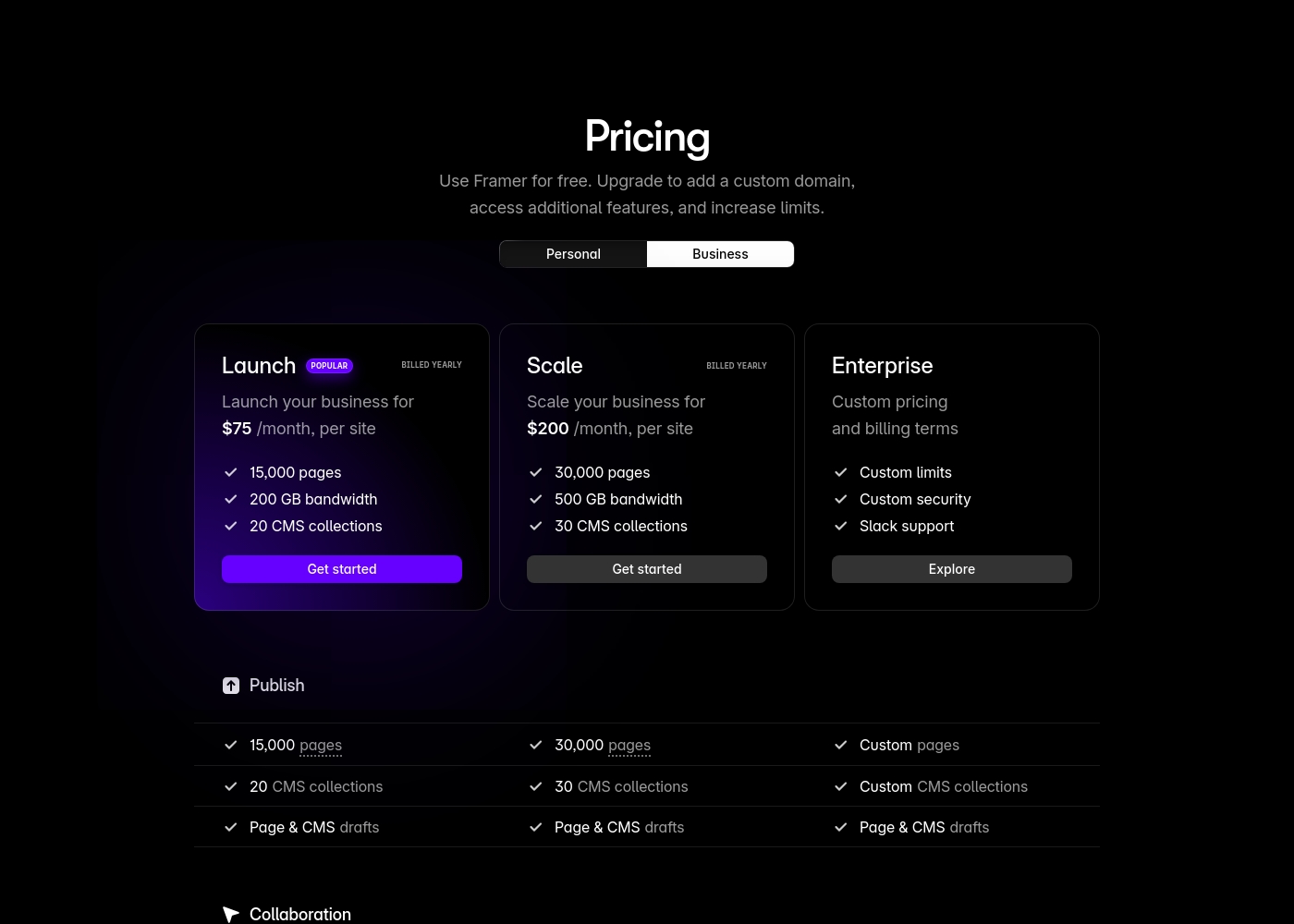
Framer costs between $75 and $200 per month (billed yearly) with two fixed-price plans: Launch at $75/month and Scale at $200/month, plus a custom Enterprise option.
Framer offers a Free plan to let you start designing right away. When you are ready to add a custom domain and access advanced features, you can choose from these paid business offerings.
Launch (Popular Business Plan)
Price: $75/month, per site (billed yearly) Websites Supported: Per site Best For: Launching a business site or marketing stack Refund Policy: 14-day refund eligible for EU and Turkey residents Other Features:
- 15,000 pages, 20 CMS collections
- 200 GB bandwidth, 50GB file storage
- Password protect, Custom code, Cookie banner
- Up to 10 editors (additional editors $40/month)
- 10 CMS collections
- 1,000 pages
- 5MB file uploads
- Free locale to try
- 15,000 pages
- 20 CMS collections
- 200 GB bandwidth
- 50GB storage
- 90 day version history
- 30,000 pages
- 30 CMS collections
- 500 GB bandwidth
- 100GB storage
- 120 day version history
- Custom limits and security
- Premium CDN and hosting
- Unlimited analytics and redirects
- Dedicated Slack support and team training
- SSO for editors and sites
Pricing Notes
- Carrd is drastically cheaper overall, priced around the cost of a few coffees per year.
- Framer's paid plans, starting at $75/month per site, are aimed at professional businesses, not individuals.
- Framer charges $40/month for each editor seat beyond the included 10, increasing team costs quickly.
- Framer utilizes usage-based pricing for its Advanced Analytics add-on and charges $40 per extra location locale.
- Carrd offers a 7-day trial for Pro features; Framer has a permanent Free plan and a 30-day analytics trial.
Pricing Head-to-Head
User Reviews
Users generally praise Carrd for its exceptional value and deployment speed, describing it as a game-changer for quick projects, landing pages, and personal portfolios. The platform is often highlighted for its highly intuitive drag-and-drop interface, enabling users to launch a modern, professional, and responsive website in minutes, often for as little as $19 per year on the Pro plan.
Reviewers frequently note the robust third-party integrations, particularly with payment processors like Stripe and email services like Mailchimp, which significantly enhance the functionality of the simple one-page structure. However, user sentiment is mixed regarding functionality depth and reliability.
I’m genuinely thrilled with Carrd! It delivers exactly what it promises: a budget-friendly platform for creating fast, professional single-page sites. I was able to launch a site in under 20 minutes, which is perfect for quick projects and portfolios.
Framer generates highly polarized feedback, reflected in its low Trustpilot standing. Users generally praise the platform’s powerful features and the impressive technical capabilities for designers, noting its potential as a beautiful site builder.
However, the external criticism mainly centers on poor User Experience (UX), which many describe as clunky, complicated, and unintuitive, making even simple tasks frustrating 😡. A significant number of reports highlight constant bugs and half-baked features impacting overall reliability.
The UI/UX is truly terrible, clunky, and overly complicated. I’ve been in web design for eight years, and this is the least intuitive platform I have ever used. Seriously, they need to hire a new designer quickly.
Our Verdict
The ultimate decision between Carrd and Framer is a clear choice between budget simplicity and design power. Carrd is the reigning champion of low-cost, high-speed website deployment. You can launch a stunning, responsive portfolio or landing page for minimal annual cost. Carrd is excellent for volume builders managing up to 25 simple sites quickly. Framer is engineered for creative teams needing absolute design control and content scalability. It handles multi-page architectures and complex animations effortlessly, making it great for polished marketing sites. Framer features a powerful CMS and integrated analytics for serious growth. Financial budget and required site complexity must drive the final decision. Do you need a single, affordable, lead-generating page (Carrd)? Or do you require a highly complex, scalable team website with A/B testing (Framer)? Choose Carrd if affordability and speed dominate your needs, despite its missing auto-save feature. Select Framer if your team prioritizes deep visual design control, integrated CMS tools, and powerful team publishing.
Frequently Asked Questions
Which tool is better for a beginner: Carrd or Framer?
Carrd is significantly better for beginners due to its intuitive, drag-and-drop interface. Framer has a steep learning curve and users often report a clunky, unintuitive UI/UX. Starting with Carrd allows for immediate success.
Does Carrd have a powerful CMS like Framer?
No, Carrd is exclusively for static, single-page sites and lacks a built-in CMS. Framer includes a powerful CMS system essential for managing blogs or multi-page content easily. This functionality difference is critical for scaling.
Is Framer worth the extra cost over Carrd?
Framer's higher cost is only justified if you require advanced features like team collaboration, visual effects, and a built-in CMS. If you mostly need a high-converting one-page site, Carrd offers vastly superior value.
Which platform works better for small design teams?
Framer is designed for team collaboration, supporting up to 10 editors for handoff-free publishing. Carrd's pricing structure is less suited for teams, focusing on the number of sites managed. Framer is superior for collaborative work.
Can I integrate payment gateways using Carrd and Framer?
Yes, Carrd supports direct embeds for payment processors like Stripe, PayPal, and Gumroad. Framer allows payment processors via custom code embeds and advanced integrations. Both can handle basic product selling.
Which tool has better overall user reviews and satisfaction?
Carrd has much better user satisfaction, boasting an average 4.3 rating. Framer users report frequent frustration with the UI, support, and hidden pricing, resulting in a low 2.5 rating.
Ready to Choose?
Both tools have their strengths. Choose based on your specific needs.