Framer vs Phonesites
Framer and Phonesites both accelerate web creation but for two very different users. Framer targets designers needing total creative control and high-performance sites. Phonesites focuses on marketers and solopreneurs needing ultra-fast, mobile-first lead capture. The choice comes down to pixel-perfection versus rapid, effective lead generation.
Best for: Design agencies requiring total creative control, Startups focused on creating high-performance marketing sites
Best for: Solo entrepreneurs and freelancers needing fast lead funnels, Marketers who must build and publish pages from a mobile device
Powerful Design, Challenging User Experience.
Framer is pitched as a high-performance visual tool offering designers full creative control and rapid deployment capabilities. However, we note that the steep learning curve, combined with systemic issues like unhelpful support and reports of misleading pricing structures, creates a challenging user environment. Overall, we find that the foundational technology is impressive, but major user experience and customer service failures drastically undermine its claimed efficiency.
Pros
- Powerful visual tool favored by designers, especially those familiar with Figma.
- Enables handoff-free publishing and rapid site deployment.
- Built-in modern features like advanced CMS, SEO tools, and AI generation.
Cons
- Highly complicated and unintuitive user interface (UI/UX).
- Frequent reports of constant bugs and reliability issues.
- Pricing is often misleading, with unexpected, high costs for basic features like localization.
- Customer support is reportedly slow, difficult to access, and often relies on unhelpful AI bots.
Speedy, simple funnels, built anywhere.
We find Phonesites delivers on its powerful promise of speed and simplicity, enabling anyone to create effective landing pages and automated funnels quickly, even from a mobile device. Overall, this platform is an excellent choice for marketers and small businesses prioritizing efficiency and high lead conversion rates through easy-to-use, powerful automation tools.
Pros
- Extremely fast no-code builder, allowing page creation in minutes.
- Mobile-first design enables construction and management from your phone.
- Includes robust built-in email and SMS lead capture automation.
- Integrated AI writer accelerates content generation (on top tier).
Cons
- The integrated AI writer is only available on the most expensive plan ($69/month).
- The Essential plan is strictly limited to supporting only five websites and 25 pages.
AboutFramer
Framer is a powerful visual design tool made for crafting and publishing modern websites. It empowers you to build exactly what you imagine using smooth effects, animations, and interactions. You can craft responsive layouts visually, eliminating the need to write code.
The platform helps you skip the blank canvas entirely. Integrated AI can generate sophisticated page layouts and advanced components right away. Collaboration is built in, meaning updates are seamless, and the entire process is completely handoff-free. 💡
AboutPhonesites
Phonesites is an innovative, no-code builder designed to help businesses, marketers, and consultants collect leads and sell products effectively. The core benefit is the ability to create and publish complex digital assets in minutes, using either your phone or desktop. This includes high-converting landing pages, surveys, pop-ups, and digital business cards.
This platform simplifies website creation, ensuring that users with very little technical knowledge can easily have a site up and running in minutes. It's truly built for speed and simplicity. 💡
Highlights
Feature Comparison
Features Overview
We highlight the main differences and pick a winner for each feature.
Core Audience Focus
Framer targets professional designers; Phonesites is for marketers focused on lead conversion.
Framer empowers designers with complete visual control and no code limits to create stunning sites. Framer users prioritize performance and high-fidelity output. Phonesites targets small teams and marketers who need rapid lead-capture funnels. Phonesites emphasizes speed and simplicity above complex design. If design mastery is key, choose Framer. If converting traffic immediately matters most, choose Phonesites.
Speed of Launch
Phonesites publishes funnels in minutes; Framer uses AI but requires detailed design refinement.
Phonesites allows you to build pages and funnels using templates and publish them incredibly fast. You can literally create and publish a Phonesites page from your phone quickly. Framer uses AI Wireframer to instantly generate initial layouts, skipping the blank canvas. However, Framer requires more detailed visual refinement afterward. Phonesites is faster for a functional landing page. Framer is quicker for a custom, complex marketing website.
Built-in Marketing Tools
Phonesites includes integrated SMS and email follow-up; Framer relies heavily on external integrations.
Phonesites shines by offering automated follow-ups via email and SMS built directly into the platform. It focuses intensely on lead capture using pop-ups and forms. Framer offers integrated analytics and A/B testing as an add-on dedicated to site optimization. Framer expects you to connect to external marketing tools. Phonesites functions as an all-in-one lead machine. Framer is a high-performance publishing tool.
Design & Control
Framer offers total creative freedom and advanced graphics; Phonesites uses templates for mobile responsiveness.
Framer is the undisputed winner for design flexibility, allowing designers complex effects and interactions visually. Framer enables pixel-perfect design mastery without needing developer handoffs. Phonesites provides 500+ templates and a drag-and-drop builder focused on mobile-first results. Phonesites prioritizes delivery speed over fine-grain control. If you need 10/10 visual fidelity, you must choose Framer.
Learning Curve
Framer has a steep, complicated UI; Phonesites is known for its simplicity and supportive guidance.
User reviews indicate Framer has a highly complicated and often clunky user interface. Getting started effectively with Framer usually requires deep familiarity with other design tools like Figma. Phonesites offers guided 1:1 orientation calls and weekly workshops for users. Phonesites focuses on quick, no-code, drag-and-drop usability. You'll spend much less time learning how to use Phonesites features fully.
Content Management
Framer features a robust CMS supporting localization; Phonesites is primarily transaction and form-based.
Framer includes a powerful CMS perfect for updating large-scale content collections like blogs or knowledge bases. Framer supports complex localization requirements, including Right-to-Left (RTL) layouts. Phonesites pages are primarily used for standalone landing pages and lead forms. Phonesites is not built for complex content architecture. Framer is essential for sites requiring scalable, frequently updated content.
Mobile Workflow
Phonesites allows creation and publishing from a phone; Framer requires a high-powered desktop environment.
Phonesites excels because users can build, edit, and launch campaigns directly from their smartphone. This workflow is ideal for highly agile solo entrepreneurs and constantly busy marketers. Framer is a desktop-heavy visual tool where mobile responsiveness is a design output, not a core input method. You cannot effectively design a Framer site using only your phone. Phonesites provides unparalleled flexibility for on-the-go work.
Pricing Clarity
Framer has clearer tiers but risky hidden fees; Phonesites has a broad range but less public tier detail.
Framer's pricing can be misleading due to unexpected high costs for editors and localization ($40 per editor). Framer users frequently complain about these hidden fees. Phonesites uses a broad range ($1-$1000) and usage-based models. Specific per-tier costs for Phonesites are scarce in the provided data. Framer's base cost is significantly higher. Phonesites' value seems better for quick lead-gen tools.
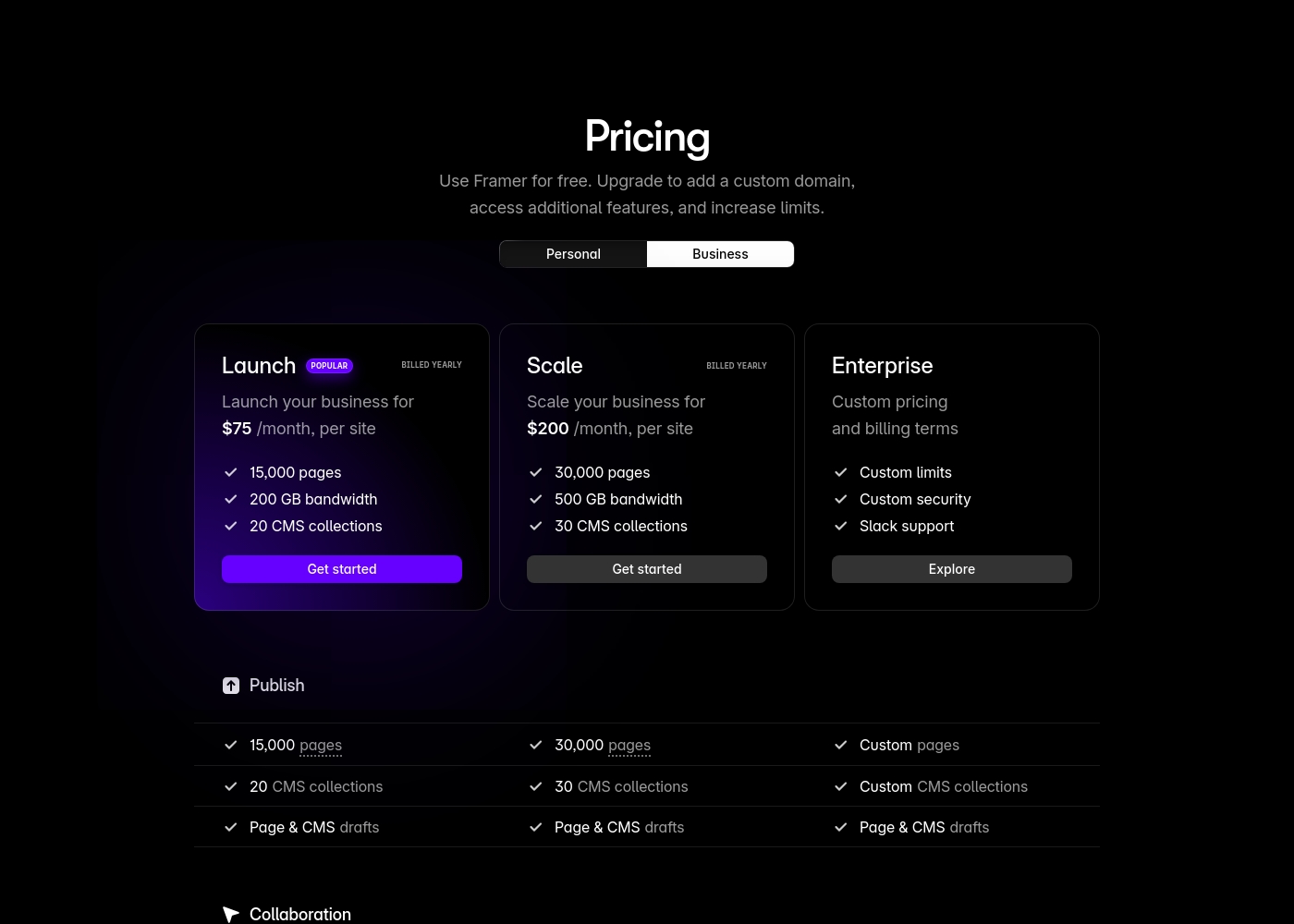
Framer costs between $75 and $200 per month (billed yearly) with two fixed-price plans: Launch at $75/month and Scale at $200/month, plus a custom Enterprise option.
Framer offers a Free plan to let you start designing right away. When you are ready to add a custom domain and access advanced features, you can choose from these paid business offerings.
Launch (Popular Business Plan)
Price: $75/month, per site (billed yearly) Websites Supported: Per site Best For: Launching a business site or marketing stack Refund Policy: 14-day refund eligible for EU and Turkey residents Other Features:
- 15,000 pages, 20 CMS collections
- 200 GB bandwidth, 50GB file storage
- Password protect, Custom code, Cookie banner
- Up to 10 editors (additional editors $40/month)
- 10 CMS collections
- 1,000 pages
- 5MB file uploads
- Free locale to try
- 15,000 pages
- 20 CMS collections
- 200 GB bandwidth
- 50GB storage
- 90 day version history
- 30,000 pages
- 30 CMS collections
- 500 GB bandwidth
- 100GB storage
- 120 day version history
- Custom limits and security
- Premium CDN and hosting
- Unlimited analytics and redirects
- Dedicated Slack support and team training
- SSO for editors and sites
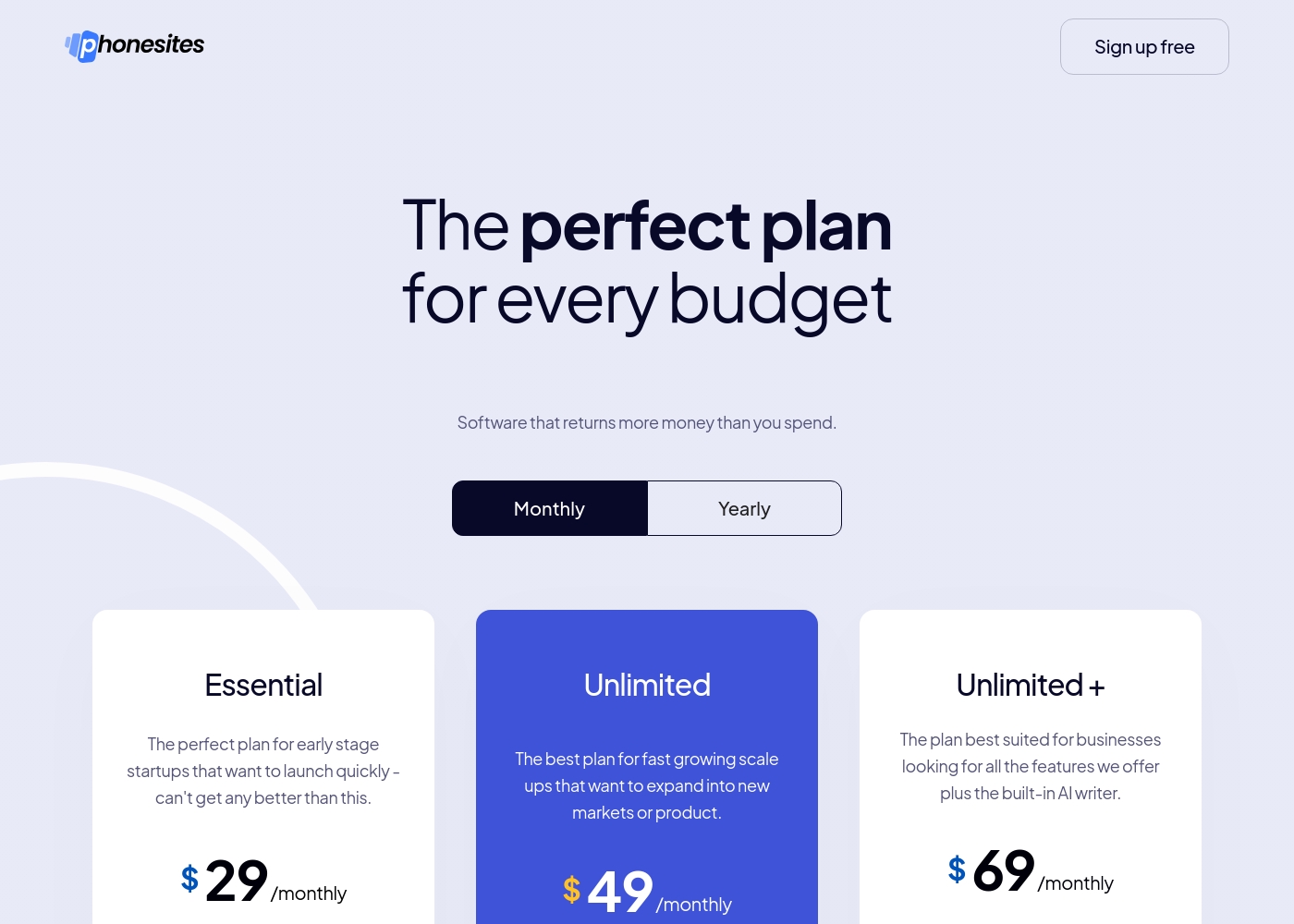
Phonesites costs between $29 and $69 per month with 3 plans: Essential at $29/month, Unlimited at $49/month, and Unlimited + at $69/month.
Here is a detailed breakdown of the features and restrictions for each option.
Essential
Price: $29/month Websites Supported: Up to 5 Websites / 25 Pages Best For: Early stage startups that want to launch quickly Other Features:
- Custom domains
- Subdomains
- 600+ templates
- Free hosting and SSL certificate
- Fast load speed
- Custom domains
- Subdomains
- Email automations
- 600+ templates
- Share my funnel
- Unlimited Websites & Pages
- Custom domains
- Subdomains
- Email automations
- 600+ templates
- Unlimited Websites & Pages
- AI writer credits
- Zoom & phone support
- Funnel closer training
- Permission based selling
Pricing Notes
- Framer offers an indefinite Free plan for design exploration before upgrading to a paid plan ($75/month minimum).
- Framer charges significant extra fees ($40/month) for editors beyond the first 10 seats included in paid plans.
- User reviews heavily criticize Framer for extremely high, unexpected costs related to adding new locales or languages.
- Phonesites offers a simple 14-day free trial; specific feature costs within its broad $1-$1000 range are not publicly detailed.
Pricing Head-to-Head
User Reviews
Framer generates highly polarized feedback, reflected in its low Trustpilot standing. Users generally praise the platform’s powerful features and the impressive technical capabilities for designers, noting its potential as a beautiful site builder.
However, the external criticism mainly centers on poor User Experience (UX), which many describe as clunky, complicated, and unintuitive, making even simple tasks frustrating 😡. A significant number of reports highlight constant bugs and half-baked features impacting overall reliability.
The UI/UX is truly terrible, clunky, and overly complicated. I’ve been in web design for eight years, and this is the least intuitive platform I have ever used. Seriously, they need to hire a new designer quickly.
Phonesites consistently receives high praise for its unmatched simplicity and rapid deployment speed. Users frequently call it the easiest tool they have ever used for building landing pages and sales funnels, often reporting creation times under ten minutes.
A strong recurring theme is the platform’s effectiveness in lead generation, empowering businesses to automate follow-ups via email and SMS, thereby increasing their return on investment (ROI). The mobile-first capability is highly valued, allowing entrepreneurs and marketers to build and launch sophisticated pages entirely from their phone, even without prior web design skills.
This is the best landing page software I’ve ever used. It’s incredibly easy to use, and I love the fantastic layout. The built-in AI writer is truly amazing and helps speed up content creation fast.
Our Verdict
Choosing between Framer and Phonesites means choosing between design fidelity and immediate function. Framer offers unparalleled creative freedom, but Phonesites provides rapid, high-ROI results. For most small businesses focused on fast lead capture, Phonesites is the clearer winner. Framer is the superior choice for professional designers who need pixel-perfect control and enterprise features. Framer's AI Wireframer accelerates the design process, and the built-in CMS manages huge content stores. However, be prepared for Framer's steep learning curve and user-reported hidden costs, especially for localization. Phonesites specializes in making quick, mobile-first pages that convert traffic into leads immediately. Phonesites includes essential internal lead-gen tools like automated SMS and email follow-up. You can start fast, work from your phone, and leverage Phonesites’ excellent community and training resources. The key deciding factor is your primary goal: marketing speed or creative mastery. If you are a solo marketer launching five campaigns monthly, use Phonesites. If you are an agency needing a bespoke, high-performance website, Framer is the required design tool. Ultimately, choose Framer if your priority is a perfect, handoff-free publishing workflow. Choose Phonesites if you need fast funnels, simple mobile management, and built-in lead conversion tools right now.
Frequently Asked Questions
Which is better for lead generation: Framer or Phonesites?
Phonesites is explicitly built for lead generation and funnel building. Phonesites includes automated SMS and email follow-up tools to convert leads. Framer focuses on publishing performance; you must integrate separate lead tools.
Can I build a full website or only landing pages with Phonesites?
Phonesites is best for landing pages, surveys, and digital business cards. It focuses on standalone, fast funnels. Framer is the platform to choose for building complex, multi-page corporate or marketing websites with a robust CMS.
Does Framer support mobile publishing like Phonesites?
No, Framer sites are responsive, but the design workflow is desktop-heavy. Phonesites is truly mobile-first, allowing you to edit and publish pages directly from your phone easily.
Why are Framer's user reviews so low compared to Phonesites?
Framer users often cite a complicated UI and excessive, unexpected costs for features like localization. Phonesites reviewers consistently praise its speed, simplicity, and valuable training resources (4.3 rating).
Which tool has a Free plan: Framer or Phonesites?
Both offer a free path. Framer has an indefinite Free plan for design exploration but without a custom domain. Phonesites offers a 14-day free trial and a noted Free plan.
Is Framer suitable for beginners learning web design?
Framer is not ideal for beginners due to the steep learning curve and complicated UI/UX. Phonesites is much more beginner-friendly, offering 1:1 orientation calls and weekly workshops.
Ready to Choose?
Both tools have their strengths. Choose based on your specific needs.