Flaticon

Flaticon review

Flaticon puts a massive, designer-built icon and sticker library at your fingertips. Search specialized categories like Animated and Interface icons, then download assets as PNG, SVG, EPS, PSD, or CSS for immediate use.

Flaticon costs from €7.50/mo · 3 plans · Free plan available · prices checked Oct 13, 2026

By Ciroapp Editorial Team · Updated Sep 16, 2026

Commission may apply at no extra cost

Flaticon homepage screenshot

At a glance

Quick overview for Flaticon: rating, pricing summary, key features, and highlights.
Pricing verified Oct 13, 2026

Ciroapp score

4.0/ 5

Flaticon makes sourcing icons and stickers quick, with downloads in PNG, SVG, EPS, PSD, and CSS, plus categories that keep matched sets together. It's icon-only by design, and PNGs cap at 512px, so it won't replace a full stock library. Overall, it's a solid pick for designers who need production-ready icons fast.

Pros

  • Pros:Downloads span five formats—PNG up to 512px, SVG, EPS, PSD, and CSS—so one asset covers web, print, and editable workflows
  • Pros:Specialized categories like Animated icons, Interface icons, and Style Packs make it fast to source matched, visually consistent sets
  • Pros:The catalog is built specifically by and for designers, so organization and curation beat generic stock-site search

Cons

  • Cons:PNG raster downloads cap at 512px, which is too small for large-format print or high-resolution background use
  • Cons:Scope is limited to icons and stickers—no stock photos, video, or broader illustration—so many teams still need a second asset library
  • Cons:Public pricing data can lag behind vendor changes, so high-volume buyers should confirm current plan tiers and download limits directly at flaticon.com/pricing
Best for
  • UI/UX designers who need consistent interface icon sets for apps, dashboards, and websites
  • Web developers who want icons pre-exported as SVG or CSS so assets drop straight into code
  • Marketers and consultants producing decks, one-pagers, and social graphics who need polished PNG icons quickly
This section is a summary. Detailed sections about features, use cases, pricing, and reviews follow below.

What is Flaticon?

Flaticon is a dedicated media library for designers who need vector icons and stickers on demand. Instead of hunting through general-purpose stock sites, users browse a catalog organized specifically around iconography, including Animated icons, Interface icons, and Style Pack collections. Every asset can be downloaded in the format a project actually requires, from raster PNGs to editable SVG, EPS, PSD, and CSS.

That combination of breadth, organization, and format flexibility is what makes it a default bookmark in many design workflows.

Flaticon is a media library built specifically for sourcing vector icons and stickers. The catalog is highly organized, so users can browse specialized categories such as Animated icons, Interface icons, and Style Pack collections rather than scrolling undifferentiated results. Once an asset is selected, it is ready for immediate use and can be exported in several professional formats: PNG at sizes up to 512px for raster needs, SVG and EPS for scalable vectors, PSD for layered Photoshop editing, and CSS for direct web integration.

It functions as both a search tool and a delivery mechanism for production-ready design assets.
Should you choose Flaticon?

Quick buyer guidance before you compare plans or click through.

Choose it if

  • UI/UX designers who need consistent interface icon sets for apps, dashboards, and websites
  • Web developers who want icons pre-exported as SVG or CSS so assets drop straight into code
  • Marketers and consultants producing decks, one-pagers, and social graphics who need polished PNG icons quickly
  • Print and brand designers who require scalable EPS vectors and layered PSD files from the same library as their digital assets

Skip it if

  • Teams looking for a full stock library—photos, video, and broader illustration require a second source
  • Projects needing raster images larger than 512px, since PNG downloads cap at that size
  • High-volume buyers who should verify current download limits and subscription terms directly with Flaticon before standardizing on it

Next steps before buying

  1. 1Visit flaticon.com and browse or search by category—start with Interface icons or Style Packs if you need a matched set for a specific project
  2. 2Select an asset and choose the download format your workflow requires: PNG up to 512px, SVG, EPS, PSD, or CSS
  3. 3Begin on the free plan to evaluate quality and coverage, then move to a monthly subscription or usage-based billing if your download volume or commercial needs exceed what the free tier allows

Flaticon Key Features

✨ Multi-Format Downloads: PNG, SVG, EPS, PSD, and CSS

Every icon and sticker can be exported in the format the job demands. Raster PNG downloads go up to 512px for quick mockups, slides, and documents, while SVG and EPS preserve vector quality for scalable web and print use. PSD output keeps assets editable in Photoshop, and CSS exports let developers integrate icons directly into stylesheets.

One search therefore covers web, print, and editing workflows without a second sourcing trip.

✨ Specialized Categories: Animated, Interface, and Style Packs

Flaticon organizes its catalog around how designers work. The Animated icons category supplies ready-made motion assets for UI, web, and promo projects; Interface icons target app and dashboard design with consistent iconography; and Style Pack collections group visually matched icons so a project's icon set looks coherent instead of cobbled together from unrelated sources.

✨ Highly Organized, Designer-Built Catalog

The library is built specifically by and for designers, and the structure reflects that: assets are sorted into clear categories and curated collections, making browse-and-filter workflows faster than searching a general stock site. This organization matters at scale—when a team needs a dozen matched icons, the category and Style Pack structure shortens the hunt considerably.

✨ Ready-to-Use Icons and Stickers

Assets are positioned as ready for immediate use, meaning downloads arrive production-ready rather than as drafts requiring cleanup. For sticker and icon assets, that means designers can drop them into decks, prototypes, or web builds directly after download, and marketers can self-serve without waiting on a designer for simple graphics.

Use Cases

💡 UI and Web Design

Interface icons combined with SVG and CSS exports make Flaticon a natural fit for product teams building apps and websites. Designers can source a consistent icon set from the Interface or Style Pack categories, hand developers SVG or CSS versions, and keep PNGs on hand for documentation and presentations.

💡 Presentations and Marketing Collateral

PNG downloads up to 512px are sized for slides, social graphics, and one-pagers. Marketers and consultants who need a quick, professional icon to illustrate a point can search the organized catalog, download a PNG, and place the asset without involving a designer.

💡 Brand and Print Work

EPS vector output keeps icons crisp at any print scale, so packaging details, printed collateral, and brand-adjacent graphics can draw from the same library as digital work. PSD exports let retouchers adjust the asset in layers before final output.

💡 Motion and Product Demos

The Animated icons category supplies pre-built motion assets that can be dropped into prototypes, product tours, and promo videos. For teams that need simple animation without commissioning a motion designer, this category turns a sourcing task into a download task.

Flaticon pricing

From€7.50/mo

  • From the vendor's pricing page, checked Oct 13, 2026
  • 3 plans
  • Free plan available

Prices checked on Oct 13, 2026 from Flaticon's pricing page

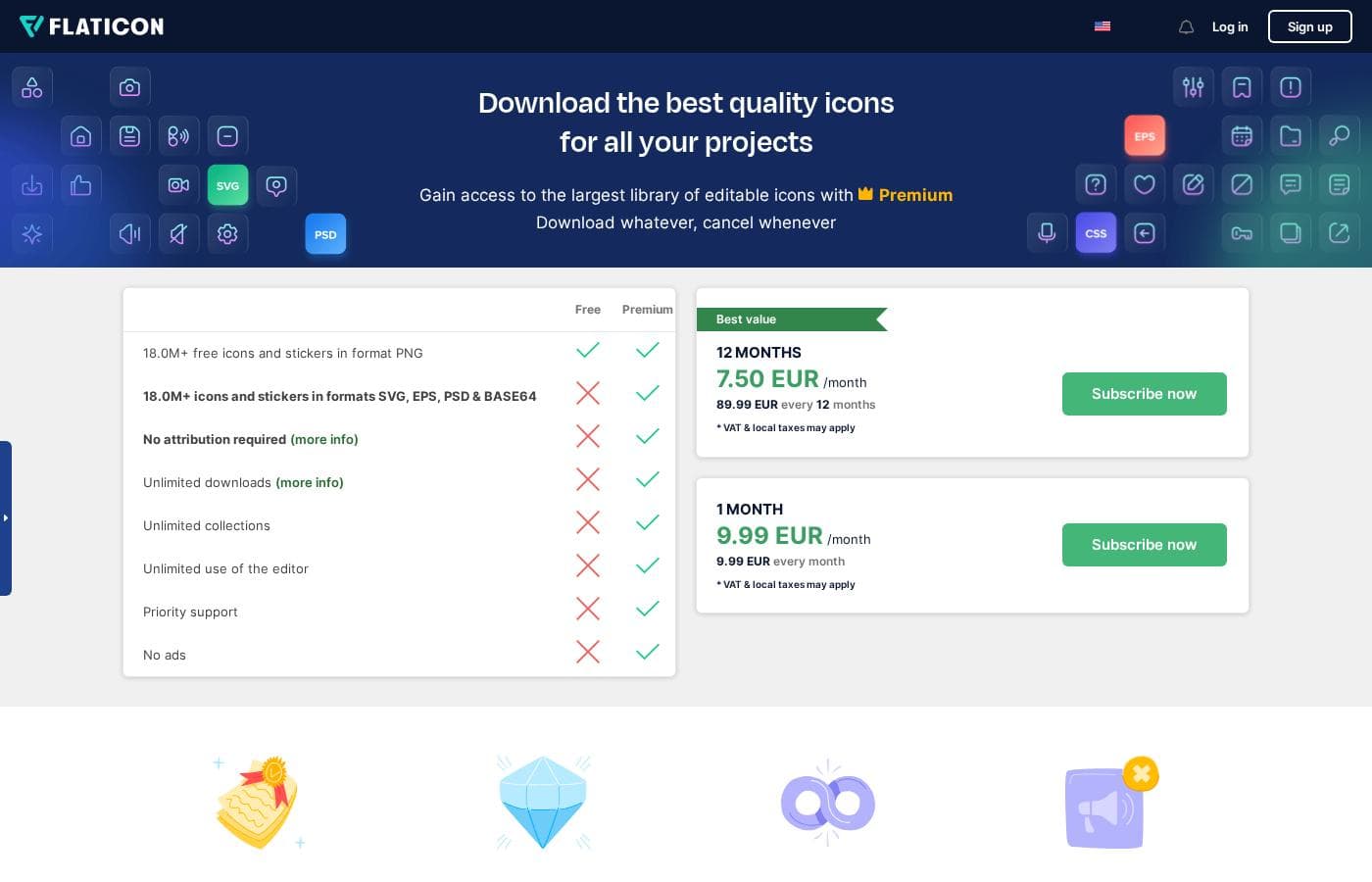
Flaticon pricing page screenshotView pricing page screenshot
PlanBilled monthlyBilled annuallyIncludes
Free
Free
—
18.0M+ icons and stickers in PNG format only; attribution required; limited to 3 collections with a 50-icon limit each; ads shown.
Premium — 12 months (Best value)
€7.50/mo
—
VAT & local taxes may apply. Includes unlimited downloads (up to 2000 icons/day), no attribution required, SVG, EPS, PSD, BASE64 & PNG formats, unlimited collections (256-icon limit each), editor access, priority support, and no ads. 30-day refund guarantee only if no icons were downloaded.
Premium — 1 month
€9.99/mo
—
VAT & local taxes may apply. Same Premium benefits: no attribution, all file formats, unlimited downloads (2000 icons/day), unlimited collections, no ads, priority support.

Price history

Tracking prices since Oct 1, 2026. No price change detected yet.

Pricing types: Free plan, Monthly subscription, Usage-based pricing

Pricing notes

Flaticon pricing: Billing options: Free plan, Monthly subscription, Usage-based pricing

Cost calculator

Estimate what Flaticon costs for your team.

Billing
Per month
€7.50
Per year
€90

Premium — 12 months (Best value) states no user limit: shown as one price for the whole account. Check the price for 5 users with the vendor. Estimate based on published list prices, before taxes, add-ons and discounts.

How to pay less for Flaticon

  • Start on the free plan and upgrade only when you hit its limits.
Visit Flaticon

Email me when Flaticon changes price

One email when we detect a price change on the vendor's pricing page. No newsletter, no deals. Unsubscribe in one click.

User Reviews

No reviews yet.

Write a Review

Write a Review for Flaticon
0/100 characters
0/2000 characters

Why use Flaticon?

Designers choose Flaticon because it removes the friction between finding an icon and shipping it. The library is built by and for designers, so the catalog is curated and organized around how icon work actually happens rather than generic stock-site tagging.

Multiple download formats mean a single asset can serve a website (CSS or SVG), a print job (EPS), an editable mockup (PSD), and quick documentation (PNG) without sourcing the graphic twice. The specialized categories, particularly Animated and Interface icons, cover niches that general stock libraries usually treat as an afterthought.

Flaticon alternatives

Other tools in the Media Library category

View all Media Library tools
Alamy

Alamy

Media Library4/5

Alamy is a comprehensive stock content platform built around authenticity and immense variety. It offers diverse photography captured by content creators all around the world. Importantly, you won't find any AI-generated content here—only real images reflecting real life 💡. Beyond powerful photographs, Alamy provides expansive collections for nearly every type of project. You can explore four carefully curated Creative collections, specialized Editorial content, and deep archival records. The platform also features a fresh video library with over 30 million new videos available, thanks to key partnerships.

Bigstock

Bigstock

Media Library3.6/5

Bigstock offers a wide library of Stock Photos, Images, Vectors, Stock Videos, and Footage. It's designed to provide "Images and Video for everyone." They focus on providing royalty-free media across a stunning array of top categories. This gives you plenty of legally safe options for any visual project you might be tackling.

Unsplash

Unsplash

Media Library4.3/5

Unsplash is defined as the internet’s key source for visuals. It provides beautiful, free images and pictures across a wide range of topics. These categories cover subjects like Nature, Animals, Film, and 3D Renders. The entire extensive library is powered by creators worldwide who contribute their work. It's a vast platform for anyone needing stunning, accessible imagery for their projects.

Getty Images

Getty Images

Media Library4.2/5

Getty Images acts as your global resource for impactful visual content. You gain access to a massive library covering everything from creative stock art to up-to-the-minute editorial needs. They provide royalty-free images, high-definition videos, illustrations, and vectors across all popular categories. You can also explore Getty Images Music, powered by Triple Scoop Music, for comprehensive audio and sound effects. Professionals rely on this service to access iconic moments and trending visuals that leave a lasting impact.

Dreamstime

Dreamstime

Media Library4.1/5

Dreamstime is known as the world's largest stock photography community. It was established in 2000 and has since grown immensely. Talented contributors worldwide enrich the vast collection daily. This resource is perfect for everyone, from large corporations to small magazines and personal blogs. You'll find professional assets regardless of your budget.

Storyblocks

Storyblocks

Media Library4.1/5

Storyblocks is recognized as the most-loved stock media platform currently available for creators. It is a comprehensive service designed to streamline your production process. Instead of managing individual purchases, you pay for a subscription that grants wide access to millions of assets. Whether you work with video, audio, or images, the system is built to support your creative vision efficiently.

Placeit

Placeit

Media Library4/5

Placeit is an extensive online platform built specifically for easy design creation. It's truly the internet's largest source for professional mockups readily available. You can quickly make essential brand assets, including a free logo for your business and specialized gaming designs. It also includes several useful, free online tools to manage your media, such as a Free Background Remover and video conversion utilities.

Envato Elements

Envato Elements

Media Library4/5

Envato Elements is a massive creative library built for professionals and hobbyists worldwide. It provides over 23 million premium assets sourced from talented global artists. You get everything you need in one place, spanning stock video, photos, music, sound effects, and specialized graphic templates. The platform is designed to help you create your best work yet, supplemented by a full stack of cutting-edge AI tools to enhance your workflow.

Cheapest Media Library software for 1 to 25 users

Flaticon FAQ

How much does Flaticon cost?

Flaticon's cheapest paid plan, Premium — 12 months (Best value), costs €7.50 per month. Paid plans range from €7.50 to €9.99 per month. Prices checked on Oct 13, 2026 from the vendor's pricing page.

Does Flaticon have a free plan?

Yes. Flaticon has a free plan (Free); paid plans start at €7.50 per month.

Has Flaticon's price changed recently?

No. We have not detected a price change since we started tracking on Oct 1, 2026.

What file formats can I download from Flaticon?

Flaticon supports several professional download formats: PNG raster files at sizes up to 512px, scalable vector formats SVG and EPS, layered PSD files for editing in Photoshop, and CSS for direct integration into web projects. A single icon search can therefore serve web, print, and editable-design workflows without sourcing the asset elsewhere.

Is Flaticon free to use?

Flaticon offers a free plan alongside paid billing options that include monthly subscriptions and usage-based pricing. The free tier gives access to the icon and sticker library for light or evaluation use, while heavier or ongoing commercial needs are typically covered by a subscription—check flaticon.com/pricing for current limits and terms.

What does Flaticon offer beyond standard icons?

Beyond standard vector icons, the library includes stickers and specialized categories such as Animated icons for motion projects, Interface icons aimed at app and web design, and Style Pack collections that group visually consistent icons so a set matches across an entire project.

Who is Flaticon designed for?

Flaticon is built by and for designers. Its typical users are UI/UX designers sourcing interface icons, web developers who need SVG or CSS assets, marketers producing decks and social graphics from PNG downloads, and print designers who depend on scalable EPS vectors and editable PSD files.

Ready to try Flaticon? Check out the official site or pricing.

Are you Flaticon? Claim this listing · Get the badge