Storyblocks

Storyblocks review

Unlimited human-made stock media, with AI editing tools built in.

Storyblocks costs from $21/mo · 4 plans

By Ciroapp Editorial Team · Updated Sep 17, 2026

Commission may apply at no extra cost

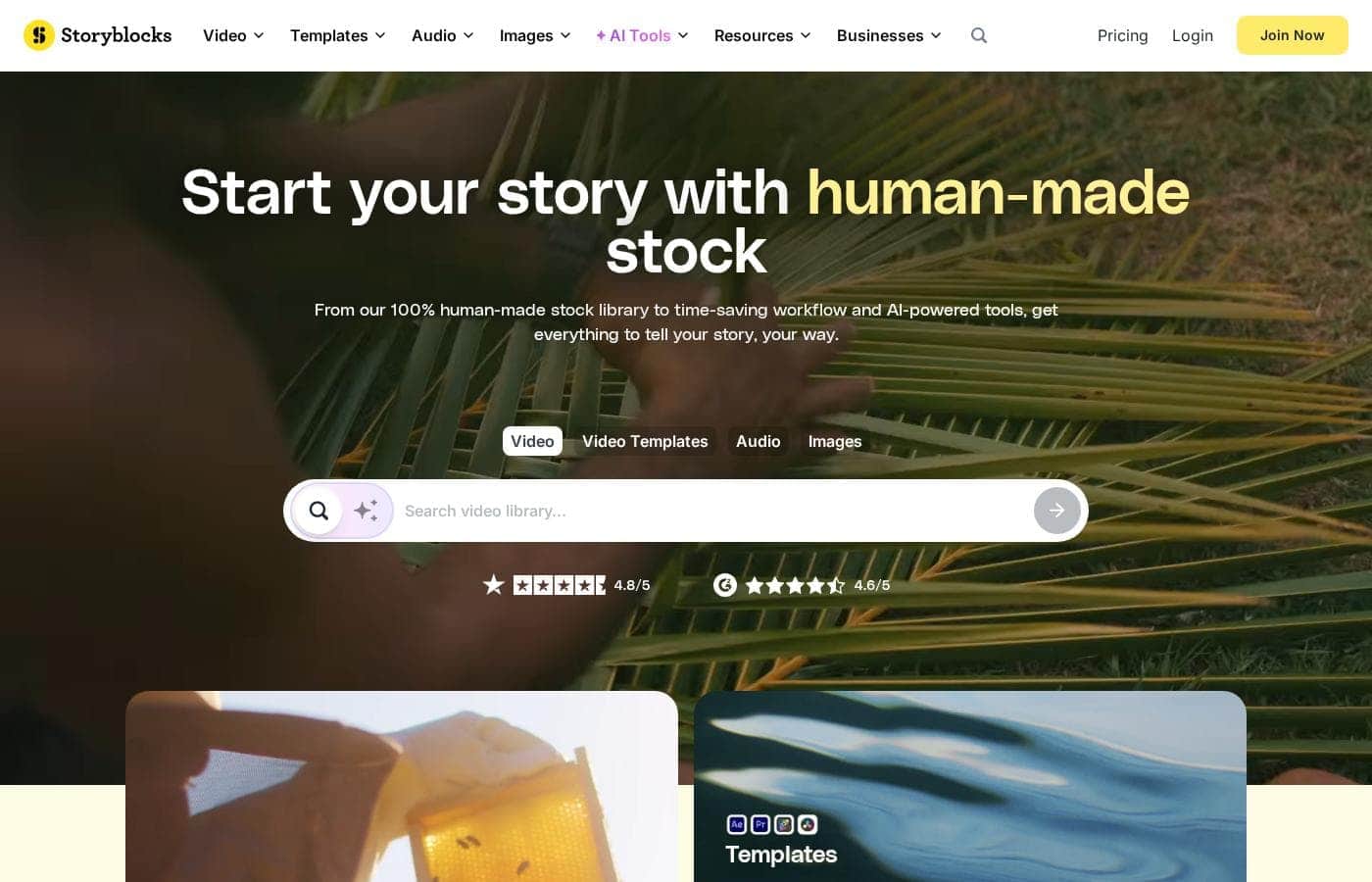
Storyblocks homepage screenshot

At a glance

Quick overview for Storyblocks: rating, pricing summary, key features, and highlights.
Vendor page checked Nov 6, 2026

Ciroapp score

4.1/ 5

Storyblocks bundles unlimited downloads of human-made stock video, audio, images, and templates with AI editing and voiceover tools under one license. The catch is annual-only billing with no advertised free trial, and the editor plugin fits only Premiere Pro and After Effects. Overall, it's a strong pick for frequent creators who already edit in Adobe apps.

Pros

  • Unlimited downloads across the entire library — stock video in 8K/4K/HD, music, sound effects, photos, vectors, and templates — with no per-clip metering, so heavy users avoid escalating per-asset fees
  • Every asset is 100% human-made with zero AI-generated content, a meaningful differentiator for brands and clients whose guidelines exclude AI media, and each download pays the originating artist directly
  • The AI Toolkit is bundled under one license rather than sold separately, including clip editing via Runway's Aleph model and voiceover generation powered by ElevenLabs, with 3,000–6,000 monthly credits depending on plan tier

Cons

  • All self-serve plans are annual commitments with no monthly billing option shown, and the pricing page doesn't advertise a free trial or money-back guarantee — trial and refund terms must be verified at checkout before committing to a year
  • The Small Business plan ($40/month) explicitly excludes agencies, production companies, and broadcasters, forcing those users into the custom-quoted Business plan; broadcast and OTT distribution rights are also locked behind that tier
  • The in-app plugin only supports Premiere Pro and After Effects, so editors using DaVinci Resolve, Final Cut Pro, or other software lose the in-editor workflow and must use the web interface
Best for
  • Video editors and creators who need footage, music, and templates often
  • Marketing teams producing social video and ads on a regular schedule
  • Agencies juggling multiple client projects that need varied licensed media
This section is a summary. Detailed sections about features, use cases, pricing, and reviews follow below.

What is Storyblocks?

Stock media hunting eats time. You search, you settle, and you still pay per clip. Storyblocks flips that: one subscription unlocks unlimited downloads from 8+ million human-made videos, templates, audio, and images, plus AI tools to speed up editing.

Storyblocks is a subscription stock media platform. It offers unlimited downloads of stock video, motion graphics templates, audio, and images, all created by human artists rather than AI. It targets people who produce content regularly: video editors, marketers, agencies, and social teams.

Subscriptions also include an AI Toolkit, editable templates, and a plugin that brings the library into Premiere Pro and After Effects.

Should you choose Storyblocks?

Quick buyer guidance before you compare plans or click through.

Choose it if

  • You download stock media frequently enough that per-clip fees add up
  • You want one subscription covering video, audio, images, and templates
  • You edit in Premiere Pro or After Effects and want in-app library access
  • You need royalty-free media for ads, social posts, or client work
  • You want AI editing and voiceover tools bundled with your stock subscription

Skip it if

  • If you only need a few clips per year, an unlimited subscription may cost more than one-off purchases, and the homepage we reviewed doesn't show pricing, so compare plans first
  • The editor plugin is built for Premiere Pro and After Effects, so editors using other software lose that in-app workflow
  • Key AI features rely on third-party models from Runway and ElevenLabs, so those capabilities may change as the partners evolve
  • Trial and refund terms aren't visible in the published content we reviewed, so verify them before committing
  • Some licensing answers, like using assets after your subscription ends, sit in collapsed FAQs, so read full terms before large client projects

Next steps before buying

  1. 1Check current subscription pricing and plan tiers on Storyblocks' site, since the homepage we reviewed doesn't list prices
  2. 2Confirm the plugin supports your editing software; the page specifically names Premiere Pro and After Effects
  3. 3Read the license and FAQ details for commercial, advertising, and client use before you buy
  4. 4Look for trial or refund terms, and compare Storyblocks against one or two other stock libraries
  5. 5Note which AI Toolkit features you'd actually use, since they're bundled rather than sold separately

Ease of use

The published workflow points to a low-friction setup: AI-powered chat search, ready-made customizable templates, and a plugin that keeps browsing and downloading inside your editor. Beyond installing the plugin, no heavy setup is described. We haven't tested the product hands-on, but for anyone already comfortable with standard editing software, the learning curve looks short.

Storyblocks Key Features

🎬 Download without limits

Your subscription covers unlimited downloads from a library of over 8 million assets. Grab stock video in 8K, 4K, and HD, plus templates, photos, and illustrations. There's no per-clip metering, so you can pull everything a project needs.

Fresh, pre-licensed content is added every day.

✨ Real footage from real artists

Every asset is 100% human-made, with zero AI-generated content. A fully human pipeline runs from the artists who create each file to the Storyblocks team that curates it. Strict quality standards mean only the best gets accepted, so you can find what you need fast.

✨ Search the way you think

The library's AI-powered chat search goes beyond keywords. Describe the shot you have in mind, and it surfaces matching footage fast. Use it when a standard search term doesn't quite capture what you need, and spend less time hunting.

✨ Edit without leaving your timeline

The Storyblocks Plugin brings the library right into Premiere Pro and After Effects, so browsing doesn't break your flow. Pre-made, customizable templates for top software speed things up further.

✨ AI tools under one license

The AI Toolkit is included with your subscription and covered under one license. Use short text prompts to customize any library clip through Runway's Aleph model. Need narration?

Generate voiceovers with authentic artist voices or core AI voices powered by ElevenLabs.

Use Cases

📱 Social Media Managers Shipping on a Schedule

You post video content week after week. Pull B-roll, photos, and music as often as you need — downloads aren't metered. Customizable templates keep your posts looking consistent.

Expected outcome: A steady content pipeline without per-clip fees.

✂️ Editors Staying Inside Premiere Pro or After Effects

Install the Storyblocks Plugin and browse, search, and download without leaving your editor. No tab-switching mid-project.

Tip: Test a few clips in your timeline before you lock one in — downloads are unlimited.

🏢 Agencies Handling Multiple Clients

Every client wants different media — ads, social clips, explainers. One subscription covers video, audio, images, and templates, all royalty-free. Need broadcast or OTT rights?

The Business plan adds them, plus admin controls for your team.

🎨 Brands That Require Human-Made Stock Only

Some clients and brand guidelines rule out AI-generated content. Storyblocks' library is 100% human-made and curated by real people — so you can say that with confidence in client work.

Expected outcome: Licensed assets you can defend to any client.

Storyblocks pricing

From$21/mo

  • 4 plans

Vendor page checked on Nov 6, 2026; confirm current prices on Storyblocks's pricing page

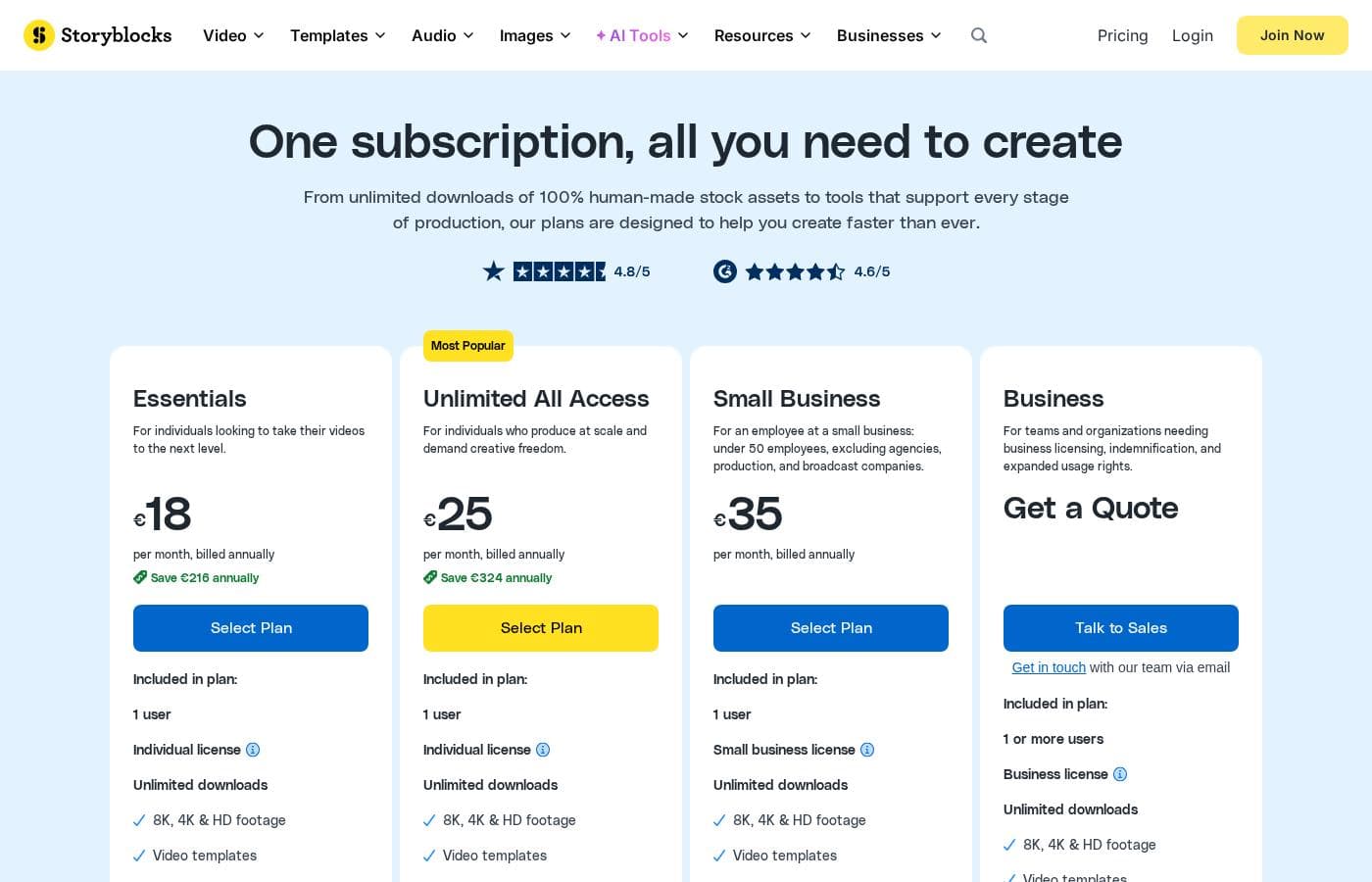
Storyblocks pricing page screenshotView pricing page screenshot
PlanBilled monthlyBilled annuallyIncludes
Essentials
—
$21/mo
$252 per year
1 user, individual license
  • Unlimited downloads
  • 8K, 4K & HD footage
  • Video templates
  • Photos, vectors & illustrations
  • AI Toolkit with 3,000 credits/month (video editing, video generation, image generation)
  • +1
Unlimited All Access
—
$30/mo
$360 per year
1 user, individual license
  • Unlimited downloads
  • 8K, 4K & HD footage
  • Video templates
  • Photos, vectors & illustrations
  • Music & sound effects
  • +3
Small Business
—
$40/mo
$480 per year
1 user, small business license; for companies under 50 employees, excluding agencies, production, and broadcast companies
  • Unlimited downloads including music & sound effects
  • 8K, 4K & HD footage
  • Video templates
  • Photos, vectors & illustrations
  • AI Toolkit with 6,000 credits/month
  • +2
Business
See vendor page
See vendor page
1 or more users, business license, organization-wide coverage
  • Unlimited downloads including music & sound effects
  • Business license with $1 million indemnification
  • Broadcast & OTT rights
  • Flexible AI credit options
  • Maker for Teams and admin controls
  • +2

Price history

Tracking prices since Oct 1, 2026. No price change detected yet.

Pricing types: Monthly subscription, Yearly subscription

Pricing notes

Storyblocks offers subscription plans from $21 to $40 per month, all billed annually, plus a custom-quoted Business plan for teams. Every plan includes unlimited downloads and monthly AI Toolkit credits.

Storyblocks costs between $21 and $40 per month with four plans: Essentials at $21, Unlimited All Access at $30, Small Business at $40 — all billed annually — plus Business, which is custom-quoted for teams.

Here's what each plan includes, so you can match one to your workflow.

Essentials

Price: $21/month, billed annually (save $252 a year) Best For: Individuals who want to take their videos to the next level Other Features:

  • Unlimited downloads of 8K, 4K & HD footage, video templates, photos, vectors & illustrations
  • AI Toolkit with 3,000 credits/month for video editing, video generation, and image generation
  • Adobe Creative Cloud plugin
  • 1 user with an individual license

Essentials is a solid starting point for solo creators. You get the full human-made stock library without paying for audio assets or extra AI power. If your work centers on video and graphics, this covers the basics well.

Unlimited All Access

Price: $30/month, billed annually (save $420 a year) Best For: Individuals who produce at scale and want creative freedom Other Features:

  • Everything in Essentials, plus music & sound effects
  • AI Toolkit with 4,500 credits/month, including AI voiceover
  • Maker design tool included
  • 1 user with an individual license

This is the most popular plan, and it's easy to see why. Music, sound effects, and voiceover in one place means fewer separate tools to pay for. Creators who touch audio in most projects will get the most value here.

Small Business

Price: $40/month, billed annually Best For: One employee at a company with fewer than 50 people Other Features:

  • Small business license
  • Full stock library including music & sound effects
  • AI Toolkit with 6,000 credits/month
  • Maker and the Adobe Creative Cloud plugin

Pick this if you create content for a small company. Just note the license rules: it excludes agencies, production companies, and broadcasters. If that's your world, Business is the better fit.

Business

Price: Custom quote (talk to sales) Best For: Teams and organizations needing business licensing and expanded usage rights Other Features:

  • 1 or more users with organization-wide coverage
  • $1 million indemnification plus broadcast & OTT rights
  • Flexible AI credit options for any team size
  • Admin controls and Maker for Teams
  • Dedicated Customer Success Team, onboarding, flexible invoicing, and custom licensing terms

This tier exists for companies with legal and scale requirements. If multiple teammates need coverage or you distribute through broadcast and OTT channels, request a quote.

All self-serve plans are annual commitments, so you're paying for a year upfront at a lower monthly rate. Storyblocks doesn't advertise a free plan on its pricing page, and its FAQ raises free trials and cancellation without showing the answers — confirm those terms at checkout before you commit.
Cost calculator

Estimate what Storyblocks costs for your team.

Billing

Essentials has no published price for this billing cycle.

Essentials has a flat price: the number of seats does not change the total. Estimate based on published list prices, before taxes, add-ons and discounts.

How to pay less for Storyblocks

  • Cheaper tools in this category start at $7.42/mo.
Visit Storyblocks

Email me when Storyblocks changes price

One email when we detect a price change on the vendor's pricing page. No newsletter, no deals. Unsubscribe in one click.

User Reviews

No reviews yet.

Write a Review

Write a Review for Storyblocks
0/100 characters
0/2000 characters

Why use Storyblocks?

If you pull stock media more than a few times a month, an unlimited subscription usually beats paying per clip. Based on what Storyblocks publishes, here's where it stands out:

  • Unlimited downloads - Grab as many clips, templates, tracks, and images as your projects need, without metering each one.
  • A fully human-made library - Every asset is created and curated by artists, with zero AI-generated content, which matters if your brand or clients require it.
  • AI tools under one license - Edit clips with short text prompts using Runway's Aleph model, and generate voiceovers with artist or core AI voices powered by ElevenLabs, all included with your subscription.
  • Works inside your editor - The Storyblocks Plugin lets you browse, search, and download directly in Premiere Pro or After Effects, so you don't break your editing flow.
  • Fresh content daily - New, pre-licensed assets are added every day, with strict quality standards to help you find usable footage fast.
  • Artists get paid - Each download puts money directly toward the artist who created the asset.

Storyblocks alternatives

Other tools in the Media Library category

View all Media Library tools
Thematic

Thematic

Media Library3.8/5From $9.99/mo

Thematic is an innovative service built specifically for content creators who need quality, trend-setting music. It provides licensed, no-copyright songs from real artists, making it a better option than relying on generic stock audio libraries. Trusted by over a million creators worldwide, Thematic helps users find the right song for their content, often called the best site for getting aesthetic, trending music for YouTube videos.

Monster One

Monster One

Media Library4/5From $19.08/mo

Monster One is an incredibly vast library of digital resources available through one flexible subscription model. It serves as your central hub for over half a million professional assets. This service is designed for anyone building an online presence or creating content. This includes developers needing WordPress themes and designers seeking compelling presentation templates. Monster One expertly gathers tools for web building, ecommerce, graphic design, and media creation all in one secure place.

TuneReel

TuneReel

Media Library3.9/5From $7.42/mo

TuneReel is a premier music library designed for the next generation of content creators. It gives video editors, filmmakers, YouTubers, and podcasters access to high-quality stock music. These tracks are composed by talented indie artists and established, world-renowned composers. 🎵 This extensive library ensures you'll find the perfect background music for commercial or personal use across films, videos, and all social media platforms.

Pngtree

Pngtree

Media Library3.8/5From $14.92/mo

Pngtree functions as a comprehensive stock image market primarily known for its extensive collection of PNG files. It is recognized as the largest asset site for transparent images online. The platform provides access to millions of creative assets like high-quality backgrounds, templates, text effects, and illustrations. Pngtree supports tens of millions of registered designers worldwide. They also help users stay organized by providing a marketing calendar featuring upcoming major holidays and events.

Unsplash

Unsplash

Media Library4.3/5

Unsplash is defined as the internet’s key source for visuals. It provides beautiful, free images and pictures across a wide range of topics. These categories cover subjects like Nature, Animals, Film, and 3D Renders. The entire extensive library is powered by creators worldwide who contribute their work. It's a vast platform for anyone needing stunning, accessible imagery for their projects.

Getty Images

Getty Images

Media Library4.2/5

Getty Images acts as your global resource for impactful visual content. You gain access to a massive library covering everything from creative stock art to up-to-the-minute editorial needs. They provide royalty-free images, high-definition videos, illustrations, and vectors across all popular categories. You can also explore Getty Images Music, powered by Triple Scoop Music, for comprehensive audio and sound effects. Professionals rely on this service to access iconic moments and trending visuals that leave a lasting impact.

Dreamstime

Dreamstime

Media Library4.1/5

Dreamstime is known as the world's largest stock photography community. It was established in 2000 and has since grown immensely. Talented contributors worldwide enrich the vast collection daily. This resource is perfect for everyone, from large corporations to small magazines and personal blogs. You'll find professional assets regardless of your budget.

Envato Elements

Envato Elements

Media Library4/5

Envato Elements is a massive creative library built for professionals and hobbyists worldwide. It provides over 23 million premium assets sourced from talented global artists. You get everything you need in one place, spanning stock video, photos, music, sound effects, and specialized graphic templates. The platform is designed to help you create your best work yet, supplemented by a full stack of cutting-edge AI tools to enhance your workflow.

Cheapest Media Library software for 1 to 25 users

Storyblocks FAQ

How much does Storyblocks cost?

Storyblocks's cheapest paid plan, Essentials, costs $21 per month. Paid plans range from $21 to $40 per month.

Has Storyblocks's price changed recently?

No. We have not detected a price change since we started tracking on Oct 1, 2026.

How do AI Toolkit credits work across plans?

Every self-serve plan includes monthly AI credits: 3,000 on Essentials, 4,500 on All Access, and 6,000 on Small Business. They cover video editing, video generation, voiceover, and image generation. Business teams get flexible credit options.

Can I try Storyblocks or get a refund before committing to a full year?

All self-serve plans are billed annually, and the pricing page doesn't advertise a free trial or money-back guarantee. Review the checkout and cancellation terms carefully before you commit to a year.

Which plan fits agencies, production companies, or broadcasters?

The Small Business plan excludes agencies, production companies, and broadcasters. If you fall into those categories, or need broadcast and OTT distribution rights, the Business plan is the right fit.

Ready to try Storyblocks? Check out the official site or pricing.

Are you Storyblocks? Claim this listing · Get the badge