Deputy

Deputy review

The AI-powered people platform for simplifying hourly work.

Deputy costs from $5.50/mo · 4 plans

By Ciroapp Editorial Team · Updated May 15, 2026

Commission may apply at no extra cost

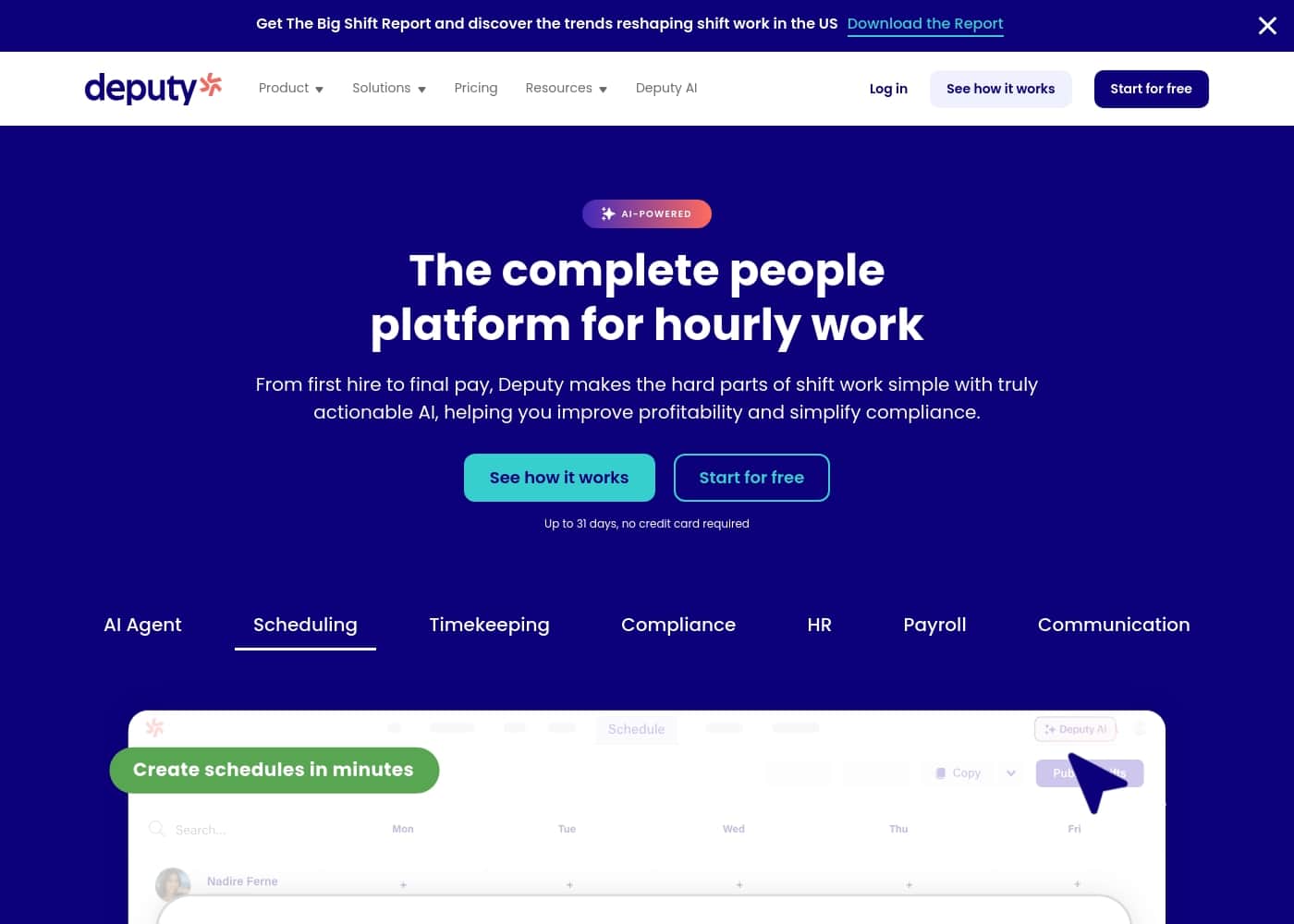
Deputy homepage screenshot

At a glance

Quick overview for Deputy: rating, pricing summary, key features, and highlights.
Vendor page checked Nov 27, 2026

Ciroapp score

4.2/ 5

AI-Powered Scheduling, With Caveats

We find Deputy to be a robust, AI-driven solution that excels at simplifying complex shift scheduling and compliance for growing, multi-location teams. Overall, its powerful automation and user-friendly apps deliver real efficiency gains, but prospective users should carefully evaluate support responsiveness and total cost against their specific needs.

Pros

  • Intuitive, easy-to-adopt interface for managers and staff
  • Powerful AI for auto-scheduling and demand forecasting
  • Strong tools for automating labor law and compliance rules

Cons

  • Customer support responsiveness can be inconsistent
  • Minimum $30 monthly spend may impact very small teams
  • SMS fees and some advanced features require add-ons
Best for
  • Multi-location businesses needing centralized scheduling control.
  • Industries with complex compliance rules like hospitality, healthcare, and retail.
  • Franchises and enterprises scaling their hourly workforce operations.
This section is a summary. Detailed sections about features, use cases, pricing, and reviews follow below.

What is Deputy?

Managing hourly teams across multiple locations is a constant headache. Scheduling, compliance, and payroll create endless admin work. Deputy tackles this with an AI-driven platform that simplifies shift work from hire to pay.

It promises to improve profitability and reduce compliance risks. ✨

Deputy is a workforce management platform built for businesses with hourly employees. It's designed for single-location shops up to large franchises and enterprises. The core focus is making complex shift work simple and actionable with AI.

💡

Should you choose Deputy?

Quick buyer guidance before you compare plans or click through.

Choose it if

  • Teams wanting to reduce scheduling time and labor costs with AI.
  • Managers focused on improving staff retention through easier-to-use tools.
  • Businesses needing to automate compliance for rules like Fair Workweek and overtime.

Skip it if

  • Very small teams with only a few employees and simple schedules.
  • Businesses seeking a low-cost, basic time-clock-only solution.
  • Companies needing deep, built-in full-service payroll without integrations.
  • Organizations wary of cloud-based, subscription software.

Next steps before buying

  1. 1Visit the Deputy website and click 'Start for free' to begin a trial.
  2. 2Check the 'Pricing' page to understand plan costs and what's included.
  3. 3Review available integrations to ensure compatibility with your existing payroll or HR systems.
  4. 4Compare Deputy's features against alternatives for your specific industry needs.

Ease of use

The platform emphasizes ease of use with fast app implementation. It offers a mobile app and claims processes are designed to keep staff happy. Onboarding support and training resources are available.

Deputy Key Features

🧠 AI-Powered Scheduling

Deputy uses powerful AI to build the perfect schedule for your business. It helps you put the right people in the right places at the right time. This ensures precise staffing at every location, which directly helps control your labor costs.

The system is designed to learn from your patterns and improve over time.

✨ Smart Timekeeping & Timesheets

Track every worked minute with a simple time clock app. The system automatically calculates hours and breaks, creating accurate timesheets. Managers can approve timesheets with one click, which streamlines payroll.

This helps you eliminate manual entry and reduce costly errors.

✨ Simplified Compliance Management

Deputy automates key compliance rules to keep you audit-ready. It can handle complex requirements for breaks, overtime, and Fair Workweek regulations. You can also set custom pay rules to match your specific policies.

This reduces your administrative burden and litigation risk.

✨ Effortless Team Communication

Keep your entire team connected with built-in messaging. You can share updates, documents, and news through a central feed. Staff can swap shifts and find replacements easily, which reduces manager involvement.

It's a straightforward way to replace group texts and scattered emails.

✨ Easy HR and Onboarding

Streamline the hiring process from the very first interaction. Deputy helps you onboard new hires and manage their documents in one place. This creates a smooth start for employees.

It ensures you have all the necessary paperwork organized from day one.

✨ Visibility and Control for Any Business

Whether you run a single shop or a global enterprise, Deputy gives you scalable control. You can view your operations with both high-level roll-ups and detailed drill-downs. This visibility helps you eliminate inefficiencies across your entire organization.

The platform grows with your business needs.

📱 Mobile-First for Managers and Staff

Everyone gets an easy-to-use app on their phone. Managers can build schedules, approve timesheets, and communicate from anywhere. Staff can view their shifts, clock in, request time off, and swap shifts on the go.

It's designed to keep your whole team engaged and happy.

Use Cases

🏪 Multi-Location Scheduling Chaos

You're a regional manager for a retail chain. Staff schedules are a mess—some stores are overstaffed, others are drowning. You need a single view to fix it.

With Deputy, you use AI-powered scheduling to create efficient processes across all locations. You get roll-up visibility to see labor costs in real-time and drill down to fix specific store problems. This eliminates inefficiencies and helps you control labor costs company-wide.

Tip: Start by connecting your existing payroll system. Deputy's integrations help ensure a smooth flow of hours and wages.

🛡️ Cutting Compliance Risks in Hospitality

Your hotel has to follow strict Fair Workweek laws and complex break rules. Manually tracking this is risky and eats up manager time. You need an audit-ready system.

Deputy automates compliance with tools for breaks, overtime, and custom pay rules. It helps you stay ahead of regulations and reduces the risk of costly mistakes or litigation. Your managers can focus on guests, not paperwork.

Expected outcome: Audit-ready timesheets and reduced administrative burden.

🏥 Solving High Turnover in Healthcare

High staff turnover is draining your budget and hurting patient care. You need a better way to manage shifts that your nursing staff will actually use.

Deputy's easy-to-use mobile app lets staff manage their availability and swap shifts themselves. This improves work-life balance and job satisfaction. Happier staff stay longer, which cuts your recruitment and training costs significantly.

Tip: Use the 'Shift Swap & Find Replacement' feature to empower your team and fill gaps faster.

🚀 Franchise Scaling Without the Headaches

You're a franchise owner growing quickly. Each new location adds scheduling complexity. You need a scalable system that works from one store to hundreds.

Deputy provides scalable control. You can set efficient processes and standard operating procedures (SOPs) that work across your entire franchise network. This gives you a consistent way to manage labor as you expand.

  1. Set up location hierarchies in the Pro plan.
  2. Use AI to forecast demand for each new site.
  3. Auto-schedule staff based on your proven rules.

📊 Optimizing Labor Costs with Data

You suspect you're overspending on labor but lack the data to prove it or fix it. You need smarter insights, not just spreadsheets.

The Core plan's AI tools analyze your data to optimize schedules for precision staffing. You can set labor budgets and use demand forecasting to match staff levels to actual customer traffic. This drives efficiency and directly impacts your bottom line.

Expected outcome: Better-staffed shifts and optimized labor spending.

🧹 Simplifying Timesheets for a Cleaning Crew

Your cleaning team uses paper timesheets and manual spreadsheets. Errors are common, and payroll takes forever. You need a simple digital solution.

The Lite plan offers basic scheduling and time tracking to get you started. Staff clock in and out via the app, and timesheets are created automatically. This removes the admin headache and gets you paid more accurately.

Tip: The geofencing feature ensures clock-ins happen at the right job site.

Deputy pricing

From$5.50/mo

  • From the vendor's pricing page, checked Nov 27, 2026
  • 4 plans
  • Save up to 17% with annual billing

Vendor page checked on Nov 27, 2026; confirm current prices on Deputy's pricing page

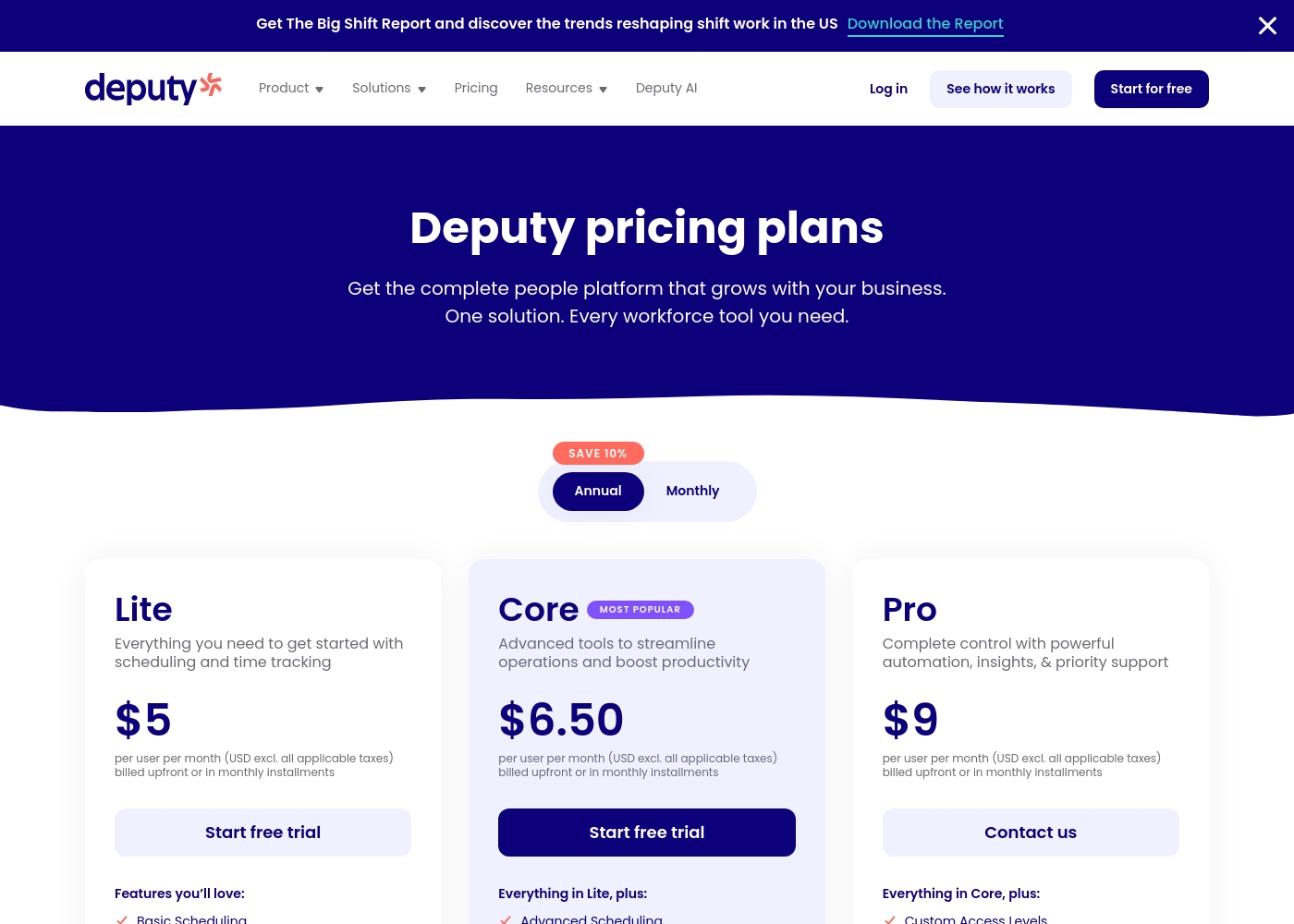
Deputy pricing page screenshotView pricing page screenshot
PlanBilled monthlyBilled annuallyIncludes
Lite Plan
$5.50/mo
$5/mo
$60 per year
Save up to 9% with annual billing
Core Plan
$7.25/mo
$6.50/mo
$78 per year
Save up to 10% with annual billing
Pro Plan
$10/mo
$9/mo
$108 per year
Save up to 10% with annual billing
Premium Plan
$6/mo
$5/mo
$60 per year
Save up to 17% with annual billing

Price history

Tracking prices since Oct 1, 2026. No price change detected yet.

Pricing types: Free plan, Free trial, Monthly subscription, Yearly subscription, Per seat pricing

Pricing notes

Deputy offers three main pricing plans ranging from $5 to $9 per user per month. There is a minimum monthly spend of $30 per invoice, and a free trial is available for up to 31 days with no credit card required. Scales based on team size and feature needs. Free trial available. Minimum monthly spend applies. Monthly or annual billing. Paid per user. Additional charges for SMS. Minimum spend $30/mo per invoice. Start for free. 31-day free trial. 4 plans. Lite at $5, Core at $6.50, Pro at $9, Payroll at $8 + $49/mo fee. Flexible weekly and monthly billing options. Optional add-ons. Minimum spend $30/mo. Choose a plan below to see which features fit your business best. Starting at $5, Lite covers scheduling and timesheets. Core adds automation at $6.50, and Pro offers full control for $9. All prices are per user per month. Minimum $30 per month per invoice. Free trial available. Features vary. Add-ons cost extra. SMS charges apply. No refunds on annual plans. Lite $5/user/month, Core $6.50/user/month, Pro $9/user/month, plus available add-ons like Payroll. A minimum monthly spend of $30 applies to monthly plans. Annual billing often requires upfront payment. Features grow with each tier. Support included. SMS costs extra. Deputy costs between $5 and $9 per user per month with 3 core plans: Lite at $5, Core at $6.50, and Pro at $9.

You can view the specific features and costs for each tier below.

Lite

Price: $5 per user per month

Best For: Basic scheduling and time tracking Refund Policy: No refunds on annual plans Other Features: Basic scheduling, basic timesheets, time clocking, leave management, news feed.

This plan is ideal for small teams needing the essentials to manage shifts and track hours. It helps you move away from manual spreadsheets without complex overhead.

Core

Price: $6.50 per user per month

Best For: Operations needing demand forecasting Refund Policy: No refunds on annual plans Other Features: Advanced scheduling, auto-scheduling, labor optimization, wage budgets, biometrics.

You should pick this if you need to optimize labor costs and use AI for smarter scheduling. It is the most popular choice for growing businesses.

Pro

Price: $9 per user per month

Best For: Enterprise-level automation and support Refund Policy: No refunds on annual plans Other Features: Custom access levels, single sign-on (SSO), 24/7 live chat, sandbox environment, location hierarchies.

Choose this tier if your organization requires deep customization, advanced security, and dedicated support. It includes premium add-ons like Analytics+ and Messaging+ by default.

Deputy offers a free trial for up to 31 days with no credit card required. While there is no permanent free plan, charities may request special pricing. Please note that monthly plans have a $30 minimum monthly spend starting September 2025. You can cancel at any time, but annual plans do not offer refunds if canceled early. 🚀

  • No credit card required for trial
  • Minimum $30 spend per invoice
  • SMS charges vary by region
  • 24/7 support available on Pro
  • Self-serve onboarding for Lite
  • Payroll add-on available ($49 + $8/user)
  • Annual plans billed upfront
  • Taxes not included in pricing
  • Flexible weekly plans for events
  • Unarchive users at full monthly rate
  • Monthly invoice usually on last day
  • Shift Pulse™ for real-time feedback
  • Geofencing for clock-in accuracy
  • Biometric face-unlock available
  • Compare features for best value
  • US, UK, AU currency supported
  • 390k+ happy customers globally
  • Trusted workforce management software. Confirm license limits before buying. Confirm license limits before buying. Lite $5/user/month, Core $6.50/user/month, Pro $9/user/month. $5–$9/user per month. ["Free Trial","Monthly","Yearly","Per seat","Usage-based"]. true. 31. false. "https://www.deputy.com/pricing".

Deputy pricing: Deputy offers three main pricing plans ranging from $5 to $9 per user per month. There is a minimum monthly spend of $30 per invoice, and a free trial is available for up to 31 days with no credit card required. Scales based on team size and feature needs. Free trial available. Minimum monthly spend applies. Monthly or annual billing. Paid per user. Additional charges for SMS. Minimum spend $30/mo per invoice. Start for free. 31-day free trial. 4 plans. Lite at $5, Core at $6.50, Pro at $9, Payroll at $8 + $49/mo fee. Flexible weekly and monthly billing options. Optional add-ons. Minimum spend $30/mo. Choose a plan below to see which features fit your business best. Starting at $5, Lite covers scheduling and timesheets. Core adds automation at $6.50, and Pro offers full control for $9. All prices are per user per month. Minimum $30 per month per invoice. Free trial available. Features vary. Add-ons cost extra. SMS charges apply. No refunds on annual plans. Lite $5/user/month, Core $6.50/user/month, Pro $9/user/month, plus available add-ons like Payroll. A minimum monthly spend of $30 applies to monthly plans. Annual billing often requires upfront payment. Features grow with each tier. Support included. SMS costs extra. Deputy costs between $5 and $9 per user per month with 3 core plans: Lite at $5, Core at $6.50, and Pro at $9.

You can view the specific features and costs for each tier below.

Lite

Price: $5 per user per month

Best For: Basic scheduling and time tracking Refund Policy: No refunds on annual plans Other Features: Basic scheduling, basic timesheets, time clocking, leave management, news feed.

This plan is ideal for small teams needing the essentials to manage shifts and track hours. It helps you move away from manual spreadsheets without complex overhead.

Core

Price: $6.50 per user per month

Best For: Operations needing demand forecasting Refu

Cost calculator

Estimate what Deputy costs for your team.

Billing
Per month
$5.50
Per year
$66

Lite Plan has a flat price: the number of seats does not change the total. Estimate based on published list prices, before taxes, add-ons and discounts.

How to pay less for Deputy

  • Pay annually: saves up to 17% compared with monthly billing.
  • Cheaper tools in this category start at $2.50/mo.
Visit Deputy

Email me when Deputy changes price

One email when we detect a price change on the vendor's pricing page. No newsletter, no deals. Unsubscribe in one click.

User Reviews

Based on external review snippets, Deputy is frequently praised for its intuitive interface and powerful scheduling features that save significant time for managers. 👍 Users highlight the ease of creating rosters, managing shift swaps, and the helpfulness of the mobile app for staff.

However, recurring concerns appear around customer support responsiveness and occasional glitches with time clocking or integrations. Some reviewers also mention the pricing can feel steep for smaller businesses, especially after introductory periods or when add-ons are required.

The AI automation is seen as a major benefit by many, but a few note a learning curve for maximizing its potential. Overall, sentiment leans positive for core functionality but is mixed on long-term value and support.

Summarized from public reviews on Trustpilot, Capterra

No reviews yet.

Write a Review

Write a Review for Deputy
0/100 characters
0/2000 characters

Why use Deputy?

Deputy's goal is to turn the daily grind of hourly work into a streamlined advantage. Here’s why it stands out:

  • Drive Efficiency with AI: Use powerful AI models to optimize schedules and ensure precise staffing at every location. This directly targets labor cost control. ✅
  • Reduce Staff Turnover: Easy-to-use apps are fast to implement. Happy staff means lower churn, which cuts significant recruitment costs. 💰
  • Automate Compliance: Stay audit-ready and reduce litigation risk. Tools automate key rules for breaks, Fair Workweek, overtime, and custom pay requirements. 🛡️
  • Gain Scalable Control: Create efficient scheduling processes with roll-up and drill-down visibility. This helps eliminate inefficiencies across your entire operation.

Deputy alternatives

Other tools in the Employee Scheduling category

View all Employee Scheduling tools
Roosted

Roosted

Employee Scheduling4/5From $2.50/mo

Roosted is an AI-driven platform designed to streamline scheduling for your on-demand workforce. 💡 Think of it as your all-in-one solution for managing staff time, availability, credentials, and performance. It's perfect for healthcare teams and anyone dealing with complex event scheduling.

Shiftie

Shiftie

Employee Scheduling3.8/5

Staff scheduling made simple. Shiftie is a smart staff scheduling tool that simplifies rota planning, tracks availability, and improves team communication, saving time and ensuring you're always staffed when it counts.

Deputy FAQ

How much does Deputy cost?

Deputy's cheapest paid plan, Lite Plan, costs $5.50 per month. Paid plans range from $5.50 to $10 per month.

How much do you save with annual billing on Deputy?

Paying annually saves up to 17% compared with monthly billing, based on Deputy's list prices.

Has Deputy's price changed recently?

No. We have not detected a price change since we started tracking on Oct 1, 2026.

Does Deputy integrate with my existing payroll or HR software?

Yes, Deputy offers integrations with payroll and HR systems. The exact list isn't detailed on the main site, so you should confirm compatibility in their integrations directory or check with support before purchasing.

What is the monthly minimum spend requirement?

For monthly plans, there is a minimum spend of $30 USD per invoice. This applies to all users combined, so a very small team might hit this minimum even if their user count is low.

How does the free trial work, and do I need a credit card?

The free trial lasts up to 31 days and requires no credit card to start. You won't be charged until you choose a paid plan after the trial ends.

Are there different plans for different team sizes?

Deputy uses a per-seat pricing model. You pay a fixed monthly fee for each user, so your total cost scales directly with the number of employees you add.

What happens if I need to cancel my subscription?

You can cancel your monthly plan at any time. Your access continues until the end of the current billing period. Annual plans are billed upfront and have no refunds for early cancellation.

Does Deputy support my country and language?

Deputy is available in most countries. Billing currency is determined by your business account's country during signup (USD, AUD, or GBP). The platform's language support isn't explicitly detailed.

How do I get help or support if I have an issue?

Support options depend on your plan. Lite and Core plans include onboarding assistance, while the Pro plan features a dedicated customer success manager and 24/7 live chat.

Is there a limit to how many users or locations I can have?

Deputy doesn't state specific user or location limits on its public website. You should confirm any license caps with their sales team before committing, especially for large deployments.

How is data security handled?

Deputy maintains a Trust Center with details on security practices and compliance. For specifics on data handling and encryption, you should review their public Trust Center documentation.

Is Deputy suitable for very small businesses?

It's possible, but the $30 monthly minimum spend may make it costly for teams with only a few employees. The Lite plan starts at $5 per user, which is ideal for those needing core scheduling.

Ready to try Deputy? Check out the official site or pricing.

Are you Deputy? Claim this listing · Get the badge