Adobe Photoshop

Adobe Photoshop

Work faster and create quickly with powerful, intuitive editing tools.

#4 dans Photo editing
1 min read · Updated 10/4/2025
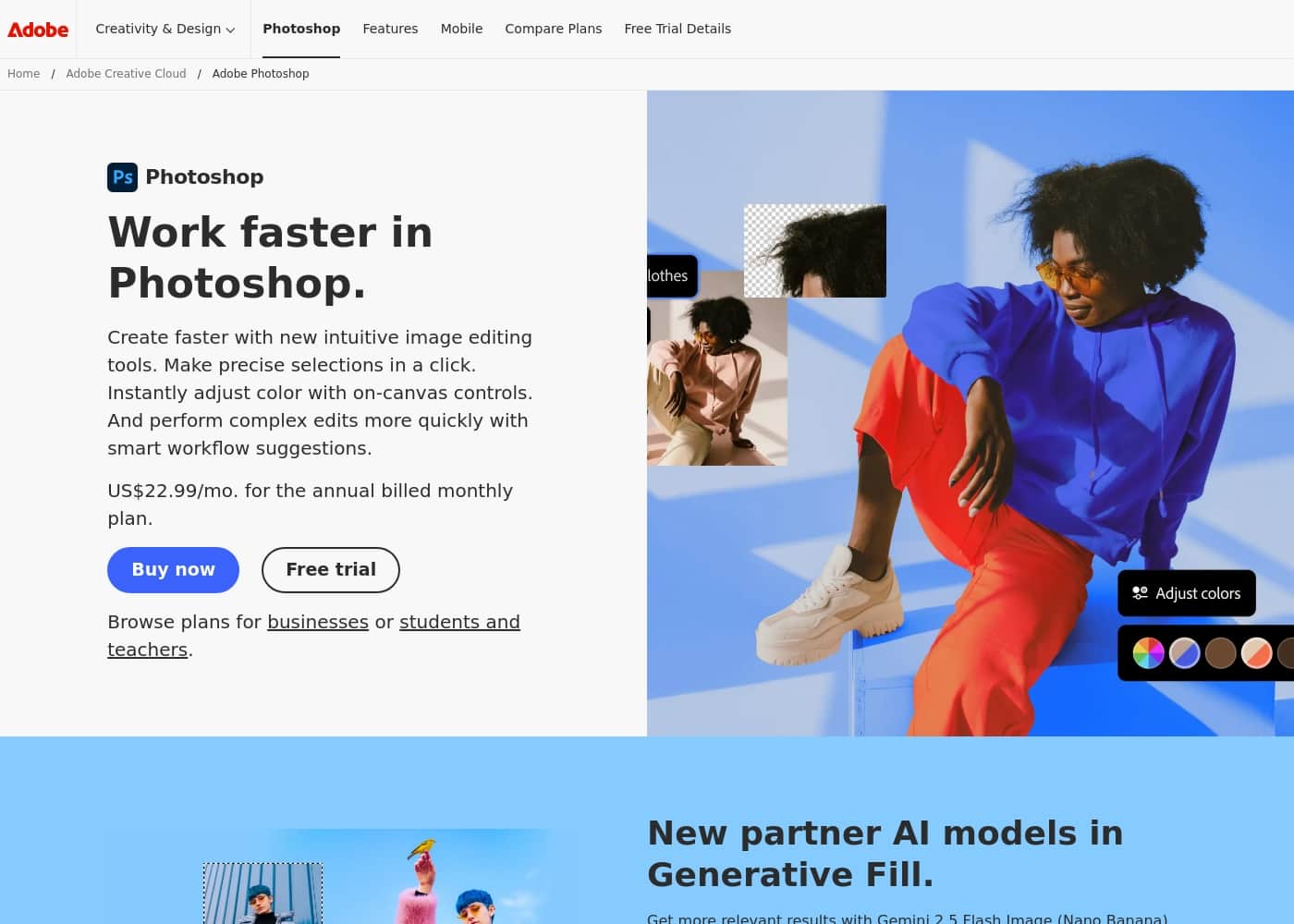
Adobe Photoshop homepage screenshot

At a glance

Quick overview for Adobe Photoshop: rating, pricing summary, key features, and highlights.

Ciroapp review

2.8
Master software, deceptive pricing

We find Adobe Photoshop offers industry-leading intuitive tools for fast, precise image editing, which dramatically improves professional workflows. However, we cannot ignore the widespread user complaints regarding the costly, confusing annual subscription model and the aggressive cancellation fees. Overall, the powerful features are currently overshadowed by surrounding corporate policies and poor customer support.

Pros

  • Pro:Industry-leading, powerful features for professional image editing.
  • Pro:Intuitive tools speed up complex selection and color adjustments.
  • Pro:Smart workflow suggestions help handle complicated projects faster.
  • Pro:Special comprehensive plans available for students and educators.

Cons

  • Con:The subscription model is widely criticized as misleading (annual contract paid monthly).
  • Con:Substantial cancellation fees are enforced for early termination.
  • Con:Customer and technical support are widely described as non-existent or unhelpful.
  • Con:Reports of sudden product crashes across multiple devices.
Free trial
Yes
Range: Not explicitly statedFree trial, Monthly subscription, Yearly subscription, Per seat pricing
This section is a summary. Detailed sections about features, use cases, pricing, and reviews follow below.

Adobe Photoshop review, pricing, features, pros & cons

Do complex image edits usually slow down your progress? Getting precise selections can sometimes feel like a difficult chore. Adobe Photoshop helps you move past these frustrations.

You can create faster and work much more quickly. It offers smart suggestions and supports intuitive workflows. ✨

What is Adobe Photoshop?

Photoshop is the essential tool for professional image editing. It offers new, intuitive tools designed specifically to speed up your process. You can browse plans easily, whether you are an individual, a business, or looking for options tailored for students and teachers.

You can even try Photoshop out with a generous free trial. It’s built to help you explore every feature of digital creation. 💡

Adobe Photoshop Key Features

✨ Precision Selections in a Single Click

Tired of tedious masking? Photoshop helps you move past complex selection chores quickly. You can make incredibly precise separations with total ease. It often requires just a single click of the mouse to define your subject.

This capability streamlines your editing process significantly. Getting clear, accurate selections is now instant, speeding up any project. It ensures you never waste time on frustrating manual tasks.

✨ Instant, Hands-On Color Adjustment

Gaining complete control over your final image colors should feel immediate and simple. Photoshop lets you adjust visual elements without interruption. You easily access clear, easy-to-use on-canvas controls right within your workspace.

This means the adjustment tool is exactly where you need it. You can instantly adjust your colors and tones. This feature is powerful for quick refinements and complex color grading alike, resulting in faster visual outcomes.

💡 Workflow Suggestions for Faster Editing

Completing complicated projects doesn't have to slow down your progress. Photoshop provides smart suggestions to keep your creative momentum high. The tool supports intuitive workflows designed to help you organize and structure complex image edits.

It offers helpful smart suggestions as you work. These suggestions handle frustrating manual tasks for you. The system is built to help you navigate heavy editing sessions more efficiently, ensuring you work faster.

✨ Intuitive Tools for Rapid Creation

You can create faster than ever before using highly intuitive new image editing tools. Photoshop is designed specifically to accelerate your pace. The interface gives you the power of professional-grade editing instantly. These new tools make high-quality work seamless and efficient.

The software provides essential support features to enhance your speed and accuracy:

  • Speeds up complex tasks and detail work.
  • Supports powerful intuitive workflows.
  • Helps you explore every feature of digital creation.

🔗 Seamless Connectivity and Integration

Need a quick edit or a simplified design option? Photoshop connects seamlessly with other creative platforms. You can explore seamless editing that includes connectivity to Adobe Express.

This integration ensures your work stays flexible across different applications. If you need powerful, instant, and precise editing, Photoshop is the solution. It provides the essential framework for professional image editing while offering easy access to simplified creative tools.

Use Cases

✂️ Achieving Precise Selections Quickly

Photoshop helps you handle complex image edits that usually slow down your progress. Making precise selections often feels like a difficult chore. Now, you can move past this frustration and focus on creativity.

Imagine you need to isolate a finely detailed object, like hair or leaves. Photoshop’s intuitive tools allow you to make incredibly precise selections very quickly. You activate the tool, click the mouse once, and the selection is immediately mapped.

🚀 Streamlining Complex Editing Projects

A project involves many steps and multiple layers, making organization difficult. Handling this complication manually means wasted time and effort. You need software that works smarter, not just harder.

Photoshop is specifically designed to help you streamline complicated processes. You work faster because the system offers helpful smart workflow suggestions. This power delivers seamless and efficient, high-quality editing every time.

🎨 Instant Color Adjustment and Correction

Problem: You have a photo needing subtle color correction, but using deep menu hierarchies slows you down.

Approach: Use Photoshop's clear, easy-to-use on-canvas controls. This enables interaction directly with your image.

Outcome: You adjust colors instantly and preview the changes in real-time. This efficiency saves valuable editing time, letting you finalize images much faster.

Tip: Focus on the visual result instead of hunting through menus; the intuitive controls speed everything up.

🔗 Seamless Asset Creation for Marketing

A small business needs a quick Instagram graphic using an image you just edited. You want to avoid re-exporting and re-importing the asset.

Photoshop offers seamless editing that includes connectivity to Adobe Express. After perfecting your image, you transition directly to the social media template designer. This integration ensures you move from detailed photo editing to final graphic deployment instantly.

🎓 Equipping Educational Institutions

Schools and universities need comprehensive, professional tools for students and teachers. The software must cover photo editing alongside other creative mediums.

Qualified students and teachers can access a full Creative Cloud Pro package. This bundle includes Photoshop plus applications like Illustrator and Premiere Pro. It’s a comprehensive choice for both learning and high-level production across multiple digital arts fields.

✅ Evaluating Software Before Commitment

Before adopting any professional tool, you need to test its features and workflow speed. Committing to a subscription sight unseen can feel risky. Photoshop makes this evaluation easy.

Step 1: Sign up for the generous free trial period. Step 2: Utilize the intuitive editing tools to tackle a complex project. Step 3: Test how easily you can use advanced features like one-click selections.

Expected outcome: You explore every feature of digital creation risk-free and confirm its efficiency before purchasing a plan.

Pricing Overview for Adobe Photoshop

Pricing range
Not explicitly stated
Pricing types
Free trial, Monthly subscription, Yearly subscription, Per seat pricing

Adobe Photoshop is available primarily through subscription plans tailored for individuals, teams, and educational users. While the exact numerical pricing is not listed, we know plans offer options for annual commitments paid monthly.

There is a free trial available for those who want to test the software first.

Plans & Pricing

Individuals

MonthlyNot explicitly stated
YearlyNot explicitly stated
Not explicitly stated
  • Create faster with new intuitive image editing tools
  • Make precise selections in a click
  • Instantly adjust color with on-canvas controls
  • Perform complex edits more quickly with smart workflow suggestions

Business

MonthlyNot explicitly stated
YearlyNot explicitly stated
Not explicitly stated
  • Not explicitly stated (Aimed at teams)

Students & Teachers (Creative Cloud Pro)

MonthlyNot explicitly stated
YearlyNot explicitly stated
Available for qualified students and teachers only
  • Full version of Photoshop, Illustrator, Premiere Pro, and more
  • Own portfolio website
  • Apps to create and share photos, videos, and graphics anywhere
  • Helpful tutorials for every skill level
  • Generative credits for premium creative AI features

Schools & Universities

MonthlyNot explicitly stated
YearlyNot explicitly stated
Not explicitly stated
  • Not explicitly stated (Aimed at institutional licensing)

Adobe Photoshop costs an amount that is Not explicitly stated per period with 4 plans: Individuals, Business, Students & Teachers, and Schools & Universities.

Since pricing is dynamic based on location and user type, details are often customized. Here's a breakdown of the subscription options available.

Individuals

Price: Not explicitly stated (Annual paid monthly plan mentioned) Websites Supported: Not explicitly stated Best For: Individual professionals, hobbyists, and freelancers Refund Policy: Not explicitly stated Other Features:

  • Create faster with new intuitive image editing tools
  • Make precise selections easily
  • Instantly adjust color with on-canvas controls
  • Smart workflow suggestions

This plan is perfect if you need the full power of Photoshop just for yourself. It gives you the latest features and updates, ensuring you always have cutting-edge tools for your creative work. You get all the essential features needed for professional image editing.

Business

Price: Not explicitly stated Websites Supported: Not explicitly stated Best For: Teams, agencies, and large companies Refund Policy: Not explicitly stated Other Features: Not explicitly stated

If you manage a team or run a studio, the Business plan is built for multiple users. This tier usually includes centralized licensing and management features, streamlining how you handle software access across your organization.

Students & Teachers (Creative Cloud Pro)

Price: Not explicitly stated Websites Supported: Not explicitly stated Best For: Qualified students and teachers Refund Policy: Not explicitly stated Other Features:

  • Full versions of Photoshop, Illustrator, and Premiere Pro
  • Your own portfolio website
  • Apps for creating and sharing graphics and videos
  • Generative credits for premium AI features

This option offers an incredible value, providing the entire Creative Cloud suite at a lower rate. If you are a qualified academic user, this is the most comprehensive choice for learning and production.

Schools & Universities

Price: Not explicitly stated Websites Supported: Not explicitly stated Best For: Educational institutions seeking volume licenses Refund Policy: Not explicitly stated Other Features: Not explicitly stated

Educational institutions needing to equip classrooms and labs with tools should look into this plan. It's tailored for large-scale deployment and administration across campuses.

If you are unsure which plan is right for you, we know Adobe offers a free trial for Photoshop. This lets you try the software and test its intuitive image editing tools before committing to a paid subscription.

User Reviews

External feedback overwhelmingly targets the corporate policies of the provider rather than the core software's performance. While many users acknowledge that the core programs (like Photoshop) are powerful and effective tools, frustration centers almost entirely on the subscription model and inadequate customer service.

Pricing is frequently branded as excessive, misleading, and confusing, especially concerning the annual contract paid monthly structure. The primary complaint, mentioned repeatedly, is the cancellation process, which many users describe as a scam due to substantial “early termination fees” or the inability to cancel online 🤔.

Furthermore, support is widely criticized as being non-existent, unhelpful, and reliant on ineffective bots, making resolution of billing issues nearly impossible. Users strongly advise caution before signing up for trials or subscriptions, citing unauthorized renewals and unexpected charges.

What users say elsewhere

Mark T.
· Trustpilot
2.0 / 5

The software is genuinely great, but the company's approach is terrifying. After my free trial, I switched to monthly payments, but canceling meant I had to pay a massive early termination fee. This pricing policy feels predatory.

Lee S.
· Trustpilot
1.0 / 5

I tried the 14-day free trial and canceled it the next day. I still never received my refund after nearly two weeks. It seems I was ultimately charged for what was advertised as a free trial.

No reviews yet.

Write a Review

Write a Review for Adobe Photoshop
0/100 characters
0/2000 characters

Why use Adobe Photoshop?

Why waste valuable time on manual tasks when powerful tools can handle the detail for you? Photoshop is specifically designed to help you work faster and streamline complicated processes. It makes the highest quality editing feel seamless and efficient.

Here are compelling reasons to start using Photoshop today:

  • ✅ Create much faster using highly intuitive new image editing tools.
  • ✅ Make incredibly precise selections with just a single click of the mouse.
  • ✅ Adjust your colors instantly using clear, easy-to-use on-canvas controls.
  • ✅ Handle complicated projects more quickly with helpful smart workflow suggestions.
  • ✅ Explore seamless editing that even includes connectivity to Adobe Express.
  • ✅ Easily access flexible pricing plans tailored for individuals, education, or businesses.

Ready to transform your workflow with Adobe Photoshop?

Frequently Asked Questions

What are the main pricing plans offered for Adobe Photoshop subscriptions?

Photoshop is offered across four primary subscription tiers. These plans are designed for Individuals, Business teams, Students & Teachers, and large educational institutions like Schools & Universities.

Is the actual numerical cost of the subscription visible on the website?

No, the exact numerical pricing is not explicitly stated on the official site. Pricing often depends on your location and whether you qualify for specific educational or volume discounts.

How is the standard subscription for individuals structured?

The available information suggests the standard option for individuals is an annual commitment. Under this structure, you pay the total subscription fee through convenient monthly payments.

Does Photoshop integrate or connect with other Adobe services?

Yes, seamless editing functionality is supported, including connectivity to Adobe Express. This allows you to quickly utilize various Adobe tools within a unified creative workflow.

What difference is there between the Individual plan and the Business plan?

The Business plan is built specifically for teams, agencies, and companies requiring volume licensing. The Individual plan is meant only for singular use by hobbyists or individual professionals.

Are there any volume licenses or per-seat options available?

While not fully detailed, the Business, and Schools & Universities plans suggest multi-user or volume licensing. If you manage a team, you'll need to inquire directly about per-seat pricing.

Does Adobe offer a free trial for Photoshop?

Yes, Adobe explicitly offers a free trial for Photoshop. Testing the software lets you evaluate the intuitive editing tools before completing a purchase commitment.

How long is the duration of the free trial period?

The exact duration of the free trial is not explicitly stated on the official website. You'll need to check the current terms displayed when signing up for the offer.

Is Photoshop sold as a one-time purchase?

No, Photoshop is primarily available through subscription plans only. You choose from monthly or annual recurring payment options when you sign up.

What AI features are included, and do they have usage limits or quotas?

All users benefit from smart workflow suggestions and intuitive tools. Students and teachers on the Creative Cloud Pro plan receive generative credits for premium creative AI features.

What academic requirements qualify users for the Students & Teachers plan?

This powerful plan is reserved only for qualified students and teachers. You must check your specific eligibility requirements on the site through the provided link.

Is there a stated standard refund or cancellation policy?

The official refund or money-back guarantee policy is not explicitly stated on the pricing pages. We recommend reviewing the full terms of service before finalizing your subscription.

Does Adobe provide guaranteed service uptime or technical support response times?

Details regarding specific Service Level Agreements or guaranteed customer support response times are not explicitly stated on the official site.

Ready to try Adobe Photoshop? Check out the official site or pricing.